If you’ve started creating your website with Hostinger AI Builder manual mode and would like to use another Content Management System (CMS) instead, you need to delete the builder-based website and set up a new website from scratch using another CMS.
NOTES
-
A deleted website cannot be restored; all its content is lost permanently.
- To move your existing content manually to a platform other than WordPress, see How to move your Hostinger AI Builder manual mode content to another platform.
Switching to another content management system
-
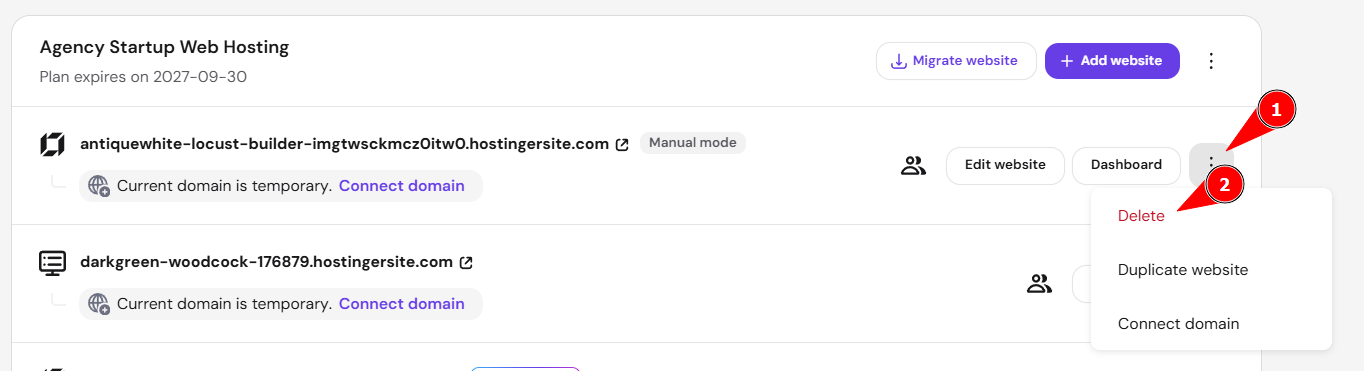
Navigate to the Websites section of Hostinger dashboard and delete the website that you’ve created:
-
Then, add a new website to your hosting plan and choose between Empty PHP/HTML or migrate the website to your preferred website-building platform.
If you select WordPress, to finish the setup, create a WordPress account, choose the preferred plugins and website template, and insert the domain name that you’ve previously released by deleting the website built with Hostinger AI Builder.
Switching to WordPress
-
If content wants to be preserved
If you want to switch to WordPress and keep the content that was in Hostinger AI Builder manual mode, follow these steps: How to export content to WordPress -
If the content doesn’t need to be preserved:
If you plan to start over with WordPress without keeping the content:
-
Navigate to the Websites section of Hostinger dashboard
-
Click the ellipsis to expand the options, and then click delete
-
Then, add a new website to your hosting plan and choose WordPress
Once you’ve deleted your builder-based website and set up your new site on WordPress or another CMS, your domain is ready to serve your new website.