Lock or unlock a domain at Hostinger to allow or disallow transferring it away. To prevent unwanted domain transfers, all domains are locked by default. For this reason, to transfer your domain to another registrar, you first need to unlock it. Domains that have been recently registered or transferred can only be unlocked after 60 days from the registration or the last transfer date.
What the domain transfer lock at Hostinger blocks
The Transfer lock blocks only transfers of your domain to another registrar, which protects the domain from unauthorized transfers. Your website, email, DNS records, and domain renewals keep working while the domain is locked. A locked domain shows the status clientTransferProhibited when you check the domain status on WHOIS.
There are three situations in which a domain at Hostinger can’t be transferred to another provider for 60 days:
- The domain was registered at Hostinger less than 60 days ago.
- The domain was transferred to Hostinger less than 60 days ago.
- The domain’s contact details were updated less than 60 days ago. See How to change domain contact details at Hostinger for details.
Not all domain extensions show the Transfer lock toggle. To transfer a domain out of Hostinger, you also need to disable WHOIS privacy protection and get the EPP code, as described in How to transfer your domain out of Hostinger.
Unlock a domain registered at Hostinger
Unlock a domain registered at Hostinger with the Transfer lock toggle in the domain’s Domain Overview section. If your domain is registered elsewhere and you want to transfer your domain to Hostinger, follow How to unlock your domain to transfer it to Hostinger instead.
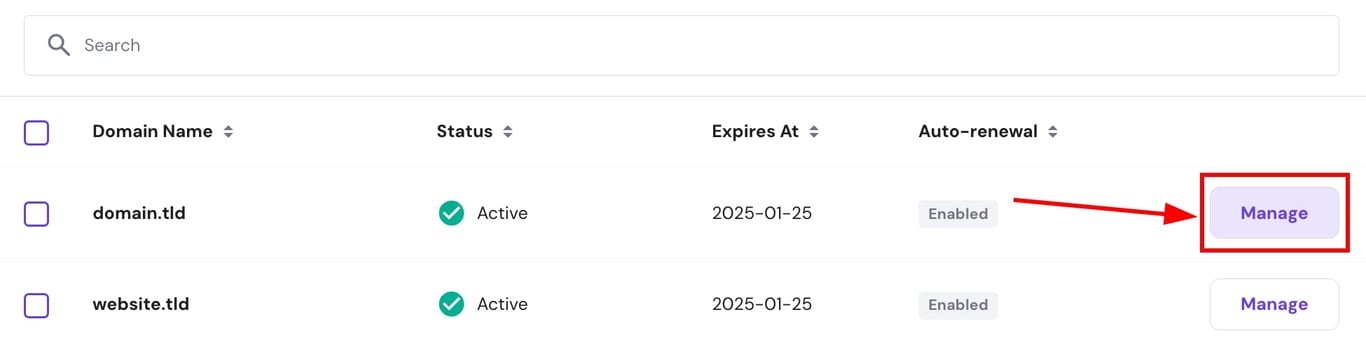
To unlock a domain registered at Hostinger, navigate to the Domains section of Hostinger dashboard and click on Manage next to the domain:
In the Domain Overview section, find the Domain lock and click on the toggle to unlock your domain for transfer:
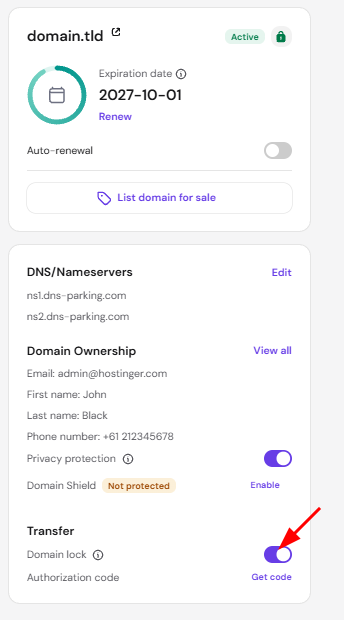
Once you change the domain status, whether from locked to unlocked or vice versa, you need to wait for 12 hours before reverting the change, if needed.
If the domain automatically locks again after clicking on the toggle, it indicates that unlocking is currently not possible. You will have the option to unlock it after the 60-day period from the domain’s registration or last transfer date.
After you unlock the domain, get the EPP code at Hostinger and enter it at your new registrar to start the transfer.