Turn off PHP error messages in Hostinger if you don’t want errors displayed on your website.
Disable PHP error messages
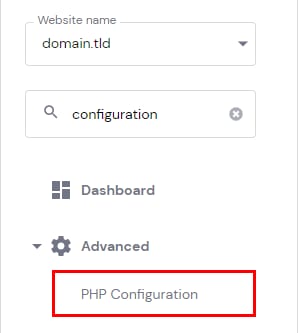
If you do not want PHP errors to be displayed on your website, all you need to do is open Hosting → Dashboard, search for PHP Configuration on the sidebar and click on it:
Once there, open the PHP options page and remove a checkmark from displayErrors (display_errors) parameter. If you do not want errors to be logged as well, remove a checkmark from logErrors (log_errors) as well:
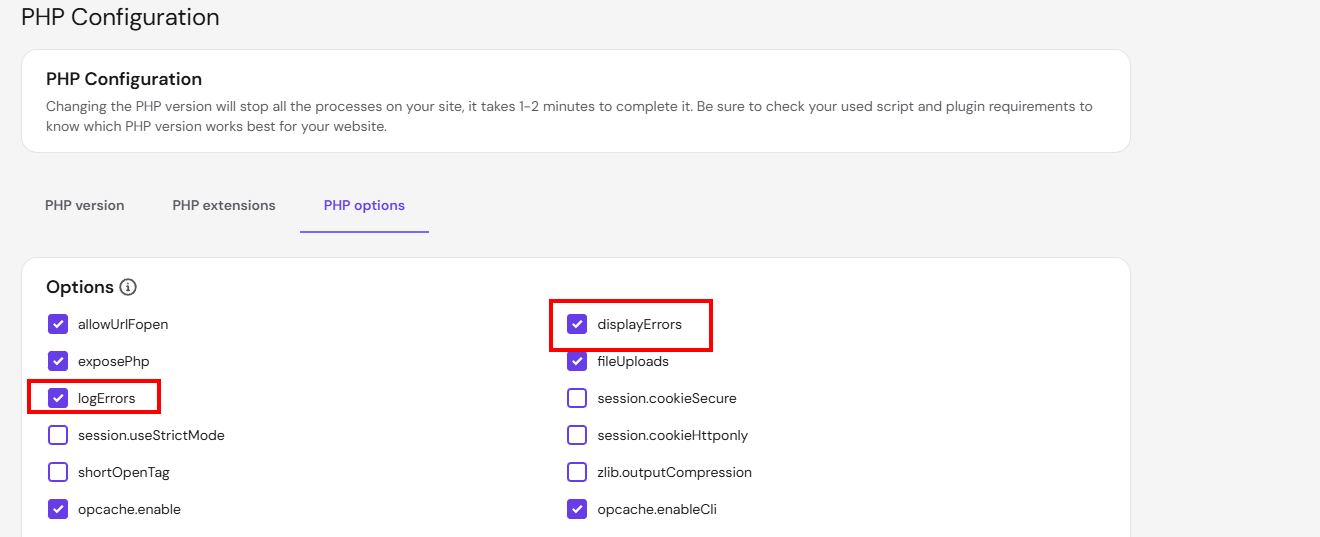
Make sure to save changes before leaving the page.
NOTES
- If the mentioned parameters were not chosen or errors keep displaying even after disabling them, check additional options for disabling errors.
- If you’re looking to enable them instead for debugging, see how to display PHP error messages in Hostinger.