How to train an LLM
Sep 04, 2026
/
By Ksenija
/
24 min Read
To train a large language model (LLM), you need to adjust its learned parameters by presenting it with tokenized text, measuring prediction error, and optimizing its weights.
During training, the model predicts the next token, calculates a loss that measures prediction error, uses backpropagation to calculate gradients, and applies an optimizer to update its weights. That loop repeats across enormous numbers of token sequences.
Reaching that point requires far more than running a training loop. Every stage of the process influences the final model, from preparing high-quality datasets and selecting a tokenizer to evaluating the model’s performance after training.
There are two main routes. Training from scratch starts with randomly initialized weights and a very large pretraining corpus, while fine-tuning starts with an already pretrained model and adapts it to a narrower task, style, domain, or instruction set using much less data and compute.
For most developers and small teams, fine-tuning a suitable open-source model is more practical than training a foundation model from scratch because it requires far less data, compute, time, and engineering effort.
Training an LLM from scratch vs. fine-tuning
Training from scratch builds a language model from randomly initialized weights, while fine-tuning models modifies an already pretrained model for a specific task, behavior, or domain.
Between these two approaches is continued pretraining, which extends a pretrained model’s knowledge before it is fine-tuned for a particular application.
The table below compares the main differences between training an LLM from scratch and fine-tuning an existing model.
Factor | Train from scratch | Fine-tune an existing LLM |
Starting point | Random model weights | Pretrained model |
Data required | Very large corpus | Smaller task- or domain-specific dataset |
Compute | Multi-GPU or distributed GPU training | Often one or several GPUs |
Cost | Very high | Much lower |
Time | Days to months | Hours to days |
Flexibility | Full control over architecture and training data | Works within the existing architecture |
Best for | Research labs, foundation model providers, AI companies building proprietary models | Application developers, startups, enterprises, and AI teams customizing existing models |
Main risk | High cost and training instability | Overfitting or degrading general capabilities |
Training from scratch begins with an untrained model whose parameters are randomly initialized.
At this stage, the large language model has no learned language representation from data; it has no understanding of language, grammar, facts, or reasoning.
It gradually learns statistical patterns by processing a massive text corpus, repeatedly predicting the next token in each sequence, measuring prediction errors, and adjusting its parameters over a very large number of training steps and token sequences.
As the training progresses, the model learns statistical patterns in the data, enabling it to generate coherent text and perform a wide range of language tasks.
Because every capability must be learned during this initial training stage, training from scratch requires enormous datasets, significant computing resources, and careful optimization.
The result is a foundation model that can later be adapted to specific domains or tasks through continued pretraining or fine-tuning.
Continued pretraining starts with an existing pretrained model and exposes it to additional text from a particular domain, such as medicine, law, finance, or software development. The objective is to expand the model’s knowledge before adapting it to a specific application.
Fine-tuning also starts with a pretrained model, but the objective is different. Rather than teaching the model new general knowledge, fine-tuning adjusts its behavior for a particular task, output format, writing style, or set of instructions using a much smaller dataset.
What happens when you train an LLM?
The LLM workflow starts with preparing text and training the model, then moves into evaluation, post-training, where needed, and deployment after the trained model has been produced.
Between those stages, the model repeatedly learns from the training data by making predictions, measuring errors, and improving its internal parameters.
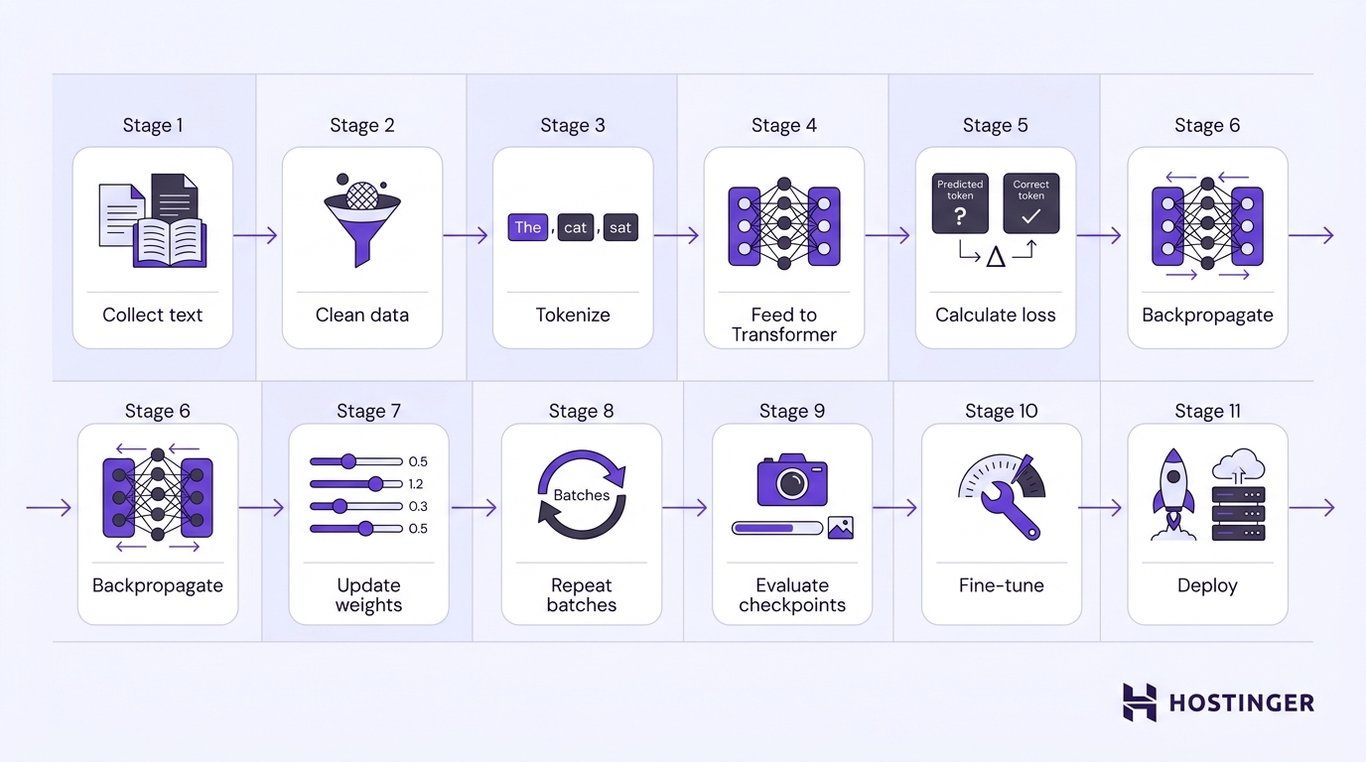
At a high level, the training process follows these stages:
- Collecting text. Training begins with a large corpus of text gathered from books, websites, research papers, source code, or other data sources.
- Cleaning and preparing the data. The dataset is filtered to remove low-quality, duplicated, or irrelevant content before being converted into a format suitable for training.
- Converting the text into tokens. Because LLMs cannot process raw text directly, a tokenizer breaks each document into smaller units called tokens, which become the model’s input.
- Feeding token sequences into the Transformer. The Transformer processes each sequence of tokens and predicts the next token based on the preceding context.
- Calculating the loss. The predicted token is compared with the correct token from the training data. The difference between the prediction and the correct answer is measured by the loss, a numerical value indicating how far the prediction is from the expected result.
- Backpropagating the error. The training process calculates how much each model parameter contributed to the prediction error. This process, called backpropagation, determines how the model should change to reduce future errors.
- Updating the model weights. An optimizer uses the results of backpropagation to adjust the model’s weights, the numerical parameters that determine how the model processes information.
- Repeating across many batches. The training data is divided into batches, or groups of training examples processed together. The optimizer updates the model across many training steps until the planned token or step budget is reached.
- Evaluating checkpoints. During training, developers periodically save checkpoints, which are snapshots of the model at different stages of learning. These checkpoints help measure progress, compare model quality, and resume training if necessary.
- Fine-tuning or post-training the model. Once pretraining is complete, the model may undergo additional training to improve instruction following, adapt to a particular domain, or specialize in specific tasks.
- Deploying the model. After evaluation, the trained model is ready for inference, enabling applications to generate responses, answer questions, or perform other language tasks.
How to train an LLM from scratch
Training an LLM from scratch involves a series of interconnected stages, from defining the model’s purpose and preparing the training data to optimizing the model and evaluating its performance.
Each stage builds on the previous one, and decisions made early in the process influence every step that follows.
1. Define the model’s purpose and size
The first step is determining what the model is expected to do. A model designed to answer questions across many subjects requires a different architecture, training dataset, and computing budget than one built exclusively for legal research, medical literature, or software development.
At this stage, developers define the model’s scope by answering several key questions:
- Will the model be general-purpose or domain-specific?
- Which languages should it support?
- What context length should it handle?
- Approximately how many parameters should it contain?
- What are the inference requirements, such as response latency, memory usage, or deployment environment?
- How much time, hardware, and budget are available for training?
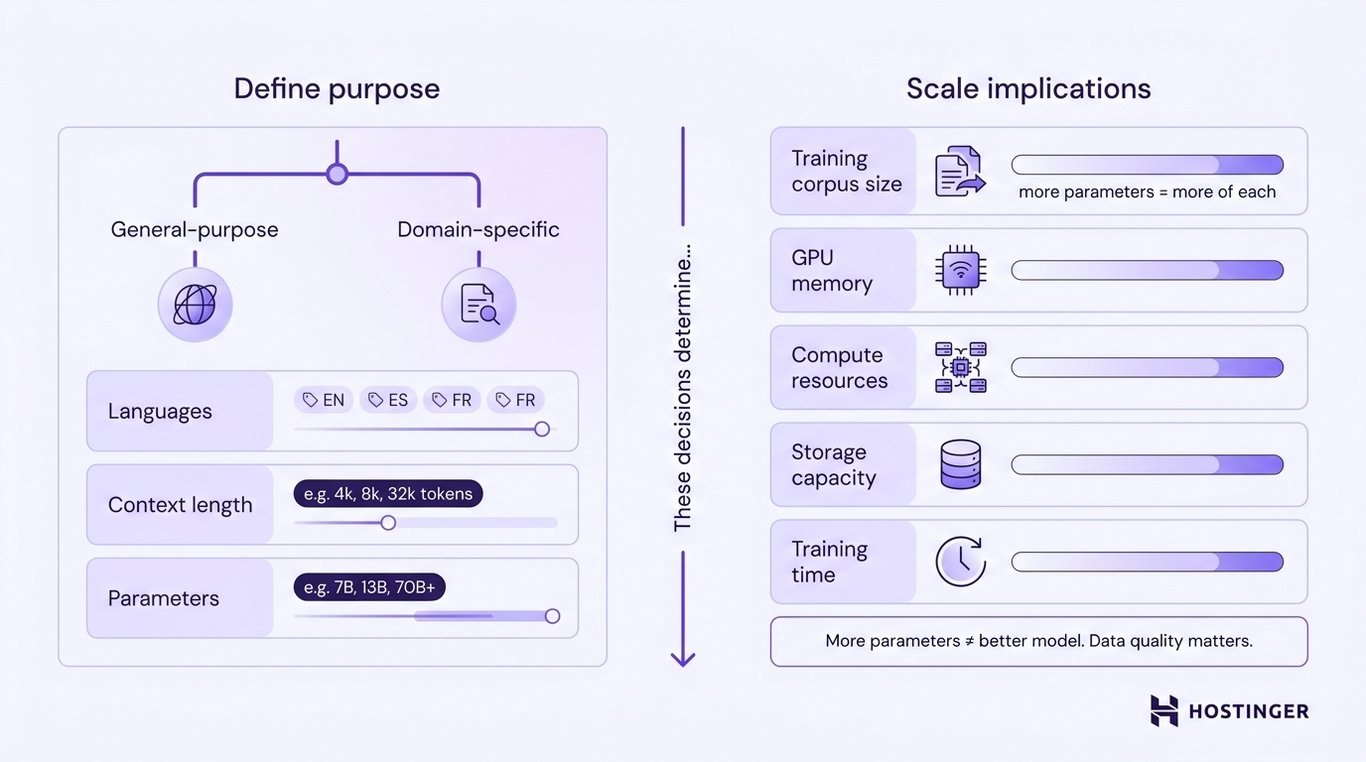
Parameter count alone does not determine model quality. Dataset quality, token coverage, optimization stability, architecture choices, and evaluation results can matter as much as raw size
2. Collect the training dataset
The next step is to assemble the dataset that the model will learn from. During pretraining, an LLM analyzes enormous amounts of text to discover language patterns, factual relationships, and reasoning structures.
The quality and diversity of that data directly impact the model’s capabilities, making dataset preparation one of the most important stages of the training process.
A pretraining corpus typically combines multiple sources to capture a broad range of writing styles, topics, and vocabulary.
Common sources include licensed datasets, public-domain books, technical documentation, academic publications, code repositories with appropriate licensing, web content, and organization-owned data.
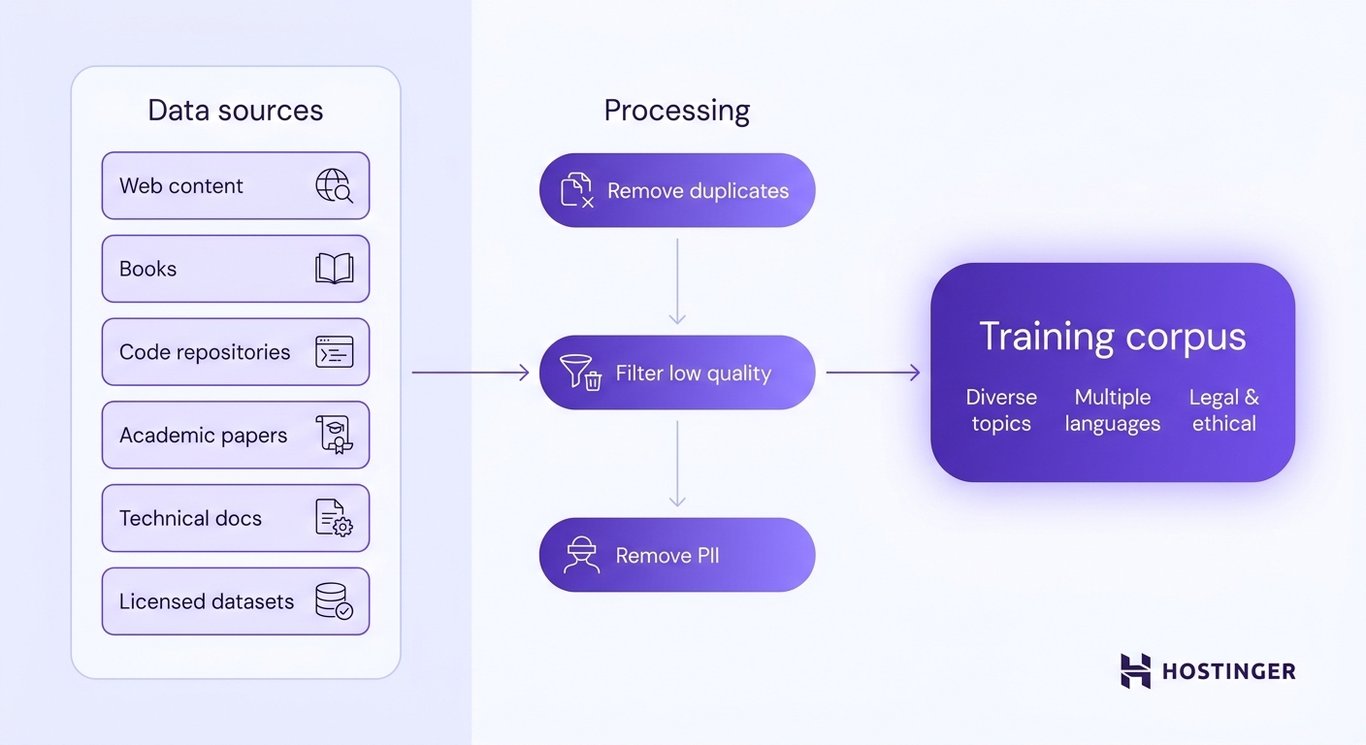
The exact mix depends on whether the goal is to build a general-purpose foundation model or one specialized in a particular domain.
Before using a source, confirm that its license or terms permit the intended training use and account for applicable copyright, privacy, and data-protection obligations. Remove, anonymize, or otherwise protect personally identifiable information (PII) and sensitive data where required.
3. Clean and prepare the data
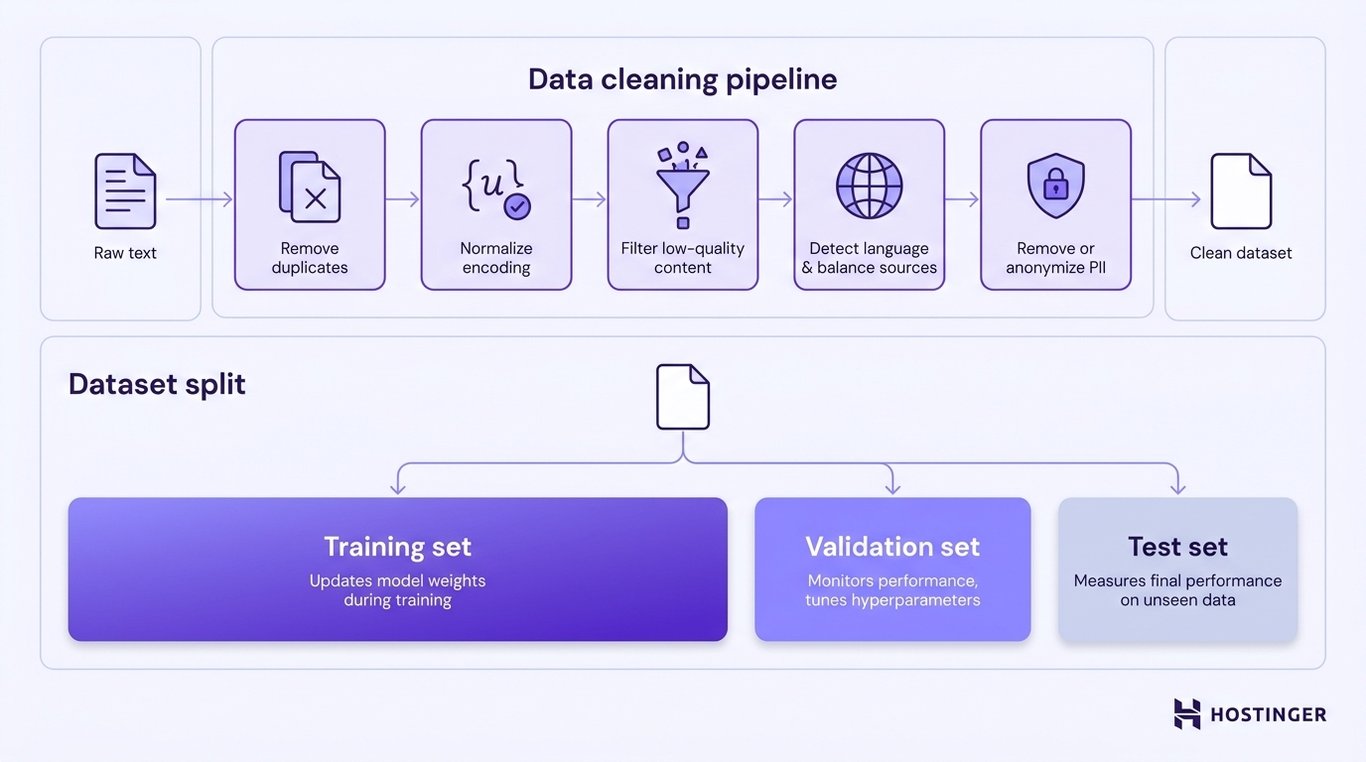
Before the dataset reaches the tokenizer, developers remove duplicate documents and corrupted or malformed text, normalize character encoding and formatting, and filter out spam, low-quality content, and synthetic data that does not meet the project’s quality criteria
They also detect the language of each document, balance multilingual and domain-specific data sources, and remove or anonymize personally identifiable information (PII) and other sensitive data.
Once the dataset has been cleaned, it is divided into three subsets, each serving a different purpose throughout development:
- Training set – The portion of the dataset used to update the model’s weights during training.
- Validation set – A separate dataset used to monitor the model’s performance during development, helping developers tune hyperparameters and detect problems such as overfitting (where the model performs well on training data but poorly on unseen data).
- Test set – A dataset the model has never seen during training or validation, used only to measure its final performance on unseen data.
Careful data preparation improves both the quality of the trained model and the reliability of its evaluation.
Without it, even a large training corpus can produce a model that memorizes repeated content, learns from noisy data, or performs poorly on new tasks.
4. Train or choose a tokenizer
The next step is deciding which tokenizer the model will use. When training an LLM from scratch, developers typically train a new tokenizer so its vocabulary matches the languages, terminology, and writing patterns of the training corpus.
A tokenizer converts raw text into a format the model can process. LLMs do not read words or sentences directly. Instead, they process tokens, which may represent whole words, parts of words, punctuation marks, spaces, or even individual characters.
The tokenizer assigns each token a unique numerical identifier called a token ID, and the complete set of tokens it recognizes forms its vocabulary.
In addition to ordinary text, the vocabulary contains special tokens that mark the beginning or end of a sequence, separate different inputs, or pad shorter sequences to a consistent length.
For example, the sentence:
The cat sat on the mat.
might be converted into the following tokens:
["The", "cat", "sat", "on", "the", "mat", "."]
Each token is then mapped to a numerical token ID. For illustration, a tokenizer might produce:
[154, 892, 431, 78, 25, 613, 9]
The model processes the token IDs rather than the original text.
Many modern tokenizers go one step further by using subword tokenization, which breaks unfamiliar or uncommon words into smaller, reusable pieces.
Rather than assigning a unique token to every possible word, the tokenizer can combine existing subwords to represent words it has never encountered before.
For instance, if the tokenizer has never seen the word “untestable”, it might split it into:
["un", "test", "able"]
Because each subword already exists in the vocabulary, the tokenizer can represent the complete word without needing a dedicated token for “untestable”.
This approach keeps the vocabulary compact while allowing the model to process a much wider range of text.
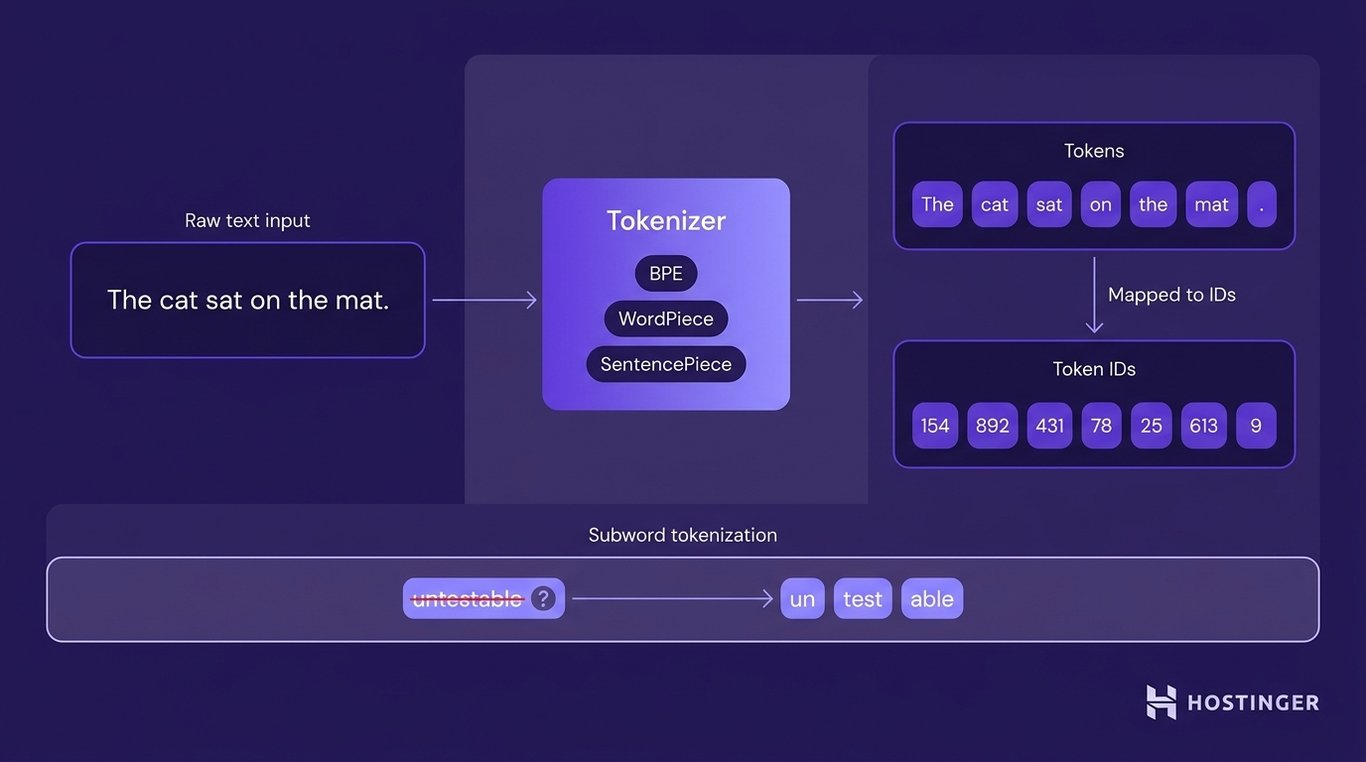
Several tokenization methods implement this idea in different ways:
- Byte Pair Encoding (BPE) builds the vocabulary by repeatedly merging the most common pairs of characters or subwords found in the training corpus.
- WordPiece creates a compact vocabulary by selecting the most useful subwords from the training data.
- SentencePiece learns subwords directly from raw text without requiring the input to be split into words first.
5. Configure the Transformer architecture
Configuring the architecture means deciding how much capacity the model should have.
Developers begin by choosing the number of layers, which determines how many processing stages the model uses to analyze each token sequence.
They then select the hidden dimension, which defines how much information each token can carry as it moves through the network.
The number of attention heads controls how many relationships between tokens the model can analyze simultaneously, while the context length specifies how many tokens the model can process in a single input.
Finally, the vocabulary size establishes how many unique tokens the model can recognize through its tokenizer.
These architectural choices affect model capacity, memory use, and training cost, but increasing them does not automatically improve model quality. The right configuration depends on the data, training budget, target tasks, and evaluation.
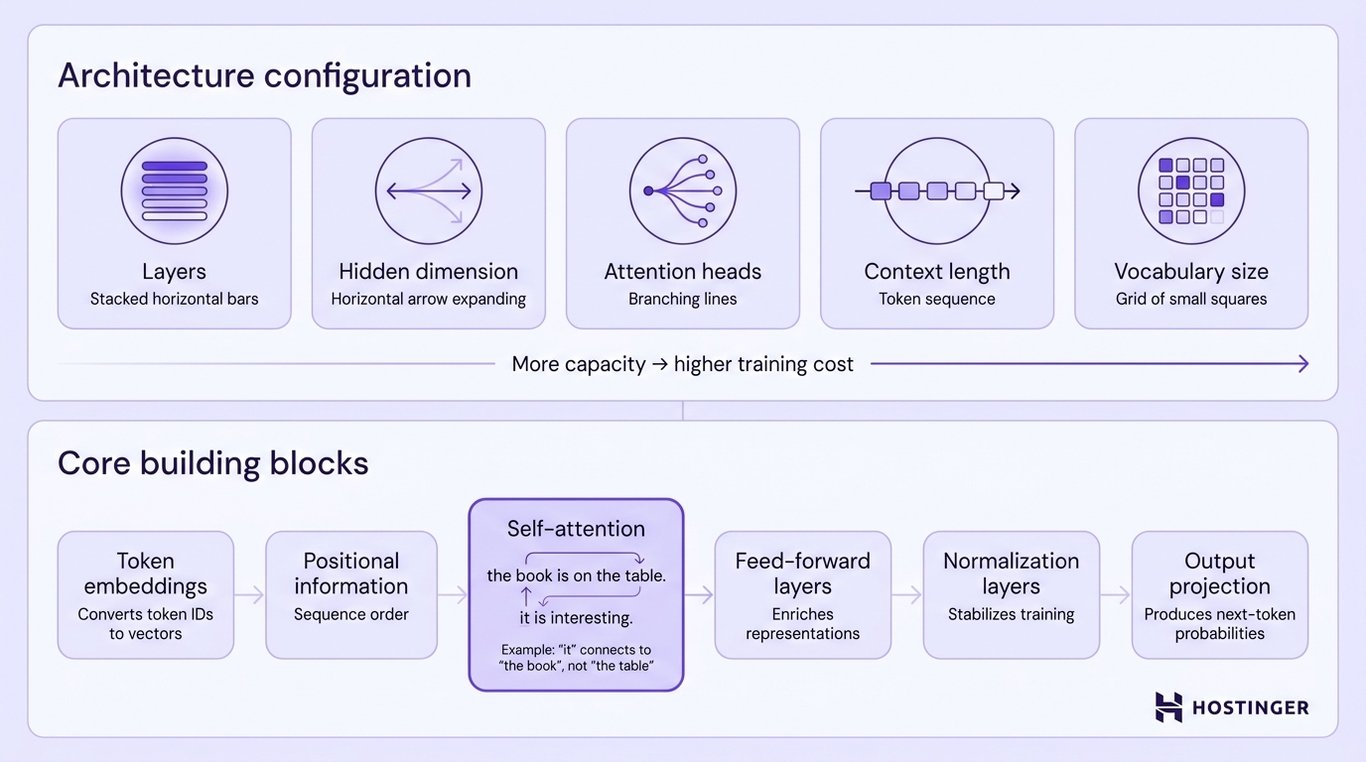
Most modern LLMs use the same underlying Transformer architecture. Although developers configure its size, the core building blocks remain the same:
- Token embeddings convert each token ID into a numerical representation that the model can process.
- Positional information tells the model where each token appears in the sequence.
- Self-attention allows the model to determine which earlier tokens are most relevant when processing the current token. For example, in the sentence “The book was placed on the table because it was heavy,” self-attention helps the model associate “it” with “the book” rather than “the table.”
- Feed-forward layers transform the information produced by self-attention into richer language representations.
- Normalization layers stabilize training by keeping numerical values within a consistent range.
- The output projection layer converts the model’s internal representation into a probability distribution over the vocabulary, enabling it to predict the next token.
6. Configure the training environment
Configuring the training environment involves preparing the hardware and software that will run the training job.
The hardware requirements depend on model size, sequence length, batch size, precision, optimizer state, and the scale of the training run. Modern LLM training relies primarily on graphics processing units (GPUs) or other AI accelerators because they can efficiently execute the large matrix operations used in neural network training.
As the model grows, training may require multiple GPUs to provide sufficient memory and compute power.
GPUs are only one part of the training environment. CPUs prepare and load the training data; system RAM temporarily stores that data before it reaches the GPUs; storage holds the training corpus, model checkpoints, and software, and networking allows multiple machines to exchange data during distributed training.
Training requires much more memory than inference because the system stores more than just the model’s weights.
During training, it also stores activations (intermediate values produced as data moves through the network), gradients (values used to calculate how the weights should change), and optimizer states (additional information used when updating the weights).
These intermediate training states can consume more memory than the model weights themselves.
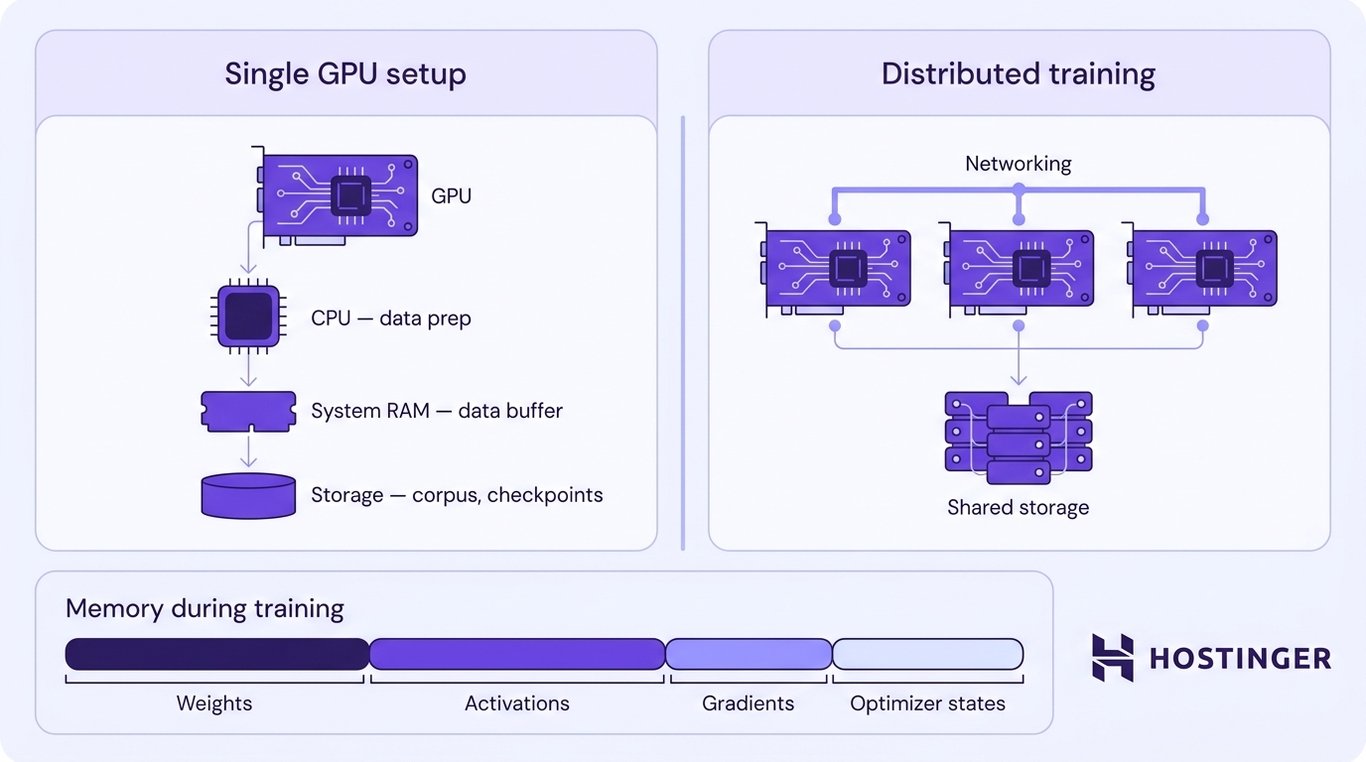
As models grow larger, configuring the environment also means deciding how the training workload will be distributed.
Smaller models may fit on a single GPU, whereas large-scale pretraining typically requires multiple GPUs or distributed training across several machines to provide sufficient memory and computational power.
7. Set the training hyperparameters
Hyperparameters are predefined training settings, such as the learning rate, batch size, and number of training steps.
Unlike model parameters, they are selected by developers rather than learned by the model.
Setting them involves choosing values that balance training speed, memory usage, numerical stability, and the model’s final performance.
Developers usually begin by selecting the optimizer, which defines how the model’s weights are updated after each training step.
They then choose a learning rate, which controls how much the weights change after each update.
Because a learning rate that is too high can make training unstable, many training runs start with a warmup period, gradually increasing the learning rate before following a predefined learning-rate schedule for the remainder of training.
The next step is configuring how the training data is processed. The batch size determines how many training examples are processed together before the model updates its weights, while the sequence length sets the maximum number of tokens the model processes in a single input.
When GPU memory is limited, developers can use gradient accumulation, which combines gradients from multiple smaller batches before updating the weights.
This produces the effect of a larger batch size without requiring additional GPU memory.
Training duration must be configured before learning begins. An epoch represents one complete pass through the training dataset, although LLM pretraining is more commonly measured by the number of training steps or the total number of tokens processed because the datasets are extremely large.
Developers also configure weight decay, a regularization setting that discourages excessively large weight values and can help reduce overfitting when tuned appropriately.
Finally, they choose the numerical precision used during training. Common formats include FP32 (32-bit floating-point), FP16 (16-bit floating-point), and BF16 (Brain Floating-Point 16).
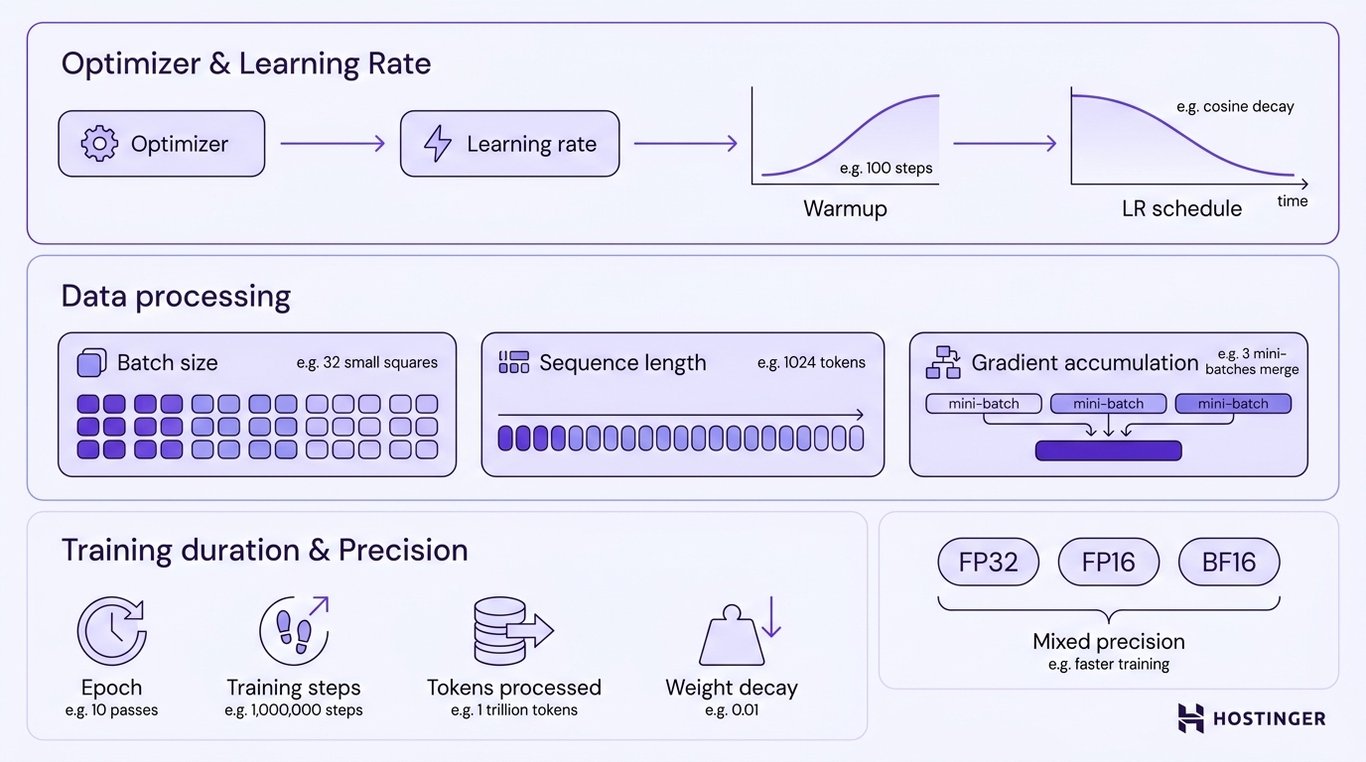
Many training runs use mixed or reduced precision to lower memory use and increase throughput on compatible hardware, while monitoring for numerical instability or quality regressions.
8. Run the pretraining loop
Running the pretraining loop involves repeatedly processing batches of training data until the model reaches the desired performance level.
Each training step processes a batch of token sequences and updates the model’s weights. The goal is for performance to improve over many updates; an individual step is not guaranteed to improve the model.
Repeated across a very large token budget, these updates allow the model to learn statistical regularities in the training data.
During each training step, the training system performs the following sequence of operations:
- Load a batch of token sequences.
- Feed the tokens into the Transformer.
- Predict the next token at each position in every sequence.
- Compare the predictions with the correct tokens from the training data.
- Calculate the loss to measure the prediction error.
- Run backpropagation to determine how each model weight contributed to that error.
- Update the model’s weights using the optimizer.
- Clear or accumulate gradients, depending on the training configuration.
- Repeat the process with the next batch.
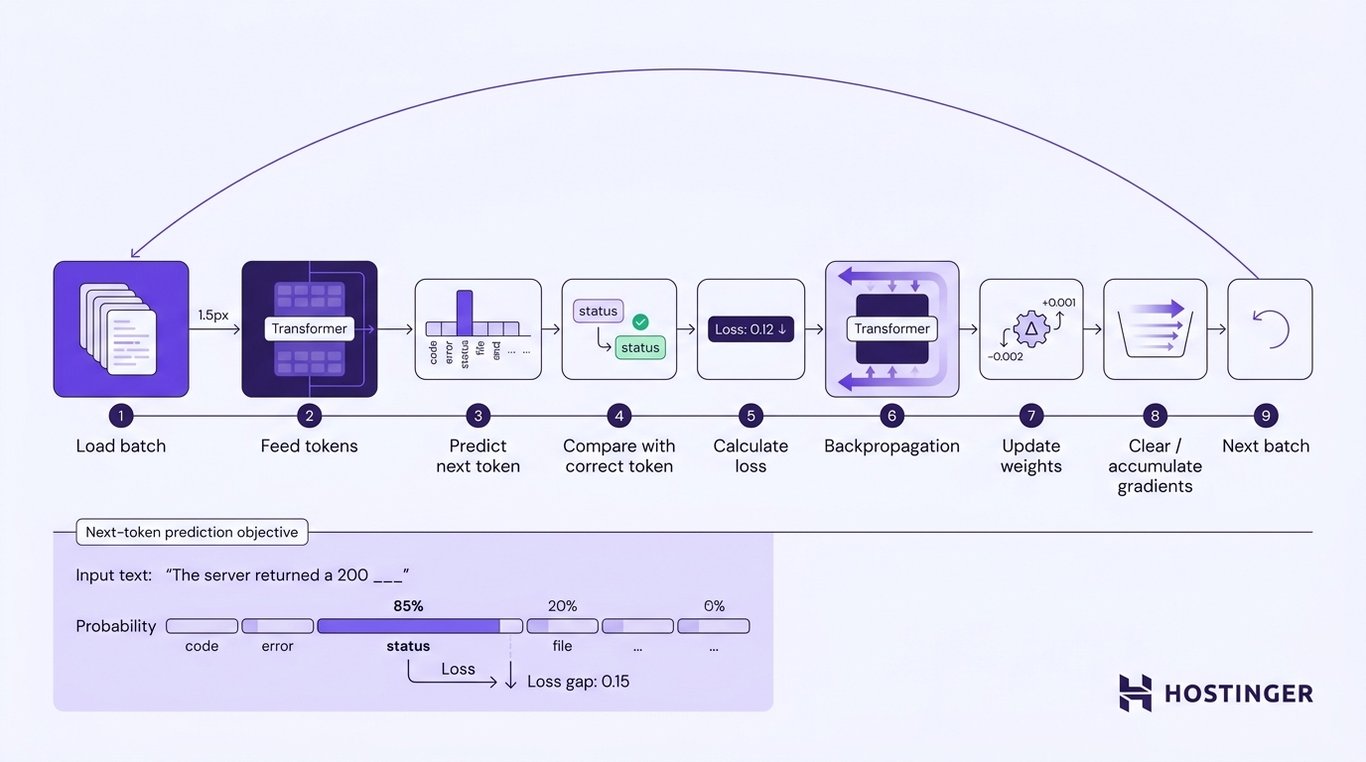
The entire loop is driven by a single objective: next-token prediction. Suppose the model receives the text:
“The server returned a 200 ___”
The model assigns a probability to every possible next token in its vocabulary. If the correct next token in the training data is “status”, the loss measures how far the prediction differs from that expected result.
The optimizer then adjusts the model’s weights so that “status” becomes more likely in similar contexts during future training steps.
Predicting the next token may seem like a simple objective, but repeating the same learning process across billions of token sequences allows the model to learn grammar, vocabulary, factual relationships, programming syntax, reasoning patterns, and many other statistical regularities without being explicitly programmed with those rules.
9. Save checkpoints
Saving checkpoints periodically protects training progress and makes long training runs easier to manage.
Rather than waiting until pretraining finishes, developers save checkpoints at regular intervals throughout the training process.
If training is interrupted by a hardware failure, software error, or power outage, it can resume from the most recent checkpoint instead of starting over.
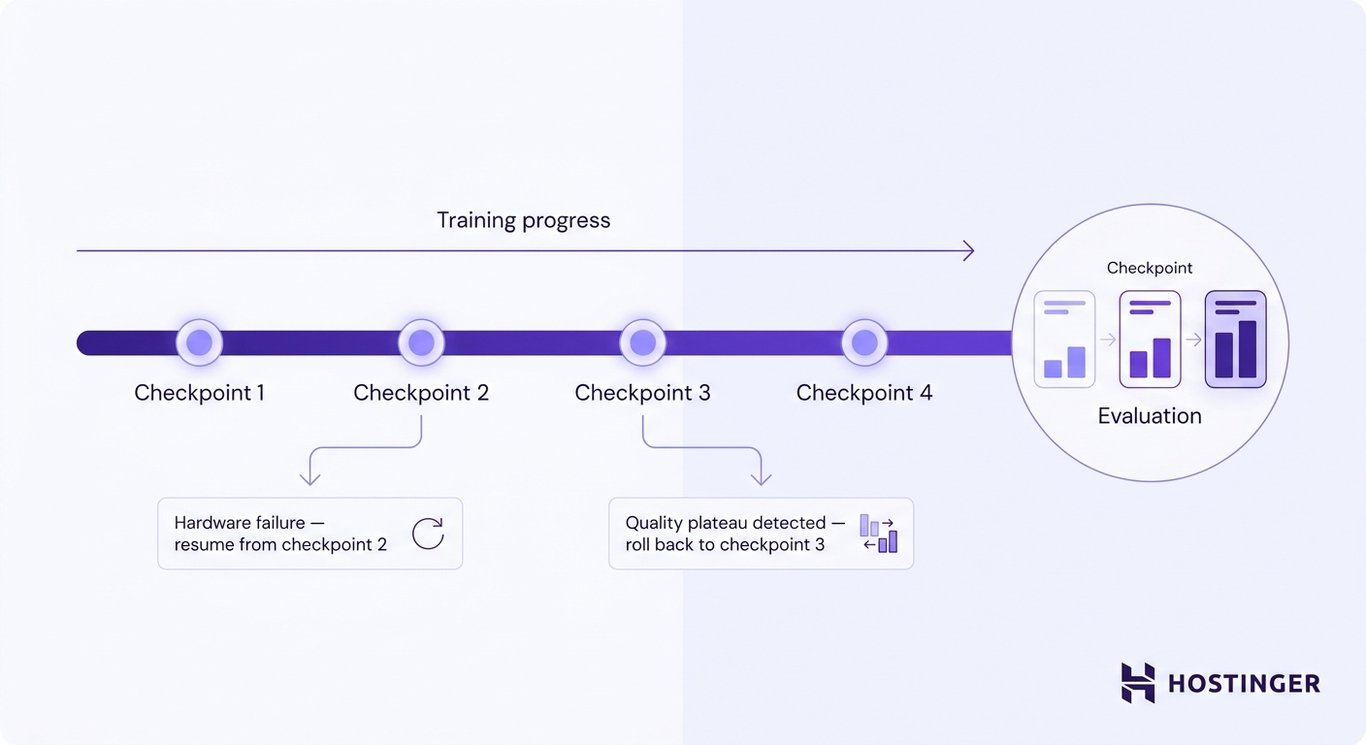
Regular checkpoints also make it easier to compare different stages of training. Developers can evaluate multiple checkpoint versions, identify when model quality begins to plateau or decline, and roll back to an earlier checkpoint if a later version becomes unstable or performs worse.
10. Monitor training
Training should be monitored continuously to verify that the model is learning as expected and that the training infrastructure is operating efficiently.
Developers typically track the following metrics throughout the training run:
- Training loss – Measures prediction error on the training batches. A plateau can mean the run is approaching its current limit, but it can also reflect the learning-rate schedule, data mix, or optimization settings.
- Validation loss – Measures performance on data the model has not seen during training. If validation loss increases while training loss continues to decrease, the model may be overfitting.
- Learning rate – Confirms that the learning-rate schedule is progressing as intended throughout training.
- Gradient stability – Indicates whether weight updates remain numerically stable. Unstable gradients can prevent the model from converging or cause training to fail.
- GPU utilization – Shows how effectively the available GPUs are being used. Low utilization may indicate bottlenecks in the training pipeline.
- Throughput – Measures how many training examples or tokens the system processes over time. Unexpected slowdowns often point to hardware, storage, or data-loading issues.
- Memory usage – Tracks GPU and system memory consumption to help detect memory bottlenecks before they interrupt training.
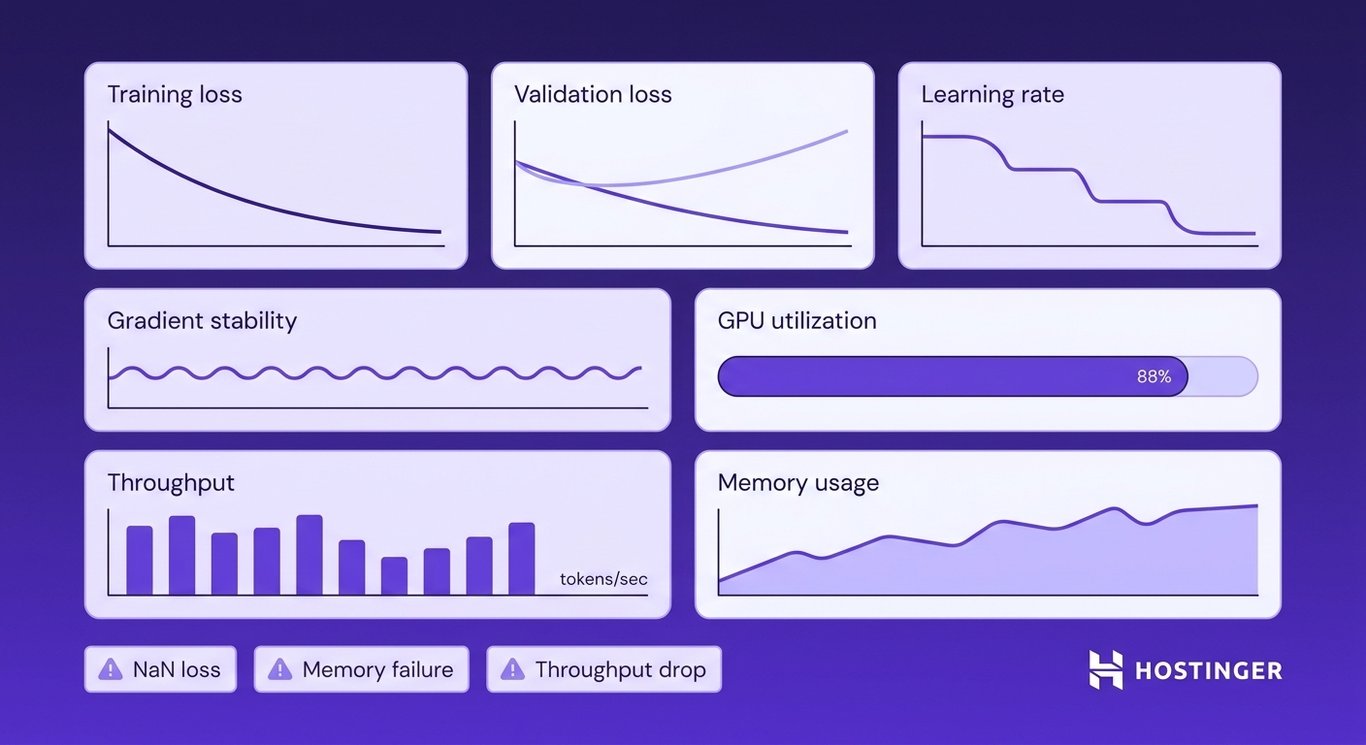
Monitoring these metrics helps identify problems early. Common warning signs include NaN (Not a Number) loss values caused by numerical errors, GPU memory failures, and unexpected drops in throughput.
Detecting these issues early allows developers to adjust the training configuration before the training run fails or produces a lower-quality model.
11. Evaluate the pretrained model
Evaluating the pretrained model determines whether it has learned the language patterns and capabilities required for its intended use.
A low training loss alone is not enough, because a model can perform well on the training data while still producing poor results on new tasks or unseen text.
Evaluation begins with held-out datasets that were not used during training. Developers measure language modeling loss to assess how accurately the model predicts unseen text.
Some evaluations also report perplexity, which measures how well the model predicts the next token on unseen data. Lower perplexity generally indicates better predictive performance.
The evaluation process then expands beyond next-token prediction to measure how well the model performs real-world tasks.
Depending on the intended application, evaluations may include:
- Reasoning tasks to measure logical problem-solving ability.
- Factuality tests to evaluate how accurately the model recalls and presents information.
- Coding benchmarks to assess code generation, completion, and debugging capabilities.
- Language understanding tasks to measure comprehension, summarization, or question answering.
- Instruction-following evaluations to determine how well the model responds to user requests.
- Domain-specific tests for fields such as medicine, law, finance, or software engineering.
- Safety evaluations to identify harmful, biased, or otherwise inappropriate outputs.
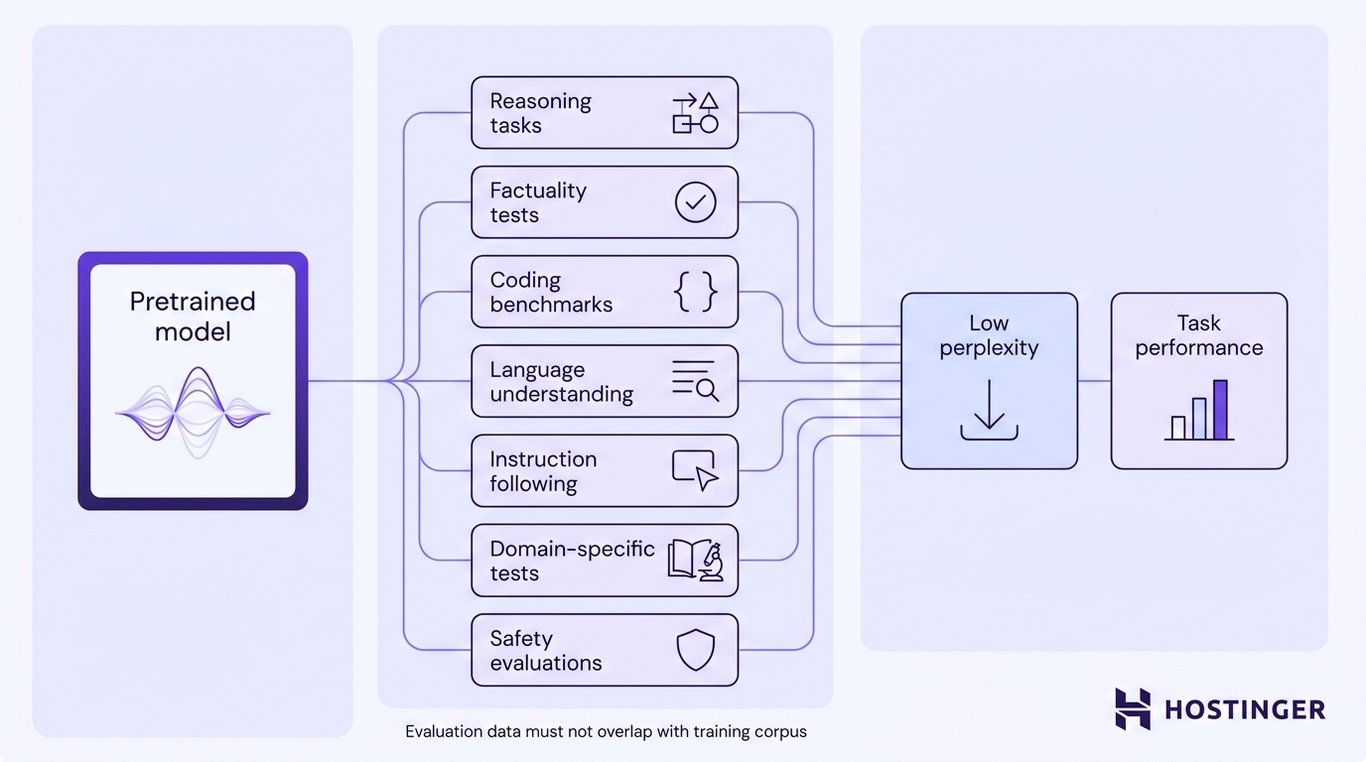
The evaluation strategy should reflect the model’s intended purpose. A coding assistant, for example, should be evaluated primarily on programming tasks, while a medical model requires domain-specific medical evaluations in addition to general language benchmarks.
Finally, evaluation datasets should remain independent of the training corpus. If benchmark questions or test data overlap with the training data, the model may appear to perform well simply because it has already seen similar examples during training.
Using unseen evaluation data provides a more reliable measure of how well the model generalizes to new tasks and inputs.
Fine-tuning adapts an existing pretrained LLM by continuing training on a much smaller dataset designed around the behavior or domain you want the model to learn. Instead of teaching the model general language patterns from scratch, you build on the knowledge it has already acquired and adapt it to a specific application.
What happens after pretraining?
Pretraining teaches an LLM general language patterns, but it does not automatically produce a helpful conversational assistant.
Before a model is deployed, it typically undergoes post-training, a series of additional training and evaluation stages that improve its behavior, reliability, and safety.
A common first stage is supervised fine-tuning (SFT), where the model learns from curated examples of desired inputs and outputs.
For a casual LLM, SFT still uses token-level language-modeling loss: the model predicts target response tokens from the preceding context, but the examples are curated to teach instruction following, conversational behavior, domain responses, or required output formats.
Many models then undergo preference optimization, which teaches them to favor better responses when multiple valid answers are possible.
During this stage, the model compares preferred and less-preferred responses and learns to produce behavior that aligns more closely with human expectations.
Common approaches include reinforcement learning from human feedback (RLHF), direct preference optimization (DPO), and related preference-training methods.
Post-training also includes extensive safety and alignment testing. Developers evaluate the model for harmful or biased outputs, privacy leakage, prompt injection attacks, hallucinations, inappropriate refusal behavior, and performance in sensitive domains such as healthcare or finance.
Alignment is not a one-time process. Production models continue to be monitored, tested, and updated as new risks, use cases, and attack techniques emerge.
How to fine-tune an existing LLM
The overall process resembles pretraining. You’ll still choose a model, prepare a training dataset, configure the training process, run a training loop, and evaluate the results.
The difference is that fine-tuning uses a much smaller dataset, requires far less computing power, and focuses on refining an existing model rather than creating a new one.
1. Choose a base model
The first step is choosing a pretrained model that matches your fine-tuning goals and available hardware.
The right model will also depend on the resources available for training and deployment.
When comparing candidate models, evaluate the following:
- License – Check whether the license permits commercial use, redistribution, or the creation of derivative models. Some open models restrict commercial deployment or require attribution.
- Parameter size – Match the model size to your hardware. A sub-billion or 7B-class model is far easier to adapt than a 70B-class model, while PEFT, quantization, offloading, and multi-GPU training can change the exact memory requirement.
- Context length – Choose a context window that matches your workload. Customer support assistants may need only a few thousand tokens, whereas document analysis or code assistants often benefit from much longer contexts.
- Supported languages – Verify that the model was pretrained on the languages you plan to use. Fine-tuning can improve a target language or domain, but it may not fully compensate for weak language coverage in pretraining.
- Instruction tuning – Decide whether you need a base model or an instruction-tuned model. Instruction-tuned models are a better starting point for chatbots and assistants, while base models are often preferred for continued pretraining or highly specialized fine-tuning.
- Hardware requirements – Estimate the GPU memory needed for fine-tuning before selecting a model. Choosing a model that exceeds your available VRAM may require techniques such as LoRA, quantization, or distributed training.
- Model format – Confirm that the model is available in a format supported by your training and deployment framework. Hugging Face Transformer checkpoints and Safetensors are common for fine-tuning, while formats such as GGUF and ONNX are commonly used for optimized inference or export workflows.
- Ecosystem support – Look for models with active maintenance, detailed documentation, evaluation results, and community tooling. A mature ecosystem makes fine-tuning, benchmarking, and deployment much easier.
Pro tip
Start with the model card, license, task-specific evaluations, and recent benchmark results that match your use case. Re-run the most important evaluations yourself before committing to a base model.
Smaller models are generally easier and less expensive to fine-tune because they require less GPU memory, storage, and computation.
They are also faster to deploy and run during inference. Larger models may perform better on some complex tasks, but that benefit is workload-dependent and comes with higher memory, compute, and latency costs.
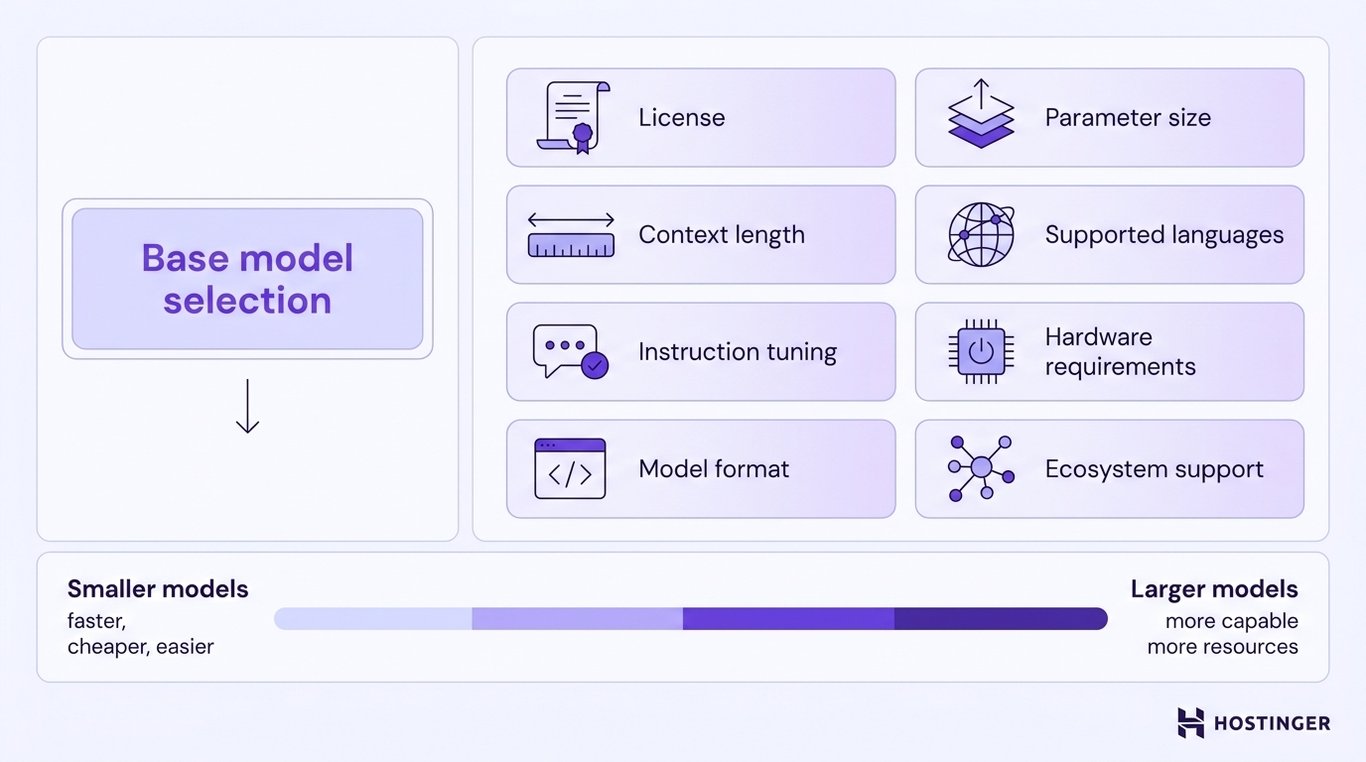
For many applications, starting with the smallest model that satisfies your performance requirements is the most practical approach.
2. Prepare a fine-tuning dataset
The next step is preparing a dataset that teaches the model the behavior you want it to learn. The format of the dataset depends on your objective.
If you want the model to follow instructions, create pairs of prompts and expected responses that demonstrate the desired behavior.
For example:
Input: Summarize this support ticket.
Output: The customer cannot access their account after resetting the password. Escalate the issue to the authentication team.
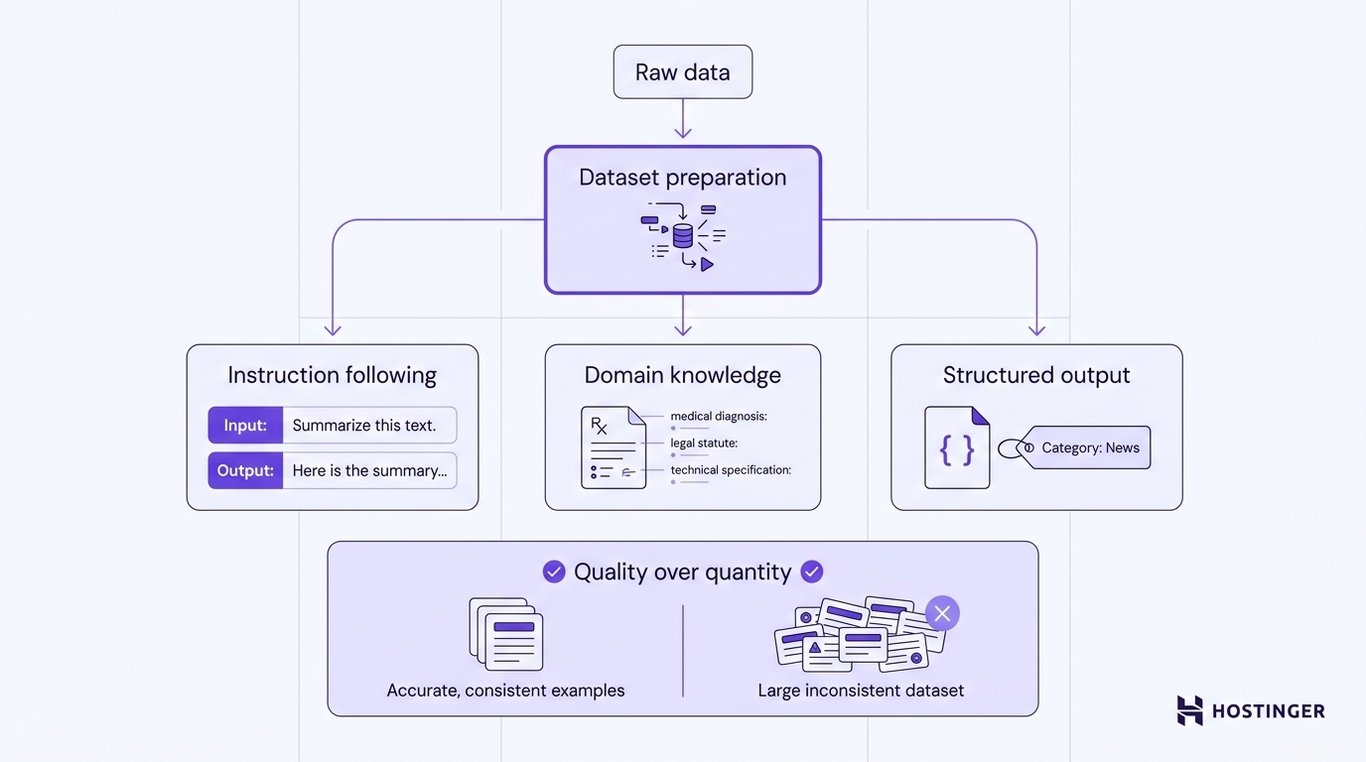
If you want deeper adaptation to a specialized domain, distinguish between continued pretraining and supervised fine-tuning. Continued pretraining uses high-quality domain text to adapt the model’s language distribution, while supervised fine-tuning uses curated input-output examples to teach task behavior.
Medical, legal, financial, or software documentation can be useful for continued pretraining or for constructing supervised examples, but fine-tuning should not be treated as a guaranteed way to inject accurate domain knowledge. Domain accuracy still needs dedicated evaluation.
If you want the model to produce structured or consistent outputs, include examples that demonstrate the exact behavior you expect.
The dataset might teach the model to:
- Generate responses in a consistent writing style.
- Return data in a specific JSON format.
- Predict predefined classification labels.
- Produce requests in a required tool-use format.
- Use organization-specific terminology and naming conventions.
3. Choose full fine-tuning or parameter-efficient fine-tuning
For most projects, parameter-efficient fine-tuning (PEFT) is the practical choice because it requires much less GPU memory and storage than updating the entire model.
Full fine-tuning is usually reserved for situations where maximum flexibility justifies the additional computational cost.
Full fine-tuning updates every weight in the pretrained model. This approach gives you complete control over how the model adapts to the new task or domain, making it suitable when you need to make substantial changes to the model’s behavior.
The trade-off is that training requires significantly more GPU memory, produces larger model checkpoints, and increases the risk of degrading the capabilities the model already learned during pretraining.
Parameter-efficient fine-tuning (PEFT) keeps most of the pretrained model unchanged and updates only a small subset of parameters or adds lightweight trainable components called adapters.
Because far fewer parameters are trained, PEFT requires less memory, generates much smaller checkpoints, and is often the preferred approach when working with limited hardware.
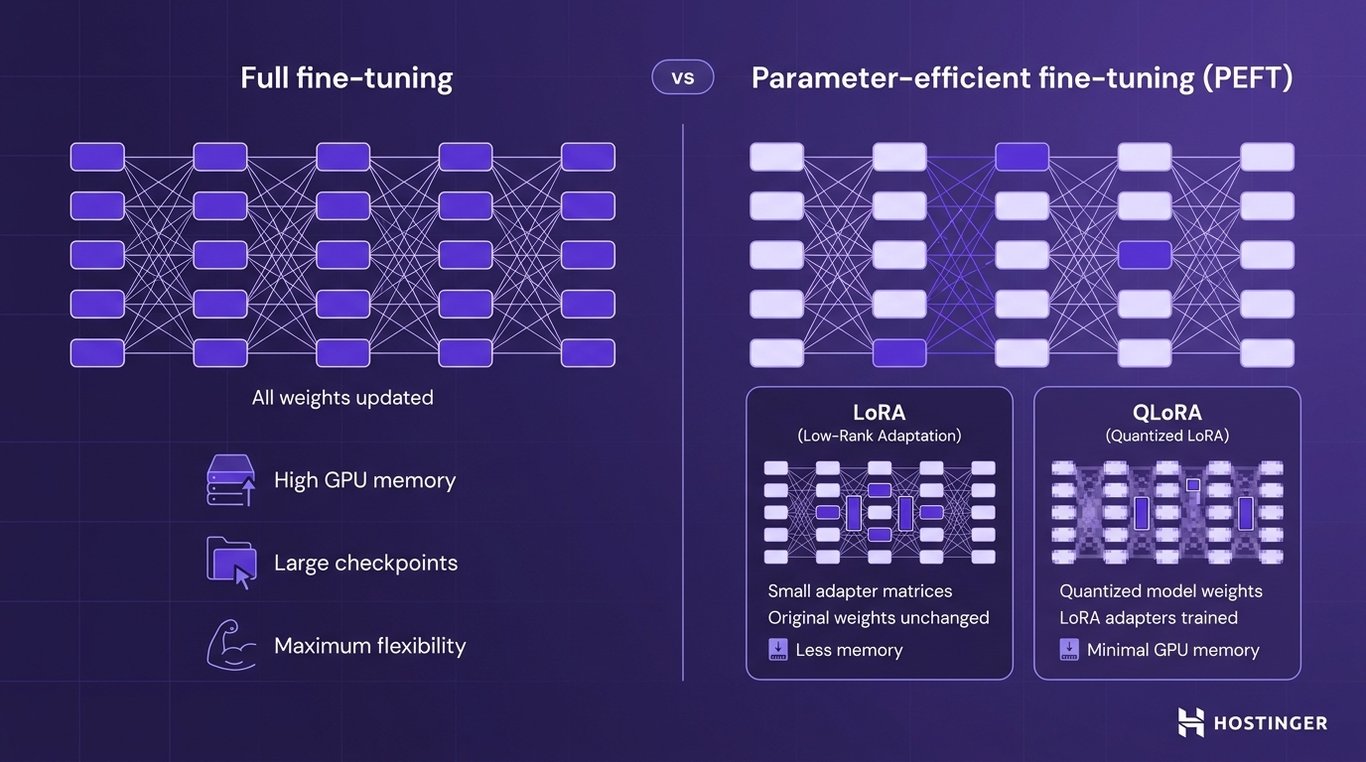
A common PEFT method is LoRA (Low-Rank Adaptation). Instead of modifying every model weight, LoRA trains small additional matrices that adjust the model’s behavior while leaving the original weights unchanged.
This can reduce both memory usage and storage requirements while retaining strong task performance in many settings, but the result still needs to be benchmarked against full fine-tuning or the base model for the intended task.
If GPU memory is particularly limited, QLoRA (Quantized Low-Rank Adaptation) offers an even more efficient alternative.
QLoRA combines LoRA with quantization, storing the pretrained model in a lower-precision format while training only the LoRA adapters.
This significantly reduces memory requirements, making it possible to fine-tune larger models on more modest hardware.
Pro tip
The Hugging Face PEFT library provides ready-to-use implementations of LoRA and QLoRA that integrate directly with Transformers, so you can add adapter-based fine-tuning without implementing the method from scratch.
4. Fine-tune and evaluate the model
Once the dataset and training configuration are ready, you can start the fine-tuning process.
The model still follows the same training loop used during pretraining: it processes a batch of inputs, performs a forward pass, computes the loss, backpropagates, and updates either the model weights or the trainable adapters.
The difference is that fine-tuning uses a much smaller dataset and focuses on improving a specific capability rather than learning general language patterns.
As training progresses, monitor both task performance and the model’s overall behavior. Watch for:
- Overfitting – The model memorizes the fine-tuning dataset instead of learning patterns that generalize to new examples.
- Catastrophic forgetting – The model loses capabilities it learned during pretraining while adapting to the new task.
- Formatting consistency – Verify that responses follow the required structure, such as JSON schemas, classification labels, or tool-call formats.
- Task accuracy – Measure how well the model performs the specific task it was fine-tuned for.
- Regression on general capabilities – Check that improvements on the target task do not reduce performance on broader language, reasoning, or coding tasks.
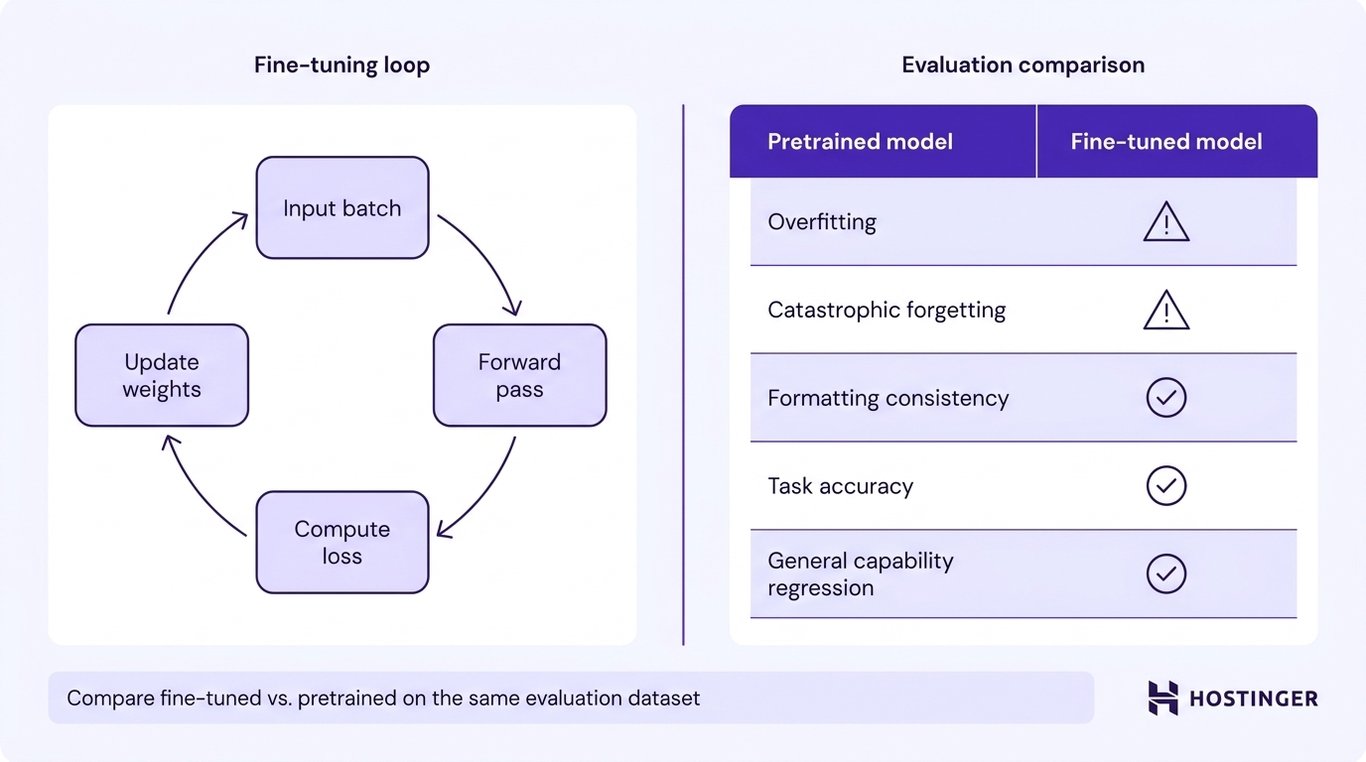
Don’t evaluate the fine-tuned model in isolation. Compare it with the original pretrained model using the same evaluation dataset and metrics.
If the fine-tuned model doesn’t produce a measurable improvement on the target task, or if the improvement comes at the cost of significantly worse general performance, you may need to revise the dataset, adjust the hyperparameters, or choose a different fine-tuning approach.
Fine-tune an open-source LLM: Step-by-step example
The example below uses Python, PyTorch, Hugging Face Transformers, and LoRA to adapt a small open-source model on a small instruction dataset.
Although the exact model and dataset may differ depending on availability and licensing, the overall workflow remains the same: load a pretrained model, prepare the dataset, configure LoRA, train the adapter, and compare the results.
1. Set up the environment
Before you can fine-tune an LLM, you need a Python environment with the libraries required to load the model, prepare the dataset, configure LoRA, and run the training process.
A typical workflow uses:
- PyTorch to run the training process and perform tensor computations on the CPU or GPU.
- Transformers to download pretrained models and tokenizers from the Hugging Face Hub.
- Datasets to load, preprocess, and split the fine-tuning dataset.
- PEFT to configure parameter-efficient fine-tuning methods such as LoRA.
- Accelerate to simplify training on one or more GPUs.
If you have access to a compatible GPU, PyTorch and Accelerate can use it to significantly reduce training time.
CPU fine-tuning is technically possible for very small or toy workloads, but it is usually impractical for modern LLM fine-tuning because training can be dramatically slower than on a compatible GPU.
For the best experience, use a machine with a GPU that has enough memory to hold the model and the LoRA adapters during training.
2. Load the model and tokenizer
The next step is loading the pretrained model and its tokenizer. The tokenizer must match the model because both were trained together and use the same vocabulary.
Replace the model identifier below with any small open-source model that supports fine-tuning and is compatible with your hardware.
from transformers import AutoModelForCausalLM, AutoTokenizer

model_name = "your-model-name"

tokenizer = AutoTokenizer.from_pretrained(model_name)
model = AutoModelForCausalLM.from_pretrained(model_name)
After loading the model, it’s good practice to verify that both the model and tokenizer were initialized correctly before moving on to dataset preparation.
At this stage, the model is ready for inference, but it has not yet been adapted to your specific task or domain.
3. Prepare the training dataset
Before training can begin, the dataset must be converted into the format expected by the model.
Most instruction-tuning datasets consist of paired prompts and responses, where each example demonstrates the behavior the model should learn.
The example below formats each training example as a simple instruction followed by its expected response, then converts the text into tokens.
from datasets import load_dataset

dataset = load_dataset("your-dataset-name")

def format_example(example):
    return {
        "text": (
            f"Instruction: {example['instruction']}n"
            f"Response: {example['output']}"
        )
    }

dataset = dataset.map(format_example)
The formatted text must then be tokenized so the model can process it. During tokenization, long examples are truncated to the model’s maximum context length, while shorter examples are padded where necessary so multiple examples can be processed together in the same batch.
Finally, split the dataset into training and validation sets. The training set updates the model during fine-tuning, while the validation set helps measure performance on unseen examples and detect problems such as overfitting before training finishes.
4. Configure LoRA
LoRA fine-tunes a model by adding a small set of trainable parameters while keeping the original model weights frozen.
Because only those additional parameters are updated, LoRA requires far less GPU memory and produces much smaller checkpoints than full fine-tuning.
A basic configuration looks like this:
from peft import LoraConfig, get_peft_model

lora_config = LoraConfig(
    r=8,
    lora_alpha=16,
    lora_dropout=0.05,
    target_modules=["q_proj", "v_proj"],  # varies by model architecture
    task_type="CAUSAL_LM"
)

model = get_peft_model(model, lora_config)
The exact target_modules values depend on the base model. They identify which Transformer projection layers receive LoRA adapters, so you should check the model architecture or its PEFT documentation before training.
Some models use names such as q_proj and v_proj, while others expose different module names.
The other settings control how the adapters are trained. r sets the rank of the LoRA matrices and affects both adaptation capacity and memory use. lora_alpha scales the LoRA update, while lora_dropout applies dropout to the adapter path during training.
5. Run the training job
Once the model, dataset, and LoRA configuration are ready, you can start the fine-tuning process.
The training configuration defines how long the model trains, how many examples it processes at a time, where checkpoints are saved, and how frequently progress is evaluated.
A minimal configuration might look like this:
from transformers import TrainingArguments, Trainer

training_args = TrainingArguments(
    output_dir="checkpoints",
    learning_rate=2e-4,
    per_device_train_batch_size=4,
    num_train_epochs=3,
    evaluation_strategy="epoch",
    save_strategy="epoch"
)

trainer = Trainer(
    model=model,
    args=training_args,
    train_dataset=train_dataset,
    eval_dataset=validation_dataset,
)

trainer.train()
During a healthy run, training loss will often trend downward, but it can fluctuate between steps. Compare training and validation behavior rather than treating every decrease as proof that the model is improving.
The training process will also save checkpoints to the output directory at the configured intervals, allowing you to resume training or compare different stages later.
Keep an eye on GPU memory usage throughout training. If memory becomes a limiting factor, you can reduce the batch size, shorten the sequence length, or use techniques such as gradient accumulation to lower memory requirements without changing the dataset.
6. Compare the results
Fine-tuning is only successful if it improves the behavior you intended to change. The easiest way to verify this is to run the same prompt through both the original and fine-tuned models, then compare the responses.
prompt = "Summarize the following support ticket..."

base_response = generate(base_model, prompt)
fine_tuned_response = generate(model, prompt)

print("Base model:")
print(base_response)

print("nFine-tuned model:")
print(fine_tuned_response)
Don’t rely on a single example when evaluating the results. Test the model on multiple prompts that were not included in the fine-tuning dataset to verify that it has learned the desired behavior rather than memorized the training examples.
If possible, compare the two models using the same evaluation metrics and benchmark dataset.
A small tutorial dataset is useful for demonstrating the fine-tuning workflow, but it is not enough to produce a production-ready model.
High-quality fine-tuning requires a representative dataset, careful evaluation, and multiple rounds of testing to verify that the model generalizes well beyond the examples it was trained on.
7. Save the fine-tuned adapter
After verifying that fine-tuning improved the model’s behavior, save the LoRA adapter so it can be reused later without retraining.
model.save_pretrained("fine-tuned-adapter")
tokenizer.save_pretrained("fine-tuned-adapter")
The saved adapter contains the additional LoRA parameters learned during fine-tuning, not a complete copy of the base model.
To use it later, load the original base model and attach the saved adapter before running inference.
Training from scratch vs. fine-tuning: Which approach should you choose?
Most developers should fine-tune an existing open-source LLM rather than train a new foundation model from scratch, unless they specifically need control over the architecture, tokenizer, or pretraining corpus and have the resources to support it.
Choose fine-tuning if you:
- Have found a base model that already understands the language, domain, or type of content you need.
- Want the model to follow a specific writing style, response format, or set of instructions.
- Need consistent outputs, such as JSON responses, classification labels, or tool calls.
- Have a relatively small, high-quality dataset focused on a specific task or domain.
- Want to keep infrastructure costs low and work within limited GPU resources.
- Expect to refine the model frequently as your data or requirements change.
Training a new foundation model from scratch is worth considering only if you:
- Cannot find a suitable base model for your use case.
- Need complete control over the model architecture, tokenizer, or pretraining process.
- Have a training corpus that differs fundamentally from the data used to pretrain existing models.
- Must meet licensing, regulatory, or data-provenance requirements that prevent you from using an existing model.
- Have access to the large datasets, GPU infrastructure, engineering expertise, and budget required to train a foundation model.
Training from scratch and fine-tuning aren’t the only options. If a suitable pretrained model already meets your requirements, you may not need additional training at all.
In many cases, you can simply set up an open-source model with Ollama and start using it for inference or application development.
How to deploy and run a trained LLM
After training or fine-tuning, the model must be packaged and served in an environment where applications can send inference requests to it.
Deployment prepares the trained model for production by optimizing it for inference, loading it into a serving system, and making it accessible to users or other applications.
The deployment process typically follows these steps:
- Select the final checkpoint that achieved the best evaluation results.
- Merge LoRA adapters, if required, so the model can be deployed as a single set of weights.
- Convert or quantize the model to reduce memory usage or improve inference performance where appropriate.
- Transfer the model files to the target serving environment.
- Load the model into an inference engine capable of processing prompts and generating responses.
- Expose an API or application interface so applications can send inference requests and receive outputs.
- Monitor the deployment by tracking latency, memory usage, error rates, and resource utilization.
One common deployment optimization is quantization, which reduces the numerical precision used to store the model’s weights.
Lower-precision weights reduce model memory requirements and can improve inference throughput on compatible hardware, but the quality-speed trade-offs vary by model, quantization method, and workload.
Aggressive quantization (e.g., 4-bit) can degrade output quality on tasks requiring precise reasoning or factual recall. Always benchmark your quantized model against the original before deploying it in production.
Run LLMs with Ollama
If you’re deploying an open-source LLM locally or on your own server, Ollama provides a straightforward way to manage and serve compatible models.
Ollama is an open-source tool for downloading, managing, and running LLMs locally. It packages compatible models with an inference engine, making it easier to serve them without manually configuring the underlying software.
Once you install Ollama, you can download compatible models from the Ollama library, store them locally, and serve them for inference.
Using Ollama to run LLMs locally typically requires only a compatible model and a few commands to start serving it.
After the model is running, you can continue working with Ollama from the command line to download additional models, manage your local model library, and start or stop inference sessions.
Pro tip
To keep your model available without manually restarting it, configure Ollama as a systemd service on Linux. This ensures the inference server starts automatically on boot and recovers from unexpected restarts without manual intervention.
Choose a deployment environment
Training infrastructure and serving infrastructure are not the same thing. The final deployment decision is where the trained model will run for inference, and that choice depends on model size, quantization, latency targets, concurrency, and whether you need persistent self-hosting.
Large-scale pretraining relies on specialized GPU clusters that provide the compute and memory needed to train billions of model parameters.
Once training is complete, however, serving a smaller or quantized model typically requires far fewer resources.
An LLM VPS is well-suited for workloads that support model development and deployment. You can use it to:
- Experiment with smaller open-source models.
- Run data preprocessing or evaluation scripts.
- Store and manage datasets, checkpoints, and training artifacts.
- Host Ollama and serve compatible models.
- Expose an inference API for your applications.
- Run supporting services such as web applications, databases, or vector stores alongside the model.
Hostinger LLM VPS Hosting provides a persistent VPS environment for self-hosted AI model deployment and supporting applications.
You control the operating system and software stack, and Hostinger offers an Ubuntu 24.04 with the Ollama template that includes Ollama, Llama 3, and Open WebUl for faster setup. You can then host compatible models and connect them to your own applications or APIs.
Allocated VPS CPU, RAM, storage, and networking resources also provide a stable environment for inference endpoints and supporting services such as web applications, databases, or vector stores.
An LLM VPS should not be confused with a large-scale training cluster. Training a foundation model from scratch still requires specialized GPU infrastructure, whereas deploying and serving a suitably sized or quantized model can often be done on far more modest hardware.

This article is a localized version of How to train an LLM, originally published in English.
All of the tutorial content on this website is subject to Hostinger's rigorous editorial standards and values.

Ksenija is a digital marketing enthusiast with extensive expertise in content creation and website optimization. Specializing in WordPress, she enjoys writing about the platform’s nuances, from design to functionality, and sharing her insights with others. When she’s not perfecting her trade, you’ll find her on the local basketball court or at home enjoying a crime story. Follow her on LinkedIn.

