We benchmarked 34 CPU-only SLM configurations. The biggest performance win wasn’t model choice
Running AI locally or on CPUs usually means accepting slower responses or using smaller, less capable models than GPU-hosted large language models (LLMs).
At the same time, small language models (SLMs) can run entirely on CPUs and are increasingly capable of handling specialized tasks such as customer support, translation, document processing, and code generation.
While SLMs aren’t designed to replace LLMs, they offer a practical, lower-cost way to deploy AI for many real-world applications without dedicated GPU infrastructure.
With so many SLMs and deployment options available, the bigger challenge is knowing which ones are actually worth deploying.
To find out, we benchmarked 34 CPU-only SLM configurations across four open-weight model families to identify which ones delivered the biggest performance gains.
The experiment we ran
We tested 34 CPU-only SLM configurations built from four open-weight model families. Each family included one or more parameter sizes (where M = million parameters and B = billion parameters):
- Qwen3.5 (0.8B and 2B)
- Gemma-4 E2B
- Gemma-3n E2B
- LFM2.5 (350M and 1.2B)
Each model family was tested at multiple compression levels, from full precision down to aggressively compressed. Every configuration ran under the same fixed settings each time, so the numbers are directly comparable and reproducible.
Then, we measured the SLM performance across five axes:
- Reasoning accuracy, tested with MMLU-Pro
- Cross-language comprehension, tested with Belebele
- Single-turn latency, meaning time-to-first-token and decode speed on standalone requests
- Multi-turn latency, measuring the same two metrics under a back-and-forth chat workload
- Long-context handling, tested with a needle-in-a-haystack setup that measures the maximum context length a model can handle before timing out
Testing ran on two deliberately different CPU platforms – a Google Cloud Intel Xeon (8 cores/16 threads, no AVX-512) and a Hostinger VPS on AMD EPYC (8 cores/8 threads, with AVX-512).
The full 34-config sweep ran on the Intel Xeon machine, and an 18-config shared subset ran on both Intel Xeon and AMD EPYC CPUs. Cross-machine comparisons are drawn from the shared subset.
Follow our ongoing SLM on CPU benchmark
This benchmark is an ongoing project. We'll continue adding more models, configurations, and results over time. To stay up to date with the latest benchmarks and methodology, read our full report on Hugging Face.
Is compressing an SLM impactful?
One comparison pattern kept appearing throughout our benchmark. Fewer-parameter models matched compressed higher-parameter models in inference speed while delivering substantially weaker reasoning performance.
These two Qwen model configurations showed a clear example:
| Configuration | Reasoning accuracy | Decode speed |
| Qwen3.5-2B, compressed (Q8) | 36.6% | 18.8 tokens/second |
| Qwen3.5-0.8B, uncompressed (BF16) | 20.5% | 18.7 tokens/second |
And it wasn’t an isolated result. Similar trade-offs appeared throughout the benchmark, with compressed models repeatedly outperforming their full-precision counterparts.
This is because downsizing the AI model configuration removes parameters, reducing both the model’s memory usage and its reasoning capacity. Meanwhile, compression keeps the same SLM architecture intact and stores its weights more efficiently, preserving much more of the model’s capability at a similar latency.
Our experiment also revealed that not all compression levels are equally beneficial. Comparing the same Qwen3.5-2B model across different compression levels makes that clear:
| Configuration | Reasoning accuracy | Decode speed |
| Qwen3.5-2B (Q8) | 36.6% | 18.8 tokens/second |
| Qwen3.5-2B (Q4) | 31.3% | 20.2 tokens/second |
| Qwen3.5-2B (BF16) | 34.8% | 10.5 tokens/second |
In this case, the Q8 variant (the “Q” denotes a compressed model and “8” refers to 8-bit precision) was almost a free optimization, delivering nearly double the throughput without sacrificing reasoning accuracy.
But the gains didn’t continue indefinitely. Compressing further to 4-bit precision (Q4 variant) traded a few points of reasoning accuracy from 36.6% to 31.3% for additional speed.
SLM compression proved to be a more effective optimization strategy than downsizing, but only up to a point. Our testing results suggest that moderate compression hits the sweet spot between speed and reasoning performance.
Which SLM performed the best?
Once we plotted all 34 model configurations by reasoning accuracy and decoding speed, only five were never beaten on both fronts at once.
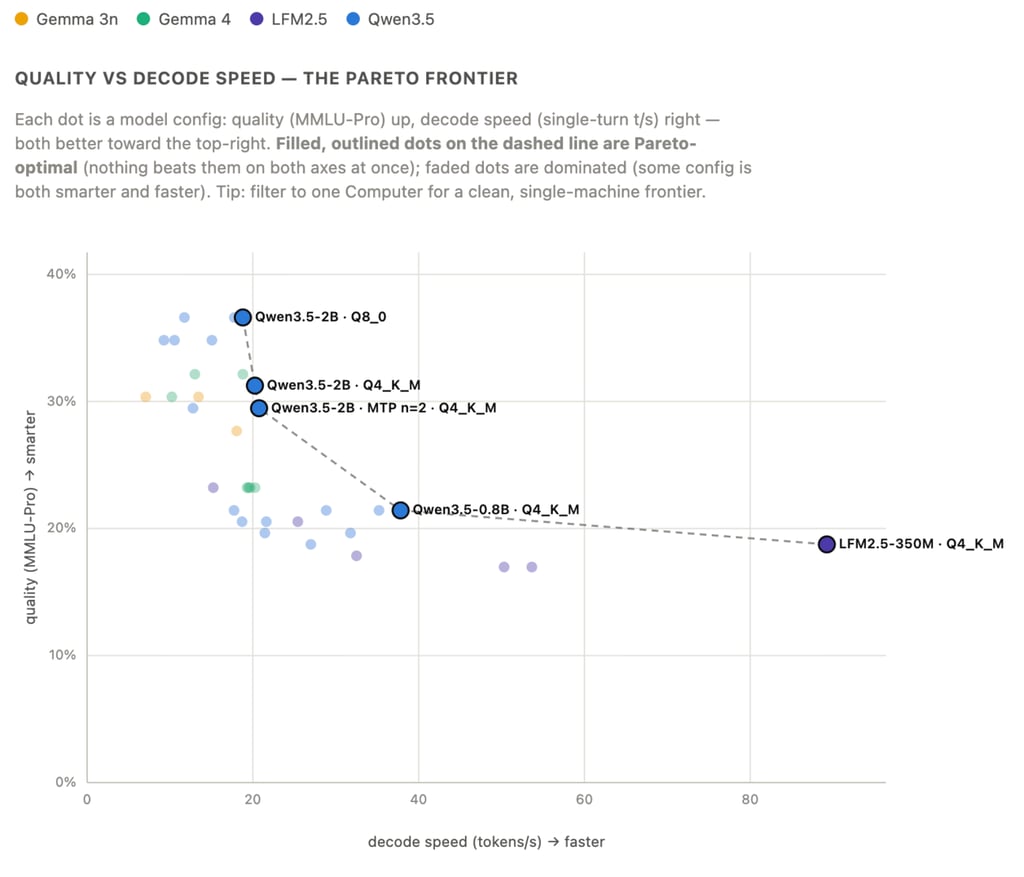
And among those five, only three SLM configurations showed prominent performance insights:
- Smartest – Qwen3.5-2B (Q8) delivers the highest reasoning accuracy while maintaining interactive response speeds. It’s the best choice for assistants and workflows where answer quality matters most.
- Most balanced – Qwen3.5-0.8B (Q4) offers one of the best speed-to-quality trade-offs in the benchmark, showing a large jump in throughput for a relatively small drop in reasoning performance. For many production workloads, this is likely the sweet spot.
- Fastest – LFM2.5-350M (Q4) prioritizes latency above everything else, making it well-suited for routing, classification, extraction, and other lightweight tasks.
Interestingly, none of the surviving tiers use a full-precision model. Each is a compressed variant.
Where these best SLMs fell short
Speed and compression aside, these models are still small language models, and that shows up most clearly in the topic and the language it’s asked in.
On reasoning, the gap is subject-dependent.
These SLMs handle knowledge-and-memory tasks, like biology, history, and general health questions, reasonably well. They struggle more with problems that require step-by-step thinking, like math or business logic.
Language usage shows a similar pattern.
All models performed best in English, with a modest drop in accuracy across German, Spanish, French, and Portuguese. Gemma held up the most evenly across all five, making it the better pick if multilingual output matters more than squeezing out the last few points of reasoning accuracy.
Does newer hardware always mean faster SLM results?
Running the same 18 SLM configurations on Intel Xeon and AMD EPYC servers, we expected the newer AVX-512 EPYC processor to consistently outperform the older AVX2 Xeon.
On average, it did, delivering 1.12x higher decode throughput across the shared configurations. But that average hid two different stories.
Uncompressed SLMs nearly doubled throughput on newer EPYC processors, thanks to AVX-512 and higher clock speeds that accelerated large matrix multiplications.
On the other hand, compressed models ran faster on the older Xeon server because it exposed 16 processing threads, compared to only 8 on the EPYC virtual machine. For these workloads, thread count mattered more than newer vector instructions.
Reasoning accuracy remained effectively unchanged across both CPU types. This implies that your choice of hardware will be primarily driven by cost and latency, not by output quality.
Why do some models still feel slow to respond, even when they generate text quickly?
In our experiment, we measured time-to-first-token for every SLM configuration. While tokens per second measures how quickly a model generates text, time-to-first-token captures how long users wait for the first word.
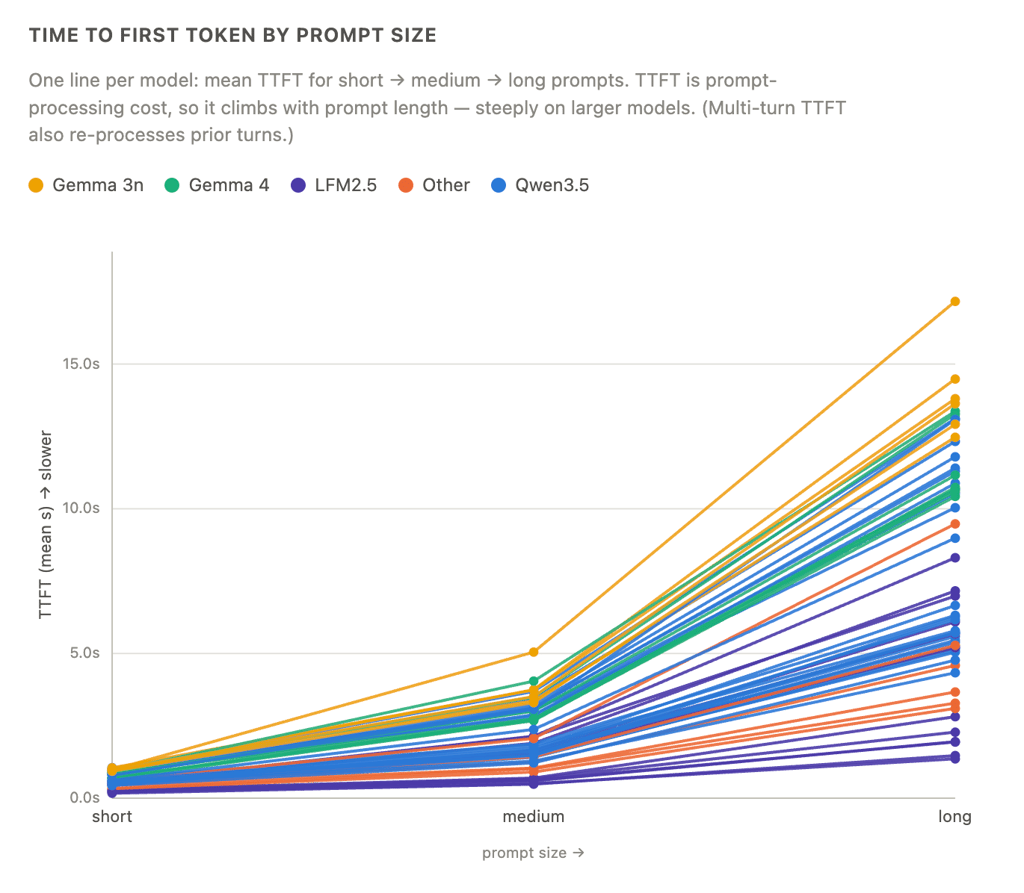
A roughly 1,000-token prompt, such as a retrieval-augmented generation (RAG), long system instruction, or document to summarize, was added anywhere from 2 to 15 seconds before the first token appeared.
The penalty grew with model size. Qwen3.5-2B Q8 waited around 10.5 seconds, while Gemma 3n Q8 took nearly 15 seconds.
For AI applications built around RAG, long system prompts, or large context windows, improving throughput alone won’t eliminate the wait before the model begins responding. Reducing delay also means keeping prompts concise, caching repeated system prompts, and choosing smaller model tiers for retrieval-heavy workloads.
Choosing the best SLM for your project
Our benchmark showed that optimizing SLM deployments is less about choosing the “best” model and more about choosing the right optimization strategy.
Compression consistently delivered more value than simply choosing a smaller model, and every configuration that survived our combined reasoning-and-speed cut was a compressed variant.
The same pattern appeared elsewhere in the benchmark. Newer hardware only improved throughput under specific workloads, while prompt length often had a bigger impact on perceived responsiveness than decoding speed.
Together, these findings suggest that getting the most out of an SLM isn’t about applying as many optimizations as possible. It’s about knowing which one will have the biggest impact.

Larassatti Dharma is a content writer with 5+ years of experience in the web hosting industry. She has populated the internet with over 100 YouTube scripts and articles around web hosting, digital marketing, and email marketing. When she's not writing, Laras enjoys solo traveling around the globe or trying new recipes in her kitchen. Follow her on LinkedIn

Tomas Rasymas, AI Research Lead at Hostinger, drives the integration of AI to enhance our products and customer experience. With over 15 years of tech experience, he leads AI research, mentors a talented team, and advocates for transformative AI power. During leisure, Tomas enjoys trail running and reading books.