Monday January 26, 2026
Larassatti D.
Hostinger weekly product updates: Week 4, 2026

Here’s what shipped the week of January 19 to 23, 2026, across Hostinger Website Builder, Hostinger Horizons (now merged into AI Builder), Hostinger Reach, Kodee (now Hostinger Agent), Node.js hosting, and domains.
- Hostinger became an official .ai domain registrar, expanding our TLD options available for registration.
- Hostinger Reach’s email editor has 11+ additional editable section types, inherited template styles, and more precise layout controls.
- Node.js hosting now shows deployment progress and logs during onboarding and provides clearer guidance when something goes wrong.
- Kodee now supports Elementor tools for editing WordPress site content and styles.
- Kodee can now explain AI credit limits in Hostinger Mail, helping users understand what happens when they reach their available credits.
- Hostinger Horizons interface now includes visual feedback for actions such as image selection and data storage changes.
- Hostinger Website Builder payments now surface the most popular payment provider for each store’s country first.
- Hostinger Mail supports a dark theme.
- Hostinger Horizons has clearer loading states and improved chat and file-handling interactions.
- Hostinger Website Builder’s booking feature now supports phone locations alongside custom options.
- NuPay Wallet is now available as a payment method for Hostinger customers in Brazil.
Here’s a closer look at each.
Hostinger becomes an official .ai registrar
Hostinger is now an official .ai registrar, meaning new .ai domain registrations are made under Hostinger’s own accreditation.
The .ai domain extension has become a popular choice for AI startups, tools, and projects, and this update makes it part of Hostinger’s domain registration offering.
Head to our domain name search page to check if your preferred .ai domain is still available.
More control over email designs in Hostinger Reach
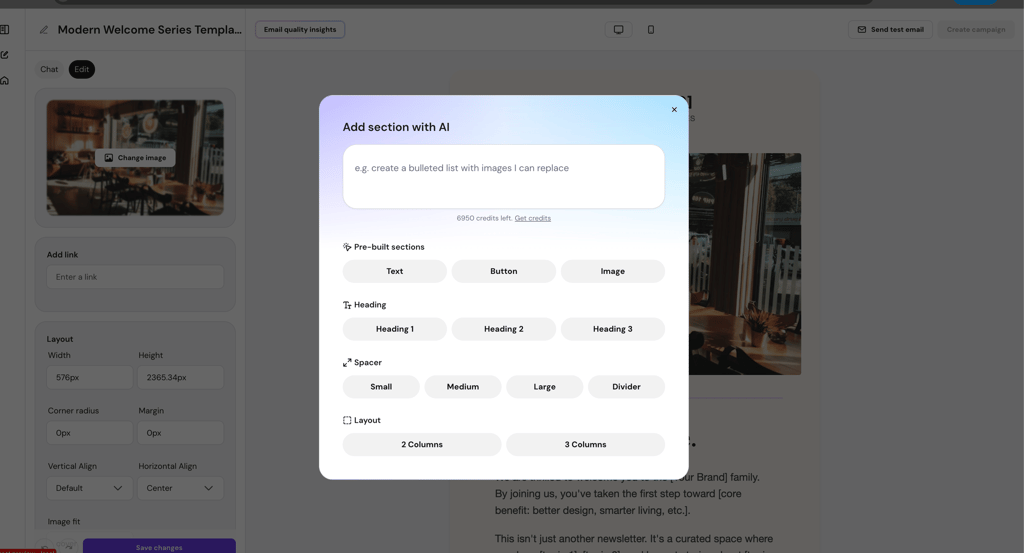
Hostinger Reach’s email editor now gives you more flexibility when building campaigns.
The editor added 11+ editable section types, template-inherited styles, and more precise layout controls. This makes it easier to customize an email while keeping the design consistent with the template you’re working from.
Clearer deployment progress in Node.js hosting
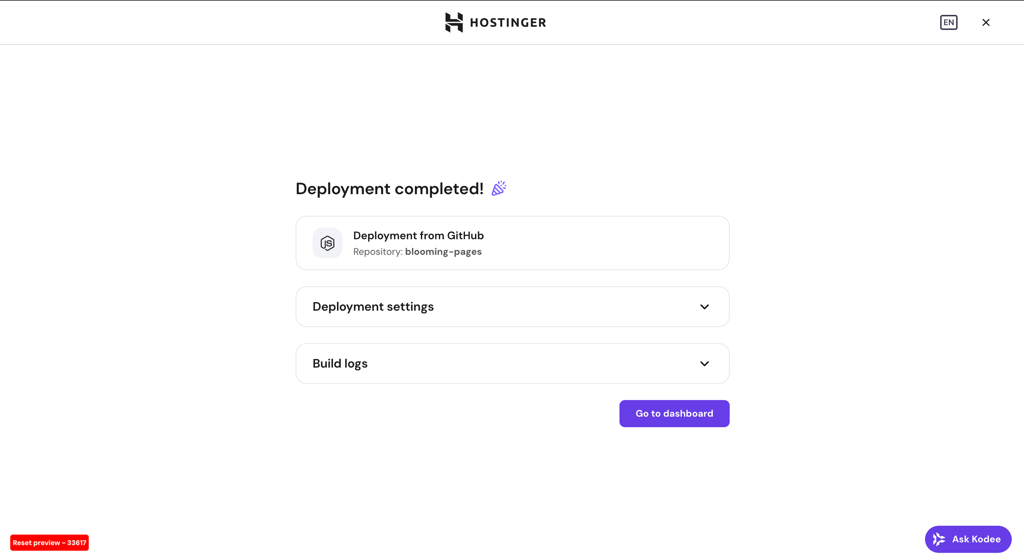
Hostinger gives you more visibility into what’s happening behind the scenes when deploying a Node.js application.
During onboarding, you can see deployment progress and logs, and clearer error messages explain what went wrong when a deployment fails. Depending on the result, you’ll also be directed to the relevant dashboard or build logs for the next step.
The result is a more informative deployment experience, especially when troubleshooting is needed.
Kodee integrates with Elementor tools for WordPress
Kodee for WordPress now integrates with Elementor, letting you use AI to make changes to your site without navigating Elementor’s editor settings manually.
With 11 new tools, you can retrieve page structures, global styles, and kit settings, as well as update text, images, links, and visual styles through the AI interface.
Kodee now also includes a welcome screen in the WordPress dashboard that introduces its features. In hPanel (Hostinger dashboard), banners help eligible customers discover Kodee and explain which features are available with different hosting plans.
Together, these updates make Kodee easier to discover and give you more ways to manage your WordPress site through AI.
Read in more detail about Hostinger’s AI Website Builder for WordPress.
Kodee explains AI credit limits in Hostinger Mail
Kodee in Hostinger Mail now lets you know when you’ve reached your AI credit limit.
Instead of leaving you wondering why Kodee can no longer complete an action, it explains the available options for upgrading or waiting for the credits to reset.
Learn more about how to navigate Hostinger Mail.
Hostinger Horizons adds visual previews for actions and loading states
Hostinger Horizons now provides visual feedback for certain actions performed during a conversation.
For example, when Horizons selects an image or makes changes to data storage, the chat can show a visualization of the result. This gives you a clearer view of what happened instead of relying solely on text responses.
Horizons also added more specific loading states for different actions, making it easier to tell what it’s currently working on.
More polished Hostinger Horizons user interface
Hostinger Horizons received some minor improvements to make its interface even more user-friendly.
Chat spacing and formatting have been refined, while the file drag-and-drop area has been expanded across the sidebar. Horizons also removed package-version restrictions and added a Customers shortcut in the ecommerce drawer.
The “Build with Horizons” sharing feature has also been retired.
Payment providers are easier to find on Hostinger Website Builder
Hostinger Website Builder’s payment settings now put the most popular payment provider for your store’s country first, with other supported options listed below it.
This makes it quicker to find a relevant payment option when setting up ecommerce, while still keeping alternative providers accessible.
Read more about online payment gateways in Hostinger Website Builder.
Dark theme comes to Hostinger Mail
Hostinger Webmail now supports a dark theme.
By default, the theme follows your system settings, but you can also choose it manually under Settings → Theme.
It’s a small change, but it gives you more control over how your inbox looks and can make working in Webmail more comfortable in darker environments.
More flexible appointment locations in Hostinger Website Builder
Hostinger Website Builder’s booking feature now supports phone as a location type.
The previous “online” option has also been renamed to “custom,” giving you more flexibility to describe how an appointment will take place.
NuPay Wallet is now available for payments in Brazil
Hostinger customers in Brazil can now use NuPay Wallet as a local payment method.
The option is also available for renewals, giving eligible customers another way to pay for their Hostinger services.
A new home for Kodee in hPanel
Kodee has moved to the hPanel (now Hostinger dashboard) header, so it no longer blocks other hPanel elements.
A pop-over explains the change and helps users find Kodee in its new location.
That’s all for the week
From becoming an official .ai registrar to giving you more control over email design, deployments, payments, and AI-assisted workflows, this week’s updates span several parts of the Hostinger experience.
For the running log of every release, check our changelog, and for the story behind each week’s updates, browse our weekly product updates.

Larassatti Dharma is a content writer with 5+ years of experience in the web hosting industry. She has populated the internet with over 100 YouTube scripts and articles around web hosting, digital marketing, and email marketing. When she's not writing, Laras enjoys solo traveling around the globe or trying new recipes in her kitchen. Follow her on LinkedIn