How we found the right models for every task in our AI website builder for WordPress
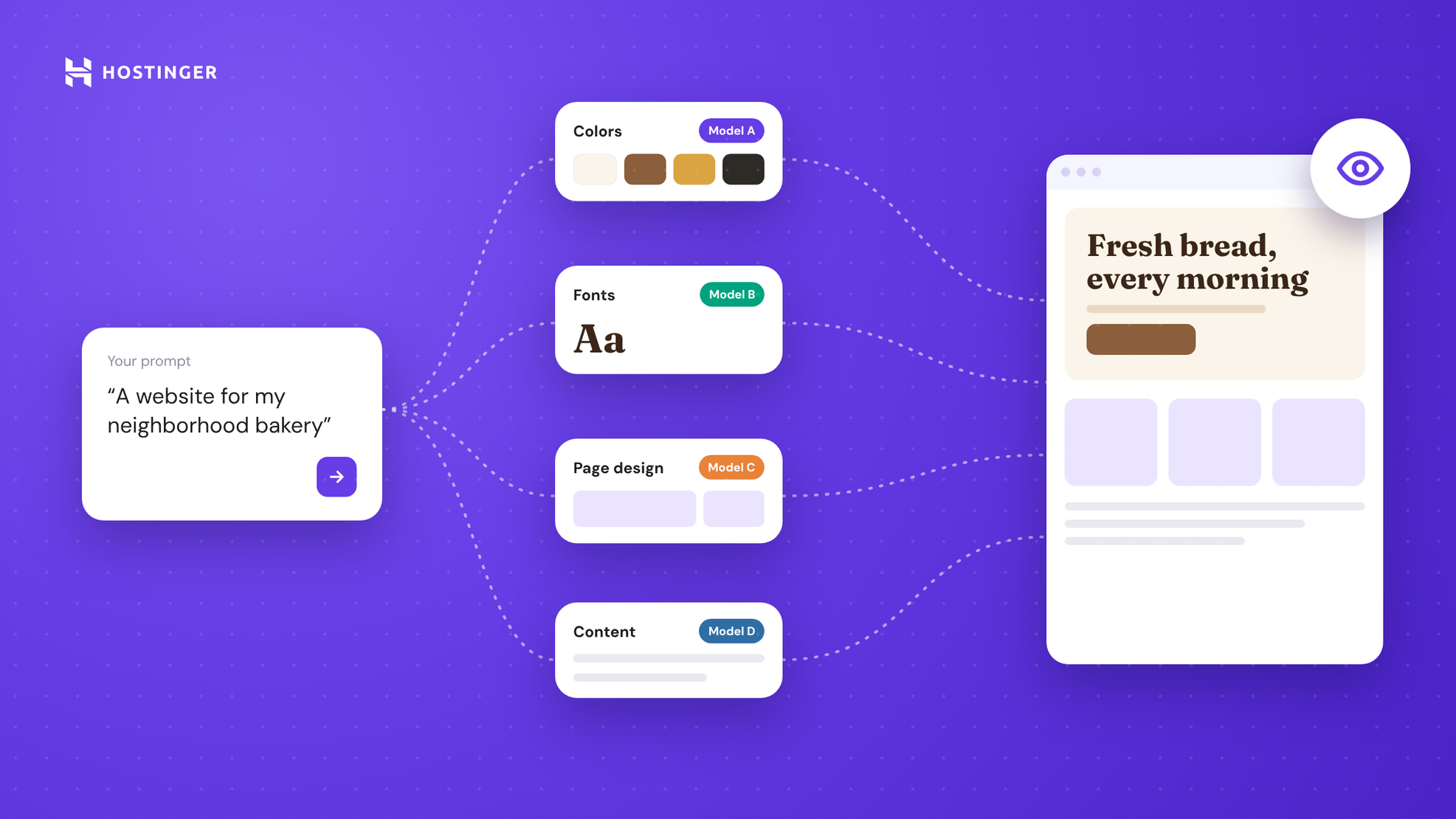
The best-scoring AI model isn’t always the one you should ship. When we benchmarked the AI behind our AI website builder for WordPress, a smaller, faster model outperformed the top scorer in page design.
We ended up with quality improving across every endpoint we upgraded, yet costs decreased. Getting to this point started with a problem. In early September, we replaced the builder’s template-based engine with a pipeline that generates every website from scratch.
In A/B testing, customers preferred the new output, but it was significantly more expensive to run. The dozens of LLM tasks behind each site also still relied on a few models chosen when the product was first built.
But there was no reliable way to tell whether switching models would actually help.
“We could change a model and eyeball a few results, but there was no proven way to know it would be okay,” says Eylül Güleryüz, AI Engineer on our WordPress team.
She set out to change that by building a way to measure how well each AI task performs, turning model selection into an informed decision.
Here’s how she did it.
How each AI model earned its spot
Eylül first created a flow that lets every model go through the same test.
One benchmarking recipe for every endpoint
She began by shortlisting around 10 to 12 candidate models, ranging from low-cost options to top-tier frontier alternatives.
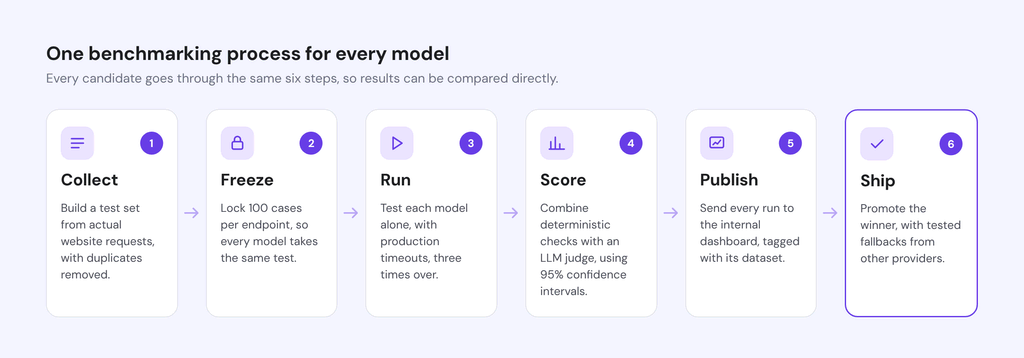
She then put each one through the same six-step benchmarking process, scoring every endpoint and stage on its own:
- Collect. Build a test set from actual website requests, filtered for WordPress and with duplicates removed.
- Freeze. Select 100 cases per endpoint using a fixed random seed, then pin each dataset with a hash so that every model faces the exact same test and results remain comparable.
- Run. Test each model independently, without fallbacks, using production timeouts. Each model runs through the same 100 cases three times, producing 300 outputs per endpoint. Testing models individually matters because, inside a fallback chain, a backup can quietly hide the primary model’s failures.
- Score. Combine deterministic checks, such as whether the output uses the correct format, language, and fields, with an LLM judge that rates output quality on a 1–5 scale. Report each score with a 95% confidence interval, so small differences aren’t mistaken for real gains.
- Publish. Send every run to an internal benchmarking dashboard, tagged with its dataset hash. This keeps results comparable across experiments and over time.
- Ship. Roll out the winner as the endpoint’s main model. Backup models, tested on the same frozen cases and, ideally, from other AI providers, step in if the primary model fails.
Scoring each piece on its own has one blind spot: it can’t show how the pieces work together. For that, Eylül added a final check on complete websites, built end to end and visually reviewed, which we cover in the later section.
Eylül applied the recipe across 18 endpoints and website-generation stages, testing about seven models on each one on average. She used real requests and kept testing new models as they became available.
The dashboard turns those results into an internal LLM leaderboard, ranking the tested models for each endpoint by quality, cost, and speed.
Other teams in the company can also access the dashboard, so they can choose models for their own products based on these benchmarking results.
Measuring what “good” looks like
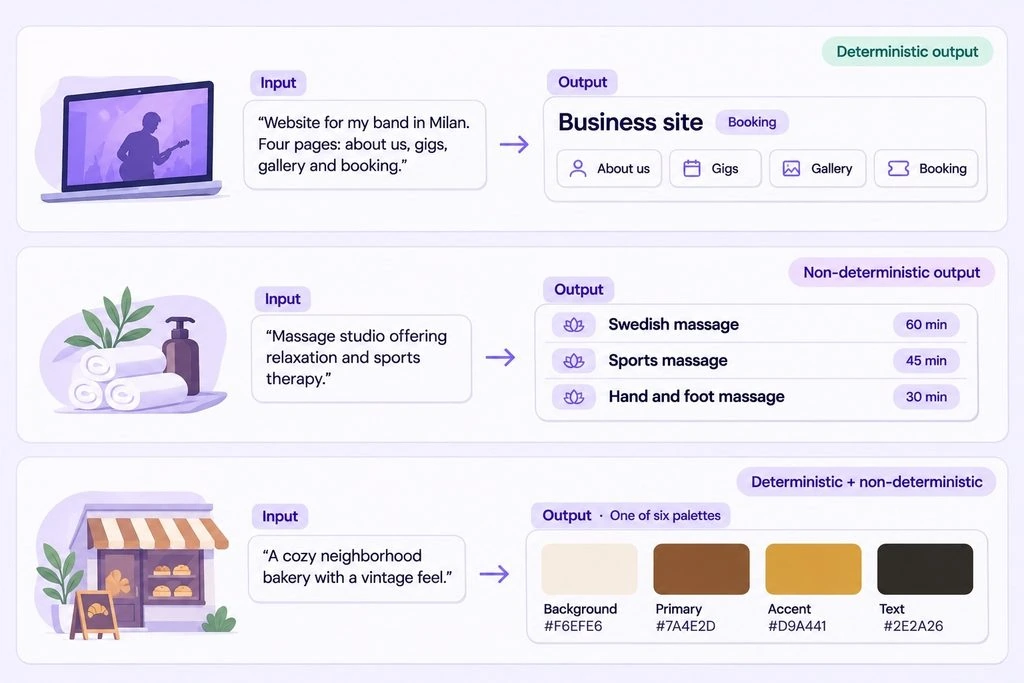
Not all AI tasks produce the same kind of output. For some, there’s a reliable expected answer that correctness can be checked against. For others, several different outputs can be equally valid, and quality depends on judgment.
This distinction determined how Eylül evaluated them. She used two methods, depending on the endpoint. Some outputs needed only one, while others required both.
First, deterministic checks evaluate outputs against predefined rules. They verify whether the result is valid, follows the expected format, and contains all required fields. When correctness can be defined in advance, these checks provide an objective measure.
Second, an LLM judge evaluates outputs that require qualitative judgment. The LLM judge reads the user’s request and the generated output, then rates it from 1 to 5 against predefined criteria, such as how faithfully the result follows the brief and how well it fits the brand. There’s no single correct answer in these cases, so using the same judge to score every model keeps the comparisons consistent.
Choosing the LLM judge
The judge itself is an AI model, so Eylül had to evaluate it too. A judge that’s too small might miss important quality differences, while a larger model could add unnecessary costs.
To select the best LLM judge, she started with the default judge in the team’s codebase, then experimented with larger models to see whether they could produce more reliable evaluations.
The largest model turned out to be more than most endpoints needed. After benchmarking the judges against each other, she switched to a newer, stronger default model at no extra cost.
The exception was page design, where judging quality takes something closer to a human’s eye. In this aspect, the largest model was the strongest judge available, but Eylül’s end-to-end pipeline test showed that it had limits.
She also watched for potential bias. A judge from the same model family as the model it’s scoring may favor that model’s style. When that happened on one endpoint, Eylül kept spot-checking the results against actual outputs.
Scoring the output quality from different AI models
To see how these evaluation methods work in practice, let’s look at three endpoint examples, from outputs with clearly defined answers to those requiring subjective judgment.
1. Deterministic check method: website-type detection
This endpoint reads the user’s request and identifies the type of website they want to build.
For example, a request to create an online store should return the corresponding website-type label. Since there’s a predefined correct answer, the output can be evaluated objectively.
A top-tier model first drafted the expected labels, which Eylül then reviewed manually. Deterministic checks compared the endpoint’s output against these approved labels to verify its correctness.
2. Qualitative judgment method: appointment catalogs
For businesses that accept bookings, this endpoint generates a list of services customers can book.
Consider a massage studio. There’s no single correct list of services it should offer. One model might suggest Swedish massage and deep tissue massage, while another might include aromatherapy and hot stone treatments. Both combinations could be relevant, depending on the business and its customers.
Because multiple answers can be equally valid, predefined expected outputs wouldn’t be enough to assess quality. Eylül therefore relied on the LLM judge for scoring while also manually reviewing the generated results.
3. A combination of both methods: color palette generation
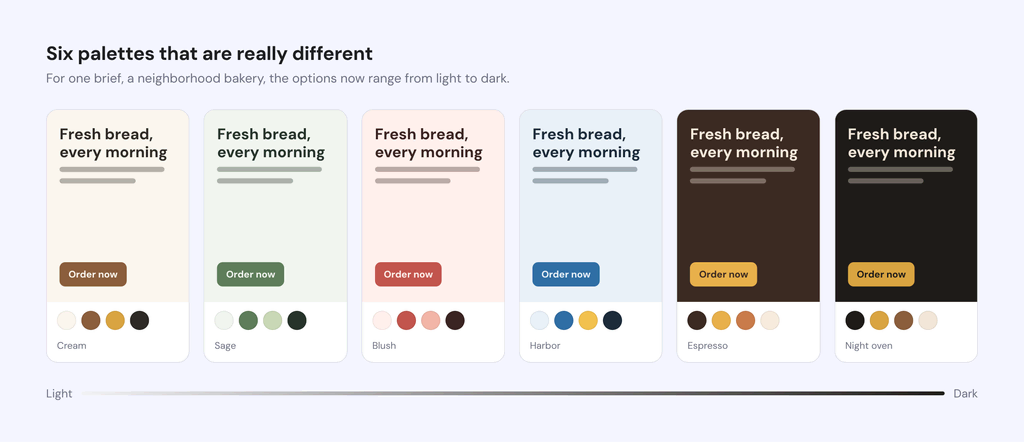
This endpoint generates six color palette options based on a brand description. For example, a brief for a cozy, vintage bakery should produce six palettes, each containing a set of hex codes.
Some parts of the output can be checked objectively, while others require interpretation.
Deterministic checks verified that the six palettes were distinct, covered a light-to-dark range, and included at least one dark option. But whether those colors actually suited the bakery’s brand was a different question.
That’s where the LLM judge came in. It evaluated how well each palette matched the brand brief, assessing the subjective quality that code alone couldn’t capture.
Picking the actual winners
A higher benchmark score didn’t automatically make a model win. Eylül used four criteria to decide whether a model was worth switching to.
1. Is it clearly better?
A higher average score wasn’t enough. Eylül set a deliberately conservative rule: a new model was considered better only if its 95% confidence interval didn’t overlap with the current model’s.
If the intervals overlapped, she treated the result as a tie, marking it as “within noise” rather than claiming an improvement.
2. Is it fast and reliable enough?
The AI website builder operates in real time, so every model was tested under the same time limits it would face in production. Models that scored well but were too slow or failed too often didn’t make the cut.
3. Is it worth the cost?
Any quality improvement had to justify the additional expense. Some top-tier models performed well but were too costly to use.
Self-hosted models faced the same scrutiny. One appeared inexpensive at first, but its quoted price didn’t account for the GPUs needed to run it. It also frequently timed out during longer generations, making it an impractical choice despite its seemingly low cost.
4. Does it actually look right?
Finally, Eylül didn’t rely on benchmark scores alone. She compared the LLM judge’s ratings against the actual outputs and, for full websites, reviewed screenshots against design principles she’d learned from a designer on her team, such as consistent spacing on an 8-point grid, readable line lengths, and enough color contrast.
After all, a model can score well on paper and still produce a website that doesn’t look or feel right.
What changed for us and for our customers
With the benchmarking process in place, Eylül began rolling out the winning models. She started with the smaller endpoints that make foundational decisions about each website, then moved on to the main website-generation stages.
The results show how much our WordPress team improved quality and speed while reducing costs, and what those improvements mean for our customers.
The building blocks: better and cheaper at the same time
Before a website can take shape, the AI website builder needs to make several foundational decisions: what kind of website to create, which colors and fonts to use, and what content to write.
Eylül started by benchmarking the models behind these tasks. Every endpoint she switched to improve quality got better, and most also became cheaper to run.
Here’s how the changes compared:
| Endpoint | Quality before → after (1–5 score range) |
| Product descriptions | 3.24 → 3.78 |
| Font pairing | 3.47 → 3.92 |
| Colors | 4.19 → 4.72 |
| Prompt enhancer | 3.44 → 3.93 |
| Post and page generation | 2.82 → 3.31 |
Post and page generation was the exception: it became more expensive to run, but the quality improvement was large enough that our WordPress team agreed the trade-off was worth it.
One other building block isn’t included in the table because it’s evaluated using accuracy rather than a 1–5 quality score.
Website-type detection determines what kind of website the builder should create, so its output is either right or wrong. Its accuracy increased from 95.3% to 98.7%. The new model takes roughly twice as long to respond, but still stays comfortably within its time budget.
Not every endpoint needed a new model, though. The benchmarks also helped Eylül identify where switching wouldn’t bring meaningful improvements.
Page suggestions stayed with the existing model because no challenger clearly outperformed it, and it was already among the cheapest and fastest options.
Image keywords also stayed as they were. Every tested model scored low, ranging from 2.28 to 2.41, indicating that the prompt, not the model, was the problem.
Site structure was a different case. Its quality improved only within noise, so Eylül switched models based on cost and speed instead, without claiming a quality win.
Rebuilding website generation, stage by stage
The building blocks handle the groundwork for website creation. The main AI engine then takes those decisions and turns them into a complete website through four stages:
- Discovery works out what the business does, who it serves, and what the website needs to achieve.
- Planning maps out the website, deciding which pages to include and what goes on each one.
- Page design lays out every web page, section by section, ready for Elementor or Gutenberg.
- Catalog generation fills the website with starter content when needed. It comes in three types: product catalogs for online stores, appointment catalogs for bookable services, and blog catalogs with initial posts.
Eylül benchmarked each stage independently, including all three catalog types, so each task could have its own best-performing model.
Here’s what changed:
| Website creation stage | Quality before → after (1–5 score range) |
| Discovery | 3.78 → 4.60 |
| Planning | 3.71 → 3.77 |
| Page design | 2.99 → 3.25 |
| Product catalog | 3.12 → 3.27 |
| Appointment catalog | 3.28 → 3.42 |
| Blog catalog | 3.13 → 3.58 |
Quality improved at every stage, but the gains came in different forms.
- Discovery and catalog generation delivered some of the biggest cost savings while improving quality.
- Page design became much cheaper and faster. Its p95 response time (the time within which 95% of requests finish) dropped from 37.9 seconds to 12.4 seconds.
- Planning saw only marginal improvements in quality and cost, but its p95 response time fell from roughly 98 seconds to 71 seconds.
Together, these changes made website generation significantly cheaper while improving quality across every stage.
The new setup is also more resilient. Each stage has backup models from other providers, tested against the same frozen cases. This reduces reliance on a single provider and makes website generation less exposed to outages.
What customers actually see
Here’s how those improvements show up in the websites customers get:
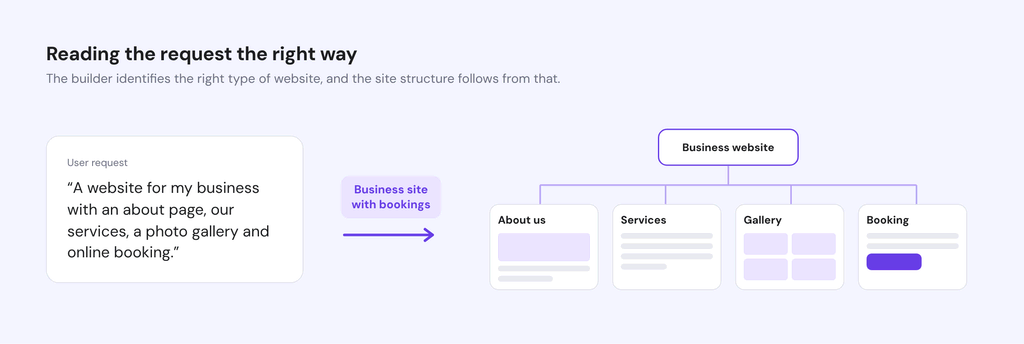
1. Better understanding of website requests
The builder now identifies the right type of website more reliably, giving every subsequent generation stage a better starting point.
For example, a request for a business website with services, a gallery, and online booking is now correctly identified as a multi-page business site.
2. More variety in color options
The builder now generates options that span a wider range, from light to dark. Around 99% of palette sets also include a dark option, giving customers more distinct directions to choose from.
3. Better handling of multilingual requests
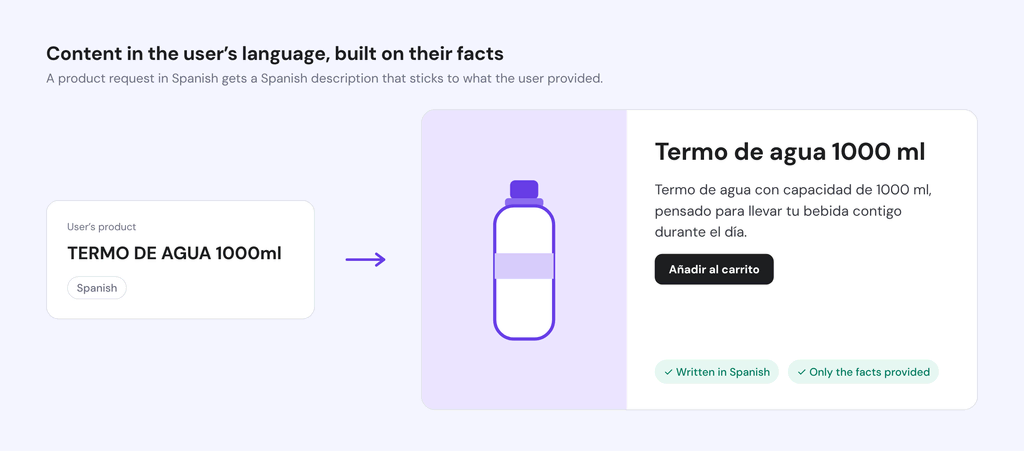
Generated content now follows the language of the user’s request while sticking to the information provided.
For example, when asked in Spanish to write a product description for a water bottle, the builder now responds in Spanish without inventing product features.
4. Font suggestions that fit the brand
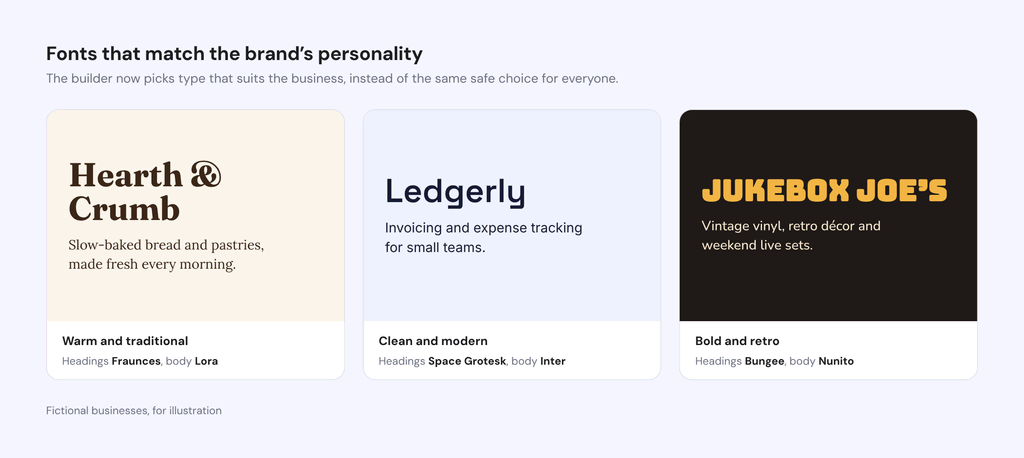
Font recommendations now better reflect the business’s personality.
A bakery gets a warm, traditional type, while a software tool gets a clean, modern one, rather than the same generic typefaces for every business.
The problem that slipped past the benchmarks
Benchmarking individual stages of website generation helped Eylül identify the best-performing model for each task. But when she tested running the complete pipeline end to end, she discovered that the website output actually looked worse.
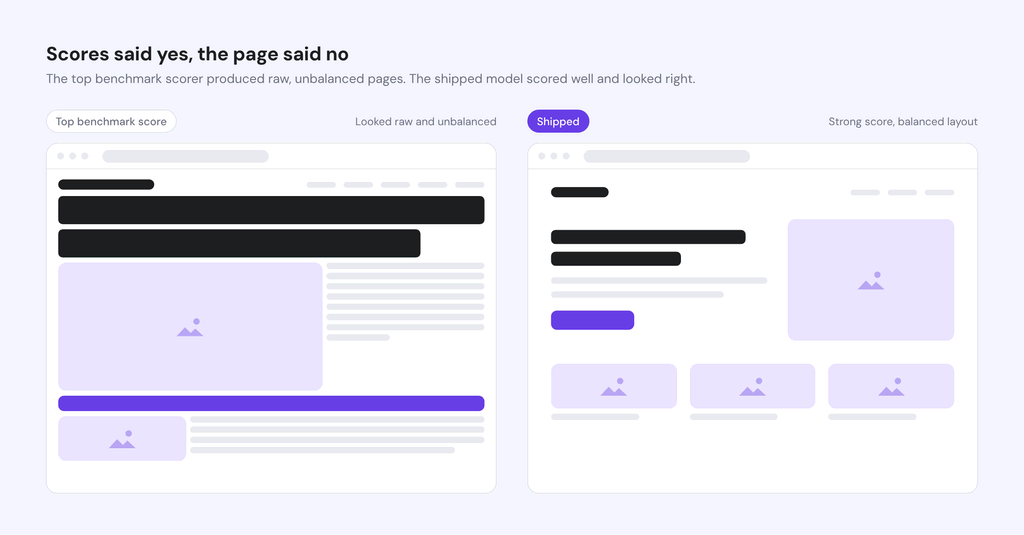
The page design winner had scored highest in its isolated benchmark, but in Eylül’s judgment, its pages felt raw and the layout looked unbalanced. Meanwhile, a model ranked sixth produced designs much closer to what was shipped before.
This is because the LLM judge could assess whether a page included the right sections and followed the brief, but it couldn’t tell whether the page actually looked good.
The model that ended up shipping in the AI website builder was a smaller, faster one, released while this work was underway. It scored well on the benchmark and held up visually.
To confirm the new setup held up, Eylül tested both the old and new setups using the same website requests across seven languages, with both Elementor and Gutenberg, in a real hosting environment. She then compared screenshots of the generated pages side by side. The results showed that:
- Pages looked more eye-pleasing: The new setup produced more proportional hero sections, photo cards, and clearer headlines.
- Costs went down: The new setup was cheaper to run across most of the tested websites.
- Generation speed remained comparable: The old setup took an average of 106 seconds, compared with 99 seconds for the new one.
- Website generation remained reliable: Both setups applied successfully, with no missing images or sections.
The live experiment revealed a limitation of isolated benchmarks: the model with the highest score doesn’t necessarily produce the best result when it’s part of a larger system.
That’s why Eylül also reviews the actual websites, not just the scores. She acknowledges that this visual judgment is still subjective.
“I can only judge what looks best to me, so I leaned on the design principles our designer taught me while we built the engine,” she says. “The next step is turning more of those rules into automatic checks.”
Turning model upgrades into pull requests
Testing the next model now takes a pull request and a benchmark run, not a sprint. Eylül set up two feedback loops to make that possible:
- On every pull request, in minutes. When an engineer touches an endpoint, an automated eval runs the current model and the challenger side by side. A comment on the pull request reports quality, speed, cost, errors, and format checks, and each endpoint gets a pass/fail status that can block a merge.
- The full benchmark. For the final decision, the challenger runs on the same 100 frozen test cases as every earlier model, three times, and the results appear on the dashboard alongside all past runs.
In one real example, the pull request check came back in under a minute. The challenger scored higher on quality (3.87 → 4.03), responded faster, and cost noticeably less per request.
When a new model is released, validating it takes four steps:
- Swap the primary model in the endpoint’s route and open a pull request.
- Read the automated comparison on the pull request.
- Run the full benchmark on the frozen dataset.
- Merge only if it wins.
That’s how a newly released model reached our planning stage within days. Adding a brand-new endpoint to this system needs just a small spec file and a set of test scenarios.
The best AI model depends on the job
Teams building AI-powered products all face the same question: with new models arriving every few weeks, how do they know which one is right for each task? Swapping a model and checking a few outputs only goes so far.
Eylül built a repeatable evaluation process based on user requests, frozen test sets, and consistent criteria for comparing models.
Along the way, the work challenged a few common assumptions:
- Better results don’t always require more expensive models. Some of the biggest quality gains came with lower costs. And in page design, a smaller, faster model produced better-looking websites than the top scorer.
- Different tasks need different models. Understanding a request, choosing colors, and laying out pages each reward different strengths, so no single model is the best default for everything.
- Measurement beats guesswork, but it still needs a human eye. With a fixed benchmarking process in place, model upgrades stopped being risky one-off projects and became a routine part of the development process. But scores only capture what they’re designed to measure. When quality comes down to taste, like how a website looks, a human still needs to review the actual output.
Our WordPress team now has better models and a system for testing the next ones, keeping our AI website builder adaptable as new models emerge.
If you’re building with AI, you can apply the same approach. Freeze a test set built from real requests, so every model faces the same exam. Test each model on its own, without fallbacks hiding its failures. And wherever an automated judge can’t reliably tell good from bad, look at the output yourself before you ship.


Larassatti Dharma is a content writer with 5+ years of experience in the web hosting industry. She has populated the internet with over 100 YouTube scripts and articles around web hosting, digital marketing, and email marketing. When she's not writing, Laras enjoys solo traveling around the globe or trying new recipes in her kitchen. Follow her on LinkedIn


