What we learned running seven AI coding models on real production work
Seven AI models read the same ticket and reached the same answer. They were all wrong.
The ticket asked for a 30-second timeout, so all seven wrote a 30-second timeout. The engineer who shipped the task used 20.
The service sits behind a circuit breaker that cuts off requests after five failures, and retries count toward that limit. A 30-second wait didn’t fit the window that setup allows, so the engineer used the timeout the codebase already defined for that kind of request.
Every model had the same code in front of it. None of them made that call.
That was one of 50 pull requests (PRs) in an experiment we ran: 350 runs, 2.5 billion tokens, and about $608 in AI usage. We reset each codebase to the commit before the engineer started, gave every model the same task, and let it work alone with no human help.
Claude Opus came out on top, and five more models finished within four hundredths of a point of each other behind it. The timeout was only one of several blind spots every model shared.
What we tested and how
We picked 50 PRs from 11 codebases, with between two and eight tasks from each so no single team’s habits would dominate. All of them were reviewed, merged, and shipped.
The smallest touched one file and six lines of code, the largest touched 21 files and nearly 2,500 lines, and the widest spanned 30 files. There were 29 tasks in TypeScript, 12 in Vue, five in Python, and four in JavaScript, covering ordinary product work like new features, bug fixes, page changes, integrations, and cleanup.
Each model got a task based on the description the engineer had already written, with no tailoring to make it easier for AI. No follow-up questions were answered, and there was no “try again.” The models had no access to GitHub, Slack, Jira, or the internet, and never saw the engineer’s solution.
All seven ran inside Claude Code with identical instructions, permissions, and effort settings across all 350 runs. Each run got its own private copy of the code and the same rules: change only what the task requires, follow the existing style, don’t add new packages, and don’t write summary documents. On average, the models took anywhere from 24 steps per task (Claude Sonnet) to 122 (GLM Flash).
For scoring, we used GPT-6 Astra, a model that wasn’t part of the test. It compared each model’s work to the engineer’s solution and scored the match from 0 to 1. A score of 1.0 means it matches the engineer’s work, 0.8 means the right files changed but the solution differs, and 0.5 means it was only partly right. It also wrote out its reasoning and specific concerns for every run.
We didn’t measure speed. Some runs were paused and resumed partway through, so timings wouldn’t be a fair comparison.
Here’s what came back.
| Model | Match to engineer’s work (0–1) | Cost/run | Tokens/run |
| Claude Opus | 0.83 | $1.71 | 2.96M |
| Qwen 38 Max | 0.82 | $3.77 | 8.71M |
| Kimi K3 | 0.80 | $5.02 | 9.36M |
| Claude Sonnet | 0.80 | $0.63 | 1.53M |
| GLM Flash | 0.79 | $0.39 | 10.87M |
| DeepSeek V4 Flash | 0.78 | $0.28 | 8.07M |
| GPT Luna | 0.64 | $0.35 | 7.75M |
Claude Opus led, and five models finished close behind
Claude Opus scored 0.83 on average. Qwen 38 Max followed at 0.82, Kimi K3 and Claude Sonnet both hit 0.80, GLM Flash came in at 0.79, and DeepSeek V4 Flash at 0.78. GPT Luna trailed at 0.64.
Opus was the only model to pull clear of the pack. It produced the best or tied-best answer on 28 of the 50 tasks, more than any other model, and came out on top 86% of the time when we resampled the task set. It was also the most dependable, scoring 0.8 or better on 76% of tasks and falling to 0.5 or below on just one.
The next five sit so close together that their order doesn’t mean much. A different set of 50 tasks could easily reshuffle them.
For everyday engineering work, six of these seven models can do the job, and picking between them comes down mostly to cost and fit. GPT Luna is the only one that falls clearly behind, and part of the reason is a codebase rule it took too literally.
We saw a similar pattern when we benchmarked four AI models on creative and analytical tasks – the newest model wasn’t always the best.
Teams spending weeks evaluating which model writes the “best” code might get more out of that time by improving their prompts, tooling, and review process instead.
Prices varied far more than quality did
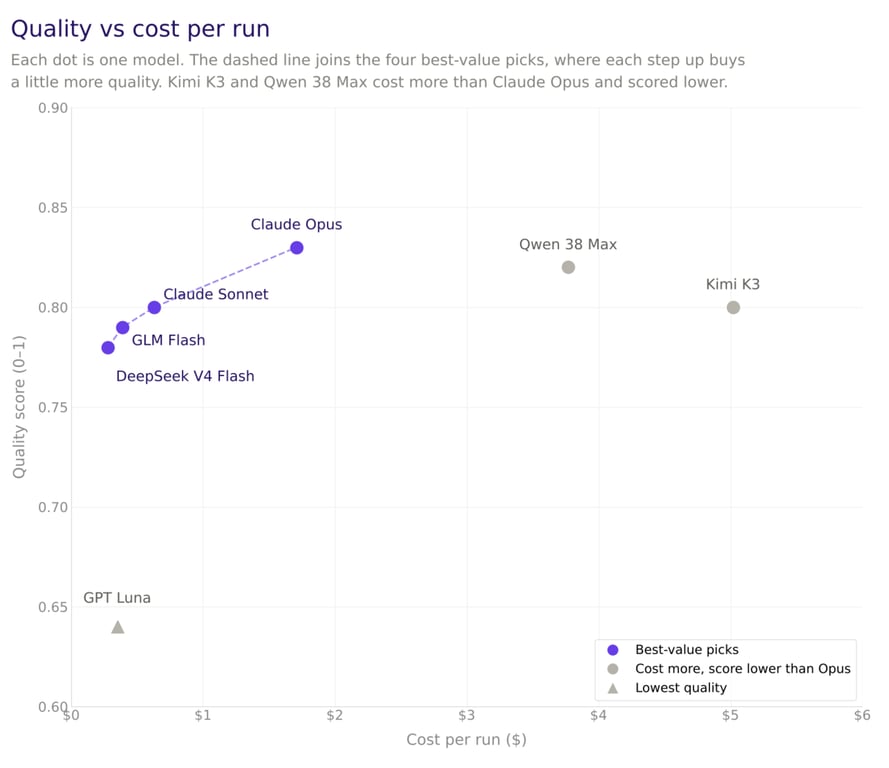
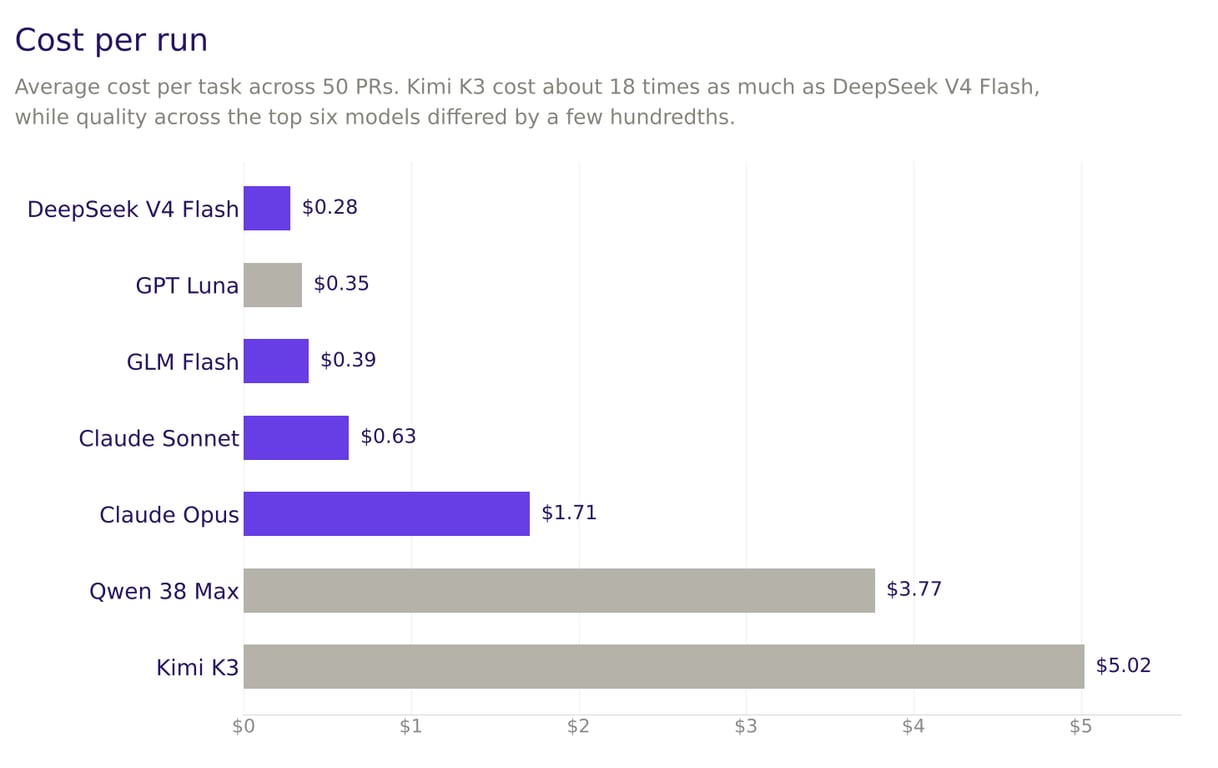
DeepSeek V4 Flash was the cheapest model at $0.28 per task, or $13.98 for all 50. Kimi K3 was the most expensive at $5.02 per task, $250.86 in total. That’s an 18-fold price gap, while quality across the top six differed by a few hundredths.
Only four models make sense on price. Going from DeepSeek V4 Flash to GLM Flash, then Claude Sonnet, then Claude Opus, each step buys a little more quality for a little more money. Kimi K3 and Qwen 38 Max cost two to three times as much as Opus and still scored lower.
At the budget end, DeepSeek V4 Flash was the cheapest option on 32 of the 50 tasks and still scored 0.8 or better on 60% of them. Opus costs about six times as much for a 0.05 bump in quality.
How much a model reads drives its cost
A model’s bill depends on its price per token and how many tokens it uses to finish a task. A token is a chunk of text, roughly three quarters of a word, and it’s how AI usage is measured and billed.
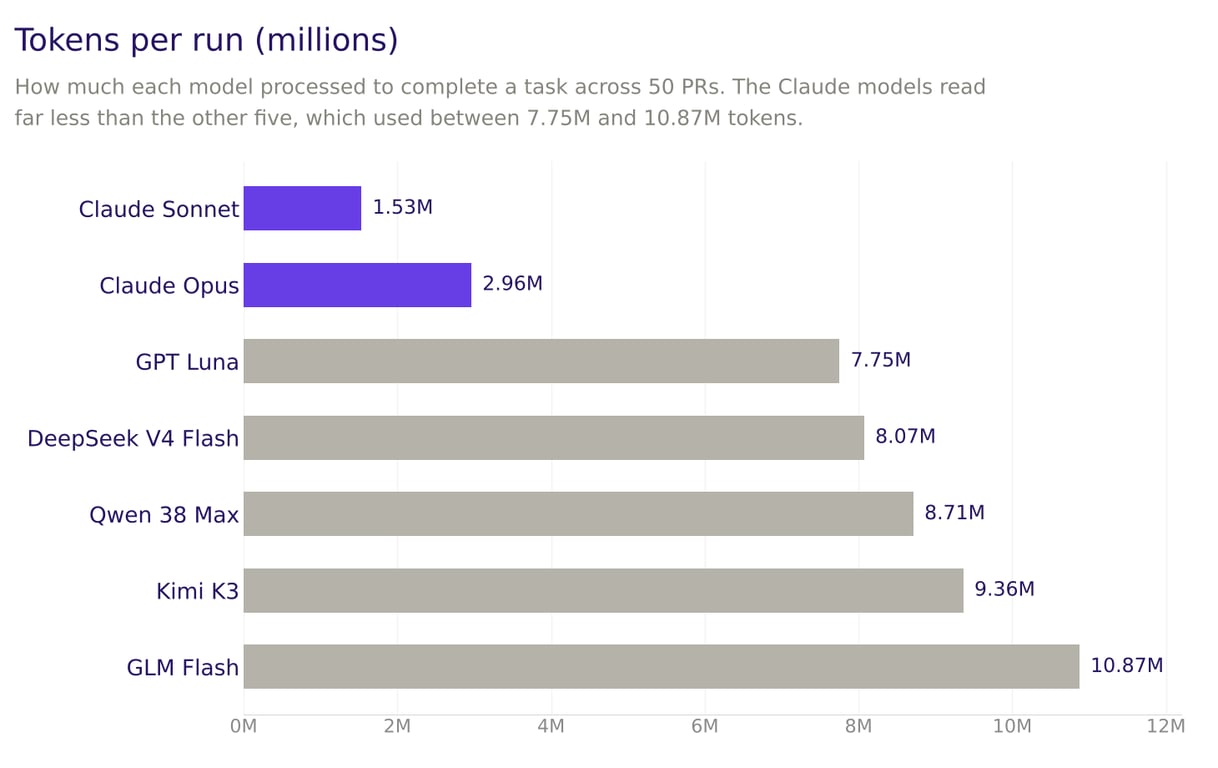
The Claude models were the most economical readers. Sonnet averaged 1.53 million tokens per task and Opus 2.96 million, while the other five used between 7.75 and 10.87 million.
Kimi K3 shows how fast this adds up. Its per-token price is mid-range, but it read so much that it became the most expensive model in the study. DeepSeek V4 Flash and GLM Flash read just as heavily and stayed cheap only because their per-token prices are very low.
Caching cut the bill by 82%
At every step, a model rereads the whole conversation so far: the instructions, every file it opened, and every change it made. Most of that text is identical to the previous step. With caching, the provider remembers text it already processed and charges a fraction of the normal price, typically a tenth or less, to read it again.
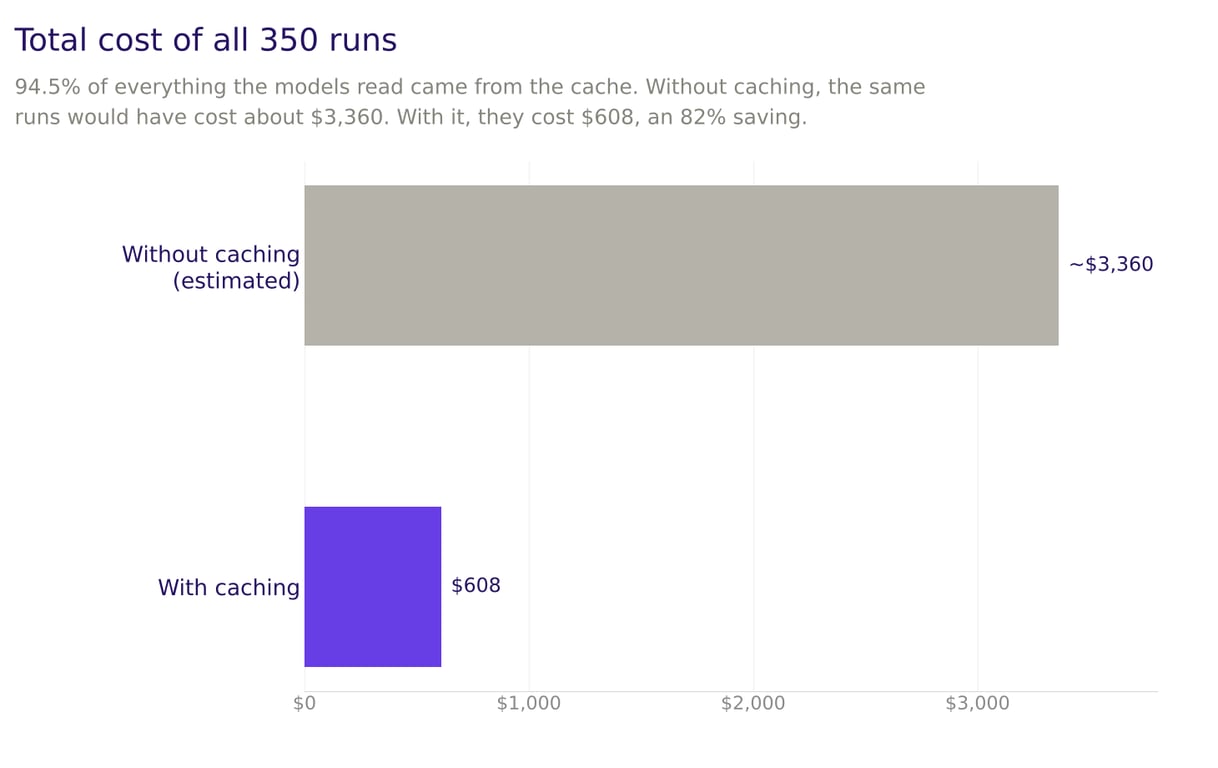
Across the study, 94.5% of everything the models read came from the cache. Without it, the same 350 runs would have cost about $3,360 instead of $608. Every model saved between 76% and 86%.
We saw this firsthand. In an early test batch of 12 tasks, caching was switched off for Claude Opus and Claude Sonnet. Rerunning the same tasks with caching on dropped Opus from $299.90 to $13.79 and Sonnet from $200.29 to $7.76. Part of the Opus drop came from a newer version that’s 20% cheaper, and caching covered the rest.
If you’re budgeting for AI coding tools, confirm caching is on before you draw any conclusions about price.
What the scores don’t tell you
The scores look clean, but they hide some interesting stories when you dig into the details.
Some models follow a codebase’s rules too literally. One of our codebases includes standing instructions for AI assistants: before starting a larger task, restate it and wait for the developer to confirm. That works when a developer is around to approve it. In our unattended setup, nobody answered.
GPT Luna stopped to wait on six of the eight tasks in that codebase. It restated each task clearly, changed nothing, and scored zero, while the other six models did the work. Leave that codebase out and GPT Luna’s average rises from 0.64 to 0.73, still last but much closer to the pack.
If you’re automating AI coding, check what instructions your repos already give AI assistants. Rules written for a human-in-the-loop setup can stall an unattended agent, and some models follow them far more literally than others.
It also found only 64% of the right files and never produced the best answer on any task. The weird part is that it was the most precise about the files it did touch, at 99%. So it picks one corner of the job, does that corner well, and stops as though it’s done.
A high score can still mean an unmergeable submission. On the largest task in the set, Kimi K3 scored 0.9. It also touched 200 files where the engineer touched 21. Most of the extra work was end-of-line character rewrites, plus unrelated database migrations and a test script. That’s why we track which files each model changed and how large its edits were alongside the quality score.
One data file had all 961 lines flagged as changed while the content stayed identical. The judge scored the behavior as correctly implemented, because it was. But any engineer reviewing that PR would reject it.
Every model made the same mistake. On one task, the code needed to avoid sending the same message twice. All seven models identified each message only by its content, so two identical replies in different conversations, like “Thanks, that’s resolved!”, would look like duplicates and one could be silently dropped. The engineer identified each message by both its conversation and its content. Three of the models also skipped the short pause before retrying a failed request.
Seven models from five companies made the same mistake independently. They train on overlapping data and share blind spots, so switching providers won’t necessarily fix a weakness. If one model writes the code and another reviews it, both can miss the same thing.
Tests were where models differed most. The judge flagged missing or weaker tests in 39% of all runs. Claude Opus drew that objection in 28% of its runs and GPT Luna in 54%. Our engineers write tests as part of the job, while most models treated them as optional.
The code reads fine. It just assumes everything goes right.
We went through all 1,042 objections the judge raised across 350 runs, and a clear pattern showed up. The most common, in half of all runs, was that part of the task had been left out.
Next came unhandled situations, like what should happen when something fails or arrives incomplete, and missing or weaker tests, each in 39% of runs. Complaints about naming, formatting, or readability showed up in just 18%.
What it flagged was behavior the code didn’t think about: a success response missing the ID the next step needs, a retry that fires with no delay, a validation check quietly left for the caller to handle.
One run was flagged for treating every HTTP 201 as success, including responses without a ticket ID.
Across the board, the code handled the expected case well and left the unexpected case to someone else. This is one of the bigger risks for non-developers building with AI tools, where there’s often no one in the process to catch what the model missed.
Bigger tasks were harder on average. On small tasks (up to 115 lines changed), the top six models scored between 0.81 and 0.89, and the cheapest models did nearly as well as the most expensive. On large tasks (more than 639 lines), scores fell to between 0.68 and 0.78. Kimi K3 handled large tasks best at 0.78, though its cost climbed to $8.57 per task.
Size didn’t explain everything, though. The hardest task was medium-sized, eight files and under 300 lines, and the models averaged just 0.43 on it. Every model scored perfectly on a 650-line cleanup, and the biggest task, about 2,500 lines, landed mid-table at 0.74. Writing lots of code comes easily to these models. Working out what should happen in the awkward cases is harder.
The timeout example is the clearest case of this. The engineer looked at the system and overrode the ticket. The models had the same code to work from but stuck to the ticket.
Limitations and what comes next
Each model ran once per task, so the small differences between the five models behind Opus are within normal variation.
Most tasks were TypeScript (29) or Vue (12), so we’re more confident in those results than for Python and JavaScript, which had nine tasks between them.
The judge is an AI too. Its scores are well reasoned but approximate, and on the largest tasks it saw only part of the changes, so those scores are less precise. DeepSeek V4 Flash also ran on two versions after the original was retired, with 38 of its 50 tasks on the newer one. Costs are list prices from nexos.ai and Anthropic, so actual invoices may differ.
Only 47 of 350 runs (13%) got a perfect score, usually because the model’s change was identical to the engineer’s. That tells you whether the model could have saved us a day of work, but not whether the code was good. A model can even lose points for following the ticket when the engineer’s version was wiser than the ticket.
Only 11 of 84 runs got a perfect score, and in those cases the model’s code was essentially identical to the engineer’s. That tells you whether the model could have saved us a day of work, but not whether the code itself was good or bad.
The bigger limitation is how we ran the test. Each model worked alone, start to finish, with no human input. That’s not how developers actually use these tools, which means these scores are the floor, not the ceiling. In practice, it’s back-and-forth: the developer steers, corrects, asks follow-ups, iterates.
How a model responds to feedback and collaborates on a solution matters a lot, and none of that shows up in a single-shot test. Developers also bring their own setups – custom skills, MCP servers, various tools – all of which affect the output.
To get a fuller picture, you’d need to combine automated analysis like this with real developers doing actual work alongside the models.
For now, if you’re using AI coding tools, the model you pick matters less than you think, as long as it’s one of the six that can do the job. Two settings matter more than most teams expect: whether caching is on and what your repos tell AI assistants to do.
After that, focus your reviews on scope creep, unnecessary file changes, missing edge cases, and skipped tests rather than syntax and style.

Simon is a dynamic Content Writer who loves helping people transform their creative ideas into thriving businesses. With extensive marketing experience, he constantly strives to connect the right message with the right audience. In his spare time, Simon enjoys long runs, nurturing his chilli plants, and hiking through forests. Follow him on LinkedIn.

Tomas Rasymas, AI Research Lead at Hostinger, drives the integration of AI to enhance our products and customer experience. With over 15 years of tech experience, he leads AI research, mentors a talented team, and advocates for transformative AI power. During leisure, Tomas enjoys trail running and reading books.