Node.js pull request previews in Hostinger give you a temporary link to test each pull request before you merge it. When you open a pull request in the GitHub repository connected to your Node.js website, Hostinger builds that version separately from your live website. Hostinger then posts the preview link as a comment in the pull request. The preview and its link are removed when the pull request is merged or closed.
Before you start
- Your Node.js website must be deployed from a GitHub repository. Pull request previews don’t apply to websites deployed by uploading files.
- Pull request previews are currently available for websites hosted in the Mumbai and Germany data centers. See How to transfer your hosting plan to a different server in Hostinger to check where your server is located.
How pull request previews work for Node.js websites
Hostinger creates a pull request preview automatically, with no setup needed in your repository:
- Open a pull request in the GitHub repository connected to your Node.js website.
- Hostinger builds that version of your website in a separate folder next to your live website. Your live website is not changed.
- When the build is ready, the hostinger bot comments on the pull request with the commit the preview was built from and a temporary
hostingersite.comlink. - Open the link to review your changes before you merge.
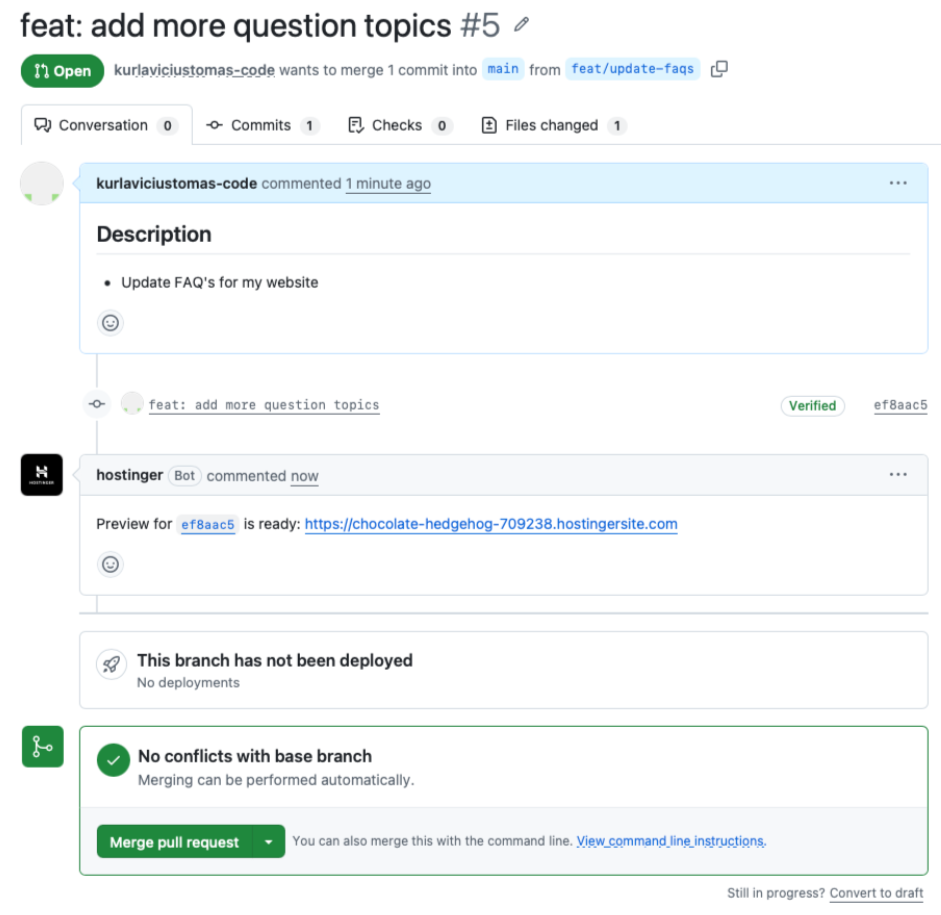
The pull request preview and its link are removed when the pull request is merged or closed.
With pull request previews, you can check every change on a working copy of your Node.js website while your live website stays untouched.
Learn more about connecting a repository in How to add a Node.js web app in Hostinger.