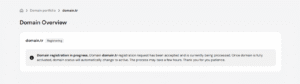
A .tr (Turkey) country-code top-level domain (ccTLD) helps you establish a local presence in the Turkish market. Unlike many extensions, the Turkish registry requires specific identification or tax details during the registration process. If these details are missing or incorrect, the domain will show a registering status in your Hostinger dashboard. Keep in mind that changing domain contact details for .com.tr domains is a paid procedure, so make sure the details are correct while registering it.
Prerequisites for .tr domain registration
Before you begin, check if your specific domain requires additional documents by searching the TRABİS WHOIS database. Certain names have restrictions:
- Restricted names: Domains containing “Turkey”, “Turkiye”, or province/district names can only be registered under .gov.tr, which Hostinger does not currently support.
- Specialized institutions: Domains for public institutions (DETSİS), CMB-licensed investment firms, or BRSA-licensed financial institutions require specific reserved-name documentation.
- Financial terms: Domains containing terms like finance, bank, or lease require financial institution verification.
Provide registration details for .tr domains
Depending on the registrant type, you must provide the following information during the setup of the domain name:
- For Turkish individuals: Provide your Turkish passport number or the 11-digit Turkish citizen ID number (T.C. Kimlik No). Foreigners residing in Turkey must provide a number starting with 99.
- For non-Turkish individuals: No additional tax or ID numbers are required for the initial registration.
- For companies (all countries): Provide the Tax ID number and the official name of the tax office that matches your company name.
Submit documents if the domain status is registering
If your domain is stuck in a registering status, the registry may require physical documentation such as a Commercial Register extract, Trademark certificate, or a declaration of intended domain use.
- Navigate to the Hostinger Document Submission page.
- Upload clear, digital copies of the required identification or business papers and documents that have been issued within the last 6 months.
- Contact our Customer Success team to manually forward these documents to the registry.
Conclusion
Once the registry verifies your details or documents, your domain status will change to Active in your Hostinger dashboard. You can then proceed to set up your Hostinger website or email services.
NOTES
- The registry verification process is manual and may take several business days to complete.
- Ensure the details on your submitted documents match the registrant information provided during the initial purchase exactly.