The Managed OpenClaw application features an AI-powered log analysis tool that automatically evaluates your AI Automation application log streams to diagnose errors and optimize performance. Instead of manually parsing lines of text, you can review automated summaries and sequential solutions to resolve your AI Automation application anomalies quickly. This feature ensures your Managed OpenClaw application operates efficiently and handles tasks or channel integrations without disruption.
Before you start
- An active Hostinger account with a configured OpenClaw application.
How to access Managed OpenClaw application log insights
To view the AI-generated evaluation of your Managed OpenClaw application logs, navigate to the tracking section in your management panel:
- Log in to your Hostinger account to access the Hostinger dashboard.
- Select the OpenClaw section from the left sidebar menu.
- Navigate to your OpenClaw dashboard by clicking the Manage button next to your application.
- Access the application logs by clicking Logs in the side menu or navigating to the Settings section.
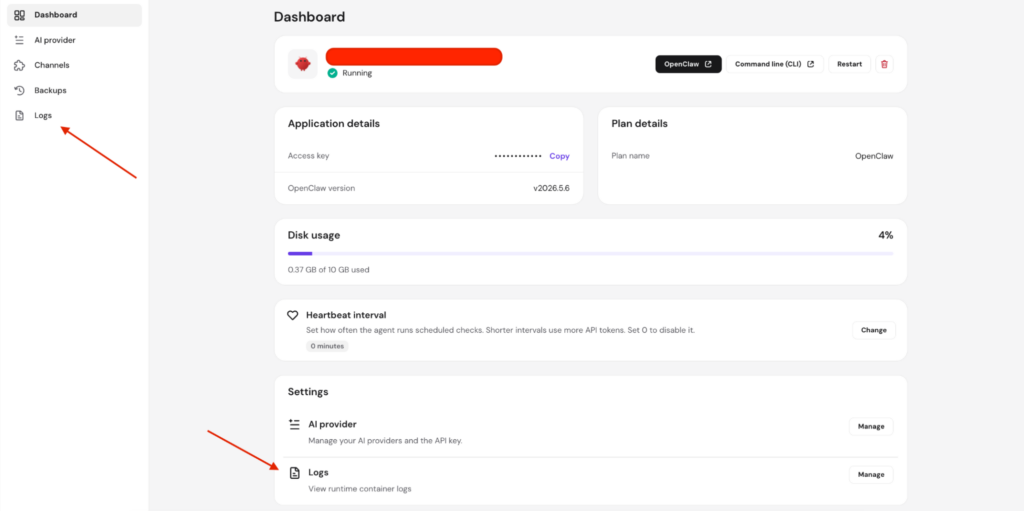
How to review log analysis and suggested actions
Once inside the log interface, you can leverage the automated assessment to pinpoint and resolve AI Automation application issues:
- Locate the Get insights from your logs section at the top of the page.
- Click the Analyze logs button to generate an analysis of your logs.
- Review the summary text provided under the Analysis section. This area details recent agent behavior, unexpected channel crashes, or timeout events detected by the system.
- Examine the breakdown under the Suggested actions section. A sequential troubleshooting list appears to guide you through fixing the specific agent problem, such as clearing corrupted channel configurations or restarting the instance.
- For any command-line interventions recommended in the list, open your terminal and execute the provided commands, such as openclaw doctor –fix, directly from your command-line interface (CLI).
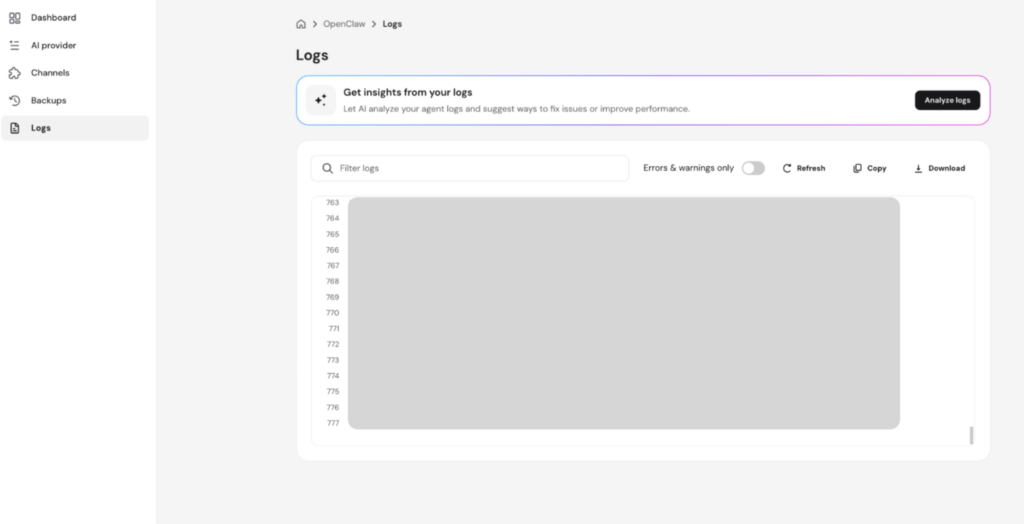
By regularly monitoring your automated log insights, you can proactively resolve application errors and maintain optimal uptime for your managed workflows.