Hostinger CDN allows verified search engine crawlers, such as Googlebot and Bingbot, to access your website without browser verification. If Google Search Console reports “robots.txt unreachable” or crawl errors with 403 or 429 status codes, check four settings: the Under Attack mode, country and IP blocking rules, blocked bots, and your crawl rate.
How Hostinger CDN identifies search engine crawlers
Hostinger CDN verifies crawlers using the official IP address lists published by search engines and reverse DNS (Domain Name System) checks. Verified crawlers are not shown the browser verification page under normal settings, so enabling Hostinger CDN does not harm indexing or SEO (Search Engine Optimization).
Requests that only pretend to be Googlebot or Bingbot fail this verification. Blocking fake crawlers protects your website from scrapers and does not affect search rankings.
Why search engine crawlers get blocked by Hostinger CDN
There are four common reasons a search engine crawler receives errors through Hostinger CDN: Under Attack mode, country blocking, bot blocking rules, and crawl-rate limits.
Under Attack mode challenges all visitors, including crawlers
The Under Attack mode makes Hostinger CDN challenge every visitor with a browser verification page. Search engine crawlers do not execute the verification, so they receive errors while the mode is active. Keep Under Attack mode enabled only during an active attack:
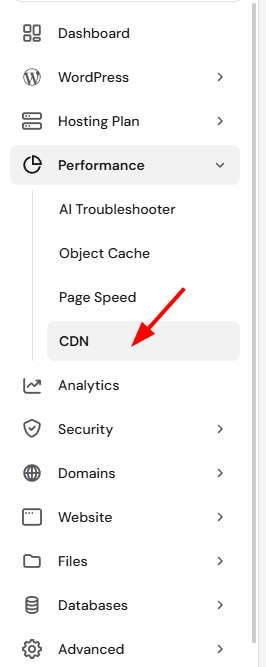
- Go to Hostinger dashboard → Websites → Dashboard → Performance → CDN.
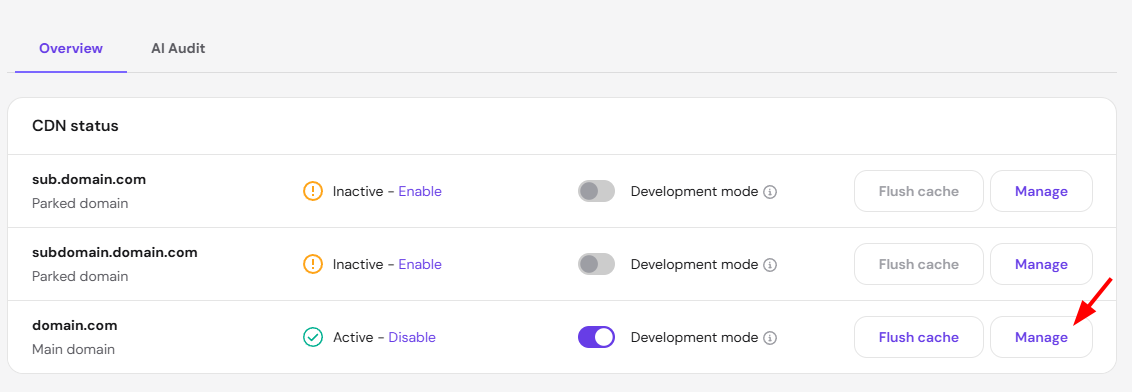
- Click Manage and open the Security tab.
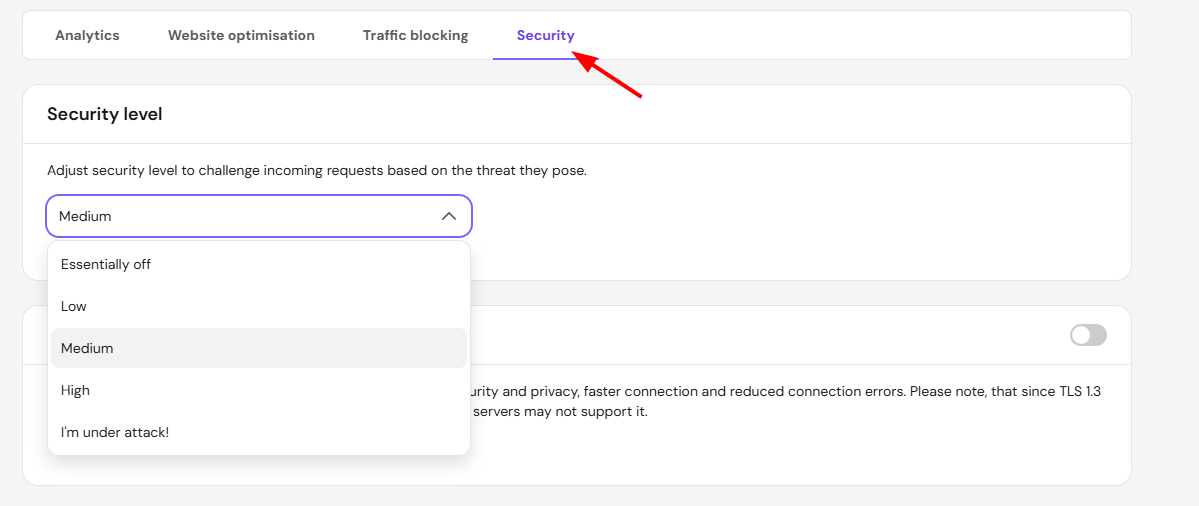
- Change the security level to Medium or Low once the attack has stopped.
Country blocking can block crawlers
Googlebot crawls primarily from IP addresses located in the United States, so blocking the United States in the Traffic blocking tab also blocks Googlebot. The same applies to allow-only setups that omit the crawler’s country. Search engines publish the IP ranges their crawlers use, so compare your country-blocking rules against the published crawler locations, then remove or adjust rules that cover them.
Bot blocking rules
Bots blocked explicitly in your CDN settings receive a 403 response, even when they are verified. Review your blocked bots configuration and unblock search engine crawlers that you want to index the website.
Crawl bursts can hit rate limits
Rapid bursts of requests to pages that are not cached, such as large XML sitemaps, can reach the rate limits that protect your website and return a 429 status code. Confirm the 429 response came through Hostinger CDN before changing any crawler settings: run a live URL test and check the response headers for `x-hcdn-request-id` — when the header is missing, the response came from another layer, such as the website itself. Occasional 429 responses during bursts are normal and crawlers retry automatically.
If Bing reports persistent 429 errors, lower the crawl rate in Bing Webmaster Tools under Configure My Site → Crawl Control. Googlebot adjusts its crawl rate automatically.
How to verify crawler access to your website
Test crawler access after each settings change:
- In Google Search Console, open URL Inspection, enter the affected page, and select Test live URL.
- In Google Search Console, check Settings → Crawl stats for the response distribution.
- In Bing Webmaster Tools, use URL Inspection to run a live test.
A successful live test confirms that the crawler reaches the website through Hostinger CDN.
When to contact Hostinger support about crawler blocks
Contact Hostinger support if a verified crawler still receives 403 or 429 errors after Under Attack mode is disabled, blocking rules are reviewed, and the live URL test keeps failing. Include the domain name, the exact URL and status code, a screenshot of the Search Console or Bing Webmaster Tools error, the approximate time of the failed crawl, and the `x-hcdn-request-id` value when the response headers are available. Crawler rate limits cannot be changed from Hostinger dashboard, so persistent cases need review by Hostinger.
NOTES
- The browser verification page shown to suspicious visitors does not apply to verified search engine crawlers, so regular visitors being challenged does not affect crawling.
- With Under Attack mode reserved for real attacks and blocking rules that avoid crawler locations, search engines crawl and index your website through Hostinger CDN without interruptions.