If your domain suddenly stopped working, your website is down, emails are not sending, and nothing seems wrong on the Hostinger side, your domain may have been placed on serverHold by the domain registry.
This article explains what serverHold means and how to get your domain working again.
What is serverHold?
When a domain is on serverHold, the registry (the organization that manages your domain extension) has temporarily removed it from the internet. This means your domain cannot be found online until the hold is lifted.
This is different from a regular hosting issue. ServerHold is not something Hostinger sets. It comes from the registry that manages your domain extension (for example, .com, .site, or .online).
Common reasons a registry places a domain on serverHold:
- The domain was reported or flagged for abuse (such as phishing or malware)
- Contact details in the domain registration are incorrect or unverified
- A legal dispute was filed against the domain
💡 serverHold is not the same as clientHold. If your WHOIS shows clientHold, that is set by Hostinger. Contact our Support team directly and we will help you from there.
Step 1 – Confirm your domain is on serverHold
Before taking any action, check your domain’s status to confirm it is on serverHold.
- Go to hostinger.com/whois
- Type in your domain name (for example, mywebsite.com) and press Enter
- Look for the Domain Status field in the results
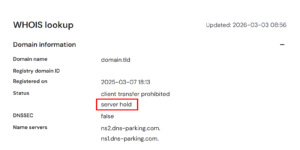
- If you see serverHold listed, your domain has been suspended by the registry
Your result should look something like this:
Step 2 – Follow the steps for your domain extension
The next steps depend on which domain extension you have. Find yours below.
.site, .online, .store, .tech, .website, .space, .press, .host, .fun, .uno
Managed by: Radix
Radix suspends domains that are flagged for abuse, phishing, malware, or illegal content. You can submit an unsuspension request directly to them.
What to do:
- Remove any harmful or policy-violating content from your website
- If your domain was on a blocklist, confirm it has been removed
- Submit an unsuspension request to Radix at: abuse.radix.website/unsuspension
.xyz, .lol, .lat
Managed by: gen.xyz
Radix suspends domains that are flagged for abuse, phishing, malware, or illegal content. You can submit an unsuspension request directly to them.
What to do:
- Remove any harmful or policy-violating content from your website
- If your domain was on a blocklist, confirm it has been removed
- Submit an unsuspension request to gen.xyz at: Unsuspend your domain in gen.xyz
.eu
Managed by: EURid
What to do:
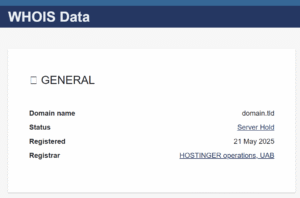
- Check your domain status at whois.eurid.eu

- Check your registrant email for details on the suspension from EURid.
- If you can’t find the email, you can contact whoisaccuracy@eurid.eu for more information about the suspension.
.in
Managed by: NIXI
For .in domains, please refer to our dedicated article: How to Fix ServerHold Suspension for .in Domains at Hostinger
.uk, .co.uk, .org.uk, .me.uk
Managed by: Nominet
Nominet is the registry that manages .uk domain extensions. When a .uk domain is suspended, the process depends on which IPS tag is currently assigned to your domain.
How to identify your IPS tag:
- Go to hostinger.com/whois
- Type in your .uk domain name and press Enter
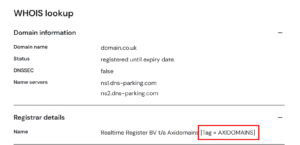
- Look for the IPS tag field in the results
What to do based on your IPS tag:
- If the IPS tag shows YOURSRS-NL or REGISTRAR-EU – You will need to submit the required documents through hDocument mentioned in the email and Contact our Support team to process the unsuspension request with Nominet.
![WHOIS lookup registrar details with Realtime Register BV [Tag = YOURSRS-NL] highlighted](https://www.hostinger.com/support/wp-content/uploads/sites/55/2026/03/2026-03-05_17-12-300x158.png)
- If the IPS tag shows AXIDOMAINS – You will need to submit the required documents and contact Nominet directly by email to request the suspension to be lifted.
All other domain extensions
If your domain extension is not listed above, the registry and process may be different.
What to do:
- Check your registrant email for further instructions on the requirements to lift the serverHold for your domain.
- If you don’t receive any information on the unsuspension process, contact our Support team directly, and we can provide you with the details.
- Once the serverHold is lifted, you will receive a confirmation email from Hostinger.
Step 3 – After serverHold Is Lifted
Once the registry removes the serverHold status:
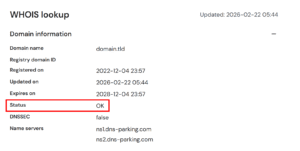
- Check hostinger.com/whois again. The status should now show OK, and serverHold is no longer visible there.
- Wait up to 24 hours for your domain to fully come back online worldwide