Hostinger Reach supports multiple Reach plans under one Hostinger account, and each plan runs as a separate workspace with its own settings, contacts, limits, and billing. Add a Reach plan from Hostinger dashboard → Email marketing → Add plan, and switch between plans with Switch workspace in the Reach dashboard.
This setup is ideal if you:
- Manage multiple businesses or brands
- Have different audiences or contact sources
- Want to keep marketing activities fully separated
Each Reach plan works independently, making it easy to organize and scale your email marketing.
Viewing your Reach plans in Hostinger dashboard
When you log in to your Hostinger account and open Hostinger dashboard, you will see Email marketing in the main navigation bar.
From there, you can view all Reach plans associated with your account. For each plan, you will see:
- Plan status
- Plan title
- The domain attached to the plan
If a domain has not been connected yet, it will appear after you complete the domain connection inside the Reach dashboard.
Purchasing an additional Reach plan
To purchase a second or additional Reach plan:
- Go to Hostinger dashboard → Email marketing.
- Click the Add plan button.
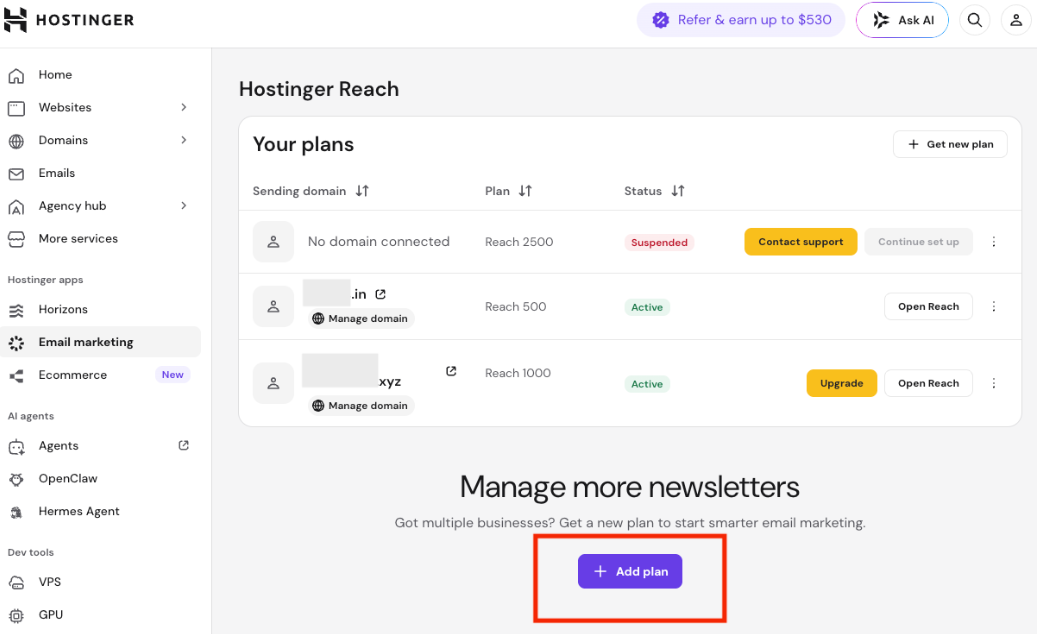
- Continue with the Reach plan purchase process.
After completing the purchase, you will be redirected to the Reach dashboard for the newly purchased plan. From there, you can set up the plan from scratch, such as connecting a domain, importing or adding contacts, creating email templates
Important note about free plans
The Reach free plan can be claimed only once per Hostinger account and is valid for one year. If you have already tried the free plan, you will not be able to claim another free plan.
Switching between Reach plans
From the Reach dashboard
When managing a specific Reach plan, you can quickly switch between your workspaces without returning to Hostinger dashboard:
- Open the Reach dashboard.
- Click your profile icon in the top-right corner.
- Select Switch workspace.
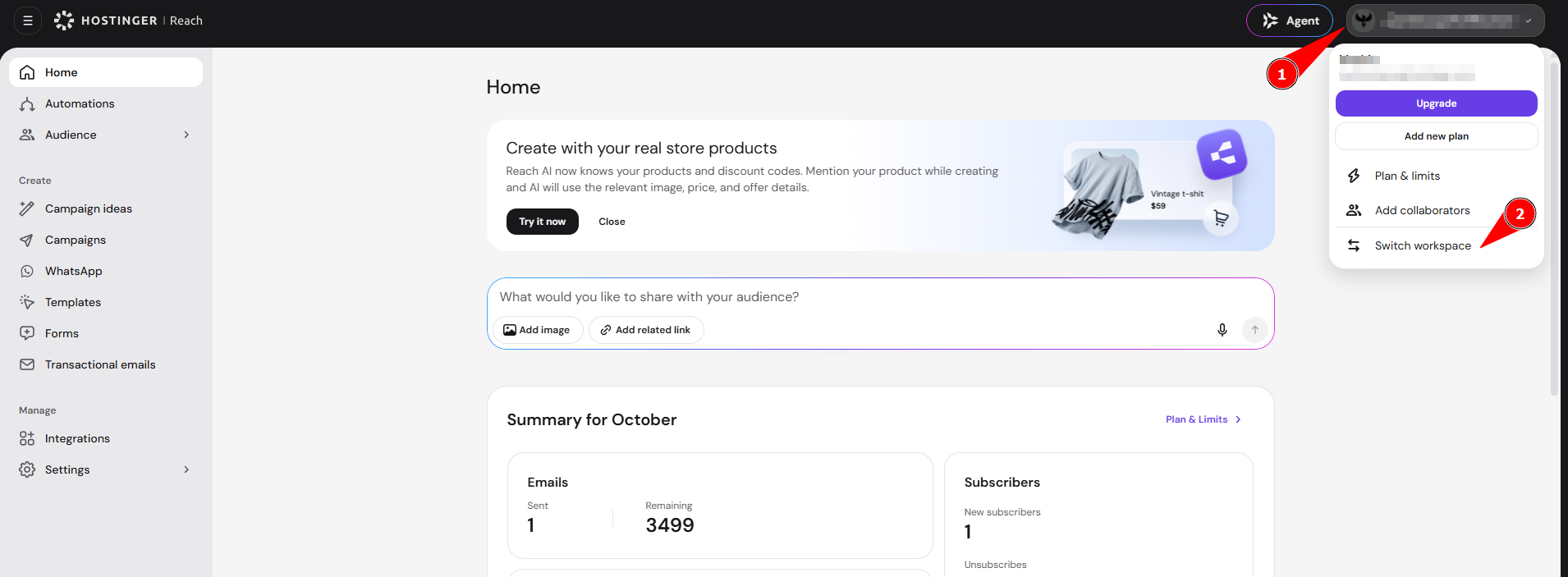
- Choose the Reach plan you want to manage.
You will be instantly redirected to the selected plan.
From direct reach.hostinger.com login
If you go directly to reach.hostinger.com and log in to your Hostinger account, you will be prompted to choose which Reach plan you want to access. This makes it easy to select the exact workspace you want to manage when you have multiple plans.
Plan isolation and limits
Each Reach plan is fully independent as a different workspace. Plans do not have any shared data such as:
- Email sending limits
- Recipients limits
- Usage statistics
- Automations
- Brand details
- Other features
This means every plan is suitable for managing a separate workspace with its own audience and goals.
Managing billing and usage
You can manage and review your Reach plans in the following ways:
Billing details
In Hostinger dashboard → Subscriptions, you can:
- View all active Reach plans
- Check the next billing date
- Manage auto-renewal settings under your subscriptions
Usage limits
In Reach → Plan & Limits, you can view:
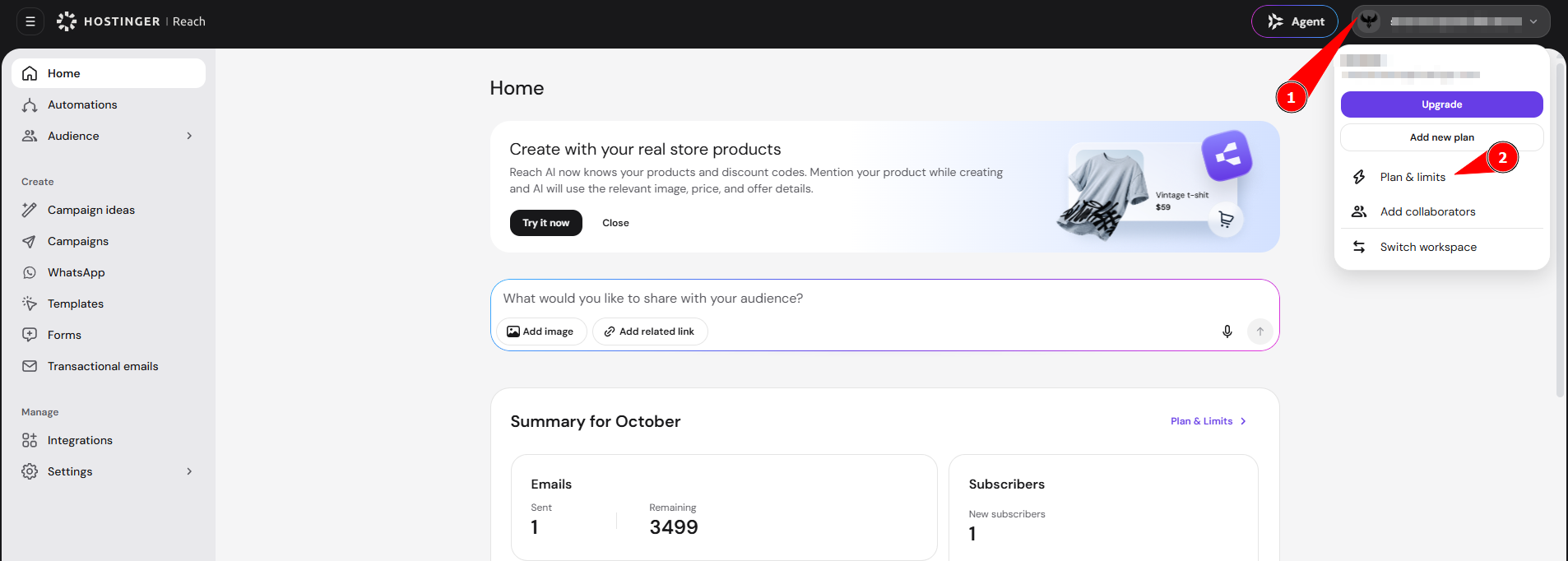
- Current month’s emails and recipients usage
- Remaining AI credits
These details are specific to each individual Reach plan. See Hostinger Reach: Choosing the right plan and setup for how unique recipient and monthly email limits work.
Each Hostinger Reach plan runs as its own workspace, so you can add plans, switch between them, and track billing and usage separately under one Hostinger account.