Fix the “Unexpected T_STRING” error at Hostinger — a PHP syntax error, usually caused by a typo such as a missing apostrophe, quotation mark, extra/missing space, or incorrectly commented-out code.
Find and fix the syntax error
The error message will contain useful information, such as the filename and line where it occurs. To fix it, open the file using the File Editor, go to the line mentioned in the error message, and edit the line according to the error message, such as adding any missing syntax element.
Example
From this error message:
Parse error: syntax error, unexpected '<',
expecting end of file in /home/u123456789/public_html/test.php
on line 7
The following information can be extracted:
-
The error happened in the test.php file, located in the public_html directory – this is the file that needs to be edited and its location
-
The error occurred on line 7 of the file. The File Editor will also display an ❌ sign, and the same error message if you hover over it:
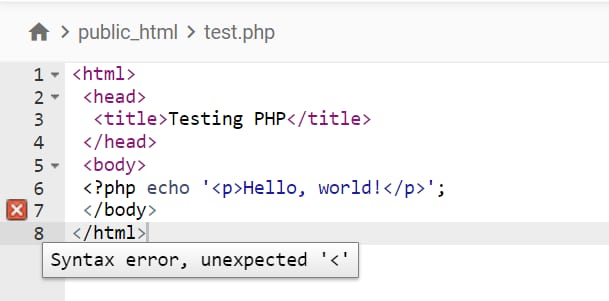
On this file, the PHP code was opened by writing <? but it was not closed, therefore missing a ?>
This is why the < symbol in the next line is unexpected.
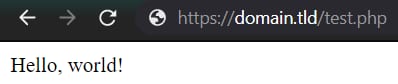
After you add the missing code, your file should work:
NOTES
- If you encounter difficulties fixing the syntax errors, you can restore your website to a previously working state.
- If you’re encountering a different kind of server error, see troubleshooting 5xx errors at Hostinger.