Find the details of your hosting plan in Hostinger, all in one place.
Access your plan details
You can find all the basic information about your hosting plan in one place. Navigate to the Websites section of Hostinger dashboard and click on the Dashboard next to your website.
Once inside the Websites page/section, on the left sidebar, search for Hosting plan → Plan Details:

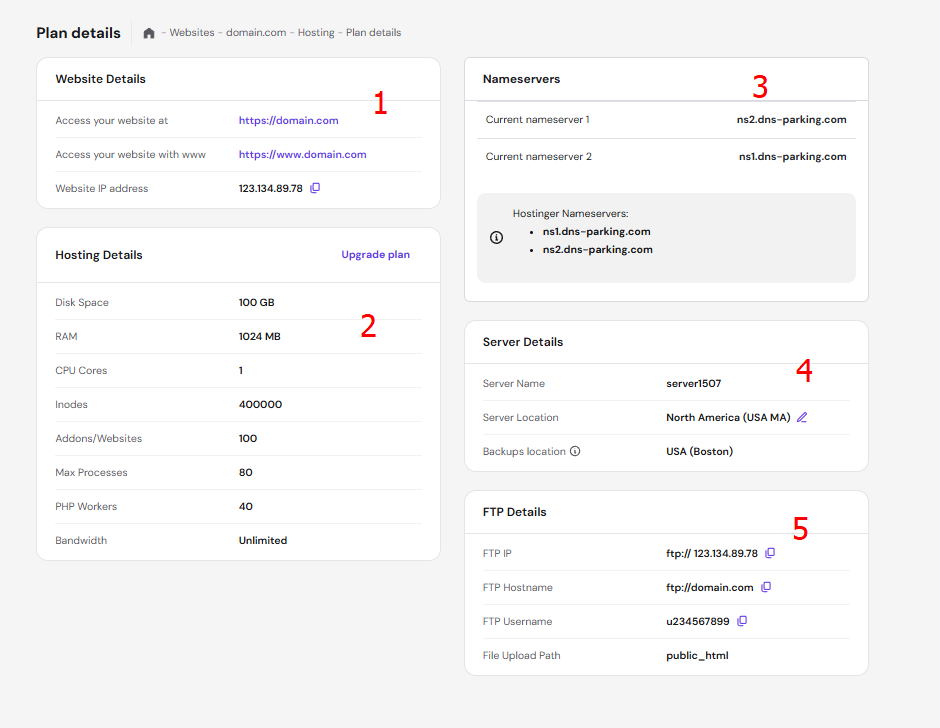
The Plan Details page contains the following:
-
Website Details — your domain name and website’s IP address.
-
Hosting Details — main limits of your hosting plan and a link to easily upgrade.
-
Nameservers — the current NS records on your domain as well as the Hostinger values. Make sure to check on how to point a domain to Hostinger if your domain is purchased elsewhere.
-
Server Details — the name and location of your server, the option change its location, and the location of backup.
-
FTP Details — information needed to connect to your account via FTP.