Leads in the Hostinger Agency Directory are potential clients who contact your agency directly, either from your directory profile or through Match with an agency. Each lead moves through statuses from New to Completed, and a lead is completed when you onboard the client via Account Sharing. Your Agency Directory ranking, based on how you respond to leads and your recent referrals, affects how many leads you receive.
Where leads come from
Leads come from two sources:
- Clients who find your agency through the Agency Directory and submit a contact form on your profile.
- Clients who use Match with an agency and are assigned to your agency by Hostinger, based on their project details.
Either way, their details appear automatically in your Agency Directory dashboard in Hostinger dashboard.
To receive leads, your agency must be approved in the Partner Program and have an active listing in the Agency Directory. If you haven’t set up your directory profile yet, you can do so through Agency Hub.
How leads are matched to agencies
Before a lead reaches an agency, Hostinger validates the submitted project description to filter out spam and placeholder text, such as greeting-only messages or unfilled form variables. Hostinger then matches the lead using a scoring system based on language, country, services offered, and budget, with deductions applied to agencies that have ignored previous leads.
Each agency can receive up to 3 leads from Match with an agency in any rolling 24-hour period. When an agency reaches this limit, the lead goes to the eligible agency with the next-highest match score. The limit doesn’t apply when fewer than 6 agencies are a good match for the lead, which usually means few agencies speak the client’s language.
If two or more agencies have the same match score, the lead goes to the agency currently handling the fewest leads.
Not accepting new clients status in the Agency Directory
Hostinger marks your agency as Not accepting new clients when 3 leads have waited 10 days or more for your reply. Your agency stops receiving new leads until you answer the waiting leads.
While your agency is marked Not accepting new clients:
- Your agency doesn’t receive leads from Match with an agency.
- Your contact form is hidden in the Agency Directory.
- Your agency profile appears below other agencies in the Agency Directory.
A pop-up explains the change the first time the status applies. A banner at the top of the Agency directory tab shows how many leads are waiting for your reply. The Not accepting new clients label also appears next to your agency page.
Accept new clients again in the Agency Directory
- Go to Refer & earn → Agency directory in Hostinger dashboard.
- Click Details next to each waiting lead, then accept or decline the lead.
- Click Accept new clients again in the banner. The button is enabled once all waiting leads are answered.
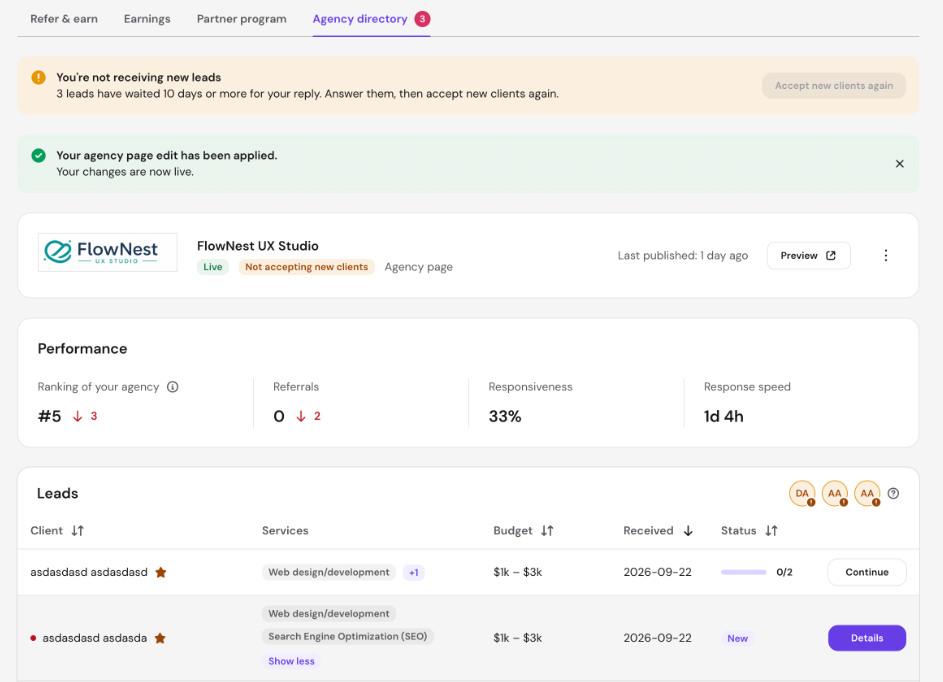
A confirmation message appears, and the Not accepting new clients label is removed from your agency page. Your Agency Directory position, contact form, and lead matching are restored.
Lead statuses
Each lead in your dashboard has one of the following statuses:
- New – Lead received, no action taken yet. Appears at the top of your list.
- Active – You’ve accepted the lead and are engaging with the client.
- Declined – You’ve indicated you’re not interested in this lead.
- Completed – The lead has been converted into a client via Account Sharing.
- Expired – No progress was made within 30 days. Lead moves to archive.
Declined and expired leads are removed from your active list but remain accessible in the archive for 12 months, after which their personal data is deleted.
How to work a lead to completion
- When a new lead arrives, you’ll be notified by email. Open Agency Hub in Hostinger dashboard to review their details.
- Click Accept to move the lead to Active and reach out to the SMB directly using the contact details provided.
- Once you’ve agreed to work together, onboard the client as a Hostinger client via Account Sharing. The lead status will automatically update to Completed once Account Sharing is verified.
Leads that remain at New with no progress for 30 days will automatically expire.
How to get more leads
Your position in the Agency Directory determines how visible you are to clients browsing for agencies. Agency Directory ranking is based on three engagement signals:
- Responsiveness – how many of your 3 most recent leads you accepted or declined.
- Response speed – how quickly you usually reply to new leads.
- Referrals – your qualified and approved referrals from the last 30 days.
Agencies that respond to leads reliably and quickly rank higher. Agencies with no record of lead engagement don’t get top placement by default. Declining a lead you can’t take still counts as a response, so act on every new lead instead of leaving it at New.
Agency Directory rankings refresh every Tuesday and Thursday. New agency pages start with a neutral score while they collect their first leads.
Check your Agency Directory ranking on the Performance card
The Performance card in Hostinger dashboard shows your current Agency Directory ranking and the three signals behind it. To open it:
- Go to For partners → Agency directory in Hostinger dashboard.
- On your first visit, a window explains how ranking works. Click Got it to close it.
- Review the Performance card.
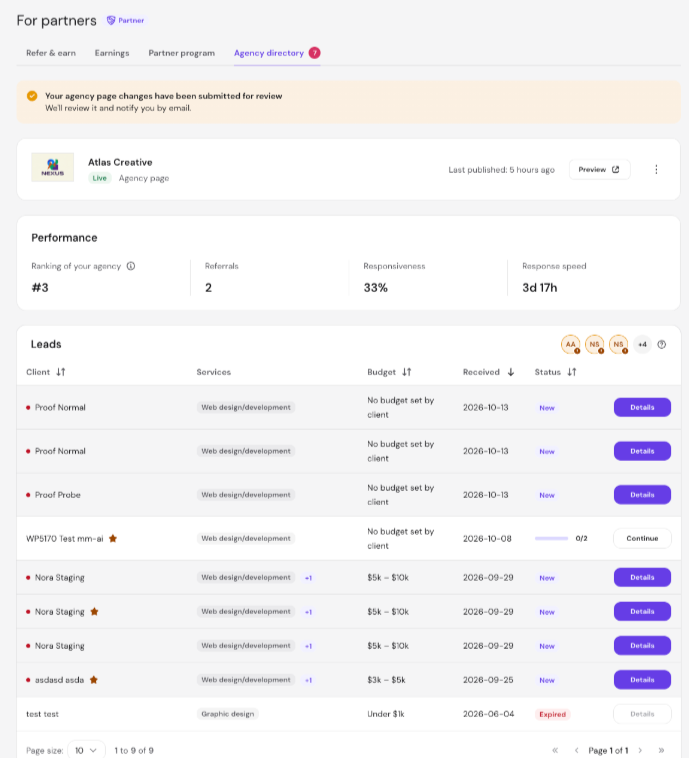
The Performance card shows four values:
- Ranking of your agency – your current position, for example #2. An arrow next to it shows how many positions your ranking rose or fell since the last refresh.
- Referrals – your qualified and approved referrals from the last 30 days.
- Responsiveness – the share of your 3 most recent leads you accepted or declined, for example 33%.
- Response speed – your usual reply time to new leads, for example 3d 17h.
NOTES
- The Performance card appears only when your agency page is live or hidden. Pages still in review don’t show the card.
- Responsiveness and Response speed show Not enough leads yet until you have 3 leads.
- Response speed shows No replies yet if you haven’t replied to any leads.
- The card shows Not ranked yet if your page is hidden and has no ranking data.
Accepting or declining each new lead quickly keeps your Agency Directory ranking moving up, so more leads reach your agency.