Pointing a domain to external services at Hostinger connects a domain registered at Hostinger to another hosting provider, website builder, or online store. To point your domain, collect the DNS values from your provider, change the domain’s nameservers or edit its A or CNAME records in Hostinger dashboard, and wait for DNS propagation to complete.
Step 1 – Preparations
-
First, check that your domain setup is completed. In addition, it is highly recommended to ensure that your domain is verified as well
-
Collect the necessary process and DNS record values required by your provider to properly point your domain. You can find this information in their Knowledge Base, Help Center, community forums or through online tutorials and videos you can find using any search engine
-
If your vendor requires preliminary steps, such as adding your domain name to their platform, complete them before proceeding.
If you cannot find the information on how to point the domain, contact your external provider’s customer support for guidance.
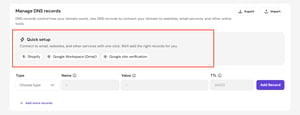
Quick setup (Recommended)
If you want to connect your domain to Shopify, Google Workspace, or Google Sites, Hostinger dashboard offers a quick setup option. Select your provider, review the DNS changes that will be applied, and follow the additional steps to finish the connection.
Step 2 – Edit DNS records
Once you have the values for the DNS records, edit them on your domain’s DNS Zone. Navigate to the Domains section of Hostinger dashboard and click on the domain in question, or click on the ellipsis button and select Manage. Then, open the DNS / Nameservers tab on the left.
To point only a subdomain to an external server, follow How to point a subdomain from Hostinger to an external server.
There are a few different ways to point your domain, which may vary by provider. Expand the sections below for more information on each method:
Using nameservers
This is the preferred method if you want to fully move your domain’s DNS zone management, including email records, to your external service provider.
Follow this detailed guide on how to change your domain’s nameservers (NS records): How to Change Nameservers at Hostinger.
Using A records
This method is suitable if you want to keep using Hostinger nameservers and manage your domain’s DNS records in Hostinger.
Before adding new A records, it is recommended to delete any existing ones. Follow this guide to update your domain’s A records: How to Manage A Records.
If your provider instructs you to add a CNAME record for www, you can do so by following this article: How to Manage CNAME Records.
Using CNAME records
Some providers only support pointing a domain through one or more CNAME records. Before adding new values, delete any existing CNAME and A records.
Follow this guide to update your domain’s CNAME records: How to Manage CNAME Records.
If you’re using external email services while keeping Hostinger nameservers, you may also need to update the MX and SPF records.
Step 3 – Verification
After making these in your domain’s DNS zone, allow up to 24 hours for DNS propagation. During this time, you can experience brief interruptions for your website and email.
If your provider’s instructions include additional steps, like verification, follow them once propagation is complete. If you encounter any issues during the final steps, double-check that the record values you entered are correct. If issues persist, please don’t hesitate to contact your external provider’s customer support for further assistance.
Point a Hostinger domain to popular external platforms
Hostinger has step-by-step guides for pointing your domain to 21 popular platforms, grouped into hosting providers and app platforms, website and app builders, and online stores and business platforms:
|
Hosting providers and app platforms |
Website and app builders |
Online stores and business platforms |
Once propagation completes and you finish any verification steps on your provider’s side, your Hostinger domain points to your external provider.