Add keywords to your Hostinger AI Builder manual mode website pages to help search engines understand the content and context of each page, improving how well it ranks for relevant queries. Include relevant keywords in your content, metadata, alt tags, and URLs to signal what the page is about.
It is important to select your keywords thoroughly and not to use them excessively (i.e., you should not mention the same keywords in the content, meta information, and alt texts of the page) because this can harm your website’s SEO.
Add keywords using the AI SEO Assistant
If you use Hostinger AI Builder manual mode and wish to add keywords to your website pages, follow these steps:
-
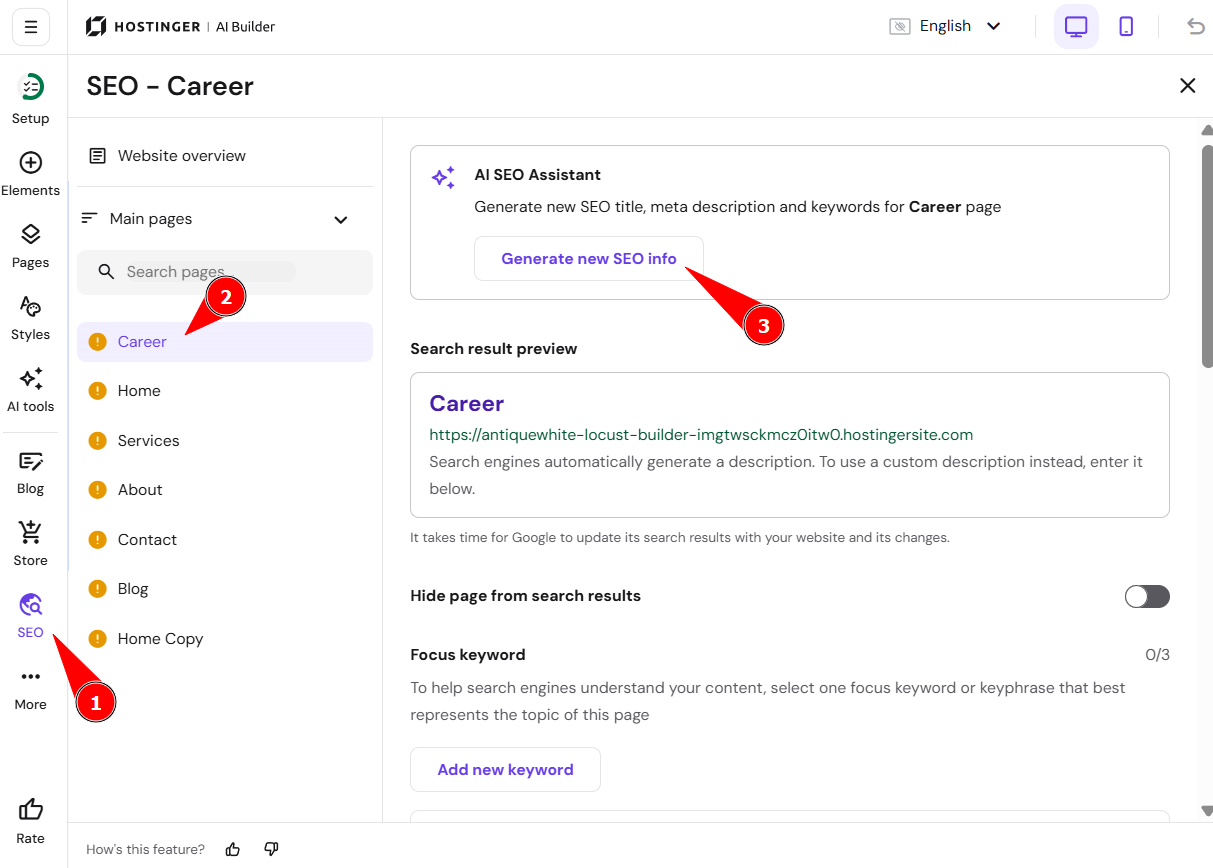
Within the builder, click on SEO.
-
Select the page in question.
-
On the right at the top, you will see AI SEO Assistant. Click on Generate new SEO info:
-
Follow the guide and fill in the Page description on the next page. The AI Assistant will then suggest a bunch of keywords for your page from which you can select three.
-
Review the generated Search Engine Appearance and click Finish.
If it’s a product page, refer here: Product SEO Settings.