Alipay’s users can pay on the web or on a mobile device using login credentials or their Alipay app. Alipay has a low dispute rate and reduces fraud by authenticating payments using the customer’s login credentials. Learn more: Alipay payments
Availability
-
Available for merchants in Australia, Austria, Belgium, Bulgaria, Canada, Croatia, Cyprus, the Czech Republic, Denmark, Estonia, Finland, France, Germany, Gibraltar, Greece, Hong Kong, Hungary, Ireland, Italy, Japan, Latvia, Liechtenstein, Lithuania, Luxembourg, Malaysia, Malta, the Netherlands, New Zealand, Norway, Portugal, Romania, Singapore, Slovakia, Slovenia, Spain, Sweden, Switzerland, the UK, the USA
-
Supported currency: CNY, AUD, CAD, EUR, GBP, HKD, JPY, SGD, MYR, NZD, or USD
-
Available for the following clients: Chinese consumers, overseas Chinese, and Chinese travelers
Set up Alipay
To offer the Alipay payment method, you first need to enable Stripe payments in your e-store. Once you do that, follow the steps below:
- Within the AI builder, open your store management area. Go to Settings → Payments → Manage Stripe and open your Stripe account.
- In your Stripe account, go to the payment methods settings.
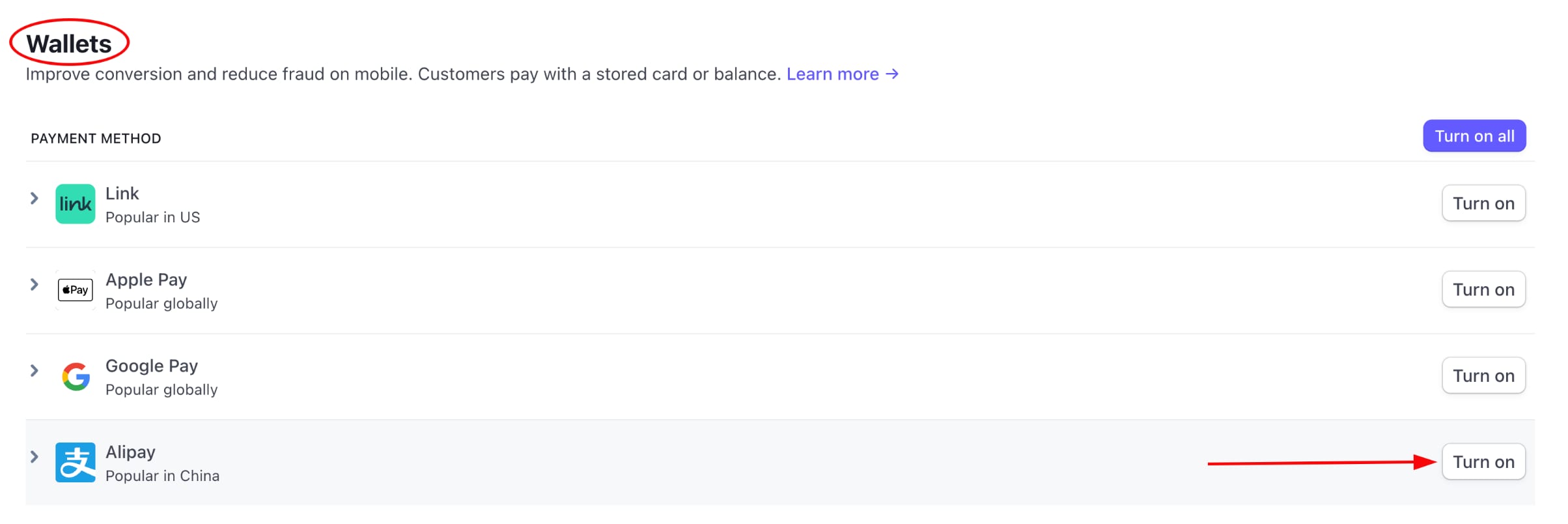
- Scroll down to the Wallets section, and click Turn on next to Alipay:
This payment method will be automatically suggested to Chinese consumers, overseas Chinese, and Chinese travelers.