Afterpay (also known as Clearpay in the EU) is a payment method that allows your customers to buy now and pay later. Basically, it allows a client to split the total sum over four installments. Your customer only pays the first installment at purchase time. Afterpay immediately pays you in full and collects the remaining installments from your customer over time. Learn more: Afterpay and Clearpay payments
Availability
-
Available for merchants in Australia, Canada, France, Ireland, Italy, New Zealand, Spain, the UK, and the USA
-
Supported currency: USD, CAD, GBP, AUD, NZD, or EUR
-
Available for clients in Australia, Canada, France, New Zealand, Spain, the UK, and the USA
Set up Afterpay / Clearpay
To offer the Google Wallet payment method, you first need to enable Stripe payments in your e-store. Once you do that, follow the steps below:
- Within the AI builder, access the store management area. Go to Settings → Payments → Manage Stripe and open your Stripe account.
- In your Stripe account, go to the payment methods settings.
- Scroll down to the Buy now, pay later section, and click Turn on next to Afterpay / Clearpay:
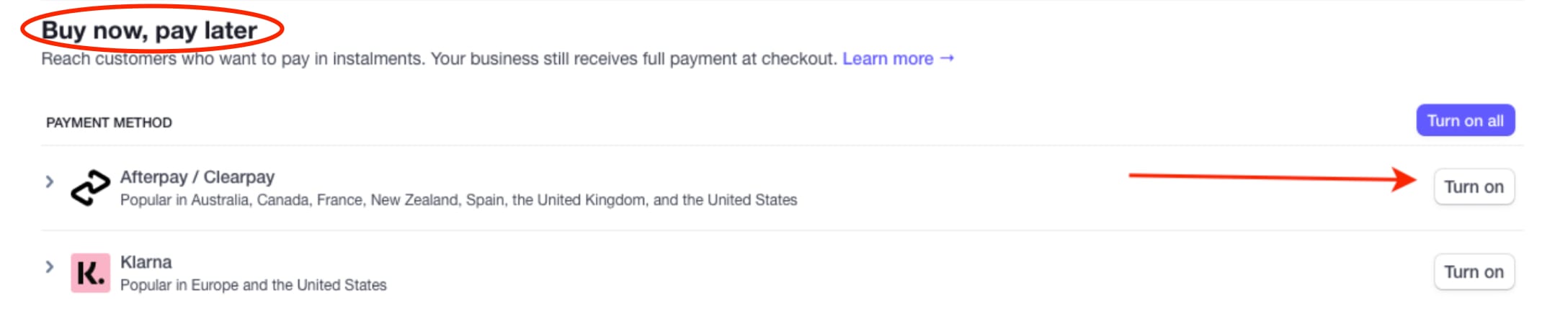
This payment method will be automatically suggested for your clients in Australia, Canada, France, New Zealand, Spain, the UK, and the USA.