The Authorized Sellers for Apps (app-ads.txt) file lets you connect Google AdMob to a Hostinger AI Builder manual mode website, controlling which channels are authorized to sell your app’s ad inventory and helping prevent counterfeit inventory and ad revenue loss.
Get started by updating your app’s listing in the app stores (Google Play and App Store for Apple) to include your website in the developer contact URL. Be aware that you don’t need to list your full app-ads.txt URL in the app store listing as AdMob will crawl your website looking for this file using the domain portion of your website’s URL.
Connect Google AdMob
- Sign in to your AdMob account, and create your app-ads.txt file by following the instructions by Google.
- Once your file is ready, copy its code.
- Then, open your website’s integrations settings, find the Google AdMob field, and paste the code there:
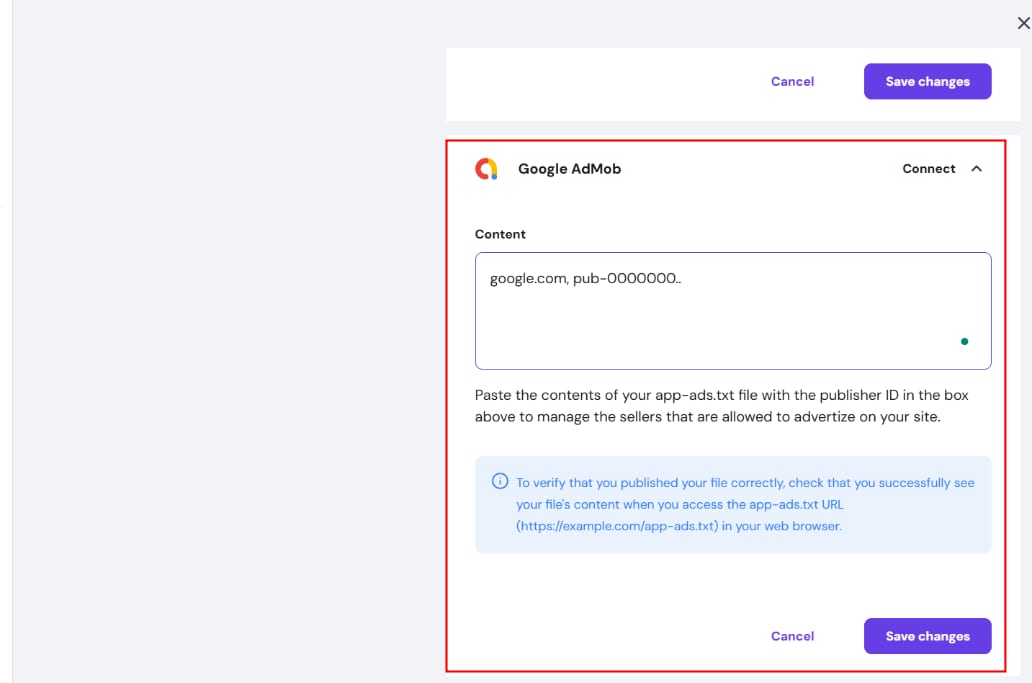
- Save the changes and update your website.
It can take up to 24 hours for AdMob to crawl and verify your app-ads.txt files.