The Hostinger Referral Program lets you earn a commission when someone you invite buys an eligible Hostinger service. Your referral gets a discount on that purchase. Join the program from the Hostinger dashboard, share your referral link, code, or an email invite, and track your earnings and payouts on the Earnings page. Bundle purchases also count, with the commission calculated on the total value of all eligible products in the bundle.
Joining the program
Access the Referral section on Hostinger dashboard by clicking on the Refer and Earn button:
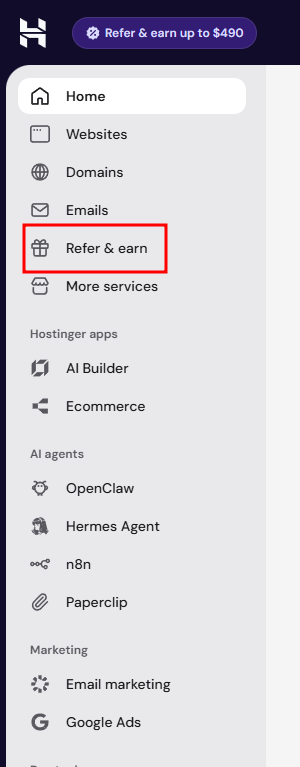
In the welcome screen, click Join now — you can start referring right away!
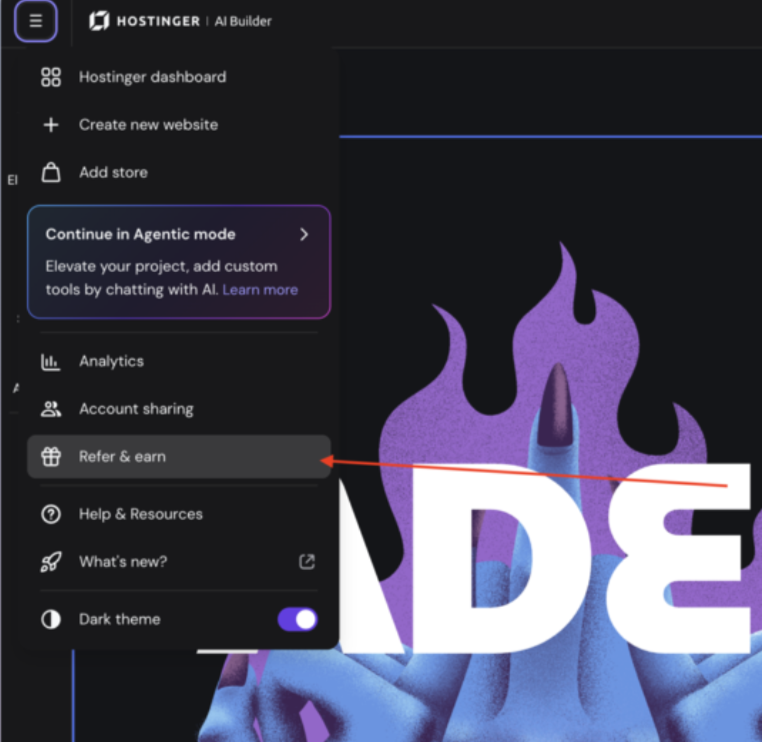
If you’re building your website with Hostinger AI Builder in manual mode, you can also access referrals directly from the editor menu. Select Refer & earn to open the referral modal, which shows your potential commission and lets you copy your invite link or share it on social media.
If there are no active referrals within 6 months, your referral account will be paused. No worries though – you can rejoin anytime.
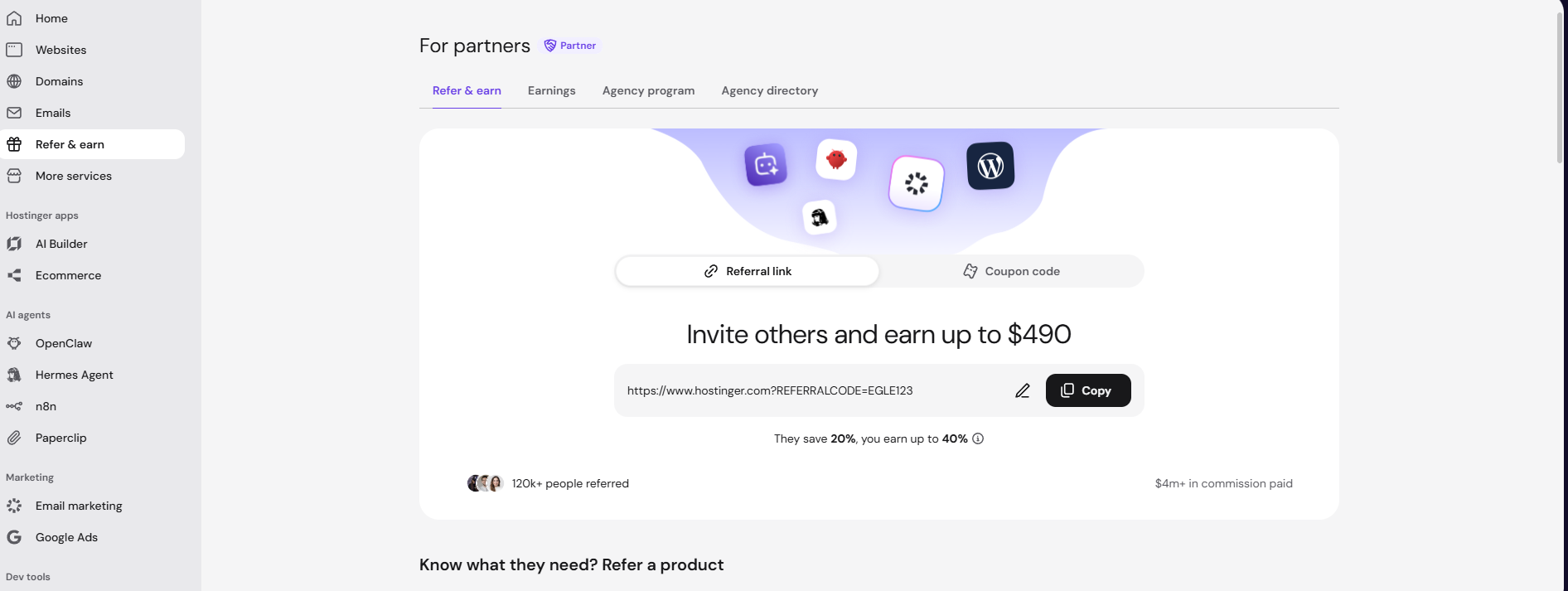
If you’re eligible to become a Hostinger partner, or are already a partner, you’ll instead find a For partners item in the Hostinger dashboard sidebar. This opens the Partner program page, where you can navigate between Refer & earn, Earnings, Partner program, and Agency directory using the tabs at the top.
In the Refer & Earn page, you will find three sections:
- Refer & Earn
- Earnings
- Partner programs
You can switch between them by clicking on the toggle at the top of the page:
Referring to friends
On the Refer & Earn page, click Refer on a product card to open the Plans & pricing modal, which lists every referable plan for that product side by side.
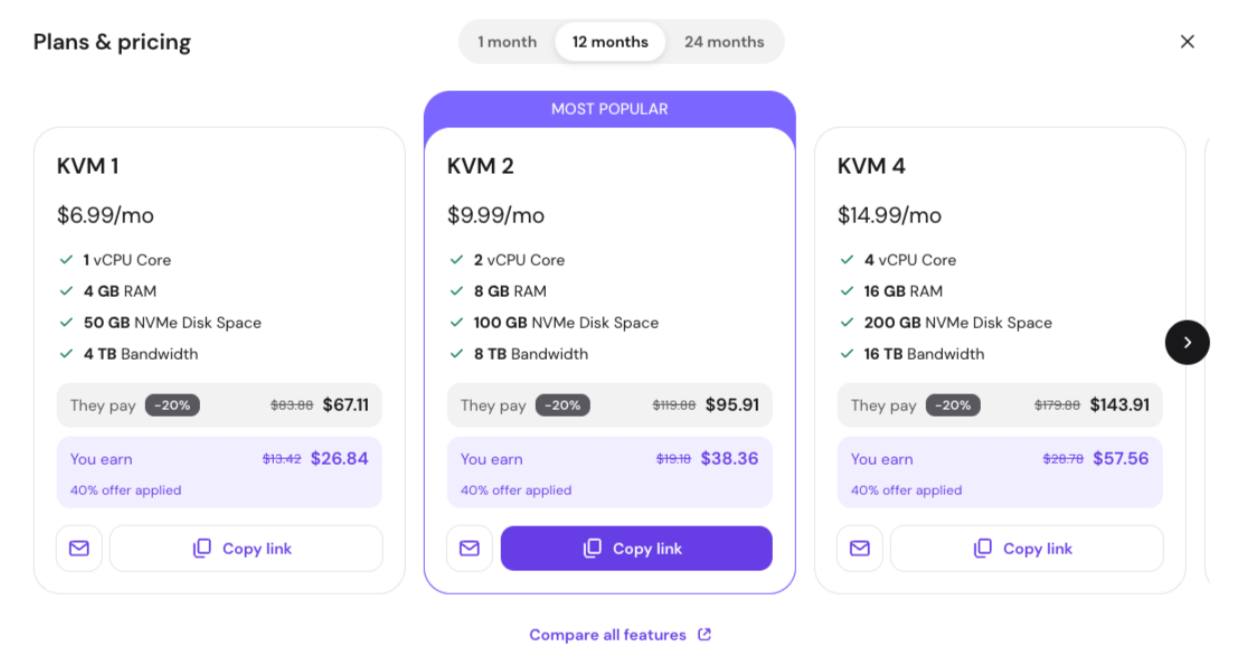
- Choose the billing period at the top of the modal — the available options depend on the product.
- Compare plans by price, what your friend pays, and what you earn, or select Compare all features for a full breakdown.
- Click Copy link on a plan card to copy a referral link for that specific plan, or click the mail icon to refer that plan by email.
- In the Refer via email modal, enter your friend’s email address under Who are you referring?
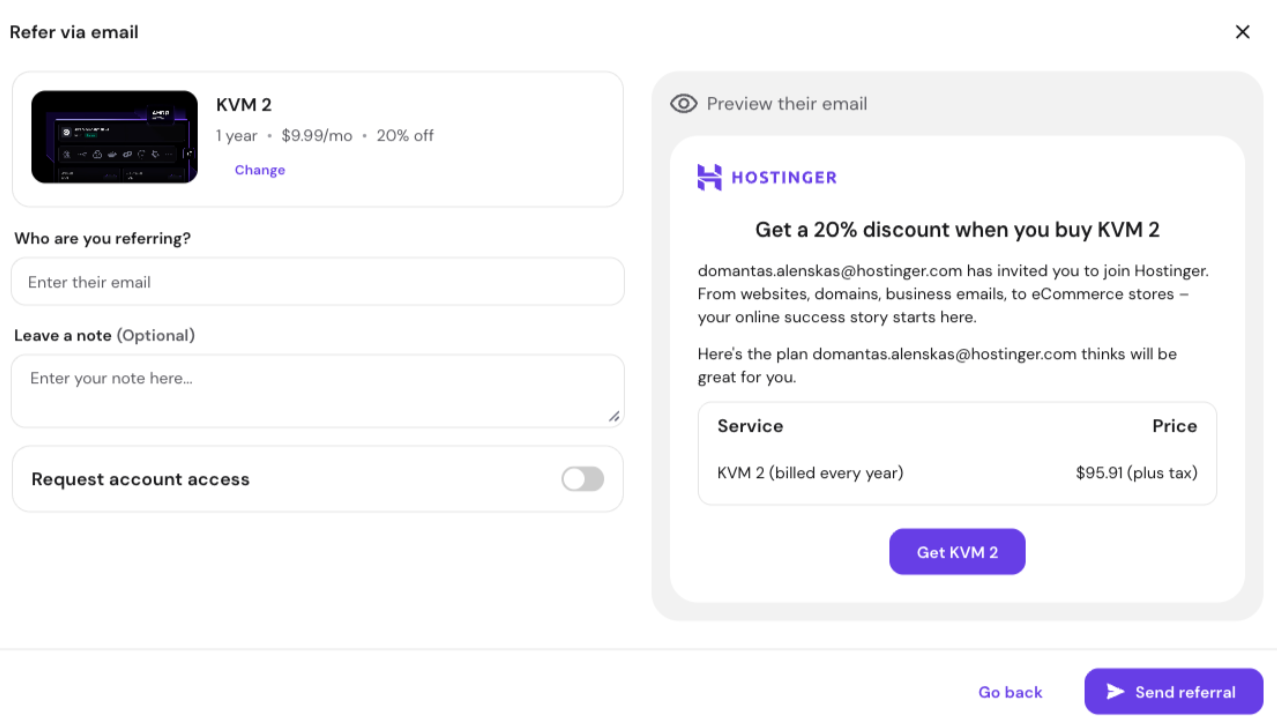
- Add an optional note under Leave a note.
- Turn on Request account access if you want access to manage the referred plan.
- Review the exact message your friend will receive in the Preview their email panel.
When all is good to go, click Send referral.
To let your friend choose their own hosting plan, head to the Referral link section, where you’ll find your referral link and a handy copy button:
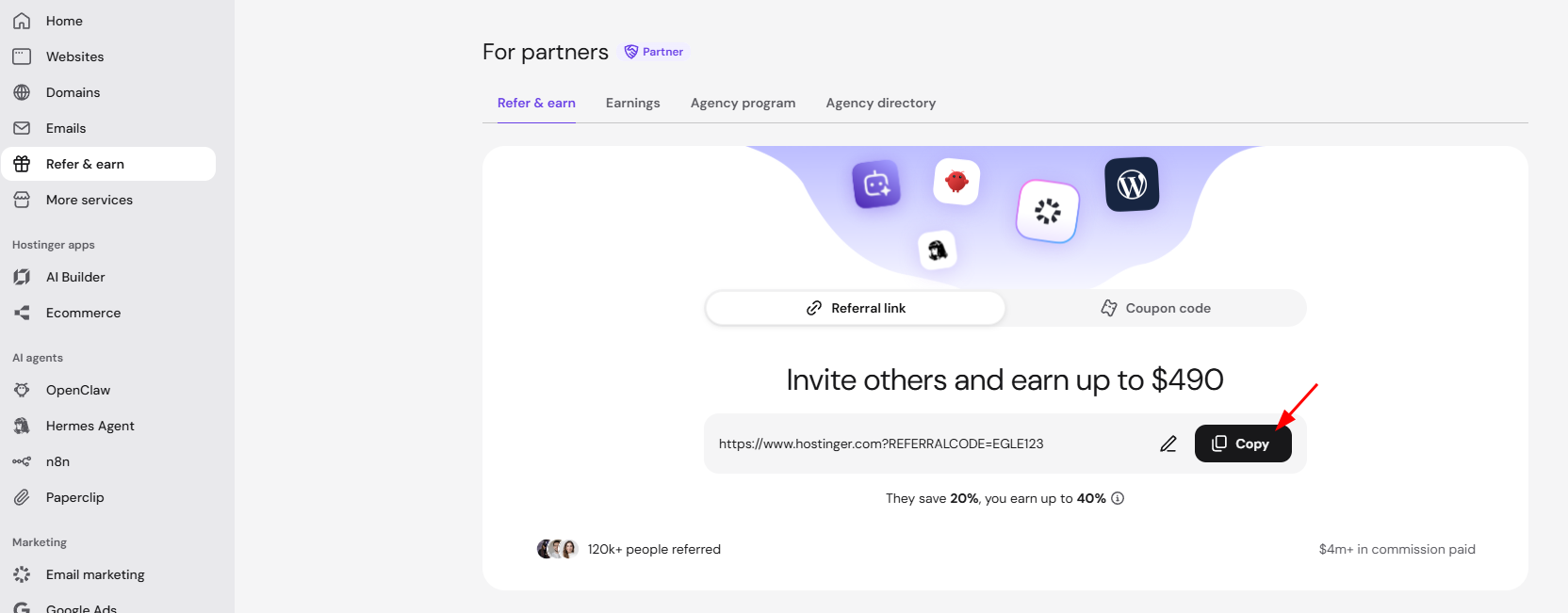
You can also share your link via your personal social media by clicking on the respective icon.
To customize the referral code, click on the pencil icon, enter the new referral code and click on Save changes.
You can also share just your referral code as a coupon. Your friend can enter it directly at checkout to get the same discount, for example, entering BESTREFERRALS instead of following a link like https://www.hostinger.com/lt?REFERRALCODE=bestreferrals.
After changing your referral code, the previous one will stop working.
Managing your earnings
Go to Earnings to reach the management options.
Adding a payout method
Before receiving your earnings, ensure you’ve added a payout method. The available options are PayPal, Wire Transfer and Hostinger Balance. To set up your payout method, go to the Earnings section, select your preferred option, and enter the required payment details:
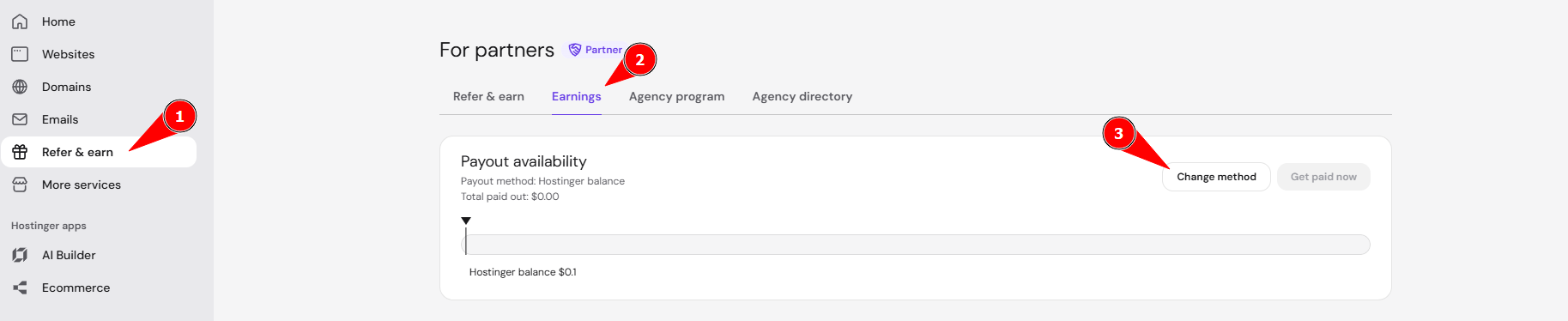
When choosing a payout method, consider the following:
-
PayPal is the recommended option. The minimum payout is $50 USD (or the equivalent in your local currency), and it’s a fast, flexible choice.
-
If you ever need to change the PayPal account linked to your earnings, refer to this guide: How to update your PayPal for the Referral Program.
-
-
If PayPal is unavailable to you, opt for a wire transfer. Keep in mind that the minimum payout is $200 USD, and additional fees or exchange rate differences may apply depending on your bank’s policies, which can reduce the final amount you receive.
- Hostinger Balance is another payout method that allows you to receive your referral rewards directly as account credit. It has a lower minimum payout threshold of $30, and once the threshold is reached, the payout is processed instantly. You can then use the credited balance to purchase Hostinger services.
Eligible commissions from the Referral Program are automatically sent to the selected payout method. Referral Program commissions older than 2 years that haven’t been withdrawn are removed from your referral balance.
Referral earnings and payout availability
Track your Referral Program commissions in the Earnings tab. The Earnings tab has two sections: Payout availability and Earnings by type.
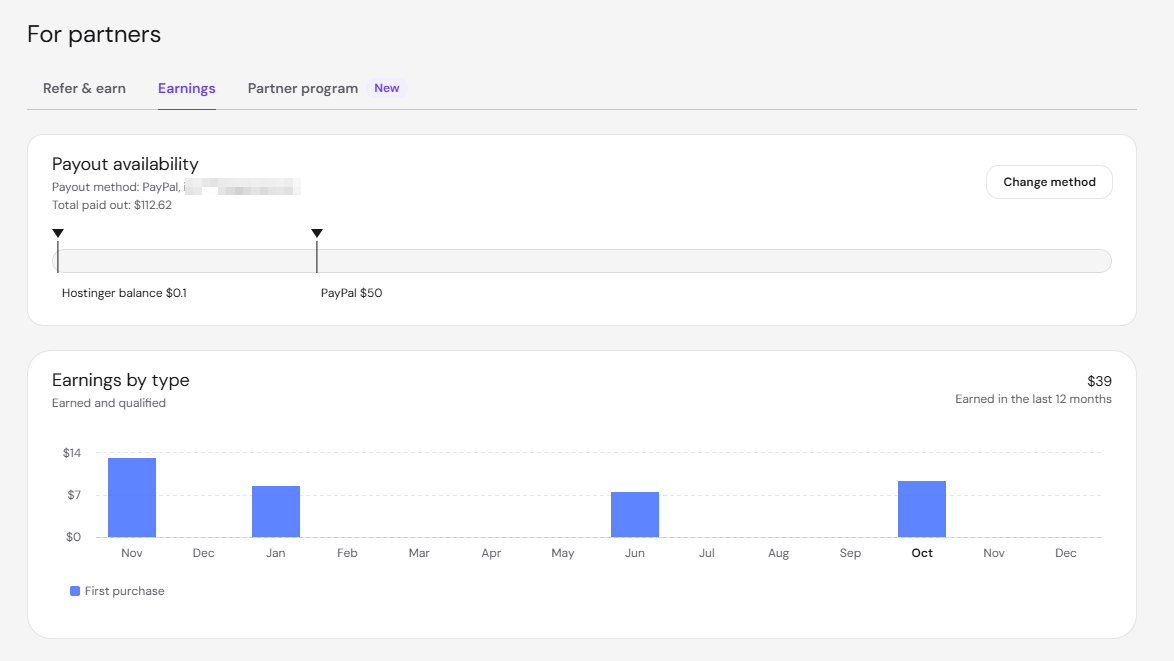
The Payout availability section shows:
- Payout method — The method your commissions are sent to, such as PayPal with the linked email address.
- Total paid out — The total commission you’ve received through the Referral Program.
- Payout thresholds — A progress bar showing how close your earnings are to the minimum payout amount for each method, for example $0.1 for Hostinger Balance and $50 for PayPal.
The Earnings by type section shows a monthly chart of your earned and qualified commissions, plus the total earned in the last 12 months. Commissions in the chart are grouped by type, such as First purchase.
Referral Program referrals and payouts lists
The Referrals and Payouts tabs below the Earnings by type chart list each referral and each payout.
The Referrals tab shows four columns: Invites (the email address the invite was sent to), Status, Date purchased, and Earnings (the commission awarded). There are four possible referral statuses:
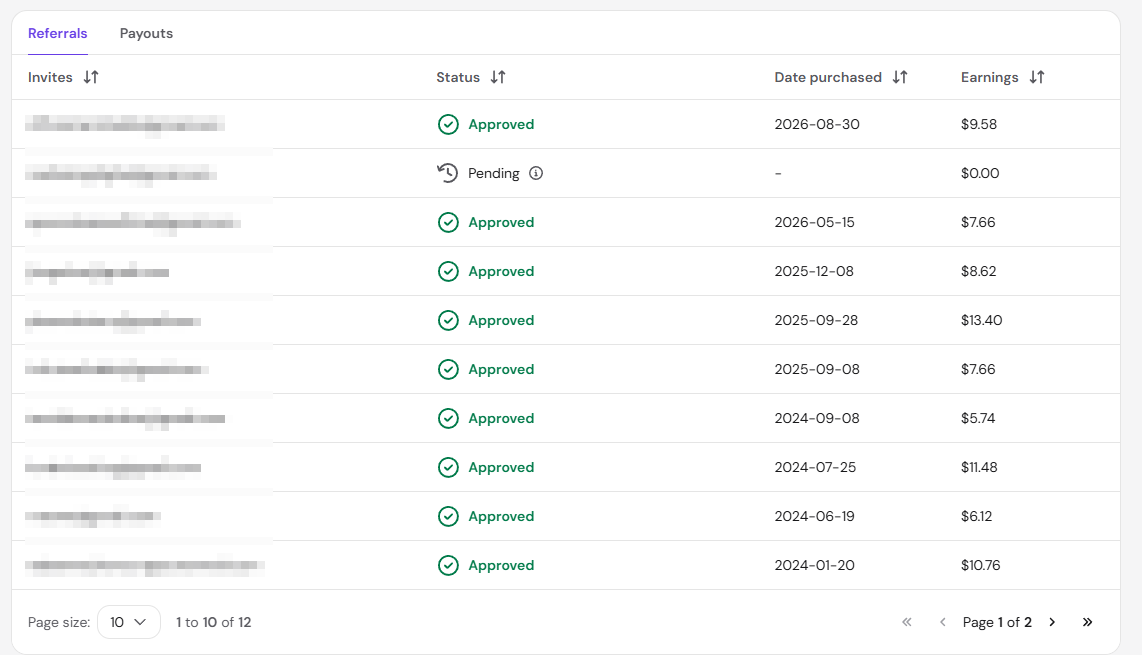
- Pending — The referral has been sent, but no purchase has been made yet.
- Qualified — The purchase was made and is waiting for the commission to be approved.
- Declined — The purchase did not meet the eligibility criteria for a commission. For bundles, this happens only when all products in the bundle are refunded or ineligible.
- Approved — The commission has been credited.
Click the Payouts tab to see a list of paid commissions with the following details:
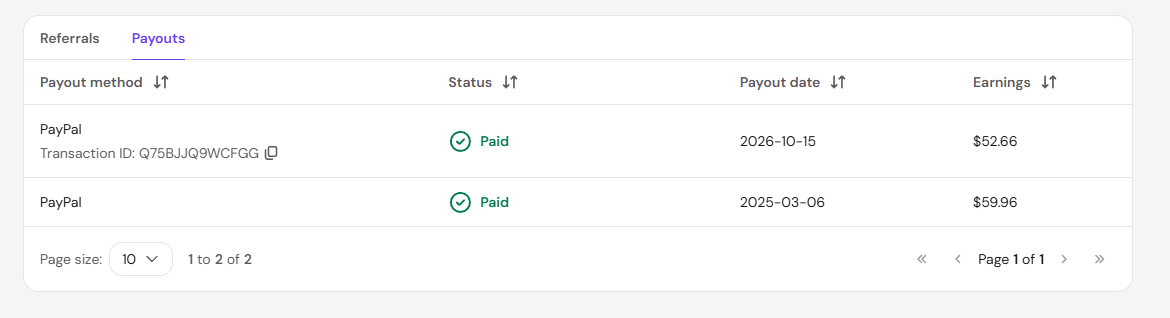
- Payout method — The method the commission was sent to, with the transaction ID when available.
- Status — Commissions that have been sent show as Paid.
- Payout date — The date the commission was paid out.
- Earnings — The amount of the commission.
Due to transaction processing times, it may take a few additional days for eligible earnings to be applied to your payout method after the 45-day period has passed.
Eligibility criteria
When your contacts use your referral link and meet the eligibility criteria, you will accumulate earnings. An eligible purchase must meet the following conditions:
-
First-time customer — The person you refer must create an account with the company using your referral link. Already registered users, even if they have not made prior purchases, do not count as new customers.
-
New service — Purchases made through your referral link must be for a new service:
- Eligible for 1-month or longer subscriptions: Cloud Hosting, Agency Hosting, VPS Hosting, Business Email, Email Marketing (Reach), AI Agents
- Eligible only for 12-month or longer subscriptions: Shared Hosting, AI Builder Plans.
- Bundles — If the purchase is a bundle, each product in it is assessed separately against the criteria above. Only eligible products count toward your commission; ineligible ones (such as domains) are excluded from the calculation.
A reward is earned when a referred person purchases their first product in a specific category, regardless of other products they may have purchased.
-
Active customer — The referred customer must remain active for 45 days and not request a refund. For bundles, refunds are handled per product: if some items are refunded, you keep the commission on the products that were not refunded. If every product in the bundle is refunded, the referral is Declined and no commission is paid.
Bundles and the Partner Program
Approved Hostinger partners earn the same 20% commission on a referred client’s first bundle purchase, and the client gets the same 20% discount.
Partners also earn recurring commissions on bundles: if any product inside the bundle is later upgraded or renewed, the partner earns 10% on that upgrade or renewal. This is assessed product by product — upgrading one item in the bundle earns 10% on that item.
Regular Referral Program participants keep the full 20% on the first bundle purchase but do not earn on later upgrades or renewals.
Restrictions
-
Referrals are intended for personal use only, meaning you can refer people in your network: friends, family, colleagues, or clients.
-
You should only share referral links on your personal social media or via email with your known contacts. You should not publish them on commercial websites, blogs, or YouTube channels, or use them in email marketing or paid advertising.
It’s important to note that failing to comply with these restrictions could result in the permanent deactivation of your referral account.
For more information about terms and conditions, consult the Referral Program Agreement.
What is the difference between the Referral and Affiliate programs?
Our Affiliate Program is a great way to earn commissions if you already have an audience — for example, if you have a sizeable amount of followers on Instagram, TikTok, YouTube, or any other social media.
On the other hand, if you want to invite some of your friends to use Hostinger services, this Referral Program is perfect for you. You can earn some cash, and your friends can get a complimentary discount at the checkout!
If you are a web developer or have a company that provides online services, you can manage Hostinger products for your clients.