Create archives with SSH at Hostinger by connecting to your hosting plan, opening the folder that contains your files, and running a single zip or tar command. You can compress separate files or a whole directory into a .zip, .tar, or .tar.gz archive.
Step 1 – Connection
First, enable SSH access and connect to your account using SSH. Open the directory, where the files and folders, which you want to compress, are located. For that:
-
Run
lscommand. If you see the needed files and folders, then you can go to Step 2 -
If the needed content is in a subdirectory, reach it by running:
cd path/to/fileswhere “path/to/files” is changed by an actual path to your files. For example, if your files are located in public_html/new/version1, then the command should be “cd new/version1”.
Step 2 – Creating an archive
You only need 1 command to create an archive. The command is different based on what you would like to compress and to which archive format you want to save it:
Archive of separate files
ZIP: zip archive-name.zip filename1.php filename2.php filename3.php
TAR: tar -cvf archive.tar filename1.php filename2.php filename3.php
TAR.GZ: tar -zcf NewArchive.tar.gz filename1.php filename2.php filename3.php
Where instead of “archive” write the name of your future archive, and after that – files which you would like to add to the archive.
Archive of the whole directory
ZIP: zip -r archive.zip DirectoryName
TAR: tar -cvf archive.tar DirectoryName
TAR.GZ: tar -zcf archive.tar.gz DirectoryName
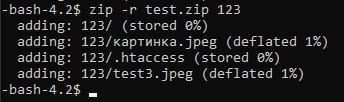
Creating an archive takes some time until it’s finished, you will see this from the new line:
-bash-4.2$This line means the archive is created successfully in the current directory.
More archive and SSH guides at Hostinger