A CNAME record at Hostinger makes a subdomain, such as www, an alias of another domain or subdomain. To manage CNAME records, open the DNS Zone Editor in Hostinger dashboard, choose CNAME as the record type, and enter the name, target, and TTL values.
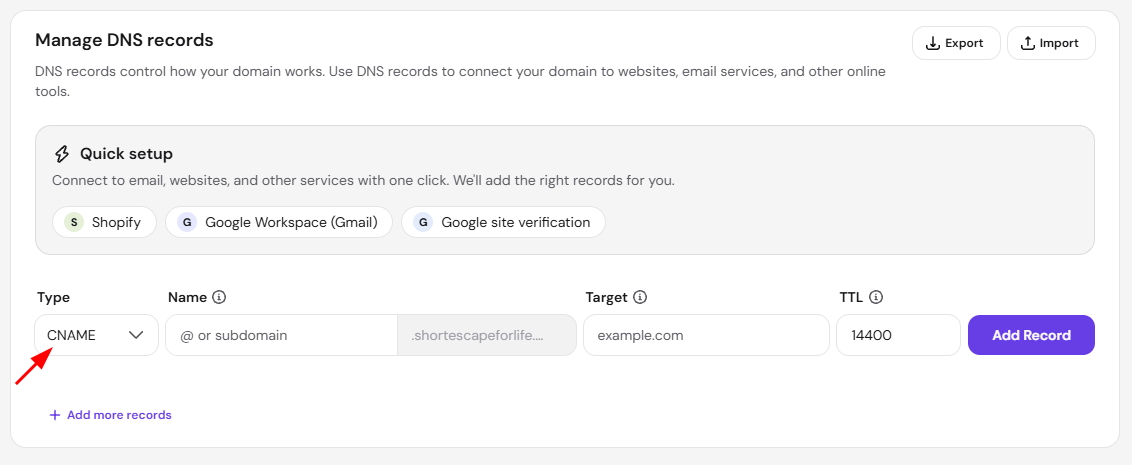
To add a CNAME record, open your domain’s DNS Zone Editor and choose CNAME as the record type:
NOTE
-
If your domain is pointing elsewhere by NS records, your DNS Zone management is moved to the provider you pointed the domain to and should be managed from there
What values to use?
Name (Host)
Name is the hostname for the record, without the domain name. This is generally referred to as a subdomain. The domain name is automatically appended, so you do not need to add it manually. To point the root domain (@) to another domain instead, use an ALIAS record, as explained in CNAME vs ALIAS records at Hostinger.
If Hostinger CDN is enabled, modifying the www CNAME record may affect your website’s functionality. Consider fully disabling the CDN before making changes.
Target (Points to)
The Target field indicates the destination the CNAME should point to. Make sure to review and confirm that both name and target are correct to ensure that your CNAME record works as intended.
TTL
If you haven’t received specific TTL requirements from the service where you want to point your domain, you can use the default TTL value of 14400 seconds (four hours).
After making any changes to your CNAME records, consider up to 24 hours for them to fully propagate.
How to edit or delete CNAME records
If you want to apply changes or remove an existing record, go to your domain’s DNS Zone Editor and select accordingly:
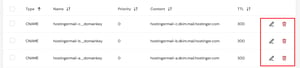
- Clicking trash icon will show a confirmation prompt. Click Delete in the prompt to permanently remove the record.
-
Clicking pencil icon to edit the record.
Once your CNAME record propagates, visitors to the subdomain reach the destination set in the record’s target.