The AI assistant that catches our Head of Content’s loose ends (and never sends a message)

Vakarė Simanaitytė, Hostinger’s Head of Content, used to be her own reminder system. “I felt I had to be on standby on Slack a lot,” she says, “to remember these things, follow up on threads, make sure nothing slips through the cracks. And a lot of things did in the end.”
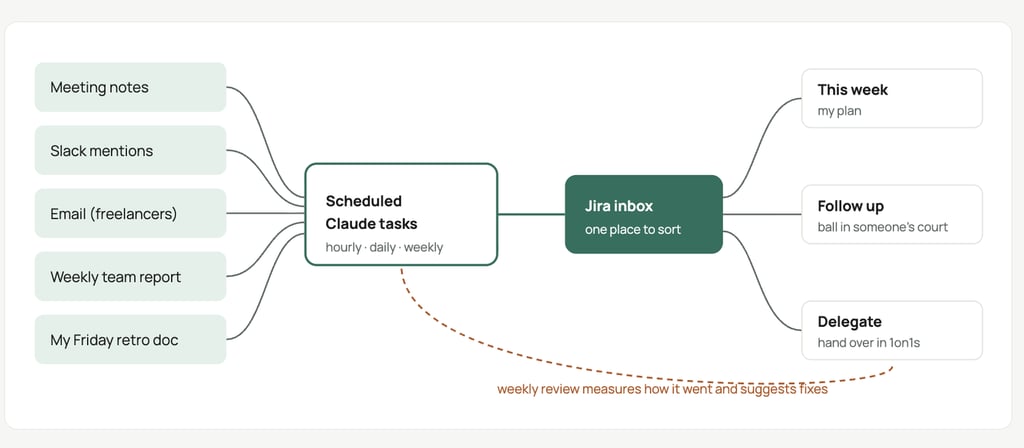
So in October, she spent about an hour chatting with Claude and built her own AI agent, an assistant that works through her apps on a schedule, no code required. Today, the assistant gathers the loose ends from her meetings, Slack threads, email, and weekly notes into a single Jira inbox, and she decides what happens to each one.
The assistant gathers the loose ends, but she set firm limits: it never sends a message, never puts a task into her plan, and treats anything unclear as a suggestion until she confirms it.

Why small promises kept slipping
The tasks that slipped were mostly small ones, like something Vakarė said she’d do on a call or a Slack thread she meant to come back to. She had tried the usual fixes. “To-do lists, Trello, handwritten notes, all of it,” she says. “Nothing worked for a long period of time for me, because I would lose it.”
“In my role, I need to look after a lot of things,” she says. “Sometimes I’ll mention an idea, or someone else will, and I’ll delegate it. But I still need to check in after some time that it’s done.”
Those tasks lived everywhere: some sat in meeting notes, some in Slack threads or email, and some in her retro, the short reflection she writes for herself at the end of each week. A few ended up on separate to-do lists, and every time a new priority landed, they slid further down.
Holding all of it in her head wasn’t free, either. “It also cost me a lot of mental energy,” she says.
Busy days made it worse. On a recent Monday, she spent the whole day writing a strategy document. “Usually this is the time I would have dropped my to-do things and just forgotten them,” she says. Now her assistant won’t let that happen: “It will remind me of things that I’ve dropped and things that I’ve forgotten.”
How she built her assistant without writing code
Vakarė built the assistant during a two-hour slot she and a colleague had set aside to explore AI. She already knew what she wanted. “I know where my problem is, and I just want to fix it,” she remembers thinking.
Her first stop was DEX, Hostinger’s internal AI assistant. But DEX lives in Slack, and she was trying to escape the noise, not add more notifications to it. So she moved to Claude Cowork, Anthropic’s desktop app that can run tasks on a schedule.
Instead of sending her more pings, Claude works in the background: it collects everything she still needs to act on from her meetings, email, and Slack (with DEX’s help) into a single task list that she checks when she’s ready.
She describes each job in plain language: what to check, what to do with the results, and when to run. The app then runs the job on that schedule, without her.
Next, she connected Claude to Google Calendar, Google Drive, Gmail, and Jira, the task tracker where her to-dos now land. None of it requires code. The easiest way to connect an app, she says, is to ask Claude to do it, then sign in and approve access.
Her calls also leave written notes behind, which gives Claude better material. She started with Gemini’s note-taking in Google Meet and later switched to Wispr Flow, which she finds better. She calls them the biggest factor in quality: the more meetings have them, the less the AI has to guess.
Slack was the tricky part. Claude isn’t connected to Hostinger’s Slack, so DEX still handles that part. At first, Vakarė copied DEX’s summaries into Claude by hand, until Claude suggested putting them in a Google Doc it could read on its own.
Every day at 5 p.m., a DEX workflow finds public-channel threads where someone mentioned her and she hasn’t replied, then writes a short report into a Google Doc. Each weekday at 8 a.m., Claude reads that doc and turns anything still open into a task.
So her two AI assistants never talk to each other: they pass notes through a shared doc, like coworkers who sit on different floors.
For Vakarė, the Slack report matters most. “That’s honestly the big thing,” she says. “It just removed so much stuff from my head. It’s such a lifesaver.” It also helps her pace her replies. Many mentions, she’s found, only need a quick “thank you” or a thumbs-up, and the summary points those out. “You don’t need to break your focus to respond,” she says.
Three weeks in, her to-do system runs on scheduled jobs and a set of rules that make the assistant more trustworthy.
A week with Vakarė’s assistant
These are the jobs that feed Vakarė’s to-do list:
Every hour, 9 a.m. to 6 p.m. The meeting job reads the notes from each call and turns her next steps into Jira tasks, sized from 15 minutes to multiple days, with a link to the notes. If a call has no notes, it suggests a likely task based on the calendar event, like leaving feedback after a hiring call.
Weekdays, 7:50 a.m. The freelancer reply job checks her email threads with freelance writers. When she owes a reply, it creates a task and a ready-to-edit Gmail draft.
Weekdays, 8 a.m. The morning triage imports the Slack threads that need her, confirms or dismisses suggested tasks with a written reason, tags each one to her quarterly goals, and sends her a short summary: her top three for the day, quick wins, and what’s waiting on her.
Tuesdays and Thursdays. The follow-up check goes through everything she’s waiting on: who to nudge (with a draft message), what’s back on her, and what to drop.
Wednesdays. The system review measures the setup itself, such as how long tasks wait and how many automatic decisions she reversed, and proposes up to three changes. She picks which ones to apply.
Fridays, 1 p.m. Retro prep gathers the facts for her weekly retro: what got done, where the week went by goal, and what slipped. If a goal’s deadline is close and nothing has moved, it says so.
Then there’s Vakarė’s part. Every task the assistant creates lands in one Jira inbox, a holding pile where it waits until she decides where it goes: her plan for this week, a follow-up list for anything where the ball is in someone else’s court, or a list of tasks to hand over in her one-on-ones.
She meant to clear that inbox every morning, but with calls often starting at 8:30 or 9, a daily routine never stuck. “I’m just not that kind of person,” she says. Her “inbox empty by 9:30” target failed every day, so she changed it to “cleared at least twice a week” and now sorts in bursts. As she puts it, “You have to be honest with yourself about the kind of person you are.”
Six rules that keep the to-do list from turning into noise
Turning every mention into a task would just swap one mess for another, so Vakarė’s fix was a short set of rules. “Without these, an automated to-do list quickly turns into noise,” she writes in her setup notes.
- One inbox. Nothing lands directly in her plan, and once she moves a task, it’s hers.
- Suggest, don’t decide. Unclear tasks come in as “suggested.” The triage confirms or dismisses them with a written reason, so she can overrule it.
- Status says whose move it is. A task marked “Waiting on someone” means the ball is elsewhere. Anything else on the follow-up list counts as hers.
- Make the next step small. Every task comes with a size, a link to its source, and a draft Slack message or email where one is needed.
- Never send. The system drafts, labels, and reminds. Emails and messages go out only when she sends them.
- Failures say so. If an import or report fails to run, the job creates a task instead of remaining silent.
Some of the rules came from the assistant trying to do more than Vakarė wanted. It kept offering to automatically sort new tasks into her weeks, and she kept saying no. “I want this on me,” she says. “It’s my schedule.”
It also started moving follow-ups into her current week, and she kept moving them back. That change was reverted quickly, and the system now asks her to decide once a task has bounced twice.
The drafts are still a work in progress. “It’s good for emails because it’s kind of formal, but for Slack, everything it suggests is a little bit too formal for me,” Vakarė says. “But it’s still helpful.”
The “never send” rule may sound like a big limitation, but in practice it matches how agents behave in our own data: when we analyzed 213 million AI email actions in Agentic Mail, only 2.5% involved the agent itself sending an email. The heavy lifting is in the reading, and that’s the job Vakarė gave her assistant.
Some decisions stay off the assistant’s list entirely. One is what to drop, “which no automation will do for me,” as Vakarė puts it. She also keeps one part of her week for herself: after the Friday job gathers what got done, she writes her own reflection on how she felt and how she showed up as a leader.
What changed, and what the assistant still can’t do
When Vakarė shared her setup with the team, she estimated the assistant was already saving her “probably about an hour of work every day and a lot of mental space to do the stuff that matters.”
The idea even followed her home. “I’ve been tracking my budget, but I keep spending money and I don’t know where. It just slips through,” she says. “So I was like, ‘Okay, maybe I can build something.'” She didn’t want her personal finances in her work tools, so she rebuilt the same pattern with a different AI assistant and a Google Sheet.
Back at work, her assistant still has limits, and Vakarė lists them as plainly as its features:
- The app has to stay open. In her setup, the jobs run only while the Claude desktop app is open.
- Slack coverage is partial. The DEX report covers the public channels DEX tracks, not private channels, DMs, or group DMs, so she still checks her DMs before logging off.
- The backlog keeps growing. Small, low-priority tasks pile up, so she’s thinking about splitting the backlog into next month and next quarter.
“This obviously doesn’t replace my usual Slack work,” she wrote when she shared the setup. “It just helps me catch those loose ends.”
What you need to build your own AI to-do assistant
Vakarė’s advice is to start smaller than she did: pick one source, like meeting follow-ups, and one daily summary. Add Slack, follow-ups, and a weekly retro only after sorting the inbox has become a habit.
Here’s the minimum you need:
- A source that already exists. Meeting notes are the easiest start, because the next steps are already written down.
- An AI tool that runs jobs on a schedule. The tool also needs to connect to the apps where your notes and tasks live.
- One place for tasks. Before Vakarė connected Jira, Claude suggested a Google Sheet, which is plenty for a lighter workload.
- A few rules from day one. Suggestions stay suggestions until you confirm them; nothing gets deleted, and nothing gets sent without you.
- A sorting rhythm you’ll keep. Daily didn’t work for Vakarė, but twice a week does. Pick the target that matches how you actually work.
Scheduled jobs are a paid feature in both Claude and Hostinger Agent. The free version of the idea is to run the same prompt yourself each morning and paste the results into a Google Sheet.
What happened when our Content Team rebuilt the assistant in Hostinger Agent
Vakarė’s setup leans on DEX, a tool built for Hostinger’s own teams. To see whether anyone could build this without it, our content team rebuilt the simplest version of her setup in Hostinger Agent.
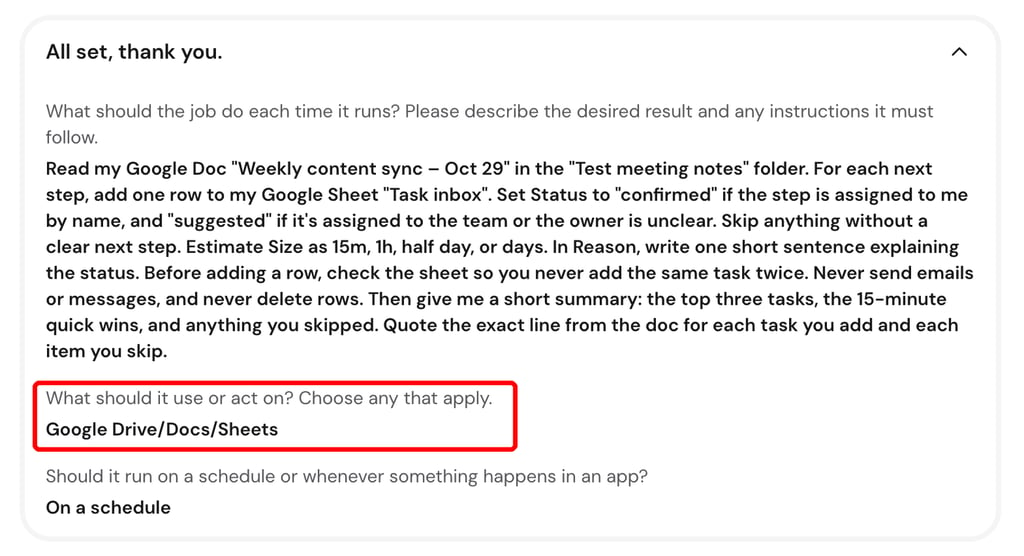
Our version had three parts: a Google Doc containing meeting notes, a Google Sheet serving as the task list, and a running job in Hostinger Agent that converts one into the other. Hostinger Agent connects to every app in her setup, and jobs need the Agent Plus plan.
Setting up the job took about six minutes of chat. A short guided setup asked what the job should do, which apps it may use, and whether it should run on a schedule or when something changes in an app. We picked only Google Drive, Docs, and Sheets, leaving Gmail out so the job can’t touch email.
The Agent improved on our instructions. Before saving the job, it changed our “never delete rows” rule to “never delete or modify existing rows,” which is closer to Vakarė’s principle that a task is hers once she’s moved it.
We let the job run every 10 minutes for more than two hours with the browser tab closed. All 15 runs completed, and each one took 21 to 80 seconds and used 3.5 to 9.7 credits.
The job added a new task we’d assigned to ourselves in the notes, kept a task assigned to the whole team as a suggestion because no one was named, and never duplicated a row. When nothing had changed, the run summary said so and left the sheet alone.

We had to make a couple of adjustments. In our first manual run, the summary listed a skipped item that didn’t exist in the notes. Asking the Agent to quote the exact source line fixed that, and the quotes held in the scheduled runs after that.
Later, the job re-added a task we’d deleted, and the new row said “1h” instead of the “half day” it got the first time. In Vakarė’s setup, a wrong size like that would get caught when she sorts her inbox.
We then switched the job to run whenever the notes doc changed, which the Agent had suggested during setup to avoid empty runs that still cost credits. The first triggered run came 14 minutes after our first edit and picked up both new tasks at once.
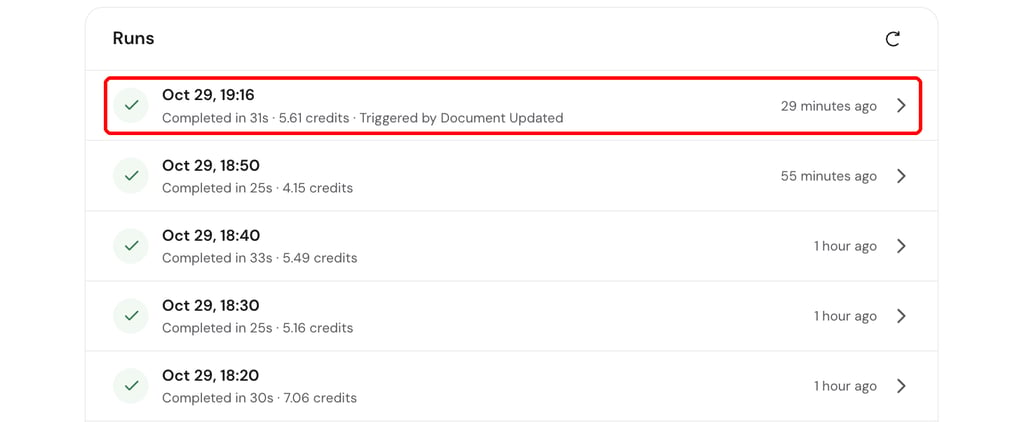
The simple version handled the core loop on its own: notes became tasks, with no duplicates, and nothing happened when nothing changed. It still needed a human check, which is the same lesson as Vakarė’s rules. It also covers only a slice of her system, with no Slack, Jira, triage, or follow-ups.
Vakarė already sees uses well beyond her own inbox. “I’m pretty sure I’m not the only person on the planet with 6,500 emails,” she says. Her idea: a job that checks an inbox every hour and pulls out what matters, like customer orders, complaints, or brands asking to collaborate.
As for her, she still spends her days in Slack – that’s part of the job, after all. But she’s no longer on standby, trying to hold every promise in her head. The loose ends wait for her in one inbox until she’s ready to do, chase, or drop them.
“You can get status, you can get money. All of it’s recoverable,” Vakarė says. “The only thing that isn’t is time.”

Bruno is a Content Writer at Hostinger, focused on creating and optimizing helpful, engaging articles about web development and marketing. With a background in journalism, he combines storytelling with practical insights to make complex topics easier to understand. He has also contributed to publications like MacMagazine and Jornal A Tarde. Outside of work, Bruno enjoys exploring art, cooking, and technology.