How to make money on Twitch
Mar 27, 2026
/
Alma F.
/
19 min Read

Twitch lets you build income from multiple directions at once – subscriptions, Bits, ad revenue, sponsorships, affiliate deals, and your own products. Which combination works for you depends on your niche, how consistently you show up, and where your audience is based, as viewers in higher-income regions tend to convert better on subs and donations.
Expect your first meaningful income around the 6–12 month mark. A tight-knit 150-viewer community can out-earn a passive 1,000-viewer channel in an oversaturated category. Growth here isn’t about going viral – it’s about matching what your audience wants with offers they’ll actually pay for.
Here’s the full 10-step process on how to make money on Twitch:
- Pick a niche with earning potential. Choose content you can stream consistently, and that attracts an audience willing to support creators.
- Turn your channel into a professional storefront. Clear branding, panels, and information help new visitors quickly understand what you offer.
- Design a repeatable stream structure. Consistent formats improve viewer retention and make support requests feel natural.
- Unlock platform monetization through Twitch Affiliate. Subscriptions, Bits, and ads activate once you hit the activity milestones.
- Strengthen subscription value. Perks, community rituals, and recognition encourage viewers to stay subscribed.
- Enable voluntary support tools. Bits, tips, and transparent goals give viewers additional ways to contribute.
- Use ads carefully. Balancing ad breaks with viewer experience protects retention while adding passive revenue.
- Work with brands that fit your niche. Sponsorships and partnerships become possible once your audience is consistent and engaged.
- Recommend products through affiliate programs. Gear and tools you already use can generate commissions over time.
- Expand income beyond Twitch. Off-platform content and products create more stable, diversified revenue.
1. Choose a monetizable niche
Your Twitch niche is the foundation on which everything else is built. A clear niche attracts the right audience and keeps viewers coming back.
Get this right, and subscriptions, sponsorships, and affiliate income become much easier to earn. Try to appeal to everyone, and you’ll spend months growing slowly with little to show for it.
And while Twitch is best known for gaming, it isn’t limited to it. Categories like Just Chatting, Art, Music, Cooking, ASMR, and Sports & Fitness all have thriving audiences. Just Chatting alone is consistently one of the most-watched categories on the platform.
Think of your niche as your “why watch me” promise – something far more specific than “I do cooking streams” or “I stream games.”
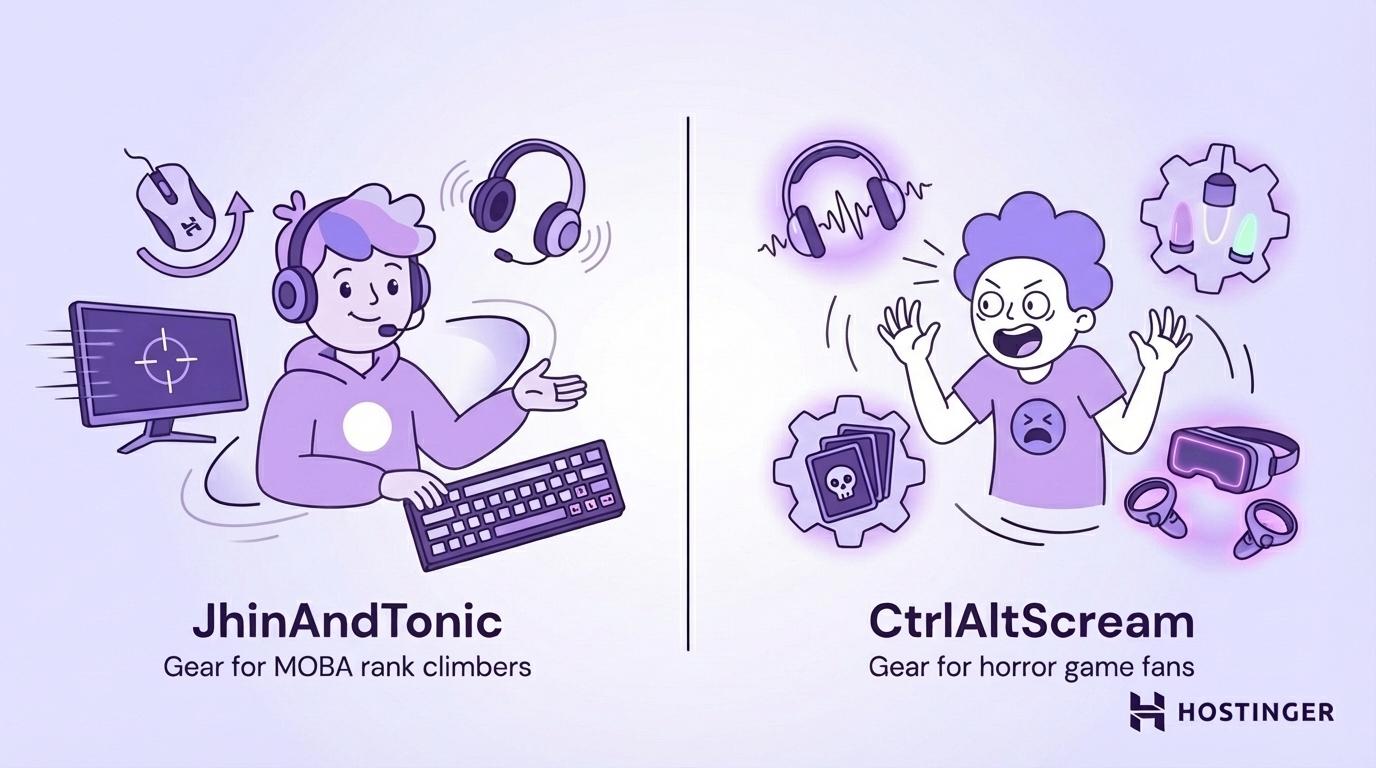
To make the niche concept concrete, we’ll use two gaming examples throughout. Meet JhinAndTonic, whose promise is “I help casual players get better at League of Legends without the toxic ranked grind,” and CtrlAltScream, who built a channel around blind horror gameplays and being genuinely terrible at them.
Two completely different niches with two instantly clear promises.
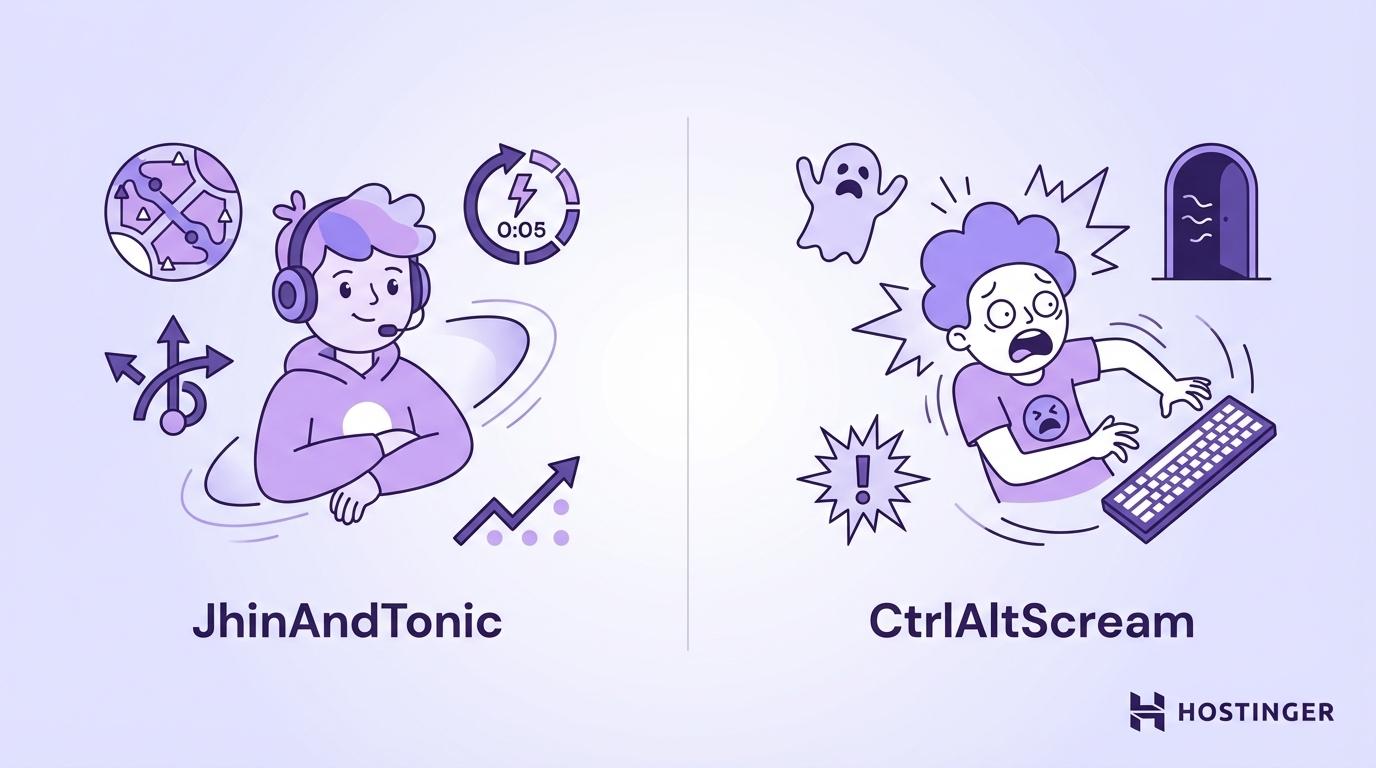
Now, how do you know people are actually out there looking for your specific promise? Check these four things:
Criteria | What to look for | Why it matters |
Audience size | How many people regularly watch this type of content? | If people aren’t watching it, your channel can’t grow |
Competition level | Can you realistically appear among the top streams? | Too many streamers already doing it makes getting discovered harder |
Content repeatability | Can you realistically stream this 3x/week for 90 days? | Burnout ends more channels than bad content |
Spending potential | Do viewers already spend money in this space? | This affects sponsorship deals and affiliate earnings |
Once you’ve found your niche, write a one-sentence channel promise and build three recurring show formats around it – ranked gameplay and viewer coaching for JhinAndTonic, or weekly recipe challenges for a cooking streamer, for example. These give your stream structure and make you predictably worth returning to.
There are plenty of ways to make money online, but Twitch specifically rewards creators who commit to a clear identity and build real relationships with their viewers.
How to pick a profitable Twitch streaming niche
- List your strengths and what you can stream consistently for 90 days. Consistency is crucial because burnout, even with passion, can cause you to quit before your channel starts growing.
- Research 5–10 Twitch categories and note average viewer counts and competition patterns. A mid-size category with engaged viewers is often better than a massive one where you’ll be lost among thousands of other streamers.
- Identify ways viewers already spend money in your niche. Gear recommendations, coaching, and game guides show that your future audience is already spending money in this area.
- Write a one-sentence channel promise and test it across 3 streams. If new viewers can understand what your channel is about without asking, you’ve found your pitch.
- Commit to one primary niche for 30 days before switching direction. Switching too early means you won’t gather enough data to improve.
What if the niche I like is already huge on Twitch?
Large categories aren't automatically bad choices. Many creators grow in massive Twitch categories by focusing on a specific angle rather than blending in – a gaming streamer might focus on speedruns, while a Just Chatting streamer might build around a specific topic like finance, mental health, or language learning. An art streamer who specializes in live character design for indie games has a clearer niche than one who draws whatever.
2. Set up your Twitch channel like a storefront
Think of your Twitch channel the way a shop owner thinks about their storefront. Nobody walks into a store that looks abandoned. The window display, the layout, the signage – they all point to whether this place is worth someone’s time.
Your channel works the same way: the visuals, the bio, the schedule, and the panels tell a new visitor in seconds whether you’re worth following. The better your Twitch channel setup, the more likely you are to earn money streaming.
To make a strong first impression, focus on building trust through clear branding. Your username, profile image, banner, and streamer bio should immediately communicate what your channel is about.
For example, JhinAndTonic’s About section might read: “Weekly coaching breakdowns for bronze-to-gold LoL players. Live Tue/Thu/Sat 7pm EST. Come to improve, stay for the community!”
CtrlAltScream takes a completely different approach: “Blind horror playthroughs. Zero preparation. Maximum screaming. New game every month. Mon/Wed/Fri 9pm EST.”
See the formula here? Niche, schedule, and what the viewer can expect.
Your Twitch panels should serve the same purpose: clearly display your schedule, rules, support options, and business contact information. If you promote products or partnerships, include a brief disclosure to maintain professionalism and stay compliant with the rules before any issues arise.
This level of professionalism should also carry through to your stream design. Cluttered overlays and distracting alerts can hurt your channel’s credibility.
How to set up your Twitch channel for monetization
- Write an About section that states your niche, your schedule, and the viewer’s benefit. This is the first thing potential followers and sponsors read, so make every sentence earn its place.
- Add essential Twitch panels. Include About, Schedule, Rules, Support, and Business Inquiries so viewers can quickly understand your stream and how to support it.
- Create one page with all your links and connect it to your channel. One page that houses your socials, YouTube, Discord, tip link, and merch makes it effortless for viewers to find the next step. A simple link-in-bio page works well here and takes minutes to set up using Hostinger Website builder.
- Add affiliate disclosures wherever you use referral links. Transparency is both a legal requirement in many regions and important for building trust – proper affiliate marketing disclosure keeps you on the right side of both.
- Set up alerts and overlays to match your brand and keep the screen readable. Consistent visuals signal professionalism, and clean overlays mean viewers focus on you rather than the clutter.

3. Build a stream format that converts viewers into supporters
Content is what you stream, while stream format is how you structure it – and that structure is what brings viewers back.
A stream without structure loses viewers quickly. If they don’t know what’s happening, they leave, which hurts retention. A stream with a clear, consistent flow keeps viewers engaged and coming back.
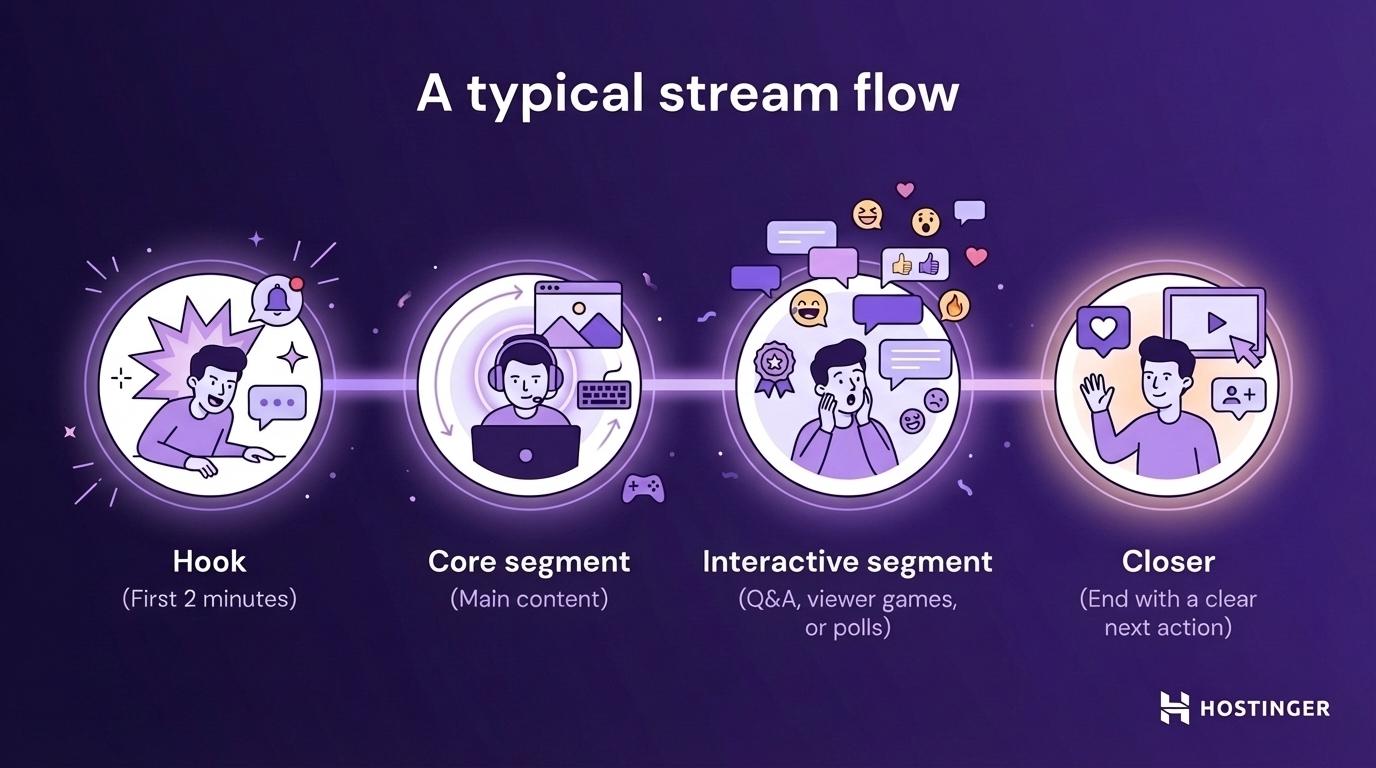
Many successful streams follow a simple 2–4 hour stream format: hook → core segment → interactive segment → closer.
Small features like channel points, viewer shoutouts, and inside jokes help with retention. They create a sense of community on your stream, and when viewers feel connected, they’re more likely to become subscribers. You can extend that sense of community off-platform by building a community forum, which keeps them connected between streams.
These small features set the stage for a well-timed call to action. Asking for support during high-energy moments, when viewers are most engaged, is far more effective than frequent interruptions. One natural ask, delivered at the right time, will get a better response than asking every 10 minutes.
JhinAndTonic might say: “Clutch win, zero tilt! If the coaching is helping your rank climb, drop a sub to keep things going!”
CtrlAltScream might go with: “If my suffering brings you joy, you can officially make it worse – sub link’s right there.”
Both fit the channel’s personality.
How to design a stream that drives subs and donations
- Start with a 2-minute hook that previews what viewers will get today. Viewers make a decision about whether to stay within the first 30 seconds – a good hook is what keeps them around.
- Run one core segment that delivers on your niche promise. Consistency here creates the “oh, it’s the part I love” feeling that keeps loyal viewers coming back.
- Add a planned interactive segment – Q&A, viewer games, or polls. Chat engagement increases the chances of a subscription because viewers feel involved in the experience, not just like spectators. For example, when JhinAndTonic asks, “Chat, am I cooked?” after a bad draft, it pulls viewers into the moment.
- Drop light CTAs at natural high-energy moments. Pick a moment like a clutch play or a follower milestone. These feel more natural than asking during slow periods with little chat activity.
- End with a clear next action – schedule a reminder, start a raid, or send a Discord invite. The end of the stream is your best chance to convert, but many streamers waste it by just saying, “Okay, see you guys.”
4. Qualify for Twitch Affiliate
Twitch Affiliate is the first big milestone for monetizing your stream. It lets you earn from subscriptions, Bits (Twitch’s currency), and ads.
Thanks to Twitch’s Monetization for All initiative, many creators can start earning from subs and Bits even before reaching Affiliate, as long as they complete the onboarding process and agree to Twitch’s Monetized Streamer Agreement.
To qualify for Affiliate, Twitch looks at your consistency over a rolling 30‑day window, including minimum follower counts, total hours streamed, unique broadcast days, and an average of concurrent viewers. You can track your progress in the Path to Affiliate section of your Creator Dashboard.
Remember, Twitch occasionally updates these targets, so always check the latest numbers in their help docs.
Once eligible, you’ll need to complete three onboarding steps: setting up payouts, filling out tax forms, and account verification. Twitch will hold your earnings until you reach the minimum payout threshold, so your first payment can take a few extra weeks.
Now, the real challenge is getting viewers to support your stream. The key is making subscriptions genuinely worth it. Strong perks, real gratitude, and building a community people want to be part of will always beat using pressure tactics.
Twitch Affiliate vs. Partner vs. Creator
All Twitch streamers start as standard creators, which lets you go live and grow your audience without earning payouts. The first milestone is Twitch Affiliate, which unlocks features like paid channel subs, Bits, and ad revenue. From there, you can level up to Twitch Partner, which is for larger channels that meet stricter criteria and get extra perks like more emote slots, priority support, and more brand deal opportunities.
How to set up Twitch Affiliate monetization
- Meet the activity milestones required for Twitch Affiliate. You’ll need to hit minimum stream days, broadcast hours, average viewers, and follower count within a 30-day period before monetization unlocks.
- Complete onboarding: payout setup, tax forms, and account verification. Monetization won’t activate until these steps are complete, so complete them as soon as you qualify.
- Enable subs, Bits, and ad settings in your Creator Dashboard. These tools are disabled by default for new Affiliates, so make sure to turn them on after onboarding.
- Create subscriber perks – Twitch emotes, badges, Discord roles, or ad-free viewing. Perks are the main reason people subscribe beyond wanting to support you directly, so invest real time in making yours feel worth the cost.
- Add a clear, compliant support section to your channel. Simple wording like “Support the stream if you enjoy it” encourages contributions without pressuring viewers or violating platform guidelines.
5. Increase subscription revenue with perks and community design
Most Twitch subscriptions aren’t driven by content quality alone. People subscribe because they feel like they belong somewhere – and they keep subscribing because they feel recognized and included in the community. Recognition, access, and repeat value are what keep supporters coming back.
This is where subscriber perks matter. Good perks give viewers clear Twitch membership benefits that make subscribing feel worthwhile.
Sub tiers should offer clear differences in value, access, and recognition:
Tier | Example perks | Best for |
Tier 1 | Discord access, emotes and badges, and sub-only chat | First-time supporters |
Tier 2 | Sub-only events, extra emotes, and extended access to VODs (Video on Demand, which are recordings of past streams that viewers can watch anytime) | Regular viewers who want more access |
Tier 3 | Behind-the-scenes content, monthly Q&A, and direct recognition | Your most invested community members |
Twitch offers three sub tiers globally (Tier 1, Tier 2, and Tier 3). Base prices are about $5.99, $9.99, and $24.99 in the US, though local sub pricing varies by country.
You don’t need to offer everything right away. Start with a few meaningful perks and improve them as your community develops.
As your audience grows, community retention becomes just as important as gaining new subscribers. Some viewers will eventually cancel, so small habits – like welcoming new subs or celebrating sub anniversaries – help people feel valued and keep them around longer.
Strong subscriber onboarding also matters. A simple shoutout, a fun ritual, or a quick invitation to your Discord helps new supporters feel like they’ve joined something real.
How to grow Twitch subscriptions
- Define a clear member promise. Explain what subscribers consistently get in return for their support. Specific perks give people a reason to stay subscribed, while vague ones lead to quick churn.
- Build three sub tiers with meaningful differences in value, access, and recognition. Each level should feel like a meaningful upgrade, not just a higher price.
- Promote perks during natural moments. Mention subscriber perks during milestones, community nights, or special streams so the support request feels relevant rather than forced.
- Welcome new subscribers properly. A strong subscriber onboarding can be as simple as a quick shoutout and an invitation to Discord to help them feel like part of your community.
- Review churn monthly and improve perks based on feedback. Pay attention to when subscribers cancel and what your community asks for. Small changes to perks or events can improve retention over time.
6. Earn more with Bits, tips, and crowd-powered goals
Beyond subscriptions, viewers can also support your stream through Bits and tips.
Twitch Bits are the platform’s built-in virtual currency. Viewers buy them through Twitch and use them to “cheer” in chat – sending animated messages that support the streamer and trigger on-screen alerts – while Twitch handles payments and payouts.
Tips usually go through third-party services like StreamElements or Streamlabs using PayPal or card payments.
The main difference is that Bits stay inside Twitch, while tips happen off-platform, which means tips can reach you faster but may carry risks like chargebacks or payment disputes.
For this reason, many streamers treat Bits as their main in-stream support option. Tips can still work alongside them, but your channel panels should include a clear support message explaining that tips are optional, voluntary, and non-refundable. This kind of transparency helps protect both you and your viewers and builds long-term trust.
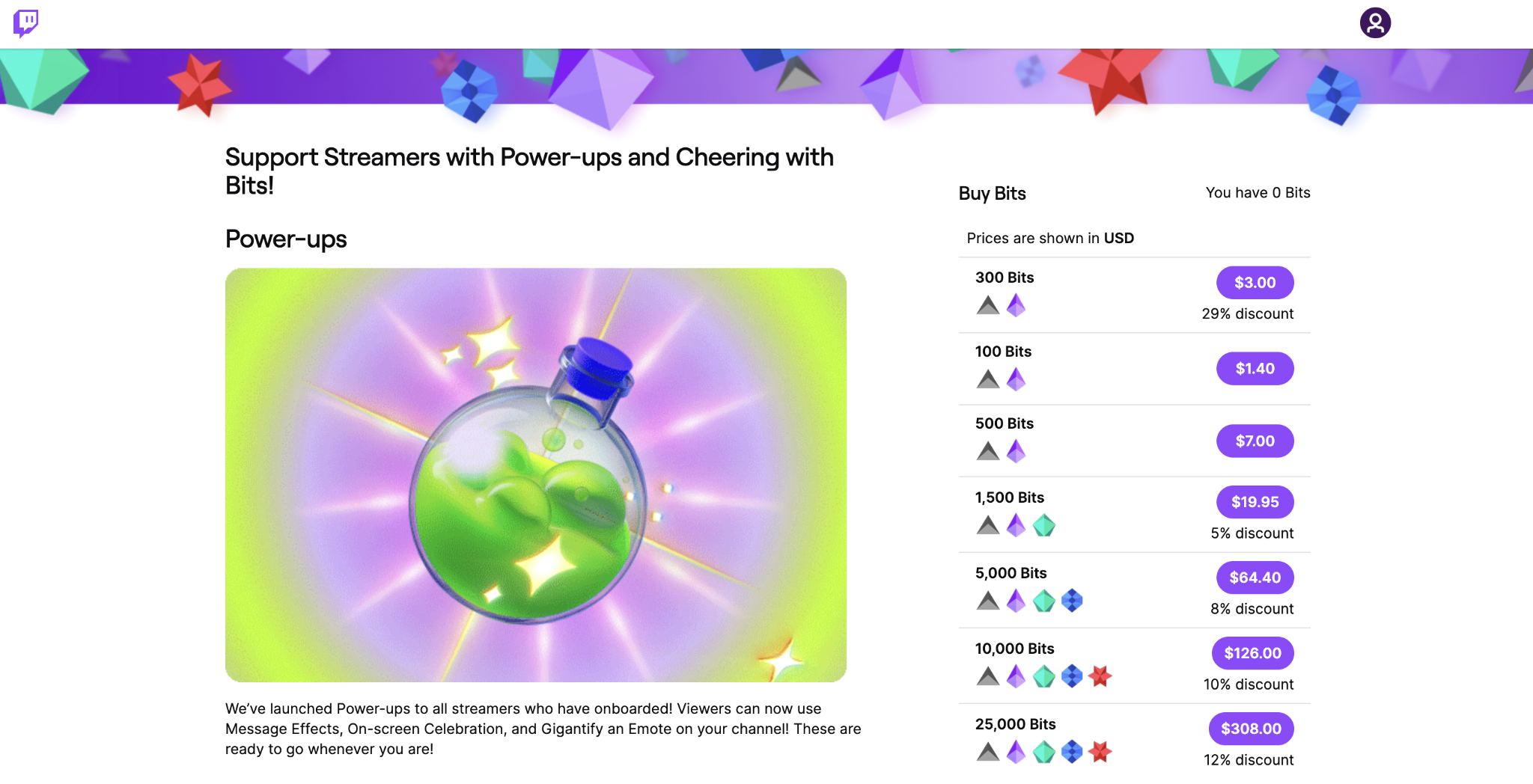
Once support options are set up, the next step is giving viewers something to rally around. Donation goals work best when they fund something specific, such as improving the stream or unlocking a community event.
For example:
- JhinAndTonic might set a goal to upgrade his microphone so his commentary is easier to follow.
- CtrlAltScream might run a goal for a full horror marathon or let chat vote on the next nightmare game once the goal is reached.
- Some creators set charity goals or community events like sub tournaments or viewer game nights.
“Help support the stream” is vague and doesn’t really motivate.
“Help us reach $300 for a new mic by the end of the month” gives viewers a clear reason to participate and rally behind the creator.
How to set up tips and goals without harming trust
- Use Twitch Bits as your default in-stream support option. Bits are friction-free for viewers and processed inside the platform, which lowers the risk of payment disputes.
- Add a tip link only after you include a clear support message and disclosures. Simple wording explaining that tips are optional and non-refundable improves transparency and protects streamer trust.
- Set one transparent donation goal with a clear purpose and timeline. Viewers are more likely to contribute when they understand exactly what the goal supports and when it will happen.
- Keep stream alerts subtle and consistent with your stream’s tone. Overly loud or long stream alerts can interrupt the experience. Simple notifications are enough.
- Thank supporters sincerely without constant prompting. Genuine supporter recognition strengthens community relationships, but frequent donation prompts can break the flow of the stream.
7. Use ads strategically without tanking retention
Twitch ad revenue is one of the most passive ways to earn on the platform, but it comes with a trade-off. Every time an ad runs, some viewers leave. For small channels, that loss can matter more than the money the ad generates.
Twitch runs two main types of ads: pre-roll ads and mid-roll ads. Pre-roll ads play automatically when someone opens your stream. You can shorten or temporarily disable them, but you can’t remove them entirely.
Mid-roll ads are the ones you control. These should run during natural transitions like queue times, loading screens, or bathroom breaks. A simple message like “Quick ad break – back in 90 seconds” helps maintain viewer retention because people know what to expect.
For smaller channels focused on growth, it’s usually better to run fewer ads. Early ad strategy decisions should prioritize building an audience first. As your channel grows and stabilizes, you can experiment with ad frequency and use Twitch analytics to see how the change affects your stream.
Watching your retention metrics – such as average watch time, chat activity, and follows per hour – will show you whether ads are helping your revenue without hurting long-term growth.
How to run ads without losing viewers
- Decide whether to prioritize growth or short-term revenue. Early in your channel’s life, running fewer ads usually helps build an audience faster, while heavier ad usage favors short-term income.
- Schedule ad breaks around natural transitions. Running ad breaks during queue times, loading screens, or intermissions keeps the viewing experience intact.
- Tell viewers when an ad break is coming. A quick heads-up helps maintain trust and prevents viewers from feeling surprised or interrupted.
- Track retention metrics after changing ad frequency. Monitor average watch time, chat activity, and follow rate in Twitch analytics to see how viewers respond.
- Pull back quickly if ads start hurting growth. If regular viewers drop off after adding ads, reduce frequency and prioritize long-term viewer retention.
8. Add sponsorships and brand deals
Twitch sponsorships don’t require a massive channel, but they do require a consistent one. A channel with 80 engaged viewers in the right niche can land deals that a 500-viewer channel with passive chat cannot.
Brands look for signals that your channel is reliable and safe to work with. The most common readiness signals include a consistent streaming schedule, stable average viewer numbers, an active chat, and a clearly defined niche.
Twitch has also added tools like the Sponsorships tab and Creator Profile in the Creator Dashboard, which can match eligible streamers with brand campaigns through built-in opportunities such as the Bounty Board and StreamElements partnerships.
When evaluating potential partners, brands usually look at:
- Average concurrent viewers and whether that number is stable week to week
- Chat engagement, which shows that viewers actively participate
- Audience demographics, such as age range, region, and buying behavior
- Content safety, since brands avoid channels with guideline violations or ongoing drama
Your streamer media kit is what helps brands quickly understand your value. It should fit on one page and include:
- A short description of who you are and what your channel focuses on
- Core metrics such as average viewers, follower count, and streaming schedule
- An audience snapshot showing demographics and interests
- Examples of past brand integrations, if available
Many creators also include a simple rate sheet with their sponsorship rates based on the type of deliverables offered. Pricing varies widely depending on audience size and engagement, so most streamers structure rates around the scope of the campaign rather than promising fixed outcomes.
A simple way to organize this is by creating three sponsorship packages:
Package | Example deliverables | Best for |
Starter | Single stream mention, panel placement | Small brands testing a collaboration |
Standard | Dedicated stream segment, social media post | One-off sponsored campaigns |
Premium | Recurring integrations across multiple streams, social posts, long-term placement | Long-term brand partnerships |
Clear packages make it easier for brands to understand what they’re buying and how the collaboration will work.
How to land sponsorships as a Twitch streamer
- Define your sponsor-friendly niche categories. Categories like gaming gear, apps, education tools, or lifestyle products help brands quickly determine whether your audience aligns with their target customers.
- Build a one-page streamer media kit. Include your audience profile, key metrics, and past examples so brands can quickly evaluate the opportunity of working with you.
- Create three sponsorship packages with clear deliverables. Structured options help brands compare opportunities and understand exactly what they will receive.
- Pitch brands with a short outreach email. A strong outreach email leads with the value you offer their audience rather than asking whether they want to sponsor you.
- Deliver on time and provide campaign reporting. Clear campaign reporting shows brands the results of the partnership and increases the chance of repeat collaborations.
9. Earn affiliate income from the products you already use
Affiliate marketing on Twitch is simple: recommend the tools you already use and earn a small commission when viewers buy through your affiliate links. Because streamers constantly talk about their setup, this can become a natural form of passive income without changing your content.
The key is credibility. Viewers can easily tell the difference between a real recommendation and a forced promotion. If you promote products you genuinely use, the suggestion feels helpful instead of sales-driven.
For example, JhinAndTonic might recommend the mouse, headset, or monitor he uses to climb ranks in League of Legends. CtrlAltScream could link the horror game bundles or headphones that help capture every jump scare clearly.
Creators outside of gaming have just as many opportunities. A cooking streamer might link the knives or cookware they use every stream, while a musician might share their recording interface, plugins, or microphone setup.
Once you decide what products to recommend, make those links easy to find. The most common placements are channel panels, simple chat commands triggered by a bot (such as !gear), and a central link hub page that lists all your recommendations in one place.
When a product comes up naturally on stream, a quick line like “This is the keyboard I use – the link’s in the panels” works far better than a rehearsed promotion.
Always include clear disclosure when links earn you a commission, and avoid presenting recommendations as unbiased reviews. Transparency protects the trust you’ve built with your audience.
Many streamers start with programs like Amazon affiliate for streamers, since viewers often ask about microphones, keyboards, and other streaming gear.
How to set up affiliate links for Twitch
- Choose 5–10 products that genuinely match your audience. Focus on streamer gear recommendations that viewers already ask about. A short, relevant list converts far better than a long page of random products.
- Organize everything in one link hub. Group products by category so viewers can quickly find things like microphones, keyboards, or lighting.
- Add panels and chat commands to surface the links. Simple commands like !gear or !setup let viewers access your recommendations without interrupting the stream.
- Mention products only when they’re relevant. Constant promotion makes viewers tune out. A quick recommendation during natural moments – like when someone asks about your headset in chat or when you adjust your mic during a stream – feels less sales-driven and genuinely helpful.
- Review clicks and conversions regularly. Monitoring your conversion rate helps you see which products resonate with your audience and keeps your recommendations current.
10. Diversify beyond Twitch with content and products
Twitch is great for live community, but it’s a fragile foundation for income on its own. In the broader creator economy, most successful streamers build revenue across multiple platforms and products. Algorithm shifts, platform policy changes, or even a few weeks away from streaming can affect your earnings overnight.
Off-platform channels help stabilize that income in three ways: discoverability, ownership, and additional revenue paths.
A common starting point for Twitch streamers is YouTube. Long-form videos and Shorts created from your stream highlights can introduce your content to viewers who might never have discovered you live.
Over time, those videos can become their own revenue stream as creators learn how to make money on YouTube through ads, memberships, and long-form content built from their streams.
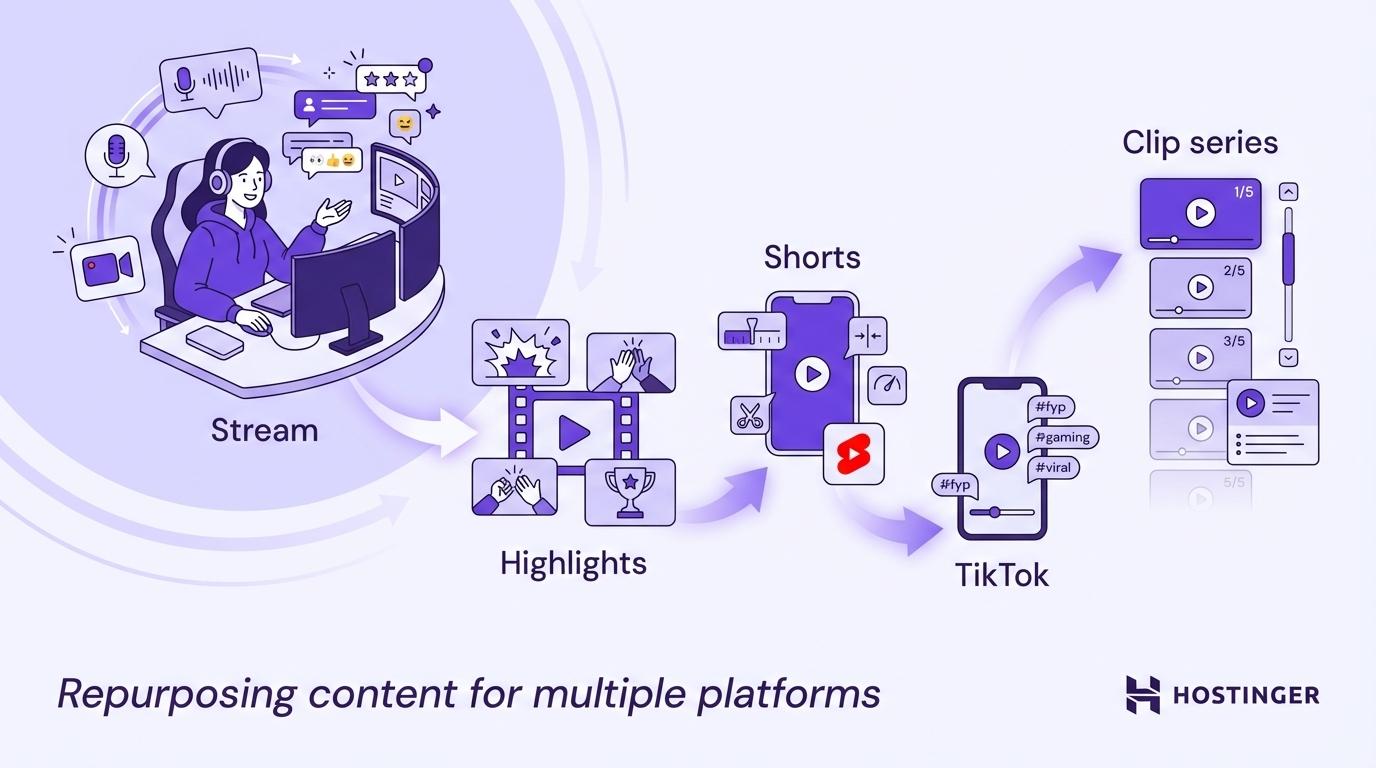
One stream can easily turn into multiple pieces of content:
- A highlight video for YouTube
- Three shorts from the best moments
- A TikTok clip
- A clip compilation for social media
This kind of content repurposing lets one stream generate content for multiple platforms without recording anything extra.
Beyond repurposed content, many streamers also create products that extend what their audience already enjoys:
- Coaching sessions. One-on-one time for viewers who want personalized help
- Digital downloads. Guides, templates, or resource packs your audience would pay for tomorrow
- Online courses. Structured versions of what you already teach on stream
- Paid community tiers. Exclusive Discord access, private streams, or monthly group sessions
- Merch for streamers. Shirts, desk mats, or inside-joke designs your community already recognizes
The key is matching the offer to something viewers already care about – whether that’s solving a problem or getting more of the content they enjoy. If JhinAndTonic’s viewers constantly ask how to improve their ranked play, coaching sessions are something they’d actually pay for. CtrlAltScream might turn their audience’s love of horror reactions into special marathon streams.
Among these options, digital products for creators are one of the cleanest ways to add a revenue stream that doesn’t require you to be live.
How to diversify income off Twitch
- Set one primary off-platform channel. Most streamers start with YouTube because it has strong discovery. Trying to grow five platforms at once usually spreads your effort too thin.
- Build a simple content repurposing workflow. Turn each stream into multiple assets: clips → shorts → longer videos. This creates a creator funnel that introduces new viewers to your content and eventually sends them back to Twitch.
- Launch one paid offer that fits your niche. Choose a product that solves a real audience problem. Coaching for competitive players, templates for creators, or a private community for loyal viewers are common starting points.
- Send viewers to one owned platform. Platforms can change their algorithms at any time. Building an email list for creators or an active Discord gives you a direct way to announce streams, products, and launches.
- Track which income streams grow fastest. Review your revenue mix each month. Instead of trying to grow everything equally, focus your time on the two income streams gaining traction the fastest.
Best practices for Twitch monetization
Growing revenue on Twitch is rarely about one big tactic. It comes from consistent habits that protect your audience, your reputation, and your growth over time. These Twitch best practices help creators keep their channels sustainable as they grow.
- Disclose anything that affects viewer trust. Affiliate links, sponsored segments, and gifted products should always be disclosed clearly in your panels and on stream. Transparency keeps you compliant with platform policies and protects long-term audience trust.
- Protect the viewer experience before chasing short-term revenue. Running too many ads, asking for subs every few minutes, or forcing irrelevant sponsorship mentions may bring short bursts of income but can drive viewers away over time.
- Review your numbers every week. Metrics like average concurrent viewers, chat messages per hour, follows per stream, and subscription conversions are core creator analytics that reveal what’s working before it shows up in your payout.
- Plan your schedule with a content calendar. Using a streaming content calendar helps maintain streamer consistency and makes it easier for viewers to build a habit of showing up for your streams.
- Build repeatable segments into your stream. Weekly formats such as viewer game nights, replay reviews, or challenge runs give regulars something specific to return for, making each stream easier to plan.
- Set clear community guidelines and enforce them consistently. Strong community guidelines and active moderation keep your chat welcoming and brand-safe, which matters when working with sponsors or growing a long-term community.
- Review your VODs regularly. Watching one stream recording each week helps you catch dead air, missed call-to-action moments, and times when viewer engagement dropped.
Tools to help you make money on Twitch
You don’t need an expensive setup to start earning on Twitch, but the right tools make your streams easier to run and manage. If you’re exploring the best streaming tools, start with a few core categories that support your stream’s growth and monetization.
- Streaming software such as OBS Studio or Streamlabs. This is the foundation of your stream. Good streaming software controls scenes, overlays, and transitions, helping your broadcast look polished and professional.
- Chatbots like Nightbot or StreamElements. A Twitch chatbot automates chat commands, moderation filters, and timed messages. This lets viewers quickly access things like your schedule, Discord, or gear links without interrupting the stream.
- Stream alerts. Tools like StreamElements or Streamlabs display follower, subscriber, and Bit notifications on screen. These alerts recognize supporters and encourage greater engagement during key moments.
- Analytics dashboards. Built-in and third-party Twitch analytics tools help you track which streams perform best, when viewers leave, and how your numbers change over time.
- Link hub tools. A link hub collects your important pages – affiliate links, Discord invites, merch stores, and tip pages – so viewers can find everything without asking in chat.
Start with streaming software and alerts first. Once your stream runs smoothly, you can add chatbots, analytics tools, and link hubs to improve automation and reporting.
When evaluating any tool, ask three simple questions:
- Is it reliable enough that a crash won’t kill your stream?
- Is it simple enough to set up quickly before you go live?
- Does it cost less than the time or money it saves you?
Choosing tools with those criteria keeps your setup lean while still supporting long-term growth.
How to scale your Twitch income over 90 days
Ninety days isn’t enough time to build a full-time income on Twitch. But it is enough time to build the right foundation, reach Affiliate, and start earning for the first time. Think of this as a suggested Twitch growth plan you can follow while learning how to make money online through streaming.
Phase | Focus | Weekly KPIs to track |
Weeks 1–2: Foundation | Channel setup, niche definition, test streams | Setup completion, baseline viewers, streams completed |
Weeks 3–6: Growth | Consistent streaming schedule, community segments, discoverability | Average viewers per stream, follows per stream, chat messages per hour |
Weeks 7–10: Monetization | Activate Affiliate tools, subscriber perks, affiliate links, early sponsor outreach | Sub conversion rate, affiliate clicks, revenue by source |
Weeks 11–13: Revenue diversification | Repurposed content, off-platform audience, first paid offer | Revenue mix, off-platform traffic, email list growth |
Tracking these numbers manually quickly becomes exhausting. Build a streamer KPI dashboard to make it easier to monitor your creator KPIs, spot growth patterns, and present your results when approaching sponsors or partners.
After ninety days, you should have a clear picture of what’s working – and a system you can keep refining as you continue building a sustainable way to make money online through streaming.
All of the tutorial content on this website is subject to Hostinger's rigorous editorial standards and values.

Alma is an AI Content Editor with 9+ years of experience helping ideas take shape across SEO, marketing, and content. She loves working with words, structure, and strategy to make content both useful and enjoyable to read. Off the clock, she can be found gaming, drawing, or diving into her latest D&D adventure.