Paperclip use cases involve orchestrating multiple AI agents to run business operations autonomously. Rather than relying on a single chatbot or assistant, Paperclip lets you build an entire organization of AI agents, each with defined roles, goals, and reporting lines.
It acts as the management layer that keeps every agent aligned with your business objectives while tracking costs, logging decisions, and enforcing governance rules.
The problem it solves is real. Paperclip’s creator built it after running an automated hedge fund with 20+ AI agent sessions open at once, each working in isolation with no shared context, no cost tracking, and no way to recover state after a crash.
That’s what happens when you scale AI agents without an organizational layer. Paperclip provides that layer by modeling companies rather than pipelines, giving you org charts, ticketing, budgets, and delegation out of the box.
Practical Paperclip use cases include:
- Building autonomous startups with virtual company structures.
- Automating software development with multi-agent sprints.
- Controlling AI costs with per-agent budget enforcement.
- Managing AI-powered marketing departments.
- Running 24/7 operations on always-on hosting.
- Operating privacy-first, self-hosted AI systems.
- Handling customer support with auditable ticket workflows.
1. Building a fully autonomous startup
One of the most ambitious Paperclip use cases is structuring a virtual company from the ground up. You define an org chart with roles like CEO, CTO, and marketing lead, assign an AI agent to each position, and set a top-level goal like reaching a specific monthly recurring revenue (MRR) target.
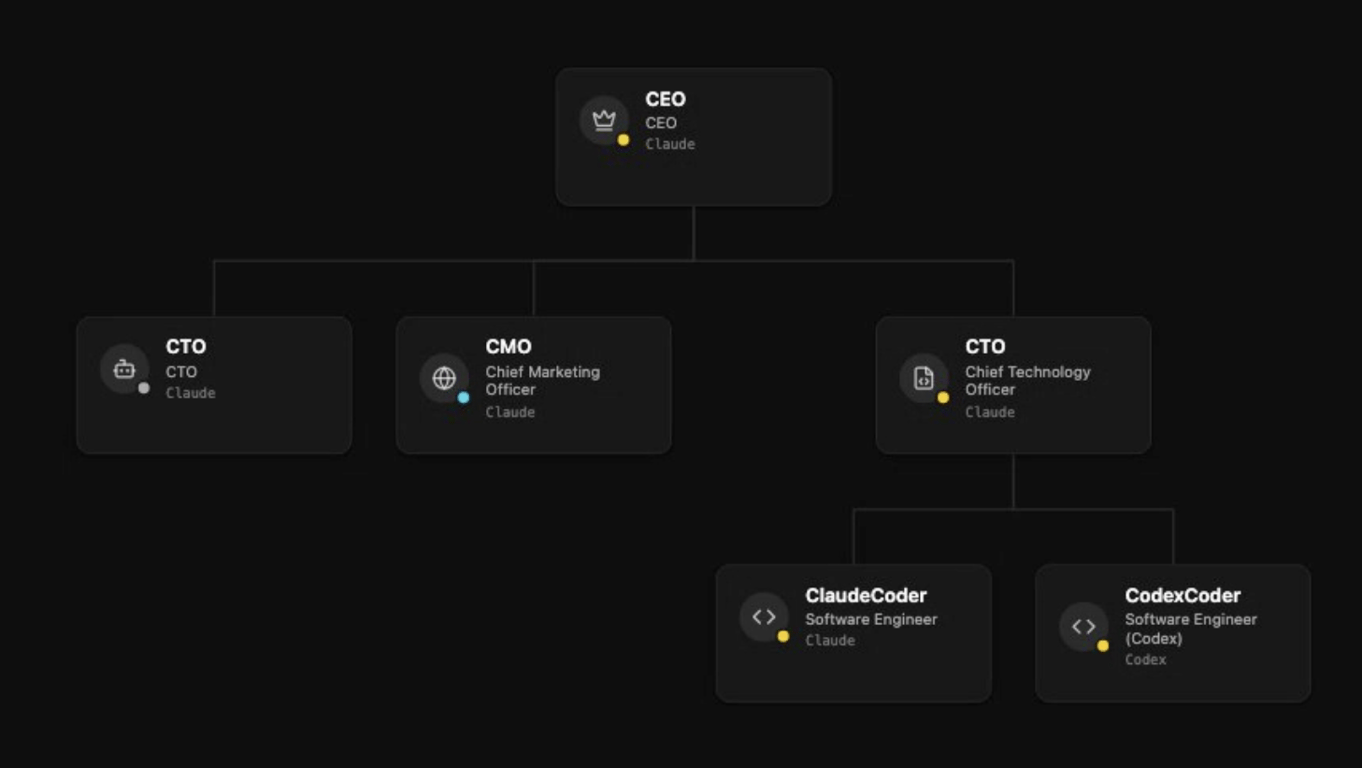
Tasks flow through this hierarchy naturally. The CEO agent breaks the main goal into strategic objectives, delegates them to department heads, and those agents further delegate to specialized workers.
Every task carries full goal ancestry, meaning each agent always understands not just what it needs to do, but why it matters in the context of the larger mission.
Here’s how it plays out in practice. Let’s say your goal is to grow MRR to $10,000. The CEO agent might create a project called “Launch freemium tier,” then assign the CTO agent to build the feature while the marketing lead agent plans a launch campaign.
The CTO further delegates: one developer agent handles the billing integration, another builds the onboarding flow. Every piece of work traces back to that original revenue target, so no agent drifts into irrelevant tasks.
The initial setup takes real thought, though. You need to define clear roles, establish reporting lines, and set budgets before launching.
Starting with two or three agents and expanding once the basic flow works is a much better approach than trying to spin up a 15-agent organization on day one.
Expect to spend time refining system prompts as you learn how agents interpret their roles.
2. Automating software development workflows
Paperclip lets you assign engineering agents to handle coding, debugging, testing, and deployment as a coordinated team.
A typical setup might look like this: a tech lead agent receives feature requests, breaks them into tickets, and delegates them to developer agents running on Claude Code, Codex, or other adapters.
Each agent picks up tasks from a shared queue, works on them, and reports progress through structured tickets. When a developer agent completes a feature, it updates the ticket status, creates follow-up tasks for testing, and notifies the tech lead for review.
If the review fails, the tech lead reassigns the ticket with specific feedback, and the developer agent iterates.
The advantage over single-agent tools is coordination. When three developer agents are working on the same project, Paperclip ensures they don’t duplicate effort or overwrite each other’s work.
Each agent sees the full task board, knows what other agents have checked out, and understands how its task fits into the larger project goal. That kind of awareness is impossible when you’re juggling separate agent sessions manually.
One practical tip: keep developer agents focused on a single responsibility. An agent that handles both frontend and backend work tends to produce inconsistent results compared to two agents with tightly scoped roles.
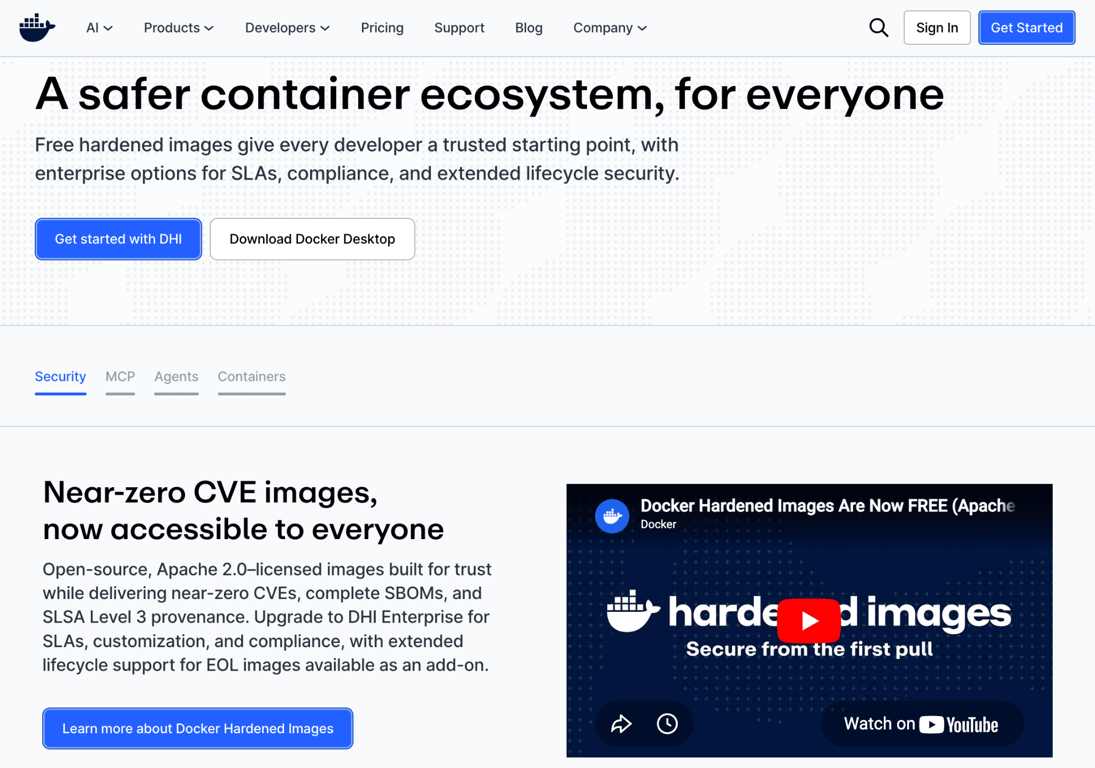
You can also integrate this with containerized environments, and understanding what Docker is will help you see how Paperclip packages its services for consistent deployment across different servers.
3. Managing AI-powered marketing teams
Paperclip allows for building a marketing department with no human team members. You assign agents to specific functions like content creation, SEO basics, social media management, and email outreach. Each agent has a defined role and reports progress through the shared ticketing system.
The mechanism that makes this work is heartbeat scheduling. You configure each agent to wake up at set intervals (for example, every six hours), check its task queue, execute any pending work, and return to idle.
Your content agent produces blog drafts. Your SEO agent reviews keyword performance and adjusts targeting. Your social media agent schedules posts. All of this runs on autopilot.
Where it gets interesting is the feedback loop. If you connect an analytics agent that monitors traffic and engagement data, it can create new tasks based on what’s actually working.
Blog posts about a specific topic driving three times more traffic? The analytics agent flags the pattern and creates a task for the content agent to produce more on that theme. No manual dashboard review needed.
The key to making this work is keeping agent roles tightly scoped. A content agent that also tries to handle analytics and scheduling will produce mediocre results across all three. Specialized agents with clear responsibilities perform better and are easier to debug when output quality drops.
4. Running customer support operations
Here’s a scenario that shows why structured orchestration matters for support. A customer submits a billing question. A frontline agent classifies it, checks the account status using an API tool, and resolves it with a templated response.
Ten minutes later, a different customer reports a complex bug. The frontline agent recognizes it’s outside its scope, creates a new ticket tagged as “engineering escalation,” and assigns it to a specialist agent with codebase access.
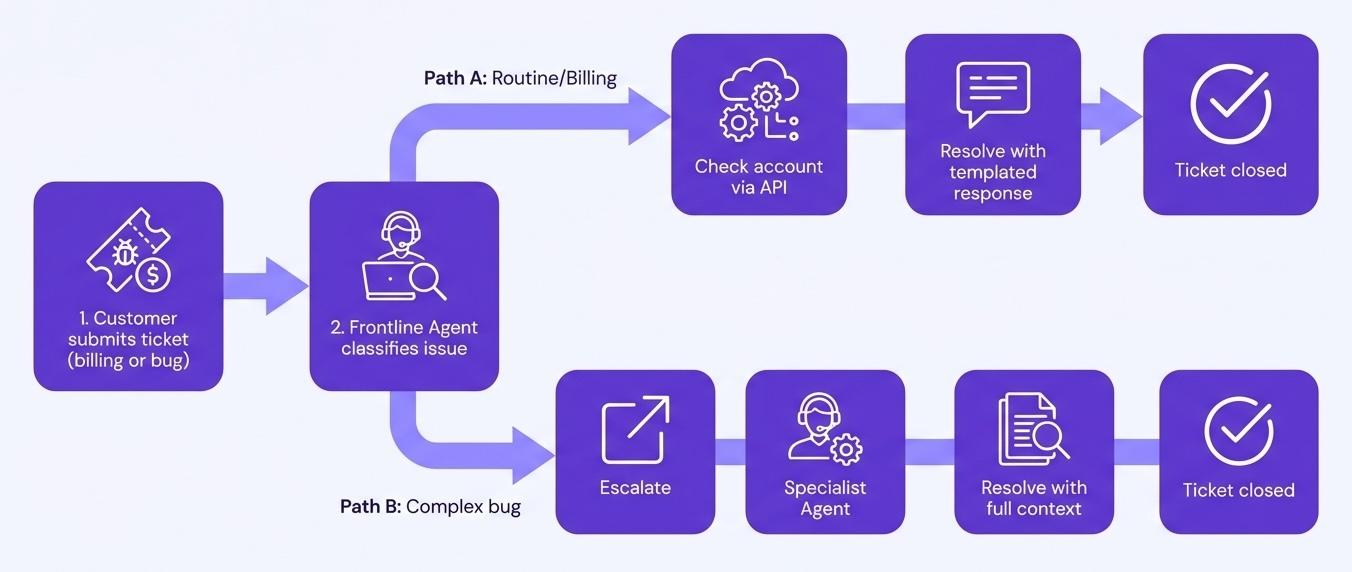
This is how Paperclip’s ticketing model works in practice. Every customer interaction becomes a ticket with a clear owner, status, and thread.
Agents respond, update statuses, and route issues based on rules you define. The frontline agent handles routine questions, and anything it can’t resolve gets escalated with full context attached so the next agent doesn’t start from scratch.
What sets this apart from a basic chatbot is traceability. Paperclip records changes to agents, tasks, approvals, budgets, and company configuration in an activity audit trail.
If a customer disputes a response later, you can review the recorded activity, task history, comments, approvals, and related runs to reconstruct what happened.
For regulated industries or teams with compliance requirements, this level of documentation would be incredibly time-consuming to maintain manually.
Over time, reviewing these logs also reveals patterns. If 40% of escalations involve the same issue category, that’s a signal to either improve the frontline agent’s instructions or create a dedicated agent for that problem type.
5. Automating data research and analysis
You can already ask a large language model to search the web and pull competitor pricing or summarize recent regulatory changes. But that still means you’re the one doing it, writing the prompt, and piecing the results together every time.
Paperclip turns that manual research routine into an automated workflow that runs on a schedule without your involvement.
A practical setup might include three agents:
- A collector that scrapes pricing pages, news feeds, or public filings on a recurring schedule.
- A synthesizer that compares new data against historical trends and flags anomalies.
- A reporter that compiles findings into a summary document.
The collector passes raw data to the synthesizer, which passes insights to the reporter.
This is especially valuable for recurring intelligence needs. Instead of spending two hours every Monday pulling competitor pricing data, your research team handles it automatically and delivers a formatted report by the time you start your week.
If a competitor drops prices by 20% on a Tuesday afternoon, the collector flags it on its next run.
The key constraint to keep in mind is that research quality depends heavily on how well you define what agents should look for and where.
Vague instructions like “monitor the market” produce vague results. Specific instructions like “list the pricing tiers on these five competitor pages and compare them to our current rates” produce actionable intelligence.
6. Controlling AI costs with budget governance
Without cost controls, here’s what happens: an agent hits an edge case, enters a retry loop, and burns through $300 in API calls at 3 AM before anyone notices.
This isn’t hypothetical. Runaway agent costs are one of the most common problems teams encounter when scaling autonomous AI systems.
Paperclip supports budget controls at the company, project, and agent levels. Company and agent budgets can limit monthly spending, while projects can have their own spending caps. When a hard limit is reached, Paperclip pauses the affected work.
The dashboard shows token usage broken down by agent, task, project, and goal, so you can see exactly which work is expensive and which is efficient.

This granularity matters more than you might expect. You might discover that your content agent costs $15/month while your code review agent costs $200/month because it processes large files with every review.
That insight lets you optimize: maybe you restructure the code review workflow to send smaller, targeted file sections instead of entire repositories.
Compare this with the alternative, which is checking your API provider’s billing page periodically and hoping nothing went wrong between checks.
Paperclip’s approach is proactive: you define the boundaries upfront, the system enforces them automatically, and you get detailed reports on where every dollar went.
You can complement Paperclip’s budget controls with Hostinger AI Router. It gives compatible AI agents access to multiple AI models through a single API, with a shared credit balance, centralized usage tracking, and spending limits per API key. This adds another layer of cost control beyond Paperclip’s internal budgets.
7. Creating and managing custom AI agents
Paperclip doesn’t lock you into a fixed set of agent types. When a new need arises, you create an agent directly from the dashboard: give it a name, pick an adapter – Claude Code for engineering, Codex for code generation, Gemini for research – point it at a working directory, and define its responsibilities through a system prompt.
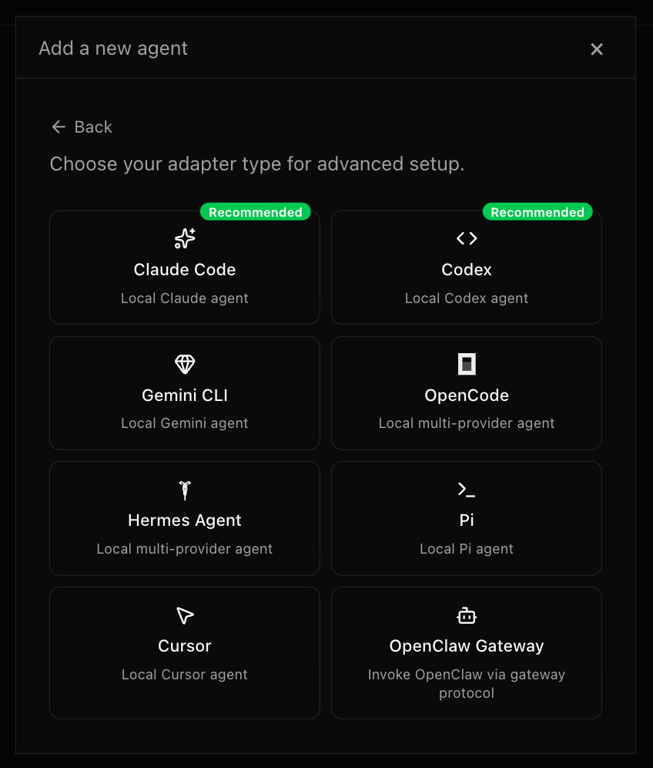
The practical value shows up when your needs evolve. Say you launched with an engineering team and a marketing team, but now you need competitive intelligence.
Instead of reconfiguring existing agents, you create a new research department: a lead researcher agent that plans what intelligence to gather, and two specialist agents that execute the actual research tasks.
Each new agent slots into your existing org chart with its own reporting line and budget.
Governance stays tight throughout. Agents can’t spin up sub-agents without your approval – if a CEO agent decides the company needs a new designer, it proposes the hire and waits for sign-off.
You can also restrict which tools each agent can access, set cost thresholds that require manual approval, and pause or terminate any agent at any time.
8. Running 24/7 autonomous operations
Running Paperclip locally works well for testing, but scheduled work stops when the device hosting it goes offline. Shut down your laptop, lose power, or restart it for an update, and Paperclip cannot trigger agent work until the application is available again.
An always-on hosted deployment keeps Paperclip available around the clock. Agents do not run continuously. Instead, they wake in short execution sessions called heartbeats when triggered by a schedule, task assignment, comment, manual action, or automation.
This means a reporting agent can wake before you start work, a monitoring agent can respond to an overnight event, and scheduled tasks can run in other time zones without requiring your computer to stay online.
Paperclip uses PostgreSQL to store its application data. Embedded PostgreSQL is the default for basic deployments and persists its data across restarts, while production deployments can use an external PostgreSQL database.
For autonomous workflows that need to run on a schedule, reliable Paperclip hosting keeps the application available so heartbeats can start when their triggers occur.
9. Managing complex projects with AI org structures
Consider a product launch that needs engineering, design, and marketing to work in parallel. Without structure, you end up with agents duplicating effort, missing dependencies, or working on tasks that another agent has already completed.
Paperclip’s hierarchical org chart prevents this.
The CEO agent owns the launch goal and breaks it into three projects: “build the product,” “design the landing page,” and “prepare the launch campaign.” Each project gets assigned to a department lead agent, who further breaks it into individual tasks with clear dependencies.
The design agent can’t finalize the landing page until the engineering agent confirms the feature set. Paperclip tracks these relationships, so agents don’t start work that depends on unfinished upstream tasks.
Visibility into all of this comes through the dashboard. You can see which tasks are in progress, which are blocked, which agents are active, and how budgets are tracking across every department.
Instead of asking each agent for a status update, you get a unified view of the entire operation.
10. Operating privacy-first AI systems
Self-hosting Paperclip on a virtual private server (VPS) gives you control over where Paperclip’s application data is stored. Model requests still leave your server when agents use external providers such as Anthropic or OpenAI, so review each provider’s data-handling and retention policies before processing sensitive information.
If you choose your own VPS, deploy Paperclip using a supported installation method such as Docker or Node.js, then secure the server before exposing the Paperclip interface publicly.
Your organization data, tasks, agent configuration, and activity records remain in the Paperclip deployment you control. External AI providers still receive the prompts and context required to run their models, so restrict agent permissions and API access to what each workflow actually needs.
This matters most for teams handling proprietary information or workloads with strict data-governance requirements. Paperclip’s activity log also gives you a record of changes to agents, tasks, approvals, budgets, and other application state.
Strengthening your VPS security helps protect the Paperclip instance, its credentials, and its stored data.
Paperclip is MIT-licensed and open source, so you can inspect and modify the software you run. Paperclip collects anonymous usage telemetry by default, but its documentation states that personal information, issue content, prompts, file paths, and secrets are not collected. You can disable telemetry if your organization’s policies require it.

How to get started with Paperclip at Hostinger
Start Paperclip from Managed apps in Hostinger dashboard. Each application runs on a dedicated microVM, while Hostinger handles the server, security, and updates. You still have root access through SSH or the Web Console when you need it.
If you already have a plan waiting for setup, click Set up and select Paperclip. To purchase a new application plan, click Get new app, choose Paperclip, and complete the purchase first.
Enter an admin email and password for Paperclip. You can also add an admin name. Click Continue and wait for Hostinger to provision the application.
When setup finishes, copy your Paperclip login credentials and click Open app. Sign in, enter your organization name, and name your first agent.
On the Connect a model screen, choose Claude or OpenAI to connect a supported subscription, or select Use API key instead. Complete the connection steps for your chosen model.
Keep your first setup simple. Start with one coordinating agent and a clearly defined task, confirm that it behaves as expected, then add more agents, reporting relationships, budgets, and scheduled work gradually.
For the latest dashboard steps, follow the Hostinger Managed apps setup instructions for Paperclip.
This article is a localized version of Paperclip use cases: 10 ways to automate operations with AI agents, originally published in English.
All of the tutorial content on this website is subject to Hostinger's rigorous editorial standards and values.

Arif is a Technical Content Writer for Hostinger Tutorials with an educational background in Informatics. He specializes in Linux server administration, VPS hosting, and web development, and has authored more than 200 technical articles. Follow him on LinkedIn.