How to submit your website to search engines
Mar 10, 2026
/
Ariffud M.
/
7 min Read

Submitting your website to search engines helps them crawl, index, and rank your content faster.
Search engines can automatically discover and index websites using web crawlers, but manual submission speeds things up and improves coverage.
This matters most for new sites, recently updated content, or pages without inbound links.
There are five main steps to submit your website to search engines:
- Create an XML sitemap. List only the pages you want search engines to index. Include only canonical URLs and exclude thin or duplicate content.
- Verify site ownership. Use Google Search Console and Bing Webmaster Tools to confirm you control the site with an HTML file, DNS record, or meta tag.
- Submit your sitemap. Upload the sitemap through each search engine’s webmaster tools to trigger crawling.
- Request indexing for individual URLs. Use this option for newly published pages or major updates when you don’t want to wait for the next crawl cycle.
- Monitor indexing status. Check coverage reports regularly and fix crawl errors as they appear.
1. Create and optimize your website’s sitemap
An XML sitemap is a file that lists the URLs you want search engines to crawl and index.
Search engines use sitemaps to find pages more efficiently, understand your site structure, and decide which content to crawl first.
A well-built sitemap is especially helpful for new websites, large sites, or pages with few internal links.
There are three main ways to create a sitemap:
- WordPress plugins. Plugins like Yoast SEO and Rank Math automatically generate and update sitemaps when you publish or edit content. Both create a sitemap index at /sitemap_index.xml.
- Online generators. Tools like xml-sitemaps.com crawl your site and generate a sitemap file you can download from there and upload to your site’s root directory.
- Manual creation. Create an XML file that lists each URL using <url> tags, <loc> elements for page URLs, and optional <lastmod>, <changefreq>, and <priority> elements. Here’s a simple XML sitemap example:
<?xml version="1.0" encoding="UTF-8"?>
<urlset xmlns="http://www.sitemaps.org/schemas/sitemap/0.9">
  <url>
    <loc>https://domain.tld/</loc>
    <lastmod>2025-01-15</lastmod>
    <changefreq>weekly</changefreq>
    <priority>1.0</priority>
  </url>
  <url>
    <loc>https://domain.tld/about/</loc>
    <lastmod>2026-01-10</lastmod>
    <changefreq>monthly</changefreq>
    <priority>0.8</priority>
  </url>
</urlset>
Replace domain.tld with your actual domain name, and add a <url> block for each page you want indexed.
Follow these sitemap best practices for optimal indexing:
- Include only canonical URLs to avoid duplicate content issues.
- Exclude thin pages, admin areas, and URLs blocked by robots.txt.
- Split large sites (over 50,000 URLs or 50 MB) into multiple sitemap files.
- Update the sitemap whenever you add, remove, or significantly change pages.
- Open the sitemap URL (https://domain.tld/sitemap.xml, https://domain.tld/sitemap_index.xml, or https://domain.tld/wp-sitemap.xml for WordPress sites) in your browser before submitting it to make sure it loads correctly.
A sitemap is just one part of a solid SEO foundation. To achieve better results, it should work alongside a clean site structure, internal linking, and high-quality content.
Learn more about how to optimize your website for better search engine performance.
2. Verify your website with Google and Bing Webmaster Tools
Verification proves you own or control your website. It unlocks indexing tools, performance reports, and diagnostic data. Without verification, you can’t submit sitemaps or request URL indexing.
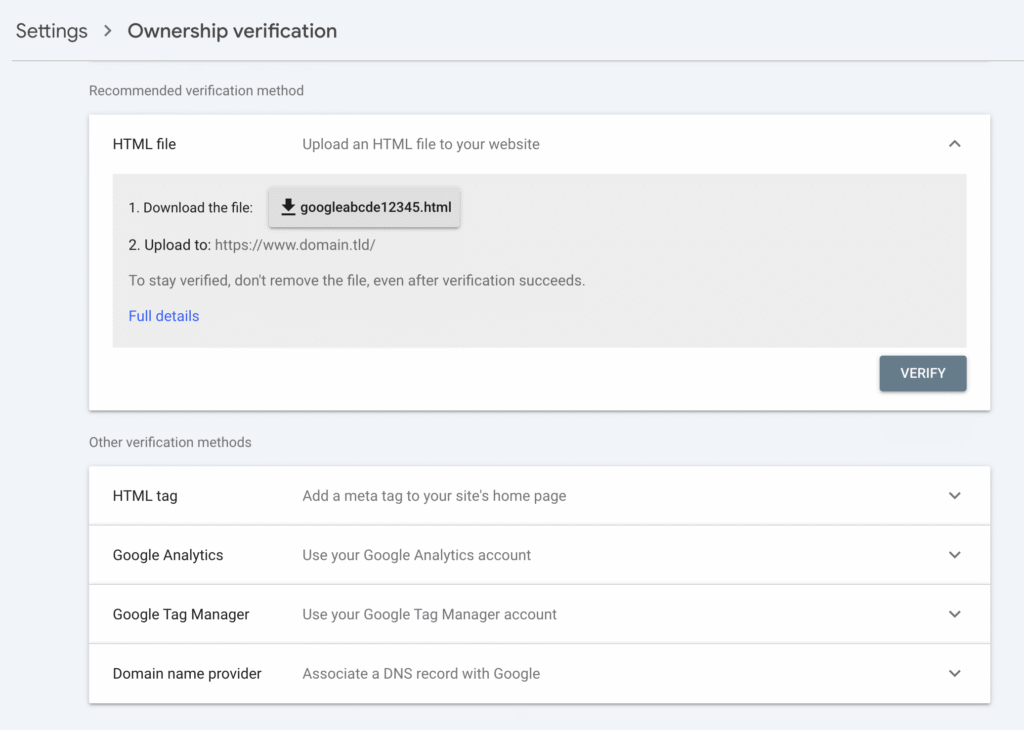
Google Search Console offers five verification methods:
- HTML file upload. Download the verification file from Search Console and upload it to your site’s root directory.
- Google Analytics. If Google Analytics is already installed and you have edit permissions, Search Console can verify your site using the existing tracking code.
- HTML meta tag. Add a <meta> tag to the <head> section of your homepage.
- DNS TXT record. Add a TXT record to your domain’s DNS settings. This option verifies the entire domain, including all subdomains.
- Google Tag Manager. If you’re using GTM and have publish permissions for the container, Search Console can verify ownership through your container snippet.
To verify, go to Google Search Console → Settings → Ownership verification.
Bing Webmaster Tools offers two verification options: import sites already verified in Google Search Console or add your site manually by entering its URL.
The main difference between the two platforms is coverage. Google Search Console focuses only on Google Search, while Bing Webmaster Tools covers Bing, Yahoo, and DuckDuckGo, since all three use Bing’s index.
3. Submit your sitemap to search engines
After you verify ownership, submit your sitemap to both Google Search Console and Bing Webmaster Tools using their Sitemaps sections.
To submit a sitemap to Google Search Console:
- Open Google Search Console and select your property.
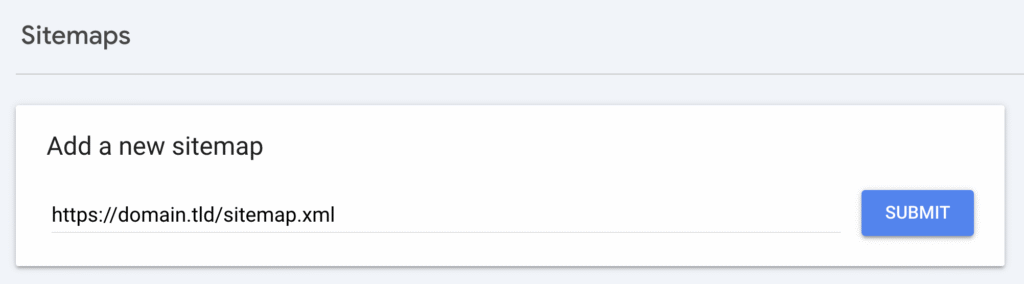
- Go to Sitemaps in the left sidebar.
- Enter your sitemap URL in the Add a new sitemap field. For example, https://domain.tld/sitemap.xml or https://domain.tld/sitemap_index.xml.
- Click Submit.
To submit a sitemap to Bing Webmaster Tools:
- Open Bing Webmaster Tools and select your site.
- Go to Sitemaps in the left menu.
- Click Submit sitemap and enter the full sitemap URL.
- Click Submit.
After submission, check the sitemap status in each tool. Google shows how many URLs it discovered and flags any errors.
Common issues include invalid XML formatting, URLs returning 4xx or 5xx status codes, and pages blocked by robots.txt.
If search engines keep showing outdated sitemap data, website caching may be the cause. Understanding how caching works can help you spot and fix these issues faster.
4. Manually submit individual URLs
Manual URL submission helps when you publish a new page and want it indexed quickly, make major updates to existing content, or notice a page missing from search results even though it’s in your sitemap.
On Google Search Console, you can do this through the URL Inspection tool:
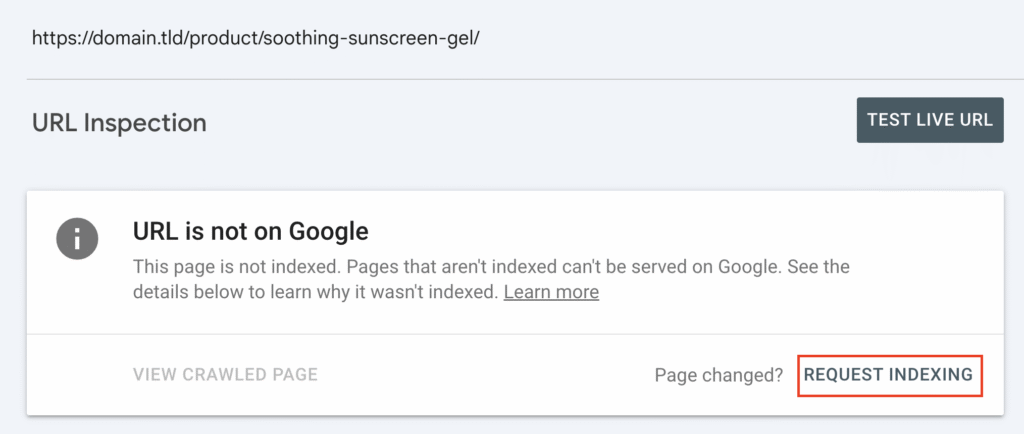
- Open Search Console and paste the full URL into the inspection bar at the top.
- Wait while Google retrieves the page’s data.
- If the page shows “URL is not on Google,” or it’s already indexed but you’ve updated the content, click REQUEST INDEXING to trigger a recrawl.
Google limits manual URL submissions to about 10–20 requests per day per property, although it doesn’t officially state an exact number. This daily limit prevents abuse and encourages using sitemap submission for indexing multiple pages.
Bing Webmaster Tools offers similar features through the Submit URLs menu. You can submit up to 10,000 URLs per domain or use the Bing URL Submission API for automated submissions.
Manual URL submission and sitemap submission serve different purposes. A sitemap helps search engines discover and crawl all your pages over time. Manual submission prioritizes a single URL for faster crawling.
Use sitemap submission for ongoing site maintenance and manual submission for time-sensitive pages.
5. Monitor your indexing status and fix errors
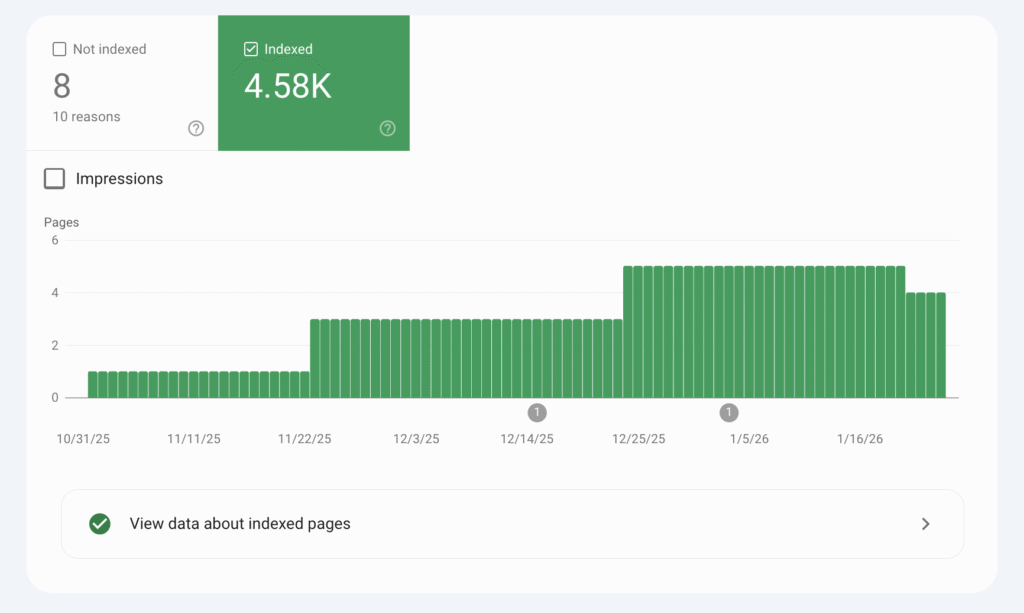
After submitting your sitemap and URLs, track indexing progress using each search engine’s reporting tools.
In Google Search Console:
- Go to Pages to see how many URLs are indexed, excluded, or showing errors.
- Check the Sitemaps section for the last read date, the number of discovered URLs, and any sitemap-specific issues.
- Use the URL inspection tool to review the indexing status of individual pages.
In Bing Webmaster Tools:
- Open Site Explorer to view indexed pages and crawl activity.
- Check Sitemaps for submission status and error reports.
- Use URL Inspection to review page-level indexing details.
Consider setting up email alerts in both tools to avoid missing critical issues.
Google Search Console sends notifications for search coverage problems, manual actions, and security issues. Bing Webmaster Tools alerts you about crawl errors and indexing problems.
Schedule monthly sitemap audits to catch issues early. Look for pages that should be indexed but aren’t, pages indexed by mistake, and crawl errors that block search engines from accessing your content.
Run a full SEO audit every quarter to spot technical problems that can hurt your site’s search visibility.
What are the best practices for submitting your website to search engines?
The best practices for submitting your website to search engines include keeping your sitemap up to date, checking your robots.txt configuration, and resubmitting your site after major changes.
- Update your sitemap regularly. Update your sitemap whenever you publish new content, remove old pages, or change URL structures. Plugins like Yoast SEO and Rank Math handle this automatically, but it’s still worth checking the sitemap URL to make sure the changes appear correctly.
- Verify your robots.txt configuration. Check your robots.txt file to confirm it doesn’t block pages you want indexed. A misconfigured file can stop search engines from crawling entire sections of your site. You can view your robots.txt file at domain.tld/robots.txt. Make sure important directories and pages aren’t disallowed.
- Resubmit your sitemap after major changes. Submit your website to search engines after these events:
- Initial launch. Submit your site as soon as it goes live to speed up first-time indexing.
- Site redesign or migration. Resubmit after changing URL structures, domains, or platforms so search engines can update their records.
- Major content updates. Submit again when you add, remove, or restructure large sections of content.
Beyond submissions, optimize Core Web Vitals to improve crawl efficiency. Search engines factor site performance into crawl budgeting, so a faster, SEO-friendly website often gets crawled more frequently than a slower one.

Common mistakes to avoid when submitting your website to search engines
Common mistakes to avoid when submitting your website to search engines are incomplete sitemaps, missing verification, noindex tags on important pages, broken URLs, incorrect file formats, and misconfigured robots.txt files.
Here’s why each issue hurts indexing:
- Incomplete sitemaps. Missing pages, broken URLs, or outdated entries stop search engines from discovering all your content.
- Missing verification. If you don’t verify site ownership in webmaster tools, you can’t submit sitemaps or access diagnostic data.
- noindex tags. Pages with <meta name= “robots” content= “noindex”> won’t appear in search results, even if your sitemap includes them.
- Broken URLs. Pages returning 404 or 5xx errors, or misconfigured redirects, waste crawl budget and signal quality issues.
- Incorrect file format. Sitemaps must use valid XML. HTML pages or malformed XML files cause submission errors.
- robots.txt blocking crawlers. Disallow rules prevent search engine bots from indexing, even when sitemaps are submitted.
These issues reduce visibility because search engines can’t reliably access, understand, or trust your content.
Catch problems early by checking the Pages report in Google Search Console each week and reviewing Site Explorer in Bing Webmaster Tools monthly.
Both tools highlight indexing problems, crawl errors, and pages excluded from search results.
How to improve your website visibility after submission
Submitting your website to search engines helps get your pages indexed, but rankings are what drive organic traffic. Without ongoing optimization, your pages may rank poorly, resulting in little to no search traffic.
Focus on these areas to improve search visibility after submission:
- Link building. Earn backlinks from relevant, authoritative websites to boost ranking potential. Guest posts, resource page links, and digital PR campaigns can help you build high-quality inbound links.
- Mobile optimization. Make sure your site passes Google’s mobile-friendly test. Search engines use mobile-first indexing, which means the mobile version of your site influences rankings.
- Content quality. Publish accurate, in-depth content that matches search intent. Update existing pages regularly to keep them relevant and valuable.
- Technical audits. Review site speed, crawlability, and structured data regularly. Fix issues that stop search engines from crawling and understanding your site efficiently.
Track progress with Google Analytics for traffic insights, Google Search Console for search performance data, and tools like Ahrefs or SEMrush to monitor rankings and backlink profiles.
For a more complete SEO strategy beyond basic search engine submission, check our guide on how to get to the top of the search results.
All of the tutorial content on this website is subject to Hostinger's rigorous editorial standards and values.

Ariffud is a Technical Content Writer with an educational background in Informatics. He has extensive expertise in Linux and VPS, authoring over 200 articles on server management and web development. Follow him on LinkedIn.