15 essential Magento security tips to protect your store
Jul 01, 2025
/
Ariffud M.
/
13 min Read
As Magento continues to be a popular eCommerce platform, the threats and vulnerabilities targeting your store also increase. From data breaches to unauthorized access, the security risks are real and might lead to significant financial and reputational damage.
Therefore, it’s crucial to implement strong security measures to protect your business and customer data from these growing threats.
This article will share practical tips to safeguard your Magento website against common security threats. By following our guide, you’ll be better equipped to secure your store and maintain customer trust.
15 Magento security best practices
Here are some of the most effective strategies to help protect your Magento store from security issues.
1. Use a secure hosting environment
A secure hosting environment is the first line of defense against cyberattacks on your site. Even the best on-site security measures can be compromised if your hosting infrastructure is vulnerable.
Therefore, host your Magento store on a secure and reliable hosting provider. When choosing an ideal platform, look for these security features:
- Malware scanning. Regular malware scanning helps detect and remove malicious code that could compromise your store’s security. This prevents attackers from injecting harmful scripts into your website.
- DDoS protection. A hosting provider with strong distributed denial-of-service (DDoS) protection will filter out suspicious traffic, ensuring your online store remains accessible to legitimate customers.
- Regular backups. Regular backups ensure you can quickly recover your website in case of a security breach or data loss. A good hosting service will offer automated, frequent backups to minimize downtime.
- Server hardening. A secure environment is less likely to be exploited by attackers. The ideal provider will regularly apply security patches, disable unnecessary services, and enforce strict server access controls.
Hostinger’s Magento VPS service offers all of these essential features, specifically tailored for Magento eCommerce sites.
Our Monarx-powered malware scanner automatically detects and removes malicious threats, preventing them from infiltrating your website. Meanwhile, advanced Wanguard DDoS filtering and an easy-to-configure firewall will neutralize targeted attacks and keep them at bay.
The Magento hosting plans also provide regular automated backups stored in multiple locations. This ensures your data remains accessible even if your primary server location experiences an issue.
Moreover, our team continuously applies the latest security patches to comply with industry standards so you can run and manage your Magento store with peace of mind.
2. Secure login credentials
Securing all admin accounts can help maintain overall website security. Weak passwords are a common entry point for attackers. In Magento, you can enforce strong admin credential policies that include a mix of uppercase and lowercase letters, numbers, and special characters.
We also suggest applying these password management best practices:
- Use password managers. These tools help generate and store strong, unique passwords for each account, so you don’t need to remember complex passwords.
- Avoid password reuse. Never use the same password across multiple accounts. If one account is compromised, it can put other accounts at risk.
- Regular password updates. Update your passwords at least once every three months to minimize the risk of using old, potentially compromised credentials.
To protect your store further, use two-factor authentication (2FA). With it, users must provide a second verification form, such as a security code sent to their mobile device. Even if attackers obtain a password, they still can’t log in without the second factor.
Follow these steps to enable 2FA in Magento:
- Log in to your Magento admin panel and go to Stores → Settings → Configuration.
- In the left panel, select SECURITY → 2FA.
- Expand the GENERAL section and choose a 2FA provider that fits your needs.
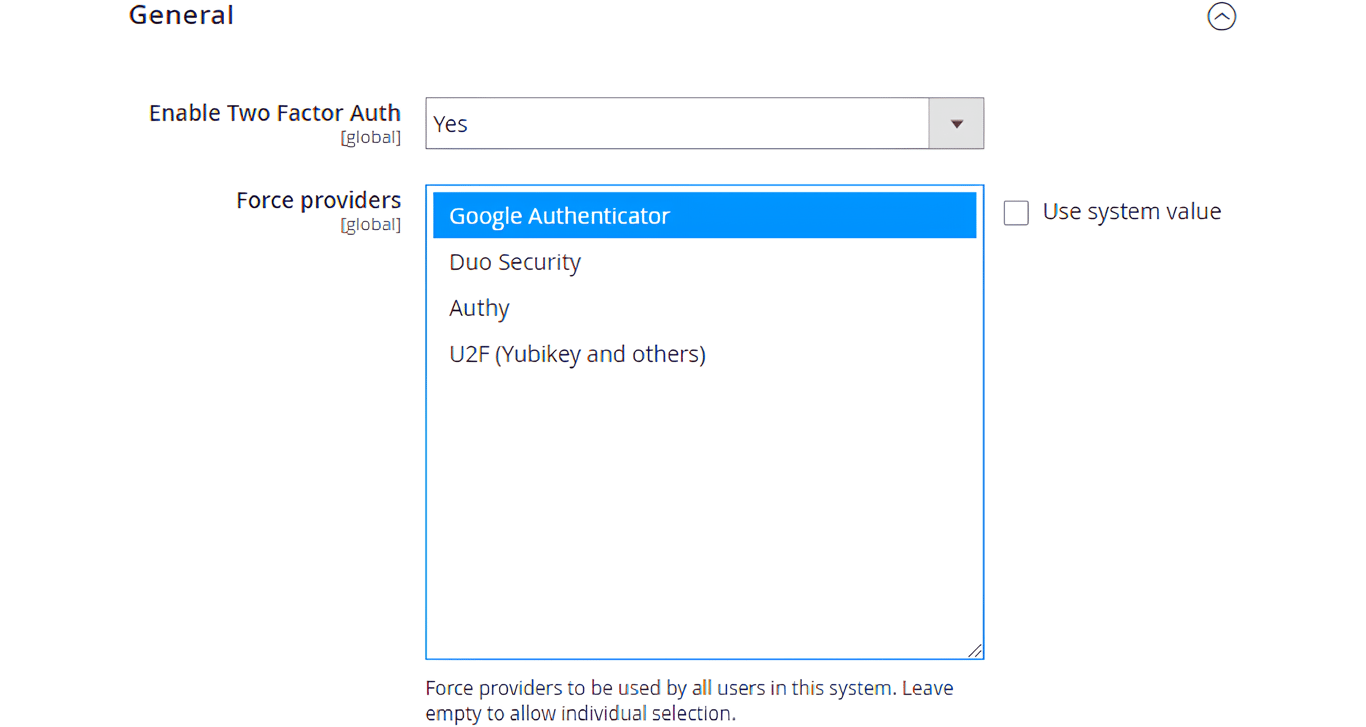
- Follow the on-screen instructions to configure your preferred provider.
- Once done, click Save Config.
3. Change the default admin URL
Leaving the default admin URL unchanged in Magento poses a significant risk. Keeping the URL as it is makes it easier for unauthorized users to locate your admin login page and launch brute-force attacks.
In contrast, using a customized URL reduces the likelihood of successful attacks. Here’s how to change your Magento admin URL:
- In your Magento dashboard, navigate to Stores → Settings → Configuration → ADVANCED.
- Select Admin and expand the Admin Base URL section.
- Set the Use Custom Admin URL value to Yes to replace the entire URL. Then, fill in the Custom Admin URL field with a unique and hard-to-guess URL, for instance, https://admin.yourstore.com.
- If you want to change the path after the domain in the URL, set Use Custom Admin Path to Yes. In the dedicated field, enter the path, such as securepanel.
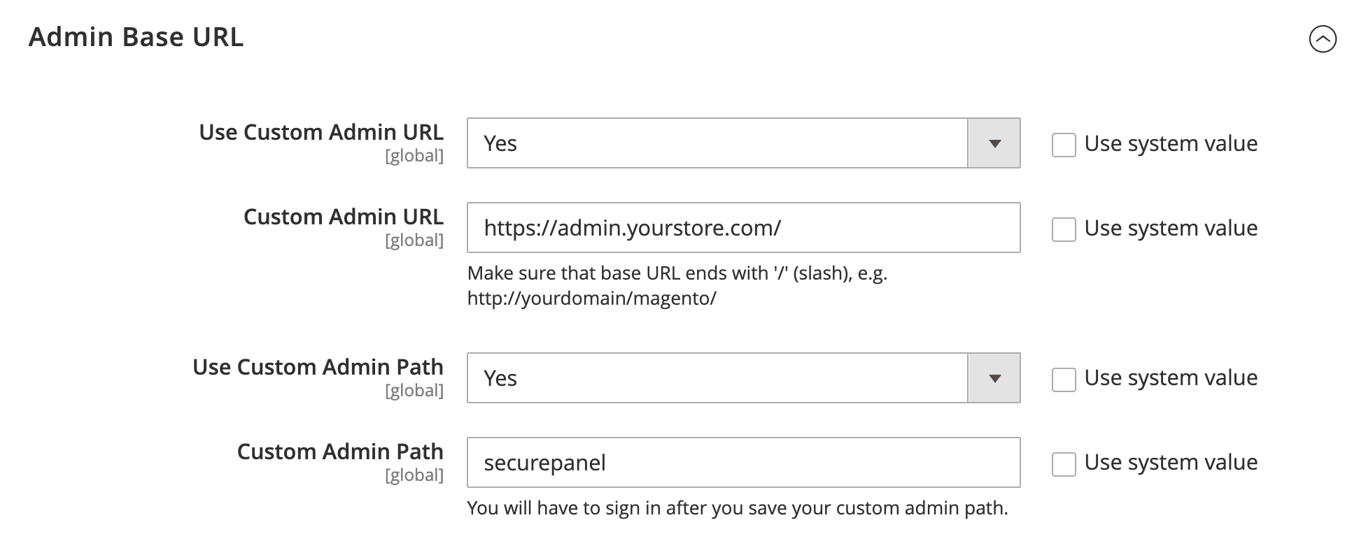
- Click Save Config to apply configurations.
Pro tip
If you decide to enable both options, for example, https://admin.yourstore.com/ and securepanel, then your full admin URL will be https://admin.yourstore.com/securepanel.
4. Restrict access by IP address
Another effective measure is restricting access to the admin panel by IP address. Limiting access ensures that only trusted IPs can reach the login page. Here’s how to do it:
- Log in to your server via a terminal or SSH application like PuTTY. Replace username and server_ip_address with your actual credentials.
ssh username@server_ip_address
- Access your Magento installation root directory and open the .htaccess file via the nano text editor. Replace /path/to/magento2 with your actual directory path:
cd /path/to/magento2

nano .htaccess
- Add the following lines to this file, replacing 123.456.789.000 with your trusted IP address:
<FilesMatch "index.php">

Order Deny,Allow

Deny from all

Allow from 123.456.789.000

</FilesMatch>
If you want to allow multiple IP addresses, include additional Allow from lines for each entry.
- Save your edits and exit nano by pressing Ctrl + X → Y → Enter.
5. Enable reCAPTCHA
reCAPTCHA helps protect your eCommerce site from automated brute-force attacks. These attacks often involve bots that repeatedly guess login credentials to gain unauthorized access.
It also effectively reduces bot spam and traffic across your site, whether fake account registrations, spammy form submissions, or malicious checkout attempts. reCAPTCHA ensures that only real users can interact with your site.
Follow these steps to activate reCAPTCHA in Magento:
- Register your website on the Google reCAPTCHA page to select your preferred reCAPTCHA version and get your site and secret keys.
- In your Magento dashboard’s left sidebar, go to Stores → Settings → Configuration → SECURITY.
- To configure reCAPTCHA for the admin panel, choose Google reCAPTCHA Admin Panel.
- Select the reCAPTCHA version based on your previous choice. Then, enter the obtained keys in the corresponding fields.
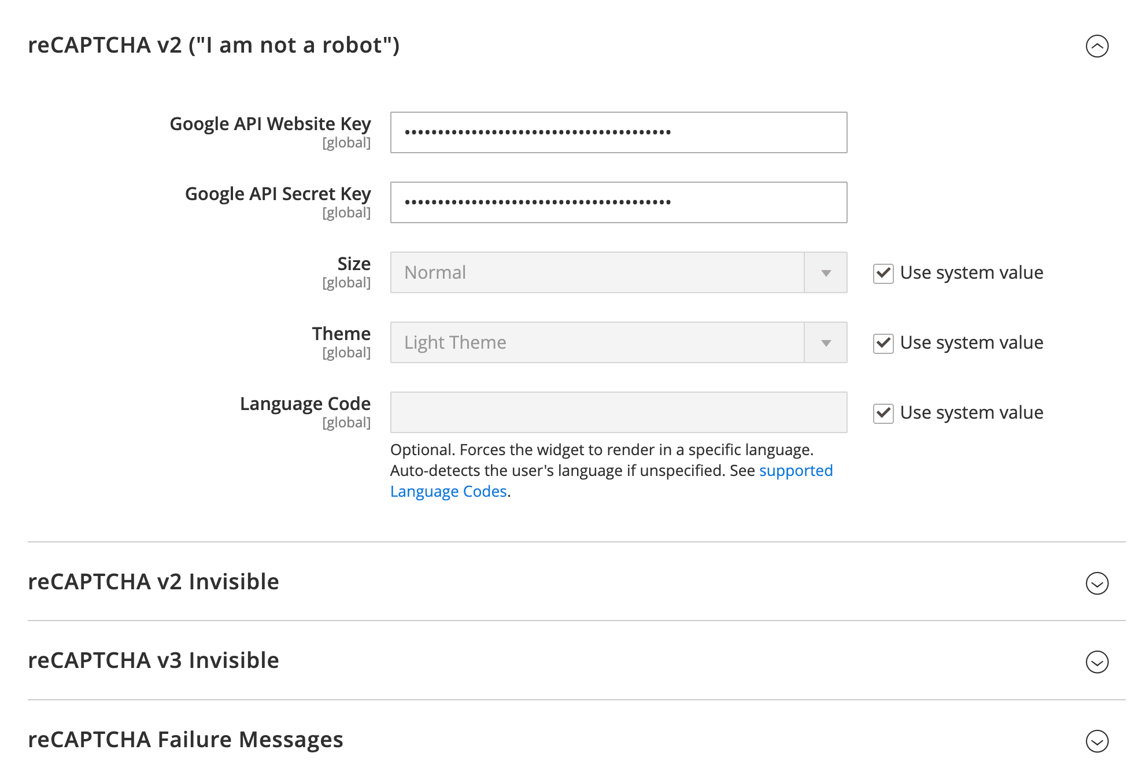
- Scroll down and expand the Admin Panel section. Select where you want to enable reCAPTCHA by setting the value to Yes. Once done, save your changes.
- To add reCAPTCHA on the storefront, click the Google reCAPTCHA Storefront menu and repeat the same process. We recommend enabling reCAPTCHA on the login, registration, and checkout pages.
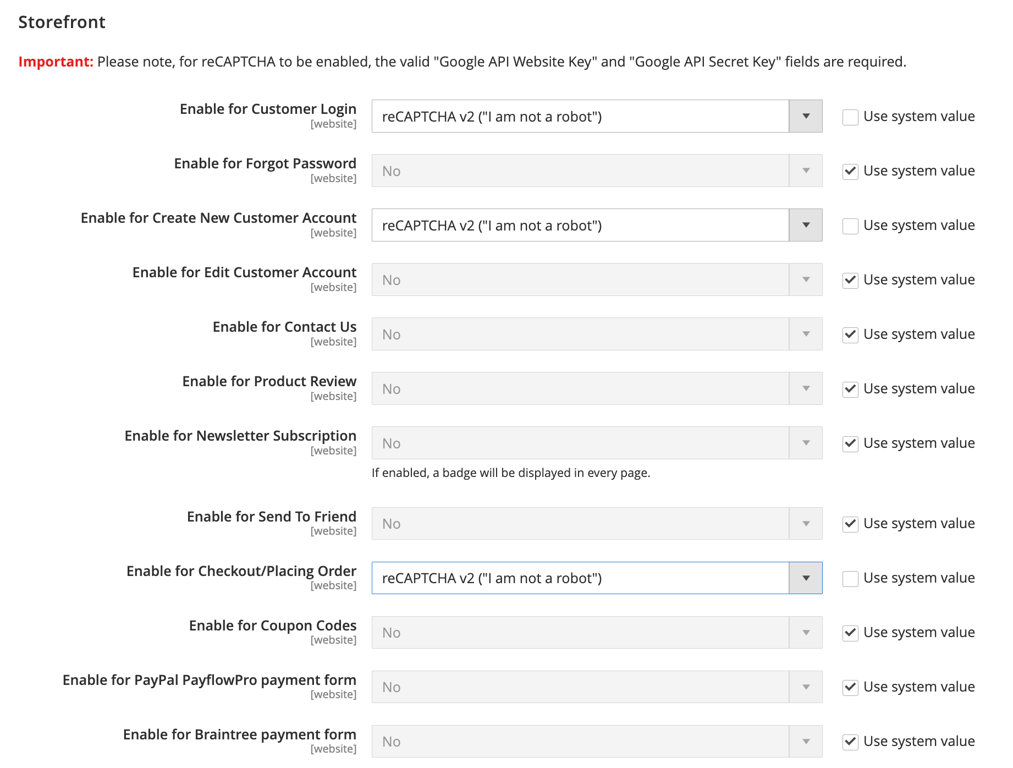
Pro tip
reCAPTCHA offers both an I'm not a robot challenge and an invisible option that works silently in the background. For most users, we recommend the former to balance security and user-friendliness.
6. Use HTTPS encryption
When customers interact with your Magento site, such as entering personal information, purchasing items, or just browsing, their data is exchanged with your server. Hypertext Transfer Protocol Secure (HTTPS) ensures that each data is encrypted. Without it, malicious actors could expose sensitive information like credit card data and login details.
Additionally, HTTPS positively impacts your Magento store’s SEO, as search engines like Google prefer secure sites. This means that HTTPS sites may see improved search rankings and attract more organic traffic.
Here are the instructions to configure HTTPS in Magento:
- Generate an SSL certificate on your server. If you installed Magento using Hostinger’s VPS template, you can read our guide on setting up SSL via CloudPanel.
- Access your Magento dashboard and go to Stores → Configuration → GENERAL → Web.
- Expand the Base URLs (Secure) section and set Use Secure URLs on Storefront and Use Secure URLs in Admin to Yes.
- Update Secure Base URL to use https:// instead of http://.
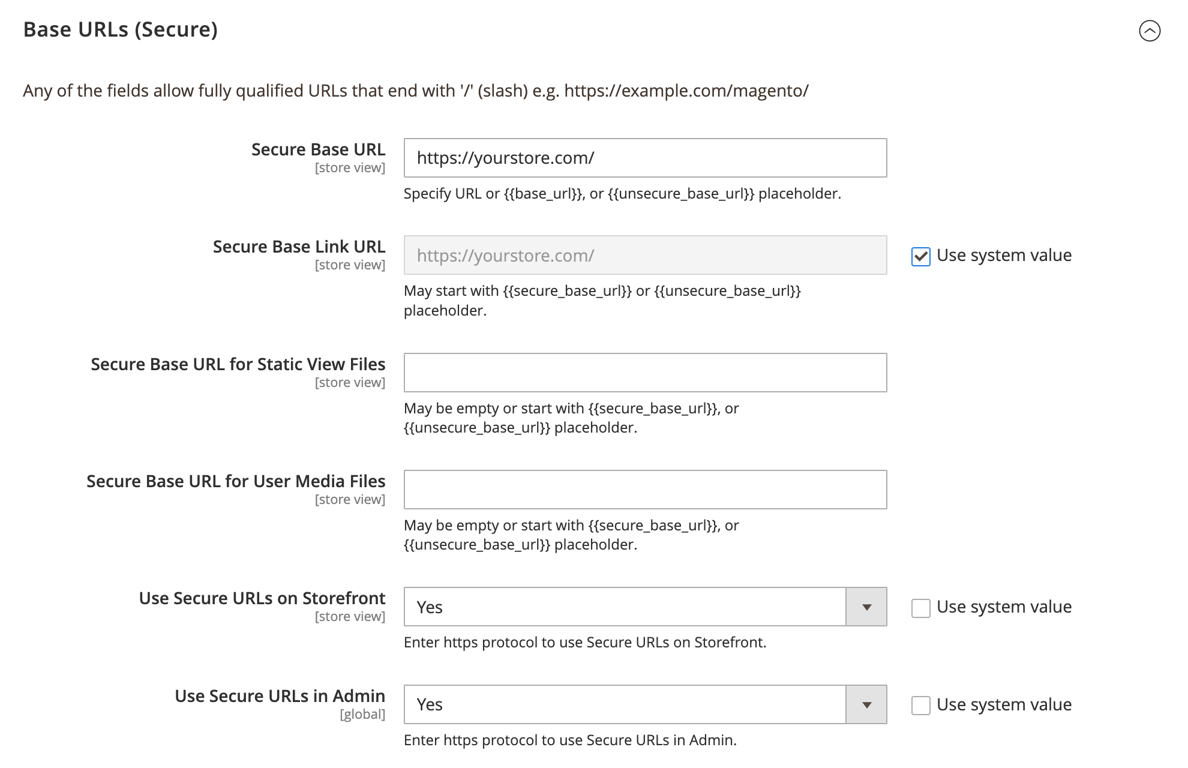
- Save your configurations and test your site to ensure it loads correctly with HTTPS.
7. Configure secure payment gateways
Insecure payment processing is one of the leading causes of security breaches, such as financial fraud and data theft. To mitigate these risks, implement secure payment options that comply with the Payment Card Industry Data Security Standard (PCI DSS), which sets stringent security requirements for handling cardholder information.
Using a PCI-compliant gateway on your Magento website ensures that customers’ payment data is processed securely, reducing the likelihood of security incidents and costly penalties.
Here’s a guide to setting up PCI-compliant payment gateways in Magento:
- Select a payment gateway that meets PCI DSS requirements. Popular options include PayPal, Stripe, and Authorize.Net.
- Most major payment gateways offer Magento-compatible extensions, such as Stripe Payments. Install the relevant extension before using it. Meanwhile, others like PayPal have built-in options in the admin panel.
- Go to Stores → Settings → Configuration → SALES → Payment Methods.
- Select your preferred payment gateway and configure the necessary settings, including entering API keys and enabling transaction security options.
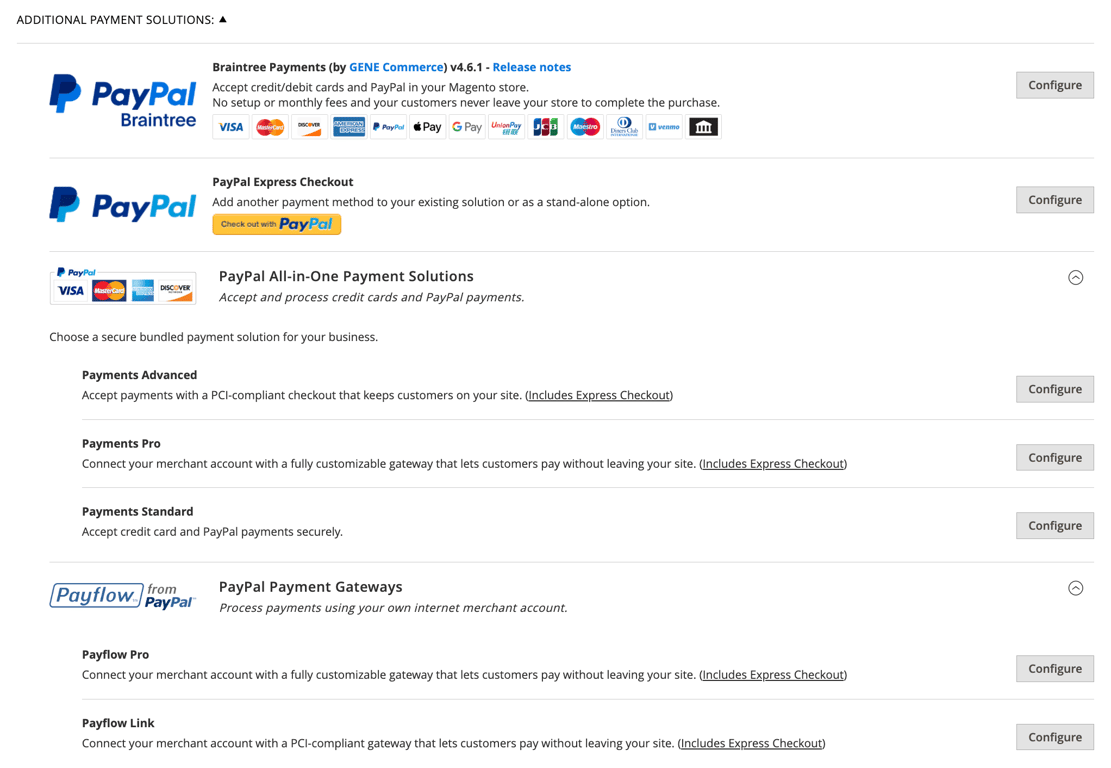
- If your payment gateway supports it, enable additional security measures such as 3D Secure or address verification service (AVS) to further protect against fraud.
- Before going live, thoroughly test the payment gateway to ensure it processes transactions correctly and securely.
Suggested reading
Check out our complete Magento tutorial if you're not familiar with installing extensions on this platform.
We also suggest implementing these best practices to maintain a secure payment environment:
- Regularly update payment gateway extensions. Keep your payment gateway extensions up to date to benefit from the newest security patches and features.
- Monitor transaction logs. Regularly review transaction logs for suspicious activity, such as repeated failed transactions or unusual payment patterns.
- Limit data storage. Unless necessary, avoid storing sensitive payment information, such as credit card numbers. If you must store this data, ensure it’s encrypted and securely stored.
8. Secure file permissions and directories
Securing files and directories involves setting up appropriate permissions so only authorized users can read, write, and execute them. This helps prevent direct server attacks and malicious modifications to your Magento site.
Here are some best practices to keep in mind:
- Files. Typically, files should have a permission setting of 644. This allows the owner to read and write while others can only read.
- Directories. Set directory permissions to 755 so the owner can read, write, and execute while others can only read and execute.
- Avoid using 777 permissions. A 777 setting grants everyone, including unauthorized users, full read, write, and execute permissions, which can lead to serious security vulnerabilities.
To set proper file and directory permissions, navigate to your Magento root directory. Then, execute the following commands:
find . -type f -exec chmod 644 {} \;

find . -type d -exec chmod 755 {} \;
Additionally, make sure to disable directory indexing. It lets visitors see a list of files in a directory if no index.html or index.php file is present. Enabling directory indexing can expose sensitive information, such as configuration files.
To turn off directory indexing, open your .htaccess file and add the following line:
Options -Indexes
Save your edits once you’re done.
9. Regularly update Magento
Magento regularly releases updates to introduce new features and include security patches that address vulnerabilities discovered since the last release. Neglecting updates can expose your store, making it easier for attackers to exploit weaknesses in outdated Magento software.
Here are the general steps to upgrade Magento to its latest version:
- Back up your Magento files and database beforehand to quickly restore your site if anything goes wrong during the upgrade.
- In your Magento installation directory, activate maintenance mode to prevent users from accessing your store temporarily:
php bin/magento maintenance:enable
- Upgrade Magento via Composer by executing the following commands:
composer require-commerce magento/product-community-edition 2.x.x --no-update

composer update

bin/magento setup:upgrade

bin/magento setup:di:compile

bin/magento setup:static-content:deploy
Replace 2.x.x with the latest Magento version number available.
- Once the update is complete, turn off maintenance mode by running:
php bin/magento maintenance:disable
Furthermore, visit the official Adobe Commerce released versions page to stay informed about the latest Magento updates and security patches.
10. Use Magento Security Scan
Magento Security Scan is a free, cloud-based service provided by Adobe that helps monitor your store for potential security threats. This tool scans for vulnerabilities, unpatched software, and misconfigurations, offering actionable insights to improve your store’s security posture.
Follow these steps to configure and run the Magento Security Scan tool:
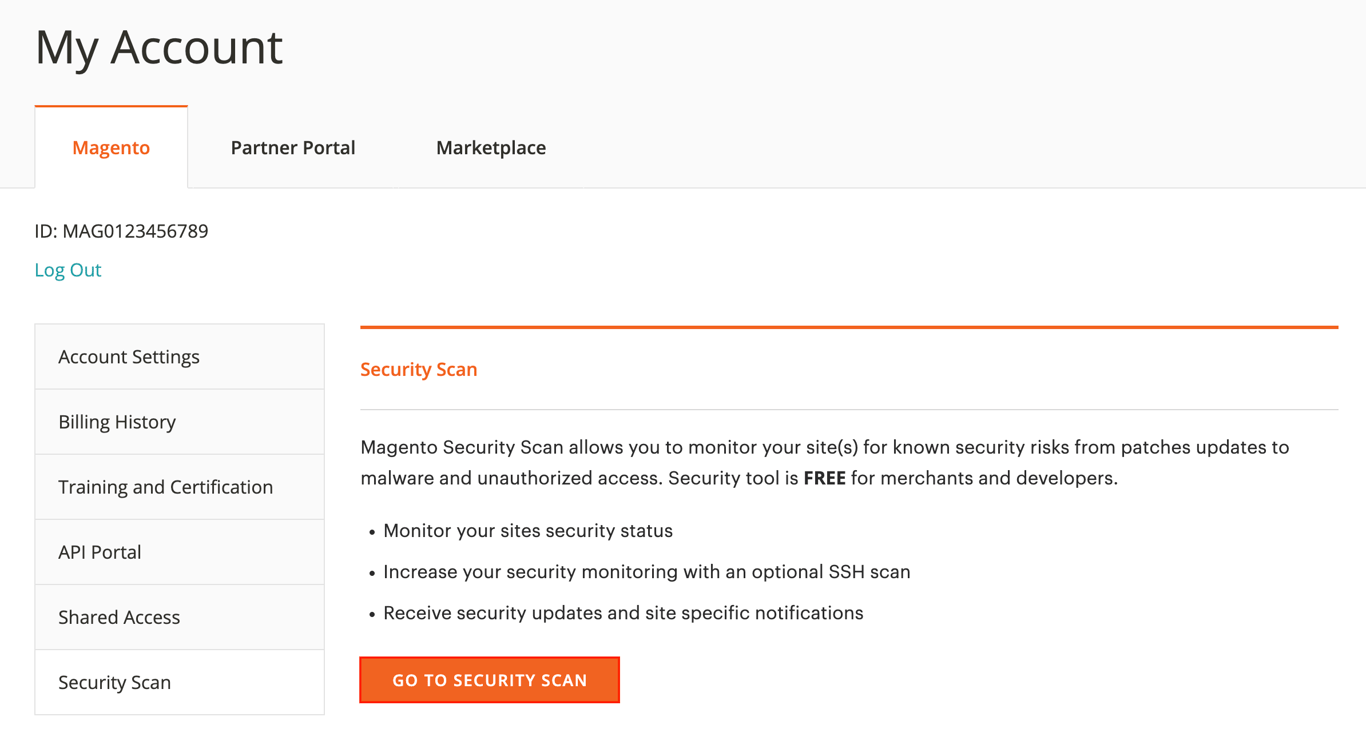
- Log in to your Adobe Commerce account with your Adobe ID, or register if you don’t have one.
- Navigate to Magento → Security Scan and hit GO TO SECURITY SCAN.
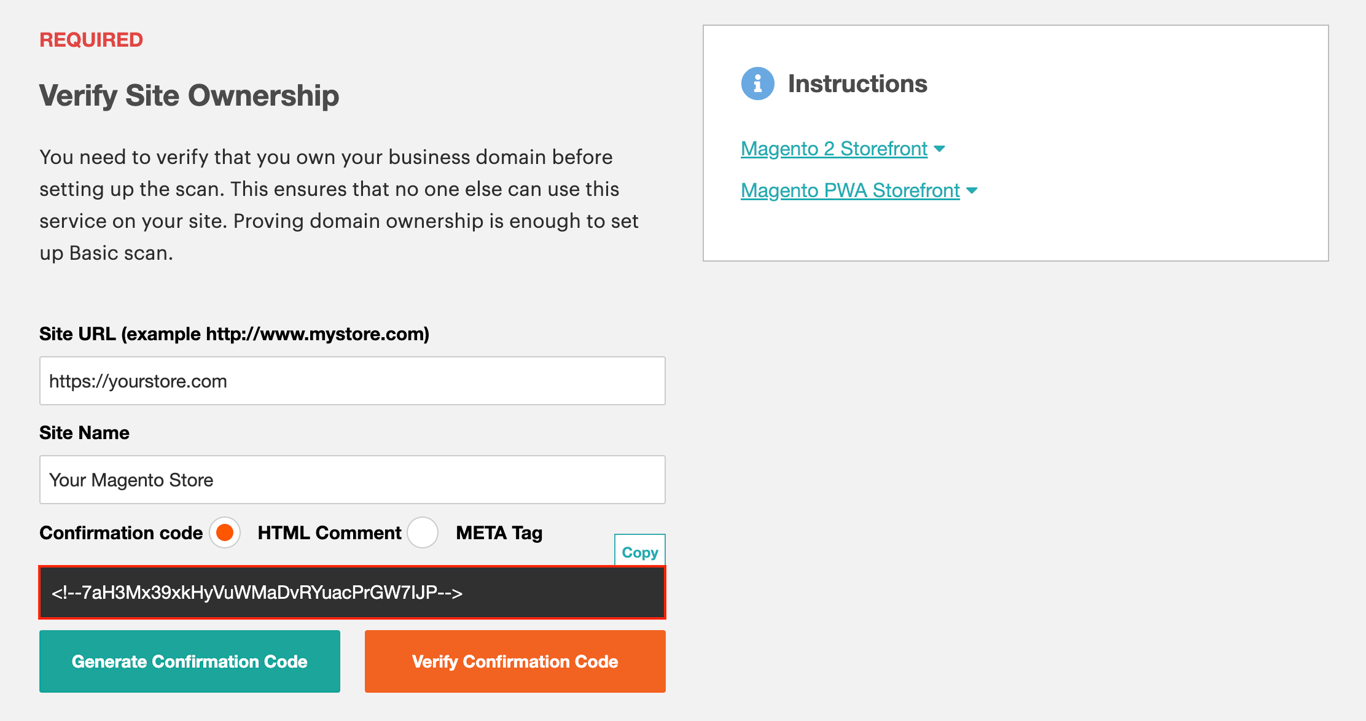
- Select Add Site and enter your store’s name and URL. Then, click Generate Confirmation Code and copy the code.
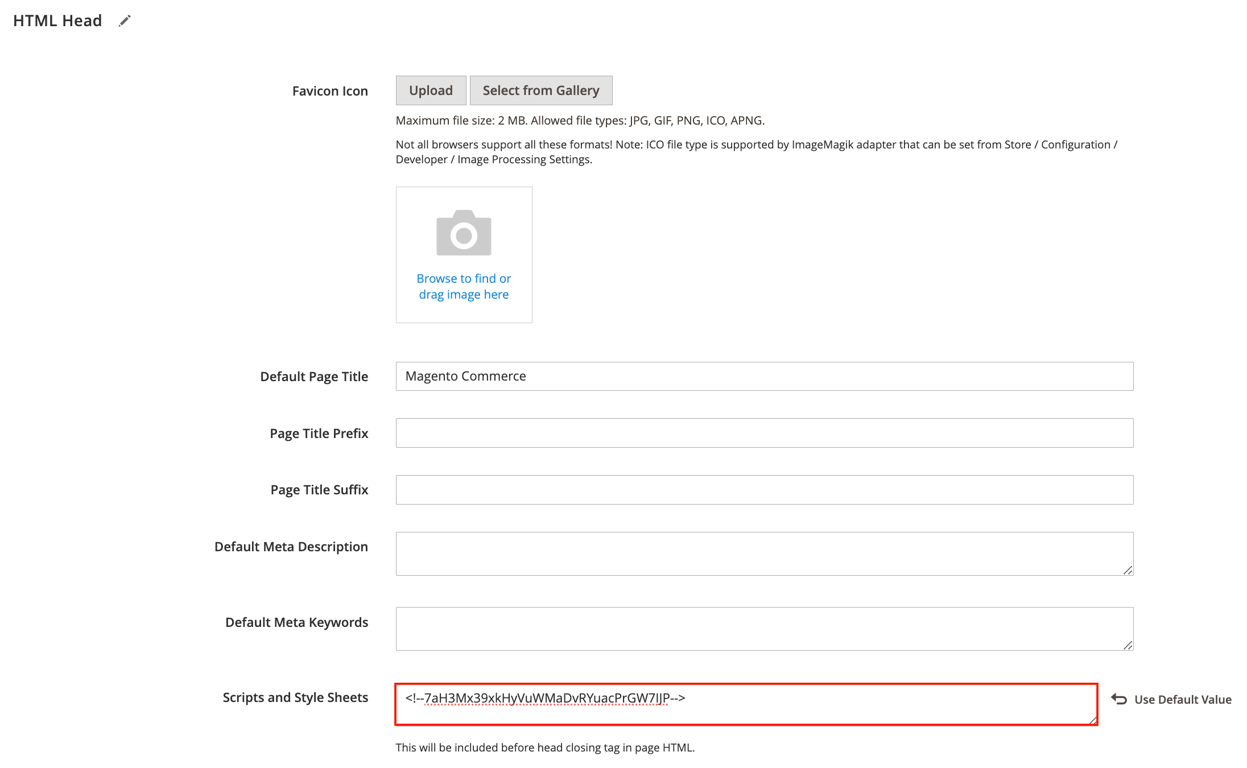
- Access your Magento dashboard and go to Content → Design → Configuration.
- Click Edit next to your Magento website and expand the HTML Head section.
- In Scripts and Style Sheets, paste the confirmation code at the end of any existing code.
- Return to the Security Scan page and click Verify Confirmation Code to complete the verification.
- Configure the automatic scan settings by choosing whether to run scans weekly or daily. Select your preferred day, time, and time zone for the scans.
- Enter the email address where you want to receive completed scans and security update notifications.
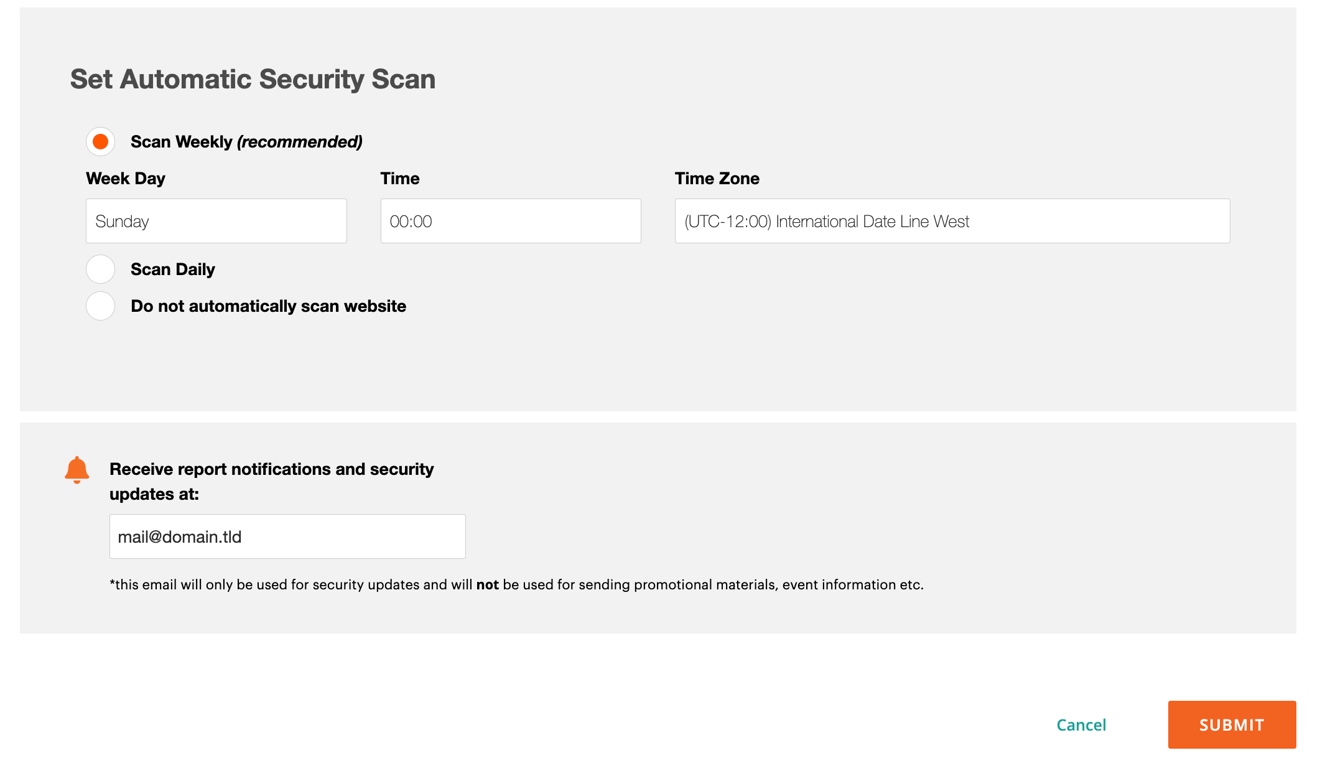
The scan will check your store for potential security risks at the scheduled time. Once completed, the tool will generate a detailed report listing any vulnerabilities found, their severity levels, and recommended actions.
You can then take action by prioritizing critical issues first. This may involve updating outdated software or reconfiguring certain aspects of your store’s security.
Alternatively, use Hostinger’s malware scanner. As previously mentioned, this Monarx-powered tool makes it easy to protect your store and server from malicious threats. Here’s how to use it:
- Access hPanel with your Hostinger account and go to VPS → Manage.
- From the left sidebar, select Security → Malware Scanner.
- Install Monarx by following the instructions if you haven’t done so.
- After installation, the malware scanner tool will automatically scan your server for malicious and compromised files.
- To enable the auto removal feature, click Activate and complete the payment.
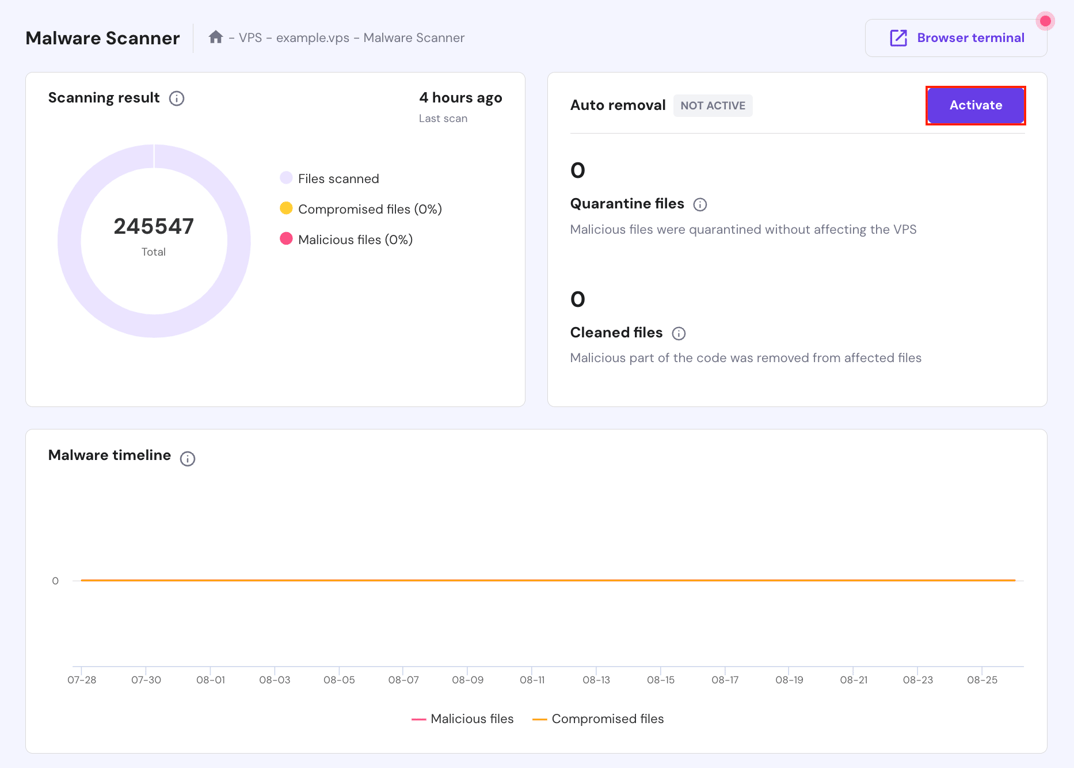
You can monitor all activities directly from this Malware Scanner page.
11. Install security extensions
Although Magento has proper built-in security features, we suggest using third-party extensions to protect your store from further threats. These extensions offer advanced features, such as login protection and activity monitoring, beyond Magento’s default capabilities, making your store more resilient to attacks.
Some trusted Magento security extensions you can install include:
- Amasty’s Security Suite for Magento 2. Offers a complete set of features, including malware detection, login protection, and file change alerts. It’s an all-in-one solution for keeping your store secure.
- Mageplaza’s Magento 2 Security. Provides features like two-factor authentication, reCAPTCHA, and security monitoring, all of which integrate seamlessly with Magento.
- Webkul’s Magento 2 Security. Offers IP whitelisting, two-factor authentication, and admin activity log features. It’s ideal for store owners who want to monitor and control their Magento admin panel access.
- Wyomind’s Watchlog Pro. Helps monitor login attempts and blocks IP addresses that attempt too many failed logins, which is excellent for preventing brute-force attacks.
12. Regularly back up your data
Regular backups are critical components of disaster recovery and business continuity. They act as a safety net, allowing you to quickly recover your store from unexpected issues without losing valuable customer data or sales records.
There are two types of backups to consider:
- Full backups. A full backup involves creating a complete copy of all your data, including files, databases, and configurations. Since full backups take longer and require more storage space, we recommend performing one at least once a week to twice a month, depending on your store’s activity level.
- Incremental backups. They capture only the changes made since the last backup, making them faster and more storage-efficient. Consider doing incremental backups more frequently, such as daily or every other day, to ensure you have up-to-date copies of your data.
For Hostinger VPS customers, you can automatically back up your Magento data using our built-in tools. Here’s how:
- Access your VPS dashboard and go to Settings → Backup & Monitoring → Snapshots & Backups.
- Click Create Snapshot to capture your VPS data and current state. To enable daily automatic backups, click Upgrade. Once purchased, set your backup frequency in Auto-backups settings.
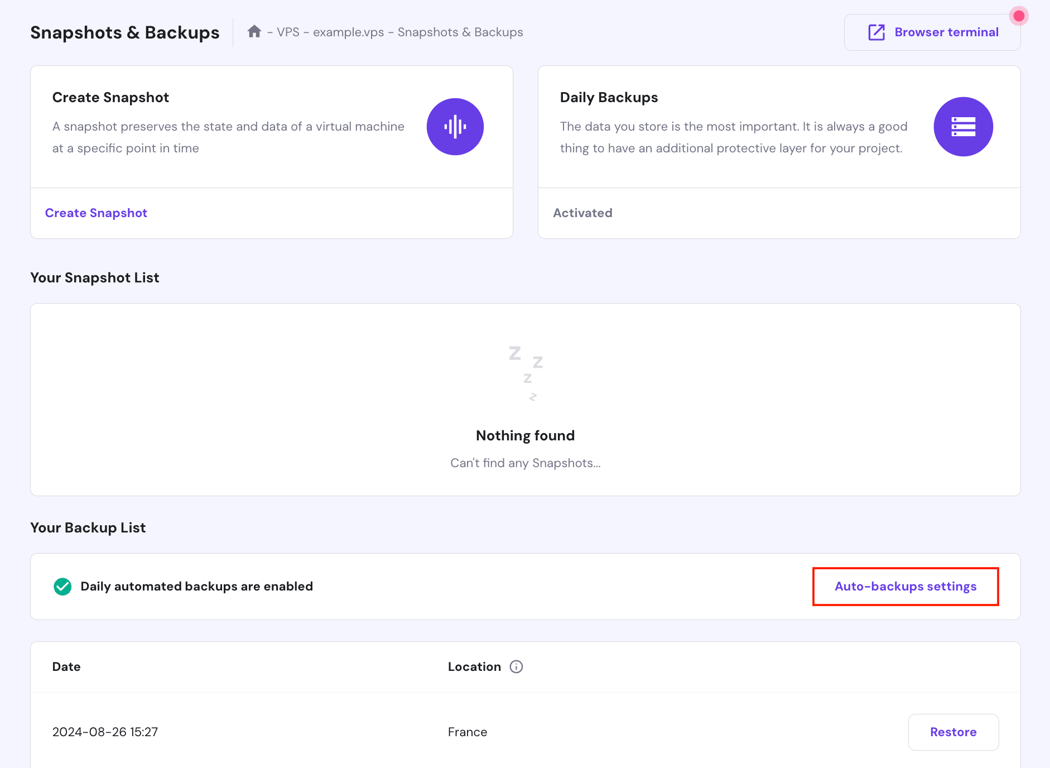
If you prefer to back up your Magento store manually, follow these instructions:
- Access your server via SSH, then create a database backup using the command below. Replace username, database_name, and /path/to/backup/db_backup.sql with your actual credentials and desired backup path:
mysqldump -u username -p database_name > /path/to/backup/db_backup.sql
- Compress the Magento directory using the tar command to back up your files. Change /path/to/backup/magento_backup.tar.gz and /path/to/magento2 with the appropriate paths:
tar -czvf /path/to/backup/magento_backup.tar.gz /path/to/magento2
13. Implement a web application firewall (WAF)
A web application firewall (WAF) specifically guards your Magento store’s application layer against sophisticated web-based attacks, such as SQL injection, cross-site scripting (XSS), and remote code execution.
While a network firewall protects your server from external threats and network-based attacks, it may not reach the application layer as a WAF does.
When selecting a WAF for Magento, consider the following factors:
- Compatibility. Ensure the WAF you choose is compatible with Magento, whether on-premises, cloud-based, or managed by a third-party provider.
- Customization. Look for a WAF that lets you customize its security rules to meet your eCommerce site’s specific needs.
- Performance Impact. Choose a WAF that provides strong security without slowing down your website.
To get started, consider popular WAF providers, such as Cloudflare, Sucuri, and Imperva. Then, follow the provider’s integration guidelines or contact their support team to help you set up the WAF with your Magento site.
After setup, perform thorough testing to ensure the WAF effectively blocks malicious traffic without disrupting legitimate user activity.
Additionally, maintain your implemented WAF regularly. This includes periodically reviewing and adjusting the security rules to match your store’s evolving needs and monitoring logs and reports to stay informed about the blocked attack types.
14. Prevent browser extensions from leaking sensitive data
Browser extensions can enhance productivity, but installing malicious or compromised extensions can expose your Magento website to significant security risks.
Malicious extensions can steal sensitive information, track browsing activities, or inject harmful code into web pages. Even legitimate extensions can become compromised if hijacked or updates introduce vulnerabilities.
To minimize the risk of browser extensions leaking sensitive data, apply the following tips:
- Use browser security features. Enable your browser’s built-in security features, such as malware protection and privacy settings. These tools can help detect and block malicious extensions before they cause harm.
- Review installed extensions regularly. Periodically audit the extensions installed in your browser. Remove any that are no longer needed or come from untrusted sources.
- Install extensions from official sources. Always install extensions from official sources, such as the Chrome Web Store for Google Chrome or the App Store for Safari.
- Limit permissions. Where possible, limit the permissions granted to browser extensions. They should only have access to the data necessary for their function, reducing the risk of exposing sensitive information.
- Implement security policies. Establish security policies that restrict the use of specific browser extensions, especially those that request excessive permissions or come from less reputable developers.
15. Perform regular security audits
Security threats constantly evolve, and even a well-secured Magento site can become vulnerable over time. Conducting regular security audits helps uncover weaknesses in your website’s code, configurations, and third-party integrations that attackers could exploit.
Additionally, these audits verify that your store complies with industry standards and regulations. By proactively auditing your site, you can ensure that your security measures remain practical and up-to-date.
A complete security audit typically includes these components:
- Code review. Analyze your website’s code to pinpoint potential security flaws, such as improper input validation or outdated libraries. Regular code reviews help ensure your site’s codebase is secure and follows best practices.
- Configuration review. Examine your Magento site’s configuration settings to ensure their security. This includes reviewing file permissions, database settings, and web server configurations.
- Penetration testing. Simulate attacks on your website to identify and exploit vulnerabilities, providing insight into how an attacker might breach your site. Penetration testing helps you understand the real-world impact of potential security issues.
Here are general guidelines for conducting a Magento store security audit:
- Use security scanning tools. Use tools like the Magento Security Scan Tool, OWASP ZAP, or Nessus to scan your site for vulnerabilities.
- Review code and configurations. Perform a thorough review of your site’s code and configuration settings. Look for outdated libraries, improper coding practices, and misconfigured settings that could expose your site to risk.
- Perform penetration testing. If you have the expertise, conduct penetration testing on your Magento site to identify how an attacker might exploit security flaws. If not, consider hiring a third-party Magento security firm to perform this test.
- Implement fixes and updates. After identifying vulnerabilities, apply security fixes and adjust configurations to address the issues.
- Document the audit. Keep detailed security audit records, including the vulnerabilities found, actions taken, and any ongoing risks. This documentation is helpful for future audits and helps track your security improvements over time.
Security audits with Kodee AI assistant
Kodee, Hostinger VPS hosting's AI assistant, can handle various security-related management tasks like scheduling a backup, managing the Monarx malware scanner, and configuring firewall rules based on your request.
Since all you need to do is chat with Kodee, it makes repetitive tasks like security audit more streamlined and time-efficient.
Conclusion
Securing your Magento eCommerce store is an ongoing process that requires diligence and a proactive approach. In this article, we’ve covered essential security tips, from using a secure hosting environment and regularly updating Magento to implementing a WAF and conducting regular audits.
By following these Magento security practices, you can protect your website, shield customer data, and ensure a safe shopping experience for your users. Make security a priority and regularly review your practices to keep your Magento website resilient and well-guarded.
Magento security tips FAQ
Why are Magento security checks important?
Regular security checks are crucial to protecting against evolving threats, preventing data breaches, avoiding financial losses, and maintaining brand reputation. They ensure your Magento store remains secure and compliant with industry standards.
What are common security vulnerabilities in a Magento site?
Common Magento vulnerabilities include outdated software, weak passwords, unsecured payment gateways, and exposed admin panels. Attackers can exploit these flaws to gain prohibited access, steal data, or compromise your site’s functionality.
How can Magento be made more secure for clients?
To enhance Magento security, apply secure development practices, use PCI-compliant payment options, protect customer data, and provide clear security policies. Additionally, educate customers about safe online practices to foster a secure shopping environment and build trust.
All of the tutorial content on this website is subject to Hostinger's rigorous editorial standards and values.

Ariffud is a Technical Content Writer with an educational background in Informatics. He has extensive expertise in Linux and VPS, authoring over 200 articles on server management and web development. Follow him on LinkedIn.