Magento SEO tips: How to optimize your Magento store for search engines
Sep 11, 2025
/
Ariffud M.
/
8 min Read

To grow your Magento store’s traffic and visibility, you need a strong search engine optimization (SEO) strategy. Optimizing your Magento store with SEO techniques is key to unlocking its full potential.
Done right, it helps your products rank higher in search results and attracts more buyers.
Scroll down to learn effective and proven Magento SEO best practices. Here’s what we’ll cover:
- Perform keyword research for ecommerce to target buyer-intent keywords.
- Optimize on-page SEO using Magento’s built-in features.
- Improve technical SEO by enhancing site speed, mobile-friendliness, and navigation.
- Use SEO extensions to streamline tasks and automate optimizations.
- Track SEO performance to monitor rankings, traffic, and growth opportunities.
Keyword research and analysis
Before you optimize your pages, identify what your customers search for. Keyword research forms the foundation of a successful Magento SEO strategy because it helps you target terms that drive sales.
For ecommerce stores, focus less on broad keywords and more on specific phrases that signal buying intent.
Tools and methods for finding relevant keywords
Use different tools to uncover valuable keywords for your Magento store. A quick starting point is Google Autocomplete – type a product name into the search bar and review the suggested searches.
These reflect real, high-volume queries that show what customers want.
For deeper insights, tools like Ahrefs and SEMrush provide data on search volume, keyword difficulty, and related terms. They also reveal which keywords drive traffic to your competitors, so you can refine and expand your strategy.
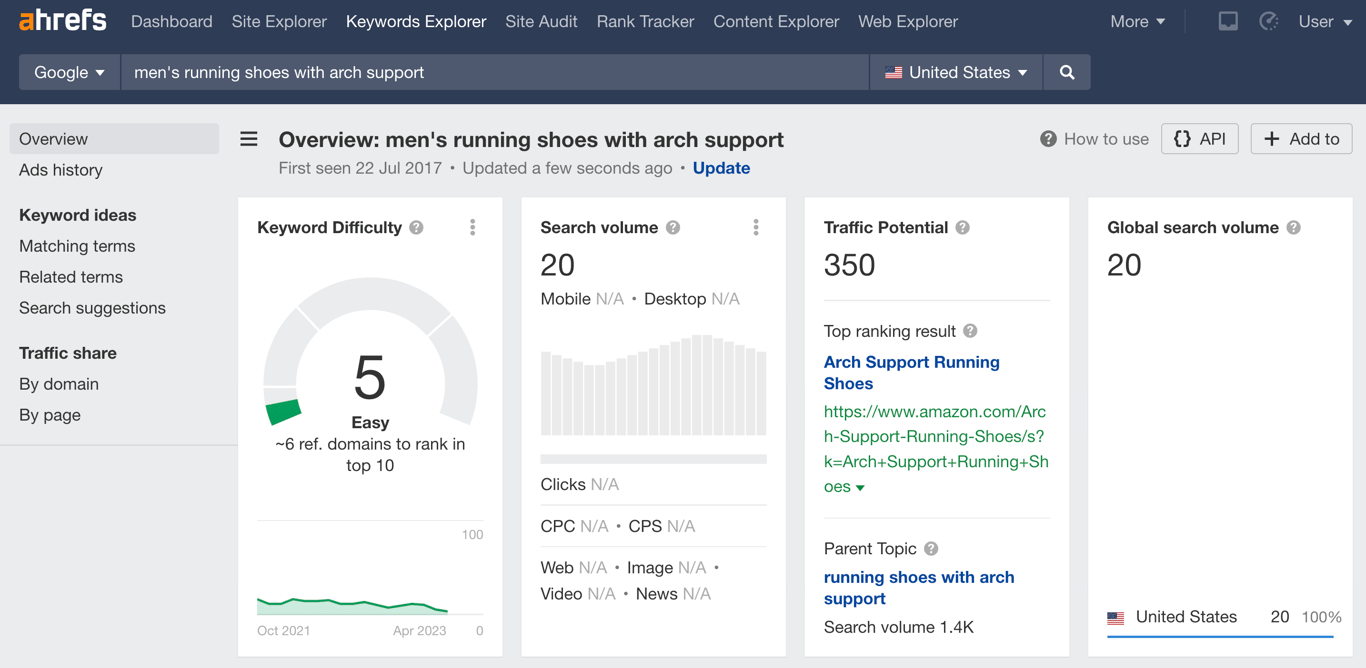
Focus on long-tail and buyer-intent keywords
For ecommerce sites, two keyword types deliver the most value:
- Long-tail keywords. Use longer, more specific phrases such as “men’s leather waterproof hiking boots” instead of just “boots.” These terms attract less traffic overall but convert at a much higher rate because searchers know exactly what they want.
- Buyer-intent keywords. Target keywords that show a customer is ready to purchase. These often include terms like “buy,” “discount,” “deal,” or “review.” For example, a user searching for “buy Nike Air Max 270 online” is far more likely to convert than someone simply searching for “Nike shoes.”
Importance of competitor analysis in keyword research
Analyzing competitor keywords helps you uncover gaps in your own strategy and focus on terms with the highest return on investment (ROI).
By studying what drives traffic to other stores in your niche, you can adopt proven tactics or target keywords they’ve missed. This approach often reveals less competitive opportunities where you can rank faster and capture new market share.
Once you’ve built a strong keyword strategy, the next step is to apply those terms through effective on-page optimization techniques.
Magento on-page SEO optimization techniques
On-page optimization refines individual pages so they rank higher and attract qualified traffic. In a Magento store, you optimize product pages, URLs, and meta tags to keep content clear, relevant, and easy to understand for both search engines and shoppers.
Add primary keywords into product titles, descriptions, and headers
Placing main keywords in product titles, descriptions, and headers helps search engines understand page relevance and boosts visibility in search results.
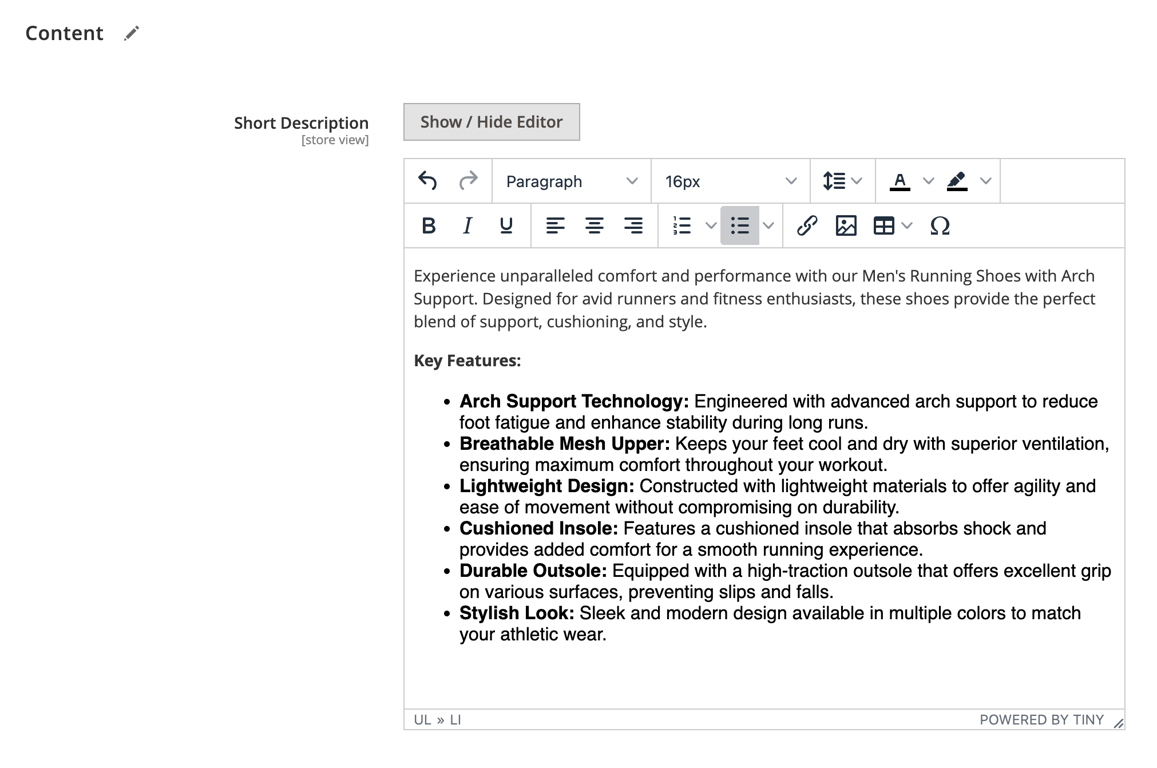
- Product titles. Replace generic titles like “Running Shoes” with descriptive, keyword-rich options such as “Men’s Trail Running Shoes with Arch Support.”
- Product descriptions. Write unique descriptions that naturally include keywords. For example: “Our men’s trail running shoes are built for comfort and durability, delivering top performance on rugged terrain.”
- Headers (H1, H2, H3). Structure content with clear headers. Use the H1 tag for the product title, and apply H2/H3 tags to subsections like “Features” or “Specifications” with relevant keywords where appropriate.
In Magento’s admin panel, go to Catalog → Products, select the product you want to edit, and update the Product Name and Short Description fields.
Use alt tags for images to enhance keyword relevance
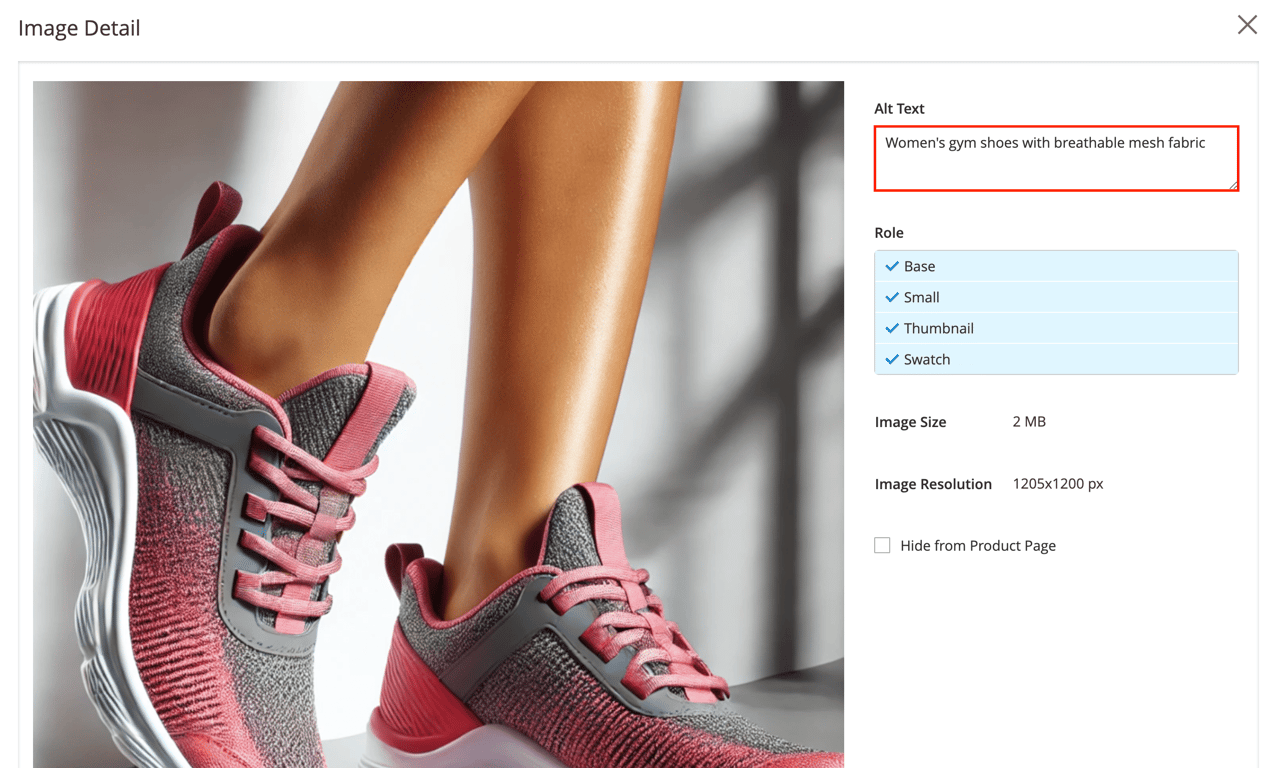
Alt tags, or alternative text, describe images. They serve two main purposes: they help search engines understand what an image represents and improve accessibility for visually impaired users who rely on screen readers.
When you write alt tags in Magento, keep them descriptive and include a relevant keyword where it fits naturally.
- Bad alt tag: “shoes”
- Good alt tag: “Red Nike running shoes with white sole on plain background”
To add alt tags in Magento:
- Open a product page.
- Scroll to the Images and Videos section.
- Click on an image and fill in the Alt Text field.
Enable HTTPS
HTTPS encrypts data between a user’s browser and your website, protecting sensitive information like login credentials and payment details. Google uses HTTPS as a ranking signal, and for ecommerce stores it’s critical for both SEO performance and customer trust.
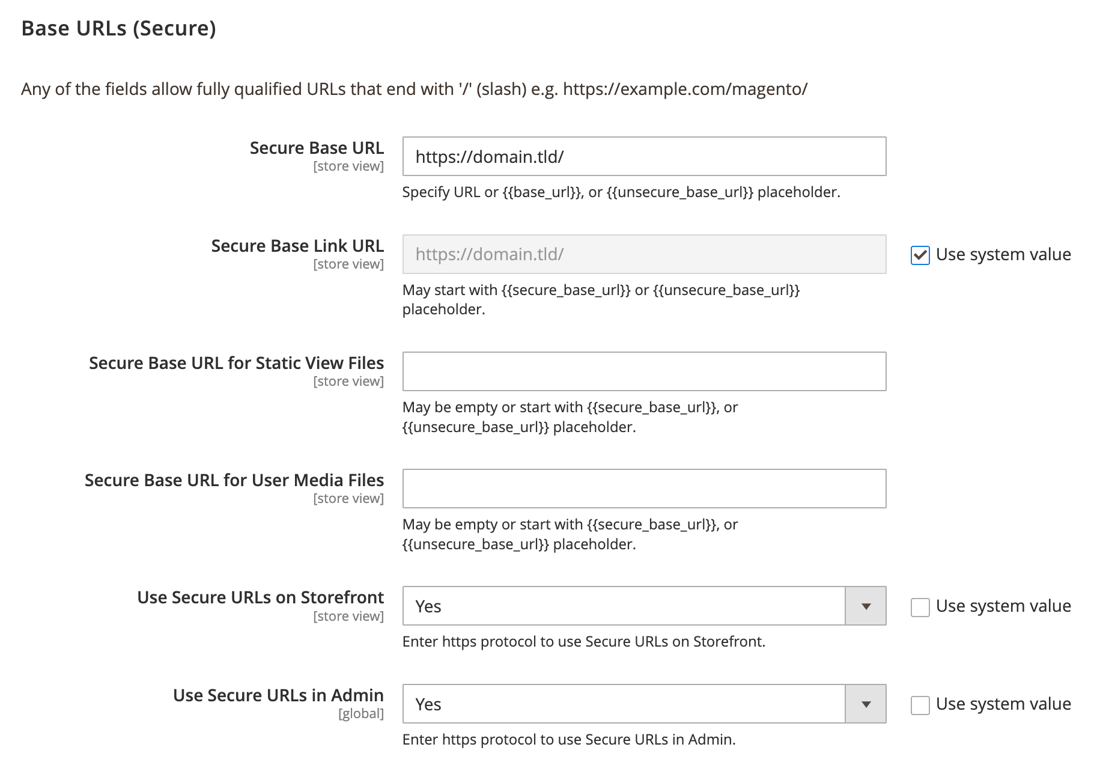
To configure HTTPS in Magento:
- Install an SSL certificate on your server. If you’re on Hostinger VPS, follow our guide on setting up SSL with Certbot.
- In the Magento admin panel, go to Stores → Configuration.
- Navigate to General → Web.
- Expand the Base URLs (Secure) section.
- Set Use Secure URLs in Storefront and Use Secure URLs in Admin to Yes.
- Update the Secure Base URL to start with https://.
- Hit Save Config.

Set up SEO-friendly URLs
A clean, descriptive URL structure improves user experience and helps search engines understand your site’s hierarchy. Well-structured URLs are easier to crawl and index, which directly boosts SEO performance.
An SEO-friendly URL should be short, descriptive, and use hyphens to separate words:
- Bad URL: example.com/catalog/product/view/id/123/s/product-name/
- Good URL: example.com/mens-jackets/waterproof-hiking-jacket
Additional examples of SEO-friendly URLs in a Magento store:
- Category page: example.com/womens-dresses/
- Product page: example.com/womens-dresses/black-evening-dress
- Blog post: example.com/blog/magento-seo-tips/
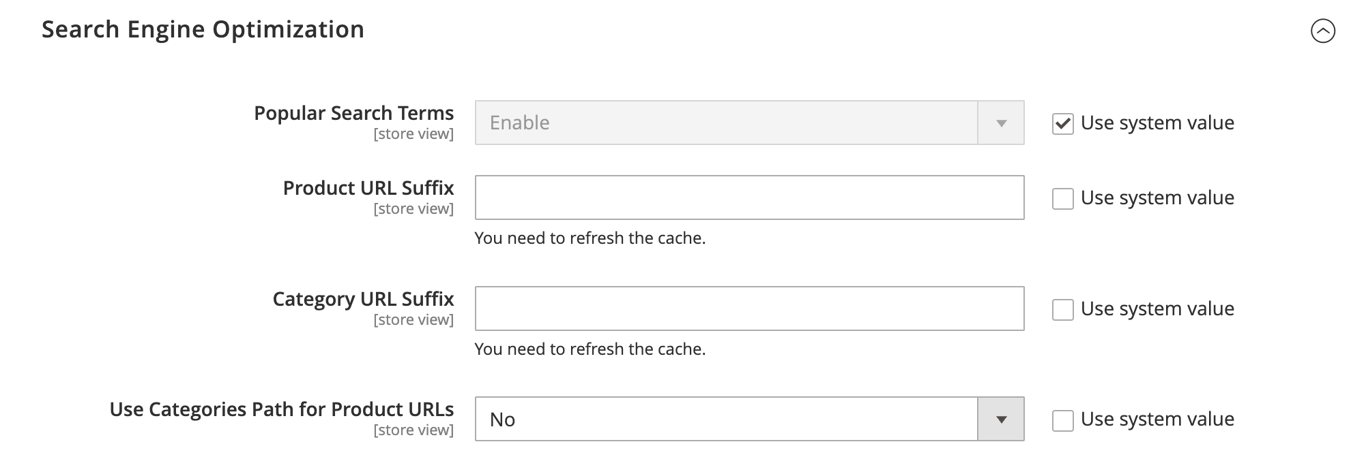
Here’s how you can configure SEO-friendly URLs in Magento:
- Go to Stores → Configuration → Catalog → Catalog.
- Expand the Search Engine Optimization section.
- Remove the .html suffix by clearing the Product URL Suffix and Category URL Suffix fields.
- Set Use Categories Path for Product URLs to No to keep URLs short and clean.
- Hit Save Config.
Configure meta tags effectively
Meta tags – especially the meta title and description – appear in search results. Strong meta tags act as ad copy for your page, boosting click-through rates (CTR).
Magento also supports structured data, which enables rich snippets. These can display extra details like price, availability, and reviews directly in search results, making your listings more attractive.
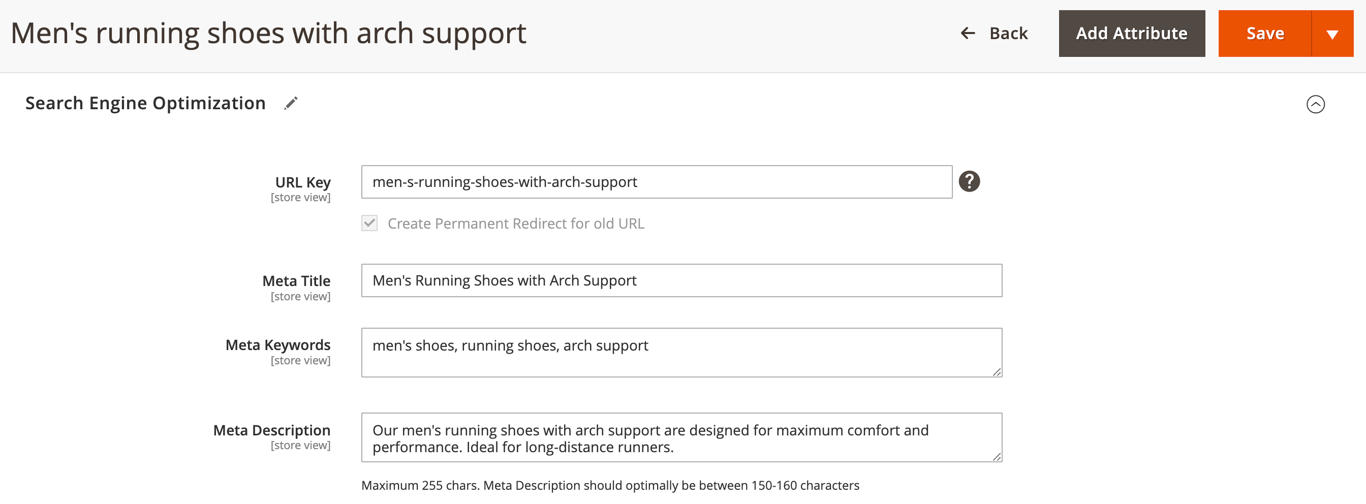
In Magento, follow these steps to configure meta tags for a product page:
- Select Catalog → Products and choose a product.
- Expand the Search Engine Optimization section.
- Fill in the Meta Title, Meta Keywords, and Meta Description fields.
- Meta titles should be unique, include primary keywords, and stay under 60 characters.
- Meta descriptions should be 150–160 characters, include relevant keywords, and feature a call to action. For example: “Shop now and get free shipping.”
Use canonical URLs
Canonical URLs tell search engines which version of a page to treat as the primary one. This matters for ecommerce sites because the same product often appears under multiple URLs – for example, through different categories or filter options.
Without canonicals, search engines may treat these variations as duplicate content, which can hurt your rankings.
To enable canonical URLs in Magento:
- Navigate to Stores → Configuration → Catalog → Catalog.
- Expand the Search Engine Optimization section.
- Set Use Canonical Link Meta Tag for Categories and Use Canonical Link Meta Tag for Products to Yes.

Configure an XML sitemap
An XML sitemap lists your website’s important pages and helps search engines crawl them efficiently. For large Magento stores with hundreds or thousands of products, a sitemap is especially valuable.
Generate an XML sitemap in Magento by following these steps:
- Select Marketing → SEO & Search → Site Map.
- Click Add Sitemap, enter a filename – for example, sitemap.xml – and path, then hit Save & Generate.
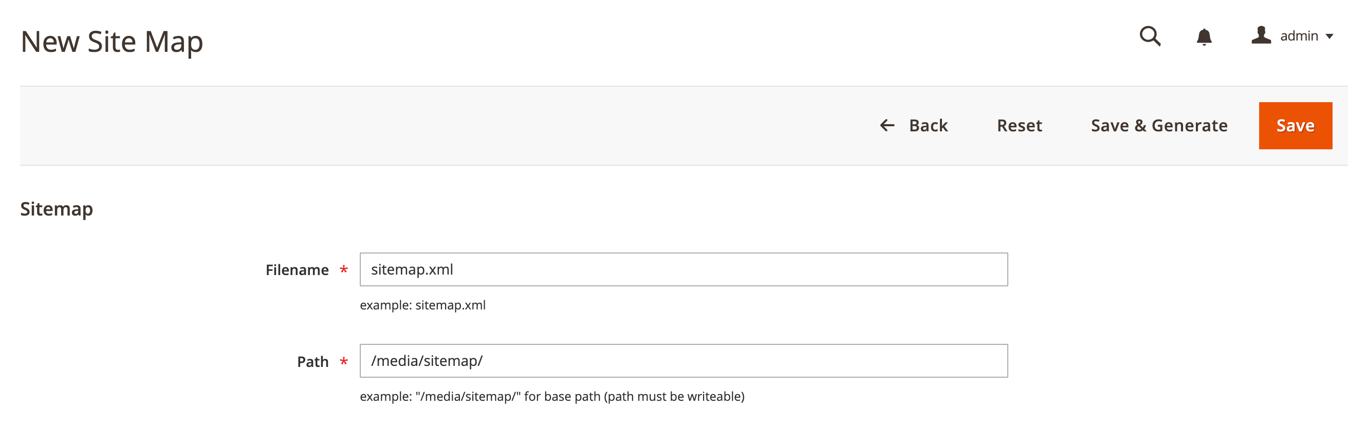
- Once generated, submit the sitemap URL in Google Search Console.
Modify robots.txt
The robots.txt file tells search engine crawlers which pages or files they can and cannot access. In Magento, you can use it to block non-public pages such as checkout, customer accounts, or internal search results.
This helps manage your crawl budget so search engines focus on indexing your key product and category pages.
Here’s how to edit the robots.txt file in Magento:
- Go to Content → Design → Configuration.
- Select the store view you want to configure and click Edit.
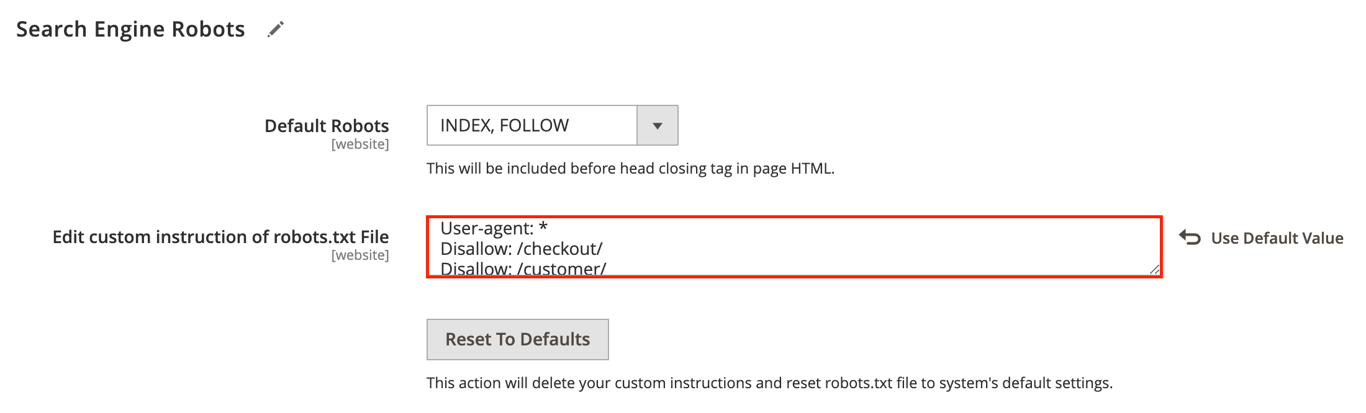
- Expand the Search Engine Robots section and add your rules. For example:
- Disallow: /checkout/ to block the checkout page.
With your on-page SEO elements optimized, move on to refining the technical aspects of your site to improve speed, usability, and overall search performance.
Technical SEO tips for Magento
Technical SEO optimizes your website’s infrastructure so search engines can crawl and index it efficiently.
In Magento, you achieve this by improving site speed, mobile responsiveness, and navigation structure to deliver a seamless experience for both users and search engines.
Improve site speed
Site speed is both a ranking factor and a critical part of user experience. Slow-loading pages raise bounce rates and lower conversions. Magento includes built-in caching features, but you can take additional steps to make your store faster.
- Image compression. Use tools like TinyPNG before uploading, or install Magento extensions such as Mageplaza’s Image Optimizer, which automates image optimization across your catalog.
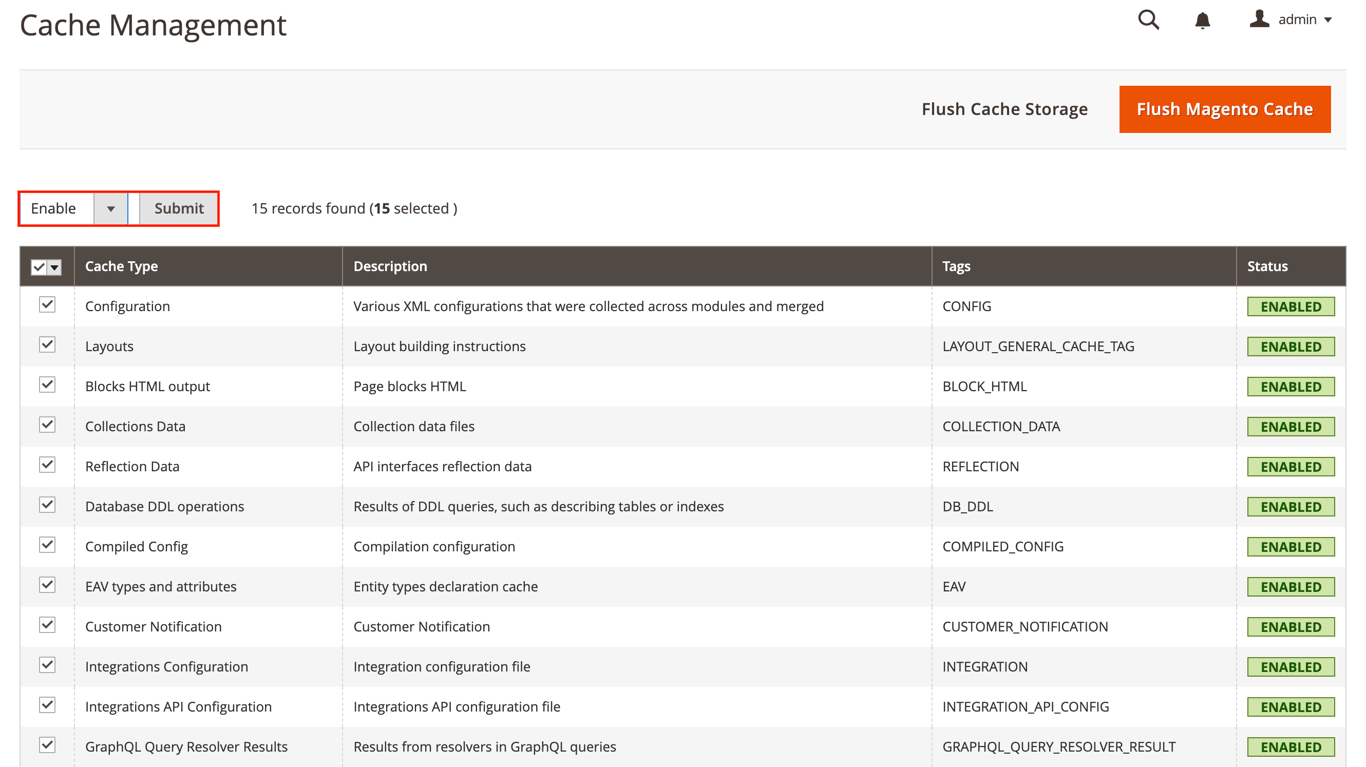
- Browser caching. Store site elements locally so returning visitors experience faster load times. In Magento, go to System → Cache Management and enable all cache types. Or, use an extension like Mirasvit’s Full Page Cache Warmer, which refreshes cache entries automatically so users receive pages faster.
- Server optimization. Use a high-performance hosting plan like Hostinger’s Magento VPS, enable Magento’s built-in caching tools, and consider a CDN to deliver content faster.
For a complete walkthrough to speeding up your store, se our Magento performance optimization guide.
Minify JavaScript and CSS files
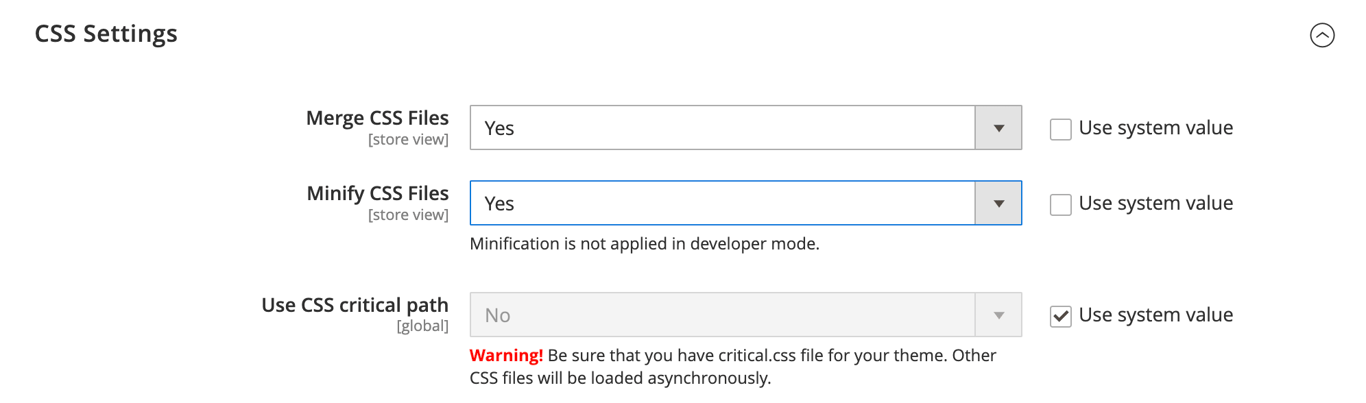
Magento can minify and merge JavaScript and CSS files to reduce file size and improve load speed.
To enable this, navigate to Stores → Configuration → Advanced → Developer, then activate the minification options under both JavaScript Settings and CSS Settings.
If you prefer using an extension, Amasty Page Speed Optimizer can handle file minification along with other performance optimizations.
Mobile optimization
With a large share of online shopping happening on smartphones, a mobile-friendly Magento store is crucial for both SEO and conversions. A well-optimized mobile experience improves search rankings, boosts customer satisfaction, and drives sales.
Most modern Magento themes are responsive and adapt to different screen sizes, but testing remains essential.
- Use Google’s Lighthouse tool to identify mobile usability issues.
- Manually test your store on various smartphones and tablets to confirm that:
- Buttons and links are easy to tap.
- Text is clear and readable without zooming.
- The checkout process is fast and user-friendly.
Streamlined navigation and clear structures
Streamlined navigation helps visitors find products quickly and lets search engines crawl your site more efficiently. In Magento, you can improve navigation by organizing your menus clearly and using built-in features like breadcrumbs.
- Create clear menu structures. Organize products into logical, top-level categories. For example, a clothing store might use menus like Men, Women, and Accessories. For larger stores with many subcategories, Magento themes often support mega menus, which display multiple navigation levels at once, so users can find items with fewer clicks.
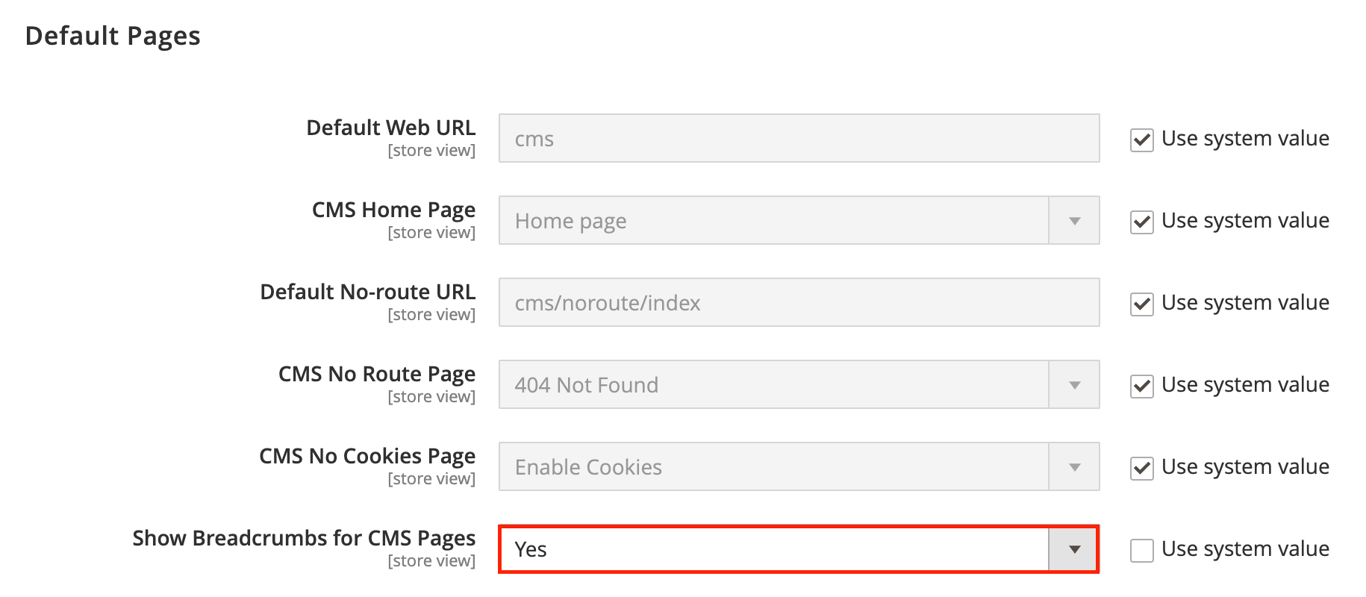
- Use breadcrumbs. Breadcrumbs show users their current path on your site, such as Home > Apparel > Men > Jackets. To enable them, go to Stores → Configuration → General → Web, expand the Default Pages section, and set Show Breadcrumbs for CMS Pages to Yes.
Internal linking
Internal links connect related pages within your site, helping distribute page authority and improving how easily search engines crawl your content.
To implement this practice, use descriptive, keyword-rich anchor text to link related products, categories, and articles.
For example, on a product page for Men’s Running Shoes, you could add a sentence like, “Complete your gear with our full range of running accessories.”
In this case, “running accessories” is the anchor text linking directly to that category page.
This strategy helps both visitors and search engines find relevant content and establishes a contextual relationship between your pages.
Magento extensions for SEO
Magento includes many built-in SEO features, but extensions can automate tasks and unlock more advanced functionality. Rather than installing dozens of tools, focus on a few high-quality extensions that cover your essential needs.
All-in-one SEO extensions can help you:
- Manage meta tags at scale.
- Generate rich snippets.
- Create advanced sitemaps.
- Set up redirects and prevent duplicate content issues.
Trusted developers like Mageplaza, Mirasvit, and Mageworx offer popular options that bundle multiple SEO features into one package, saving time and simplifying optimization.
Check our curated list of the best Magento 2 extensions, where we highlight the top three SEO tools along with other must-have extensions for your store.
Monitoring SEO performance in Magento
SEO isn’t a one-time task – it requires continuous monitoring to measure results and uncover new opportunities. Using a mix of tools will give you a complete view of your Magento store’s performance.
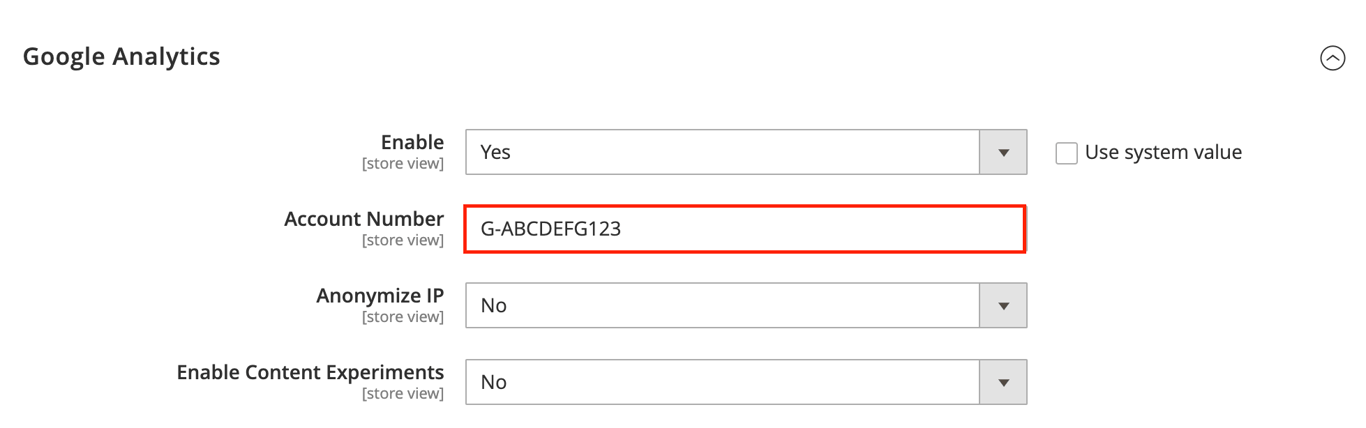
- Google Analytics. Provides insights into your traffic, user behavior, and conversion rates. To set it up in Magento, navigate to Stores → Configuration → Sales → Google API → Google Analytics and enter your tracking ID.
- Google Search Console. Essential for monitoring your site’s visibility in Google search. Use it to track keyword rankings, click-through rates, and indexing issues after submitting your XML sitemap.
- Magento SEO extensions. All-in-one SEO extensions from Mageplaza and Mageworx include built-in reporting dashboards, offering a convenient way to check your site’s health.
- Third-party audit tools. In addition to keyword research, tools like Ahrefs and SEMrush can run full SEO audits to detect technical issues such as broken links or missing meta tags. They also track keyword rankings over time and benchmark your performance against competitors.
Key takeaways
Optimizing your Magento store for search engines is an ongoing effort. Modern SEO focuses on delivering a great user experience – a site that loads quickly, is easy to navigate, and provides valuable information will naturally perform better in search results.
By applying keyword research, on-page optimization, and technical SEO strategies, your Magento site will be well-positioned for sustained growth.
As your next step, secure your store against online threats by following our guide on Magento security tips.
All of the tutorial content on this website is subject to Hostinger's rigorous editorial standards and values.

Ariffud is a Technical Content Writer with an educational background in Informatics. He has extensive expertise in Linux and VPS, authoring over 200 articles on server management and web development. Follow him on LinkedIn.