The Hostinger hPanel is a custom-made control panel designed to help you manage your web hosting, email, VPS and other Hostinger services with ease. You can access it directly at hpanel.hostinger.com. This comprehensive hPanel guide provides an overview of the main sections and tools available within the interface.
Main hPanel sections
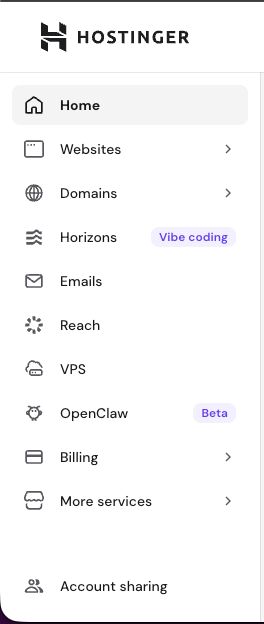
Once logged in, you will find the primary management categories in the left sidebar. These sections allow you to oversee different aspects of your account:
-
Home: This area centralizes your active Hostinger services. It includes the following features:
- Your to-dos: Relevant actions and reminders for your account.
- Your business: Manage domains associated with your business services. Each domain displays a status indicator indicating if it is active or requires attention (e.g., pointing to Hostinger).
- Websites: Here you can manage all your websites, add a new website, or migrate an existing one. Learn more: How to use the websites section in hPanel.
- Domains: Find and manage your domain settings, manage the DNS Zone and purchase new domain names. You can find a detailed guide here: How to use the domains section in hPanel.
- Horizons: Create and manage web applications using an AI-powered, prompt-based tool.
- Emails: Access and configure your email services at Hostinger.
- Reach: Create and manage email marketing campaigns, subscriber lists, and track engagement analytics.
- VPS: Manage your virtual private servers or purchase additional VPS. More details: How to use the VPS dashboard.
- OpenClaw: Access your OpenClaw instance installed on Managed OpenClaw hosting, manage credits and Managed OpenClaw hosting options.
- This section is enabled after purchasing a Managed OpenClaw hosting plan.
- Hermes: Access your Hermes instance installed on Managed Hermes hosting, manage credits and Managed Hermes hosting options.
- This section is enabled after purchasing a Managed Hermes hosting plan.
- Billing: Manage your subscriptions, invoices and payment methods. Learn more: How to Use the Billing Section.
- More services (Marketplace): Explore and purchase additional Hostinger services. This section also includes AI tools — clicking any AI tool from hPanel or the Websites section now opens the Hostinger AI Agents platform at agents.hostinger.com with a relevant skill pre-loaded for the selected task. Previously purchased standalone tool credits have been migrated to Agent credits.
- Account sharing: Share access to your account’s services to collaborators, request shared access, and manage sharing options.
hPanel top bar
The top bar and account menu offer additional functionality for account security and navigation:

-
- Quicksearch: Located in the top bar, this tool finds specific settings or pages within the hPanel instantly.

- Refer & Earn: Join Hostinger referral program and earn rewards for recommending Hostinger to your contacts.
- Quicksearch: Located in the top bar, this tool finds specific settings or pages within the hPanel instantly.
- Ask AI: Get assistance and contact support.
- Account menu: Click on the profile icon to open a menu with the following options:
- Account information: Update your personal information; enable social login, and change your Hostinger account password. You will also find the option to delete your account.
- Security: Enable and manage two-factor authentication (2FA) for better protection.
- Account activity: Review the login history to your account.
- Notification settings: Choose how you want to receive updates about your account, payments, and services.
- Learning Lab: Access free how-to guides on topics such as SEO, email marketing, and building an online store. A tooltip introduces this resource on your first visit.
- Language: Change the display language of hPanel.
- Log out of your account.
The Hostinger hPanel serves as a centralized hub for all your Hostinger services. By using the sidebar and search tools, you can navigate between domain management and website configuration efficiently.