WordPress SEO: 30+ best practices to drive traffic to your website
Mar 10, 2026
/
Brian
/
35 min Read

Did you know that a significant portion of website traffic comes from organic search? People use search engines like Google to learn something new, browse products, or book services online every day.
Now, imagine that when users type in relevant keywords in their browser, your WordPress website appears first.
That’s precisely what search engine optimization (SEO) is all about. By getting your website at the top of search engine results pages (SERPs), you’ll get more visibility, drive more organic traffic, and, eventually, gain more sales.
Still trying to figure out where to begin? This ultimate WordPress SEO guide will walk you through to implement the best practices.
Initial setup for WordPress SEO
About 53% of website traffic comes from organic search, showing just how important it is for bringing visitors to your site.
Before you incorporate more advanced SEO techniques, let’s get the basics out of the way first.
1. Choose a fast WordPress hosting provider
A reliable hosting provider is the backbone of your WordPress site. It directly impacts your site’s performance, security, and overall user experience.
While there are a lot of WordPress hosting providers out there, only a few of them are recommended by WordPress.org themselves, and that includes Hostinger.
This is mostly because we provide one of the fastest WordPress hosting solutions on the market.
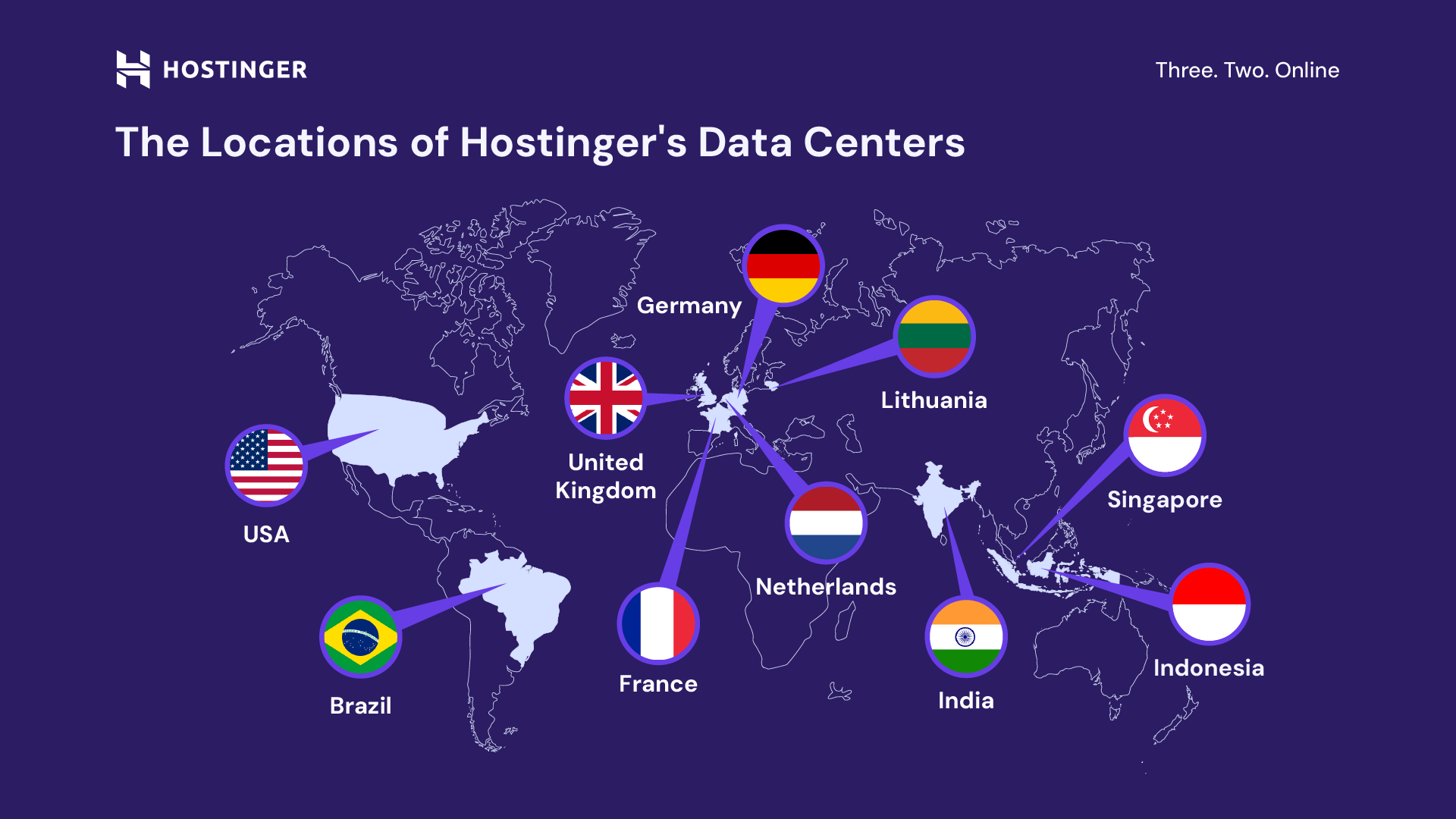
With data centers located across four continents, you can easily choose the closest server location to your audience for faster content delivery.
Our WordPress Business plan and above come with a content delivery network (CDN). It acts as a network of global remote servers that stores copies of your website content.
So, the next time users visit your site, your content will be served from the nearest CDN server to improve loading speed.
You will also benefit from an object caching feature that can improve WordPress response times by up to threefold.
Expert tip
One of the main ways to improve SEO is to invest in fast, reliable hosting with good uptime and quick support.
Our WordPress site has been hosted with Hostinger for more than two years now. When we first migrated from Bluehost, we were initially shocked at how much better the lighthouse scores were and how much better our site performed on Google search results.

The monthly Business plan costs $13.99/month. But if you’re in it for the long game, we recommend going for the 48-month plan at just $3.99/month.
In other words, by the time your site reaches its fourth anniversary, you will have spent only $191.52 out of the initial $671.52—resulting in a significant $480 in savings!
In addition, we also offer a 30-day money-back guarantee. So, your investment is safe either way.

2. Check the WordPress visibility settings
WordPress includes an option to discourage search engines from indexing a particular website. This can be useful for sites under development, private blogs, or content the owner wants to avoid appearing in search engine results.
When enabled, your web pages may not appear in search results, meaning they will not generate traffic.
Unless your website is under maintenance, ensure you turn this visibility setting off.
To double-check, log in to your WordPress Dashboard and head to Settings → Reading. Find the Search engine visibility checkbox and ensure it’s unchecked.
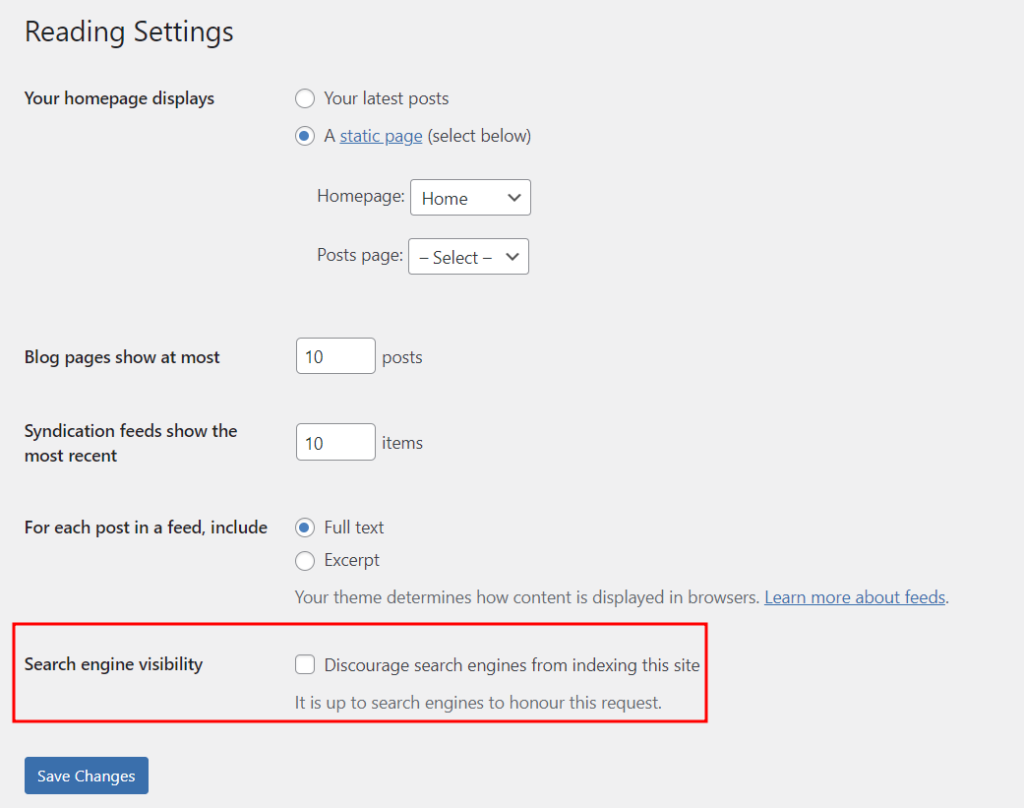
Important! Don’t check this box if it’s already unchecked. Enabling it, even temporarily, can result in the website losing all its search engine rankings, which could significantly impact its visibility and traffic.
3. Use a WordPress SEO plugin
WordPress SEO plugins make it painless for anyone to optimize their site for better search rankings without having to be an SEO expert.
You can create SEO-friendly content and perform technical SEO tasks like generating an XML sitemap. All in one place!
If you’re unsure where to begin, we’ve analyzed some of the best WordPress SEO plugins to consider. Here are some great ones you might know:
- AIOSEO. Known for its user-friendliness, AIOSEO offers a quick setup wizard and an intuitive dashboard for seamless SEO management. With TruSEO, you will get real-time recommendations on how to optimize your content as you write.
- Yoast SEO. Similar to AIOSEO, the Yoast SEO plugin offers an on-page analysis feature to optimize your blog posts. You can also handle technical SEO tasks like improving website speed, generating schema markup, and adding canonical URLs effortlessly.
- Rank Math SEO. One of the first SEO tools to leverage the power of AI, this plugin saves you time creating content with features like Content AI and smart link suggestions.
This tutorial will use AIOSEO to demonstrate how an SEO plugin can help you optimize your website.
Simply install the WordPress plugin from your WordPress dashboard. Once activated, head to All in One SEO on the left sidebar.
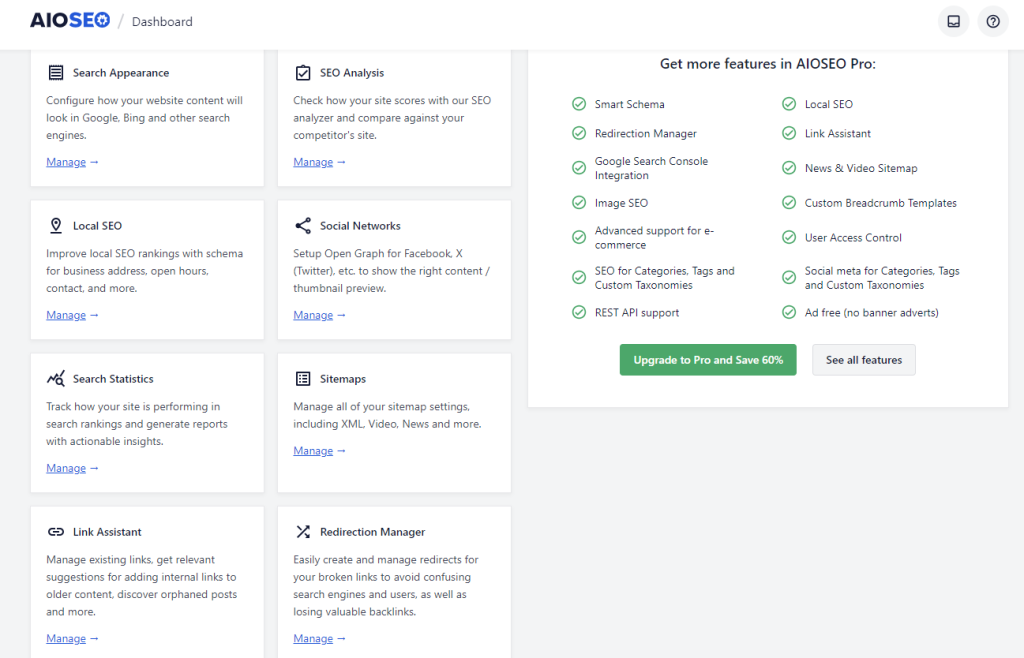
Here, you can perform day-to-day SEO tasks using AIOSEO’s exhaustive features:
- Sitemaps. Quickly generate and manage different types of sitemaps, including XML, Video, and News.
- Search Appearance. Configure how your pages and posts will appear on Google search results. Pro users can also benefit from Schema Markup Generator by creating engaging rich snippets.
- SEO Analysis. Perform SEO audits and competitor analysis to improve your site’s performance.
- Link Assistant. Manage internal and external links and get suggestions for adding links to older articles.
- Redirection Manager. Redirect your broken URLs to new destinations to maintain a smooth user experience and preserve valuable backlinks.
Keep in mind that some of the features require you to upgrade to one of AIOSEO’s premium plans.
4. Submit your sitemap to search engines
Although search engines index websites automatically, submitting a sitemap will help them understand your site’s structure better and faster.
There are two types of WordPress sitemaps – HTML and XML.
An HTML sitemap is more for your visitors, giving them a simple way to see all the pages on your site and find what they’re looking for.
Meanwhile, an XML sitemap is the one you should submit to search engines. It contains a list of all important pages on your website so that crawlers can find and index them much quicker.
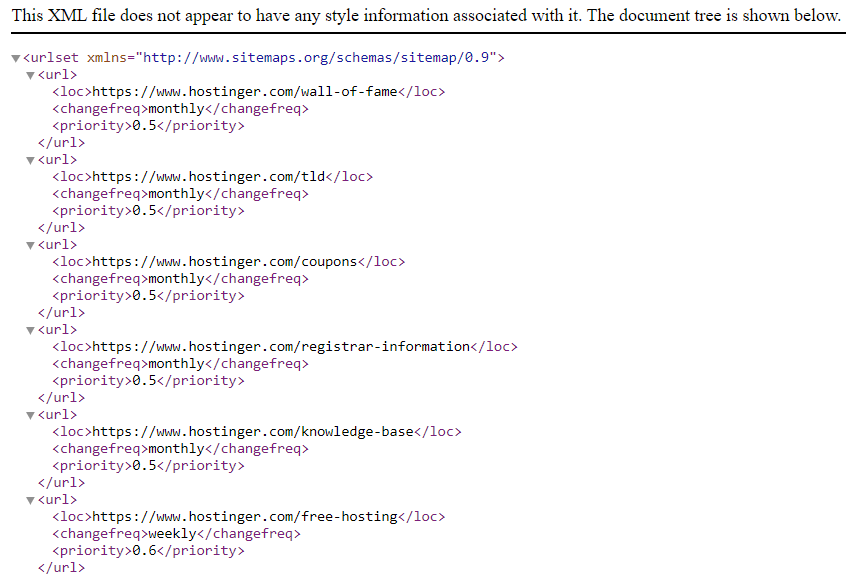
Even though it might sound technical, creating an XML sitemap with a WordPress SEO plugin is super straightforward.
Here’s how to generate one using AIOSEO:
- Head to All in One SEO → Sitemap from your WordPress dashboard.
- Open the General Sitemap tab and click the Open Sitemap button.
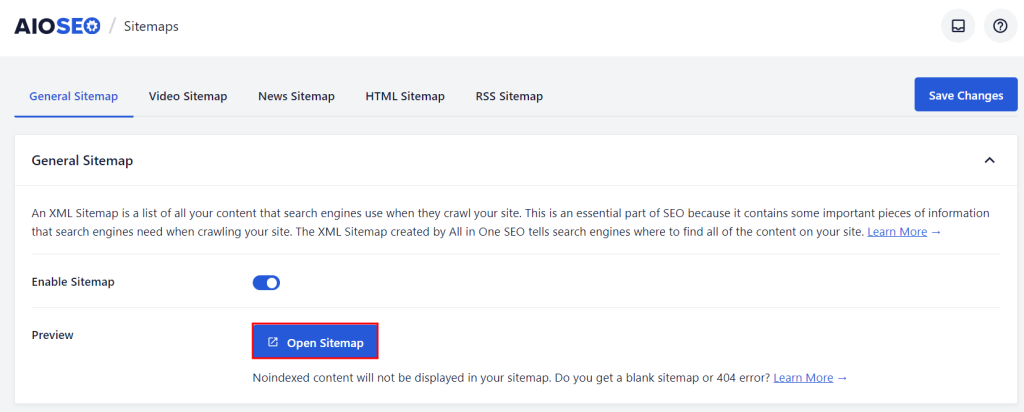
- Once your browser opens the XML sitemap in a new tab, copy the URL.
Expert tip
When you create sitemaps using a plugin, be aware that WordPress themes may generate a lot of different content types and taxonomies, many of which you don’t want or need in organic search results.
That’s why it’s important to review the generated sitemaps and exclude any posts and pages you don’t want to be indexed. If you use parallax effects, your site will often have several versions of the homepage or other content, so make sure to noindex these posts and pages to remove them from the sitemap.

Next, submit your sitemap to search engines via Google Search Console or Bing Webmaster Tools. You don’t need to submit the sitemap to other search engines like Yahoo! and DuckDuckGo since they use indexing data from Bing.
For more detailed steps, read our complete guide on how to submit a website to search engines.
5. Set up a permalink structure
A permalink is essentially a URL that points to your specific page or post. Since these URLs appear in search results, creating a clean permalink structure is required to get more clicks.
Visitors trust clean, readable permalinks more than those filled with random letters and numbers, which can seem suspicious.
A clear and straightforward URL helps users understand what a page is about at a glance, making them more likely to click on it. On the other hand, a messy or cryptic URL can seem untrustworthy, leading visitors to avoid it, thinking it might be spammy or unsafe.
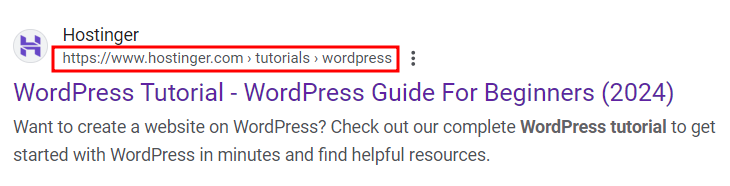
You can easily customize your WordPress website’s permalink structure to make it more SEO-friendly.
To do so, head to Dashboard → Settings → Permalinks. Then, select the Custom Structure option and include the necessary tags.
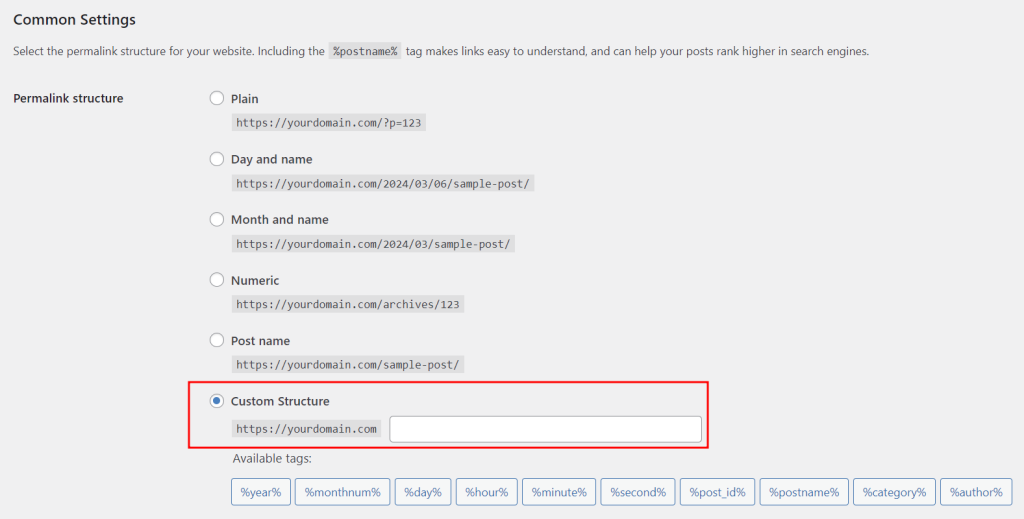
Choose tags based on your website’s type. For example, news sites often include the date and title in their URLs. Meanwhile, online store permalinks usually include the category and post name.
If your website is already online, remember to redirect your old URLs to the new ones after changing the permalink structure to prevent 404 errors. You can use a plugin like Redirection to do just that.
6. Install an SSL certificate
Secure Sockets Layer (SSL) is an online security technology that encrypts the connection between a website and a browser.
It prevents hackers from intercepting and reading the information being exchanged, such as personal details, login credentials, and payment information.
When you install an SSL certificate, your site’s URL begins with an HTTPS scheme instead of HTTP.
Web browsers like Google Chrome will also display a padlock icon and a message that says “Connection is secure” when users hover over your site’s information.
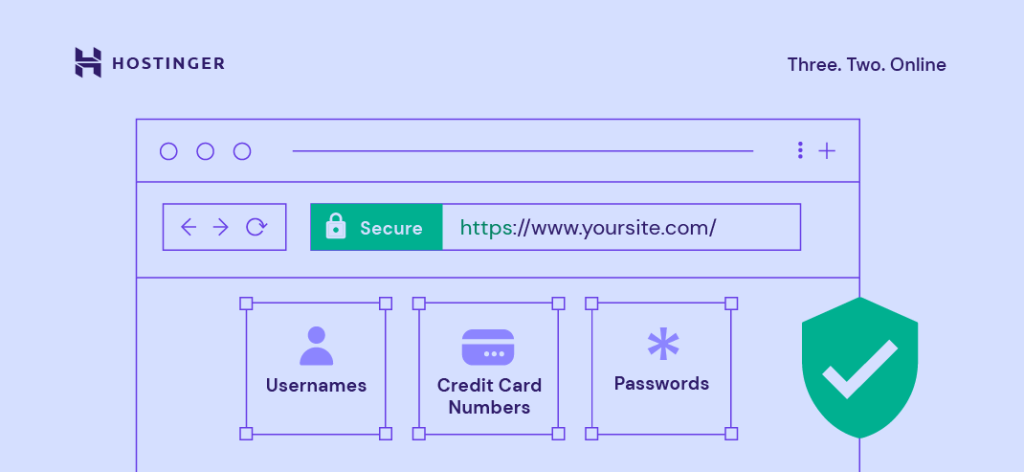
Google takes HTTPS into account when assessing a website’s page experience, which is another important ranking factor.
Some web browsers also label sites without SSL certificates as not secure, advising visitors against accessing them.
That’s why having an SSL certificate is essential to avoid driving away potential traffic and hurting your website’s conversion rate.
At Hostinger, you will get unlimited SSL certificates for free when you purchase one of our WordPress hosting plans. An SSL certificate will be automatically installed whenever you create a new website.
If, for some reason, an SSL certificate isn’t enabled by default, you can manually install and activate it via our user-friendly hPanel:
- Log in to your hPanel account.
- Head to Websites on the left menu, and click Dashboard next to your domain name.
- On the left sidebar, select Security → SSL.
- Under the Install SSL tab, select your domain from the dropdown menu and click Install SSL.
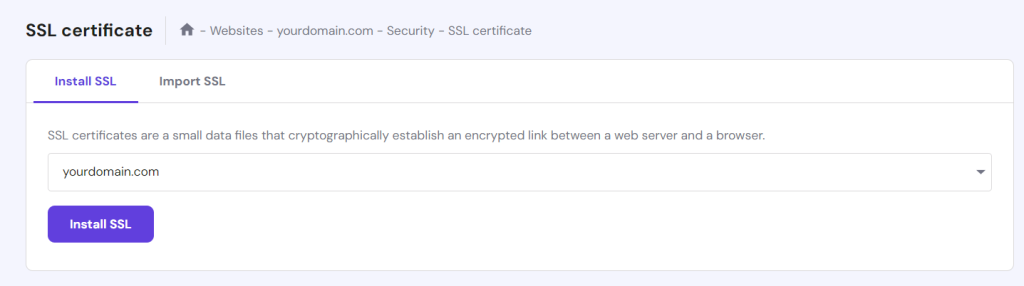
Keep in mind that the installation process can take up to an hour. Once it’s complete, your domain will automatically switch to HTTPS.
7. Enable manual comment approval
Spam comments often contain malicious links that can damage your site’s reputation with both search engines and users.
WordPress makes it easy to review and approve each comment manually so that you can avoid unwanted messages on your site.
To enable manual comment approval, head to Dashboard → Settings → Discussions from the WordPress dashboard.
Check the Comment must be manually approved option. Then, scroll down and click Save Changes.
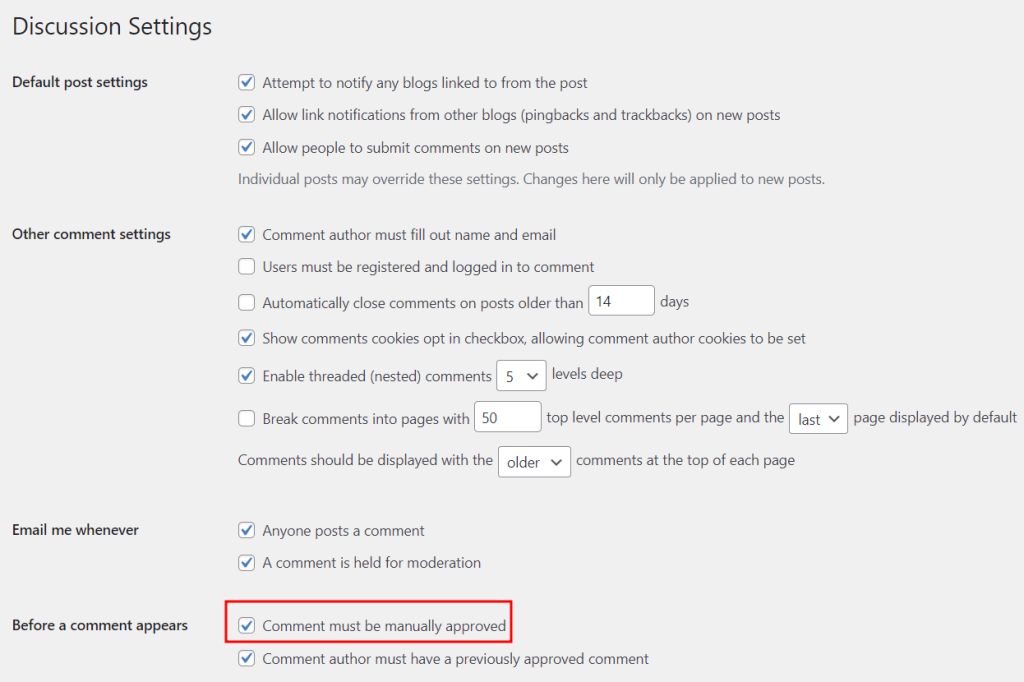
Here are the main elements to consider when reviewing comments:
- Message content. Check the content of every comment and only approve the relevant ones to your page or post. This helps maintain a positive user experience, encourages genuine engagement, and protects your site’s reputation from spam and irrelevant links that could harm SEO.
- Username. Make sure the username represents a genuine user and does not contain offensive or inappropriate language. This helps create a respectful and trustworthy environment on your site.
- Site links. Remove comments containing links to external websites, even if they don’t seem like spam. Allowing links can make your site look unprofessional, invite more spam, and pose security risks to your visitors.
You can install a WordPress anti-spam plugin like Akismet to scan your blog posts and filter any comments that may harm site security.
On-page SEO best practices for WordPress
On-page SEO involves optimizing the actual content of your website to improve its visibility for search engines and provide a better experience for users. When done right, it can boost your site’s rankings for specific keywords used by your target audience.
Here are some key WordPress on-page SEO tips you should know to help your site rank higher in search results.
1. Conduct extensive keyword research
It’s no secret that most users discover content online by entering specific keywords into search engines.
By optimizing your pages and posts with relevant keywords, your site is more likely to appear in search results, especially on the first page, which is crucial for attracting more visitors.
How do you find the keywords your target audience is searching for? This is where keyword research comes into the picture.
To find out what users are typing in their browser, you can take advantage of Google autocomplete predictions.
These predictions reflect actual queries that people use in Google’s search box.
For example, if you type “web design” as a keyword, automatic suggestions like “web design courses” and “web design software” will also pop up.
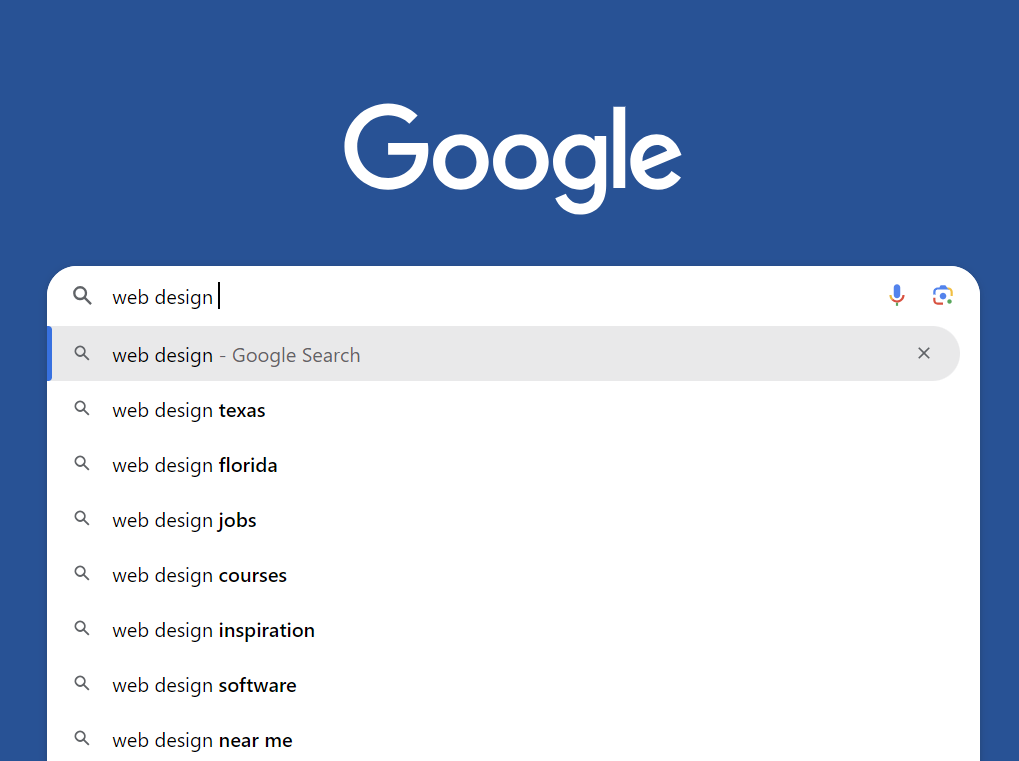
Begin a new word with any letter—like a, b, c, d, and so on—at the end to reveal additional keyword suggestions. You’ll be surprised at how many underserved topic ideas you can find with this simple trick.
After listing several topic ideas, use free tools like Moz Keyword Explorer and Google Keyword Planner to check their monthly search volumes.
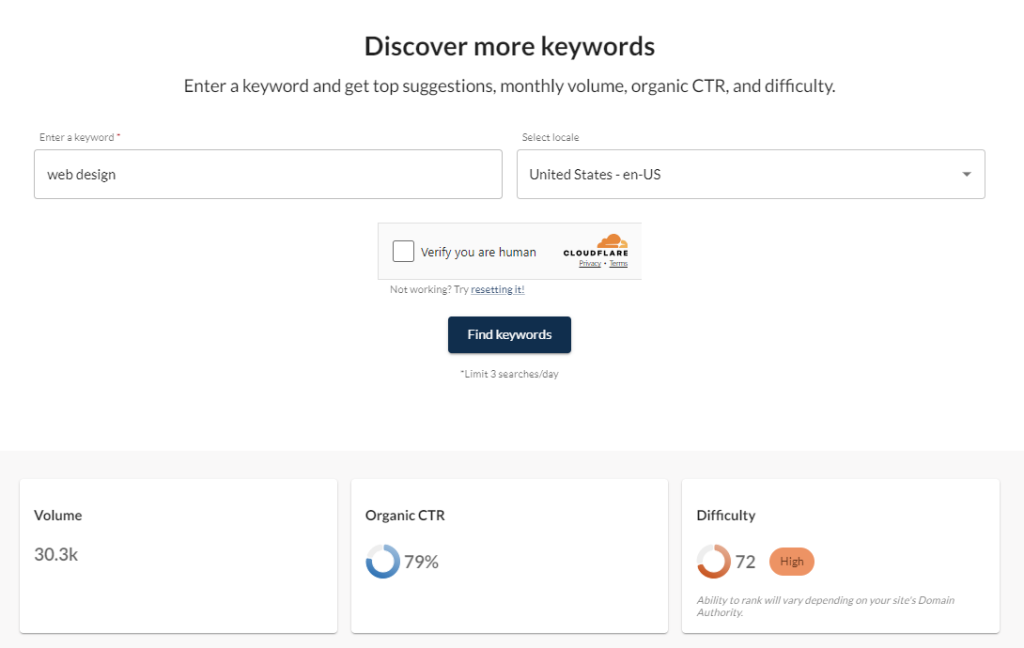
Keep in mind that free keyword research tools are limited in their own way. For example, you can only search for keywords three times a day with Moz.
Meanwhile, Google Keyword Planner only gives you the search volume ranges rather than the actual numbers.
If you want to conduct more in-depth research, we recommend investing in a paid tool like Ahrefs. Go to the Keyword Explorer page and enter your website niche in the search bar. In this case, let’s stick with “web design” as an example.
Next, choose your target location and click Search.
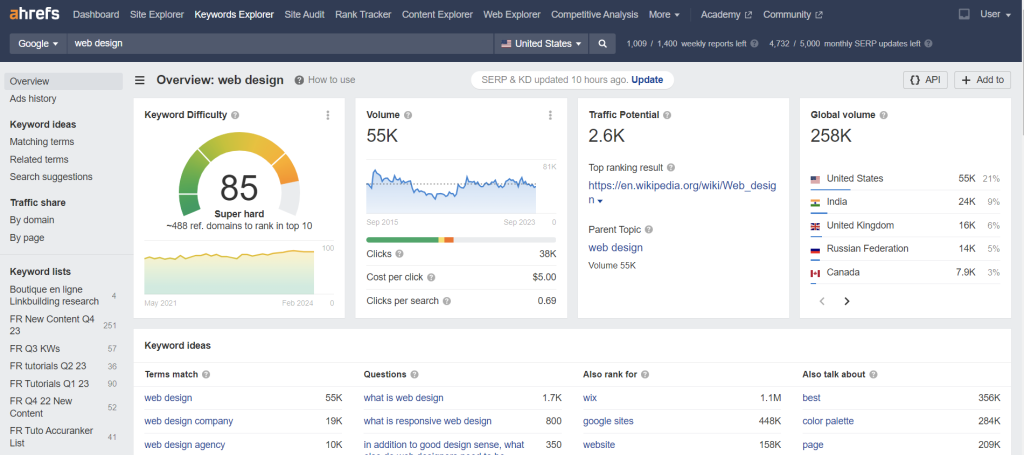
As shown in the screenshot above, this term has a stable volume of around 55,000 monthly searches, but it’s also highly competitive.
It’s better to find long-tail keywords at this stage of your journey. These phrases are usually easier to rank for than broad keywords, which major brands often target.
You can find such queries by navigating to Keyword Ideas → Matching terms on the left sidebar. Set the keyword difficulty (KD) to 30; the tool will give you potential topic ideas with low competition.
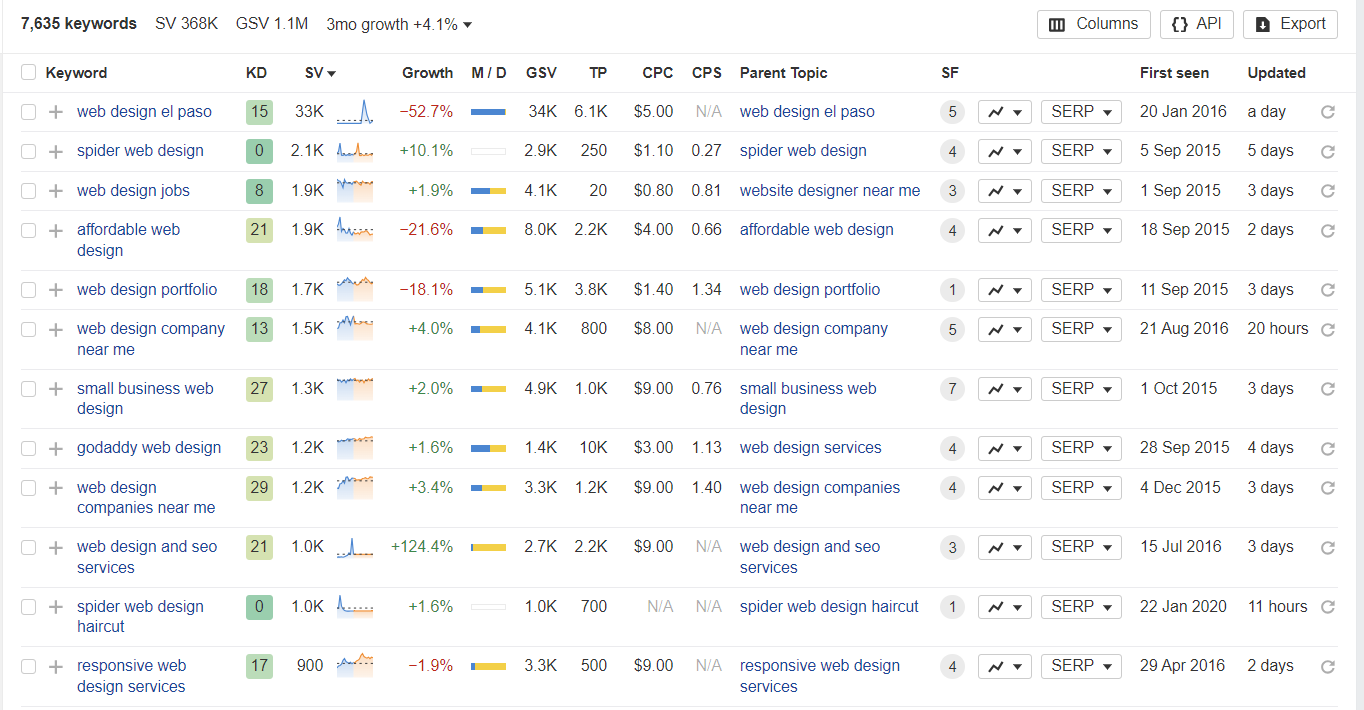
After that, select the relevant keywords you want to target in your content based on the following criteria:
- Search volumes. Make sure each keyword has plenty of monthly searches, as this indicates strong user interest and can help boost visibility and traffic to your website or content.
- Trends. Check if the topics are getting more or less popular. This way, you can see if a keyword is trending up and might bring in more traffic down the line or if it’s losing steam and could become less relevant soon.
- Difficulty. Go for queries with low competition since they’re easier to rank for. Focusing on these keywords gives you a better shot at landing higher in search results, driving more traffic, and boosting your visibility, especially if you’re just starting.
2. Focus on topical authority
A successful SEO strategy isn’t just about optimizing individual keywords. It’s about how all content pieces work together to demonstrate your expertise in your field.
Here’s what John Pennypacker, the VP of Sales and Marketing at Deep Cognition, has to say:
“Instead of just targeting broad keywords, we built interconnected content hubs. For example, we created a main page on “Machine Learning in Business” with links to more specific pages like “Neural Networks for Predictive Analytics” and “Random Forests in Customer Segmentation.
This approach helped us rank for long-tail keywords and showed search engines we had deep expertise in our niche. Our organic traffic jumped by 40% within three months of implementing this strategy.”
To establish your site’s topical authority, you need a well-planned content cluster:
- Identify the core topics that are relevant to your audience and business. These should be broad enough to generate multiple related articles but specific enough to be relevant to your target audience.
- Create comprehensive pillar pages for each main topic. These content pieces will serve as the cornerstone of your content cluster.
- Write supporting blog posts for your pillar pages. Each cluster article should focus on a specific part of the main topic and target long-tail keywords related to the main keyword of your site’s most important content.
- Link to your cluster articles from your pillar pages and vice versa. A good internal linking strategy signals to search engines that your site provides thorough coverage of given subjects.
Here’s an example of a content cluster:
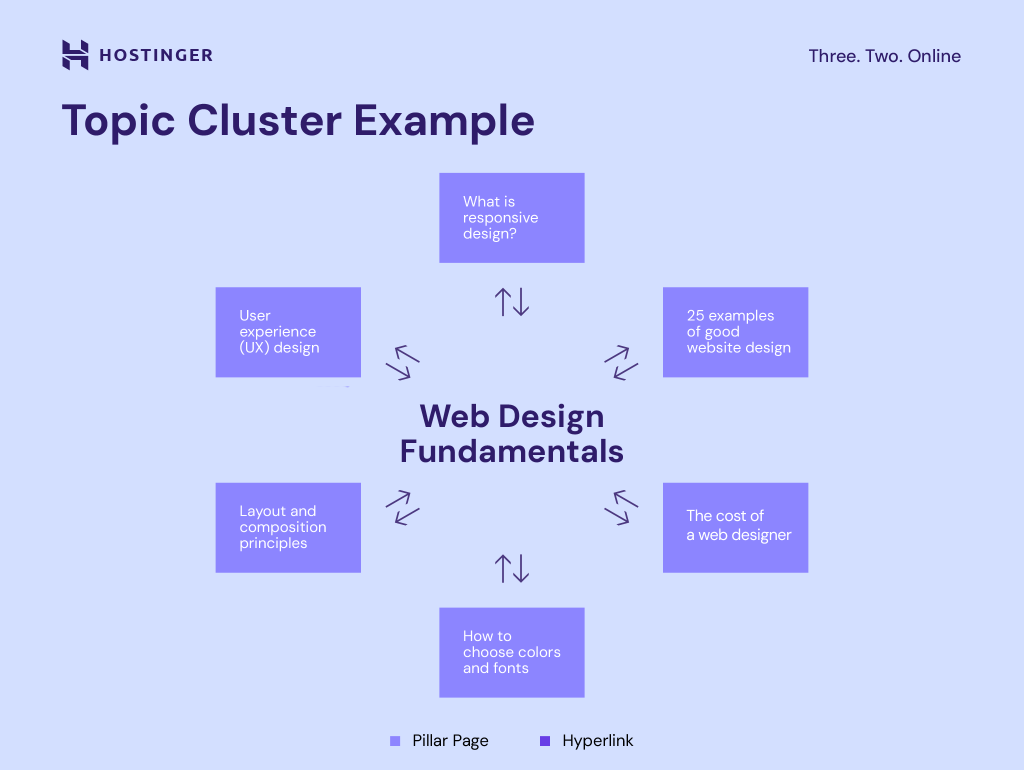
Organizing content around core topics with interlinked subtopics creates a natural flow for both visitors and search engines.
Beyond improving user experience, this approach also helps establish your website’s authority within a specific niche.
Topical authority is one strategy that has worked wonders for Sean Begg Flint, the Founder and Director of Position Digital. The SEO agency increased a client’s site traffic to over 10,000 visitors in less than six months.
Expert tip
We use Table of Contents Plus to create comprehensive pillar pages with clear, navigable structures. For a financial services client, this strategy helped us go from zero to over 10,000 monthly visitors in less than six months. The pillar content provided a strong foundation that improved the site’s overall authority, while the cluster content captured specific, high-intent searches.

3. Write and publish high-quality content
As part of their “Helpful Content Update” announcement in 2022, Google highlighted their effort to offer users more genuine and helpful content.
In other words, if you want your content to rank high on Google, the key is to optimize it for readers, not search engine algorithms.
Here’s how:
Serve the user intent
People use search engines like Google for various reasons—some are just seeking information, while others are ready to make a purchase.
When you understand what users are looking for, you can tailor your content to meet their specific needs and expectations.
Here are common types of search intent:
- Informational. Users want to learn or find a solution by asking questions such as “what is web design” or “how to design a website for free.”
- Commercial. The intent to buy is there, but users still want to research their options. A query like “best web design agencies in New York” is a good example of the commercial intent.
- Transactional. At this stage, users are ready to sign up for your service. Examples include “hire a web designer” or “buy a web design template.”
However, solving a user query’s real purpose sometimes takes more work. In that case, check top-ranking pages for that specific keyword to determine what type of content Google considers valuable.
Structure your content for readability
Readers often skim through content quickly. That’s why using clear headings to separate your content into sections is important.
Follow these best practices when adding headings:
- Follow the numerical order. Arrange the tags in descending numerical order to maintain a logical structure in your content. For example, H2 tags should come after H1 and H3 after H2. This hierarchy helps create a clear and organized flow, making it easier for readers and search engines to understand the content.
- Make it concise. Write headings and titles that are from 50 to 70 characters long.
- Use a question sentence. This format will increase your chances of getting a position in Google’s Featured Snippets and “People Also Ask” sections.
- Include keywords. To improve rankings, include the primary and secondary keywords in headings. It signals to search engines that these terms are important, improving the page’s relevance for those keywords.
Here’s an example of a good content structure:
H1: What is UX design?
 H2: The difference between UX and UI design
 H2: Types of projects a UX designer does
   H3: Website design
   H3: Software design
   H3: Augmented reality
 H2: How to become a UX designer
 H2: Conclusion
You should also avoid large chunks of text. Instead, break down your content using images, videos, and bullet points when necessary for better readability.
Provide unique and helpful information
Google uses the E-E-A-T (Experience, Expertise, Authoritativeness, and Trustworthiness) framework to measure the quality of your content.
To establish authority, don’t just repeat what’s already said by others—offer unique perspectives visitors can’t find anywhere else. You can either write based on your own experience or interview subject-matter experts.
Here’s how to make your content more unique and helpful:
- Sign up for platforms like Connectively and Help a B2B Writer, and submit a request to connect with relevant experts.
- Invite some of them for an interview to gather their insights on the topic you’re writing about.
- Include their unique advice to strengthen the credibility of your content.
Moreover, don’t forget to add a complete author bio, including your name, photo, job title, and brief description. This helps build trust with readers based on your experience, indicating that the article isn’t simply generated by AI.
It’s also a good idea to add a link to your LinkedIn profile to grow your presence as an industry expert and connect with people interested in your content.
Google will recognize you as a real person sharing valuable knowledge with others and not just some faceless bot.
Optimize your content with relevant keywords
Include relevant keywords naturally across your content, such as meta titles, meta descriptions, headings, image alt tags, and the main text.
However, be careful not to overuse the exact keywords repeatedly, as this is considered keyword stuffing. Google’s algorithms are getting increasingly better at understanding context, related topics, and user intent.
For instance, the search engine will know that the terms “software,” “mobile apps,” and “computer programming” are closely related, even if they aren’t explicitly mentioned together.
If you need help producing high-quality and SEO-friendly content, here are some useful tools to try:
- Hostinger WordPress AI Assistant. Say goodbye to writer’s block and create content faster with AI.
- Semrush SEO Writing Assistant. This WordPress plugin will evaluate your text based on its readability, keyword-friendliness, originality, and tone.
- Grammarly. Find and fix typos, grammatical errors, and unnecessarily complex sentences to improve your content quality.
4. Implement an internal linking strategy
A good internal linking strategy is great for topical authority. But more importantly, it helps users easily find the content they’re looking for.
There are two main types of internal links—navigational and contextual.
Navigational internal links, typically located on the navigation bar, sidebar, or footer, contain the website’s main menu or structure and help users find the page they need.
Meanwhile, contextual internal links are embedded in the content pieces. For example, in a blog post titled “What is UX design,” you can include an internal link to explain more about web design inspiration.
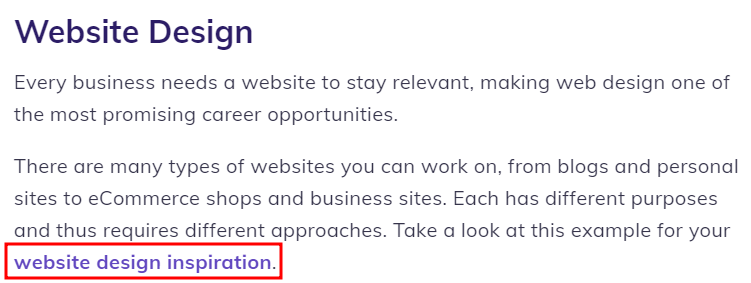
Internal links are very important in SEO as they bring the following benefits:
- Search engines understand your site better. Internal links help search engine crawlers discover related URLs and understand the relationship between your pages and posts.
- Build authority. If a page has authoritative inbound links, the authority can be passed to another page on the website using internal links. Link juice refers to the value or authority passed from one page to another through hyperlinks.
- Easier navigation. Internal links encourage visitors to stay on the website. These links may lead to other pages where visitors can perform specific tasks or learn about a new concept.
Although creating internal links may seem simple, it’s important to do it correctly. Here are some SEO tips for a good internal linking strategy:
Perform internal linking as soon as possible
Instead of waiting until your site has a lot of content, establish a strong internal linking structure from your first posts.
Every time you write a new article, make sure it links to relevant content pieces your site already has.
Expert tip
We ensure every new piece of content is linked to at least three other relevant pages on the site. This practice helps distribute link equity and keeps visitors engaged longer.
We rely on the Link Whisper plugin to automate and suggest internal links based on relevance. Implementing a robust internal linking strategy for a niche industry client led to a 20% decrease in bounce rate and a notable increase in session duration, contributing to overall traffic growth.
Focus on important pages
Naturally, you want to link to all relevant content pieces. However, too many links can make your blog post look spammy, hurting your SEO rankings.
So, be selective about the pages you link to in your content, ensuring each link adds real value for your readers.
First and foremost, focus on linking to pages that have the most significant impact on your business, such as your homepage, pillar pages, landing pages, and product or service pages.
These pages are important for either building brand awareness or generating sales.
Use descriptive anchor text to link between pages
Use keywords related to the content you are linking to rather than generic phrases like “click here.”
This not only helps users understand what to expect but also provides search engines with crucial context about your pages, further improving your SEO.
Keep in mind that your keywords don’t have to be an exact match.
For instance, if your post discusses “How to create a WordPress site,” using “make a WordPress site” as the anchor should do the trick.
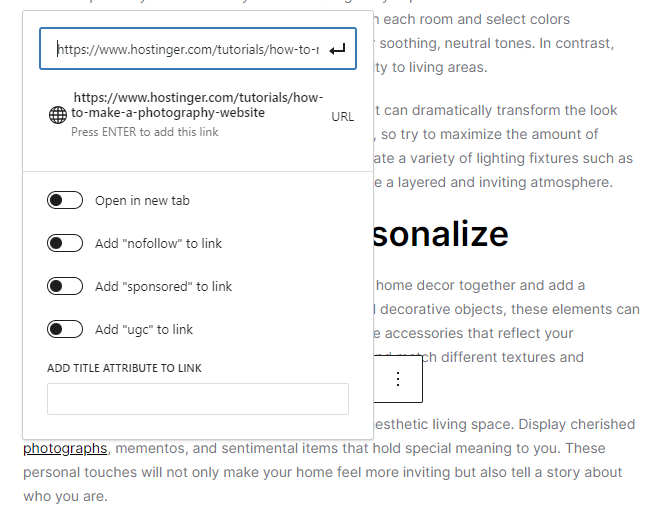
You can create an internal link with custom anchor text via the WordPress block editor:
- Make a new post or edit an existing one.
- Write your anchor text and highlight it.
- Click on the link icon in your editor’s toolbar.
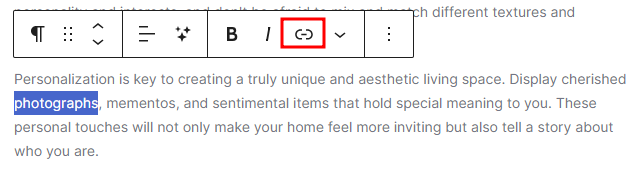
- Paste your page’s URL in the appropriate field.
- Hit Enter to add the link.
5. Structure the website content using categories and tags
As you publish more content, organize it with categories and tags to make navigation easier.
Categories define the hierarchical structure of your content. They help organize your web pages into parent categories and subcategories so readers can quickly find what they need.
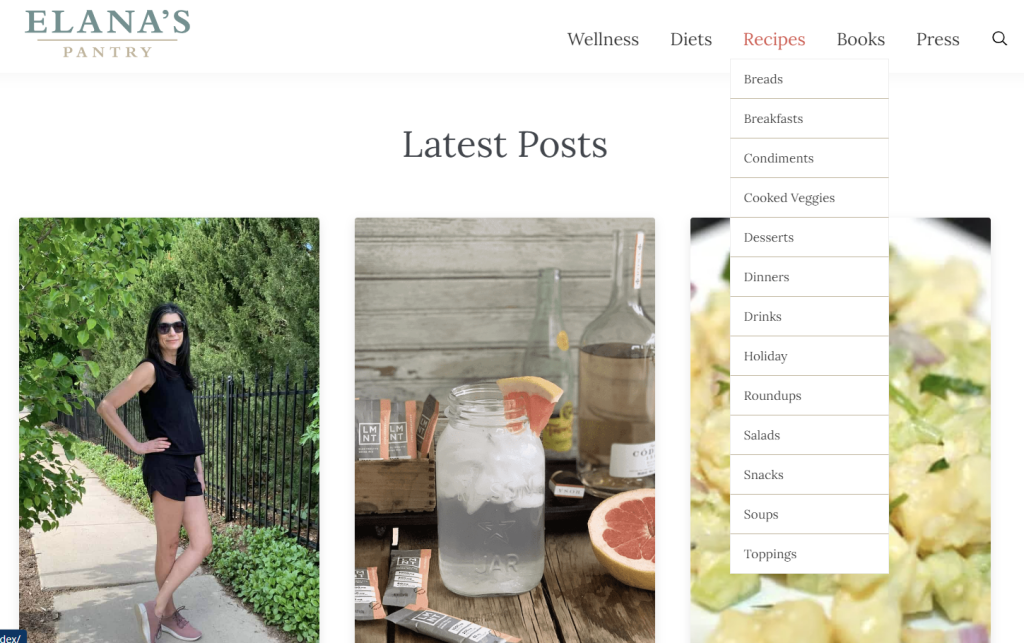
For instance, if you have a food blog, your categories could be Recipes, Diets, Wellness, and Cookbooks.
Each primary category can have multiple subcategories. For instance, the subcategories of Recipes might include Desserts, Main Courses, and Appetizers.
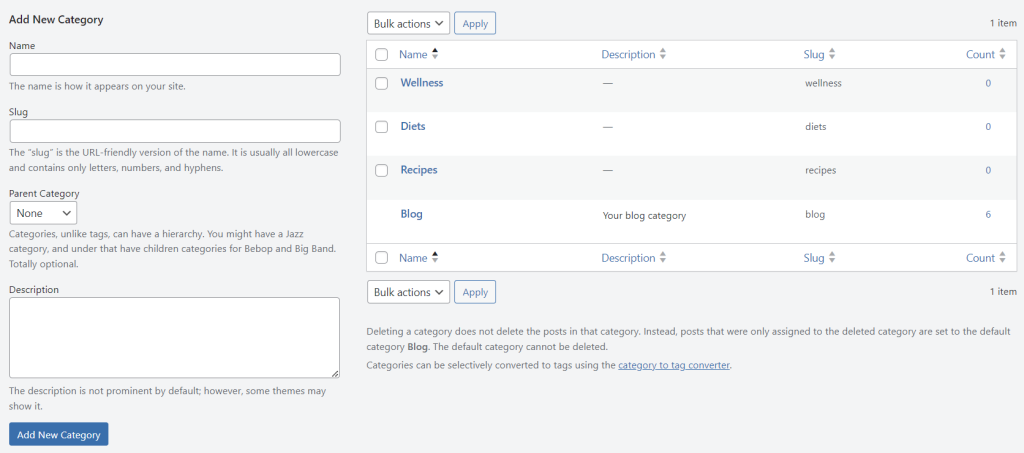
To create categories, open your WordPress dashboard and head to Posts → Categories.
Fill in the Name, Slug, and Description fields. If it’s a subcategory, assign a parent category for a more organized website structure. Save the changes by clicking Add New Category.
After adding several of them, you will see the list of all existing categories on the right side of the screen.
Meanwhile, tags are entirely optional, and there’s no hierarchy to them. You can assign multiple tags to describe various aspects of a blog post.
For instance, an article about healthy meals may have tags like Vegan, Gluten-free, and 30-minute meals.
Users can simply find content by clicking a particular tag that interests them, leading them to all posts tagged with that term.
To create tags, navigate to Posts → Tags, fill in the relevant fields, and click Add New Tag when finished.

Whenever you create a new post, you can assign its category and create new tags via the WordPress block editor.
Head to the Post tab on the right sidebar and scroll down until you find the Categories and Tags sections.

6. Optimize meta titles and meta descriptions
While not a direct ranking factor, optimizing your metadata is still important to improve click-through rates.
When people find your content in search results, having a clear meta title and description helps them quickly understand what it’s about. They will be more likely to visit your page if the information seems useful.
For example, this kind of metadata could catch the eye of someone wanting to learn more about a web server.
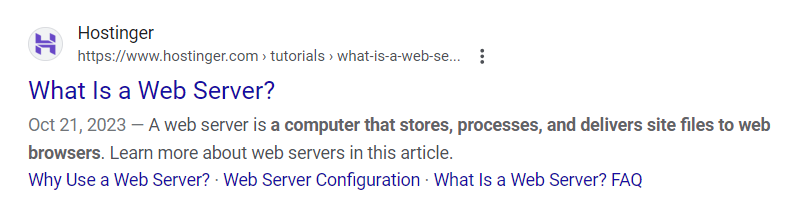
You can easily adjust your meta titles and descriptions with the help of a WordPress SEO plugin.
If you use AIOSEO, scroll down to the bottom half of the block editor to see how your metadata will look in search engine results.
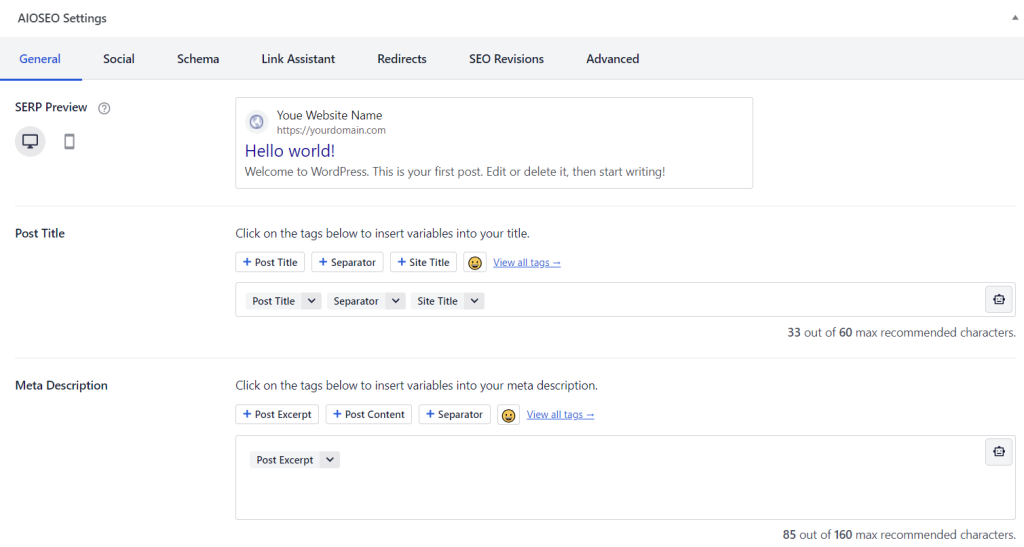
Follow these tips to improve your post title and meta description:
- Keep it short. Search engines will cut metadata that’s too long, so keep your SEO title under 60 characters. Aim for 50-160 characters for the meta description to ensure the best visibility.
- Include the focus keyword. Search engines highlight keywords in meta titles and descriptions when presenting them on SERPs. While including keywords won’t directly impact your ranking, it does increase your chances of being noticed by the right audience.
- Ensure its relevancy. Every post or page should have a meta title and description that accurately reflects its content. If users click on your page and find something different from what they expected, they’ll likely leave right away.
- Use the active voice and call to action. Use an active voice and call-to-action phrases to make your meta description more compelling. Highlight the benefits of reading your post or page to motivate users to take action.
- Avoid clickbait. Misleading titles can frustrate users and leave a poor first impression. Google may also remove pages with clickbait headlines from the SERP.
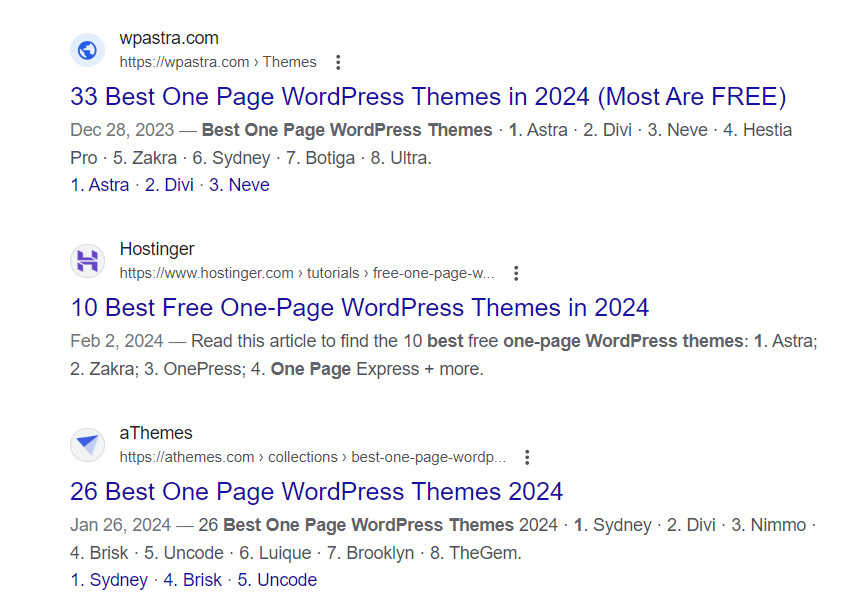
Unfortunately, search engines often rewrite meta descriptions with excerpts they find within the post.
When that happens, you need to enter your focus keyword into search engines and look at the meta descriptions of the top 10 ranked websites.
This simple research helps you understand what Google considers a good description for a particular keyword.
For example, articles formatted as lists or listicles often feature some of their items within the meta description, giving readers a preview of what they’ll find inside.
7. Optimize image content
Images help capture the audience’s attention and reinforce the ideas you want to convey. However, they can also take up a lot of resources and slow down your site.
Optimizing images can improve your site’s loading times and accessibility, which may improve rankings on SERPs.
Here’s how:
Compress your images
Image compression reduces your image’s file size and keeps your site lightweight.
You’ll have to choose between lossy and lossless image compression. The best choice will depend on the type of images you feature on your site.
Use lossy compression for JPEG files with a few details. Lossless compression is more suitable for PNG images with a lot of text.
Check out our in-depth guide on WordPress image optimization for the complete steps and best practices.
Add alt text for images
Alt text, often referred to as alt tags, helps search engines understand the subject matter of your images. For visually impaired users, screen readers rely on alt text to explain the meaning and content of images.
In WordPress, you can add alt text to images via the Media Library and the block editor. We recommend adding alt text directly via the Media Library so that it can be attached to the image whenever you want to reuse it.
To do so, head to Media → Library, select your image, and fill in the Alternative Text box.

When writing alt text, follow these best practices:
- Describe the image accurately. Write a description that could help the visually impaired understand its content.
- Keep it concise. The ideal alt text is between 80-125 characters long.
- Include keywords when necessary. However, avoid keyword stuffing. Ensure that the keywords are relevant to the image.
- Maintain sentence structure. Write alt text with proper grammar, spelling, and structure.
Use readable file names for images
File names can also help search engines understand visual content. In fact, search engines are more likely to recommend images with readable file names. For that reason, it’s best to use custom file names instead of ID-based labels like IMG_0001.jpg.
Consider these factors when writing your image file names:
- Short and descriptive. Keep your image names under five words. The file URL should look orderly and readable.
- Structure. Google recommends writing file names in lowercase and replacing spaces with hyphens. Avoid using numbers and special characters.
- Include keywords. Use keywords in image names if they accurately describe the file.
8. Enable the “last updated” date
Readers often seek articles that provide the most up-to-date information. Displaying the last updated date on WordPress posts shows them that your content is regularly refreshed, making them more likely to click.
Even though your blog post’s publishing date does not affect its search engine rankings, it is still visible in Google search results.
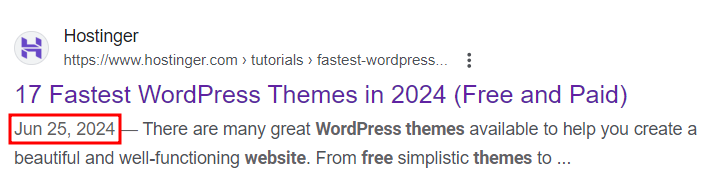
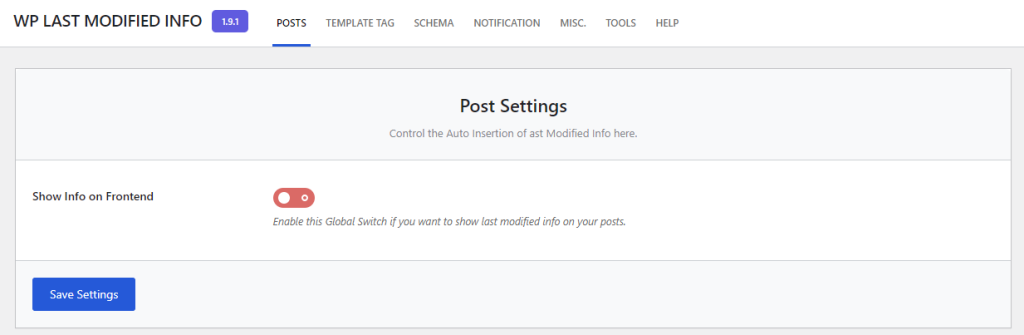
You can make the last updated date visible by installing WP Last Modified Info:
- Head to Settings → WP Last Modified Info → Posts.
- Toggle the button next to Show Info on Frontend to turn on the last updated info feature.
- Click Save Settings.
Next, head to your posts and pages and check if your WordPress site shows the last updated date.
To show the last revision date in the block editor, click the plus (+) icon and search for Modified Date.
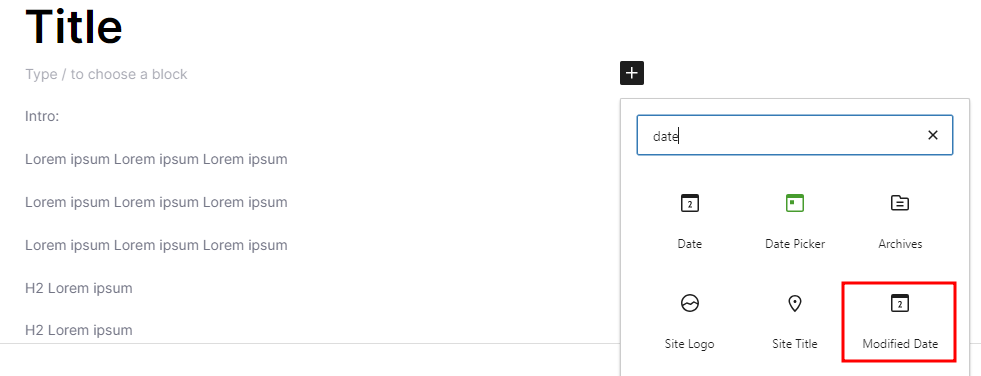
On the right sidebar, toggle on the Display last modified date option. Now, whenever you make changes to the content, the date will be automatically updated.
9. Include video content
Video content is an effective marketing tool to engage with your audience.
Why? People retain 95% of the information they get from watching a video, compared to 10% when reading the text-based version.
So, what kind of video content should you make? According to the latest digital marketing statistics, most companies found success in product demos, explainers, and recorded webinars.

You can upload videos straight to your WordPress site, but it might eat up server resources and slow things down.
Instead, we recommend adding video content from video hosting platforms such as YouTube and Vimeo.
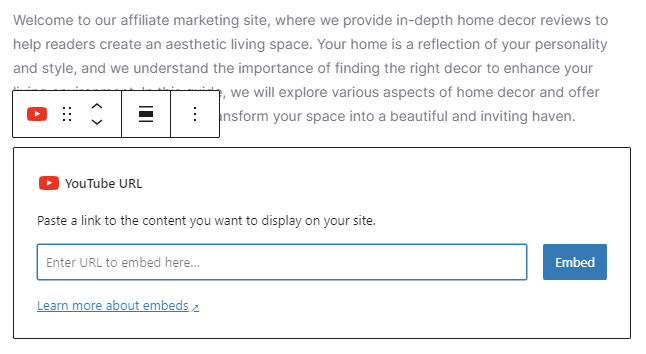
You can easily embed videos on your WordPress site via the block editor.
Click the plus (+) icon and search for the YouTube or Vimeo block. After that, enter the video URL in the appropriate field and click Embed.
Here are some tips for creating successful video content:
- Create the video version of the written content. Whether it’s a blog post or a landing page, there’s a good chance some people would prefer to see it in a video format.
- Produce your own videos. Free stock videos are a great starting point. But as your site grows, you have to invest in video production to create content that’s truly helpful for the readers.
- Optimize for search engines. For some queries, videos can appear on Google search results. To achieve this, include your video details, such as the title, description, and thumbnail, using the VideoObject schema markup.
In addition to videos, you can include interactive content like infographics and quizzes to boost engagement, social shares, and time spent on your site.
Expert tip
For one of our educational clients, embedding explainer videos and interactive diagrams within their blog posts not only enriched the user experience but also improved dwell time and social shares.
We use Embed Plus for YouTube to easily embed videos and Interactive Content by H5P to add interactive diagrams and quizzes. This multimedia approach led to a 35% increase in traffic over four months.
10. Carefully add external links
External links to other websites help readers learn more about topics you haven’t covered yet. It also signals to Google that your site prioritizes user experience, a significant ranking factor.
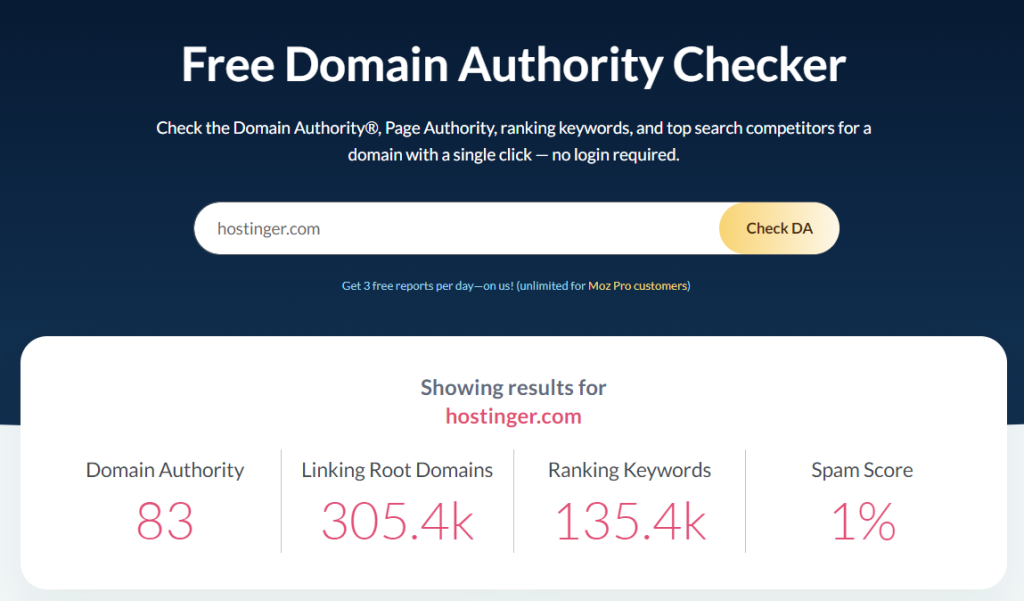
That said, you should only link to reliable and trusted sources. Check the external website’s domain authority (DA) to determine its trustworthiness.
Moz has a free domain SEO analysis tool to check a site’s DA score. As a rule of thumb, aim for sources with a score between 70 and 100.
In addition to domain authority, remember these WordPress SEO tips when including external links:
- Avoid paywalled links. Readers should be able to immediately access the content you’re linking to without subscribing or signing up.
- Open the links in a new tab. This will help readers navigate between your site and the external link more easily.
- Reach out to the website owner. Inform them you have included links to their content and ask whether they’d like to link back to yours.
- Check the published or last modified date. Refrain from referring to content older than two years, as the information will likely be outdated.
If you use an external link to a website you do not want to be associated with, include the nofollow rel attribute. It will stop search engines from crawling the link, preserving its “link juice” as a ranking factor.
You can easily add nofollow external links using the WordPress code editor:
- Select the anchor text to which you want to add a link.
- Click the link icon or press CTRL + K.
- Enter the URL in the relevant field, and enable the Add nofollow to link option. You can also open the page in a new tab here.
- Press Enter to add “nofollow” to the link.
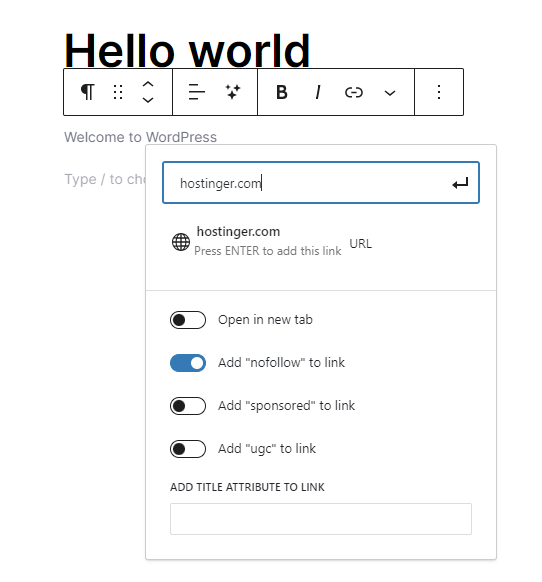
If you add affiliate links or user-generated content, use the rel sponsored and rel ugc attributes, respectively.
11. Enable breadcrumb navigation
A breadcrumb navigation system allows users to understand their current location within a site and easily trace their path back to the starting point.
Breadcrumbs appear as a row of links, usually at the top of a web page, just under the navigation bar or header.
They typically follow a structure that starts with the homepage, followed by subsequent sections leading up to the current page, separated by a delimiter like a forward slash (/), greater than sign (>), or another symbol.
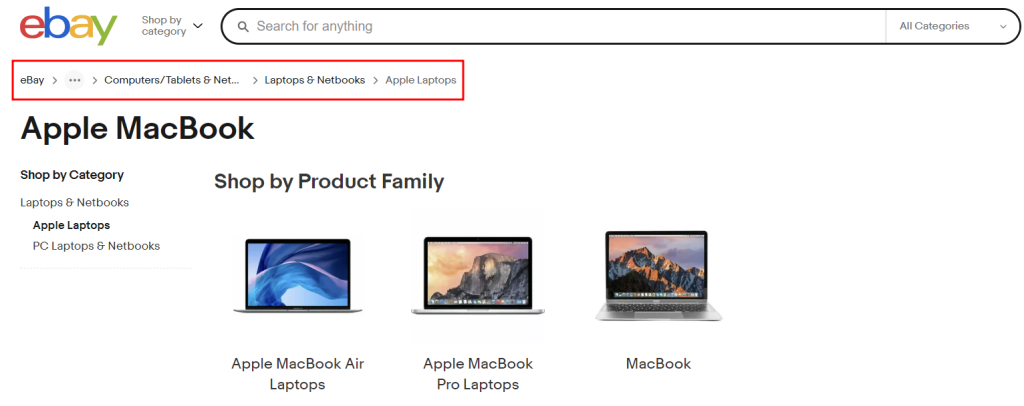
If you run a content-heavy website with many pages and blog posts, enabling breadcrumbs can significantly improve user experience and navigation.
Here’s how to add breadcrumbs on your WordPress website using AIOSEO:
- Navigate to All in One SEO → General Settings.
- Open the Breadcrumbs tab.
- Switch the Enable Breadcrumbs toggle on and select how you want to embed breadcrumbs on your website.
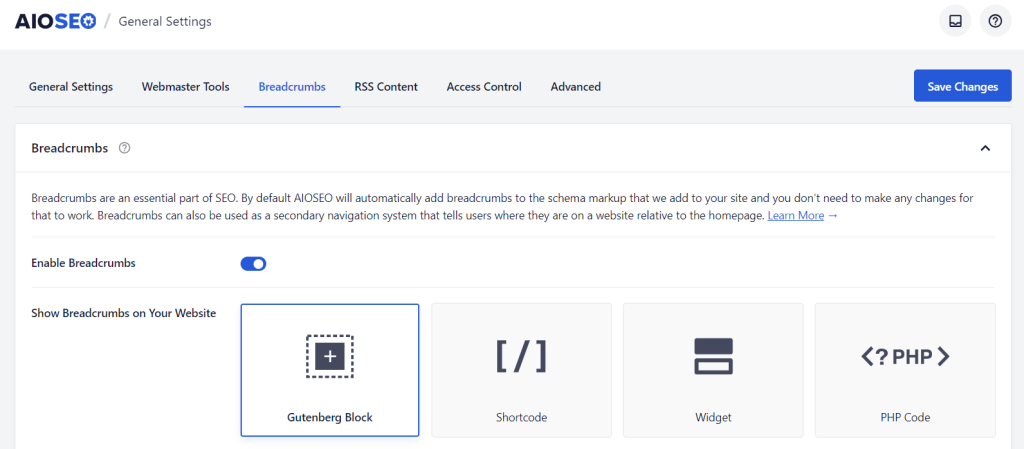
Once enabled, you can add the breadcrumbs on any WordPress template or page.
In the example below, we use the AIOSEO Breadcrumbs block on the single post template so that the breadcrumb navigation will appear on every blog post.
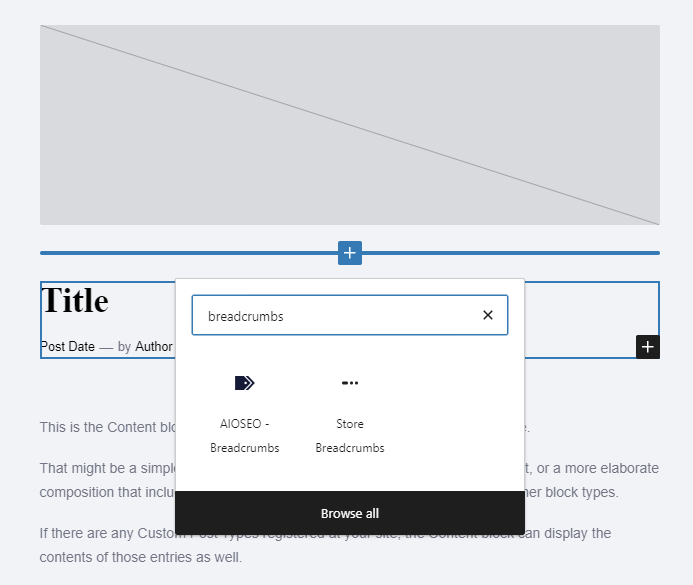
To do the same for your site, head to Appearance → Editor → Templates. Then, look for Single Posts and place the breadcrumbs block anywhere you like.
12. Make your site mobile friendly
Around 62% of website visits come from mobile devices. If you don’t optimize your site for mobile viewing, you’ll lose out to competitors who do.
Here’s how to create a mobile-friendly website:
- Implement a responsive layout. It means your site will automatically adjust its content based on the device being used. Install a responsive WordPress theme to keep your website running smoothly on all screen sizes.
- Optimize visual elements for mobile. Use a hamburger menu to save space, make buttons large enough for users to tap, and place elements like CTAs within easy reach of the thumb.
- Avoid pop-ups. Adding too many pop-ups, subscription form banners, or advertisements can distract users from the main content and ruin their experience.
- Present crucial information early. Your content should quickly answer the search intent without requiring visitors to scroll too far down the page. If visitors can’t find the information they’re looking for immediately, they may leave your site.
- Test your site performance. Use Google’s Lighthouse tool to check if your website is mobile-friendly and fast enough.
13. Consider local SEO strategy
If your business has a physical store, implementing local SEO can help you bring in more customers. According to research, 76% of consumers searching for a business nearby visited it the next day.
Creating a Google Business Profile is the easiest way to improve your visibility on local search results. Make sure to add your company details, including brand name, address, location, and phone number.
This step is important, as Google measures the distance and relevance of your business to the search query. For instance, if you run a barber shop in New York, Google will show your business whenever New Yorkers type ‘best barber near me’ in their browser.
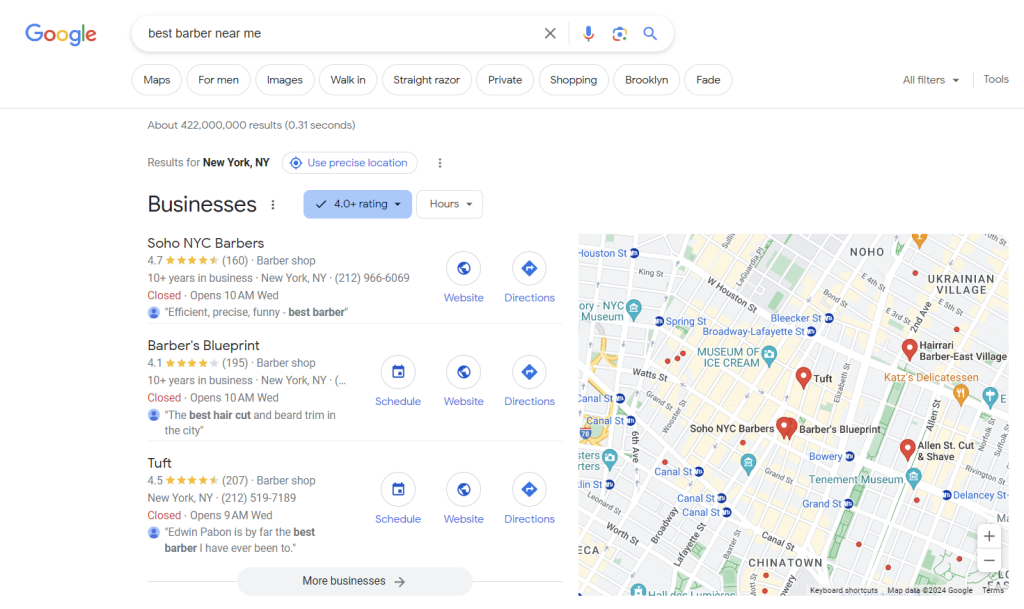
To establish social proof, ask your existing clients to leave positive reviews on your Google My Business profile. Adding high-quality photos of your business can also encourage prospects to pay a visit.
Another local SEO strategy is to optimize your pages with local keywords.
For example, if you run a vegan restaurant in London, you can use keywords like “best London vegan restaurants.” Research the volume and difficulty of such keywords using SEO tools like Ahrefs.
Beyond targeting local keywords, your website content should also cater to the area’s specific language and cultural nuances. For example, British audiences have specific spelling, idioms, sense of humor, or pop culture references that differ from the United States.
Technical SEO best practices for WordPress sites
Technical SEO is still considered a part of an overall on-page SEO strategy.
However, it focuses specifically on the aspects of your website that are designed to improve search engine crawling and indexing.
1. Optimize your website performance
Page speed can be the determining factor in keeping visitors around longer. That’s because 40% of users abandon a website if it takes more than three seconds to load.
Website performance is also an essential ranking factor, as Google uses it as an indicator of a good user experience. Google analyzes website performance based on the following Core Web Vital metrics:
- Largest Contentful Paint (LCP). The time it takes for a page to load its largest elements, including images and text blocks.
- Interaction to Next Paint (INP). The period in which page elements react to user interaction, like clicking a button or pressing a link.
- Cumulative Layout Shifts (CLS). The number of times a web page experiences unexpected layout shifts. These occur when visible elements on the page change position or size suddenly, leading to a poor user experience.
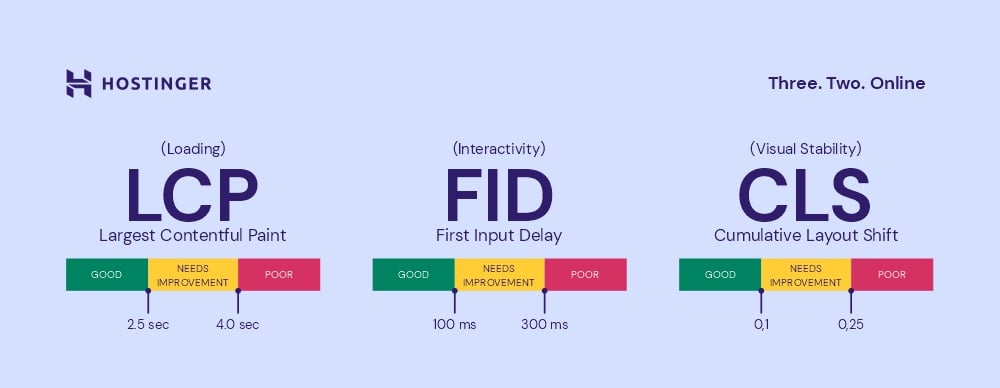
Use tools like GTMetrix or Google PageSpeed Insights to perform website speed tests, check your Core Web Vitals, and learn which areas to improve.
If you find out that your site isn’t performing well, implement these tips to speed up your WordPress site:
- Use a fast WordPress theme. A lightweight and optimally coded WordPress theme helps speed up your site’s loading time.
- Update WordPress core software, plugins, and themes. New updates usually bring performance and security improvements to keep your website running smoothly.
- Remove unused WordPress plugins and themes. They can take up server resources and slow down your website. So, it’s important to regularly audit your list of plugins and themes and remove those you no longer need.
- Implement caching. Plugins like W3 Total Cache and LiteSpeed Cache store static versions of your web pages. This reduces the amount of server processing each time a visitor loads a page, resulting in faster load times.
- Use a Content Delivery Network (CDN). It distributes your website’s content across a global network of servers. When users visit your website, the content is served from a server closest to them for quicker delivery.
Expert tip
We saw a significant improvement in traffic after reducing our load time to under two seconds. This was achieved by implementing advanced image optimization techniques such as lazy loading and deferring offscreen images. We also use a content delivery network (CDN), fine-tune our caching strategy, and minimize JavaScript. WP Rocket is our go-to plugin for caching, while Smush helps with image compression. Lazy Load by WP Rocket ensures offscreen images are loaded only when needed.
2. Use canonical tags to avoid duplicate content
Duplicate content occurs when one page has multiple URLs, including www and non-www versions. Content is also duplicated when there are separate URLs for mobile and desktop.
Furthermore, a web page available in a different language may be deemed a duplicate if its content is substantially similar.
So, if your website has a translation feature, make sure it applies to all content, including metadata, images, and videos.
When multiple URLs lead to the same content, search engines choose one as the canonical version and crawl the duplicates less often.
The problem arises when Google marks your duplicate page as canonical instead of your main content.
To avoid such a scenario, it’s best to set up canonical tags:
- Use online tools like Siteliner to identify duplicate content. Enter your domain name and click Go to start analyzing.
- Once the report is ready, scroll down to Your Duplicate Content and click Duplicate Content.
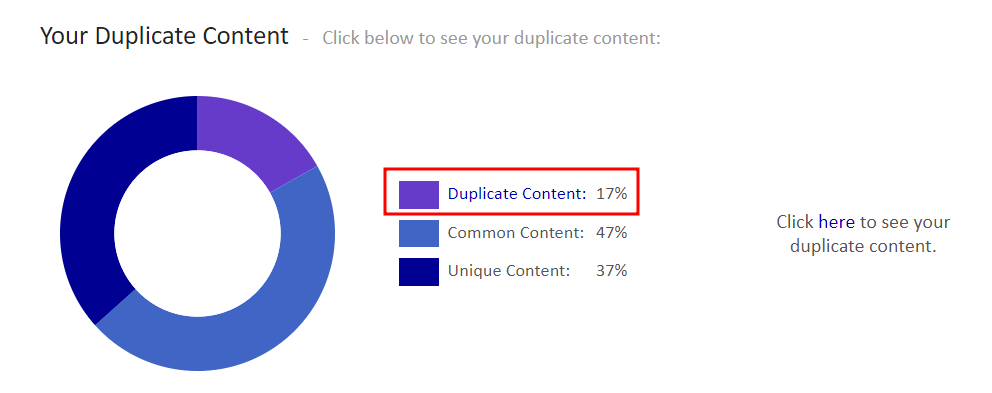
- After identifying the duplicated pages, decide which version of the content you want search engines to index and rank. This version will be the canonical page.
- Open the page or post from the WordPress dashboard you want to set as the canonical version.
- Scroll down to AIOSEO Settings → Advanced, and enter the URL in the field next to Canonical URL.
- Update or publish the page to save your changes.
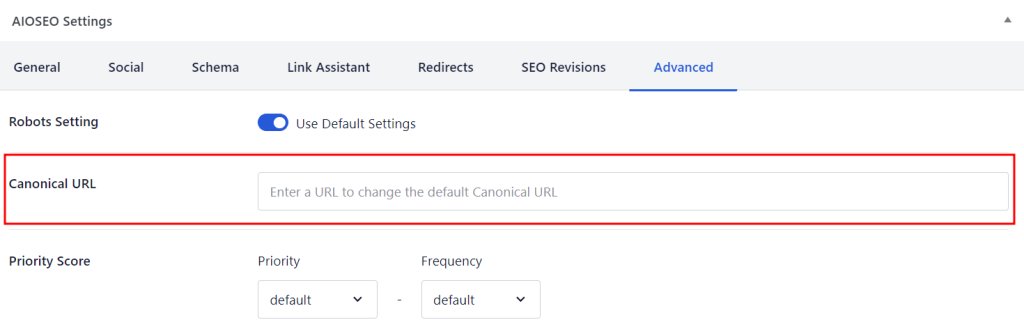
This practice prevents search engines from indexing your site’s content under multiple URLs, which can dilute page rankings and split link equity.
A consistent URL ensures that all the link authority is directed to a single version of your site, improving its search engine visibility and rankings.
Another method is adding the rel=”canonical” attribute to the HTML section of all duplicated pages, each pointing to the canonical version. It’s a bit trickier, but you can check out Google Search Central for the complete steps.
3. Add schema markups
Schema markup, or structured data, is a unique code added to your web page to help search engines understand its content.
Using this code, search engines can pull information from your pages and display rich results that appear above the regular results.
Rich snippets can include carousels, images, and other visual elements, making your pages more pleasing to the eye.
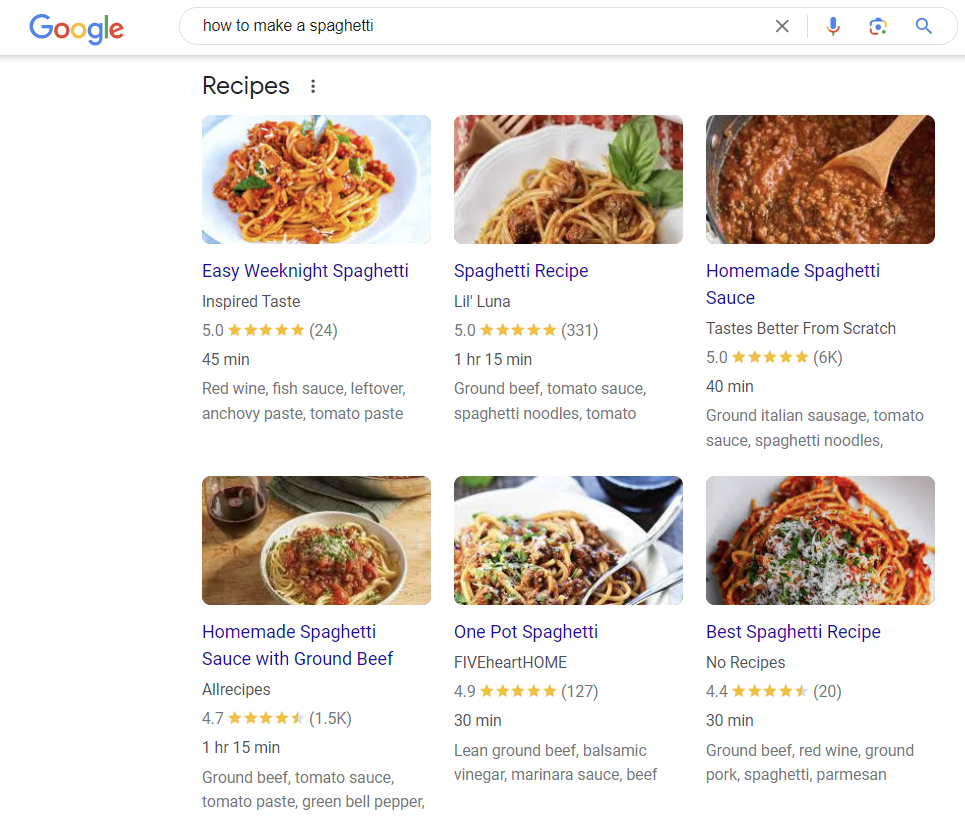
Sometimes, Google also displays how-to tutorials in a list format on SERPs. This is called featured snippets.
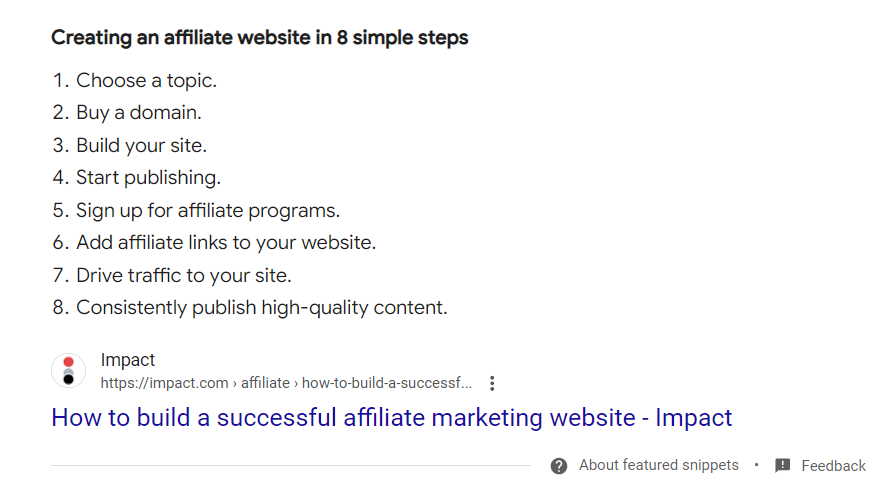
By using structured data, you can boost your site’s visibility, increasing your click-through rates in the process. In fact, users click rich snippets 58% of the time, compared to just 41% for non-rich search results.
To increase the chances of your pages appearing as rich results on SERPs, you need to follow the structured data guidelines. However, note that Google does not always create a rich result section for a query, even with structured data.
But it doesn’t hurt to try, right? Here’s how you can add schema markups to your WordPress site using AIOSEO.
Adding site-wide schema markup
By performing these steps, the schema markup will be applied to all posts and pages by default:
- Go to All in One SEO → Search Appearance from your WordPress dashboard and select Content Types.
- Open the Schema Markup tab under both Posts and Pages sections.
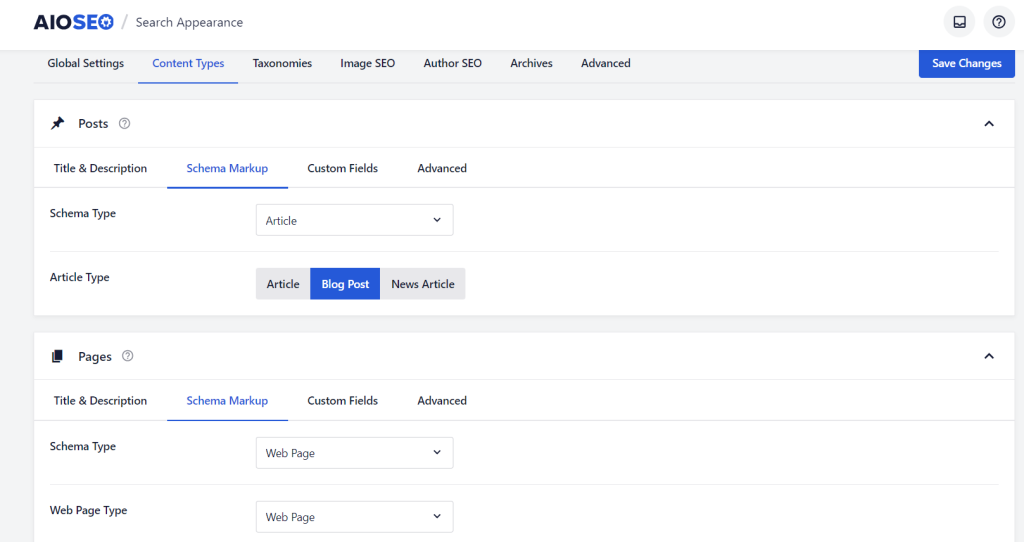
- For Posts, choose your default Schema Type from the drop-down menu. If you choose Article, you have to specify its type – Article, Blog Post, or News Article.
- Do the same for the Pages section, and save your changes once done.
Adding schema markup for individual pages and posts
AIOSEO also lets you add specific schema markup for individual pages and posts:
- Open the page or post you want to edit.
- Scroll down to the AIOSEO Settings and select the Schema tab.
- Click Generate Schema and choose a schema template based on your content type. You can also add your own JSON schema by selecting the Custom Schema tab.
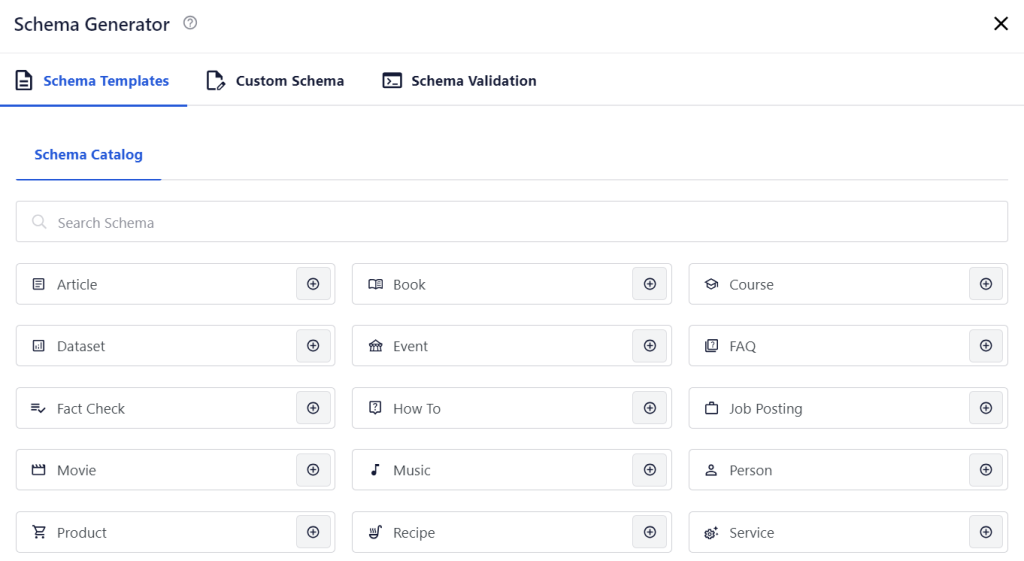
Do not use an incorrect schema markup. For instance, don’t choose the Article schema type for a recipe page.
Besides AIOSEO, there are plenty of WordPress schema plugins dedicated to creating structured data.
Either way, once you’ve added structured data, use Google’s Schema Markup Testing Tool to validate your schema markups.
4. Avoid cannibalization
Keyword cannibalization happens when two or more pages rank for the same keyword.
It can damage your overall SEO effort since the traffic will be split across multiple pages instead of one. Even worse, the page with better conversion chances might be ranked lower, hurting your conversion rate in the process.
Here’s how to identify keyword cannibalization using Google Search Console:
- On the left menu bar, go to Performance.
- Click the (+) plus icon and select Query to add a query filter. This is the keyword that you want to check for cannibalization.
- Scroll down to the Pages tab, and you’ll find all the URLs that get clicks and impressions from the keyword.
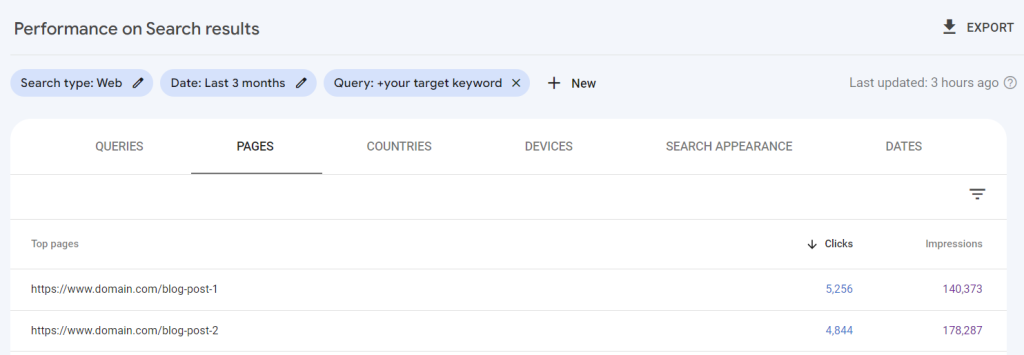
If there are multiple URLs that get significant clicks and impressions for the same keyword, it’s an indication of cannibalization.
To fix it, take a step back and re-adjust your SEO strategy for these pages. Make sure they target different aspects of a topic or different keywords altogether.
Here’s how:
- Understand the primary focus and user intent behind each page. Are they indeed serving the same purpose? Or is there a slight variation in the angle or information provided?
- Find a new focus keyword for the page you decide to repurpose. Look for long-tail keywords or variations that reflect a different aspect or niche within the same topic.
- Revise the content of the page targeting the new focus keyword. This involves rewriting sections, headings, and metadata so the new keyword is naturally integrated throughout the text.
- Use internal linking strategically. Link from relevant pages on your site to the updated page using anchor text that includes the new focus keyword.
- After making these changes, monitor the performance of the updated page and the original page in search engine rankings, clicks, and impressions for their respective keywords. You can use Google Search Console to track progress.
5. Redirect old URLs
A 301 redirect is a way to send both users and search engines to a different URL from the one they originally requested.
It’s commonly used to guide visitors from old or deleted pages to new content, preventing them from seeing the 404 error message.

Beyond ensuring a smooth user experience, redirects will also preserve the link equity and ranking power of your old URLs.
You can perform a 301 redirect in WordPress using a plugin like 301 Redirects:
- Install and activate the plugin.
- Head to Settings and locate 301 Redirects.
- Go to Redirect Rules and choose 301 as your redirect type.
- Enter your old page or post URL in the Redirect From section.
- Under Redirect To, set the drop-down menu to Custom and enter your new URL.
- Click the Save button.

6. Noindex low-value content
Low-value content consists of pages and posts that search engines and visitors do not consider valuable.
Examples of low-value content in WordPress include:
- Archive pages
- Category pages
- Tag pages
- Low-quality blog posts
To maintain your site’s authority, it’s best to discourage search engines from indexing this type of content.
You can perform an SEO audit process using tools like Ahrefs to find low-value content on your site. Once you’ve found pages targeting low-priority keywords with poor rankings and traffic, add the noindex tag.
Here’s how to do it with AIOSEO:
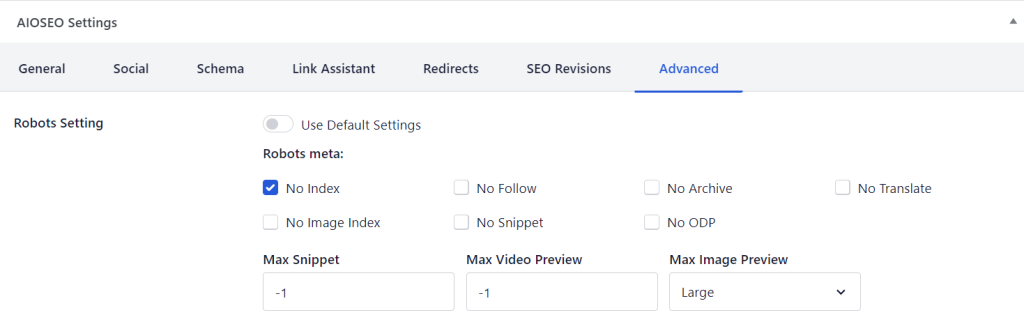
- Open the low-value page or post and scroll down to AIOSEO Settings.
- Open the Advanced tab and disable the Use Default Settings option for the Robots Setting.
- The robots meta options will appear, and you can check the No Index option.
- Click Update to save your changes.
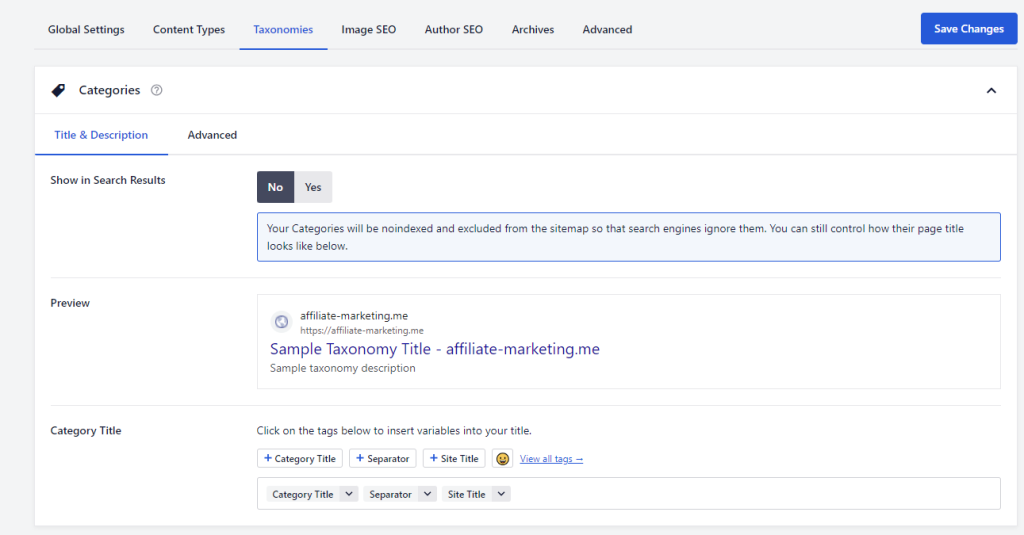
You can also noindex your category and tag pages in bulk. Simply head to All in One SEO → Search Appearance from the WordPress dashboard.
Next, open the Taxonomies tab. Under Categories and Tags, select No next to Show on Search Results. Don’t forget to save your changes once done.
WordPress Off-page SEO strategy
WordPress SEO isn’t just about fine-tuning your website for users and search engines. There are also actions you can take outside your site to improve its rankings.
This strategy is called off-page SEO, and it helps you establish expertise, gain valuable links, and drive traffic to your site.
1. Build high-quality backlinks
When you earn backlinks from reputable sources, some of their readers will visit your site. It also signals to Google that your content is valuable and credible, which will positively affect your site rankings.
Here are some ways to obtain high-quality links from other websites:
- Publish link-worthy content. In-depth guides, statistical pieces, expert opinions, and case studies usually attract a lot of organic backlinks. This is mostly because other sites can use the data to support their claims and arguments.
- Create expert roundups. Interview subject-matter experts in your field and compile their insights in one blog post. This not only attracts backlinks but also encourages experts to share and promote your content within their networks.
- Recover broken links. If you find a broken link on other websites, it’s an excellent opportunity to offer your website as a replacement. Contact the website owner and alert them about the broken link. Then, explain why replacing the broken link with one of your pages is better.
- Become a source for journalists. Platforms like Help a B2B Writer and Connectively enable you to connect with journalists and content writers who need sources. If they decide to use your expert quotes in their content, they’ll link back to your site.
- Email outreach. Find relevant blog posts and ask the authors to place your site’s links where it makes sense. If your content can add value to their existing articles, many site owners will be happy to share it.
Expert tip
I recently did link-building outreach campaigns for my latest project, viralspy.io. I’d gather all blog posts about similar topics, find email addresses of the site owners, and send them three cold emails, including follow-ups. The average response rate is 6%, and around 70% of responses result in a backlink. For every 1,000 emails I send, I build around 40 relevant backlinks.

Sometimes, there are also websites that mention your brand without linking to your site. That’s half the job done – all you have to do is convince the site owner to add your site’s URL.
You can find unlinked mentions using Ahrefs:
- Log in to Ahrefs → Content Explorer.
- Search your brand and add the modifier to exclude your website. For example, “hostinger” -site:hostinger.com.
- Use the filter to narrow down the results. To get a list of quality pages, we recommend filtering pages whose Domain Rating (DR) is higher than 70 and has 100+ organic traffic per month.
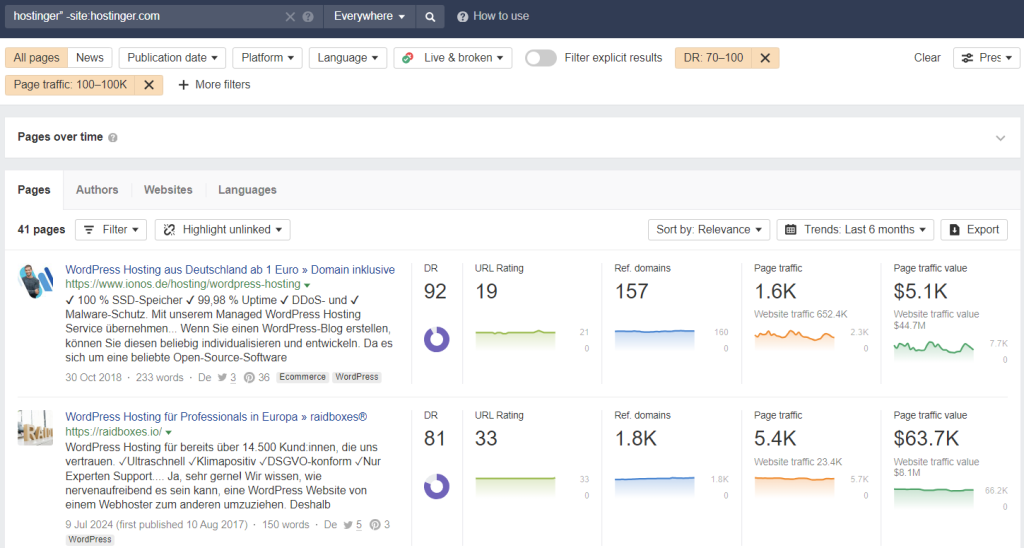
- Export the results to a CSV file.
Once you get a list of URLs that mention your brand, use tools like Screaming Frog and ScrapeBox Free Link Checker to verify the results.
Visit each relevant site one by one, reach out to the author or administrator, and ask them to include links to your website.
2. Publish guest posts on relevant websites
Beyond attracting high-quality backlinks, guest posting also helps with brand awareness.
As a guest blogger, you will be able to mention your brand several times in the content. In turn, more readers will be familiar with your business.
Over time, when you consistently contribute to reputable sites in your field, both Google and readers will start recognizing you as an industry expert.
Don’t know where to begin? Don’t worry; guest posting is easier than it seems:
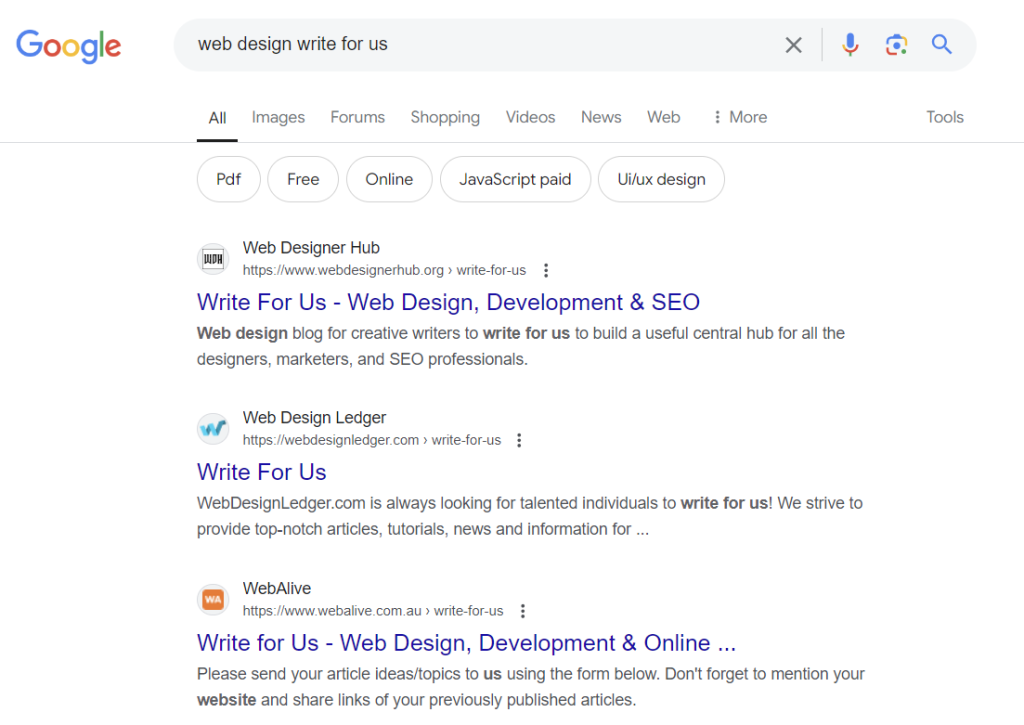
- Find high-authority websites in your field with a simple Google search: your niche + write for us or guest post.
- Contact the owners and provide several content ideas their site hasn’t covered.
- Once you’ve reached an agreement, start writing high-quality content. Don’t oversell your product or service — the goal here is to build backlinks.
- Add a complete author bio so users and search engines will know that you’re a real person sharing your expertise.
3. Use social media to promote your content
Sharing your blog post on social media platforms increases its reach and visibility. The more your content is seen and shared, the more traffic it will get.
But remember, people are primarily on social media for entertainment, not education. To capture their attention, your content needs to be fun, engaging, and easy to consume.
For instance, instead of sharing a long article, consider creating a visually appealing infographic that delivers your key points in a bite-sized format.
You also need to know when is the best time to publish social media posts. According to Sprout Social, peak engagement times are between 9 a.m to 2 p.m from Tuesday through Thursday.
If your social media accounts don’t have a big audience yet, collaborate with social media influencers to promote your blog posts. Tools like BuzzSumo can help you find and connect with influencers.
It’s also worth noting that Google indexes major social media platforms like Facebook, LinkedIn, Medium, and X. By optimizing your social media content with relevant keywords, you can boost your brand visibility on SERPs.
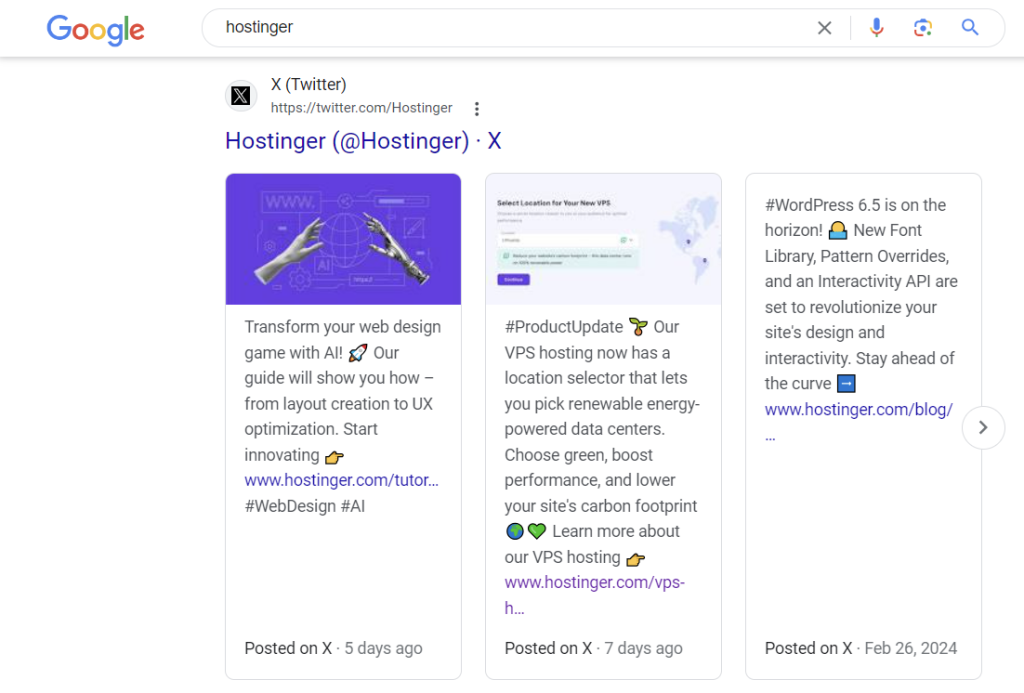
Depending on your website’s niche, the following social media platforms are particularly effective for boosting your site’s SEO efforts:
- LinkedIn. The place where professionals, experts, and potential clients in your industry hang out. Sharing insightful posts and participating in discussions can drive targeted traffic and engagement.
- X (formerly Twitter). The platform’s fast-paced environment is ideal for sharing company updates and engaging in conversations with hashtags related to your niche.
- Facebook. With billions of active users, Facebook offers immense reach. Joining relevant groups, engaging with your audience, and running targeted ads can drive traffic to your site.
- Medium. Articles from this blogging platform often rank on SERPs. That’s why, if you’re just starting, writing on Medium helps you increase exposure and establish yourself as an industry expert.
4. Utilize email marketing strategies
Despite the ongoing narrative that email marketing is dead, the latest digital marketing statistics say otherwise. In fact, email is still one of the most effective channels to build long-term relationships with your prospects.
By creating email newsletters, you will be able to inform your subscribers whenever a new article is published, or a new product is released.
Below is an example of our email newsletter, letting clients know that we’ve updated our product. We included a clear CTA button, so users know what to do next.
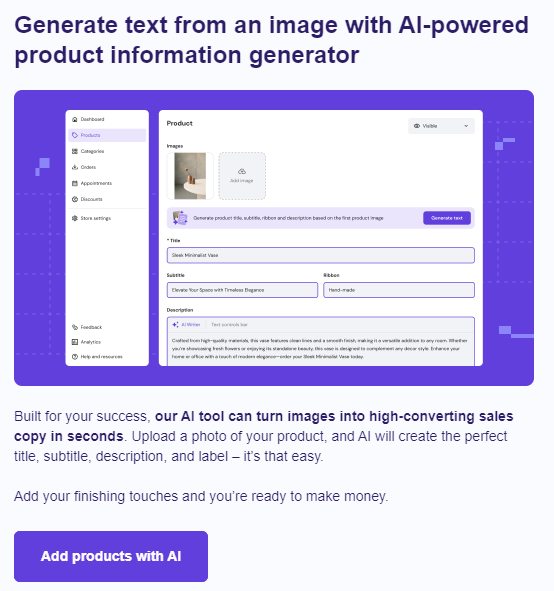
You need two plugins for successful email campaigns—a subscription form plugin like WPForms to gather subscribers and a newsletter plugin like Mailchimp to manage and send emails.
5. Contribute to forums and online communities
Have you noticed that online forums like Reddit and Quora have recently dominated the search results? If you type in the keyword “how to design a website” you will see a Reddit thread in the third position:
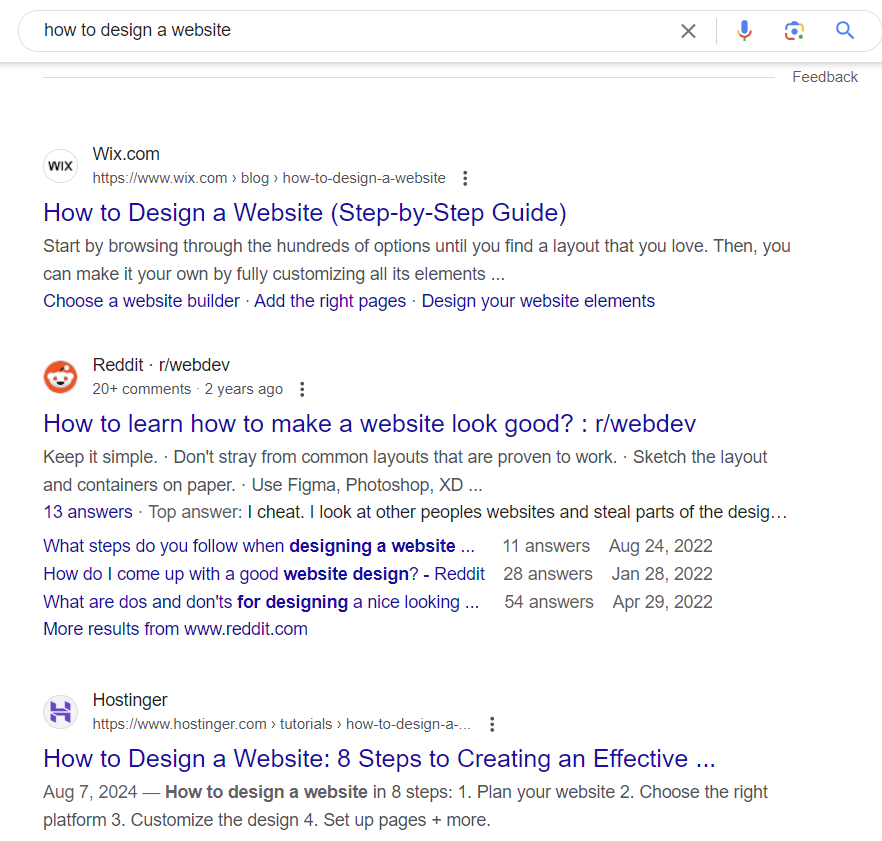
Many SEO experts believe that Google is battling AI-made articles by promoting user-generated content more, mainly because this type of content is perceived as more authentic and helpful.
This spells an opportunity for a new website owner like you. By leveraging the popularity of online discussion forums, you can showcase your expertise and build an audience of people with similar interests.
But due to the ‘anti-marketing’ nature of these forums, keep these best practices in mind when contributing to any discussion:
- Follow forum rules. Always adhere to the forum’s guidelines. Avoid posting spam or off-topic content.
- Be polite and considerate. Treat other members with respect, even if you disagree with their opinions.
- Provide helpful information. Don’t oversell your products or services. Instead, offer insightful and informative responses to questions based on your own experience.
- Be consistent. Building a reputation as a valuable contributor takes time. Regularly participate in the forum to maintain your presence.
- Link to relevant pages on your site. Only share your page links when the context is absolutely relevant to the discussion. Don’t link to your website too frequently, as this can be seen as spammy.
Monitoring your SEO performance
SEO is an iterative process, and it may take several tweaks to find the optimal strategy for your website.
The following metrics help you track whether your SEO efforts are yielding good results:
Organic traffic
Organic traffic refers to users who visit your website exclusively from search engines. Not social media, email, or any other third-party platforms.
You can use a free tool like Google Search Console to monitor your website’s performance on Google search results.
To connect your site to the tool, visit https://search.google.com/search-console/about, click Start now, and log in to your Google account.
Once logged in, you will be asked to select a property type. If you want to track data of your entire site, choose Domain, enter your domain name, and press Continue.
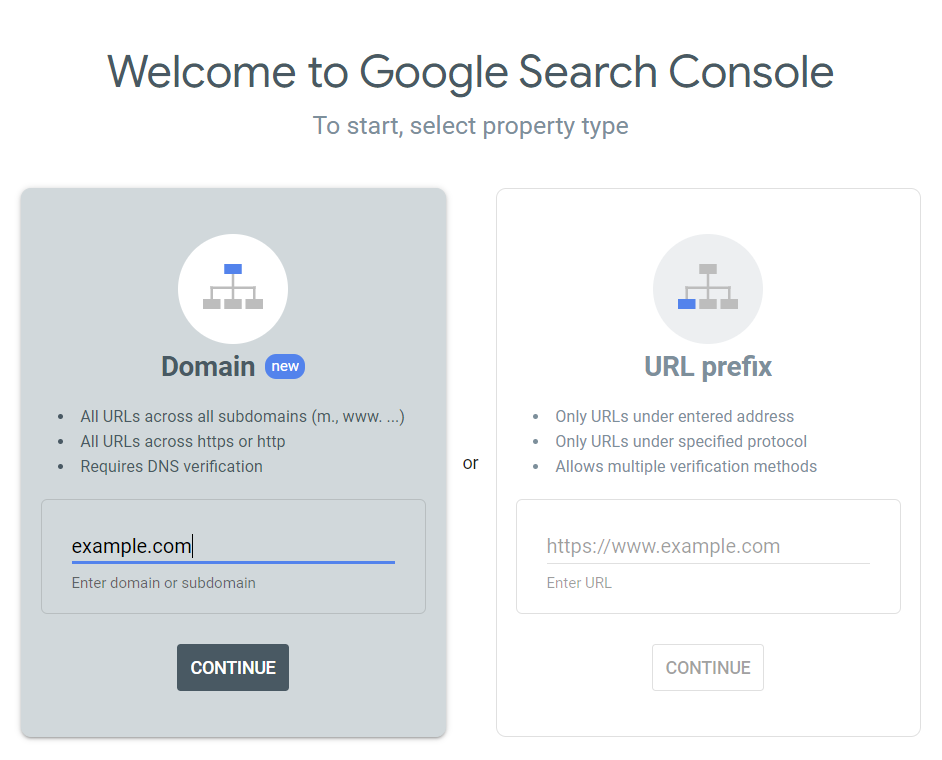
Verify your domain ownership by adding the provided TXT record from the Google Search Console to your DNS server.
With Hostinger, go to hPanel → Websites → Dashboard. From the left sidebar, scroll down to Advanced → DNS Zone Editor and add the TXT record under the Manage DNS records box.
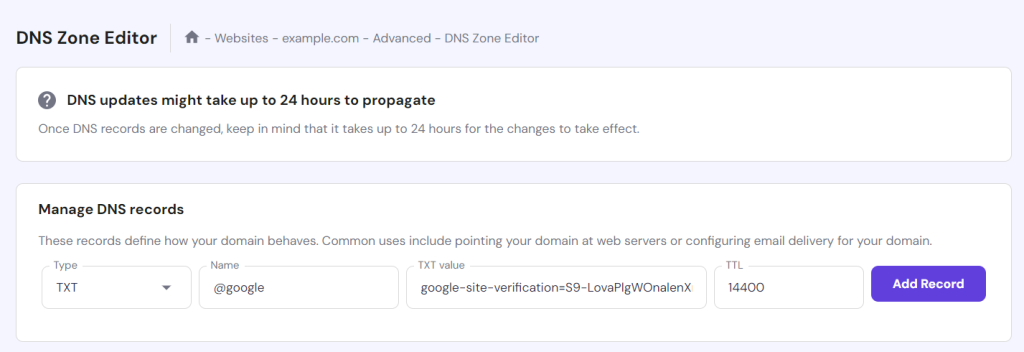
Note that it may take up to 24 hours for your DNS records to propagate properly. Once finished, head back to Google Search Console to verify your domain ownership.
Wait a day or two as Google Search Console is processing your website data. When the data is available, go to Performance → Search Results and select Total clicks to see how many people visit your website at any given time.
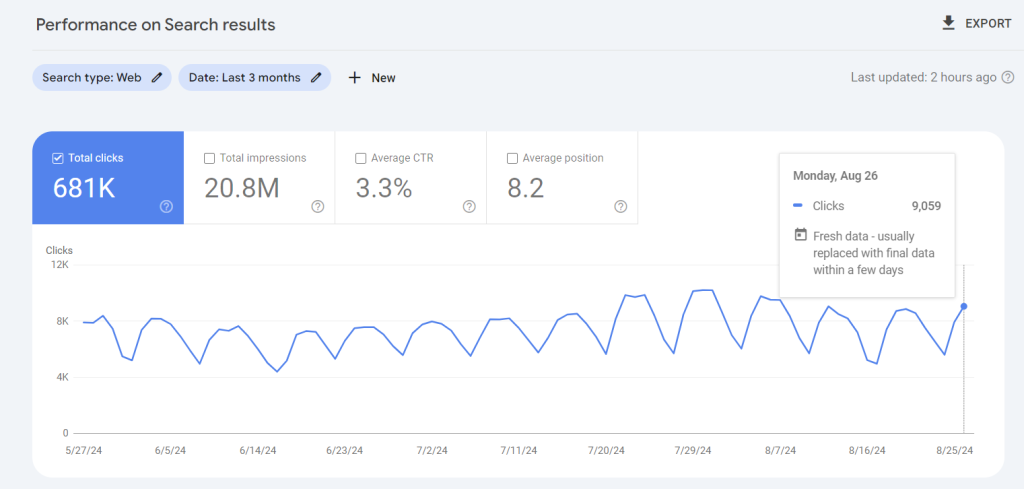
You can also compare your total clicks, total impressions, average CTR, and average position over time to measure your site’s growth. To do so, click Date, choose the Compare tab, and select any date range you wish.
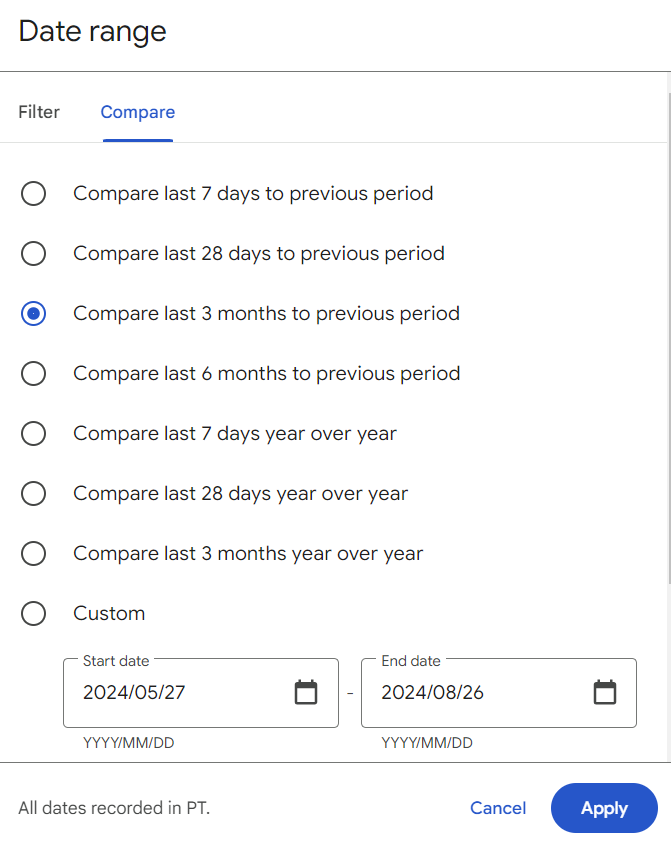
If you want to see which keywords bring you the most clicks or which pages are performing best, scroll to the bottom of the dashboard. You will see your top-performing keywords under Queries and your top-performing pages under Pages.
Primary keyword rankings
Naturally, you want to rank high for keywords that are relevant to your business instead of those that offer no monetary value.
For instance, when your site ranks first for a keyword like “hire a web designer,” it will attract qualified leads who are ready to buy. In contrast, the term “download free website templates” is less valuable because your chance of making money off it is slim.
To track whether your site is ranking for the right keywords, use the Site Explorer feature from Ahrefs. Simply enter your domain name and head to Organic keywords.
Here, you will find all the keywords your site ranks for, along with their position on SERPs and how much traffic they bring.
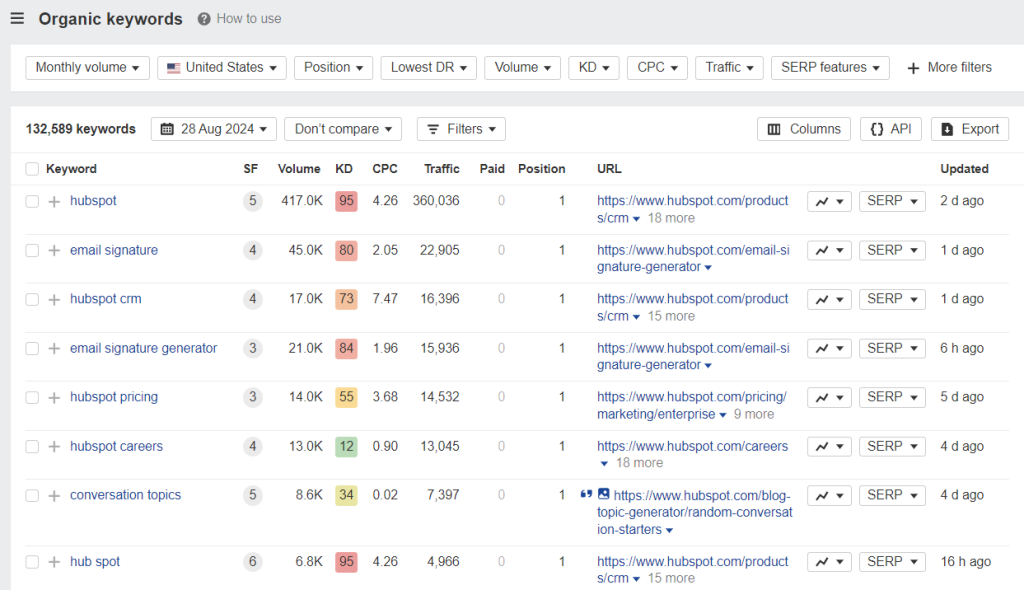
If you’re not happy with how certain keywords are performing, take your time to analyze what went wrong and what could be improved. Check your competitors’ strategies and try to do the same for your own site.
WordPress SEO video tutorial
Prefer watching a video? This video provides a step-by-step tutorial on how to install the Yoast SEO plugin and optimize your WordPress site for search engines.


Conclusion
Search engine optimization helps your WordPress site rank higher on SERPs. When that happens, your content will be visible to more users, and more people will visit your site.
While WordPress offers basic SEO features out of the gate, you still need to perform on-page and off-page SEO best practices to beat your competitors and achieve better results. Be sure to check out our WordPress SEO checklist as well to make sure you don’t skip any tasks.
Although we’ve covered a lot of tactics in this article, remember this one advice: modern SEO is about humans, not search engines. If you want to dominate search results, you have to establish your brand as a reliable, helpful, and trustworthy source of information for users.
WordPress FAQ
Let’s go over some of the frequently asked questions about WordPress search engine optimization.
Do WordPress websites rank higher than other CMS sites?
While WordPress is a popular and powerful CMS, it doesn’t inherently guarantee higher rankings in SERPs. There are a lot of factors that influence search engine rankings, such as content quality, backlinks from reputable sites, user experience, and more.
No matter what CMS you use, you can take your website to the top of search results if you implement SEO best practices.
Should I hire a WordPress SEO professional?
It depends on your needs. If you’re a busy business owner, it will make sense to work with an SEO professional. Hiring someone will free up your time to focus on other responsibilities, such as content production and branding.
Plus, SEO experts will keep up with the latest algorithm updates and industry trends, so they know exactly what it takes to optimize your website for optimal results.
Can I do WordPress SEO for free?
Absolutely, most WordPress SEO plugins offer free features that are powerful enough for your basic SEO needs. Those include content optimization, internal link management, schema markup support, and performance analysis.
You can also do keyword research using free tools like Google Keyword Planner and Moz Keyword Explorer.
All of the tutorial content on this website is subject to Hostinger's rigorous editorial standards and values.

Brian is a Content Writer who loves telling complex stories in a simple way. He has written all types of content, including tutorials, blog posts, landing pages, social media posts, white papers, infographics, and YouTube scripts. Follow him on LinkedIn.


Comments
July 08 2018
I am a new blogger and running a blog on Health niche. I read so many articles on internet about how to rank a blog, how to increase search engine ranking, and many more but today I read your article. It is totally different and informative as compared to other blog articles. I am highly impressed by the way you describe each and every SEO tip in a descriptive manner. I liked your writing style too. According to me, you read so many articles before writing this and there is no doubt that you are an experienced blogger. These days, no one wants to share their knowledge with everyone but you are a different guy. You are truly an inspiration for other bloggers. I will surely apply all the SEO tips you shared in this article and will hope for the best. Thanks for sharing these SEO tips with us.
July 15 2018
Thank you for the feedback! I hope our WordPress SEO tips will increase your traffic 100x ;)
July 14 2018
I read the whole article and learned a lot of things. I didn't know about the 'Fetch as Google' thing. Thanks anyway!
July 15 2018
Awesome, I'm glad to hear you found the guide useful!
August 06 2018
Thanks for this amazing write-up! Your article alone gave me a lot of insights and information. Keep on sharing amazing stuffs like this one! Great post!
October 25 2019
I am a new blogger and running a blog on Government Jobs niche. I read so many articles on internet about how to rank a blog, how to increase search engine ranking, and many more but today I read your article. It is totally different and informative as compared to other blog articles. I am highly impressed by the way you describe each and every SEO tip in a descriptive manner. I liked your writing style tomuch
October 25 2019
This article is an excellent example of a SEO post itself. Despite that all of the techniques are well know to the average blogger, all of those are true. Even though this article is almost perfect, it don't appear on the first page of "Seo tips" and holds a seventh place on longer keyword - "wordpress seo tips". This pattern shows that even with the perfect article you can not always be first in the Google results. But don't be discouraged by that - maintain best practices for SEO, put in the work, exploit long tail keywords and results will come to.
February 27 2020
Thanks for sharing with us, really a very help full post for us.
April 10 2020
This is very best seo tips used this seo tips and got best results.
September 07 2020
Very nice blog for beginners it is to know about that its really very usefull to make this content of post i really thank you for sharing this post.
November 11 2020
You are very very welcome, Jeffery.
October 20 2020
Your blog is very nice… I got more information From your blog page… Thanks for sharing is this great information. Also, please help me with some SEO suggestions for my website: https://www.tech-act.com/
February 02 2021
Hi, Sampada! Feel free to check out out piece on best WordPress SEO plugins ;)
December 23 2020
Most informative content I have ever read on Internet. Thank you so much for spending my time pretty efficiency :)
February 09 2021
Happy you liked it!
December 24 2020
I really like your writing style, great information, thank you for posting. I completely admitted myself with this post. Once again I just would like to say that keep it up like this.
April 27 2021
Google’s AdWords Keyword Planner is helpful for prioritizing keywords and discovering new queries. The Keyword Planner provides monthly search volume trends and competition scores for paid advertisers.
June 06 2021
I'm new blogger i have seen a lot of videos on YouTube and read a lot of articles but the knowledge i get from this article is incredible. You're such a amazing guy Bro.
July 20 2021
Very nice tutorial. That's why I bought Hostingers hosting, as the support system is awesome.
July 26 2021
Heya Deepak! Happy to hear that the customer support is awesome :)
September 06 2021
Very useful information!! You have provided really valuable and in-depth knowledge, which has proven to be quite beneficial to me. Thank you for giving such useful information.
September 20 2021
Happy to hear you found it useful!
September 24 2021
Only this post proved that any body is not equal you and your level
December 20 2021
aweosme
December 28 2021
Pretty! This has been a really wonderful post. Many thanks for providing this info.
January 17 2022
Thanks
April 15 2022
I wanted to post you a tiny note so as to thank you so much the moment again just for the gorgeous ideas you've shown at this time. It is quite remarkably generous of you to supply unreservedly exactly what many people would've distributed for an e-book in making some dough for their own end, most importantly given that you might well have done it if you wanted. The tips in addition served to become a great way to realize that the rest have a similar dreams much like my very own to know the truth a great deal more in respect of this matter. I'm sure there are many more enjoyable moments up front for individuals who look over your blog.
April 19 2022
Happy to hear you're enjoying our tutorials; the team always appreciates any feedback ;)
April 15 2022
you are truly a excellent webmaster. The website loading velocity is amazing. It seems that you are doing any unique trick. Moreover, The contents are masterwork. you've done a great process in this subject!
April 22 2022
With havin so much content do you ever run into any issues of plagorism or copyright violation? My site has a lot of completely unique content I've either written myself or outsourced but it looks like a lot of it is popping it up all over the internet without my authorization. Do you know any solutions to help prevent content from being stolen? I'd definitely appreciate it.
April 25 2022
Hi Darren! As long as your content is unique, you can always file a complaint with DMCA. Once DMCA approves your complaint, they will contact the host of the website and demand to remove the copied content in question. Good luck!
March 25 2024
Thank you for highlighting the significance of Search Engine Optimization in such a clear and informative way! Your post not only tackles its importance but also offers actionable tips. Looking forward to implementing these strategies!
March 26 2024
You're welcome! Wishing you success in implementing these strategies ?
November 19 2024
Before I decide for a managed wordpress hosting (for one year), may I ask, have I to do all these steps and following by myself or Hostinger does everything, and not to send me written steps?????
November 20 2024
Hey there! When it comes to SEO optimization, it's mainly up to you to implement the steps, but we make it easier with tools like AI content generation, WordPress acceleration with LiteSpeed, and advanced WooCommerce optimization. So, you won’t be left doing everything from scratch—these features will help you boost your site’s SEO :)