How to do an SEO audit in 2026: A step-by-step checklist for better rankings
Sep 09, 2026
/
By Ariffud M.
/
12 min Read

An SEO audit is a comprehensive health check that reviews your website’s optimization strategy against current search engine standards.
Its main goal is to identify issues that limit your content’s performance and uncover growth opportunities.
The process creates a clear roadmap of fixes, from quick technical improvements to long-term content strategies, all designed to improve visibility and traffic.
Conducting regular site audits is essential because it helps prevent ranking losses caused by algorithm updates, broken links, or outdated content.
Staying proactive makes it easier to maintain strong search rankings while delivering a smooth, engaging user experience (UX).
A modern SEO audit focuses on three core pillars:
- Technical SEO. Ensures search engines can crawl and index your pages without issues. It focuses on site speed, mobile usability, and security.
- On-page SEO. Reviews content quality, keyword usage, and HTML elements to confirm they match user intent and align with semantic search.
- Off-page SEO. Evaluates your backlink profile and external authority signals to build trust and credibility within your niche.
1. Prepare for the SEO audit
Before running any scans, you need to lay the groundwork. Proper audit preparation ensures you’re working with accurate data and can measure results later.
Assuming you already have a solid grasp of what SEO is, start by defining clear goals.
Are you trying to recover from a traffic drop, or are you preparing for a new product launch? Your goal determines what you prioritize during the audit.
Next, verify your analytics setup. You’ll need Google Analytics 4 (GA4) to track user behavior and Google Search Console (GSC) to see how Google views your site. Make sure both tools are active and collecting data.
Then, gather your baseline metrics. Record current organic traffic, conversion rates, and the load speed of your top five pages.
As a general benchmark, page load time should stay under 2.5 seconds. Anything above four seconds can hurt conversion rates.
These benchmarks help you measure progress later by answering a simple question: Does this change improve performance for this metric?
Note that while Google’s free tools are essential, you’ll also need specialized software like Screaming Frog or Ahrefs to run the deeper technical checks required for a modern audit.
2. Crawl your site and check indexing
To evaluate indexing, you need to see your website the same way a search engine does. Use a crawler such as Screaming Frog or SE Ranking. Enter your domain URL and run a full crawl.
This process simulates a bot visiting every page on your site. Look for technical issues that prevent bots from accessing or understanding your content, including:
- Crawl errors. Check for 404 (Not Found) and 500 (Server Error) status codes. These create dead ends where users and search engines can’t move forward.
- Redirect chains. For example, page A redirects to page B, which then redirects to page C. This wastes crawl budget (the limited time a bot spends on your site) and can slow page loading.
- Orphan pages. These pages exist but lack internal links, making them hard for users and search engines to find.
- Canonical issues. Conflicting canonical tags can confuse Google about which version of a page it should treat as the primary one.
- Sitemaps and robots.txt. Confirm you’re not accidentally blocking important pages from being crawled or indexed.
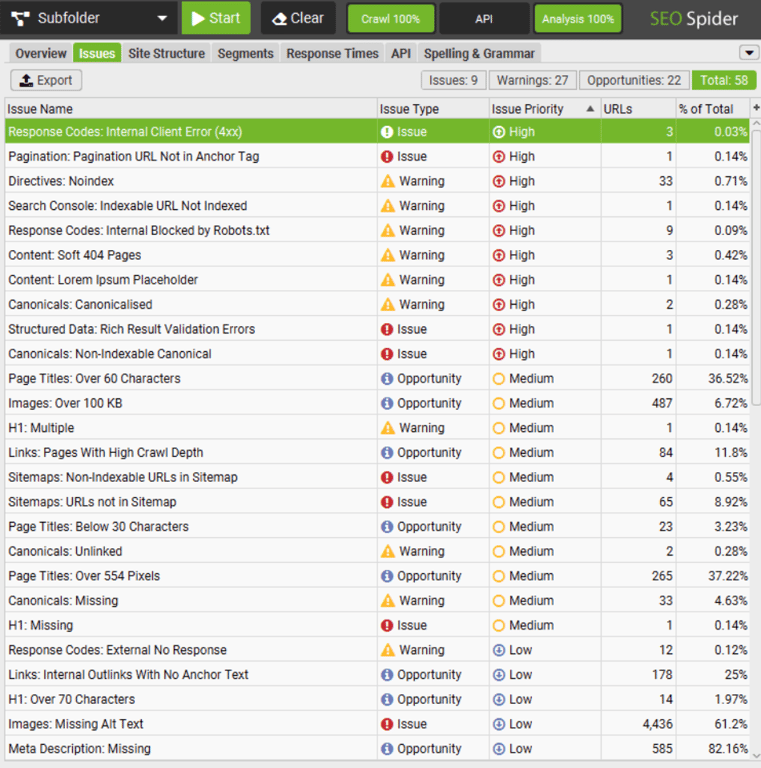
Think of it this way: your website needs to allow search engines to crawl it. If access is restricted, for example by a disallow rule in your robots.txt file, your content won’t appear in search results.
This matters even more in the age of AI. AI Overviews (AIOs) and the Search Generative Experience (SGE) rely on clean, crawlable, and well-structured sources to generate answers.
If bots can’t read your pages, they can’t reference them.
3. Evaluate your website’s speed
Page speed is a confirmed ranking factor. To audit it properly, analyze Core Web Vitals, Google’s metrics for real-world UX.
Focus on these three indicators:
- Largest contentful paint (LCP). Measures loading performance. It tracks how quickly the main image or text block appears. The target is under 2.5 seconds.
- Interaction to next paint (INP). Evaluates interactivity by tracking how fast a page responds when a user clicks or taps an element. The target is under 200 milliseconds. INP replaced first input delay (FID) as the official Core Web Vitals metric in March 2024.
- Cumulative layout shift (CLS). Assesses visual stability by checking whether content moves unexpectedly during loading. The target is under 0.1.
Google evaluates these metrics at the 75th percentile. That means at least 75% of page visits must meet the targets for a page to pass the Core Web Vitals assessment.
Use Google PageSpeed Insights or GTmetrix to test your most important pages. These tools do more than assign a score.
They display your Core Web Vitals metrics – LCP, INP, and CLS – along with Lighthouse scores that help you pinpoint where your page needs improvement.
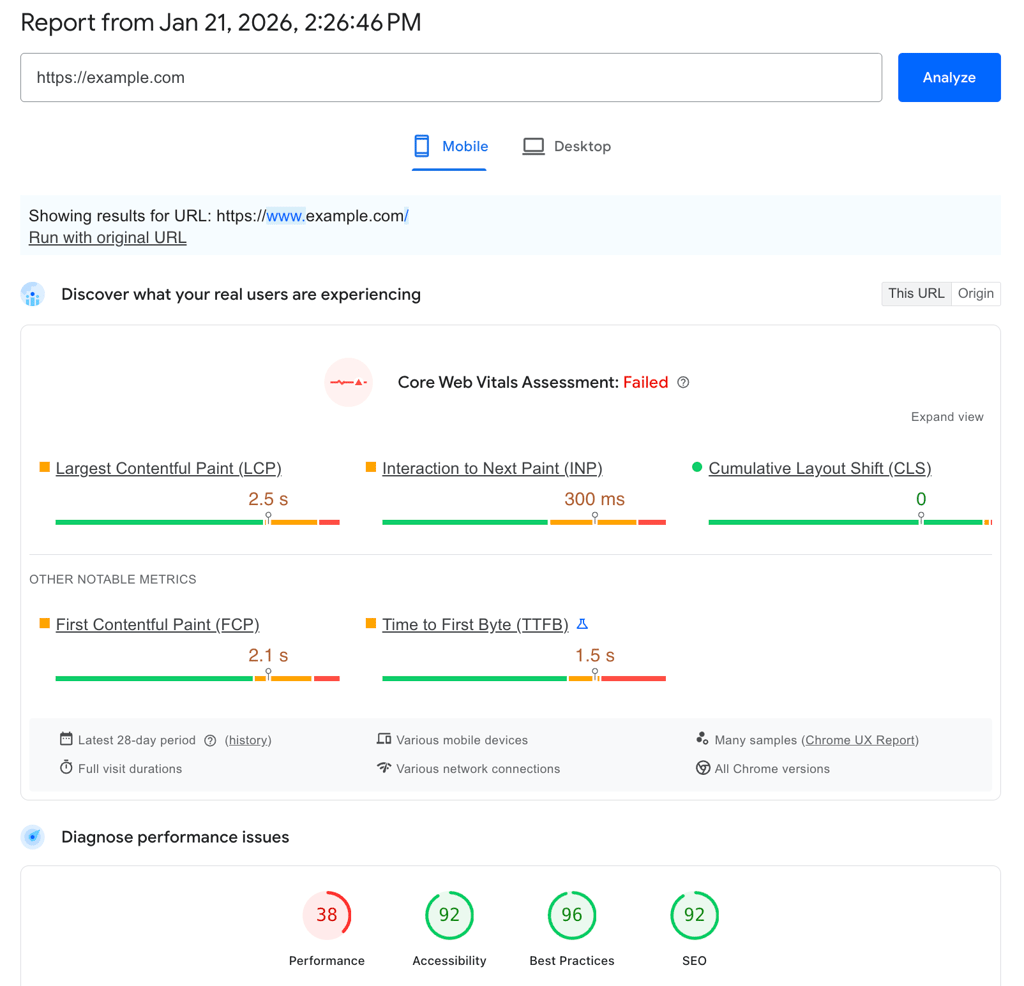
For a step-by-step walkthrough, read our guide on testing your website’s speed.
💡 Pro tip
Frontend fixes aren’t always enough. For server-side performance, check whether your host uses technologies like Hostinger’s CDN and LiteSpeed servers. They cache content closer to users, reducing latency.

4. Check mobile-friendliness and UX
Google uses mobile-first indexing, which means it predominantly crawls and indexes websites based on the mobile version, not the desktop one.
Start by auditing your pages with Google Lighthouse, which is built into Chrome DevTools (right-click → Inspect → Lighthouse tab) and also available through PageSpeed Insights.

You can also use GSC’s URL Inspection tool to see how Googlebot renders your mobile pages. Passing automated tests is only the minimum requirement, though.
You should also check the UX on a real phone. Look for these common friction points:
- Intuitive navigation. Can you open the menu and find key pages easily with one thumb?
- Tap targets. Can you tap buttons and links without accidentally hitting something else?
- Readable text. Can you read the text comfortably without pinching and zooming?
- Fast touch response. Does the site respond instantly when someone taps or scrolls?
To see how users actually interact with your site, use a session-recording tool like Hotjar. Watch real sessions closely.
If users rage-click, scroll aimlessly, or abandon pages after struggling to tap a button, that friction shows up in your metrics and Google notices it.
Poor mobile usability contributes to higher bounce rates and shorter sessions, which can signal low quality and hurt your rankings.
5. Review HTTPS, site security, and accessibility
Security is a prerequisite for trust. If users feel unsafe, they’ll leave immediately.
Browsers display a “Connection is secure” message and “Certificate is valid” status when you click the site info in the address bar, which signals instant trust.
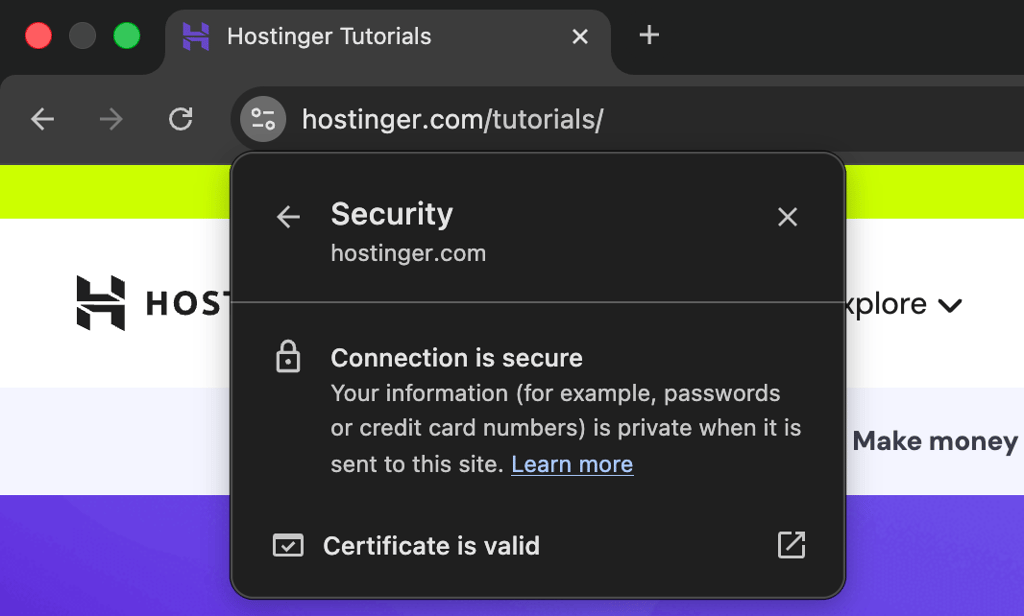
If a browser labels your site as “Not Secure,” most users will leave before reading a single line of content. HTTPS also acts as a lightweight but confirmed ranking signal.
Next, review accessibility, since it supports both SEO and UX. Make sure all images include descriptive alt text and that there’s enough contrast between text and backgrounds.
The recommended contrast ratio is 4.5:1. Alt text helps visually impaired users understand images and gives search engines the context they need to index media files correctly.
6. Evaluate on-page SEO for key pages
Now, focus on the content itself. Evaluating on-page SEO means making sure your visible content and HTML elements match what users are actually searching for.
Audit these elements on your pages:
- Title tags. Are they unique, under 60 characters, and placing the main keyword near the beginning?
- Meta descriptions. Do they work like ad copy that encourages users to click?
- H1 and H2 headings. Do the headings clearly outline the page’s structure?
- Keyword targeting. Are you using the same language your audience uses?
- Internal links. Do you link to relevant, related resources?
- Alt text. Is it descriptive and helpful?
Apply entity–predicate–object logic to make sure every element has a clear purpose. Here’s the logic example:
Meta description (entity) summarizes (predicate) page content (object) to increase SERP click-through rate (goal).
In simple terms, every meta element needs a job. If a meta description doesn’t accurately summarize the page and encourage a click, it’s wasted space.
Keep in mind that modern on-page SEO depends on semantic relevance. You can’t only rely on keyword placement anymore.
Instead, cover the topic in depth, including related subtopics you see in People also ask (PAA) boxes. This level of context helps pages rank in traditional results and appear in AI Overviews.

7. Audit content quality and AIO friendliness
High-quality content is one of the strongest ranking factors. During your audit, look for thin, outdated, or duplicated pages. These pages can dilute your site’s overall authority.
For pages you plan to keep, confirm they reflect E-E-A-T (Experience, Expertise, Authoritativeness, and Trustworthiness). Don’t just say you’re an expert. Show it.
- Original data. Instead of citing an existing stat, run a small survey or analyze your own internal data and share the results.
- Expert commentary. Add quotes, insights, or reviews from recognized professionals in your field.
- Firsthand experience. If you’re reviewing a tool, include screenshots or examples that show you actually used it.
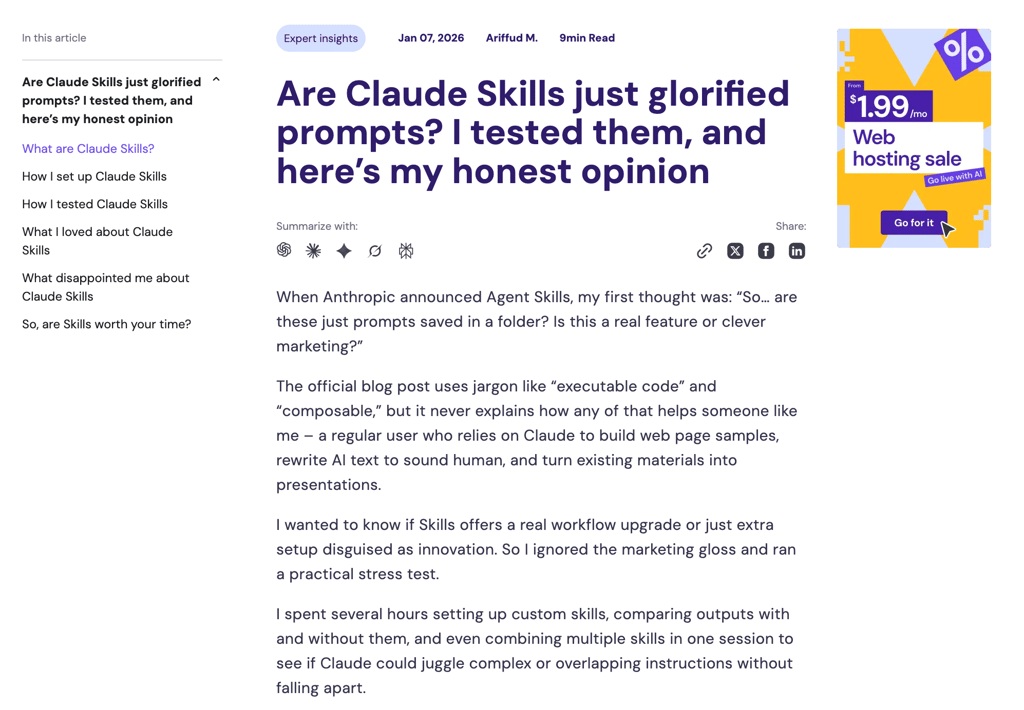
In 2026, you also need to audit for AIO friendliness. This refers to content structured so AI systems, including large language models (LLMs) and SGE, can easily understand and reuse it.
To do this, answer the user’s main question clearly in the first sentence of each section, just like this guide does. Use clean formatting, such as bullet points and tables.
This structure makes it easier for AI systems to cite your content.
For a deeper dive, read our guide on how to write SEO-friendly content. You can also explore the AI SEO playbook, which covers advanced AI-driven search strategies.
8. Assess backlink profile and off-page SEO
Search engines treat backlinks as confidence signals. When a high-authority site links to you, it tells Google your content is trustworthy.
Use tools like Ahrefs or Majestic to analyze your backlink profile. Don’t focus only on the total number of links. Review these key metrics instead:
- Domain rating (DR) or domain authority (DA). Shows the overall strength of linking sites. Aim for links from sites with a DR of 30 or higher.
- Trust flow and citation flow. These metrics help spot spam. A high citation score paired with low trust often signals low-quality links.
- Dofollow and nofollow ratio. A natural mix matters. If all your links are dofollow, the profile can look manipulated.
- Anchor text distribution. If most links use the same keyword, such as “best web hosting,” Google may treat it as a sign of over-optimization.
If you spot a pattern of toxic links from spammy or gambling-related sites, use Google’s Disavow tool to ask search engines to ignore them. A careful disavow strategy helps protect your site from negative SEO attacks.
For more guidance on earning high-quality backlinks and building authority safely, check our off-page SEO strategies.
9. Analyze internal linking and site structure
Internal links guide users to important pages and help search engines discover your content. During your audit, focus on how link equity (the ranking power passed from one page to another) flows through your site.
Start by mapping your page hierarchy. Use a top-down structure where the homepage links to major category pages, also known as pillar pages.
Those pages should then link to individual articles. This setup lets that ranking power flow from your strongest pages to more specific content.
Next, make sure your money pages (the ones that drive revenue) sit high in this structure. If a key page is ten clicks away from the homepage, Google is likely to treat it as low priority.
Watch out for orphaned content. These pages have no internal links pointing to them, which makes them hard for both users and search engines to find.
Also, review your anchor text. Use descriptive phrases that clearly explain what the destination page covers. Avoid generic text like “click here” or “read more.” Instead, link with wording that aligns with the target page’s topic.

10. Review structured data and schema markup
Structured data, often called schema, is code that labels your content in a standardized, machine-readable format.
It tells search engines exactly what a page contains, whether that’s an article, a product with a price, a review with a rating, or an event with a date.
A schema can trigger rich results in Google, such as star ratings, pricing details, or event information. These enhanced listings stand out in search results and often improve click-through rates.

Schema also helps AI systems extract facts accurately, which reduces the risk of incorrect or hallucinated information in AI Overviews.
To implement structured data, use standard schema.org formats. Articles, product pages, and local businesses should use the Article, Product, and LocalBusiness schemas, respectively.
If you’re not comfortable writing code, use a tool like Google’s Structured Data Markup Helper to generate schema visually.
To validate your setup, run your pages through the Google Rich Results Test. This helps you catch errors and preview how your listings may appear in search results.
11. Track rankings, keywords, and visibility
You can’t improve what you don’t measure. After the audit, track how your changes affect search visibility.
Use tools like SE Ranking or Ahrefs to monitor keyword positions. Don’t rely on a single average number. Instead, group your keywords by:
- Intent. Informational keywords, such as blog content, versus transactional keywords tied to money pages.
- Position. Top 3, top 10, and top 100 results.
This approach helps you spot low-hanging opportunities. Keywords ranking in positions four to ten often need only minor optimizations to move into the top three.
Track changes over time to see real progress. A Looker Studio dashboard works well because it can combine data from GSC and your rank-tracking tool in one place.
Also, monitor AI Overview visibility using tools like Semrush Sensor. This newer metric shows how often your site appears in generative search answers – a vital visibility channel in 2026.
12. Compile findings and prioritize fixes
Once the analysis is complete, you’ll have a large amount of data. The next step is to turn it into issue documentation that your team can actually use.
Create an actionable SEO audit report. Don’t just export raw data. Add clear, specific recommendations instead. For each issue, list the affected URLs and explain exactly how to fix it.
Group issues using a priority matrix based on impact and effort:
- Critical (immediate). Problems that block indexing, such as robots.txt restrictions or 500 server errors, and issues that break key flows, such as checkout. These have a high impact and need immediate action.
- High priority (quick wins). Tasks like optimizing metadata on high-traffic pages or fixing broken links to money pages. These changes offer high impact with low effort.
- Medium priority (strategic). Projects such as creating new content to fill gaps or rewriting thin pages. These have a high impact but require more time and resources.
- Low priority. Minor issues like small code validation warnings. They have low impact and can wait.
If you don’t use a dedicated SEO crawler, Hostinger Agent can give you a guided starting point. The SEO AI expert can review your pages, identify on-page SEO issues, and return a prioritized list of recommended fixes that you can evaluate and work through.
13. Implement SEO audit recommendations
The final and most important step is SEO implementation. This is where your audit turns into tangible results.
Work through the tasks based on your priority list:
- Technical fixes. Coordinate with developers to resolve server errors, improve site speed, and correct structured data.
- Content updates. Work with writers to strengthen E-E-A-T signals and optimize keywords on key pages.
- Backlink improvements. Begin outreach efforts or update disavow files as needed.
Performance tracking matters at this stage. As you roll out changes, add annotations in GA4. This makes it easier to connect results to actions, for example, “Traffic increased by 20% after we fixed canonical tags.”
Finally, re-test everything. When a developer marks an issue as fixed, re-run your crawler to confirm it. SEO is an ongoing process, and consistent monitoring and refinement are essential for long-term results.
What are the benefits of conducting regular SEO audits?
Regular SEO audits help improve your website’s rankings, keep you aligned with search engine algorithm updates, give you an edge over competitors, and create a better user experience for visitors.
- Website ranking improvement. SEO audits uncover technical issues that slow your site down, such as crawl errors or slow server responses. Fixing these problems removes barriers that stop your content from ranking well. As a result, search engines can crawl, index, and evaluate your pages more accurately, which supports long-term ranking growth.
- Risk mitigation. Websites naturally degrade over time. Broken links, plugin conflicts, and outdated code can introduce serious issues. Regular audits work like preventive maintenance, spotting these problems early before they lead to deindexing or ranking drops. This proactive approach saves time, money, and recovery effort.
- Adapting to search algorithm updates. Search engines like Google update their ranking systems constantly, with major core updates happening several times a year. An audit checks whether your site still meets current standards, such as E-E-A-T or mobile-first indexing. Staying aligned with these updates helps you avoid penalties and maintain stable visibility.
- Competitive advantage. SEO audits also reveal gaps in your competitors’ strategies, including missed keywords or weak backlink profiles. By comparing your performance to top competitors, you can spot clear opportunities to outperform them in search results and grow market share.
- Enhanced UX. Technical SEO and UX go hand in hand. Slow pages, layout shifts, or unresponsive elements frustrate users and increase bounce rates. Auditing Core Web Vitals helps you identify and fix friction points, improving usability and sending positive quality signals to Google.
- Strategic focus and ROI. Without regular audits, SEO work can become scattered and focus on low-impact tasks. A thorough audit creates a prioritized action plan based on impact and effort. This helps your team invest time and resources where they matter most, driving measurable gains in traffic and revenue.
What are common mistakes to avoid during an SEO audit?
Common SEO audit mistakes include over-focusing on keywords while ignoring technical issues, UX, and mobile optimization, relying on unreliable tools, celebrating metrics that don’t drive business value, and running audits without actually implementing the fixes.
- Focusing only on keywords and ignoring technical issues. Many beginners obsess over keyword placement and overlook the technical foundation of their site. If your website has crawl errors, slow server response times, or broken code, keyword optimization alone won’t improve rankings. Technical health needs to come first, not last.
- Ignoring UX and mobile optimization. Search engines place heavy weight on page experience signals, but many audits never test how real users interact with the site. Ignoring UX issues such as small tap targets or layout shifts often leads to higher bounce rates, which can hurt SEO. Make sure your site works smoothly across all devices, not just on the desktop.
- Falling into the trap of over-optimization. Trying to force rankings by stuffing keywords into headings or manipulating internal anchor text rarely works long-term. Over-optimization makes content harder to read and signals low quality to search engines. Modern algorithms favor natural language and genuine authority, so focus on usefulness instead of keyword density.
- Using unreliable SEO tools. Building a strategy on free, limited, or outdated tools can give you a false sense of security. Tools that miss JavaScript rendering or deeper pages often overlook serious issues. Always validate third-party data against Google Search Console, which provides the most reliable performance signals.
- Misinterpreting keyword value. Another common audit pitfall is celebrating rankings for keywords that don’t actually drive traffic. You might rank #1 for a long-tail term, but if the search volume is negligible, that top position won’t move the needle. Your audit should confirm that high-ranking pages target keywords people are actively searching for.
- Failing to prioritize and implement fixes. The biggest mistake is treating the audit as the end result rather than the starting point. A detailed report has little value if it never leads to action. Turn findings into a prioritized plan with clear owners and deadlines. Without execution, you’re only documenting problems, not solving them.
How to apply SEO audit results in real projects
To apply your findings effectively, shift your focus from analysis to SEO project management.
Don’t just review a spreadsheet of issues. Set measurable goals, such as improving LCP to under 2.5 seconds or fixing all 404 errors. Assign clear owners and deadlines to every task.
Once changes go live, track performance closely to confirm their impact.
Search engines may take weeks to recrawl your site, so monitor leading indicators like impressions in GSC along with lagging indicators such as organic traffic and revenue.
Keep in mind that optimization isn’t a one-time effort. Make continuous auditing a core part of your long-term SEO strategy.
Schedule monthly mini-audits to capture quick wins, and run full technical reviews quarterly to keep your SEO-friendly website ahead of the competition.
All of the tutorial content on this website is subject to Hostinger's rigorous editorial standards and values.

Ariffud is a Technical Content Writer with an educational background in Informatics. He has extensive expertise in Linux and VPS, authoring over 200 articles on server management and web development. Follow him on LinkedIn.