How to Prevent Website Downtime: 10 Tips to Keep Websites from Going Down
Mar 10, 2026
/
Brian & Saulius L.
/
11 min Read
A website often serves as the virtual storefront for businesses and personal brands, connecting them with a global audience.
However, just as brick-and-mortar stores face occasional closures due to maintenance, websites can also experience downtime.
In this article, we’ll dive deeper into the topic of website downtime, explaining what it is and why preventing it should be a top priority for website owners.

What Is Website Downtime?
Website downtime is a period during which a site is inaccessible to users. This is usually due to server overload, hardware failure, or distributed denial-of-service (DDoS) attacks. When not properly handled, downtime can result in lower search engine rankings and missed opportunities for conversions.
Why Is It Important to Prevent Website Downtime?
Website downtime isn’t merely a technical inconvenience – it can severely damage your brand’s credibility and financial stability.
Imagine when site visitors land on your website to make a purchase, only to find a 503 service unavailable error. They may likely turn to a competitor, costing you potential customers.
This scenario illustrates the negative implications of website downtime, which include:
- Lost revenue. The longer your eCommerce store is down, the more potential sales and revenue will be lost.
- Reputation damage. Visitors who encounter frequent downtime are likely to lose trust in your brand. A reliable website is a testament to your professionalism and commitment to user experience.
- Lower rankings. Search engines like Google factor in your website’s uptime and load times when determining rankings. Frequent downtime can lead to a lower search position, reducing your website’s visibility.
- Security risks. Malicious actors can exploit site downtime, making your website more vulnerable to attacks.
Because of these consequences, it’s clear that preventing your website’s downtime is a critical component of any business strategy for long-term success.
10 Key Strategies to Prevent Website Downtime
In this section, we’ll explore 10 effective best practices for avoiding website downtime and ensuring 24/7 website access.
1. Choose a Reliable Hosting Provider
Selecting a reliable web host is crucial, as your hosting server directly impacts the site’s availability and overall performance.
That said, with many hosting providers in the market, you need to be extremely careful when weighing your options.
As a general rule, look for the following factors before buying a hosting service:
- Uptime guarantee. Reliable hosting providers keep your website accessible to visitors at all times. They minimize downtime through regular server maintenance and advanced technologies.
- Site speed. Having a slow website frustrates visitors. Select a web host that invests in high-speed servers and global data centers so your site can load quickly and perform flawlessly.
- Top-notch security. Cyber attacks can lead to downtime, data loss, and potential legal issues. A trustworthy hosting provider should implement robust security measures, safeguarding your website against all kinds of threats.
- 24/7 support. In case an issue or downtime occurs, hosting providers should offer responsive support through multiple channels, such as email and live chat.
- Scalability. As your business grows, scalable hosting plans will help your site handle increased traffic without experiencing downtime or performance issues.
With Hostinger’s cloud hosting solutions, you will benefit from a well-maintained hosting infrastructure, next-generation technologies, and globally distributed data centers with a 99.9% uptime guarantee.
We also employ advanced security measures, including DDoS protection, malware scanning, and a web application firewall, to protect your website from threats. Plus, each hosting plan comes with automated site backups and unlimited free SSL certificates.
On top of that, if your site experiences errors or downtime, our Customer Success team is ready to help at any time.
2. Set Up Regular Backups
Website downtime can lead to data loss for your company and customers, putting your account information, contact details, and transaction records at risk.
If customers are making a purchase or editing their profiles when your website goes down, they may lose their unsaved changes. This will result in lost sales and poor user experiences.
That’s why setting up regular backups for WordPress and other sites is crucial for various reasons:
- Data protection. Regular backups keep your website’s data safe. During a cyber attack, server failure, or accidental deletion, you can quickly restore the website to its previous state.
- Business continuity. Even when experiencing data loss, having backups ensures that your online store remains operational.
- Compliance requirements. Depending on the industry, there may be legal obligations to safeguard customer data. Regular backups help you meet these compliance requirements.
Fortunately, Hostinger users do not need to worry about data loss. Each cloud hosting plan comes with automated daily backups, saving you time and effort.
If you want to save your progress before making major changes, setting up a manual backup is also easy:
- Access the hPanel → Websites.
- Select your domain name and click Manage.
- On the left menu, scroll down to Files and choose Backups.
- Under Generate new backup, click Select, and then Proceed. The process may take up to a few hours, depending on the amount of website data.
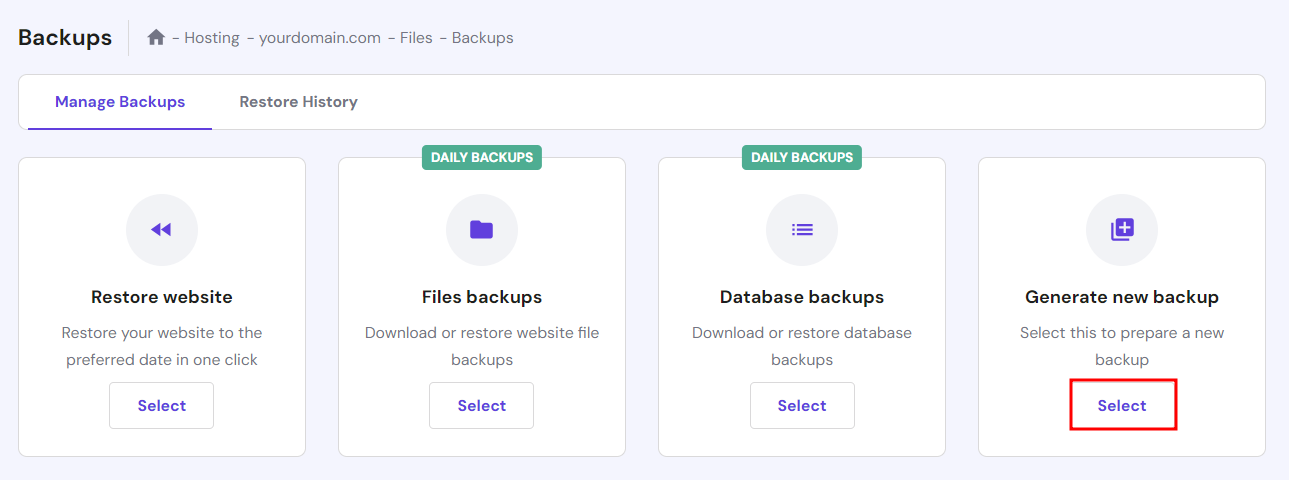
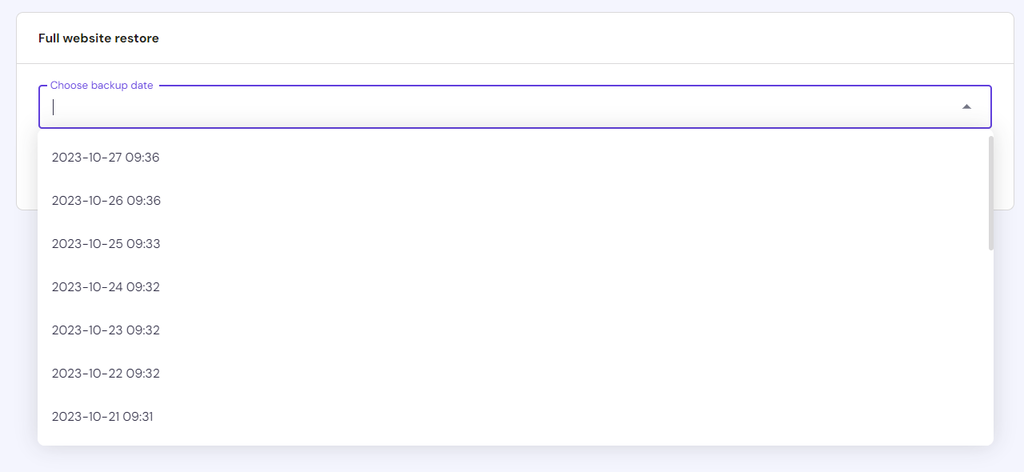
Hostinger retains your data for a specific period, enabling you to access the backup history and download a site backup quickly.
To restore your site to its previous state, simply click Select under Restore website and choose the last backup date.
3. Use Monitoring Tools
Monitoring tools enable website owners to check whether the site is working and take proactive measures to maintain an uninterrupted online presence.
Here are some of the best tools to monitor your website’s uptime and downtime:
- UptimeRobot. This freemium tool checks your website every five minutes and sends instant alerts if it goes down.
- Pingdom. Known for its speed testing, Pingdom also offers website monitoring with real-time alerts.
- Site24x7. This comprehensive monitoring tool provides in-depth insights into your website’s performance and offers various notification options.
By hosting your site with Hostinger, there’s no need to purchase a third-party website monitoring service or tool. We proactively monitor your website and immediately notify you of any performance, server health, and security issues via the control panel.
To monitor your site, simply follow these steps:
- Log in to hPanel.
- Head to Websites, choose your domain name, and select Manage.
- From the Dashboard section of hPanel, you can find the site’s performance score and malware scan result. There’s also a tab for detecting plugin and theme vulnerabilities for WordPress sites.
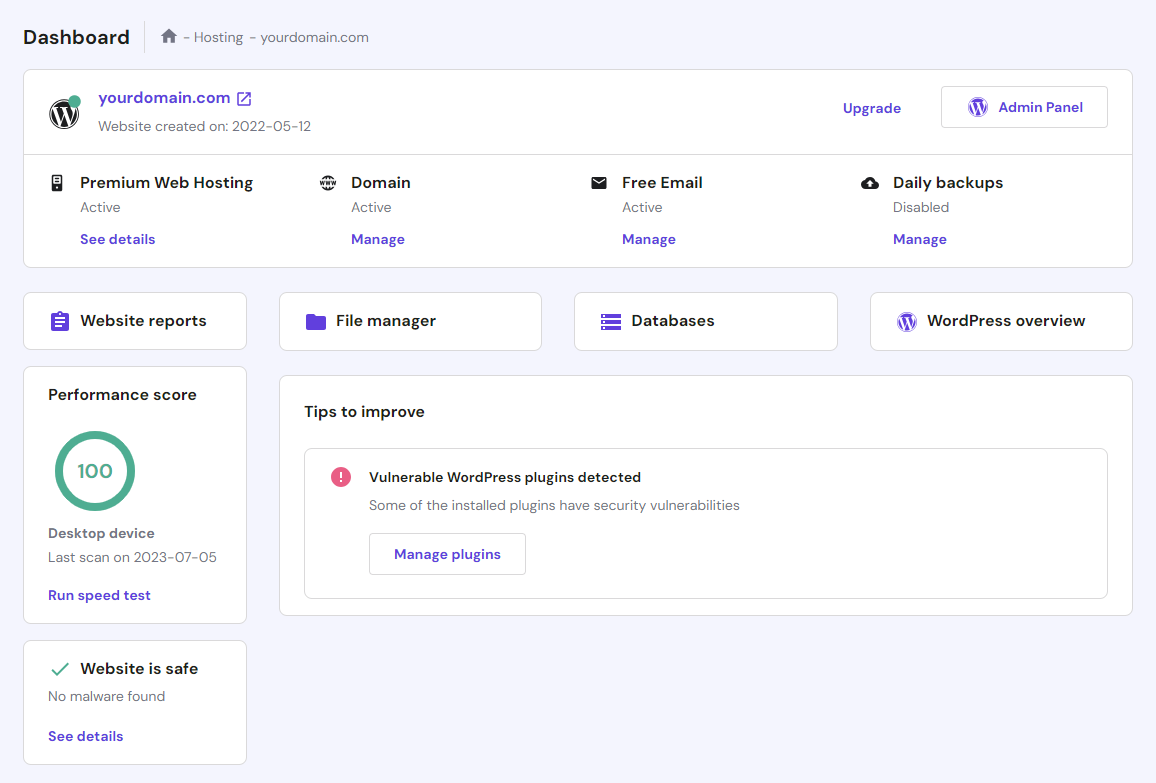
- Under Performance score, you can also run load testing and gauge your site’s current performance by clicking Run speed test.
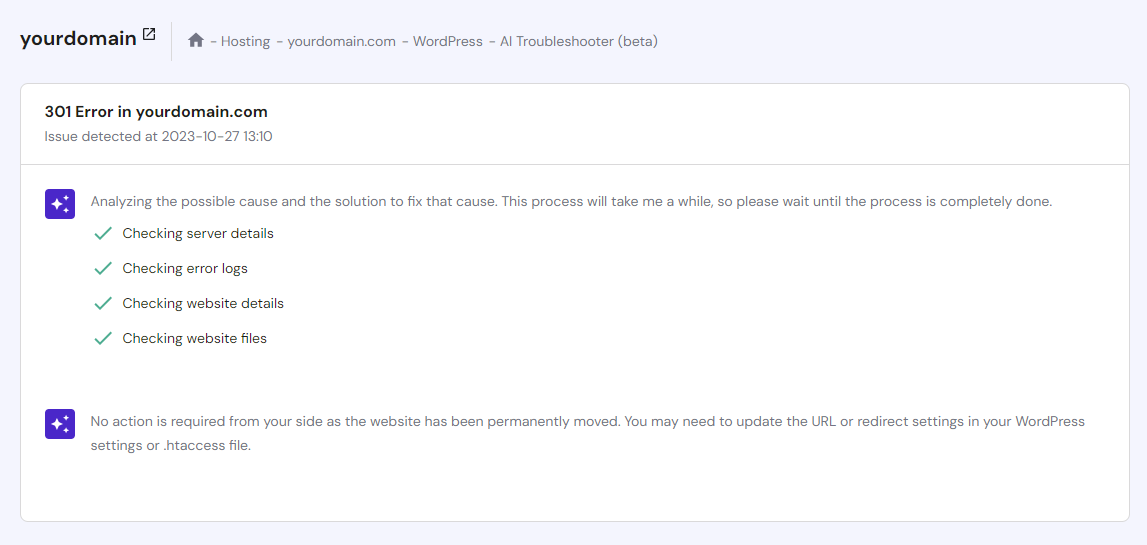
Additionally, WordPress site owners can benefit from our AI Troubleshooter. When a site returns a 500, 403, or 404 error, the tool will inform the website owner of the error cause, helping them take immediate action.
To access this uptime monitoring feature, simply select WordPress → AI Troubleshooter on the left menu.
4. Optimize Website Performance
When a large number of users visit your website, the server has to work harder to process requests, generate pages, and serve content. As the server becomes overloaded, it can lead to slower site speed and, in some cases, crashes.
While not a direct cause of website downtime, optimizing your site for speed is still crucial for a better user experience. This includes compressing images, minifying code, and leveraging browser caching.
Hostinger understands the importance of website optimization tools in preventing website outages and delivering flawless performance.
That’s why our cloud hosting plans are powered by the industry-leading LiteSpeed caching system. We also provide solid-state drives (SSDs) for faster data retrieval and a global content delivery network (CDN) to improve loading times.
These features work collectively to ensure your website runs at peak performance, minimizing the chances of downtime. Having a fast-performing site is also crucial for search engine optimization (SEO), as page speed is one of Google’s ranking factors.
5. Implement Security Measures
Malicious attacks come in various forms, and they all pose a significant threat to your website’s total uptime:
- DDoS attacks overwhelm your site with traffic, overloading server resources and causing site crashes.
- Phishing attempts and social engineering schemes often lead to data breaches. Beyond compromising user trust, sometimes they also trigger the web host to take your site offline temporarily.
- Malware infections can disrupt critical website functionality. In most cases, it requires the removal and extensive cleanup of compromised elements, usually resulting in website downtime.
To mitigate these risks and maintain a secure website, it’s essential to conduct regular audits and downtime prevention techniques.
If you don’t have the technical skills, choose a managed hosting provider that offers automated security features like Hostinger.
Here’s how we protect your site against various threats:
- Web Application Firewall. It filters incoming traffic to block malicious requests, only allowing legitimate users to pass through.
- Malware scanner. We automatically detect and remove malicious code from your website database.
- Free SSL certificate. Our hosting services come with unlimited free SSL certificates, ensuring secure data transmission between your server and users’ browsers.
- DDoS protection. By eliminating bad bots and malicious actors, our system enables you to deliver an uninterrupted browsing experience.
- Login security. To prevent brute-force attacks and unauthorized access, we employ two-factor authentication when users log in to their hosting account.
6. Manage Traffic Spikes Effectively
Traffic management is crucial to prevent downtime, especially during periods of increased user activity.
To handle peak traffic better, perform these website uptime strategies:
- Track site visitors. Use tools like Google Analytics to analyze your site’s performance and traffic trends, so you can anticipate upcoming surges. For instance, travel companies may expect peak traffic during the holiday season.
- Optimize database. Remove unnecessary files from your database and use indexing to speed up queries. This will ensure efficient data storage and retrieval, resulting in faster loading times.
- Monitor hosting resources. Make sure your hosting plan has sufficient resources to handle traffic spikes. This is especially important when using shared hosting, a service where one dedicated server hosts multiple sites.
- Enable caching. This technique stores static content like images and stylesheets on users’ devices, reducing the need for repeated server requests.
With Hostinger’s scalable hosting plans, you can easily upgrade your resources as needed.
If you’re not ready to invest in a higher package, we also have a temporary boosting option. This feature allows you to increase your plan’s limits for 24 hours.
Another standout feature is object caching for WordPress, which temporarily stores frequently accessed database queries or objects. So, the next time a user requests data, our server can retrieve it much faster. This method can boost website performance and reliability by up to three times.

7. Schedule Routine Maintenance
Ensuring website uptime is a process that requires continuous monitoring. Do not wait for a failure or crash to occur – regular checks and updates can help prevent downtime and keep your site running smoothly.
To stay on track, create a site maintenance plan and establish a routine schedule. Depending on your site’s complexity, this can be weekly, monthly, or quarterly.
Pro Tip
Before making any changes, perform a full site backup. This ensures that you can restore your site to its previous state if something goes wrong during maintenance.
Then, follow these step-by-step maintenance strategies for continuous website operation:
- Assess your website’s performance and overall health. Identify areas that need attention, such as slow loading times or security vulnerabilities.
- Update your content management system (CMS), plugins, themes, extensions, and any other software your website runs.
- Conduct a speed test using third-party tools like PageSpeed Insights or directly via Hostinger’s control panel.
- Perform thorough website security audits to identify and eliminate threats.
- After making any changes, check for broken links, missing images, formatting errors, or any other issues that may arise while you perform maintenance.
- Keep detailed records of the maintenance tasks you’ve performed, including the dates and descriptions of the changes made. This documentation can be valuable when performing maintenance and site troubleshooting in the future.
If your maintenance results in temporary server downtime, create a dedicated landing page to inform visitors of the scheduled maintenance and expected duration.
8. Balance the Traffic Load
Load balancing is one of the most effective strategies to maintain website availability. It refers to the distribution of website traffic across multiple servers or resources, preventing server overload.
However, you need a hosting provider with a global server network to achieve this. This is another benefit Hostinger users can enjoy – our data centers are strategically located across Europe, Asia, North America, and South America.
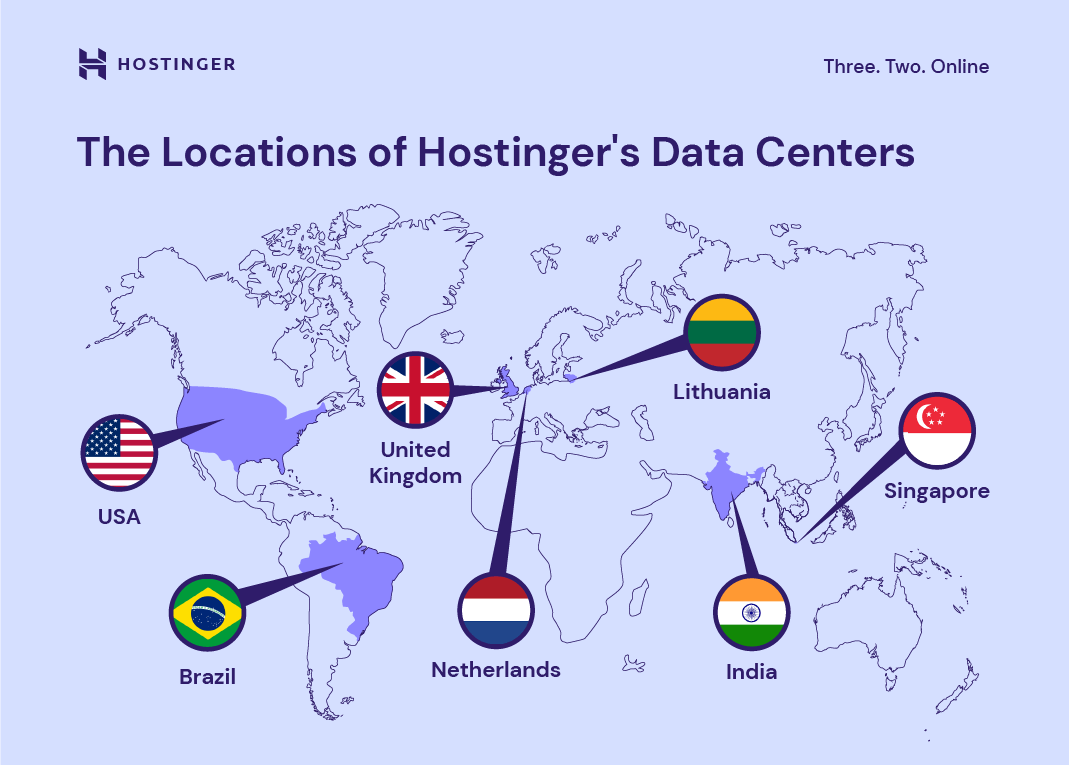
Combined with our in-house CDN solution, you have the tools to ensure your website’s uptime. If one data center encounters problems or becomes overloaded, our system will automatically route traffic to a backup location, keeping your site online.
9. Install Secure Themes and Plugins
Themes and plugins enable WordPress users to add more functionality and design elements to their site, making it more appealing and user-friendly.
However, using outdated themes and plugins can compromise your website’s security. By exploiting their vulnerabilities, hackers can gain access to your site’s back end, leading to data theft and a possible site outage.
To ensure maximum security, follow these tips before installing a WordPress theme or plugin:
- Download from reputable sources. Obtain themes and plugins from the official WordPress directory or trusted marketplaces like ThemeForest. Be cautious of free themes and plugins from unverified platforms.
- Read reviews and ratings. Online testimonials can provide insights into a theme or plugin’s security and overall performance.
- Check for regular updates. Make sure your chosen themes and plugins have received updates within the last six months. Developers who actively maintain their products are more likely to address security issues promptly.
- Test before using. For added safety, create a staging environment to run security scans and compatibility tests without affecting the live production site.
When you no longer need a theme or plugin, uninstall it. Besides posing security risks, inactive themes and plugins consume server resources, which can slow down your site.
10. Create a Disaster Recovery Plan
Even after employing all the techniques for avoiding downtime, unexpected security incidents can still happen.
This is why creating a disaster recovery plan (DRP) is important to protect your website data. Here’s how:
- Identify critical assets and risks. List all critical assets of your business, including data, hardware, and software. Then, identify potential risks and threats such as server failures, cyber attacks, natural disasters, and human errors.
- Set recovery objectives. Define your recovery time objective (RTO) for how quickly systems should be restored, and recovery point objective (RPO) for the acceptable data loss in case of an incident.
- Assemble a disaster recovery team. Assign specific roles to each member, including a DRP coordinator, IT personnel, and communication liaisons. Train your team and make sure everyone understands their responsibilities.
- Develop recovery strategies. Prioritize risks based on severity and potential consequences. After that, create detailed procedures to mitigate each risk scenario.
- Back up your data. Implement automated backups of critical data and systems. Store them in secure places to prevent data loss during disasters.
- Regularly update the plan. Continuously adapt your DRP based on evolving technology, risks, and business needs. Identify weaknesses and areas for improvement, then revise the plan accordingly.
- Create documentation. Keep all aspects of your DRP, including contact information, procedures, and recovery strategies, in one comprehensive document. Make sure it’s easily accessible to the DRP team.
What Causes Website Downtime
From hardware failure to cyber attacks, here are several factors that cause websites to crash:
Server Problems
When a server goes down, all websites hosted on it will be unavailable to users. There are two main causes of a server outage:
- Hardware side. These include hard drive failures, unstable power supplies, overheated CPUs, and aging components.
- Software side. It can be related to software glitches, corrupted operating systems, insufficient RAM storage, incorrect configurations, and database connection errors.
Software Update Errors
Software updates are important for maintaining security and performance. However, during the update process, errors may occur due to compatibility issues, improper installation, or conflicts with existing software.
Traffic Spikes
Often caused by sudden increases in visitor numbers, traffic surges can overwhelm your server’s resources. If your hosting infrastructure can’t handle these spikes, your website will slow down or even become inaccessible.
Security Breaches
When hackers gain unauthorized access to your site, they can disrupt services, damage web pages, or steal data. Protecting your website with robust security measures, such as firewalls and two-factor authentication, is crucial to prevent these incidents.
DDoS Attacks
In this case, attackers use botnets or networks of compromised devices to generate a massive influx of traffic. The goal is to overwhelm the server and make your site inaccessible. That’s why robust DDoS countermeasures, like those offered by Hostinger, are essential for mitigating these attacks and protecting against website downtime.
Conclusion
Businesses rely on websites to reach online audiences and sell their products worldwide. However, server issues, traffic spikes, and DDoS attacks can cause websites to crash, disrupting operations.
By implementing the site upkeep best practices discussed in this article, you can maintain website availability and uptime. Here are some of the most important site resilience measures:
- Choose reliable web hosting for high uptime and faster load times.
- Set up regular backups to avoid data loss during website downtime.
- Monitor your site and schedule routine maintenance to ensure top-notch performance and security.
- Manage huge traffic spikes by balancing the load across multiple servers.
- Create a disaster recovery plan in case unexpected incidents occur.
Keep in mind that website downtime mitigation is an ongoing commitment. Even when everything works fine, these website reliability tips will help you deliver a seamless browsing experience.
Prevent Website Downtime FAQs
In this section, we’ll address some commonly asked questions about minimizing website outages and keeping your website online.
Is Regular Website Maintenance Required to Avoid Downtime?
Yes, routine site maintenance is crucial to prevent downtime. Regularly perform website availability solutions, such as updating software, monitoring security, optimizing performance, and eliminating all technical issues that can lead to crashes.
What Should I Do if My Website Experiences Downtime?
If your website experiences downtime, identify the cause first. Often, it’s due to server-related issues or traffic spikes. After finding the culprit, contact your hosting provider to restore your backup data. Also, communicate your site’s downtime to visitors using a maintenance mode page and through other channels like social media.
How Often Should I Back Up My Website to Prevent Data Loss During Downtime?
We recommend backing up your website daily, especially if it frequently changes. This ensures minimal data loss in case of downtime, and you can quickly restore your site to its previous state.
Is It Possible to Use Tools to Test My Website’s Resilience to Downtime?
Yes, various website monitoring tools can test your website’s resilience to downtime. They simulate traffic spikes, check server response times, and flag issues, helping you take immediate action.

Brian is a Content Writer who loves telling complex stories in a simple way. He has written all types of content, including tutorials, blog posts, landing pages, social media posts, white papers, infographics, and YouTube scripts. Follow him on LinkedIn.

As VP of Product at Hostinger, Saulius oversees Web Hosting Platform & Tools, Managed WordPress, and WebPro Experience. Saulius enjoys observing users through their daily life activities, looking for problems to solve, and building products that make users more efficient online, help them spend more time on the things they love, and leave all the rest for technology to solve. Follow him on LinkedIn.