15 Black Friday ecommerce tips to prepare your store in 2026
Sep 25, 2026
/
By Ariffud M.
/
24 min Read

These Black Friday ecommerce tips help you prepare your store and maximize online sales during Black Friday 2026: configure deals, organize inventory and orders, improve the purchasing experience, and check that your website can handle more traffic.
Start several weeks before Black Friday so you have enough time to test how shoppers find products, browse on mobile, add items to the cart, and complete checkout.
You can then fix problems that could hurt conversions, from unclear promotions and inconsistent stock levels to payment errors and slow pages.
Follow these steps to get your ecommerce store ready for Black Friday:
- Set goals and KPIs.
- Build a preparation timeline.
- Create profitable deals.
- Prepare inventory, orders, shipping, and returns.
- Improve mobile shopping.
- Make deals easy to find.
- Optimize checkout and payments.
- Test the purchase journey.
- Keep sales channels consistent.
- Add genuine urgency.
- Prepare abandoned-cart recovery.
- Personalize the store experience.
- Set up upsells and cross-sells.
- Prepare for Cyber Monday and post-sale activity.
- Measure store and campaign performance.
Black Friday ecommerce preparation involves more than running an online promotion. Your pricing, inventory, checkout, fulfillment, customer recovery, and technical setup need to work together when more shoppers arrive at the same time.
Black Friday ecommerce tips for 2026
The 15 Black Friday ecommerce tips cover the key steps businesses should take before traffic arrives, from planning deals and managing inventory to testing checkout and preparing post-sale operations.
Work through them in order so each decision supports the next. Start with your goals and store setup, then prepare the shopping experience, operations, recovery flows, and performance measurement.
1. Set Black Friday goals and KPIs
Set one primary Black Friday goal and pair it with KPIs that show whether the campaign is achieving it. Revenue alone can look strong even when heavy discounts, shipping costs, or fulfillment problems reduce the value of those sales.
Start from how your store performs normally, then decide what you want Black Friday to improve. Use recent Black Friday shopping data for market context, but set your targets on your own sales, margins, traffic, inventory, and previous seasonal campaigns.
Match each goal with the metrics and store decisions it affects:
| Goal | KPIs to track | What to change |
| Increase revenue | Revenue, conversion rate, orders | Product selection, promotion visibility, and traffic allocation |
| Keep sales profitable | Profit per order, contribution margin, return rate | Discount depth, free-shipping rules, and product exclusions |
| Increase average order value (AOV) | AOV, items per order | Bundles, cross-sells, and minimum-spend offers |
| Acquire new customers | New-customer orders, cost per new customer | First-purchase offers and products used to attract new shoppers |
| Clear inventory | Units sold, sell-through rate, remaining stock by SKU | Discounts on slow-moving or seasonal products |
| Encourage repeat purchases | Returning-customer revenue, repeat purchase rate | Loyalty offers and post-sale follow-ups |
AOV is your total revenue divided by completed orders. If your normal AOV is $60, you might set a target of $70 and use bundles or a minimum-spend incentive to reach it.
Set both a target and a limit. A store that wants to increase revenue can also set a minimum acceptable contribution margin, so a big sales day doesn’t end up costing money.
Keep these goals documented so you can compare your final results with the targets you set before launch.
2. Build a Black Friday store preparation timeline
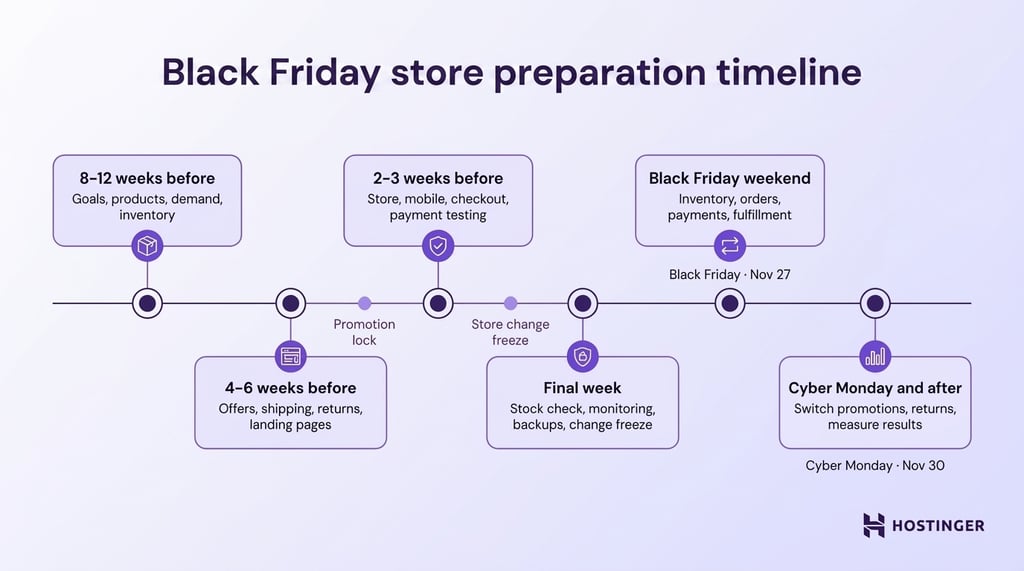
Build your Black Friday store preparation timeline around dependencies, testing time, and the cost of fixing mistakes late. In 2026, Black Friday falls on November 27, followed by Cyber Monday on November 30.
Start with tasks that depend on suppliers, carriers, developers, or payment providers. Coordinate them with planning your wider Black Friday campaign, but set earlier deadlines for store operations and technical work than emails and banners.
A useful rule is to schedule each task around its longest dependency, then leave enough time to verify the result. If a supplier needs five weeks to restock a bestseller, making the inventory decision two weeks before Black Friday is already too late.
Use this timeline as a starting point:
- 8–12 weeks before. Finalize goals, choose promotional products, estimate demand, and check for any inventory or delivery problems.
- 4–6 weeks before. Finalize offer rules, product eligibility, shipping conditions, return policies, and Black Friday landing pages.
- 2–3 weeks before. Complete functional, mobile, checkout, payment, and website-performance testing.
- Final week. Check that your stock numbers match what you actually have, repeat critical checks, confirm monitoring and backups, and avoid unnecessary high-risk changes.
- Black Friday weekend. Assign owners for inventory, orders, payments, fulfillment, and technical issues.
- Cyber Monday and after. Switch promotions as planned, process remaining orders, handle returns, and measure performance.
Add one or two internal checkpoints before launch. A promotion lock date can stop last-minute discount changes, while a store change freeze can reduce the risk of introducing new problems during the final days.
Think of the timeline as a list of tasks that depend on each other, not just a marketing calendar. As Black Friday gets closer, spend less time adding features and more time checking that everything you prepared earlier is working properly.
3. Configure Black Friday deals without reducing margins
Configure Black Friday pricing strategy by deciding how much contribution you need to make from each order before choosing the discount. Higher sales volume won’t help if discounts, shipping subsidies, payment fees, and fulfillment costs consume most of the revenue.
Calculate what remains at the promotional price:
Promotional price − product cost − payment fees − fulfillment cost − shipping subsidy − other variable costs = contribution per order
Contribution per order is the amount left after the variable costs tied directly to the sale. If a product normally sells for $100 and costs $60 to source, a 30% discount lowers the price to $70.
That leaves only $10 before payment processing, fulfillment, shipping subsidies, and other variable costs. Set a minimum contribution you want each order to generate, then avoid offers that push the order below that limit.
Match the promotion to the behavior you want to encourage:
| Promotion | Best suited for | Margin check |
| Percentage or fixed discount | Driving sales of selected products | Check contribution at the discounted price |
| Product bundle | Increasing items per order | Calculate contribution on the full bundle |
| Tiered discount | Encouraging higher orders | Keep every spending tier profitable |
| Free-shipping threshold | Increasing cart value | Set the threshold high enough to cover shipping costs |
| Gift with purchase | Adding value without offering a bigger discount | Include the gift and fulfillment costs |
| Selected-product promotion | Protecting low-margin or limited-stock products | Exclude products that can’t support the offer |
Calculate the effective discount, meaning the total value of all discounts and extras a customer receives compared with the original order value.
For example, a 20% product discount combined with free shipping and a free gift can reduce your contribution by much more than 20% of the order value.
Document eligible products, minimum spend, rules for using multiple coupons, usage limits, exclusions, and exact start and end times. These rules will also need to work correctly across the complete purchase journey.
4. Prepare inventory, orders, shipping, and returns
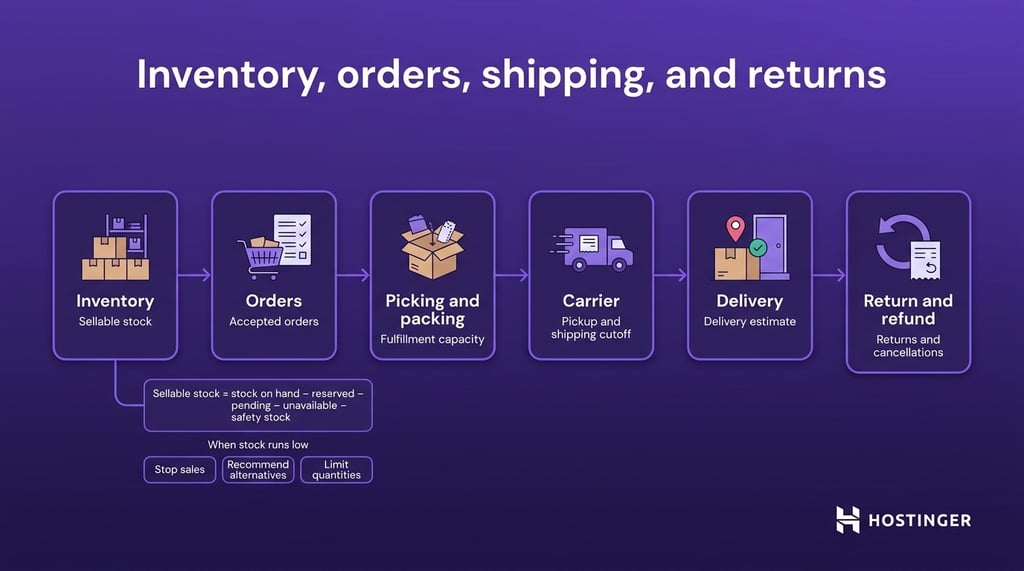
Prepare inventory and fulfillment around the number of orders you can realistically accept and deliver during Black Friday.
Selling out isn’t necessarily a problem, but accepting orders you can’t fulfill can lead to cancellations, support requests, and disappointed customers.
Start with accurate ecommerce inventory management so you know how much stock is actually available to sell. Calculate sellable stock for each promoted product:
Sellable stock = stock on hand − reserved units − pending orders − damaged or unavailable units − safety stock
Use normal sales, previous promotions, current demand, and how long it takes to get new stock from to estimate how quickly each product could sell.
Promote products with healthy stock, protect items that are difficult to restock, and avoid pushing products that could sell out too early.
Decide what happens when demand exceeds your forecast:
- Stop sales. Prevent new purchases when sellable stock reaches zero.
- Accept backorders carefully. Offer them only when you can provide a realistic delivery date.
- Recommend alternatives. Direct shoppers to an available product when the original item sells out.
- Limit quantities. Restrict how many units shoppers can buy when stock is running low.
- Shift promotion. Give more visibility to products with healthier stock levels.
If manual updates make inventory difficult, Hostinger Ecommerce keeps your products and inventory in one place.
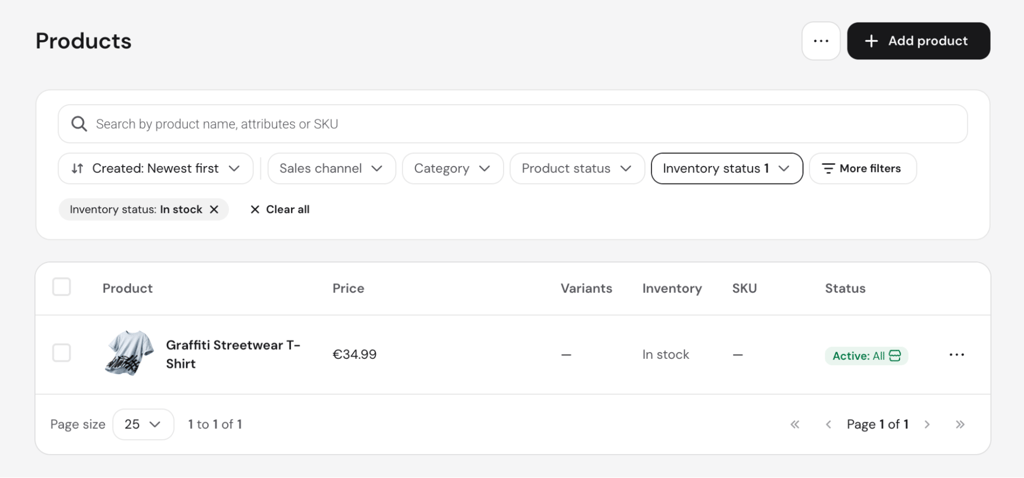
Businesses with an existing website can also connect supported sales channels without rebuilding their entire ecommerce operation.
Check fulfillment capacity separately from inventory. Estimate how many orders your team can pick, pack, label, and hand to a carrier each day, then compare that capacity with your expected Black Friday order volume.
Before the sale starts, make sure you have enough packaging supplies and confirm shipping pickup times, shipping deadlines, and realistic delivery estimates. Display delivery information before checkout so shoppers know when to expect their orders.
Finally, define how you’ll handle returns, restocking, cancellations, and refunds after the sale. The goal isn’t unlimited capacity, but understanding your limits before Black Friday demand tests them.
5. Optimize the mobile shopping experience
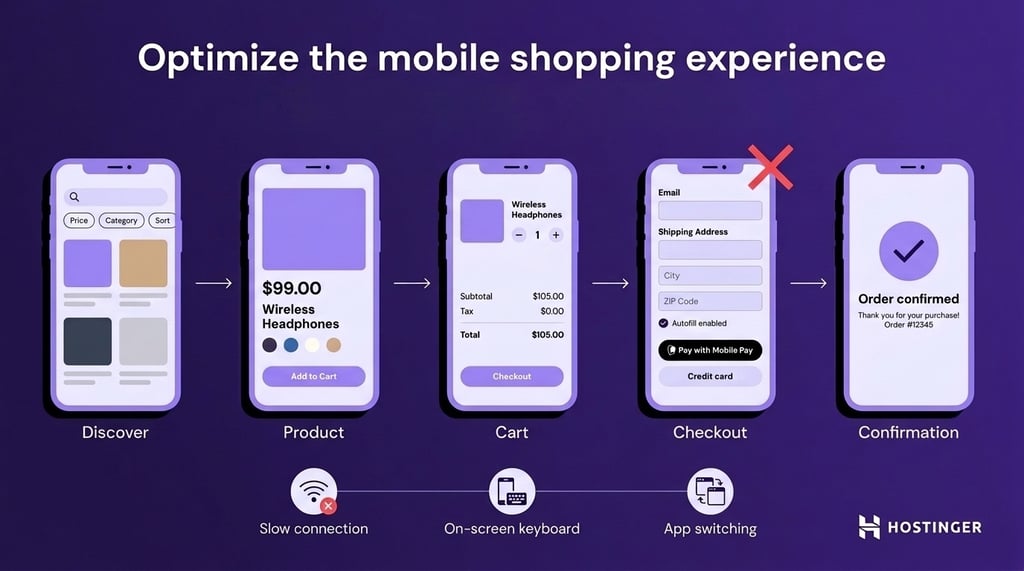
Optimize the complete mobile shopping journey, from product discovery to payment, rather than simply checking whether the homepage fits a smaller screen.
Smartphones accounted for 56.4% of U.S. online transactions during the 2025 holiday shopping season, according to Adobe’s holiday shopping data.
For stores that rely heavily on mobile ecommerce, mobile usability problems can affect a large share of Black Friday purchases.
Start with your own analytics. Find out which mobile devices and browsers bring in the most visits, orders, or revenue so you know which combinations deserve priority.
Review these parts of the journey:
- Product discovery. Make navigation, search, filters, and sorting easy to use without zooming or horizontal scrolling.
- Product pages. Keep images, variations, prices, stock information, and primary CTAs clear on smaller screens.
- Button size. Make buttons, quantity controls, filters, and close icons big enough to tap easily.
- Forms. Use appropriate mobile keyboards and autofill support to reduce typing.
- Cart. Make quantities, product removal, promotions, and totals easy to review and change.
- Checkout and payment. Keep the checkout forms short and simple, and offer mobile payment options when available.
- Promotional elements. Prevent banners, countdowns, pop-ups, cookie notices, and chat widgets from covering important controls.
Test less-than-ideal conditions too. A slower connection, an open on-screen keyboard, or briefly switching between apps can reveal usability issues that a desktop responsive preview won’t show.
The mobile store is ready when shoppers can find a deal, choose a product, edit the cart, pay, and reach confirmation without fighting the interface.
6. Make Black Friday products and deals easy to find
Make Black Friday deals easy to find by giving shoppers clear links to the products included in the sale. A shopper who sees 30% off selected items shouldn’t have to search the regular catalog or guess which products qualify.
Create one main Black Friday landing page or sale category, then direct homepage banners, announcement bars, navigation items, and campaign traffic to it. Use examples of effective Black Friday landing pages to help plan the page structure.
Organize deals around how customers shop. A clothing store could use categories such as Under $50, 50% off, and Bestsellers, while an electronics store might use Laptops, Gaming, and Accessories.
Test on-site search with campaign queries such as Black Friday, Black Friday deals, product names, and combinations such as laptops sale. Fix searches that return irrelevant or empty results for products included in the promotion.
Keep the offer clear across landing pages, categories, and product pages. Show the correct sale price, eligibility conditions, exclusions, stock status, and promotion deadline before shoppers reach the cart.
Review sold-out products throughout the campaign. Move them lower, replace them with available alternatives, or remove promotional links that send shoppers toward unavailable products.
Finally, ask someone unfamiliar with the campaign to find a specific deal. If they need several unnecessary clicks or can’t work out which products qualify, the store still has product-discovery friction.
7. Optimize checkout and payment options
Optimize checkout by making it easy and quick to pay. Avoid unexpected costs, forced account creation, and unnecessary form fields. Clearly explain delivery options and offer payment methods that your customers commonly use.
Baymard’s checkout research found that 40% of surveyed shoppers abandoned checkout because extra costs were too high, 18% left because the site required account creation, and 17% abandoned because the checkout process felt too long or complicated.
Prioritize these improvements:
- Show costs early. Display discounts, shipping, taxes where calculable, and other fees before the final payment step.
- Offer guest checkout. Let first-time shoppers buy without creating an account, then offer account creation after purchase.
- Reduce form work. Ask only for information needed to process and deliver the order, and support autofill where possible.
- Show clear delivery options. Include estimated delivery dates where possible instead of relying only on labels such as Standard or Express.
- Prioritize relevant payment methods. Use payment and analytics data to identify which methods customers already use by device and market.
Hostinger Ecommerce supports more than 100 payment methods, including cards through Stripe, Apple Pay, Google Pay, and PayPal. Razorpay is available to businesses in India, while Alipay is available through Stripe for Chinese consumers, overseas Chinese, and Chinese travelers.
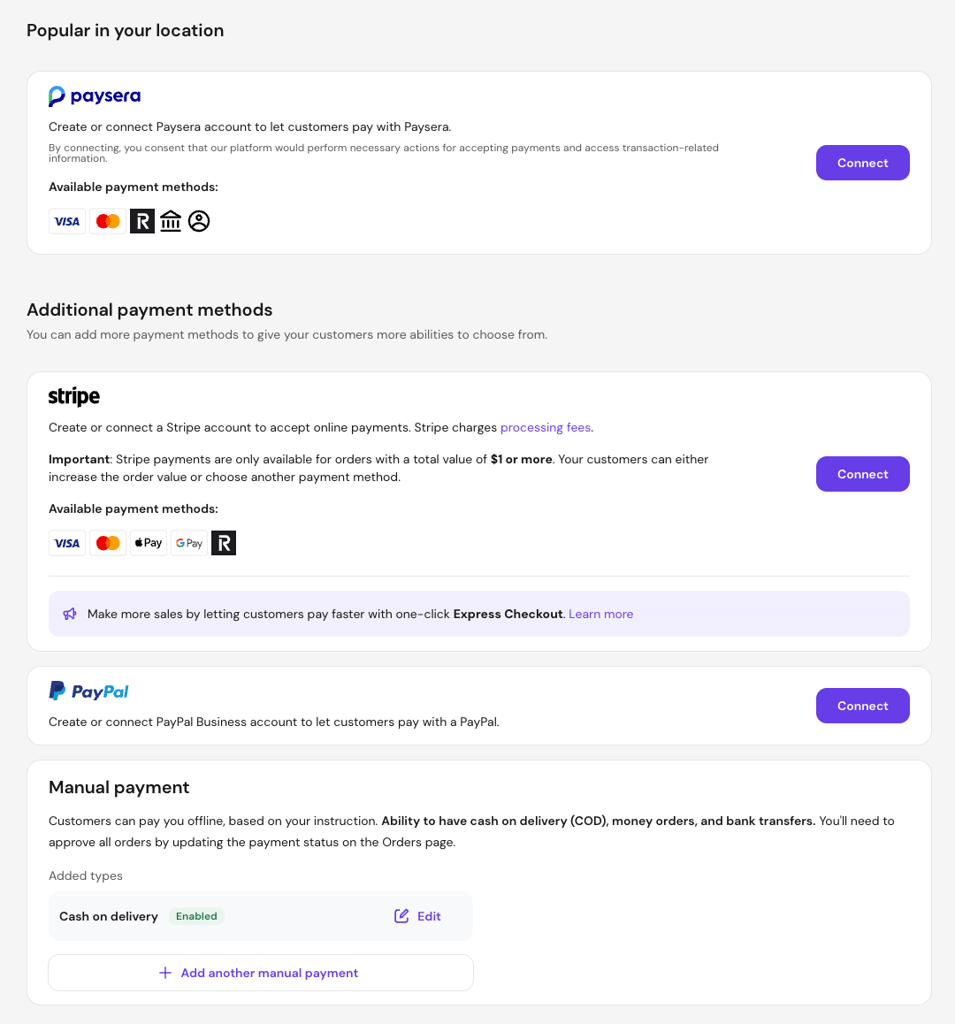
Hostinger charges no platform transaction fee, although payment providers can still charge their own processing fees.
8. Test the complete purchase journey
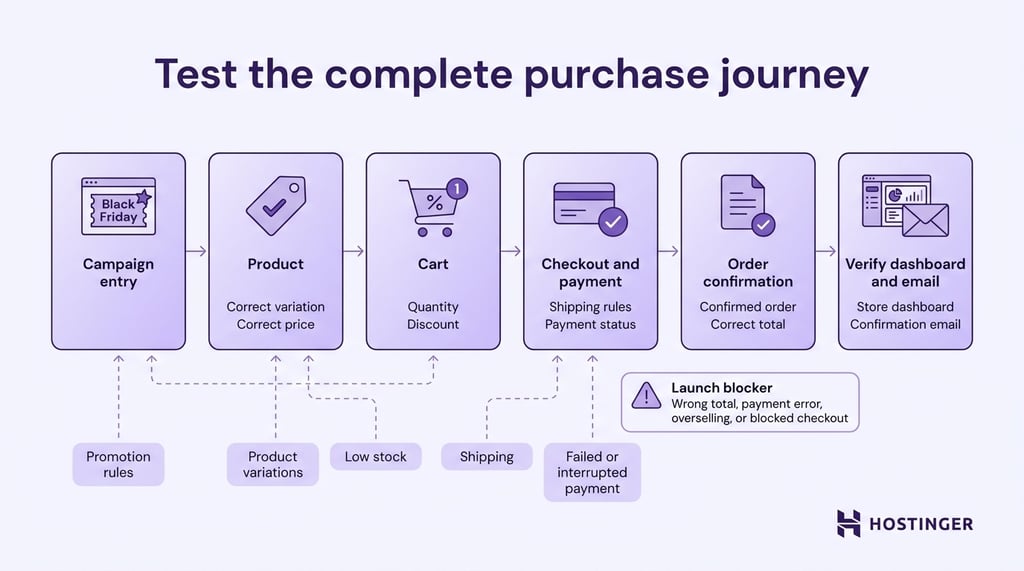
Test the complete Black Friday shopping journey from the campaign entry point to the confirmed order. Check that all the store changes you’ve made work well together, instead of testing each feature separately.
Use a simple test sheet with Scenario, Expected result, and Actual result. This makes it easier to identify problems and test them again after a fix.
Start with a normal purchase on desktop and mobile. Enter through the Black Friday landing page, find a promoted product, add it to the cart, complete checkout, and confirm the order in your store dashboard.
Then test the areas most likely to affect revenue or operations:
- Promotion rules. Test minimum spend, excluded products, overlapping promotions, and expired offers.
- Product variations. Confirm the correct price and promotion apply to intended sizes, colors, or bundles.
- Inventory. Purchase a low-stock test item and confirm the order changes inventory only once.
- Shipping. Check qualifying and nonqualifying orders against your configured shipping rules.
- Payments. Complete successful and failed transactions through your priority payment methods.
- Interrupted flows. Test what happens when a shopper leaves or interrupts a payment process.
- Order creation. Confirm that successful payments create the right order status and unsuccessful payments don’t create paid orders.
After each test, check both your store dashboard and what the shopper sees. Confirm that order and payment confirmation emails contain the correct products, quantities, prices, discounts, and totals.
Treat any issue that changes the order total, processes payment incorrectly, oversells inventory, or prevents checkout as a launch blocker.
Repeat the full purchase journey test whenever you change a promotion, payment, shipping, inventory, or campaign pages.
9. Keep products, offers, and inventory consistent across sales channels
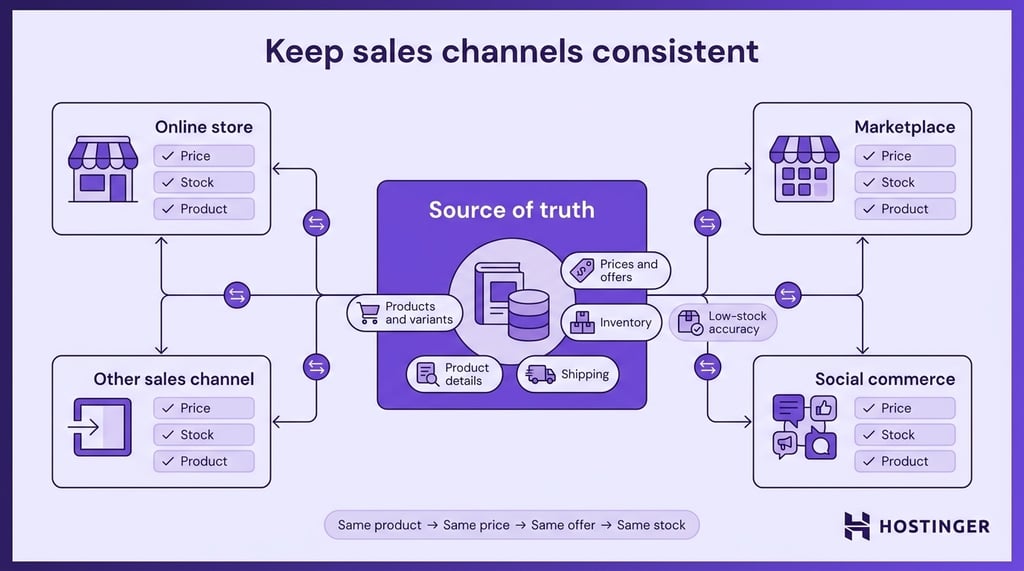
Keep one reliable source for product details, pricing, promotions, and stock when you sell through multiple channels.
Focus on consistency between sales paths rather than forecasting or restocking inventory, which should already be planned before the campaign starts.
Decide which system acts as the source of truth, then audit each active sales channel for:
- Product and variant IDs. Make sure each product is linked to the correct size, color, bundle, or variation.
- Prices and promotions. Keep promotional prices, exclusions, and campaign dates aligned.
- Inventory. Make sure each sales channel reads the correct available quantity.
- Product details. Keep titles, images, variations, and key specifications consistent.
- Shipping. Match applicable delivery options, costs, and restrictions.
Pay attention to variants and low-stock products. A synchronization problem on the final unit of a product can produce an order you can’t fulfill.
Compare the final price and offer conditions across every sales path, not just the product page.
A customer arriving through one storefront shouldn’t receive different terms from someone buying the same product elsewhere unless you’ve intentionally configured a channel-specific promotion.
If you use Hostinger Ecommerce, make updates in your central catalog first, then verify that they appear correctly across each connected sales channel.
You can also use its Quick Links feature, which are shareable product URLs that let shoppers open a product directly instead of searching for it on your website.
Once the campaign starts, make price or stock changes in your main product management system first. Then verify that the update appears correctly across every active sales channel.
10. Add urgency without disrupting the store experience
Add urgency only when there is a real deadline, limited quantity, or a short-term promotion. The goal is to clarify the offer, not pressure shoppers with deadlines that don’t exist.
Match each urgency element to the condition behind it:
- Campaign deadline. Show the exact date or time the promotion ends.
- Flash sale. Use a countdown only when the offer actually changes or expires when the timer reaches zero.
- Low stock. Trigger messaging from current inventory data rather than displaying it permanently on every product.
- Limited quantity. Show the remaining quantity only when your inventory system updates it reliably.
- Offer eligibility. Remind shoppers about a requirement such as Spend $75 for free shipping while they still have time to qualify.
Place urgency close to the decision it affects. A stock warning belongs near the Add to cart button, while a campaign-wide deadline can appear on the sale landing page and in the cart.
Keep the wording specific. Sale ends November 30 at 11:59 PM gives shoppers more useful information than Hurry, offer ending soon.
Make sure deadlines are the same across your store messages and promotion settings, so customers see accurate information. On mobile, remove or reposition urgency elements that cover product information, CTAs, or checkout fields.
11. Prepare abandoned-cart recovery
Prepare your abandoned-cart recovery emails before Black Friday so shoppers who leave can easily return to their cart. Make sure the email shows the correct products, prices, and discounts, and doesn’t introduce a different promotion.
Configure each message to include the details shoppers need:
- Cart contents. Show the products they left behind.
- Current prices. Display prices that match the live store.
- Active promotion. Reflect the Black Friday offer currently available to the shopper.
- Stock status. Show availability where it helps shoppers make a decision.
- Promotion deadline. Use the real expiration date or time.
- Cart link. Give shoppers a working route back to their cart.
Avoid automatically adding another discount to the first reminder. An extra incentive can reduce margins and may encourage repeat customers to abandon carts because they expect a better offer later.
Your recovery emails should support the offer already defined in your broader Black Friday email marketing strategy.
For Hostinger Ecommerce users, Hostinger Reach integrates with the ecommerce platform and can use abandoned-cart and purchase events for email automation.
You can manage these automations from the Automations page in the Hostinger Reach dashboard.
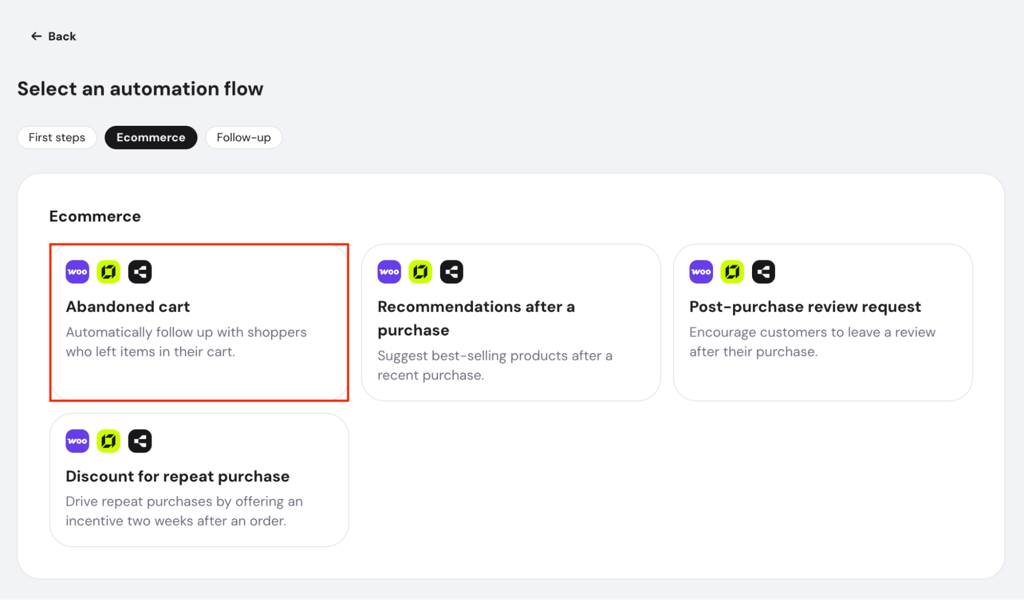
Check marketing consent before Black Friday too. Your subscription and checkout consent flows need to work before abandoned-cart volume increases.
Run one complete recovery scenario before launch, from cart abandonment to email delivery and return.
Confirm that the automation starts when expected, stops after a completed purchase, and reflects the live promotion throughout the sequence.
12. Personalize the Black Friday store experience
Personalize the Black Friday store experience using customer information you already have, such as purchase history, browsing behavior, account data, or loyalty status.
Focus on changing what different shoppers see rather than increasing the size of an individual cart.
Use a few meaningful segments:
| Segment | Useful personalization |
| First-time visitor | Highlight bestsellers, popular categories, and clear Black Friday offers |
| Returning customer | Prioritize categories related to previous purchases |
| Category buyer | Highlight relevant sale products within a familiar category |
| VIP customer | Offer early access, exclusive bundles, or loyalty benefits |
| Frequent browser | Show recently viewed products or relevant sale categories |
Define each segment using your own store data. For example, set a meaningful spending or order threshold for VIP customers based on your typical customer behavior.
Keep the main Black Friday offer consistent unless you’re intentionally running a customer-specific promotion. Create a default experience for shoppers you can’t identify reliably.
Check whether personalization improves the results you want, such as clicks on personalized collections, product discovery, or conversion rate. Remove rules that add complexity without improving the ecommerce customer experience.
13. Prepare upsells and cross-sells
Prepare upsells and cross-sells that increase AOV without reducing profit or distracting shoppers from checkout.
Personalization changes the experience based on who the shopper is, while upselling and cross-selling focus on increasing the value of the order they’re already building.
An upsell offers a higher-value version of the original product, while a cross-sell adds a complementary product.
Match each upsell or cross-sell to the right point in the purchase journey:
| Placement or approach | Offer type | Black Friday example |
| Product page | Upsell | Offer a 256 GB model instead of the 128 GB version |
| Cart | Cross-sell | Recommend a compatible memory card with a camera |
| Bundle | Cross-sell | Sell a cleanser, serum, and moisturizer as one set |
| Spending threshold | Cross-sell | If a gift becomes available at $100 and the cart is $92, suggest a relevant add-on |
Choose recommendations based on what’s already in the cart rather than your overall bestsellers. Check compatibility, promotional eligibility, and availability before showing each recommendation.
Use the contribution limit you set earlier when evaluating these offers. A higher AOV isn’t useful if the additional discount, product cost, shipping, or fulfillment consumes the extra revenue.
Limit recommendations to the strongest matches. Keep upsells and cross-sells on product or cart pages where shoppers can consider them without interrupting checkout.
Track attach rate, or the percentage of eligible orders that include the recommended product, alongside AOV and contribution per order. If AOV rises while profit or checkout completion falls, adjust or remove the recommendation.
14. Prepare the store for Cyber Monday and post-sale activity
Prepare the Black Friday-to-Cyber Monday transition before the sale starts so you can update promotions, inventory, and messaging without rebuilding the campaign over the weekend.
Use the operational data you’ve already collected to decide which offers should continue.
Decide what happens to each offer:
| Offer status | When to use it | Cyber Monday action |
| Continue | The offer remains profitable and stock is healthy | Keep it and update the deadline |
| Change | Demand is weaker than expected or another product needs support | Adjust the product, bundle, or incentive |
| End | Stock is low, margins are too thin, or the offer applies only to Black Friday | Disable the promotion and remove related messaging |
| Replace | You planned a separate Cyber Monday offer | Switch the promotion, products, and messaging together |
Set a checkpoint on Saturday or Sunday to review sell-through rate, remaining stock, contribution per order, and fulfillment capacity.
Use those numbers to decide which products deserve more visibility rather than automatically extending every Black Friday deal.
Schedule the store transition before the weekend begins. Define when banners, countdowns, landing-page copy, coupons, automatic discounts, and featured products should change.
Run through this checklist as soon as the transition goes live:
- Expired promotions. Confirm that Black Friday discounts no longer apply.
- Cyber Monday offer. Check that landing pages and product pages display the intended promotion.
- Unavailable products. Remove links to sold-out or excluded items.
- Deadlines. Verify countdowns and promotion end times.
- Fulfillment capacity. Review outstanding order volume before increasing demand again.
Prepare for post-sale operations too. Track outstanding orders, cancellations, returns, refunds, and support volume so the next promotion doesn’t push the team beyond its capacity.
Treat Cyber Monday as the next stage of the same ecommerce operation. Adjust the campaign using the limits and results you’ve already observed, then close it cleanly without expired promotions or an unmanageable backlog.
15. Measure store and Black Friday performance
Measure Black Friday performance against the goals and baseline you set before launch. Focus on what changed and why rather than redefining the KPIs you’ve already chosen.
Use Google Analytics 4 to track ecommerce performance across product discovery, cart activity, checkout, purchases, promotions, and refunds. Relevant events include view_item, add_to_cart, begin_checkout, purchase, and refund.
Build a simple scorecard for each main goal:
| What to record | Example |
| Goal | Increase AOV |
| Baseline | $62 |
| Target | $70 |
| Black Friday result | $74 |
| Supporting metric | Contribution per order |
| Next action | Reduce the bundle discount if contribution fell |
Track commercial and operational performance together:
| Metric | What to look for |
| Revenue and profit | Higher sales that also produced healthy returns |
| Conversion rate | Additional traffic that turned into purchases |
| AOV | Customers who spent more per completed order |
| Cart and checkout completion | Where shoppers dropped out before payment |
| New vs returning customers | Growth that came from acquisition or retention |
| Stockouts and overselling | Whether inventory planning matched demand |
| Failed transactions | Checkout or payment problems that blocked sales |
| Fulfillment delays | Whether operations kept up with order volume |
| Website errors and downtime | Technical problems interrupted shopping |
There is no universal “good” ecommerce conversion rate, AOV, or cart-abandonment rate. Product prices, traffic sources, markets, devices, and customer behavior vary too much between stores.
Look at combinations of metrics to diagnose problems:
- Traffic increased, but conversion fell. Review traffic quality, mobile performance, product availability, and promotion clarity.
- Add-to-cart activity stayed strong, but checkout completion fell. Review shipping costs, payment errors, and checkout friction.
- Revenue increased, but contribution per order fell. Review discounts, shipping subsidies, gifts, and other incentives.
- Sales exceeded expectations, but fulfillment fell behind. Increase operational capacity before focusing on more traffic next time.
- One channel oversold stock. Review how your source-of-truth system synchronizes inventory across sales channels.
- AOV rose, but checkout completion fell. Review whether upsells or cross-sells introduced too much friction.
Segment results by device, customer type, traffic source, product group, sales channel, and campaign period before drawing conclusions.
A healthy overall result can hide a weak mobile experience, unprofitable product group, or failing payment method.
Record the exact changes that worked or caused problems, then turn them into actions for the next campaign. Use lessons from previous Black Friday campaigns alongside your own data to decide what to keep, fix, or test again.
How to prepare your ecommerce website for Black Friday traffic
Prepare your ecommerce website for Black Friday traffic by estimating peak demand, testing the store under load, reducing performance bottlenecks, checking hosting capacity, and preparing monitoring and recovery procedures.
Promotions, checkout improvements, and conversion tactics won’t help if pages become slow or unavailable when more shoppers arrive.
If your ecommerce store runs on a fully hosted platform such as Shopify, the platform manages most of the underlying hosting infrastructure and performance configuration. You can still optimize your storefront and monitor its performance.
If you run a self-hosted ecommerce website, such as a WordPress and WooCommerce store, you need to review hosting capacity, caching, database performance, and other technical factors before Black Friday traffic increases.
Estimate expected peak traffic
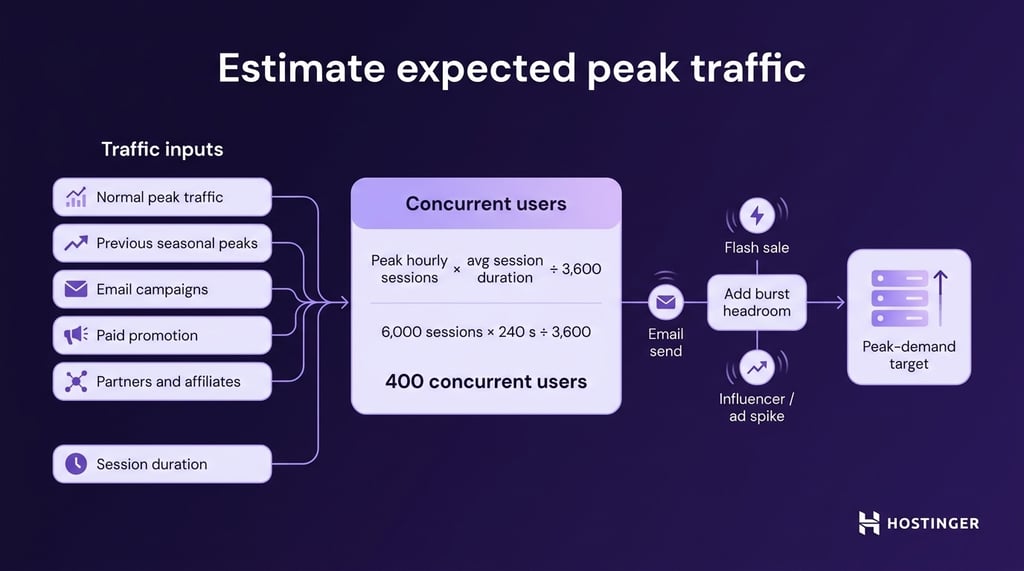
Estimate expected peak traffic from your own store data and campaign plans instead of applying a generic Black Friday multiplier.
Focus both on total visits and on how many shoppers may use the store at the same time.
Start with the factors most likely to affect demand:
- Normal peak traffic. Use your busiest hours as the baseline instead of daily or monthly averages.
- Previous seasonal peaks. Review Black Friday, Cyber Monday, product launches, flash sales, and other high-traffic campaigns.
- Email audience. Consider list size, previous click volume, and whether a campaign could send many shoppers at once.
- Paid promotion. Account for planned ad spend, campaign reach, and launch times.
- Partners and affiliates. Include expected traffic from influencers, affiliates, or other partners.
- Session duration. Longer sessions increase the number of shoppers active at the same time.
Total visits alone don’t show peak infrastructure demand. A store receiving 60,000 visits throughout one day will face less pressure than one receiving a much smaller number within a few minutes.
Grafana k6 recommends using hourly sessions and average session duration as a baseline for estimating concurrent users:
Concurrent users = peak hourly sessions × average session duration in seconds ÷ 3,600
For example, 6,000 sessions in one hour with an average session duration of 240 seconds gives about 400 concurrent users.
Treat that number as a baseline rather than a maximum. Email sends, flash sales, influencer posts, and ads can create short traffic bursts, so add headroom based on your previous traffic patterns and campaign risk.
If you don’t have previous Black Friday data, start with your highest known traffic period and add the expected impact of planned campaigns. The result gives you a practical peak-demand target for capacity planning.
Once you have that target, compare it with what your hosting plan or platform can handle. If your estimate is close to or above your current capacity, address it before Black Friday rather than during the sale.
Load-test your ecommerce website
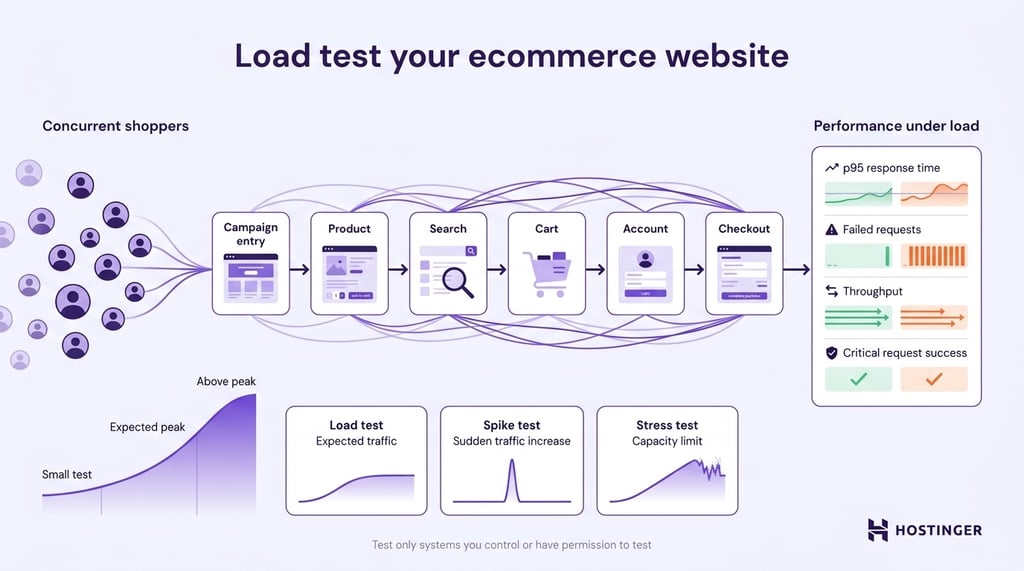
Load-test your ecommerce website to check whether critical shopping journeys remain responsive as concurrent traffic increases. Unlike functional testing, load testing measures how the store performs when many shoppers use it at the same time.
A page-speed test measures how quickly a page loads under specific conditions. Load testing instead tracks response times, errors, and request handling as traffic increases.
Test the parts of the purchase journey that create the most demand:
- Campaign entry and browsing. Include heavily promoted landing, category, and collection pages.
- Product selection. Include popular products, variations, and dynamic inventory information.
- Search. Test common product and campaign searches.
- Cart. Include adding products, changing quantities, and removing items.
- Accounts. Include login or account workflows when they’re part of the normal purchase journey.
- Checkout. Test the components your website controls, using sandbox or test payment environments where appropriate.
Start with a small test to confirm the scenario works, then increase traffic toward your expected peak.
Test above that level when you need to understand how the store handles sudden or higher-than-expected demand.
Different performance tests answer different questions:
| Test type | What it tells you | When it’s useful |
| Load test | How the store performs at expected traffic levels | Preparing for forecast Black Friday traffic |
| Spike test | How the store reacts to a sudden traffic increase | Email launches, flash sales, or influencer traffic |
| Stress test | Where performance starts to degrade or fail | Finding capacity limits in a controlled environment |
Define success criteria before testing. Useful measures include p95 response time, which is the response-time threshold that 95% of requests don’t exceed, along with the failed-request rate, throughput, and critical-request success rate.
Set thresholds using your normal performance as a baseline. Track where and when things start to slow down.
Run heavy tests only against systems you control or have permission to test.
Don’t send Black Friday-scale test traffic to live payment providers, third-party APIs, or shared infrastructure without authorization.
Optimize ecommerce website speed
Optimize your ecommerce website so each shopper places less demand on your pages and servers as Black Friday traffic increases.
Focus on the pages that drive conversions– landing pages, categories, product pages, cart, and checkout – rather than trying to optimize every page equally.
Start by measuring your store’s current loading speed. A baseline helps you identify slow pages and check whether your changes improve them.
Focus on the main sources of unnecessary work:
- Images and campaign media. Resize and compress oversized images, and use efficient formats that your website supports.
- Caching. Cache reusable content so the server doesn’t have to generate the same response for every visitor.
- CDN delivery. Deliver store content through a CDN to serve cacheable assets closer to visitors and reduce requests to the origin server.
- Third-party scripts. Review analytics, advertising tags, chat tools, countdowns, and other campaign scripts that can affect performance.
- Plugins and application code. Remove unnecessary extensions and investigate slow server-side processes.
- Database queries. Check for slow or repeated queries affecting dynamic store functions.
Use Core Web Vitals to assess key user-experience performance metrics alongside transaction and server testing. Google currently defines these good thresholds at the 75th percentile of page loads for mobile and desktop:
| Metric | Good threshold | What it measures |
| LCP | ≤ 2.5 s | Loading performance |
| INP | ≤ 200 ms | Interaction responsiveness |
| CLS | ≤ 0.1 | Visual stability |
Core Web Vitals don’t measure infrastructure capacity. A page can perform well under normal traffic but slow down when many shoppers trigger dynamic requests at the same time.
Review performance again after adding Black Friday assets. A large hero image, advertising tag, countdown, pop-up, or other campaign tool can introduce new delays.
If a page remains slow, improve slow-loading store pages based on the cause instead of chasing a perfect synthetic score.
Check hosting and resource capacity
Check hosting and resource capacity before Black Friday if you control or can monitor the environment running your ecommerce website.
The goal is to determine whether the infrastructure has enough resources to handle your expected peak traffic after performance improvements are in place.
Use server performance metrics to evaluate server resource usage, including:
- CPU. Look for sustained high usage as request volume increases.
- Memory. Check whether the application and database have enough RAM without hitting memory limits.
- Disk and storage. Review available storage, disk I/O, and storage performance.
- Network capacity. Monitor throughput, bandwidth usage, and network limits.
- Request handling. Check application workers, processes, queues, and other limits that control how many requests the server can process.
- Database capacity. Watch connection limits and resource pressure as request volume increases.
Don’t judge capacity from one CPU or RAM percentage alone. Repeated resource-limit events combined with rising response times or errors are stronger signs that the environment is reaching its limits.
For Hostinger web hosting plans, you can access resource usage in Hostinger dashboard through Websites → Dashboard → Hosting Plan → Resources Usage.
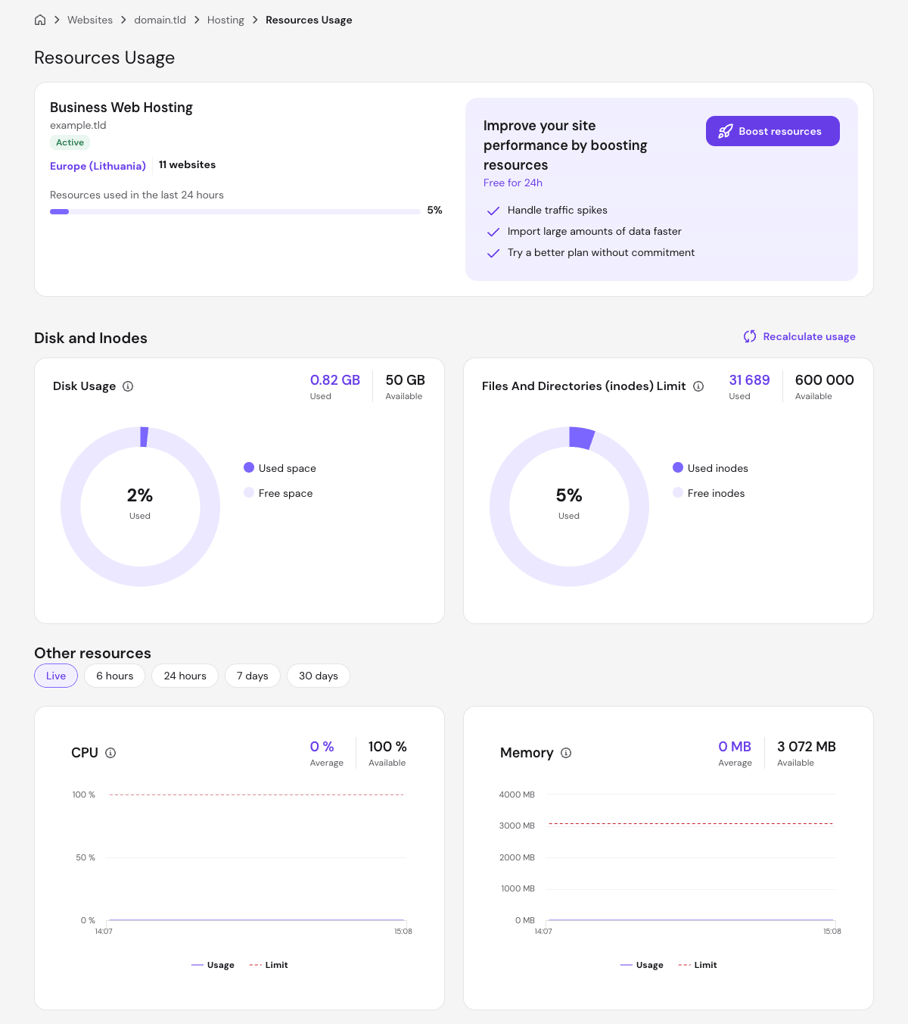
If multiple websites share the same hosting plan, check whether another site, scheduled task, import, backup, or background process could compete with your store for resources during peak traffic.
Confirm that caching and CDN delivery are also reducing unnecessary requests to the origin server.
If the store still reaches resource limits after optimization, increase capacity at least one to two weeks before Black Friday so you have time to verify the new setup under real conditions before promotional traffic begins. If you need more hosting resources before the sale, check the Hostinger Black Friday deals for available hosting offers.
Black Friday traffic is temporary, so a short-term capacity upgrade is often a better fit than a permanent one. Confirm how quickly it takes effect and whether you can scale back down once traffic returns to normal.
If the current environment doesn’t provide enough headroom or scaling flexibility, compare hosting built for ecommerce websites before peak traffic begins instead of migrating during the sale.

Monitor uptime and errors during Black Friday
Monitor your ecommerce website during Black Friday so you can detect availability, performance, and transaction problems before they affect more shoppers. Focus on changes from your normal performance and the limits established during preparation.
Set up website uptime monitoring before promotional traffic begins. Prioritize the campaign landing page, product pages, cart, checkout, and payment journey – the paths shoppers depend on to browse and complete a purchase.
Watch these signals together:
| Signal | What to watch for | Possible problem |
| Page availability | Failed checks or unexpected HTTP status codes | Outage or deployment issue |
| p95 response time | A sustained increase beyond the normal or tested range | Server, application, or database slowdown |
| HTTP 5xx errors | An unusual increase from normal levels | Application or infrastructure failure |
| Checkout completion | A sudden decline during comparable traffic | Checkout, pricing, payment, or usability issue |
| Payment failures | An increase above the provider’s normal failure rate | Payment provider or integration issue |
| Resource usage | Resource limits reached alongside higher latency or errors | Infrastructure saturation |
Avoid using the same alert percentage for every store. Set thresholds based on your normal error rates, traffic patterns, test results, and the business impact of each issue.
Route each critical alert to someone who can investigate it quickly, and define when that person should escalate the issue. Keep these alert rules documented as part of your plan to reduce the risk of store downtime.
Prepare backups, recovery, and security
Prepare backups, recovery procedures, and security controls so a technical failure or security incident doesn’t cause prolonged Black Friday downtime or data loss. Focus on recoverability instead of introducing major security changes at the last minute.
Create a recoverable website backup before significant campaign-related changes. For a self-hosted ecommerce website, confirm that it includes the files and database needed to restore the store.
A backup only helps if you know how to restore it. Document where the recovery process starts, which backup to use, and what data could be lost if you restore an older copy.
Complete these readiness checks:
- HTTPS and certificates. Confirm that the storefront and checkout load over HTTPS without certificate errors.
- Application, plugin, and theme updates. Apply important security fixes early enough to test the store afterward, and remove unused extensions.
- Administrator access. Review privileged accounts and remove access that is no longer needed.
- Payment integrations. Use supported integrations and avoid unnecessary custom handling of sensitive payment information.
- Backup and rollback. Document how to restore the store and keep a known-good version of campaign-related code or configuration.
- Incident contacts. Record who can handle or escalate hosting, development, security, ecommerce, and payment problems.
Use a website security audit to check your store for security weaknesses early enough to fix important issues before the final campaign days.
Avoid major platform migrations, infrastructure redesigns, or broad software changes immediately before Black Friday unless they resolve a critical problem. Major changes introduce new risks that need testing.
For serious incidents, follow a simple recovery sequence: identify the problem, stop or roll back the faulty change where possible, restore service, verify checkout and order data, and confirm that the store remains stable.
The goal isn’t to prevent every possible failure. It’s to detect problems quickly and restore a working purchase experience when something goes wrong.
Black Friday ecommerce store checklist
Use this Black Friday ecommerce store checklist as a final chronological review of your operations, purchase journey, and technical readiness. Complete major planning and testing early, then use the final days to verify the setup rather than redesign it.
- Early preparation. Establish the goals, inventory needs, capacity requirements, and promotion economics that later decisions depend on.
- Define revenue, profit, AOV, conversion, inventory, and retention goals, then record normal store metrics as a baseline.
- Select promotional products and categories, and calculate margins before finalizing discounts.
- Forecast demand and calculate sellable stock by product or SKU, flagging items that may be difficult to replenish.
- Review fulfillment, packaging, shipping, carrier, and return capacity.
- Estimate peak visits and concurrent shoppers, then compare expected demand with your hosting resources, limits, and scaling options where applicable.
- Weeks before Black Friday. Focus on store configuration, operational preparation, and full testing.
- Configure discounts, exclusions, minimum spends, and promotion dates.
- Prepare Black Friday landing and category pages.
- Update product descriptions, images, prices, variations, and availability, then confirm that product, promotion, and stock data stays consistent across active sales channels.
- Review mobile navigation, product discovery, cart controls, forms, and promotional elements.
- Complete end-to-end purchase testing, including checkout, priority payment methods, shipping rules, confirmation emails, and critical failure paths.
- Confirm shipping prices, delivery options, cutoffs, and delivery estimates.
- Run expected-peak and higher-risk load tests, compare the results with hosting resource usage, and increase capacity if needed.
- Optimize slow campaign and purchase pages, including caching and CDN configuration where appropriate.
- Set up uptime monitoring and technical alerts.
- Review HTTPS, important security updates, administrator access, backups, rollback procedures, and incident contacts.
- Final pre-launch. Verify that the tested store still matches the promotion shoppers will see.
- Complete final purchases on desktop and mobile, then recheck rejected payments, invalid coupons, and other critical failure paths.
- Test sold-out scenarios and reconcile final sellable stock across active sales channels.
- Verify discount calculations, exclusions, minimum spends, final order totals, promotion dates, countdowns, and scheduled changes.
- Review shipping and return information.
- Verify ecommerce analytics.
- Create a fresh, recoverable backup.
- Repeat speed checks on critical campaign pages after major assets and scripts are in place.
- Confirm that technical alerts reach the right people.
- Avoid unnecessary high-risk redesigns, integrations, migrations, or software changes.
- Black Friday monitoring. Prioritize problems that stop shoppers from finding products, paying, or receiving accurate order information.
- Monitor uptime, response times, HTTP errors, resource usage, checkout completion, and unusual payment failures.
- Track inventory, stock depletion, stockouts, and overselling.
- Review order and fulfillment queues, and watch for carrier or delivery problems that could affect customer expectations.
- Check for unexpected pricing, discount, or promotion-rule errors.
- Record incidents, actions taken, and outcomes as they happen.
- Post-sale actions. Close expired promotions cleanly and turn campaign results into operational improvements.
- Continue, change, end, or replace Black Friday offers according to your Cyber Monday plan.
- Disable expired discounts, coupons, and countdowns, then remove or replace outdated banners, landing-page content, and promotional links.
- Update sold-out products and review remaining inventory.
- Process outstanding orders, cancellations, returns, refunds, and support requests.
- Compare commercial and operational KPIs with your goals and baseline.
- Document website, checkout, inventory, payment, and fulfillment problems, then save successful settings, test scenarios, and processes for future high-traffic campaigns.
How Hostinger customers prepare their stores for Black Friday
Hostinger customers prepare for Black Friday by focusing on the parts of their business most likely to face pressure during a sale: managing inventory, simplifying checkout, building demand early, and choosing promotions that protect product value.
MuseDuo: Prioritizing proven products and a simpler checkout path
MuseDuo prepares for Black Friday by stocking proven products and simplifying the path to checkout. The business sells DIY kits and creative workshops, and this Black Friday is likely to be its final major sales period for the product collection.
MuseDuo uses previous sales to decide what to restock instead of increasing inventory across its catalog. It also focuses its messaging on customer favorites and keeps navigation and checkout straightforward.
Practical lesson: Use past sales to prioritize inventory, then make your Black Friday offer easy to find and buy.
Wilding: Building demand before the promotion starts
Wilding prepares for busy sales periods by building its audience before launching a promotion. The herbal and botanical brand is testing its first discount around the Onam harvest festival ahead of larger shopping periods later in the year.
Its preparation includes growing an email list, working with a relevant influencer, and improving product visibility on Google. The smaller promotion also gives Wilding a chance to see how customers respond before demand increases.
Practical lesson: Build your audience before Black Friday and test a smaller promotion first if you have limited experience running sales.
Fazenda Bonanza: Adding value instead of cutting prices
Fazenda Bonanza prepares its Black Friday offer by adding value instead of relying on deep discounts. The Brazilian specialty coffee producer wants to protect its premium positioning without cutting into margins.
The business has tested free shipping, bundles, and physical gifts. A promotion offering a free French press with three specialty coffees increased revenue by about 5%, so Fazenda Bonanza plans to use a similar approach for Black Friday.
Practical lesson: Test gifts, bundles, or shipping incentives when large discounts do not fit your margins or brand.
Get your ecommerce store ready for Black Friday
To make your ecommerce store ready for Black Friday, confirm that your offers, operations, purchase journey, and website can work together under peak demand.
A promotion only works if shoppers can find the right products, complete checkout, and receive accurate order information without delays or technical problems.
Before traffic peaks, complete one final purchase from the campaign entry point to order confirmation.
Check that prices and discounts are correct, inventory updates properly, payments process successfully, transactional emails arrive as expected, and your website stays responsive under the expected load.
Black Friday can also reveal weaknesses that normal traffic doesn’t expose.
Use what you learn about checkout friction, inventory accuracy, fulfillment, and website performance to improve your store beyond the campaign and attract and retain ecommerce customers year-round.
All of the tutorial content on this website is subject to Hostinger's rigorous editorial standards and values.

Ariffud is a Technical Content Writer with an educational background in Informatics. He has extensive expertise in Linux and VPS, authoring over 200 articles on server management and web development. Follow him on LinkedIn.