Continuous integration (CI) automatically builds and tests code changes, while continuous deployment automatically publishes every change that passes those checks to production – the live app that users access. This speeds up releases, but a missed error can also reach users without a final human check.
For example, a developer pushes code to GitHub. CI builds the app and runs its tests. If a test fails, the process stops so the developer can fix it. If every check passes, the change is ready to release. These automated steps form a pipeline – the path code follows from a developer’s update to the live app.
Continuous delivery is a process that sits between the two. It prepares a production change but waits for someone to approve the release.
CI covers automated builds and tests, but releasing the app still needs its own process – manual, continuous delivery, or fully automatic with continuous deployment. Continuous deployment suits teams that release small changes and can quickly spot and roll back a failure.
The hosting setup needs to support that process too: managed web app hosting handles server configuration and deployment automation for you, while a VPS gives you full control over your own tools and pipeline settings.
What is continuous integration?
Continuous integration means developers merge small code changes regularly, and each change is built and tested automatically.
Developers still write, review, and merge the code. CI runs repeated checks to verify that the new code works with the rest of the application.
For example, a developer pushes a feature to GitHub and opens a pull request. A pull request asks the team to review the change before adding it to the main branch, which holds the current shared version of the project.
The CI system then:
- Installs the software packages the app needs
- Runs the build command that prepares the app to run
- Checks the code for errors
- Runs automated tests
- Reports whether the change passed or failed
If a check fails, the pipeline stops there. The developer can fix that one change before it gets mixed with more work.
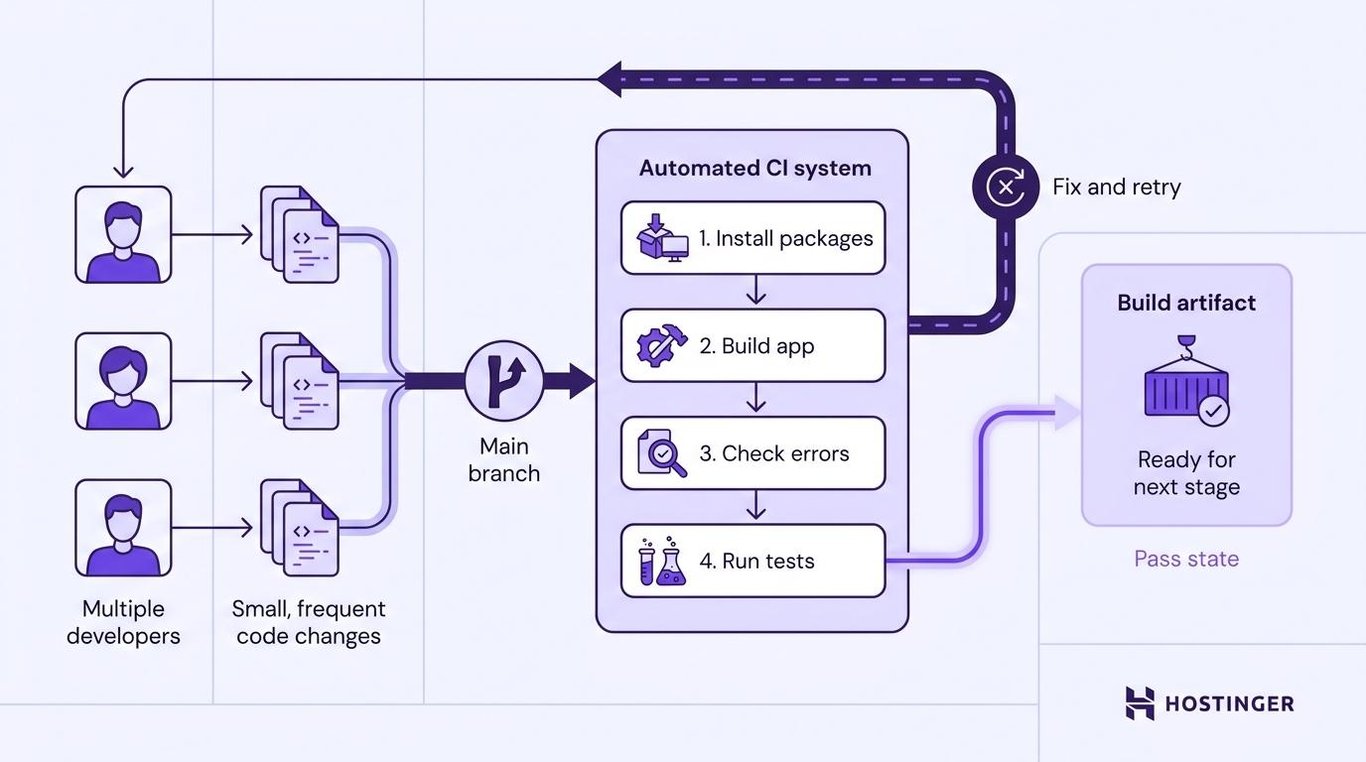
Without CI, developers can work separately for days or weeks before combining their changes. One update can then conflict with another, and finding the cause takes longer because the team has to inspect a large batch of code.
Once all checks pass, CI can package the code for the next stage. This package is called a build artifact.
A build artifact is a version of the application that’s ready for more testing or release. It can be a compiled program, a ZIP archive, or a container image built with Docker.
The CI stage doesn’t decide whether that package goes live. The same platform can also handle delivery or deployment, depending on how the workflow is set up. From there, the team can release the package manually, require approval through continuous delivery, or deploy it to production automatically via continuous deployment.
What is continuous deployment?
Continuous deployment automatically deploys every change that passes the required checks to production.
The process starts after CI builds and runs tests. The deployment system updates the live app and checks that the new version starts correctly. Our guide on how continuous deployment works breaks the process into 6 stages, from merging approved code to recovering from a bad release.
Suppose a developer merges a tested change into the production branch. The deployment system detects the update, gets the approved version of the app, and publishes it.
No one has to click a release button or wait for a planned release window. Passing every required check is enough to start the deployment. A managed platform such as Hostinger Web Apps Hosting can handle this build-and-deploy step whenever approved code is pushed to the connected GitHub branch.
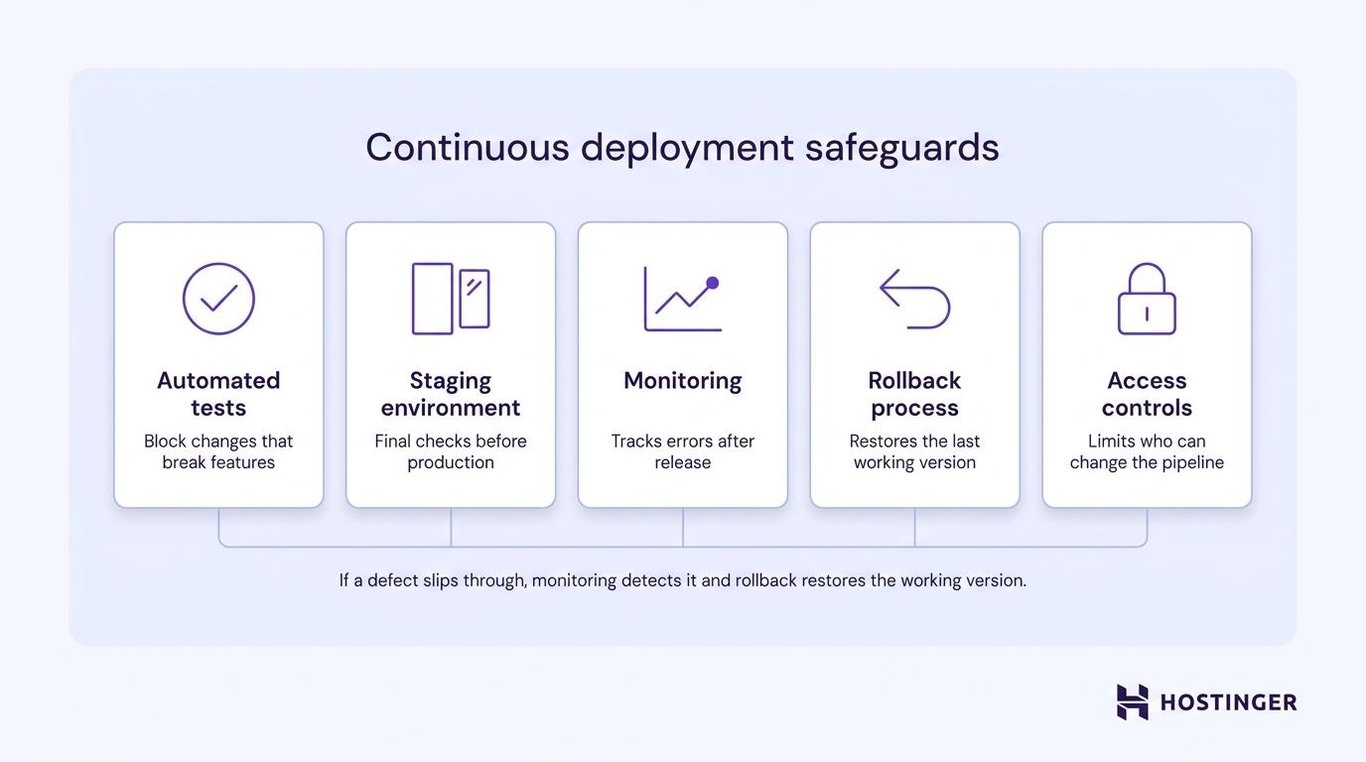
That saves time, but it removes the final production approval. Developers can still review the code before it’s merged. Teams using continuous deployment need safeguards that can catch and reverse failures quickly:
- Reliable automated tests that block changes that break important features
- A staging environment – a separate copy of the app used for final checks – that closely matches the live app
- Monitoring that tracks errors and performance after release
- A tested rollback process that restores the previous working version
- Access controls that limit who can change the pipeline and production settings
If the tests miss a defect, that defect reaches users automatically. Monitoring needs to spot the failure quickly, and rollback needs to restore the working version before more users are affected.
Where does continuous delivery fit?
Continuous delivery sits between continuous integration and continuous deployment. After CI builds and tests the code, continuous delivery packages the passing version and runs the remaining release checks, often in a staging environment. The app is then ready for production.
What happens next separates continuous delivery from continuous deployment:
- Continuous delivery – someone approves the release before it goes live.
- Continuous deployment – the release goes live automatically after every check passes.
The rest of the process can stay automated in both cases. Developers shouldn’t need to copy files, change server settings, or run deployment commands by hand.
Continuous delivery works well when a team needs control over release timing. A company might need to prepare customer support, publish release notes, schedule maintenance, or record formal approval before updating the live app.
CD can mean continuous delivery or continuous deployment. Check the production step to tell them apart. If someone approves the release, it’s continuous delivery. If the release starts automatically after all checks pass, it’s continuous deployment.
What is the difference between continuous integration vs. continuous deployment?
Continuous integration checks whether a code change works, while continuous deployment automatically deploys a passing change to the live app.
Continuous delivery connects those two stages. It prepares the production change but requires manual approval before release.
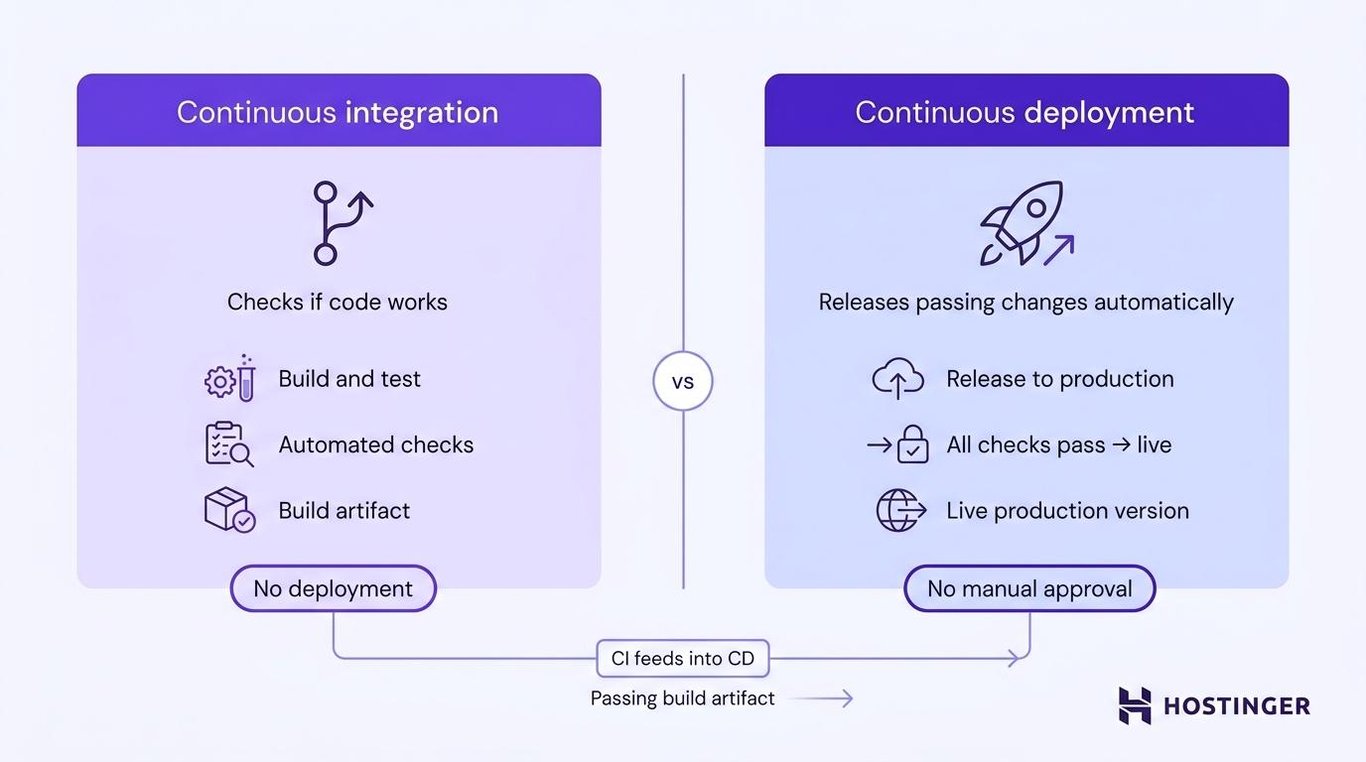
Here’s how continuous integration vs. continuous deployment compare, along with the role that continuous delivery plays between the two:
Comparison | Continuous integration | Continuous delivery | Continuous deployment |
Purpose | Catch errors early | Keep changes ready to release | Release passing changes automatically |
Pipeline stage | Build and test | Prepare for release | Release to production |
Automation | Builds and code checks | Packaging, staging, and final checks | Production deployment |
Trigger | Push, pull request, or merge | Successful CI run | All required checks pass |
Testing | Automated code tests | CI tests plus staging checks | Automated checks that decide whether deployment can start |
Human approval | Depends on repository rules | Required before production | Not required |
Main risk | Weak checks miss defects | Approval delays release | Missed defects reach users |
Rollback | Outside CI itself | Rollback plan required, but execution is manual | Fast and regularly tested |
Result | Checked code or build artifact | Release-ready version | Live production version |
Best for | Teams sharing a codebase | Teams controlling release timing | Teams with strong safeguards and small releases |
You can use CI without continuous deployment. A team might test every pull request automatically, but still release the app manually once a week.
Continuous deployment depends on CI because it needs a reliable way to decide whether a change is ready for users. Without automated builds and tests, the system would release unchecked code.
The same tool can cover more than one stage. GitHub Actions, GitLab CI/CD, and Jenkins can all run builds, tests, and deployments. The workflow settings and production approval rules determine whether the team is using continuous integration, continuous delivery, or continuous deployment.
These stages manage how code moves toward production, but they don’t cover everything needed to run an application reliably. A wider modern DevOps process also covers server setup, security, monitoring, and feedback from the live app.
Advantages of continuous integration
CI gives developers faster feedback by building and testing each code change before release.
- Errors are found earlier. Developers see failed builds and tests while the change is still small.
- Merge conflicts stay smaller. Frequent updates stop separate branches from drifting too far apart.
- Builds are more consistent. The same commands and checks run for every change.
- Broken changes stop before release. A failed check prevents the code from moving to the next stage.
Limitations of continuous integration
CI checks code, but it doesn’t manage the production release.
- It only catches errors covered by tests. An untested feature can still break.
- Slow checks delay merges. Developers have to wait when the pipeline takes too long.
- Flaky tests create false failures. Teams waste time rerunning checks that fail without a code change.
- Deployment still needs a separate process. Passing CI doesn’t send the app to production. You still need to decide where and how to host a web application.
Advantages of continuous deployment
Continuous deployment releases passing changes without waiting for someone to start each production update.
- Changes reach users faster. A passing update can go live as soon as the pipeline finishes.
- Releases stay smaller. Fewer changes go live at once, making failures easier to trace.
- Teams do less repeated release work. Developers don’t need to copy files or run deployment commands by hand.
- User feedback arrives sooner. Teams can see how each update performs in the live app shortly after release.
Limitations of continuous deployment
Continuous deployment removes the final approval step, so automated tests, monitoring, and rollback have to do the work a human approver used to do.
- Missed defects reach users automatically. Weak tests can allow a broken change into production.
- Some updates are hard to reverse. Database changes and other permanent actions can complicate rollback.
- Monitoring and rollback must be reliable. The team needs to detect failures and restore a working version quickly.
- Some releases still need coordination. Maintenance windows, customer notices, or required approval can make continuous delivery a better choice.
When should you use CI, continuous delivery, or continuous deployment?
Choose the highest level of automation your tests and production safeguards can handle reliably.
Your situation | Recommended approach | Why |
Your team has no automated checks | Start with CI | Builds and tests catch broken changes before they enter the shared codebase |
CI works, but preparing releases still takes several manual steps | Add continuous delivery | It automates repeated release work while keeping control over when the app goes live |
Every release needs documented approval | Use continuous delivery | The pipeline stays automated without removing the required sign-off |
You run a web or SaaS app with reliable tests, monitoring, and rollback | Consider continuous deployment | Small passing changes can reach users quickly and be reversed if they fail |
You ship mobile apps, firmware, or software that customers install themselves | Use CI with planned releases | App stores, physical devices, and customer schedules prevent automatic releases after every change |
Your team approves several routine deployments each day | Consider continuous deployment | The repeated approval adds delay without adding another useful check |
Before removing production approval, check whether your automated safeguards can take over the checks a person previously handled:
- Do your tests cover the features customers depend on?
- Does the pipeline stop when an important test fails?
- Will monitoring alert the team soon after the live app starts failing?
- Can you restore the previous version quickly?
- Are the releases small enough to test and reverse without a long recovery?
Stay with continuous delivery if any answer is no. Manual approval gives your team another chance to review the release while you implement the missing safeguard.
Move to continuous deployment once releases are small, failures are easy to trace, and the previous version can be restored quickly.
Best practices for CI/CD pipelines
A reliable CI/CD pipeline must catch broken changes before release, protect sensitive access, and make failed deployments easy to trace and reverse. Use these best practices to strengthen each part of the process.
- Test different parts of the application. Unit tests check individual functions. Integration tests confirm that the app’s separate parts work together. End-to-end tests repeat an important user action, such as signing in or completing a purchase. Submit a change that breaks a known test to check the pipeline. It should fail and stop the deployment.
- Use a staging environment. Staging is a separate copy of the app used for final checks before production. Keep its software versions and settings as close as possible to the live environment. Test database updates, logins, forms, payments, and other important actions before release.
- Keep passwords and keys out of the code. Store database passwords, API keys, and login tokens in environment variables or a protected secret manager. Environment variables provide these settings when the app starts, so they don’t need to appear in the repository. If a secret enters Git history, remove it and replace it because older commits can still expose it.
- Store pipeline settings with the code. Keep build commands, deployment instructions, and server configuration in version control, which records every change. The team can then review those updates and restore an earlier version if needed.
- Prepare rollback before automating releases. Rollback restores the previous working version after a failed deployment. Keep that version available and write down how to restore it. Test the process in staging by deploying a controlled failure and confirming that the earlier version returns successfully.
- Log every deployment. Record the code version, deployment time, test results, and pipeline run behind each release. If the app starts failing, these records show what changed and when.
- Monitor the app after every release. Track server errors, response times, resource use, and important customer actions. For an online store, the home page might work while checkout requests fail. Your alerts need to catch that failure, not just confirm that the server is running.
- Limit access to the pipeline. Give each person access only to the settings they need. Restrict who can edit build files, production branches, passwords, and deployment rules. Keep an audit log to see who changed a setting and when.
Which tools and platforms support CI/CD workflows?
Most CI/CD setups use one tool to store the code, another to test it, and a hosting platform to publish the app.
GitHub or GitLab holds the repository. GitHub Actions, GitLab CI/CD, or Jenkins runs the builds and tests. A hosting platform then deploys the version that passes those checks.
For developers and small teams who don’t want to maintain a server, Hostinger Web App Hosting can take care of that deployment stage for Node.js apps.
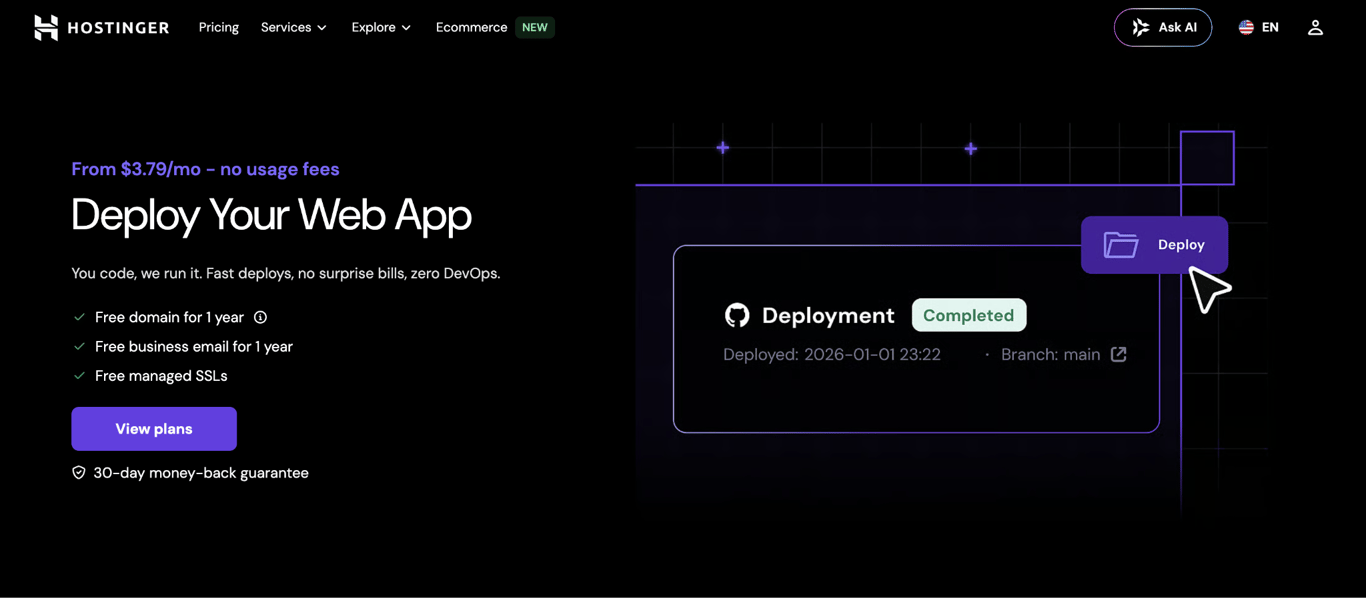
You can deploy a Node.js application from GitHub, a ZIP file, or a supported development tool through Hostinger Connector. With GitHub connected, every push to the selected branch starts a new build and deployment.
That automatic trigger makes GitHub the most relevant option for this CI/CD example. A GitHub-to-Hostinger workflow can look like this:
- A developer opens a pull request.
- GitHub Actions builds and tests the change.
- GitHub blocks the merge if a required check fails.
- A passing change reaches the branch connected to Hostinger.
- Hostinger builds the app and publishes the new version.
Set up branch protection in GitHub so only changes that pass CI can reach the connected branch. Hostinger deploys whatever is pushed there, so an unprotected branch could send untested code to production.
After you connect your Node.js project, Hostinger dashboard lets you:
- Change the build and start commands
- Add environment variables, including database credentials
- Check build logs when deployment fails
- Check runtime logs after the app starts
- Redeploy the latest code
- Restart server-side apps
- Review dependency vulnerabilities and apply available fixes
Choose Hostinger VPS when you need to install Jenkins, run GitLab Runner, manage Docker containers, use GitHub Actions, or create a custom CI/CD pipeline. You get full control over the setup, but your team also has to maintain the server and deployment tools.

This article is a localized version of Continuous integration vs. continuous deployment: What is the difference?, originally published in English.
All of the tutorial content on this website is subject to Hostinger's rigorous editorial standards and values.

Alma is an AI Content Editor with 9+ years of experience helping ideas take shape across SEO, marketing, and content. She loves working with words, structure, and strategy to make content both useful and enjoyable to read. Off the clock, she can be found gaming, drawing, or diving into her latest D&D adventure.