
An iframe (inline frame) is an HTML element that embeds another webpage or HTML document within the current page. Websites commonly use iframes to display videos, maps, forms, and other external content without redirecting visitors to another website.
For example, you can embed a YouTube video or Google Maps location directly into a webpage using the <iframe> tag. Visitors can interact with the embedded content while staying on your website. However, iframes also come with security, accessibility, and performance considerations, especially when displaying content from third-party sources.
In this guide, you’ll learn how iframes work, how to add one to your website using HTML, and which attributes to use. We’ll also cover common embedding issues and best practices for keeping iframe content accessible and secure.
How does an iframe work?
An iframe creates a separate browsing area within a webpage and loads another HTML document inside it.
For example, when you embed a YouTube video, the video player runs inside an iframe while the rest of your website remains outside it.
The embedded content has its own document and browsing context. Browsers also apply security restrictions to interactions between documents from different origins.
How to embed content using an iframe
To embed external content, add the <iframe> element to your HTML document and specify the content’s URL using the src attribute.
For example, the following code embeds a YouTube video:
<iframe
  src="https://www.youtube.com/embed/dXBohfjc4WA"
  title="Hostinger video tutorial"
  width="680"
  height="383"
  loading="lazy"
  allowfullscreen>
</iframe>
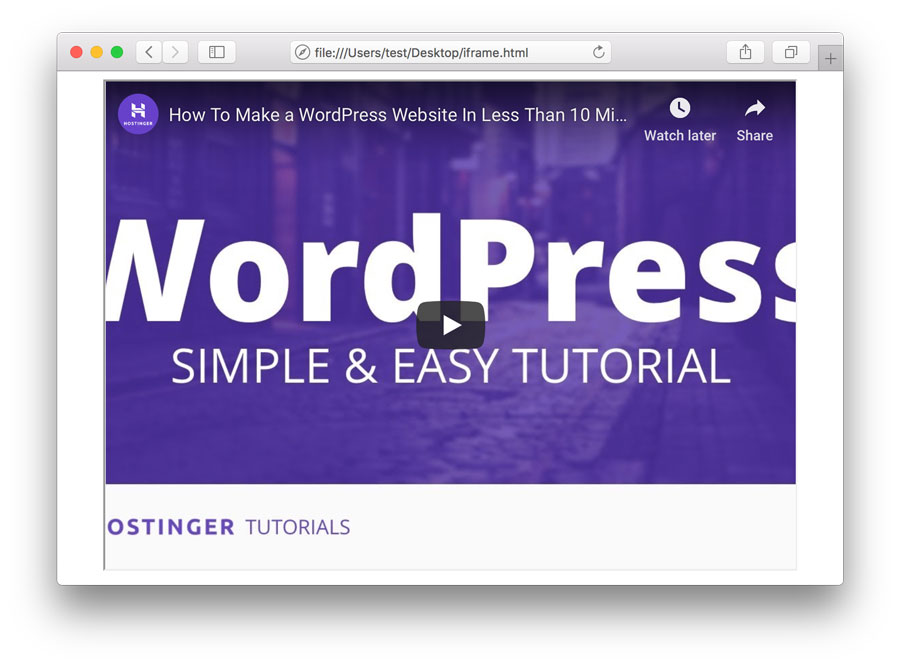
The example uses several iframe attributes:
src– specifies the URL of the embedded document.title– describes the iframe’s content for people using assistive technologies.widthandheight– define the iframe’s dimensions in CSS pixels.loading="lazy"– delays loading an offscreen iframe until it approaches the viewport.allowfullscreen– permits fullscreen display when supported by the embedded content.
You can adjust the dimensions or use CSS to make the iframe responsive on different screen sizes.
Why isn’t my iframe displaying?
An iframe may fail to display when the source website doesn’t permit its content to be embedded.
Some websites use security headers such as X-Frame-Options or Content Security Policy’s frame-ancestors directive to prevent other websites from embedding their pages.
If your iframe doesn’t load, verify that the URL is correct and that the source website supports embedding. For services such as YouTube, use their official embed URL rather than the regular page URL.
Are iframes safe to use?
Iframes are generally safe when you embed content from trusted sources, but they can introduce security and privacy risks if the embedded website is malicious or compromised.
Follow these practices when using iframes:
- Embed content only from trusted websites using HTTPS.
- Add a descriptive
titleattribute to support accessibility. - Use
loading="lazy"for offscreen embeds to reduce unnecessary loading. - Consider the
sandboxattribute when you need to restrict what embedded content can do.
The sandbox attribute can restrict actions such as running scripts, submitting forms, and opening new windows. However, these restrictions may prevent some interactive embeds from working, so test them before publishing.

Next steps: Test your embedded content
After adding an iframe to your website, preview the page to confirm that the embedded content loads correctly.
Test it on both desktop and mobile devices, especially if you’ve customized its width and height. Make sure visitors can interact with the embedded content and that it doesn’t interfere with the rest of the page.
If you’re embedding a third-party service, review its official embedding instructions and security requirements before publishing.
This article is a localized version of What is an iframe?, originally published in English.
All of the tutorial content on this website is subject to Hostinger's rigorous editorial standards and values.

Luqman is a self-proclaimed social scientist. He is passionate about education, technology, and everything in between. He wants to help create a high-quality education system. Having spent the past four years as a social researcher and blog guru, he lends his skills to Hostinger's digital content team. As for free time, he enjoys reading scientific (and not-so-scientific) literature with a cup of black arabica coffee as a companion.