How to prepare for agentic commerce in 9 steps
Oct 06, 2026
/
By Bruno S.
/
10 min Read
To prepare for agentic commerce – the shift where AI agents discover, compare, and choose products on a shopper’s behalf, often with little manual browsing – you need to make your product data readable to AI assistants.
These assistants read your fields, descriptions, and policies when they compare products on a shopper’s behalf, rather than your page design or photography. What they can read determines what they recommend.
Each step for preparing for agentic ecommerce targets a specific piece of your product data, and most involve no technical setup:
- Fill product identifier fields such as brand name, barcode, and product code
- Write descriptions with specific attributes, not marketing copy
- Verify what your storefront’s structured data outputs
- Give each product variant its own image
- Sync pricing and availability across all storefronts
- State shipping, tax, and return terms as specific numbers
- Simplify checkout: guest access, payment logos, no surprise costs
- Format support and policy pages for direct extraction by assistants
- Monitor how assistants describe your store monthly
For agentic commerce, five parts of your store are particularly important: complete product data, visible trust signals such as reviews and return policies, accurate inventory, a checkout ready to take payment, and a page structure assistants can parse.
A gap in any of them gives an assistant a reason to recommend another store.
1. Fill every product identifier field your platform offers
Enter your product’s brand, identifier codes, and key attributes as dedicated fields in your product editor: AI assistants identify products from form fields, not from the paragraph text in the description.
Three identifiers are particularly important:
- Global Trade Item Number (GTIN). Also called Universal Product Code (UPC) or European Article Number (EAN), this is the barcode number printed on retail packaging. Assistants use it to match the same product across multiple retailers.
- Manufacturer Part Number (MPN). The code the maker assigns to a specific item. Required alongside the brand when a GTIN doesn’t exist.
- Stock Keeping Unit (SKU). Your own internal reference code. Assistants use it to retrieve the exact variant a shopper asked about.
Handmade, custom, and own-brand goods generally don’t require a GTIN. The identifier gap matters most for resellers working with existing branded inventory.
Fill every identifier field your platform provides. A blank field gives the assistant less to work with than a competitor’s filled one.
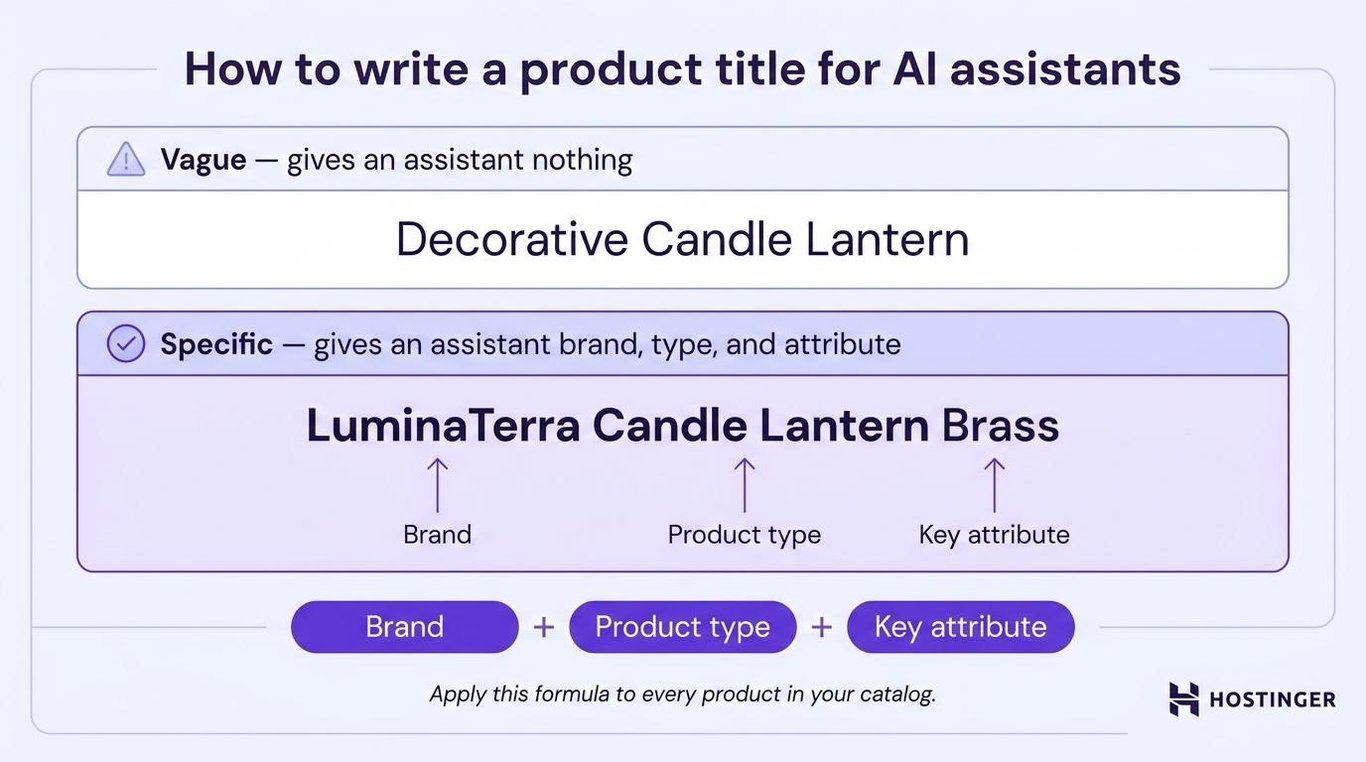
With no brand field, the product title is the only place a brand can appear. A title that reads “Decorative Candle Lantern” gives an assistant nothing, but “LuminaTerra Candle Lantern Brass” gives the assistant the brand, the product type, and the key attribute.
2. Write product descriptions that include specifics
Write a product description that is useful to an AI assistant by naming the attributes a shopper can filter by: material, dimensions, compatibility, what’s included, and care requirements.
Generic, marketing-focused copy is the default in most ecommerce descriptions, but “Adds a warm and inviting glow to any space” tells an assistant nothing it can match to a query.
On the other hand, “Solid brass, 28 cm tall, fits a standard tea light, suitable for indoor use” answers four different natural-language questions in one sentence.
Description | |
Vague | “A beautifully crafted lantern that creates a stunning ambiance wherever you place it. Perfect for cozy evenings and stylish decor accents.” |
Specific | “Solid brass lantern, 28 cm tall, 14 cm wide. Fits one standard tea light. Suitable for indoor and sheltered outdoor use. Candle included.” |
One hard rule: the description must match the product page exactly. A description that says “comes in three colors” when only one is available causes the assistant to quote incorrect information. Mismatches between description, title, and availability are a common reason listings are rejected by shopping platforms, and a trust problem as well.
Some ecommerce platforms can draft a description from a product photo, which saves time. Use the generated description as a starting point, then add the specifics an assistant needs: dimensions, materials, compatibility, and what’s included.
3. Check the structured data your store already publishes
Check your storefront’s structured data to see which product properties AI assistants can read – and which are missing.
Most ecommerce platforms generate this markup automatically when you make an ecommerce website: hidden, machine-readable code that AI crawlers use to extract product facts without parsing the page the way a human would.
Run this check for each of your storefronts:
- Open a product page in your browser.
- Copy the full Uniform Resource Locator (URL).
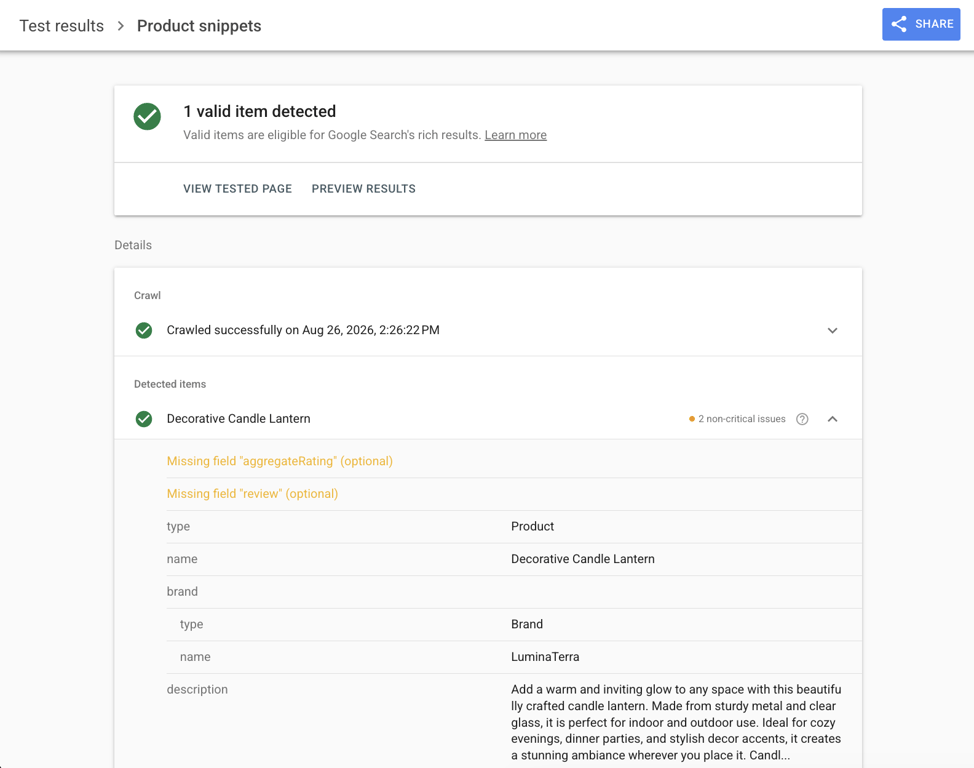
- Go to Google’s Rich Results Test and paste the URL.
- Click Test URL.
- Expand Product snippets and Merchant listings to see which properties are present and which are flagged as missing.
Pro tip
Run the test on each storefront separately. Different storefronts on the same catalog can emit different markup, and a misconfigured storefront will silently emit less without showing any visible error in your dashboard.
Collecting customer reviews populates the review and rating properties: your platform (or a review app) handles the technical formatting automatically once reviews are in place.
For shipping and return data, not all platforms generate this automatically; where they don’t, you need to write those terms in plain, direct language.
The same structured data that helps assistants also improves how search engines index your product pages, giving this step double value in Search Engine Optimization (SEO) for ecommerce.
Flag any property listed as optional but missing. Optional to a search engine doesn’t mean optional to an assistant comparing your offer against ten others.
Pro tip
Hostinger Ecommerce, Hostinger's platform for managing products, orders, and payments from one dashboard, generates this structured data automatically. Details like product name, description, image, price, and availability reach the markup without any code.
4. Match product images to the exact variant
Each product variant needs its own image showing that exact version. That image URL gets written into your structured data as a data field, the same as price or SKU. So a generic photo on a color-specific page isn’t just a visual mismatch – it’s incorrect data in the markup itself.
An assistant looking for “a black brass lantern” extracts the image URL as part of the product data it reads. A URL pointing to the gold version causes the assistant to flag the mismatch or skip the product entirely.
The practical standard: one photo per variant, showing that specific version against the same background and at the same angle as your other product shots.
Change the image whenever the color, size, or material changes. Consistent framing also looks more professional when multiple products appear together in search results or shopping feeds.
5. Keep pricing and stock levels accurate across channels
Price and availability must match everywhere: your product editor, your storefront, and the structured data your platform emits. If an assistant quotes a price or stock status your store can’t honor, you lose both the sale and the shopper’s trust.
Hostinger Ecommerce ships with Track quantity switched off by default on new products. With tracking off, the storefront always shows as in stock regardless of your actual inventory. Switch it on for every physical product and enter your opening quantity before going live.
Availability in structured data is expressed as a specific value: in_stock, out_of_stock, preorder, or backorder.
“In stock” means orderable now, not “I’ll check when an order comes in.” Use the correct value for each product’s current state.
Products can also be active on one storefront and inactive on another, since visibility is per product, per channel – check each storefront rather than assuming they match. Drift between channels is one of the most common causes of price and availability mismatches in structured data.
Currency codes must be in uppercase ISO 4217 format: USD, not usd. Assistants parsing structured data expect the standard format.
Also, use the currency that matches the country of sale.
Pro tip
Hostinger Ecommerce manages your catalog from a single dashboard, so a price change made once reaches every storefront where the product is active. From the Growth plan up, stock levels are centralized across storefronts too.
6. Make shipping, tax, and return terms specific and checkable
Publish your shipping cost, tax handling, and return window as specific numbers, because AI assistants compare products on a landed cost basis: price plus shipping plus tax. Without all three figures, the assistant either excludes your offer from the comparison or shows an incomplete price.
Return terms work the same way. “Can I return this?” is a common follow-up question, and an assistant can retrieve a specific answer from a clearly written return policy. “Contact us for details” is not an answer it can give a shopper.
Your return policy needs four facts, stated plainly:
- How long after purchase returns are accepted (e.g., 30 days from delivery)
- Whether return shipping is free or charged to the customer
- The condition the item must be in (e.g., unopened, undamaged)
- How the refund is issued and how long it takes
Configure tax settings and checkout policies with accurate numbers – an assistant comparing your offer against alternatives needs those figures. For physical products, a shipping integration with real carrier rates is more useful than a “calculated at checkout” placeholder that an assistant can’t work with.
In Hostinger Ecommerce, shipping and return terms belong in the Additional info sections on the product editor. Write them as direct lines with exact numbers rather than paragraphs, one fact per line, so an assistant can read them clearly.
7. Remove friction from checkout and payment
To remove friction from checkout, offer recognized payment methods, skip forced account creation, and keep the path to purchase short.
The dominant agentic commerce flow today is assistant recommends, shopper clicks through and buys in your store – so checkout is where that recommendation either becomes a sale or falls apart.
Many of these shoppers browse on smartphones and tablets, so the principles of ecommerce for mobile devices apply directly: thumb-friendly buttons, one-column layout, and autofill support on address and card fields.
Three things to check:
- Guest checkout on. Mandatory account creation causes 19% of shoppers to drop out of checkout, according to Baymard Institute’s checkout research. Shoppers arriving from an assistant have already made a decision, and extra friction at the payment step cancels that.
- Payment logos visible before checkout. Digital wallets made up 56% of global ecommerce transaction value in 2025, according to Hostinger’s ecommerce statistics, so show Apple Pay and Google Pay alongside Visa, Mastercard, and PayPal. Recognized logos on the product page act as trust signals before the shopper clicks.
- No surprise costs at the final step. Any shipping charge or tax not shown on the product page creates a gap between what the assistant quoted and what the checkout shows.
As of March 2026, shoppers arriving from AI assistants convert 42% better than other visitors, spend 48% more time on site, and browse 13% more pages per visit, according to Adobe’s AI traffic research.
8. Write support content as direct answers
Write support content that AI assistants can reliably read following this format: a question as a heading with the direct answer in plain prose below it – nothing hidden behind tabs or accordions.
An AI assistant answering a follow-up question will look at your Frequently Asked Questions (FAQ) and policy pages, and it can miss content hidden behind JavaScript accordions, expandable tabs, or nested navigation menus.
The same structure that helps assistants also improves ecommerce customer experience broadly: accessible, accurate support content reduces pre-purchase questions regardless of what channel sends traffic.
Keep each answer to one or two sentences. One question per heading, one idea per answer. Don’t bury the answer three paragraphs down.
Split policies across separate pages rather than combining them into one long text block – shipping, returns, warranty, and sizing each belong on their own page. Each policy page should state: who it applies to, the specific window or cost, and the process, in that order.
For products with a lot to explain, add a short FAQ section directly on the product page: questions about fit, compatibility, care, and materials let an assistant answer follow-up questions without redirecting the shopper. A shopper who gets a useful answer stays in the buying flow.
9. Track how AI assistants find and describe your products
The most reliable way to track how AI assistants describe your store is to open ChatGPT, Gemini, and Copilot and ask the kind of question a customer would ask about your category, then check whether your product appears and whether the details are accurate.
Pro tip
Make this a monthly habit and keep a running note of the results. Changes in how an assistant describes your products usually trace back to a recent change in your structured data or product feed; a short log makes that trace fast.
When you do appear, check the specifics: the quoted price, availability status, and any attributes the assistant mentions. Accurate details confirm your structured data is working correctly; wrong details mean the assistant found a stale or incorrect source, and you need to fix something in your product editor.
Re-run the Rich Results Test on your product pages after any significant catalog update. Structured data drifts when fields change, and a page that passed three months ago can show new gaps today.
For referral traffic, Google Analytics shows traffic source breakdowns that include AI referrals as they become identifiable channels. Track this monthly and compare month over month to see whether agent-referred visits are growing.
What makes an ecommerce platform agent-ready
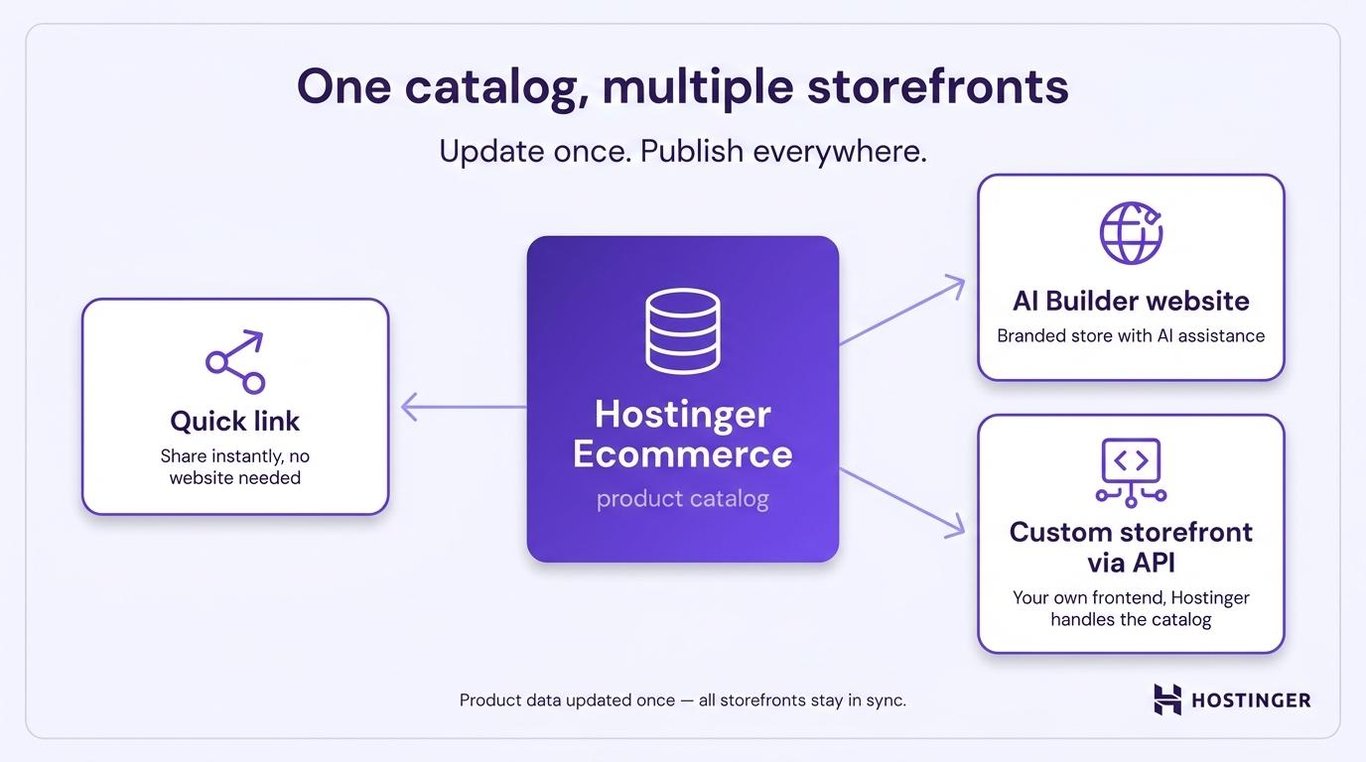
To be agent-ready, a platform needs to meet three baseline capabilities: it stores product data once and pushes it to every storefront, it emits structured data automatically, and it keeps inventory and pricing in sync across every channel. Take care of those three, and every assistant reading your catalog gets a consistent, up-to-date answer no matter where it looked.
This architecture is called headless commerce. Product data lives in a central backend; storefronts pull it on demand rather than embed it in their page templates. That way, every assistant indexing your catalog reads from a consistent, up-to-date source.
The three capabilities in more detail:
- One catalog, multiple storefronts. Product information updated in one place is reflected everywhere the catalog is published.
- Automatic structured data output. Product pages emit valid structured data without the merchant having to write any code.
- Inventory in sync. Stock levels and pricing stay consistent across all connected storefronts.
Is Hostinger Ecommerce ready for agentic commerce?
Hostinger Ecommerce covers the foundational ecommerce website features an agent-ready store needs: a centralized catalog that feeds multiple storefronts, automatic structured data on Hostinger-hosted storefronts, and centralized inventory on Growth plans and above.
It also supports 100+ payment methods with no Hostinger platform transaction fees, although payment providers still charge their standard processing fees.
Storefront options include a quick-link store you can share instantly, a website built with Hostinger AI Builder via chat or drag-and-drop, and a custom frontend connected through the Hostinger Ecommerce Application Programming Interface (API). WordPress sites connect through the Hostinger Ecommerce plugin for WordPress.

Common agent-assisted selling mistakes
The most common failure: an assistant recommends a price or stock status your store can’t honor, because the underlying data was out of date. The assistant only read what you published – so the fix is in your product editor, not the assistant.
A few other risks also apply:
- Stale data from slow feed refreshes. Assistants cache product data between crawls, so a price change may not be reflected on every surface immediately. Frequent updates reduce the gap, but it won’t be zero. This is a reason to update often, not to avoid the channel.
- Missing return terms generating a dispute. An assistant that can’t find your return policy either goes silent or guesses. Either way, a shopper buys on assumption and disputes the charge when the reality doesn’t match.
- Consent and authorization. For agent-completed transactions, it’s not always clear whether the merchant has authorization from the actual shopper. Most assistants currently send the shopper to the merchant’s checkout, where consent is explicit. Staying in that model avoids most of this risk.
- Impersonated crawlers. Not every bot claiming to be GPTBot or ClaudeBot is genuine. Legitimate AI crawlers publish their user agents and documentation publicly. Block bots that behave like scrapers regardless of what they claim to be.
- High-value purchases without human oversight. Many shoppers still hesitate to let an AI agent handle an expensive or non-returnable purchase start to finish. Making it easy to reach a person gives them an exit that protects both sides of the transaction.
Next steps for an agent-ready store
Once your product data is accurate, the next step is making sure your store converts the shoppers that assistants send. They arrive already leaning toward a purchase, so the product page has to confirm that decision quickly. That’s where ecommerce conversion rate optimization strategies take over from data cleanup.
Checkout is the part of agentic commerce still taking shape. Following broader ecommerce trends helps you spot when assistants start completing purchases themselves – and when they do, a clean catalog is what lets your store keep up.
Build the habit into how you add products rather than treating it as a one-off project. Giving every new listing a formula-based title, filled identifiers, and plain policy lines at creation is far quicker than auditing a whole catalog later – and it’s the difference between a store assistants can shop confidently and one they skip.
All of the tutorial content on this website is subject to Hostinger's rigorous editorial standards and values.

Bruno is a Content Writer at Hostinger, focused on creating and optimizing helpful, engaging articles about web development and marketing. With a background in journalism, he combines storytelling with practical insights to make complex topics easier to understand. He has also contributed to publications like MacMagazine and Jornal A Tarde. Outside of work, Bruno enjoys exploring art, cooking, and technology.