What Is TLS? Understanding Transport Layer Security and How It Works
Apr 23, 2025
/
Sopha M.
/
5 min Read

TLS or Transport Layer Security is a crucial aspect of your website. It protects users’ data from security threats like malware and denial-of-service (DoS) attacks.
Having TLS ensures that only authorized users can access data through encryption. For example, using TLS encryption for an online store will secure your customers’ transactions by converting their sensitive data into secret code. This way, third parties will not be able to read the data.
In this article, you will learn what TLS is, how it works, its benefits, and the difference between Secure Socket Layer (SSL) and Hypertext Transfer Protocol Secure (HTTPS) in the TLS implementation.
Download website launch checklist
What Is TLS?
Transport Layer Security (TLS) is a cryptographic protocol that secures the connection between a web server and a web application using data encryption. It applies to all data exchanged over the network, including emails, web browsing sessions, and file transfers. As a result, hackers cannot access users’ sensitive data like login credentials and credit card numbers.
How Does TLS Work
Established by the Internet Engineering Task Force (IETF), TLS uses encryption for the client and server to generate a secure connection between the applications. It begins when users access a secured website by specifying the TLS encryption method like the advanced encryption standard (AES).
It works with two security layers – the TLS record protocol and the TLS handshake protocol. These protocols use symmetric and asymmetric cryptography methods to secure data transfer and communications between the clients and web servers.
The TLS handshake protocol, for example, uses asymmetric cryptography to generate public and private keys that encrypt and decrypt data. Then, the overall process is as follows:
- The client sends a list of all TLS versions along with suggestions for a cipher suite and generates a random number that will be used later.
- The server confirms which options it will use to initiate the connection.
- The server sends a TLS certificate to the client for the authentication process.
- After validating the certificate, the client creates and sends a pre-master key encrypted by the server’s public key and decrypted by the server’s private key.
- The client and server generate session keys using the previously generated random numbers and the pre-master key.
- Both the client and server have a finished message that has been encrypted with a session key.
- The TLS handshake process is finished, and both the client and server have created secure symmetric encryption.
Furthermore, the record protocol uses symmetric encryption to generate unique session keys for each connection during the handshake process. It also adds all data exchanged with a hash-based message authentication code (HMAC) to verify the data authenticity.
Now, TLS is becoming a standard practice for most modern browsers and other applications, where it serves three purposes:
- Encryption. It hides the data transferred from third parties through encoded information.
- Authentication. TLS connection ensures both parties’ identities are who they claim to be by providing a certificate.
- Integrity. Finally, it verifies that the data transmitted has not been forged or tampered with during the delivery process.
TLS Protocol Benefits in Businesses and Web Applications
Since cyber threats can harm any business, ensuring your web application’s security should be the top priority. In this case, a transport layer security protocol offers many benefits, such as:
- Preventing eavesdropping and tampering. TLS provides secure internet communications between a client and a server with a trusted cipher suite. This way, hackers cannot read the data transmitted on the internet, including online transactions.
- Providing data integrity. By supporting authentication code, TLS provides privacy and data integrity. It ensures that all information will reach its destination without any loss or alteration from third parties.
- Improving search engine optimization (SEO). Website security is a vital Google ranking factor as they aim to build a safe browsing experience. Therefore, using TLS protocols will give you a competitive edge, improving your site’s ranking on search engines.
- Enhancing customer trust. Using a TLS connection will provide users with a secure web browsing experience, which will build customer trust in any business. This way, customers will feel more comfortable providing their data for creating a new account or making online purchases.
- Offering granular control. TLS has a robust and reactive alert system to help users identify a problem. It gives control over what can be transmitted or received in a secure session so that users will receive notification alerts if there’s any problem like the err SSL version or cipher mismatch error.
To get TLS benefits, you’ll need to purchase a TLS certificate from a certificate authority (CA), such as DigiCert, Comodo, and GeoTrust. However, if you use a web hosting service, the provider may include an SSL for free for your site.
In addition, the TLS certificate contains information about the domain’s owner and provides the server’s public key to verify the server’s identity.
TLS Difference From SSL and How to Which One You’re Using
Secure Sockets Layer (SSL) is just the older version of TLS. Before the TLS initiation, its final version was SSL 3.0.
Both security protocols work similarly, using cryptographic keys in various application layer protocols, such as HTTP, FTP, IMAP, and SMTP.
However, TLS connection offers a different handshake process, more robust encryption algorithms, and more secure cipher suites. As a result, TLS certificate has better data security and authentication than SSL.
For instance, uses a more robust message authentication code – HMAC, while SSL uses a standard message authentication code – MAC. Also, the TLS protocol can send more than one alert message to inform both parties about an error issue. On the other hand, SSL can only send a single error message.
However, both terms are often used interchangeably since the first version of TLS was released as an upgrade of SSL 3.0. Therefore, many people use the term TLS/SSL to refer to the protocol.
If you are using a website with TLS, a padlock icon should be visible next to the URL bar, which indicates the connection is secure. By clicking on it, you can view information details, such as those on its TLS/SSL certificate.
Difference Between TLS and HTTPS
Before we discuss TLS and HTTPS further, it is important to note that HTTP and HTTPS are different, although both have the same functionality.
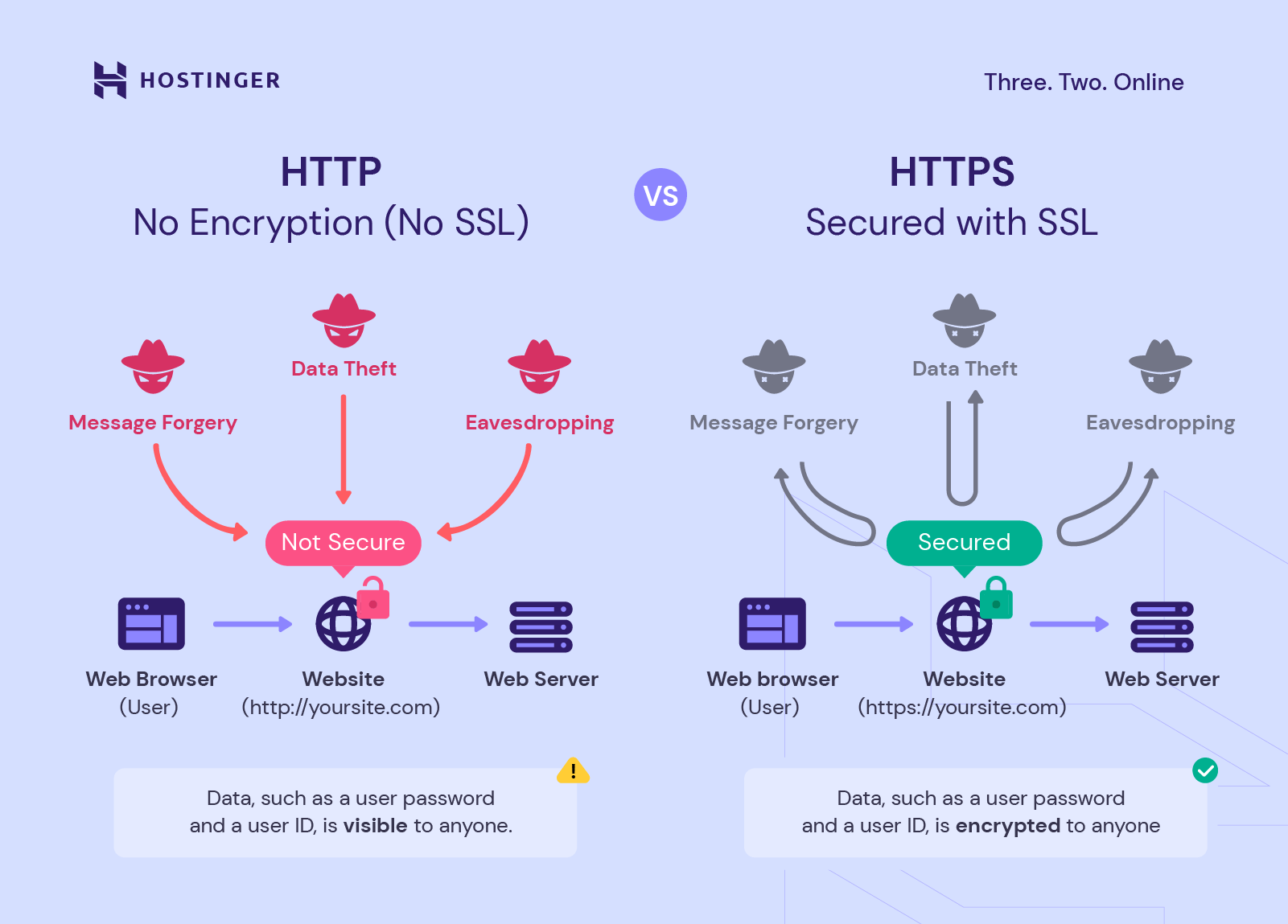
While HTTP is used to communicate and transfer data between applications, HTTPS is its secure version with encryption. That’s why most modern browsers now mark HTTP sites as not secure.
HTTPS uses TLS connection as the security layer to encrypt data over the network and protect communications between a web server and a browser. In short, HTTPS refers to the implementation of TLS, which works on top of the Transmission Control Protocol (TCP.)
Additionally, TLS has various versions, from TLS 1.0 to 1.3. That’s why most major web browsers recommend using a newer version or at least TLS 1.2 by default for websites.
TLS 1.3, its latest version, offers a shorter TLS handshake process and more secure algorithms, resulting in faster connection and better performance.

Conclusion
Transport Layer Security (TLS) is a widely deployed security protocol that encrypts data from plaintext into ciphertext and vice versa. This provides data security and privacy through encrypted traffic, preventing your sensitive data from being exposed by hackers.
Using a TLS certificate also offers many benefits for businesses and web applications, such as improving your site’s SEO and building customer trust. This way, it may help your business stay competitive in search engine results pages (SERPs).
When it comes to SSL and TLS, they provide different processes and levels of security. However, since they offer the same functionality, users often use both terms interchangeably.
Hopefully, this article has helped you understand what TLS is and how it works. If you have any questions, do not hesitate to leave us a comment below.
All of the tutorial content on this website is subject to Hostinger's rigorous editorial standards and values.

Dinda is a WordPress and digital marketing enthusiast. She loves to share her knowledge with others so that they can be successful in their online endeavors. During her free time, she enjoys watching movies and exploring historical places.


Comments
August 26 2024
How to enable TLS 1.2 on hostinger?
August 28 2024
Hey there! To activate TLS 1.2 on Hostinger, make sure your SSL certificate is correctly installed and active. Hostinger's Web and Cloud hosting plans come with free SSL certificates that support TLS 1.2 by default. If you're using VPS hosting, you'll need to manually install SSL certificates following your operating system's guidelines ;)