Mistakes to avoid when making a web app with Hostinger AI Builder
Aug 25, 2026
/
By Aris S. & Ariffud M.
/
8 min Read
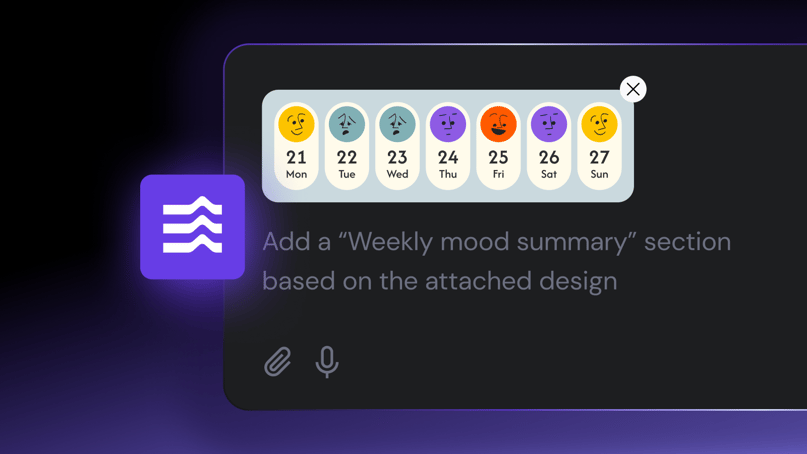
As a no-code AI web development tool, Hostinger AI Builder lets you create functional web apps by just typing in prompts. To get the best results, you need to provide efficient prompts – this speeds up production, keeps message limits at bay, and ensures your app is both functional and user-friendly.
Even though Hostinger AI Builder is designed for beginners and is incredibly easy to use, it’s still possible to make mistakes – sometimes without even realizing it. That’s completely normal, and learning how to avoid these pitfalls early on will save you time and effort.
In this article, we’ll explore the most common mistakes users make when developing web apps with Hostinger AI Builder. By learning from these examples, you’ll be able to create functional, efficient, and well-structured apps from the start.
Eight most common mistakes to avoid when creating web apps
From failing to define your web app’s goals to forgetting to secure a domain name after launch, these are the biggest mistakes you should avoid when creating a web app with Hostinger AI Builder.
1. Not specifying the app’s purpose
Why is it a mistake?
If the purpose of your web app isn’t clearly defined, you can’t really expect Hostinger AI Builder to generate the desired output. Vague prompts like “Make a functional web app” don’t provide enough context, leading to irrelevant or incomplete results.
Recommended solutions
- Describe the purpose – explain what your app does, whether it’s a review platform, fitness tracker, or task manager.
- List core features – specify key capabilities, such as user registration, submission forms, or data visualization.
Examples of prompting do’s and don’ts
- Wrong prompt:
Make a mobile-friendly web app for me.
Why? Too vague – it doesn’t define the app type, features, or objectives. As a result, the output may miss the mark completely.
- Right prompt:
Create a task manager web app with user authentication, a dashboard for tracking tasks, and a responsive layout."
Why? It clearly defines the purpose and features, helping Hostinger AI Builder generate a relevant and functional web app.
Suggested reading
Check out how one of our colleagues built a task manager web app using specific prompts and how it turned out result.
2. Using ambiguous language
Why is it a mistake?
Unclear phrases like “make it nice” or “ensure it’s user-friendly'” don’t give Hostinger AI Builder enough direction. To obtain a design or functionality you want, you need to provide full context and use precise terminology that doesn’t rely upon interpretation.
Recommended solutions
- Specify the style – define color schemes, layout preferences, and font choices. If you have specific hex codes or fonts, include them in your prompt.
- Define user interactions – explain how users should navigate the web app, from logging in to completing tasks. Mention button placements, form fields, and navigation structures.
Examples of prompting do’s and don’ts
- Wrong prompt:
Make sure all pages in my web app look nice and easy to use.
Why? There are no clear guidelines for what “nice” or “easy to use” should look like, or how the web app should function.
- Right prompt:
Create a clean, minimalistic dashboard layout with a white background (#FFFFFF) and dark text (#333333). Include an intuitive top navigation bar and hover effects on all buttons.
Why? It provides specific details about colors, layout, and interactions, guiding Hostinger AI Builder to create an interface that fits your expectations.
Suggested reading
Learn actionable, proven web app design tips with Hostinger AI Builder to ensure your app is not only aesthetically pleasing but also functional and easy to use.
3. Skipping technical preferences
Why is it a mistake?
By including key details about your technical requirements and functionality needs, you ensure that Hostinger AI Builder creates exactly the web app you want.
Recommended solutions
- Specify functionality needs – mention the core features you want, such as user authentication, data filtering, or reporting capabilities.
- Define data requirements – if your web app needs to store or process information, outline the main types of data, relationships, and how users will interact with it. Similarly, your web app requires a database system or API integration, outline the main entities, fields, and relationships to guide the AI.
Examples prompting do’s and don’ts
- Wrong prompt:
Create a web app and include a database system.
Why? It doesn’t specify the framework, database type, or structure, forcing Hostinger AI Builder to make assumptions.
- Right prompt:
Build a task-tracking web app where users can create projects, assign tasks with due dates, and generate progress reports. Each task should have priority levels and status tracking.
Why? It clearly defines the purpose, core functionality, and data relationships, allowing for a solution that meets your specific needs.
4. Overloading the prompt
Why is it a mistake?
If you pack too many instructions or features into a single prompt, you’re sending mixed signals to Hostinger AI Builder as to what should be prioritized so that tasks can be executed efficiently. Well-structured instructions are vital for a result that contains well-organized code, complete functionalities and no conflicting implementations.
Recommended solutions
- Break down complex tasks – split large goals into multiple, focused prompts. For example, start with authentication features in one prompt, then handle UI enhancements in another.
- Iterate step by step – build features gradually, testing each component to ensure it works correctly before moving on.
Examples of prompting do’s and don’ts
- Wrong prompt:
Develop a social media platform with user authentication, messaging, notifications, media uploads, live streaming, a recommendation algorithm, and an interactive feed. Make it look great on mobile, too.
Why? You’re not instructing Hostinger AI Builder what to prioritize, increasing the chances of incomplete or messy results.
- Right prompt:
First, create a social media platform with user authentication and a feed showing posts from followed accounts. Once we confirm it's working, we'll add live streaming in a separate prompt.
Why? The request is structured step by step so Hostinger AI Builder can generate a functional base before adding advanced features.
5. Focusing only on visuals
Why is it a mistake?
Focusing solely on design and UI features can lead to overlooking critical functions. While an attractive interface is important, it won’t matter if the web app can’t process data, manage user accounts, or keep information secure. By incorporating functionality, you’re making sure you’re getting an app that meets real-world requirements.
Recommended solutions
- Include security measures – specify authentication methods, data validation, and other safeguards in your prompt.
- Balance form and function – when adding features that collect or process user data, make sure your prompt also covers how the data is stored, handled, and protected.
Examples of prompting do’s and don’ts
- Wrong prompt:
Design a beautiful registration app with bright colors and animated transitions.
Why? It prioritizes appearance but lacks instructions for functionality, security, or usability.
- Right prompt:
Create a visually appealing user registration page with bright accent colors for buttons and hover animations. After testing it, we'll add input validation for the password field in the next prompt.
Why? It balances design with essential user authentication features and ensures a functional and secure registration process.
6. Repetition without refinement
Why is it a mistake?
If you keep encountering errors or outputs that don’t meet your expectations, it could be because you have been consistently entering the same prompts. This happens because the AI works with the assumption the outputs already meet your standards since you don’t specify otherwise. The AI isn’t guessing what might be wrong—it’s following your original instructions.
Recommended solutions
- Incorporate AI’s feedback – learn from the previous outputs and adjust your prompt accordingly to fix the mistakes.
- Iterate and optimize prompts – fix the current issue and follow up on lacking outputs before moving on to the next topic.
Examples of prompting do’s and don’ts
Let’s say you’re designing a web app and want to create a sidebar with menus that lead to different features. After instructing Hostinger AI Builder to create the sidebar, you receive an unsatisfactory result. Instead of addressing the sidebar, you move on to individual elements of the sidebar, only to find the results get worse.
- Original prompt:
In the sidebar, add multiple menus as shortcuts to different features."
Why? This prompt is too vague and doesn’t offer enough detail about how the menus should behave. Also, it doesn’t specify any issues with the sidebar itself. Hostinger AI Builder will interpret this as a request for a simple sidebar with shortcuts, which might not meet your expectations for functionality and design.
- Adjusted prompt:
Make the sidebar collapsable and stack the links vertically. Then, add multiple menus as shortcuts to different features. Unlike the sidebar, make these menus nested by default and expand on click, revealing more specific menus. Apply the same color palette and overall design as the sidebar for these shortcuts.
Why? This updated prompt takes into account the previous result and explicitly tells the AI what to fix (making the sidebar collapsible, adding nesting to the menus, and applying consistent design). By incorporating these details, the AI has clear instructions on what to adjust, avoiding a repeat of earlier mistakes.
7. Wasting message credits
Why is it a mistake?
Repeating inefficient prompts can waste your message credits because your instruction won’t lead to significant development progress.
Ideally, you should get the most out of each message and have enough credits until the application deployment.
Recommended solutions
- Check and optimize your prompts – before sending a prompt, make sure it follows the Hostinger AI Builder prompting best practices to achieve a high-quality output.
- Refine and iterate – focus your prompts on a specific development aspect until you get the desired result, ensuring your message credits are well spent.
Examples of prompting do’s and don’ts
- Wrong prompt:
Create a task tracking web application.
Why? This prompt lacks details, context, and specifications, resulting in an inaccurate result. This means you must spend more message credits on follow-up instructions to refine the basic aspects of your application.
- Right prompt:
Create a time-tracking web application in a minimalist, monochrome design. For now, let’s focus on the main dashboard with the calendar functionality and the tasks in a color-coded waterfall chart.
Why? Focusing on the main intent and key features of the web application will result in a more accurate result. This allows you to refine the functionality and design more efficiently.
8. Forgetting to attach a real domain
Why is it a mistake?
During the deployment, Hostinger AI Builder will assign your project a temporary domain name for testing purposes.
While you can use this address to access your web application, it might not work properly for other users, and it will not be as functional as a proper domain name.
Solution
To fix this issue, simply connect a valid domain name to your web application.
With Hostinger AI Builder, you get a free domain name included in the plan. If you wish to register another domain name, you can do that at Hostinger as well.
Connecting a domain name with your Hostinger AI Builder application is simple and can be done via the same dashboard. Simply go to hPanel’s website list and click Change domain.
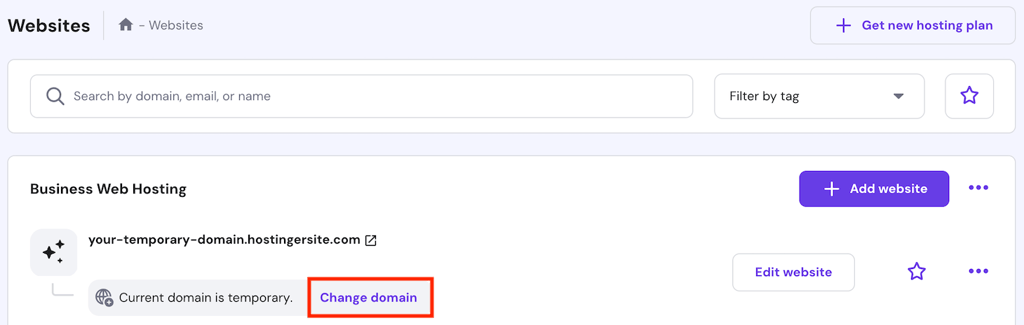
Enter the domain name you want to use and hit Next. Finish the registration process, and your application will now use the new address.
Important! If your web application is still inaccessible, wait 24 hours until the DNS propagation process is finished. This is completely normal, especially for a newly registered domain.
Conclusion
Proper use of Hostinger AI Builder, from writing high-quality prompts to being smart about message credits, leads to efficient development and a result you’ll really be happy about. To make sure you get the most out of this tool, avoid these common mistakes:
- Not specifying the app’s purpose, resulting in an inaccurate output.
- Using ambiguous language, causing the AI to misinterpret your prompts.
- Skipping context, preventing Hostinger AI Builder from delivering your application’s requirements.
- Overloading prompts with information, overwhelming the AI to be overwhelmed so it misses some details.
- Focusing only on visuals, compromising functionality
- Ignoring feedback from the outputs, causing the tool to repeat errors or mistakes.
- Wasting message credits, which slows down development.
- Forgetting to attach a domain name, resulting in an inaccessible web application.
With these common pitfalls in mind, you’ll be able to develop just the application you need, efficiently and quickly. If you have questions about this AI solution, check out our Hostinger AI Builder FAQ article. Good luck!
FAQ on mistakes to avoid when using Hostinger AI Builder
How do I avoid mistakes when creating web apps with Hostinger AI Builder?
The key to efficient web development using Hostinger AI Builder is high-quality prompts. Follow the proper prompt engineering technique, adjust your instructions based on the previous outputs, and focus on one specific development aspect at a time.
Do I need to iterate on prompts if the first result isn’t perfect?
Absolutely! Any AI tool’s first output will be most likely imperfect. Give follow-up prompts to refine the result until it fits your needs and expectations. Remember to refine one aspect of your web application at a time so the AI can give an accurate response.
Why does my web app sometimes fail to run after generating it with Hostinger AI Builder?
Since Hostinger AI Builder is still in the early access phase, it may occasionally produce inconsistent code that leads to errors in the preview pane. The tool should be able to identify the error automatically, or you can ask it to fix the issue by providing the code. For peace of mind, there is also a 30-day money-back guarantee if you feel the service isn’t the right fit for you.
All of the tutorial content on this website is subject to Hostinger's rigorous editorial standards and values.

Aris is a Content Writer specializing in Linux and WordPress development. He has a passion for networking, front-end web development, and server administration. By combining his IT and writing experience, Aris creates content that helps people easily understand complex technical topics to start their online journey. Follow him on LinkedIn.

Ariffud is a Technical Content Writer with an educational background in Informatics. He has extensive expertise in Linux and VPS, authoring over 200 articles on server management and web development. Follow him on LinkedIn.

Comments
0 responses