Direct email marketing: What it is and how to run a campaign
Aug 11, 2026
/
By Alma
/
12 min Read
Direct email marketing sends a focused email to a selected group of subscribers or customers, asking them to complete a measurable action. Businesses use it for campaigns such as cart reminders, membership renewals, event invitations, product offers, and account setup emails.
A direct email campaign needs a clear audience, a relevant reason to contact them, one main next step, and a result to track.
Running the campaign also involves choosing how and when to send it, setting up and testing the email, checking that recipients can legally be contacted, and protecting inbox delivery.
What is direct email marketing?
Direct email marketing sends a targeted email to a selected group of subscribers or customers to prompt a single measurable action.
For example, a gym could email members whose plans expire within the next 30 days. The email would state the renewal date, explain the available membership options, and include a “Renew my membership” button that links directly to payment.
Before creating a direct email campaign, answer five questions:
- Who should receive the email?
- What should they do after reading it?
- What information will help them decide?
- Which button or link will take them to the next step?
- Which completed action will you measure?
For the gym campaign, the audience is members approaching renewal. The goal is completed renewals. The message explains the deadline and plan options, while the button leads to the payment page.
The gym could send the email on a set date or automatically when a membership is about to expire.
Direct email marketing vs. other email approaches
Direct email marketing is a targeted approach to email marketing. Personalized email marketing tailors the message to each person, cold email contacts people who haven’t subscribed, and direct mail sends a physical message rather than an email.
Email marketing covers every way a business uses email to communicate with subscribers and customers. It includes newsletters, educational content, account updates, promotions, and direct email campaigns.
Direct email marketing narrows communication to a selected audience and a single main action.
Personalized email marketing changes parts of an email based on the recipient’s information. It can support a direct campaign by showing details that make the offer or next step more useful.
For example, the gym could show each member’s current plan, renewal date, usual branch, and available membership options. Businesses can tailor the message to each subscriber when those details help the customer decide what to do.
Cold email contacts someone who hasn’t subscribed or previously dealt with the sender. Direct email marketing usually reaches people who joined a list, created an account, made a purchase, or contacted the business.
Direct mail sends printed materials such as postcards, letters, and catalogs through the postal service. Direct email marketing delivers the message to an email inbox.
For a gym, each method could look like this:
Method | Gym example |
Direct email marketing | Members whose plans expire within 30 days receive an email asking them to renew |
Email marketing | Subscribers receive a monthly newsletter with class updates, fitness advice, and gym news |
Personalized email marketing | Each expiring member sees their current plan, renewal date, usual branch, and available membership options |
Cold email | The gym emails a local company’s HR manager about a corporate membership plan |
Direct mail | Expiring members receive a printed renewal postcard at home |
Types of direct email marketing campaigns
The main types of direct email marketing campaigns that you can send are welcome, promotional, behavior-based, re-engagement, and event or seasonal campaigns. The right type depends on what the customer has done and what you want them to do next.
Welcome and onboarding campaigns
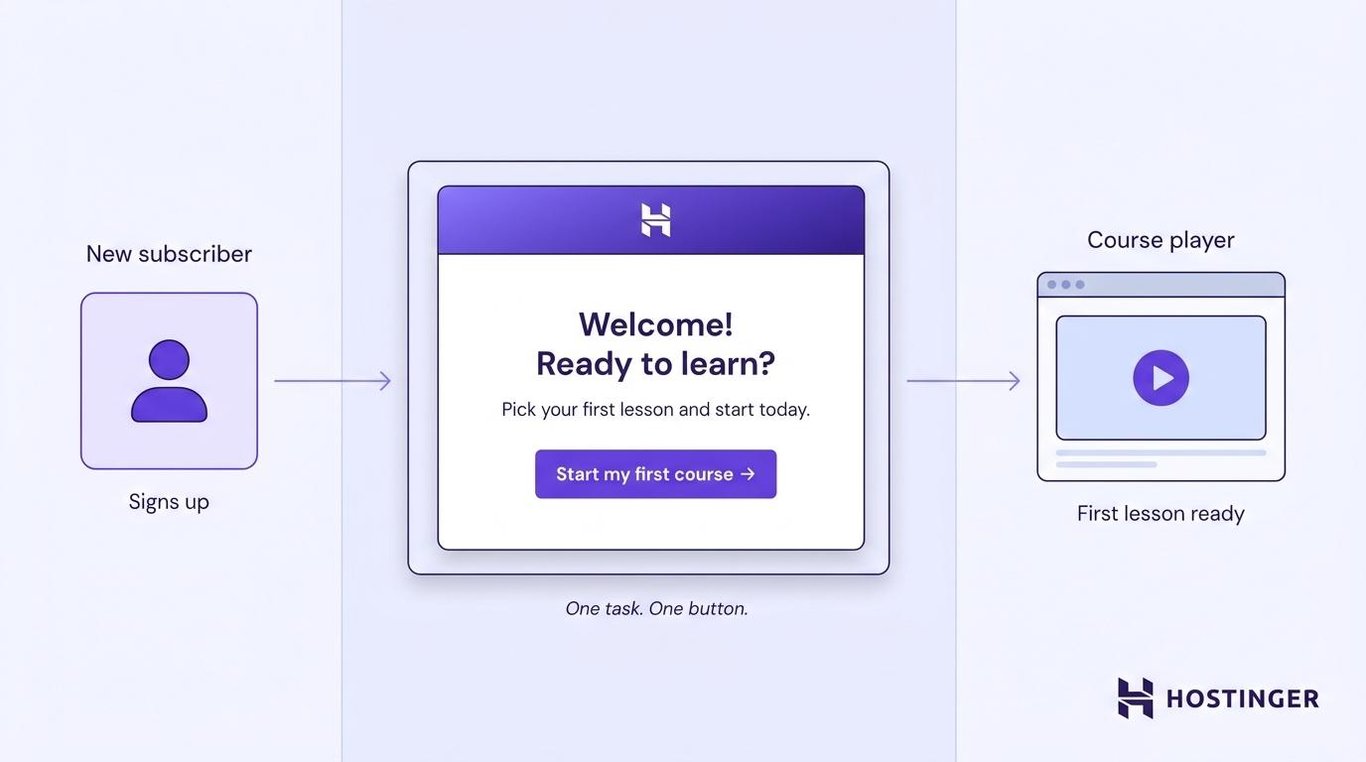
Welcome and onboarding emails help new subscribers or users take their first step after signing up.
An online course platform could send a welcome email that explains how to choose a lesson and includes a Start my first course button.
The email should focus on the first task. Listing every course, feature, and account setting at once would make it harder to find the task.
Promotional campaigns
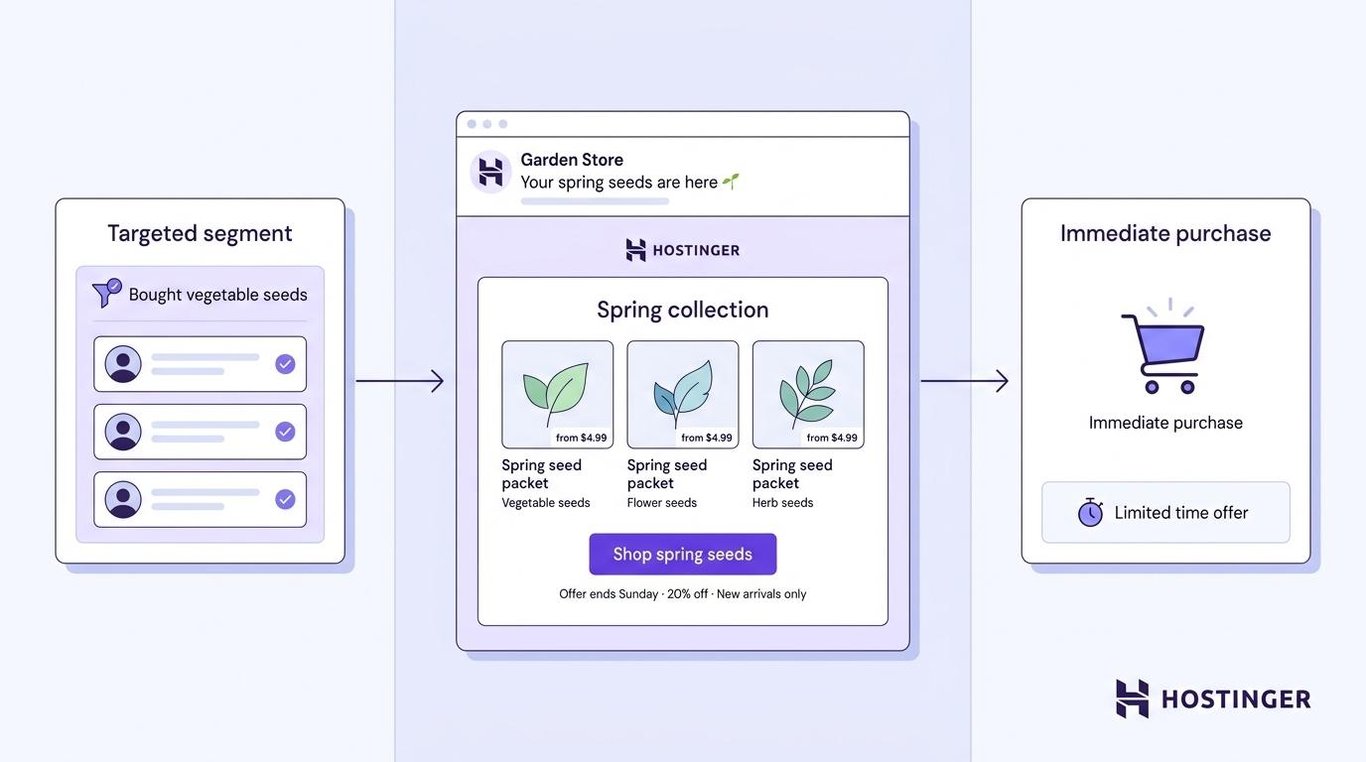
Promotional campaigns present a product, discount, launch, or limited-time offer to subscribers who are likely to care about it.
A garden store could email customers who previously bought vegetable seeds when its spring collection becomes available. The message could show the new products and include a Shop spring seeds button.
A promotional email should create an offer that encourages immediate action. State the discount, deadline, product benefit, and any restrictions clearly.
Behavior-based campaigns
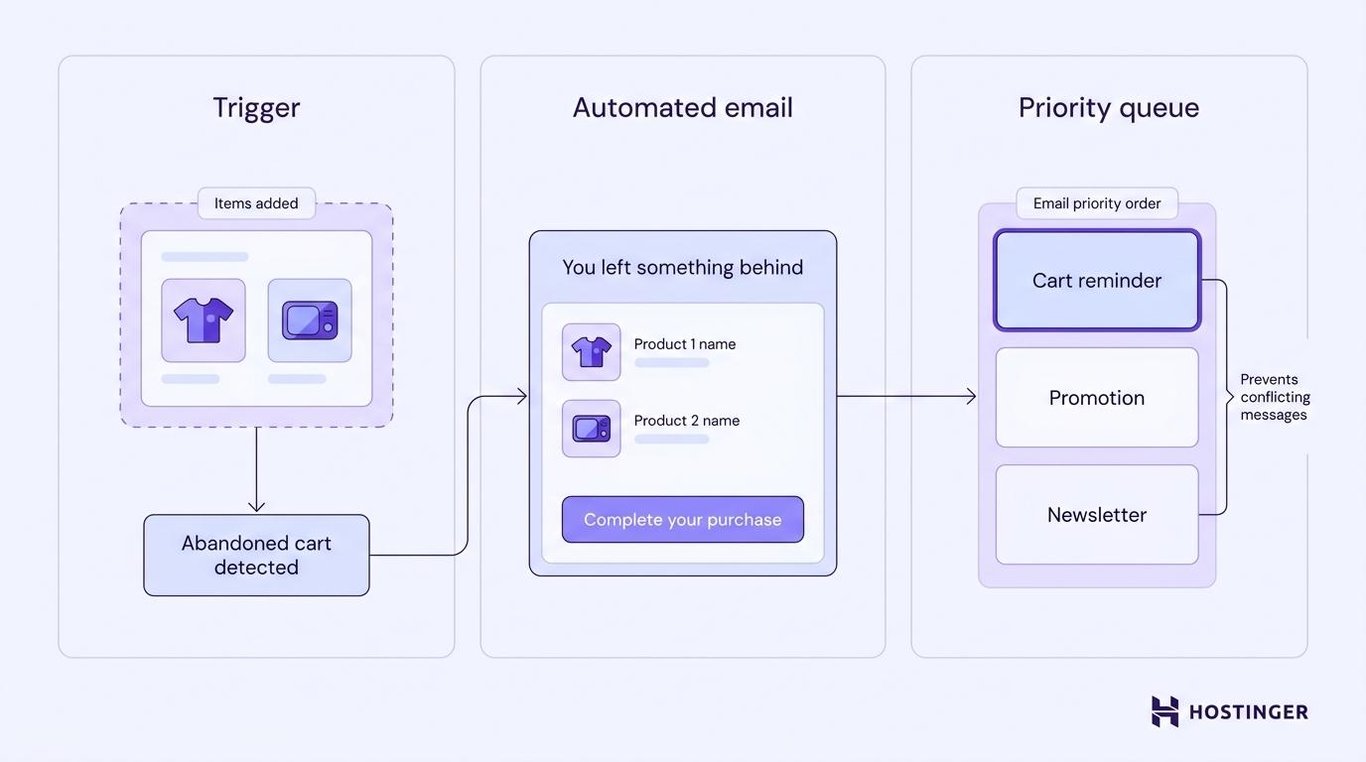
Behavior-based campaigns are sent after a customer completes an action or leaves one unfinished.
A shopper who adds products to a cart but doesn’t pay could receive a reminder – an abandoned cart email – showing those items and a link back to checkout.
The abandoned cart explains why the customer received the email. The checkout link lets them resume from where they left off.
One customer can trigger several automatic emails at once. Set priorities so a cart reminder isn’t immediately followed by an unrelated promotion and a general newsletter.
Re-engagement campaigns
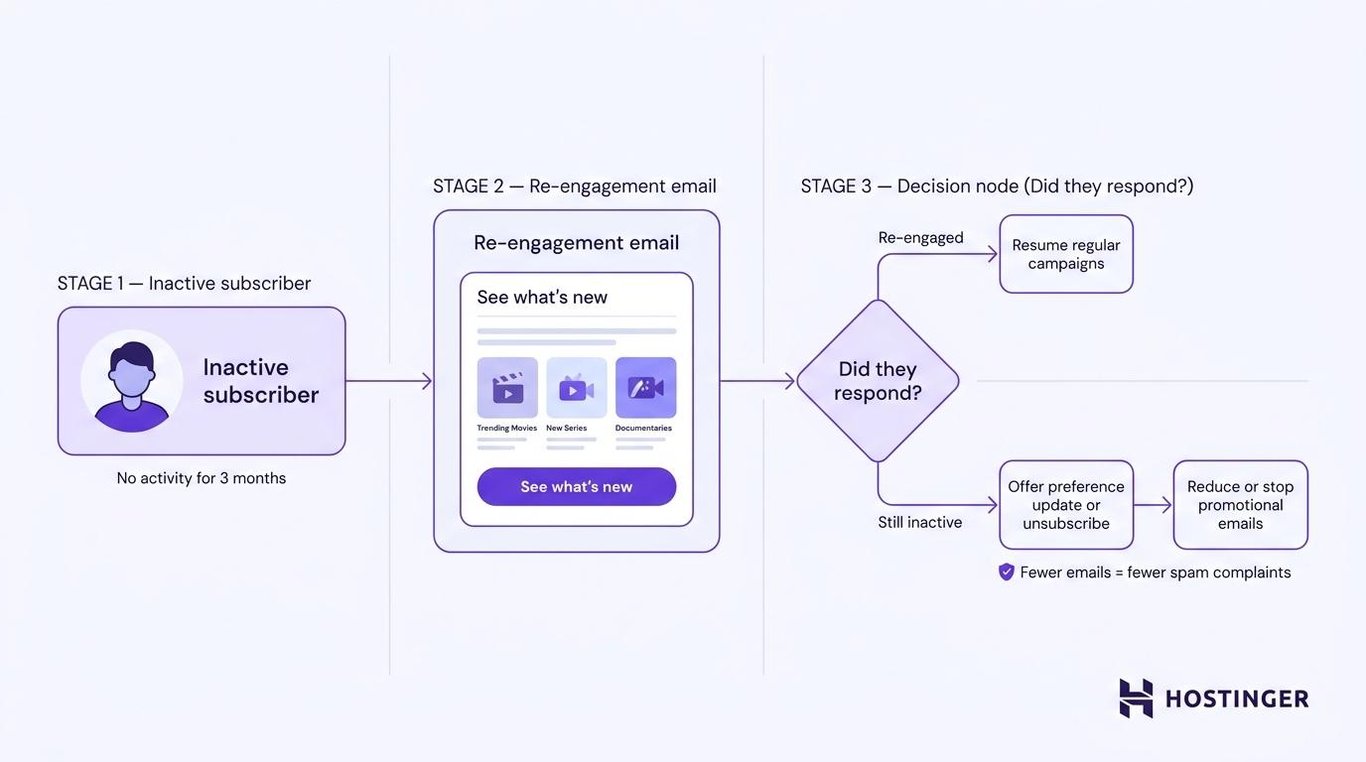
Re-engagement campaigns contact subscribers who haven’t opened, clicked, purchased, logged in, or used an account for a set period.
A streaming service could email customers who haven’t logged in for three months. The message might show recently added content based on what they previously watched, and it might include a See what’s new button.
Give inactive subscribers a specific reason to return. You can also let them change what they receive or leave the list.
If they still don’t respond, reduce or stop regular promotional emails to those contacts. Continuing to send unwanted messages can increase spam complaints and make future campaigns harder to deliver.
Event and seasonal campaigns
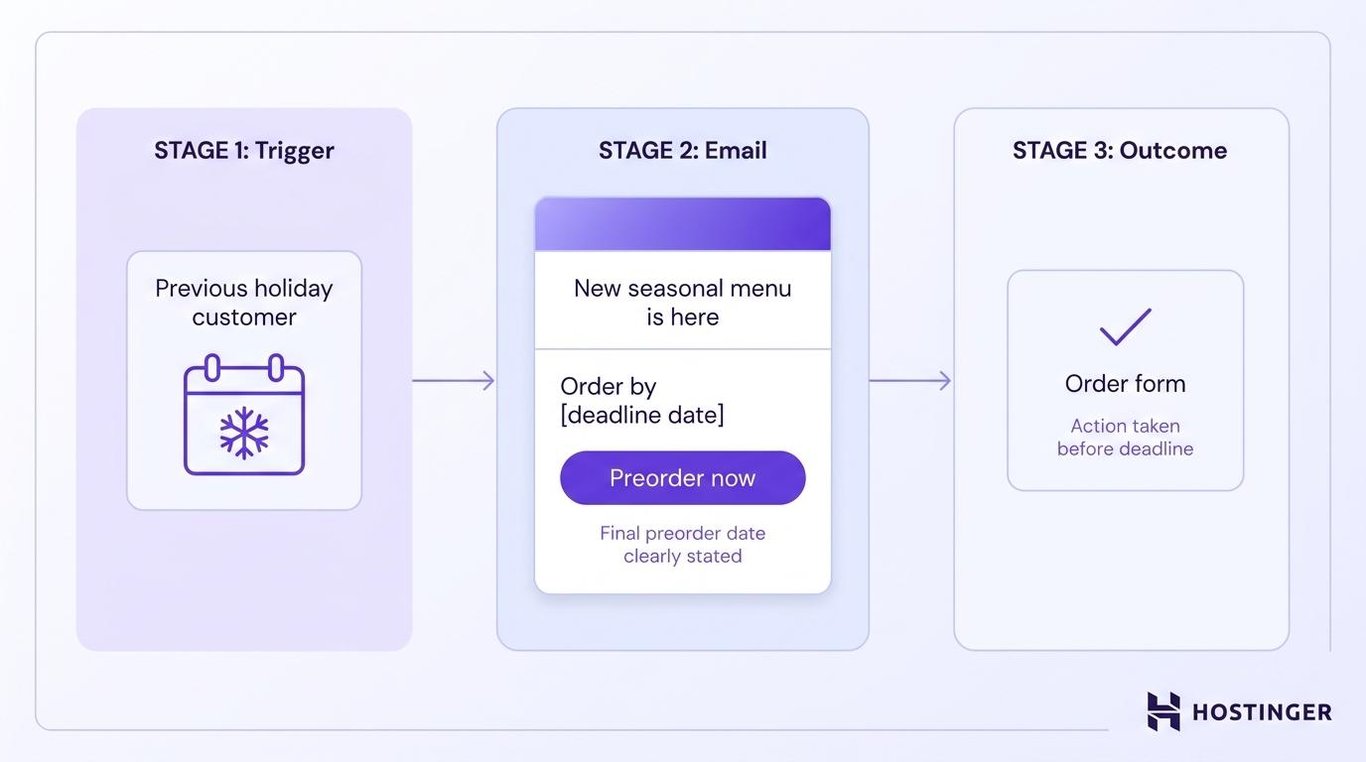
Event and seasonal campaigns promote something tied to a date, occasion, or ordering deadline.
A bakery could email previous holiday customers when its new seasonal menu becomes available. The message would state the final preorder date and link directly to the order form.
The previous purchase makes the offer relevant. The deadline tells customers when they need to act.
How to run a direct email marketing campaign
Run a direct email campaign by setting one goal, choosing the right audience, deciding how and when to send, writing the email, preparing it in an email marketing tool, testing the full customer path, checking marketing rules and inbox delivery, and measuring the result.
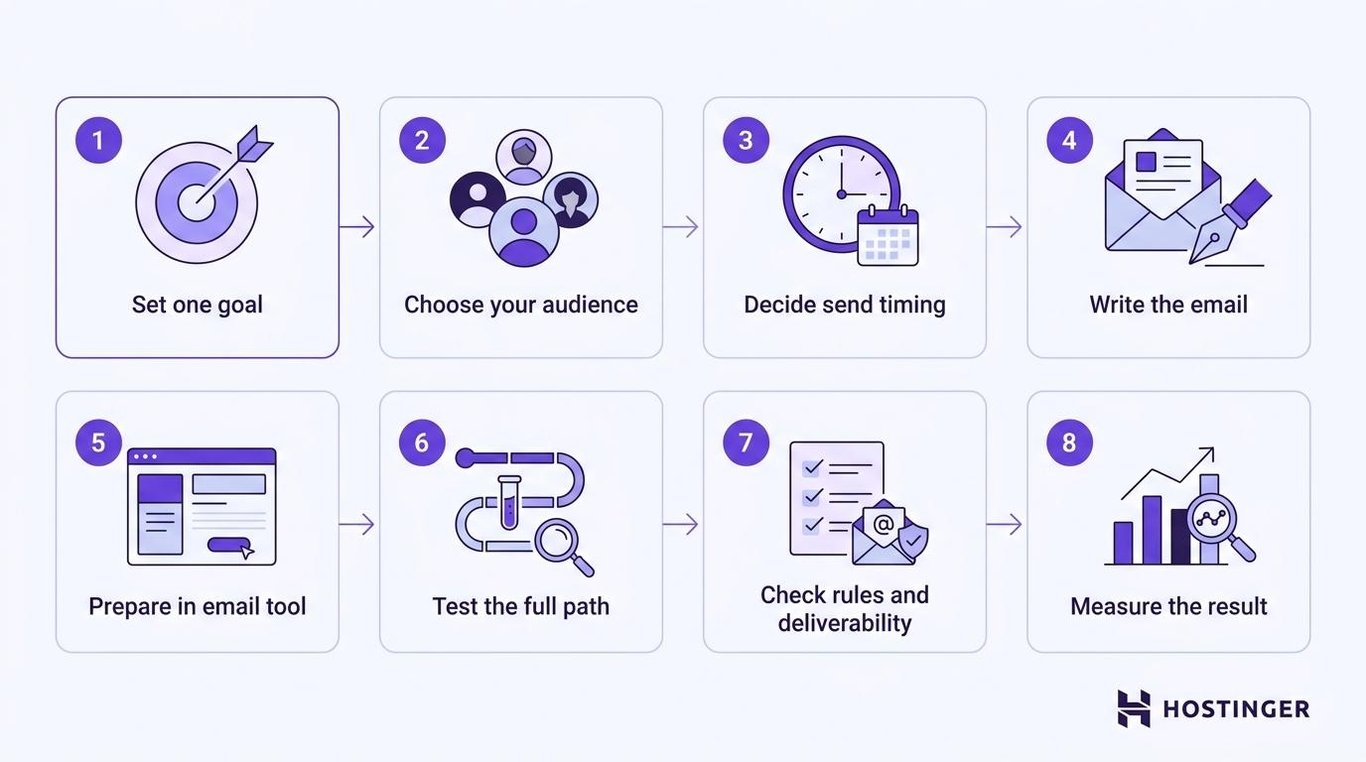
1. Define the campaign goal
Choose one action the campaign should produce.
Possible goals include:
- Completing a purchase
- Booking a consultation
- Registering for an event
- Finishing account setup
- Renewing a subscription
- Downloading a resource
- Returning to an inactive account
Avoid goals such as “increase engagement.” That phrase doesn’t explain what customers should do or which result you should count.
Write the goal using this template:
Generate [number of completed actions] from [specific audience] by [date].
For example:
Generate 100 webinar registrations from previous event attendees by August 15.
This goal identifies the audience, the action, the target, and the deadline. Those details help connect each campaign to a measurable goal.
The goal shapes the rest of the campaign. A membership-renewal email needs a different audience, message, button, and landing page from an email promoting a free trial.
2. Build or choose the audience
Send the campaign to subscribers or customers whose location, purchases, account activity, or stated interests match the offer.
Describe the audience using this pattern:
Send to contacts who [completed an action or meet a condition] within [time period], excluding [people who shouldn’t receive it].
For example:
Send to members whose plans expire within 30 days, excluding anyone who has already renewed or cancelled.
Website forms, account settings, checkout options, events, and useful downloads can help you grow a permission-based subscriber list.
Don’t buy an email list. Those people didn’t ask to hear from your business, and the list may include invalid addresses or contacts who have no interest in what you sell.
Once you have subscribers, divide contacts into relevant audience groups based on details that determine whether someone should receive the email.
Useful audience rules include:
- Joined within the last 14 days
- Bought from a particular product category
- Lives in an area covered by the offer
- Started but didn’t complete checkout
- Has a plan that expires soon
- Hasn’t purchased or logged in for several months
An invitation to an in-person event should go to people who can attend. A repeat-purchase offer should go to previous customers, not subscribers who have never bought anything.
Create separate groups only when they need different messages, offers, or send times.
Remove addresses that permanently bounce and stop emailing people who unsubscribe. Keeping them on the list makes campaign reports less accurate and increases the risk of delivery failures.
3. Choose one email, a series, or an automation
Decide whether to send one email, schedule a short series, or trigger messages automatically after a customer action.
Use one scheduled email when the same message applies to a group at the same time. Product launches, event invitations, seasonal promotions, and sale announcements fit this format.
Use an automated email when a signup, purchase, unfinished task, or account date triggers the campaign. Welcome emails, cart reminders, setup help, purchase follow-ups, and renewal notices work this way.
Some goals need a short series.
For example, a webinar campaign could include:
- An invitation when registration opens
- A reminder for people who haven’t registered
- An attendance reminder for registered participants
Each email should provide new information or help the customer take the next step. Don’t add messages simply to make the series longer.
The deadline should guide the send time.
A flash sale should reach everyone at the start of the offer. A general product promotion can arrive when each subscriber usually interacts with email.
4. Write the message and call to action
Build the email around the action you want the recipient to complete.
Use this structure:
Subject line: State the offer, task, or deadline
Opening: Explain why the person received the email
Details: Give the information needed to decide
Call to action: Name the next step
Supporting note: Add any deadline, restriction, or help option
For a gym renewal campaign:
Subject: Your gym membership expires August 31
Your membership expires at the end of August. Renew by August 25 to continue using the gym without interruption.
Current plan: Standard Monthly
Renewal price: $40 per monthRenew my membership
The subject line explains what the email is about. The message gives the member the details needed to renew, and the button leads directly to payment.
Use one main call to action, or CTA. A CTA is the button or link that takes the customer to the next step.
Choose wording that describes the action:
- Complete my order
- Reserve my place
- Finish account setup
- Renew my plan
- Download the guide
Avoid vague buttons, such as Learn more when you want the customer to complete a specific task.
Use customer information only when it makes the message more useful. A store could show the product someone viewed, while a software company could mention the setup step a user hasn’t finished.
Adding a first name to an unrelated offer doesn’t make the email relevant.
5. Choose an email marketing tool and prepare the send
Use an email marketing tool to manage contacts, choose the audience, create the email, schedule or automate delivery, and review the results.
Check that the tool supports the work your campaign requires:
- Collecting or importing contacts
- Creating audience groups
- Designing branded emails
- Scheduling campaigns
- Sending automatic follow-ups
- Adjusting delivery times
- Tracking opens and clicks
A platform that handles these tasks in one place is easier to manage when you don’t have a dedicated email team.
Hostinger Reach is one option for small businesses, creators, and people growing an audience. You can import contacts, sync subscribers from connected forms, and group them by source, tags, subscription status, and previous email engagement.
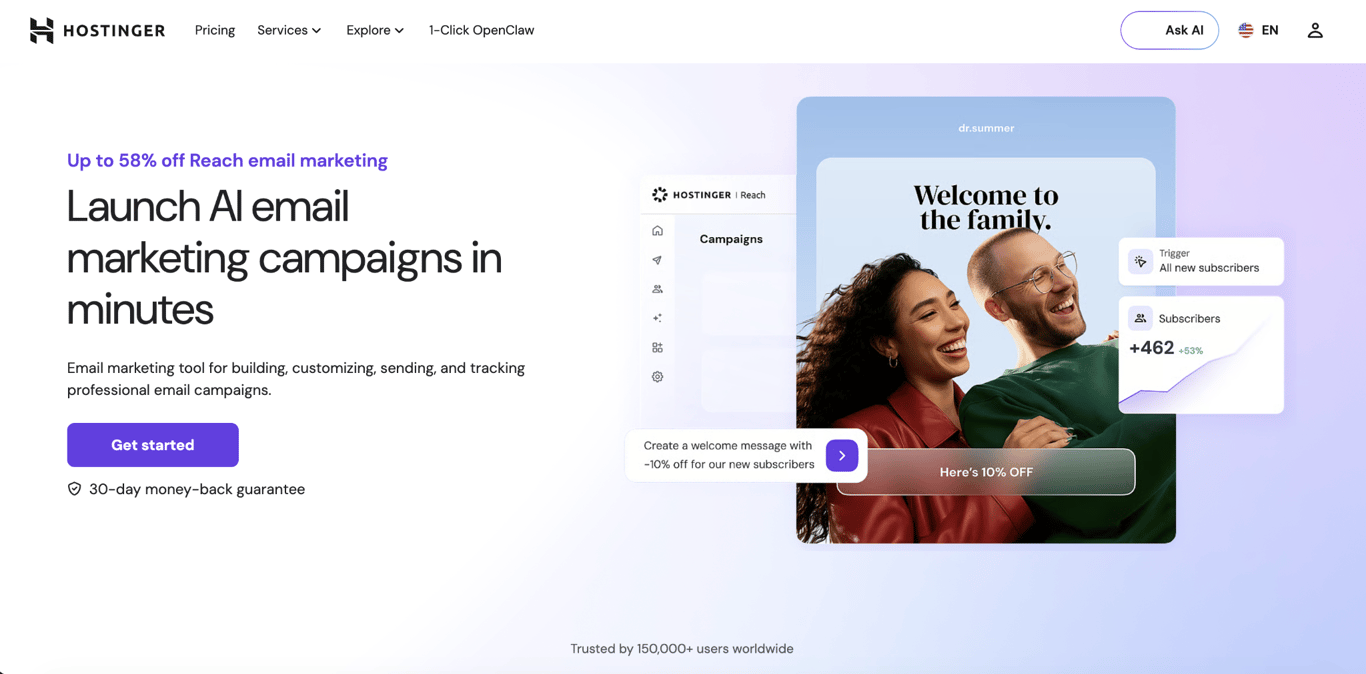
Reach can also generate an email draft using your business and brand information. Review the copy, offer, links, and main button before sending.
You can schedule the campaign for a fixed time or, on a paid plan, use automations and Smart Sending. Automations work well for campaigns triggered by a signup or customer action, while Smart Sending spreads delivery across 24 hours based on earlier email engagement.
After sending, use Reach’s delivery, open, click, bounce, and unsubscribe data to identify where the campaign needs improvement. Measure purchases, bookings, registrations, or other completed actions separately to confirm whether the campaign reached its goal.
6. Test the email and the page after the click
Test the full path the customer will take, not just how the email looks.
Send the email to yourself and check it on a phone and a computer. Confirm that names, prices, dates, links, and buttons appear correctly.
Click the main button and complete the purchase, booking, registration, or account step. Check that the page matches the offer in the email and that the completed action is recorded.
For a membership-renewal campaign, the member should be able to open the email, review the plan and price, reach the correct payment page, and renew without searching for information or encountering an error.
7. Check compliance and inbox delivery
Before sending, confirm that the rules applying to each recipient allow you to contact them, clearly identify your business, and provide an easy way to unsubscribe.
Email rules depend on the recipient’s location and whether they are a customer, subscriber, or business contact.
Before sending:
- Collect permission where required
- Use an accurate sender name and subject line
- Include a clear unsubscribe link
- Apply unsubscribe requests promptly
- Keep proof of consent when required
- Include any business details required in that location
Check how to obtain consent and respect subscriber preferences before sending to a new country or customer type.
In the US, the CAN-SPAM Act requires accurate sender information and subject lines and gives recipients the right to stop receiving commercial emails. Other countries use different consent and business email rules.
You should also authenticate the domain used to send the campaign. Authentication helps Gmail and other email providers confirm that the message came from an approved sender.
Authentication doesn’t guarantee that an email will reach the inbox. Invalid addresses, spam complaints, sudden increases in sending volume, and unwanted messages can still cause delivery failures.
To help campaigns reach the intended inboxes:
- Send from a consistent domain and recognizable sender name
- Remove addresses that permanently bounce
- Stop emailing people who unsubscribe
- Avoid sudden increases in sending volume
- Send the content people expected when they joined
- Check delivery errors and complaints after every campaign
Don’t rely on lists of supposed “spam words.” One word doesn’t decide where the email is placed.
Sending unwanted messages to an inaccurate or purchased list increases the risk of delivery.
8. Measure the result and decide what to change
Compare the completed action with the target you wrote before sending.
For example:
Target: Generate 40 renewals from 200 members whose plans expire in August.
Result: 32 members renewed.
The campaign reached 80% of its target because 32 of the planned 40 renewals were completed.
Other numbers help show where customers stopped:
- Delivery rate – How many emails reached the receiving email servers
- Bounce rate – How many emails couldn’t be delivered
- Open rate – How many emails were recorded as opened
- Click-through rate – How many people clicked a link
- Conversion rate – How many people completed the main action
- Unsubscribe rate – How many people left the list
- Spam complaint rate – How many people marked the email as spam
- Revenue per email – How much revenue the campaign produced for each email delivered
Open rate can indicate whether the subject line attracted attention, but it isn’t an exact count of how many people read the message. Privacy settings and image loading affect how opens are recorded.
Clicks show that people interacted with the email. They don’t show whether those people completed the purchase, booking, registration, or account step.
Use campaign reports to evaluate whether recipients took the intended action, rather than judging the result based on opens alone.
Compare the result with:
- An earlier campaign sent to a similar audience
- A different subject line or button
- A group that didn’t receive the new version
- The target set before sending
Change one major part at a time. Changing the audience, subject line, offer, design, button, and send time together makes it impossible to see which change affected the result.
For example:
What happened: 70 members clicked the renewal button, but only 32 renewed.
What to check: Open the payment page on a phone, confirm the displayed price, and complete a test payment.
Next change: Simplify the payment form or correct any mismatch between the email and renewal page.
Many clicks but few renewals show that the email created interest, but something stopped customers after they reached the website.
Check whether the landing page matches the offer, works on a phone, shows the correct price, and makes payment easy.
What are the benefits and limitations of direct email marketing?
Direct email marketing gives a business control over the audience, message, and goal. Its results still depend on the quality of the contact list, the offer, the email, the landing page, and the sending practices.
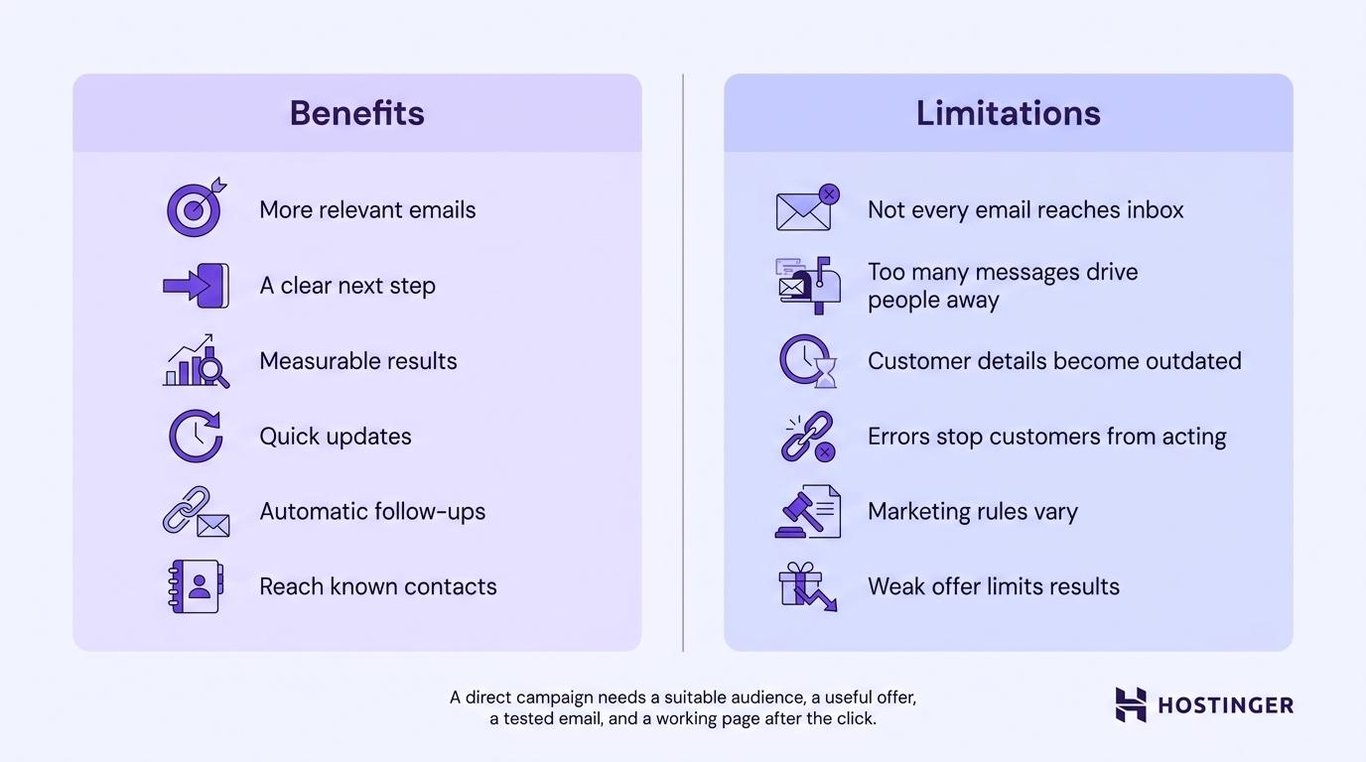
Benefits of direct email marketing
- More relevant emails – You can send the campaign to people whose purchases, interests, location, or account activity match the offer.
- A clear next step – The email can focus attention on one purchase, booking, registration, renewal, or account task.
- Measurable results – You can track whether people completed the action named in the goal.
- Quick updates – You can change the audience, message, offer, or timing without printing new materials.
- Automatic follow-ups – Emails can be triggered by signups, purchases, incomplete actions, and renewal dates.
- Contact people who know the business – Reach subscribers, customers, and leads who have previously shared their details.
Limitations of direct email marketing
- Not every email reaches the inbox – Messages can be rejected, blocked, or placed in spam.
- Too many messages drive people away – Even relevant emails become frustrating when they arrive too frequently.
- Customer details become outdated – Old locations, interests, and account information can lead to unsuitable offers.
- Errors can stop customers from acting – Broken links, incorrect audience rules, poor mobile layouts, and checkout failures reduce results.
- Marketing rules vary – Different countries and recipient types can require different consent, sender, and unsubscribe details.
- A targeted audience won’t fix a weak offer – Clear targeting can’t repair unsuitable pricing, an unclear product, or a difficult checkout process.
Best practices for direct email marketing
Keep the audience current, make the main action easy to find, test the full customer path, and use the results to improve one part of the next campaign.
- Explain why the person received the email – Refer to their signup, purchase, location, interest, account date, or recent action.
- Use one main button – Make the next step obvious even when the email includes supporting links.
- Match the landing page to the email – Repeat the offer, price, deadline, and next step after the click.
- Control overlapping automatic emails – Delay or skip less important messages when a single person triggers multiple campaigns.
- Test the full path – Open the email, click the button, complete the form or checkout, and confirm that the result is recorded.
- Keep contact details current – Remove permanent bounces, apply unsubscribes, and update audience groups when customer activity changes.
- Review automated and AI-generated emails – check the audience, offer, price, deadline, links, and business details before sending.
- Change one part after each test – Use the results to choose a specific change to the audience, message, button, landing page, or send time.
Which direct email campaign should you send first?
Start with a campaign based on a customer action, purchase, or account deadline you can already identify.
Choose the campaign that matches the clearest opportunity:
- New subscribers – A welcome email that directs them to their first purchase, lesson, or setup step.
- Shoppers who left checkout – A reminder showing the products and a link back to the cart.
- Customers interested in a current offer – A promotion focused on one product, benefit, or deadline.
- Users who haven’t finished setup – An onboarding email linking directly to the unfinished step.
- Subscribers who haven’t returned recently – A re-engagement email showing what has changed or letting them update their preferences.
- Customers approaching renewal – A reminder with the renewal date, plan details, and payment link.
If the email should be sent automatically after a signup, an abandoned cart, a purchase, a renewal date, or a period of inactivity, use these email automation examples to choose the trigger, timing, and follow-up.
After sending, compare the completed purchases, bookings, registrations, or renewals with the goal you set earlier.
If few people click, review the audience, subject line, message, and button. If many click but don’t complete the action, test the price, form, landing page, and checkout process.
Fix the step where customers stopped, then apply what you learned to the next campaign.

Alma is an AI Content Editor with 9+ years of experience helping ideas take shape across SEO, marketing, and content. She loves working with words, structure, and strategy to make content both useful and enjoyable to read. Off the clock, she can be found gaming, drawing, or diving into her latest D&D adventure.