Building web apps with WordPress
May 15, 2026
/
Larassatti D.
/
12 min Read
Thanks to its flexibility and strong community support, WordPress is a practical choice for powering a wide range of web app projects.
In this article, we’ll explore two approaches to building a web app with WordPress: low-code (plugin-based) and a more advanced headless setup. We’ll also discuss the common challenges to watch out for and offer an alternative solution for a quicker web app launch.
Whether you’re a WordPress user looking to scale or a beginner exploring your options, reading this guide will help you choose the right web app development approach for your goals.
What are web apps?
Web apps are interactive software programs that run in a web browser. Unlike traditional desktop or mobile apps, they don’t require installation and can be accessed online, offering real-time functionality to handle specific tasks.
And if you wonder what makes a web application different from a website, it comes down to functionality and interactivity.
Websites are mainly informational – they deliver static content that users read or view, like blog posts or company details. On the other hand, web applications are built to handle dynamic functions, including logging in, submitting forms, or managing data, by responding to user inputs in real time.
Most of us use web applications daily, often without giving them a second thought. These range from simple tools like web calculators and currency converters to well-known complex platforms like Netflix, Amazon, and Jira.
While the mentioned web app examples vary in complexity, they are typically built using the same core components:
✅ Frontend – what users see and interact with.
✅ Backend – the behind-the-scenes logic that processes data, handles user authentication, and powers core functionality.
✅ Database – stores persistent data such as user profiles, content, or transaction records.
✅ Application programming interfaces (APIs) – act as bridges between the frontend, backend, and external services (like payment gateways or social logins).
✅ Web server – delivers frontend and backend responses to the user’s browser.
Why build web apps with WordPress?
WordPress is widely known as a content management system, but thanks to its core capabilities and recent development options, it can also be a compelling framework for building web apps.
Given its origins as a blogging platform, WordPress is well-suited for content-driven web apps, such as membership sites, online stores, online learning platforms, directories, marketplaces, or client portals.
Creating a web app with WordPress offers some advantages compared to custom development frameworks. These include:
- Rapid development – the core WordPress software is user-friendly, making the web app development process more efficient. Plus, a wide range of pre-built plugins and themes helps speed up your web app creation.
- Custom data structures – you can easily manage complex content with custom post types, taxonomies, and custom fields – no need to build a custom schema from scratch.
- Built-in user management functionality – WordPress includes user registration, login, and role-based permissions. So, you can quickly set up and manage different types of user roles and access without building an authentication system from scratch.
- REST API and GraphQL support – ideal for headless architecture, enabling integration with modern front-end frameworks like React or Vue.
- Multisite support – you can efficiently manage multi-tenant platforms or white-labeled SaaS solutions.
- Scalable – you can choose the infrastructure that fits your development needs at each stage, making it easy to start small and scale up as you grow.
- Cost-effective – WordPress is an open-source software with no licensing fees and minimal infrastructure costs.
- Strong community and documentation – the extensive WordPress community makes it easy to hire skilled professionals or find tutorials to troubleshoot any issues.
- Flexible front-end design options – whether you’re using custom themes, page builders, or going headless with a JavaScript front end, WordPress offers the flexibility to tailor your app’s interface.
Different approaches to building WordPress web apps
Generally speaking, there are two main approaches to building a web app with WordPress, and that flexibility is one of the platform’s biggest strengths.
The first is low-code development, which relies on plugins, themes, and page builders that require little to no coding – depending on the level of customization you need. This method makes web app creation more accessible for beginners and speeds up the process for experienced developers.
The second is code-heavy development, involving a headless infrastructure implementation to unlock greater flexibility, performance, and design control.
➡️ Take a look at the table below to see how plugin-based development compares to headless infrastructure when building a web app with WordPress.
| Plugin-based | Headless | |
| Time to launch | Faster, as plugins and themes include ready-made functionality | Slower, as it requires custom coding or even building web app components from scratch |
| Cost | Lower upfront costs with free plugins and themes, but expenses can increase over time as you scale your web app | Higher initial cost to cover development resources, but long-term maintenance costs can be more predictable |
| Performance | The additional code overhead or bundled features you don’t need may negatively impact performance | You have full control to eliminate unnecessary code and dependencies, allowing for faster performance |
| Scalability | May require careful optimization as the number of plugins grows and dependencies become more complex | Easier to scale, especially if the architecture is well-structured and performance is a priority from the start |
| Security | Depends heavily on the security and update frequency of third-party plugins. Vulnerabilities can arise from outdated or poorly maintained plugins | Custom code and APIs can be more secure when developed with proper best practices, but this requires more responsibility and expertise |
| Maintenance | Easier to manage if plugins are actively maintained, but there’s a long-term risk if a plugin becomes obsolete or unsupported | You have complete control over the codebase, but that also means full responsibility for updates, bug fixes, and long-term maintenance |
Let’s now dive deeper into both approaches.
Basic approach with WordPress plugins
The low-code approach allows anyone to create a web app with WordPress quickly and easily. Thanks to its vast library of plugins, a basic WordPress website can be expanded into a fully interactive web application.
Here are the steps to create a web app with WordPress using a plugin-based approach:
- List the core features your web app needs.
- Research plugins that offer the functionality and best value for your specific requirements.
- Install the chosen plugins on your WordPress site.
- Use the plugin’s features to build out your web app.
While plugins help you build your web app’s core functionality, WordPress themes make it easy to design the front-end interface.
Thanks to the flexibility of plugins and themes, you can build a web app without writing a single line of code. But if you need more advanced customization, you can use the WordPress theme editor to make code-level changes to your site’s appearance or functionality.
To help you navigate the wide range of WordPress plugins, here are some useful types for building web apps:
Progressive web app (PWA) plugins
Progressive web apps (PWAs) deliver a similar experience to native apps through web browsers.
When building a WordPress web app, PWA plugins can make your WordPress site behave like a native mobile app by enabling service workers, caching, offline mode, and install prompts.
Some popular PWA WordPress plugins are Super Progressive Web Apps, Progressive Web Apps (PWA), and PWA for WP.
After installing a PWA plugin, the setup instructions will typically involve configuring basic settings like the app name, icon, theme color, and offline behavior. Once that’s all set up, your site will be PWA-ready.
You can also send push notifications by integrating third-party services like Firebase or OneSignal.
So, when visitors access your site from an Android device using a supported browser, they can add it to their home screen via the browser’s settings, typically by tapping the three-dot button and selecting Add to Home screen.
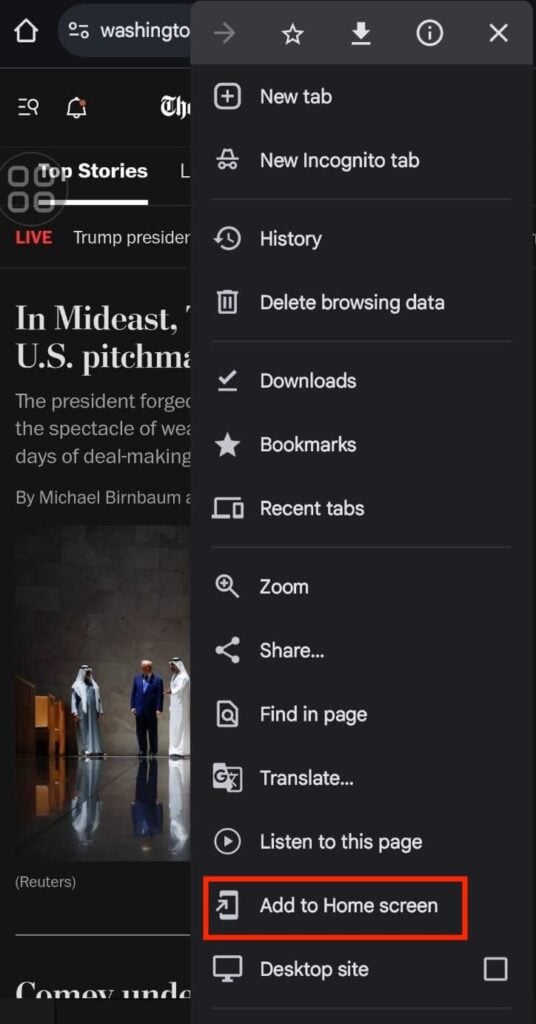
This will add an icon for your site to their device’s home screen, and they’ll be able to access it like a native mobile app.
That said, this functionality works seamlessly on Android devices only. On Apple gadgets, it’s limited to Safari, and push notifications are restricted due to platform limitations.
💡 Pro tip
If you want to publish your web app as a native app on the Play Store or App Store, you’ll need to convert it into an .apk (Android) or .ipa (iOS) file. You can do it with frameworks like Ionic or service providers like PWABuilder, which help wrap your PWA for app store distribution.
Form builder plugins
Forms introduce user interactivity to your website, allowing visitors to submit information, sign up for services, make inquiries, place orders, and more, basically turning your website into a web app.
Form builder plugins offer an intuitive interface to build user-friendly forms by dragging and dropping elements or choosing from pre-built templates.
What’s more, many form builder plugins include advanced features that can power booking systems, job application portals, and membership workflows. Just keep in mind that these features are often part of premium plans or require additional add-ons.
Some of the most popular WordPress form builder plugins include:
- WPForms – beginner-focused with a drag-and-drop builder, templates, and solid support for marketing integrations.
- Gravity Forms – built for complex workflows, ideal for developers or advanced users who need conditional logic, third-party integrations, and automation.
- Formidable Forms – an excellent choice for creating data-driven web apps with repeaters, calculations, and front-end views.
Ecommerce plugins
Ecommerce sites are among the commonly used web apps in our daily lives. And if you’re looking to build one, ecommerce plugins offer all the essential tools to turn your WordPress site into a fully functional online store. These plugins have ready-made features – from product management and payment processing to shipping and inventory control.
WooCommerce is the most popular and widely supported ecommerce plugin for WordPress. It’s highly extensible, with thousands of add-ons to tailor your store’s functionality.
While WooCommerce’s features are extensive, you may also consider alternative plugins like Easy Digital Downloads or WP EasyCart if you need more focused functionality.
Membership plugins
Suppose you want to build a WordPress web app for premium content, private communities, subscription-based services, or client portals. Membership plugins make it easy to create and manage exclusive content with access restrictions based on user roles or subscription levels.
With this type of plugin, you can define custom access levels, manage recurring payments, and control content visibility through an intuitive interface. Upgrading to the premium version will unlock features for greater control over how and when to deliver your content to different user groups.
Here are some popular membership plugin options to consider:
- MemberPress – a premium, user-friendly solution with robust membership features, including built-in payment integrations, access rules, and online course support.
- Ultimate Member – known for its lightweight design and flexible access control.
- Paid Memberships Pro – offers advanced features for managing membership levels, including add-ons for reports, integrations, and discount codes.
Do note that plugin-based development also has its downsides. For instance, plugins offer bundled features you may not need, leading to unnecessary bloat.
Conversely, relying on too many plugins to handle different features can clutter your site and slow it down. Installing multiple plugins also increases the risk of incompatibility, leading to conflicts, bugs, or even site crashes.
Not to mention, WordPress themes can also cause compatibility issues, especially if they’re not optimized to work with certain plugins.
To minimize the risk, clearly outline your web app’s core features and how you want to design the front end. This will help you prioritize what functionality you need and make it easier to identify plugins that offer the best overall value.
As a general rule of thumb, make sure to check these aspects when selecting WordPress plugins and themes:
- Update history and support – favor plugins with frequent version updates, active support, and neat documentation.
- Scalability – research how the plugin can handle growth in users, content, or complexity by reviewing its premium features or checking the official documentation.
- Compatibility – always test how plugins behave together in a staging environment before going live.
- User reviews – read user feedback on WordPress.org or marketplaces like CodeCanyon or ThemeForest for real-world insights.
Headless WordPress with advanced frameworks
Headless WordPress means using WordPress just to manage content, while the design and user interface are built separately, typically using a JavaScript framework like Next.js or Gatsby.
So, in a headless WordPress setup, the “head” (WordPress theme system) is removed, while the backend delivers content through APIs like REST or GraphQL to a custom frontend.
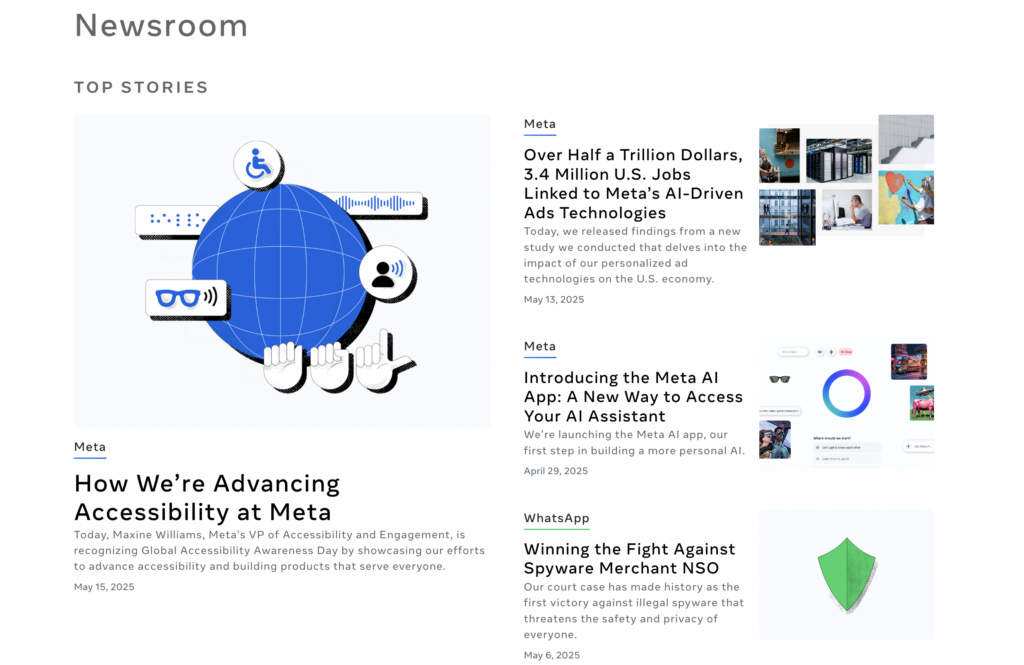
Meta Newsroom is an example of a headless WordPress implementation. The site’s front end is built using React, while WordPress works as the back end for managing content.
Due to the added complexity, going headless may not be a good fit for every project. Headless architecture requires a longer setup time, custom coding, and effective backend and frontend system coordination.
If your development team lacks full-stack experience with the various technologies involved, the process can be slower and more prone to errors.
Additionally, WordPress’ built-in access controls don’t automatically apply to a separate frontend, so you’ll need to make extra efforts to ensure the security of your web app.
Consider implementing a headless WordPress infrastructure if:
✅ You need more control over the frontend than WordPress themes allow.
✅ You’re building a web application with highly interactive UI elements.
✅ You’re targeting multiple platforms with shared content.
✅ Your development team is comfortable with JavaScript frameworks, PHP, and API-based workflows.
Challenges and considerations for building web apps with WordPress
While WordPress offers flexibility and a strong ecosystem, developing full-scale web applications on the platform comes with technical and strategic challenges.
Security
WordPress is open source, so your web app’s security maintenance will be entirely in your hands.
Common WordPress vulnerabilities stem from outdated plugins, themes, or the core system itself, which can create entry points for malicious actors when poorly maintained.
Web apps introduce additional risks due to their interactive features, increasing the chances of attacks like SQL injection, cross-site scripting (XSS), and cross-site request forgery (CSRF). In headless WordPress setups, publicly exposed API endpoints can also become vulnerable entry points if not properly secured.
Apply the following best practices to secure your WordPress web app:
- Use plugins that are actively maintained and well-reviewed from trusted sources. Also, delete unused plugins entirely, don’t just deactivate them from your WordPress admin dashboard.
- Regularly create a WordPress backup, so you can quickly restore it if anything goes wrong.
- Make sure your WordPress core software, themes, and plugins are always up to date – automate the process where possible.
- Install a trusted security plugin like Wordfence or Sucuri to integrate additional security enhancements.
- Use strong passwords and implement two-factor authentication (2FA) for all admin and high-permission user accounts.
- Properly define custom roles and restrict sensitive admin access. Grant users only the permissions they need.
- If you use headless setups, secure your REST or GraphQL endpoints with authentication tokens, scopes, and user capability checks.
Performance
WordPress isn’t a full-fledged web application framework by nature, so performance bottlenecks can occur as your project complexity increases.
In low-code development, plugin bloat is a frequent issue that can slow down the site. Meanwhile, in a headless setup, slow API responses can delay content rendering on the front end.
Choosing a high-performance hosting solution – like managed hosting for WordPress, virtual private server (VPS), or cloud-based container service – is a key step to ensuring your web app runs smoothly. And for headless setups, choosing optimized hosting for the front end is equally important.
On top of that, these are some optimization strategies to speed up your WordPress site:
- Enable page caching, browser caching, and WordPress object caching. Plugins like LiteSpeed Cache, WP Rocket, and W3 Total Cache are popular and reliable choices.
- For headless setups, implement frontend-level caching strategies that align with your framework. For example, you can use Incremental Static Regeneration (ISR) in Next.js.
- Optimize your WordPress database by removing unnecessary data like post revisions, spam comments, and transients.
- Implement lazy loading (and code splitting in headless setups) to reduce initial load times.
- Use content delivery networks (CDNs) to serve static assets from edge locations, improving performance for global users.
Complexity
Building a web application with WordPress introduces a layer of complexity that demands careful planning and execution, whether for plugin-based development or a headless architecture.
In low-code development, plugin compatibility issues and tangled logic often become obstacles as your web app grows in complexity. To implement more advanced or tailored features, you may also end up needing custom development, reducing the simplicity that plugins initially offer.
Meanwhile, headless setups add another layer of complexity by requiring seamless coordination between the back and front end. Managing this data flow introduces architectural overhead that should be thoughtfully designed.
Here are some of the things you can do to keep the web app development scalable:
- Document everything, from plugin customizations you made to all the API endpoints. This ensures that team members can pick up work without confusion.
- Set up a staging environment to test features and updates before pushing them live.
- Adopt a consistent coding standard to improve code readability, simplify maintenance, and ease developer onboarding.
- Use project management tools like Jira or Asana to improve collaboration.
- In a headless environment, use a well-structured API and keep data models consistent between the frontend and backend.
- If needed, use version control systems like Git to maintain a clean development workflow.
An easier alternative to building web apps
According to a W3Tech report, WordPress remains a popular, beginner-friendly choice for powering multiple website types, including web applications.
But at the same time, new tools and platforms have emerged, making web app development more accessible to everyone.
If you’re aiming for rapid development with minimal technical overhead, a no-code app builder can be a compelling alternative. It lets you build functional, database-driven web apps even when you don’t have any technical knowledge.
Here are some benefits of building a web app with no-code platforms:
✅ Faster time to market
✅ Lower upfront development cost
✅ Easier iteration and testing
✅ Ideal for creating minimum viable products (MVPs) and internal tools
Hostinger Horizons is an example of an AI-powered web app creation tool. Paired with Hostinger’s hosting, domain, and business email services, it offers an all-in-one solution for building a fully functional web application.
In a nutshell, creating a web app with Hostinger Horizons only takes a few simple steps: define the features you need, generate and refine the app by writing prompts, and connect your domain name.
If you already have a WordPress site, you can create a separate web app with the necessary functionality and host it on a subdomain of your existing site.
The process will be the same – build and refine your web app with Hostinger Horizons first. Then, use the subdomain you created when you’re asked to connect a domain name to your web app. Once set up, link to the web app from your WordPress site to direct users to it.
Conclusion
WordPress remains a robust and accessible platform for building web applications, especially if your project is content-driven or you want to scale an existing site. Its low-code flexibility and large user community make it a practical starting point for many use cases.
That said, building a web app with WordPress also comes with challenges, such as plugin compatibility, performance limitations, and growing complexity as your app evolves.
If you prefer more streamlined options, there are many emerging no-code platforms like Hostinger Horizons that let you launch simple apps quickly, with minimal technical overhead.
On the other end of the spectrum, if your web app demands fine-grained features, high scalability, or custom logic, choosing a dedicated framework or a headless approach with support from experienced developers may be the better path.
Ultimately, the best platform and development strategy will depend on your goals. Take your time to evaluate what your web app needs in terms of features, timeline, and resources.
Still unsure which route to choose? Drop your questions in the comments or share your web app goals – we’re happy to help you map the best way forward.
Web app with WordPress FAQ
Is WordPress secure for enterprise-level web apps?
Yes, WordPress can be secure for enterprise-level web apps when properly configured. WordPress is an open-source platform, so the responsibility for security falls entirely on you. As long as you implement robust security best practices, WordPress can be a secure and reliable platform.
What plugins are essential for building web apps with WordPress?
Caching and security plugins are essential for maintaining your web app’s performance and security. Other feature-related WordPress plugins will depend on the features you want to integrate into your web app.
How does WordPress compare to dedicated web app platforms?
WordPress offers more flexibility than no-code tools but has a steeper learning curve, so it’s in the middle ground. AI-powered platforms like Hostinger Horizons are the simplest option for building web apps quickly and easily. Meanwhile, custom frameworks like Laravel or Django are best suited for advanced projects that require complex features and experienced developers.

Larassatti Dharma is a content writer with 4+ years of experience in the web hosting industry. She has populated the internet with over 100 YouTube scripts and articles around web hosting, digital marketing, and email marketing. When she's not writing, Laras enjoys solo traveling around the globe or trying new recipes in her kitchen. Follow her on LinkedIn


