How to connect a custom domain name to your web app
May 15, 2026
/
Larassatti D. & Dainius K.
/
5 min Read
Connecting a custom domain name is an essential part of creating a web app. It lets users reach your app by typing a simple, memorable name in their browser instead of internet protocol (IP) address numbers, like 123.456.789.10.
A custom domain name is also a key part of your brand’s identity. It builds user trust, boosts credibility, and it makes your web app easier to remember.
In this guide, we’ll show you how to connect your web app to a custom domain name, and we’ll recommend the best extensions for multiple web app types. Let’s start!
What is a custom domain?
A custom domain name is a unique identifier that replaces your web app’s IP address. It consists of your chosen web app or business name combined with an extension like .com or .net, resulting in a human-readable address like yourwebapp.com.
How to connect a custom domain to a web app?
There are many ways to create a web app, and as such, the steps to connect a custom domain vary.
For example, Hostinger Horizons offers direct integration with Hostinger’s domain services, allowing for instant domain connection to your published web app. Meanwhile, other AI-powered web app builders often require additional steps.
In this section, we’ll guide you through connecting a custom domain to a web app built with no-code tools.
How to connect a domain to a web app built with Hostinger Horizons
Hostinger Horizons is an AI web app builder that offers hosting, email, and domain registration all in one place. This makes connecting a custom domain to your web app a lot simpler.
There are two ways to connect a custom domain in Hostinger Horizons. The first method is to connect the domain as the final step in your web app creation process. Here’s how:
- Build and refine your web app with Hostinger Horizons.
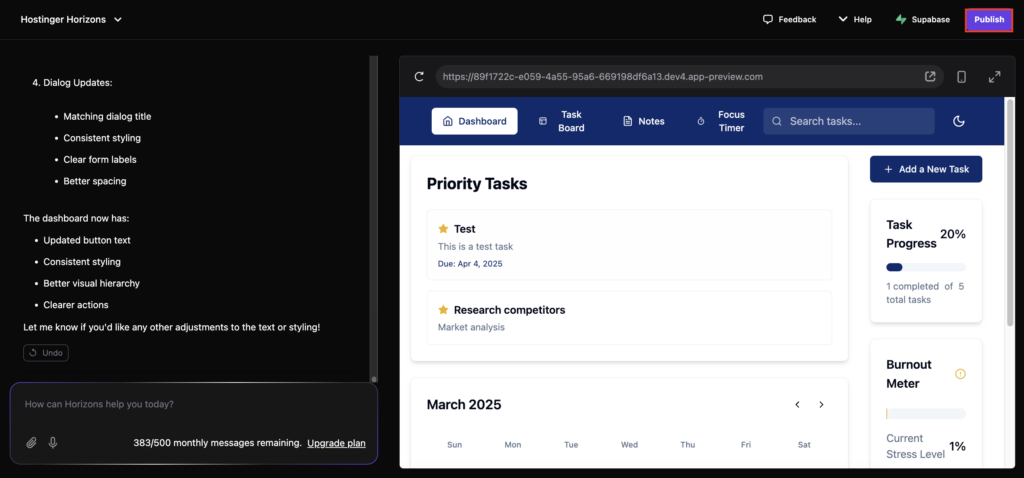
- Once you’re satisfied with the results, hit the Publish button.
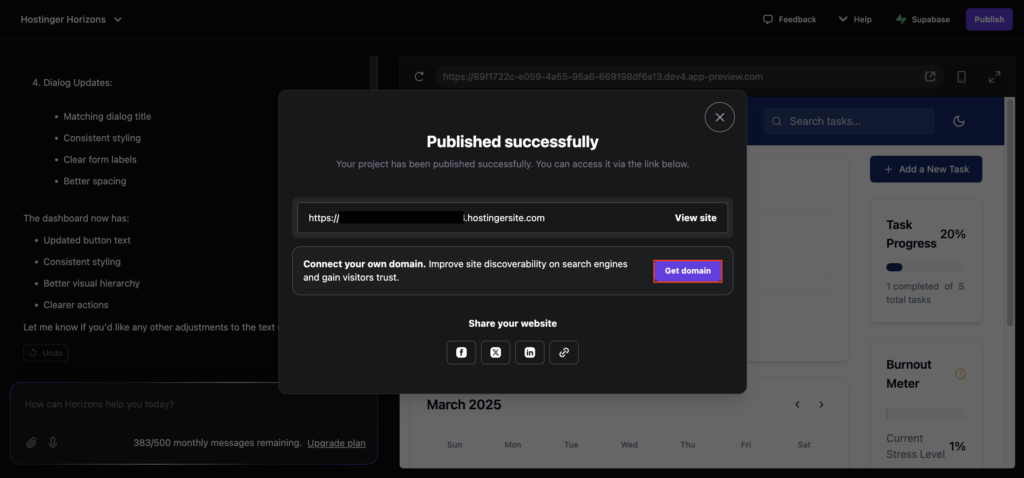
- You’ll see a pop-up confirming that your web app was published successfully. Click the Get domain button.
- Enter your desired custom domain name into the field to establish whether it is available. If so, select it from the list. If not, modify the name or change the extension until you find one that is available.
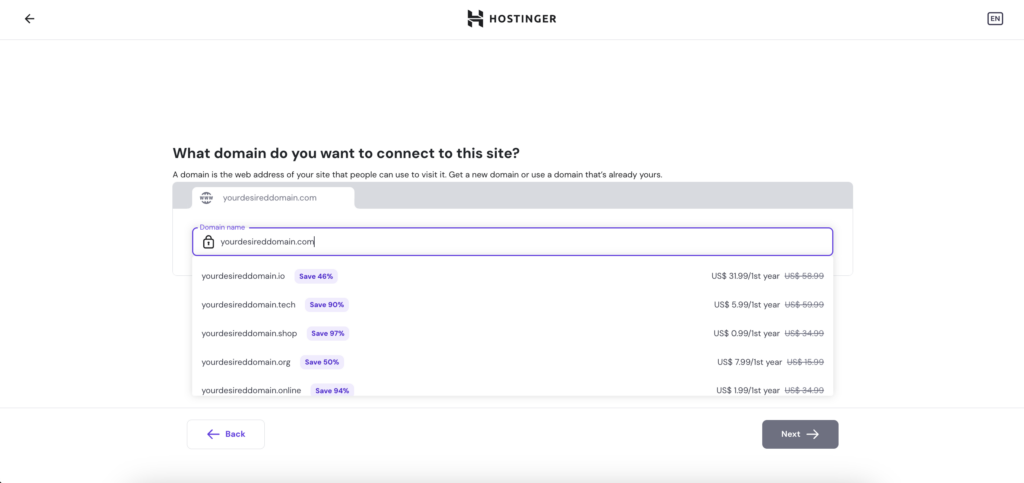
- Click Next and follow the instructions to complete.
Don’t worry if this is your first time owning a domain name. You’ll only need to complete the payment, and you’ll be all set! If you want to connect an existing domain name that you’ve already registered, there will be no extra steps after clicking Next.
The second way to connect your Hostinger Horizons web app is to do it later rather than during the web app publishing process. This way, you can take your time choosing the perfect domain name. Then, once you’re ready, just follow these steps:
- Log in to your Hostinger account to access hPanel.
- Navigate to Websites → Websites list.
- Find the web app you created on the list and click Change domain.

- Type in the domain name you want to link with your web app.
- Click Next and follow the steps to completion in hPanel.
- Go back to your web application editor interface by navigating to Websites → Websites list → Edit web app on hPanel. Hit Publish to implement the change.
Note that your domain name settings may take 24–48 hours to propagate fully. This means you still won’t be able to access your web app by typing the domain name into your browser during this period – but don’t worry, this is normal. If it takes longer than that, our Customer Success team is available 24/7 to help you troubleshoot any issues.
How to deploy your web application with other no-code tools
While other AI-powered web app builders can also simplify web application creation, the deployment process may vary.
Each no-code tool has different policies regarding your web app’s source code. Some allow you to export and host the code elsewhere, while others provide specific or required hosting options.
But when it comes to connecting a custom domain name, they all follow similar steps:
- Buy a custom domain from a registrar like Hostinger.
- Generate domain name system (DNS) records from your web app creation tool.
- Enter the DNS settings into your domain registrar’s control panel in order to point them to your web app’s server.
How to connect a custom domain to a self-hosted web app
The steps for connecting a custom component to a self-hosted, custom-coded web application vary depending on the hosting platform. For example, if you use a VPS, it involves connecting your domain to the host server.
Meanwhile, the steps are typically simpler if you use a managed service, because it provides a built-in feature for connecting a custom domain. For example, Hostinger’s Node.js web app hosting solution lets you do it via hPanel:
Important! Before getting into the steps, ensure you have deployed your application on Hostinger’s front-end hosting solution using the temporary domain.
- Open hPanel and go to the sidepanel → Websites → Websites List.
- Click Connect domain underneath the name of your website.

- Check the box to acknowledge that you may need to update the domain name in your app’s database.
- Hit Change.
- Choose an existing domain or enter a new one, which comes for free with our web-app hosting plan. Click Next.
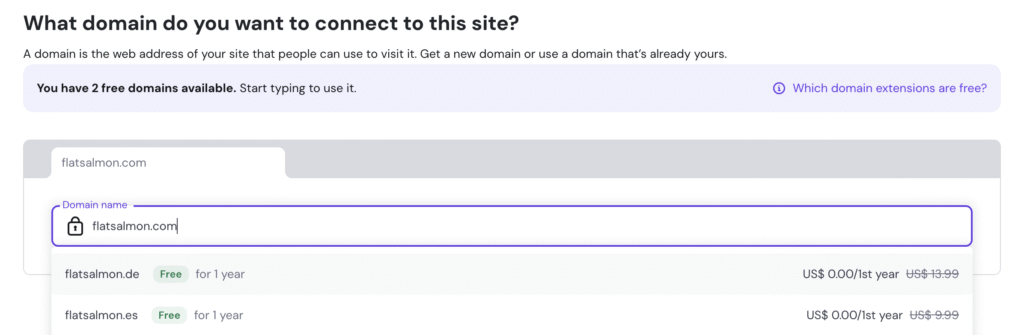
- Register your domain and click Finish registration once complete.
- Click Continue to finalize your domain.
That’s it. Wait a few hours until your domain is fully pointed to your application and the propagation process is complete, which may take up to 24 hours. If the app remains inaccessible, modify your app’s database to point to the new domain.
Recommended domain extensions for different types of web apps
A relevant domain extension helps shape your web app’s branding strategy. With the overwhelming dominance of .com, there’s a greater chance that a .com version of your chosen domain name has been taken. Here’s a look at some more distinctive extension options for multiple web application types:
- .app – a generic choice that’s suitable for all types of web apps.
- .io – popular for tech startups, SaaS platforms, and developer-focused apps.
- .tech – ideal for tech-related web apps, innovation hubs, or technology service providers.
- .edu – best for educational web apps, online courses, or learning platforms.
- .pro – suitable for professional service apps like consulting and legal.
- .co – a great choice for startups and businesses looking for a short, memorable domain.
- .dev – tailored for development tools, coding platforms, or apps focused on programming.
- .ai – perfect for AI-driven apps, machine learning tools, or automated data science platforms.
- .cloud – ideal for cloud-based web apps or services.
- .me – a great fit for personal apps like portfolios, virtual business cards, or any app focusing on individuals.
- .health – ideal for healthcare-related apps, fitness platforms, or medical services.
- .community – best for creating a community web app where users can share ideas, tips, or connect over shared interests.
- .travel – a great choice for travel web apps focusing on exploring global destinations, cultural experiences, or discovering new places.
Conclusion
Connecting a custom domain name to your web app is essential for establishing a strong online presence. It builds user trust, enhances your brand, and makes your app easier to access.
The steps to connect a custom domain name may vary depending on your chosen web app creation tool. In this tutorial, we’ve discussed how you can do it with Hostinger Horizons or other similar AI-powered tools.
We hope this tutorial helps you connect a custom domain name to your web app with no hassle. If you have more questions or feedback for Hostinger Horizons, don’t hesitate to leave a comment.
Join our Discord channel for more tips and inspiration on making the most of Hostinger Horizons. Connect with the community, get expert advice, and stay updated on the latest features!
How to connect a custom domain to my web app FAQ
Do I need an SSL certificate for a web app?
Yes. An SSL certificate is essential to secure your web app, especially if you plan to store and monetize users’ data. Without one, web browsers will mark your app as “Not Secure.”
How do I check if the domain is properly linked?
Simply enter your domain name in a browser and see if your web app loads. If it’s still in the propagation period, use a tool like WhatsMyDNS to monitor the status. In case of any issues, review your DNS and hosting settings or contact your service provider’s customer support team.

Larassatti Dharma is a content writer with 4+ years of experience in the web hosting industry. She has populated the internet with over 100 YouTube scripts and articles around web hosting, digital marketing, and email marketing. When she's not writing, Laras enjoys solo traveling around the globe or trying new recipes in her kitchen. Follow her on LinkedIn

Dainius Kavoliunas is the Head of Product for Hostinger Horizons, with a passion for building innovative solutions. As an expert in product management, he combines deep expertise in UX, experimentation, and data analysis with a technical background to lead product strategy and build strong teams. He is particularly excited about the practical applications of AI and its potential to transform how we work and live. Follow him on LinkedIn.