What is SaaS? Understanding how it works, benefits, and popular use cases
Mar 10, 2026
/
Ksenija
/
9 min Read
If you’ve ever used Google Docs, streamed music on Spotify, or managed projects with Trello, you’ve already experienced SaaS in action.
But what exactly is SaaS, and is it something you can benefit from?
This guide breaks down everything you need to know. From how SaaS works and how it compares to traditional software, to the many benefits it offers to businesses of all sizes.
Whether you’re a startup founder, IT professional, or just curious about the buzz, we’ll help you understand what SaaS is, and how it fits into the broader cloud computing ecosystem.
What is SaaS?
SaaS, or software as a service, is a cloud-based software delivery model that hosts applications online so that users can access them via the internet.
Instead of downloading and installing a program on your computer, you just open a web browser and use it online. The company that provides the software takes care of updates, security, and maintenance, yours is just to use it.
If you are a Netflix subscriber, you probably already know how SaaS works. You don’t need to download or instal anything. You just log into your account and start watching movies without storing them on your device.
A short history of SaaS
SaaS evolved from 1960s time-sharing systems, where users accessed centralized computers via “dumb terminals.” The 1980s-90s shift to personal computers brought on-premises software with costly maintenance challenges.
The internet’s evolution enabled remote software hosting and set the stage for cloud computing, with Salesforce proving the viability of cloud-based SaaS in 1999 with its CRM. Today, SaaS is a go-to solution for businesses of all sizes due to its affordability, scalability, and ease of use.
SaaS vs. on-premises software
Unlike on-premises software that requires local installation, SaaS operates entirely in the cloud.
Besides eliminating the need for on-site servers, SaaS provides businesses with more flexibility and the ability to scale easily as they grow.
Explore the table below to further understand the key differences between these two software models.
| Feature | SaaS | On-premises software |
| Pricing model | Subscription-based (monthly or annual) | One-time licensing fees per user or device |
| Installation | No installation needed; accessed via the internet | Requires hardware and manual installation on each device |
| Scalability | Easily scalable; pay for what you need | Scaling requires additional hardware and licenses |
| Maintenance | Automatically handled by the provider | Requires in-house IT team for updates and maintenance |
| Accessibility | Accessible from any device with internet access | Limited to on-site devices where the software is installed |
| Security and backup | Managed by the provider with regular backups | Requires internal security measures and backup solutions |
How does SaaS work?
SaaS works by storing and running software on cloud servers instead of individual computers. The provider handles everything behind the scenes, including updates, patches, and new features.
SaaS from the user perspective
From the user’s perspective, getting started with a SaaS application is simple. You sign up and log in using methods like a password, social login, single sign-on (SSO), or multi-factor authentication (MFA).
Once authenticated, you can access the software instantly through a web browser or mobile app without installing anything on your computer.
All your work and data are saved automatically in the cloud. That means you can pick up right where you left off, no matter which device you’re using, as long as you’re connected to the internet.
SaaS infrastructure
While your experience using the software feels effortless, a lot is happening behind the scenes to make that possible.
SaaS platforms run on powerful servers located in secure, professionally managed data centers. These servers are designed to scale, so performance stays strong even as more users log in or as data volumes grow.
The provider is also responsible for:
- Automatic updates and patches that allow you to always work on the latest software version with the newest security fixes.
- Data backups that ensure your information is protected, so you’re never at risk of losing valuable data.
- Performance monitoring that helps detect and resolve potential issues before they ever impact your experience.
- Security protocols like firewalls, encryption, and intrusion detection systems that safeguard your data and keep malicious threats away.
SaaS subscription model
Instead of buying software, SaaS users pay a recurring fee, usually monthly or annually. This subscription grants access to the platform and often includes support, updates, and cloud storage.
Pricing typically depends on factors like:
- Number of users (per seat or per team)
- Storage or usage limits
- Access to premium features or integrations
SaaS providers typically offer multiple tiers or plans, so businesses can choose the level that fits their needs and scale up as they grow. There is a wide range of different pricing models to choose from.
Multi-tenant vs. single-tenant models
Most SaaS platforms use a multi-tenant architecture, meaning one version of the software serves many users while keeping their data private and secure.
It’s similar to renting an apartment, with everyone living in the same building but having their own separate space. The building itself (the software) is maintained and managed by a landlord (the provider), and your unit (data) is kept separate from your neighbors’ (other users).
In a single-tenant setup, each customer gets their own instance, meaning they have their own isolated version of the software, running on dedicated resources such as virtual machines or cloud servers.
How SaaS handles data storage
The software runs on powerful servers housed in secure data centers, which are designed to expand capacity whenever more users or data need to be processed.
Some SaaS providers store data across multiple locations to keep things running even if something goes wrong. If one server fails, another steps in so users don’t experience downtime.
Key characteristics of SaaS
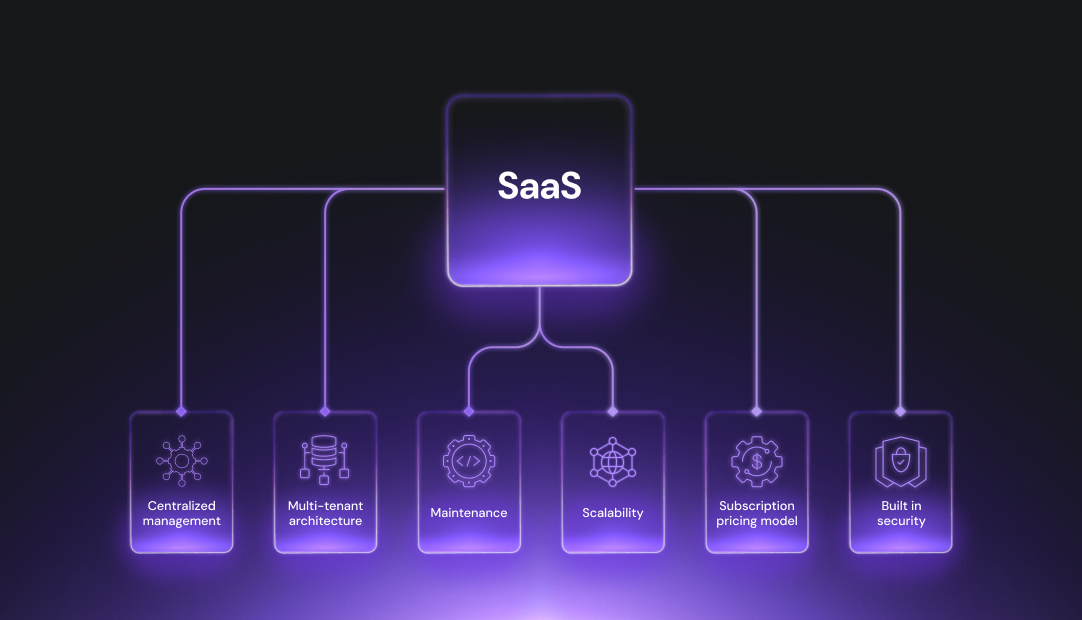
SaaS is built on key features that make it scalable, secure, and easy to use.
Key characteristics of SaaS include:
- No installation on local device: SaaS applications are hosted in the cloud, so there’s no need to download or install software on individual devices.
- Device flexibility: As long as you have an internet connection, you can access SaaS tools from any device, whether it’s a desktop, laptop, tablet, or smartphone.
- Multi-tenant architecture: Most SaaS solutions use a multi-tenant model, where a single instance of the software serves multiple customers. Each user’s data is kept secure and separate, while the shared infrastructure keeps costs low and scalability high.
- Automated updates and maintenance: SaaS providers manage updates, patches, and new feature releases automatically.
- On-demand scalability: SaaS platforms scale to match your users’ needs, without requiring additional hardware or complex installations.
- Subscription-based pricing: Rather than paying a hefty upfront fee, SaaS customers subscribe to a monthly or annual plan.
- Built-in security and data redundancy: SaaS providers take care of cybersecurity with built-in protections like encryption, firewalls, multi-factor authentication (MFA), and regular backups.
- Built-in collaboration: Features like real-time editing, shared dashboards, task assignments, and cross-team communication make it easier for teams to collaborate, no matter where they are physically located.
Benefits of using SaaS
SaaS makes day-to-day operations easier for professionals and businesses of all kinds and sizes.
The five top benefits of using SaaS include:
- Lower upfront costs – You pay a recurring subscription instead of a large one-time fee. No need to invest in expensive infrastructure or licenses.
- Effortless updates and maintenance – The provider handles all updates and bug fixes automatically, so you always use the latest version.
- Remote accessibility – All you need is a browser or app and an internet connection to work from anywhere, anytime.
- Scalability – Easily add or remove users, features, or storage as your needs change.
- User-friendliness –SaaS tools usually come with user-friendly interfaces and simple onboarding so that everyone can use them regardless of their technical background.
Some of the most popular SaaS solutions include:
- Customer Relationship Management (CRM) – Great for managing customer data, tracking sales interactions, and automating parts of the sales process.
- Project Management – Ideal for organizing tasks, setting deadlines, and keeping team collaboration in sync. These tools are especially helpful for businesses with remote or hybrid work models.
- Accounting and Finance – Perfect for simplifying payroll invoicing and expense tracking.
- Marketing and Email Automation – Useful for creating targeted campaigns, automating follow-ups, and tracking engagement in marketing strategies.
SaaS vs. IaaS vs. PaaS
When it comes to cloud computing, there are two main service models besides SaaS: infrastructure as a service (IaaS), and platform as a service (PaaS).
What is IaaS?
IaaS is a cloud computing model that provides virtualized computing resources like servers, storage, and networking over the internet.
It’s basically renting IT infrastructure from a cloud provider, giving you full control over your operating systems, web applications, and configurations, while the provider takes care of the physical data centers, security, and uptime.
Here’s what some of the leading IaaS platforms do:
- Amazon Web Services (AWS) provides services like Amazon EC2 for scalable virtual servers, Amazon S3 for storage, as well as powerful networking tools.
- Microsoft Azure offers flexible IaaS solutions such as Virtual Machines and Azure Storage, allowing businesses to run both Microsoft and non-Microsoft workloads with seamless hybrid cloud integration.
- Google Cloud Platform (GCP) delivers IaaS through Google Compute Engine, offering affordable virtual machines, strong networking options, and tools like Anthos for multi-cloud management.
What is PaaS?
In its essence, PaaS is a cloud-based environment where developers can build, test, and deploy applications without having to manage hardware or software updates.
It includes tools for coding, database management, and application hosting.
Some of the most popular PaaS providers are:
- Heroku, which lets developers deploy, manage, and scale unique software solutions.
- Salesforce Lightning, great for rapid application development with reusable building blocks and enhanced user interfaces.
- IBM Cloud Foundry, offers tools for building and deploying cloud-native applications, as well as easy integration support for enterprise systems.
SaaS vs. IaaS vs. PaaS comparison
To help you better understand the differences between these three cloud computing models, here’s a table summing up all the key points:
| Feature | SaaS | IaaS | PaaS |
| What it offers | Ready-to-use applications | Virtual servers and infrastructure | Development tools and runtime |
| What user manages | App settings and usage | OS, apps, data | Apps and data |
| What provider manages | Everything else | Hardware and virtualization | Infrastructure and platform tools |
| Best for | End users | IT teams / advanced tech needs | Developers |
| Cost predictability | High (subscriptions) | Variable (based on resource usage) | Moderate (usage-based) |
| Setup complexity | Low | High | Medium |
| Use cases | Email, CRM, accounting | Data centers, VMs, custom networks | App dev, APIs, CI/CD |
Common SaaS use cases
The real beauty of SaaS lies in its versatility. Small businesses benefit just as much as larger enterprises from the same powerful cloud-based solutions, without the need for heavy upfront investment or IT infrastructure.
Furthermore, SaaS is highly relevant for non-tech industries like healthcare, retail, and education, where it improves efficiency, collaboration, and overall business management.
Below are some of the most common SaaS use cases:
Customer relationship management (CRM):
- Popular service providers: Salesforce, HubSpot, Zoho CRM
- What they are used for: Managing customer interactions, tracking leads, and automating sales processes.
- Industries they serve: Retail, real estate, financial services, consulting, and more.
- Used by: Coca-Cola and Netflix use Salesforce to manage customer service operations and sales pipelines.
Project management and team collaboration:
- Popular service providers: Asana, Trello, ClickUp
- What they are used for: Streamlining task management, team collaboration, and project tracking.
- Industries they serve: Marketing agencies, IT services, education, and nonprofits.
- Used by: Uber and Airbnb use Asana to coordinate internal projects and team workflows.
Ecommerce platforms:
- Popular service providers: Hostinger Website Builder, BigCommerce, Wix
- What they are used for: Building and managing online stores with integrated tools for marketing, payments, and inventory management.
- Industries they serve: Retail, fashion, food and beverage.
- Used by: Redbull and Gymshark run their ecommerce operations using Shopify.
Human resources (HR) tools:
- Popular service providers: Workday, BambooHR, Gusto
- What they are used for: Simplifying recruitment, payroll processing, employee onboarding, and performance tracking.
- Industries they serve: Healthcare, digital marketing, technology companies, and small businesses.
- Used by: Levi Strauss & Co and Southwest Airlines to streamline their hiring processes.
Marketing automation:
- Popular service providers: Mailchimp, Marketo, ActiveCampaign
- What they are used for: Automating email campaigns, lead nurturing, and customer segmentation.
- Industries they serve: Ecommerce, SaaS companies, and digital marketing agencies.
- Used by: JPMorgan Chase uses Mailchimp to launch extensive email marketing campaigns.
Communication and video conferencing:
- Popular service providers: Slack, Zoom, Microsoft Teams
- What they are used for: Facilitating remote work through messaging platforms and video conferencing tools.
- Industries they serve: Corporate enterprises, education institutions, startups, and any remote work model business.
- Used by: IBM and Target use Slack for internal communication across departments
Data analytics and business intelligence:
- Popular service providers: Tableau, Looker, Snowflake
- What they are used for: Analyzing data for actionable insights to drive decision-making processes.
- Industries they serve: Financial services, healthcare analytics, manufacturing, and more.
- Used by: Lenovo and Nissan use Tableau to monitor supply chains and analyze customer behavior.
IT management:
- Popular service providers: ServiceNow, Jamf
- What they are used for: Managing IT operations like device management or workflow automation for enterprises.
- Industries they serve: Large enterprises and managed service providers.
- Used by: VISA and Siemens use ServiceNow for IT service management and workflow automation.
The future of SaaS
Not so long ago, artificial intelligence (AI) and machine learning (ML) were just another tech hot topic. Today, they’re the engines driving the next generation of SaaS.
We can already see a wave of SaaS platforms using AI and ML to deliver:
- Personalization – With Natural Language Processing (NLP), AI adapts software interfaces to human speech and behavior, offering better customer service and tailored user experiences.
- Speed – AI speeds up workflows, from forecasting to answering support queries, making businesses faster and more responsive.
- Security – Machine learning identifies anomalies and threats in real time, automating threat detection and enabling rapid self-recovery.
- Data intelligence – AI-powered tools scan through large datasets, clean and segment information, and extract actionable insights.
- Self-improving systems – ML enables platforms to learn from every user interaction, continuously improving without manual reprogramming.
This momentum is reflected in industry projections as the global SaaS market is expected to grow from $315.68 billion in 2025 to $1.13 trillion by 2032.
As SaaS technology becomes more intelligent, it’s also becoming more accessible. You no longer need a development team or deep coding knowledge to build your own SaaS tools.
With platforms like Hostinger Horizons AI web app generator that require no coding skills and are AI-driven, even non-technical individuals can create fully functional web applications for personal or professional use.
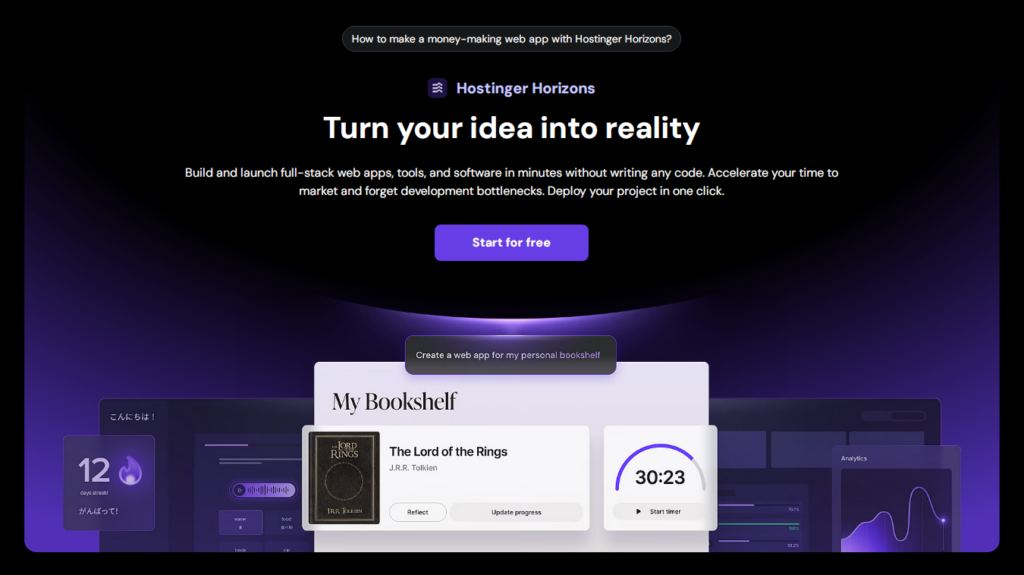
How it works?
- Describe your idea in plain language (or upload sketches/images), and the AI will take care of the initial build, creating a working version in seconds. Check out some of the best examples of web applications to get inspired.
- Edit using AI-powered prompts to add features, tweak layouts, or fix bugs in real time.
- Deploy instantly, complete with integrated hosting, a domain, and professional email services.
Its responsive design ensures your app looks great across all devices, and with built-in sandbox testing, you can refine your product before going live.
Conclusion
SaaS has completely transformed the way people and businesses access software. No more complex installations, hefty upfront costs, or endless IT maintenance.
With software as a service, you simply sign in and start working.
From flexibility and scalability to cost-efficiency and seamless updates, the advantages of SaaS are hard to ignore.
Whether you’re looking to streamline workflows, boost collaboration, or improve customer service, there’s likely a SaaS tool ready to do the heavy lifting.
We hope this article helped clarify the role of SaaS in modern tech and gave you a clearer picture of how it can support your goals.
What is SaaS FAQ
What is SaaS in simple terms?
SaaS or software as a service is a cloud-based delivery model where users access applications through the internet. You don’t need to download or install anything on your computer. You simply log in via a browser.
Think of it as renting software instead of buying it, leaving updates, maintenance, and storage to the provider to take care of.
What’s an example of a SaaS?
One of the most widely used SaaS solutions is Google Docs. You open it in your browser, write or edit documents in real time, and everything is saved automatically in the cloud without having to install any software.
Which SaaS products are the most popular?
Some of the most popular SaaS products include Salesforce, Zoom, Slack, and HubSpot. These tools are widely used for communication, collaboration, file storage, and customer relationship management.

Ksenija is a digital marketing enthusiast with extensive expertise in content creation and website optimization. Specializing in WordPress, she enjoys writing about the platform’s nuances, from design to functionality, and sharing her insights with others. When she’s not perfecting her trade, you’ll find her on the local basketball court or at home enjoying a crime story. Follow her on LinkedIn.

Comments
May 07 2025
Great read thanks Hostinger!