Web application architecture guide: What it is, and key components
Jul 08, 2026
/
Jordana A.
/
9 min Read
Web application architecture refers to the way web applications are structured and how various components work together to deliver functionality – it’s the foundation that supports the operation and performance of web apps, making sure they run smoothly, efficiently, and securely. A well-designed web application should be scalable, easy to maintain and update, and adaptable to your users’ needs.
Whether you’re just getting into web application development or looking to refine your process, this guide is a great starting point.
We’ll break down the key components of web application architecture:
- Client side (front end)
- Server side (back end)
- Database
- Web server
- Application server
- API layer
- Load balancer
- CDN (Content Delivery Network)
- Security components
- Monitoring and logging
We will also explore different types of web application architecture with examples and best design practices.
What is web application architecture?
Web application architecture outlines how the front end and back end communicate to perform specific functions.
Like a blueprint for a building, it is used to organize and plan each component, ensuring that all parts work together seamlessly to create a stable and efficient web app.
What’s the difference between application architecture and software design?
While both application architecture and software design are essential in building web applications, they focus on different aspects of the development process.
Application architecture is the high-level structure of the entire application. It focuses on how the system’s components interact, how data flows, and how different parts of the web application communicate. In short, it lays the foundation for performance, reliability, and scalability.
On the other hand, software design handles the functionality of individual components. It defines how each module solves specific problems, ensuring each part works efficiently and meets the required specifications.
What does an application architect do?
An application architect is responsible for designing the structure of a web application. They collaborate with developers, designers, and other stakeholders to understand requirements and translate them into a solid architecture.
This role involves making decisions about frameworks, data flow, and ensuring the system supports future growth. Application architects also focus on security, performance, and scalability ‒ making sure the final product meets user demands.
What are web application architecture components?
Web application architecture divides the structure into different layers, each handling specific tasks. Let’s look at the key components that make up the system.
Client side (front end)
This is the part of the web application that users interact with directly, including elements like the layout, buttons, and forms.
Key functions:
- Render user interface (UI) elements
- Handle user interactions
- Display dynamic content by retrieving data from the back end
Server side (back end)
This component handles everything that happens behind the scenes, such as processing requests from the client side, managing the database, and performing necessary operations to fulfill those requests. It’s responsible for data storage, security, and ensuring that users receive the right information.
Key functions:
- Handle data processing and business logic
- Manage database interactions and data storage
- Ensure application security and authentication
Database
The database stores and manages all the data for the web application, like user details, transaction records, and app content. It communicates with the server-side to provide or update data based on user requests.
For example, Hostinger Horizons has a built-in backend that includes a database to power your web apps, so you don’t need to integrate with external tools like Supabase.
Common database types used in web applications include relational databases like MySQL, which stores structured data in tables, and NoSQL databases like MongoDB which are ideal for handling unstructured or semi-structured data.
Key functions:
- Store and organize data for easy retrieval
- Support data queries and updates
- Maintain data integrity and security
Web server
A web server handles incoming requests from users’ browsers and delivers web pages or content. For example, when a user visits a web app, the server retrieves the requested page ‒ consisting of files like HTML, CSS, and JavaScript ‒ and sends them to the browser.
Key functions:
- Process incoming HTTP requests
- Deliver static content like HTML, CSS, and images
- Forward dynamic requests to the appropriate application server
Application server
An application server manages a web app’s logic and serves dynamic content. Unlike web servers, which typically handle static content, application servers are designed to process more complex tasks like data retrieval, user authentication, and real-time interactions.
When a user submits a form on a web app, the application server processes the data and responds with dynamic content, like user-specific information or updates based on the user’s input.
Key functions:
- Process dynamic content and business logic
- Interact with databases and backend services
- Handle server-side tasks like user authentication, session management, and data processing
API layer
The Application Programming Interface (API) layer enables communication between a web application’s front end and back end by defining the interaction rules for different components.
APIs allow the front end to request data from the back end and vice versa, making them crucial for web applications that rely on third-party services or dynamic data.
Key functions:
- Facilitate communication between front end and back end
- Provide data to and from external services
- Enable integration with third-party tools and APIs
Load balancer
A load balancer distributes incoming traffic across multiple servers to prevent overwhelming a single server. For example, during a traffic spike, it directs requests to less busy servers, maintaining performance and preventing downtime.
Key functions:
- Distribute traffic evenly across servers
- Enhance performance and uptime
- Provide fault tolerance during high traffic
CDN (Content Delivery Network)
A CDN is a network of servers that deliver web content to users based on their location. By caching content on servers closer to users, CDNs reduce latency and improve load times, making web apps faster and more efficient.
Key functions:
- Cache and deliver static content from multiple locations
- Reduce latency and improve page load times
- Enhance website performance for global users
Security components
Security components like firewalls, encryption, and authentication mechanisms protect data and maintain system integrity. For example, to secure data exchange between users and the server, web apps often require an SSL certificate.
Key functions:
- Protect data with encryption and secure connections
- Prevent unauthorized access with authentication and authorization
- Defend against security threats with monitoring tools
Monitoring and logging
Monitoring and logging help to detect issues early. Monitoring tools allow you to track website performance, while logs are records of events for easier troubleshooting.
Key functions:
- Track performance and user activity
- Detect and resolve issues quickly
- Provide insights for optimization
What is a good example of application architecture?
Good web application architecture organizes components to ensure performance, scalability, and maintainability. The following is an example of how the web application components we’ve discussed fit together in a typical architecture:
- The user interacts with the front end, where they input data, view content, and engage with the application.
- The front end communicates with the API layer, which acts as the intermediary between the client side and the server side, sending requests for dynamic data.
- The web server handles static content and forwards dynamic requests to the application server.
- The application server processes business logic and generates dynamic content, interacting with the database as needed.
- The application server communicates with the database to retrieve or store data, which is then sent back to the client side.
- The load balancer makes sure that incoming traffic is distributed evenly across multiple servers to maintain performance during high-traffic periods.
- Security components, like SSL certificates, firewalls, and authentication mechanisms, protect the data and ensure secure communication between the client and the server.
- The CDN delivers static content quickly by caching files on servers closer to the user, reducing load times and improving user experience.
- Monitoring tools track the application’s performance, while logging records actions and events to help troubleshoot any issues that arise.
Modern application architecture diagram
Here’s an illustration of how modern application architecture works and how its components communicate.
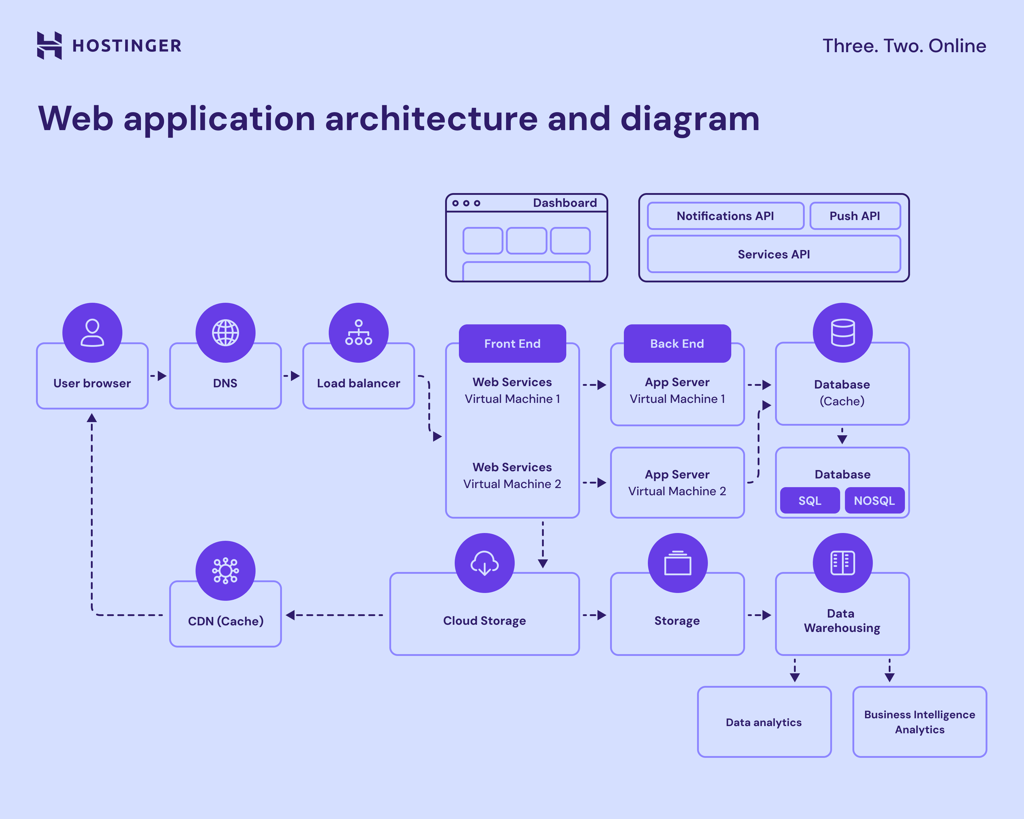
Modern application architecture is recommended for systems that would otherwise be hard to scale, maintain, or adapt to more sophisticated user needs – particularly if your app is complex or needs to be updated often.
What are the different types of application architecture?
The complexity of your application and its specific needs will determine the best architecture. Here are some common application architecture models, each with its unique features and ideal use cases.
1. Monolithic architecture
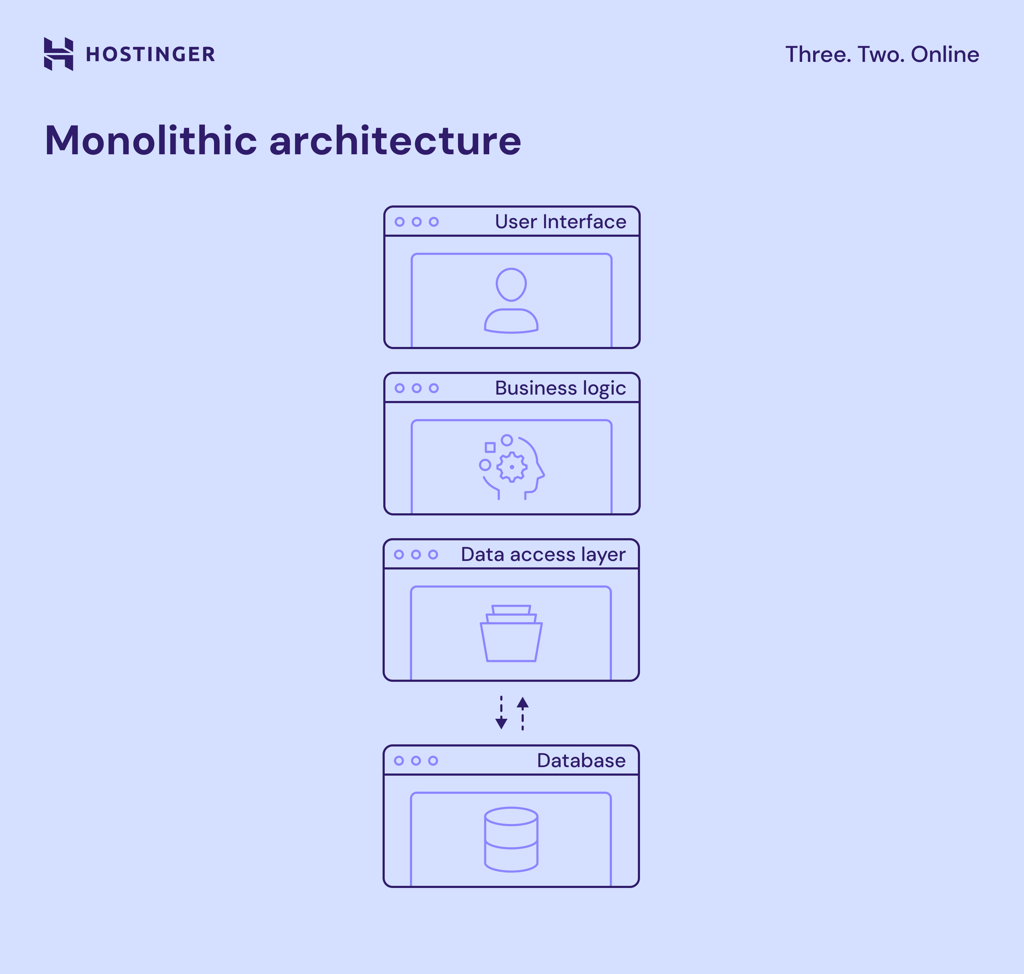
This is a traditional model where the entire application is built as a single unit, integrating all components (user interface, business logic, and data access) and deploying them together. This simplicity makes monolithic applications easier to develop and maintain initially, as there are fewer moving parts to manage.
That said, this architecture isn’t effective for complex applications. The lack of separate components makes it difficult to update or scale individual parts independently.
- Best for: small applications or minimum viable products (MVPs) that don’t require extensive scaling
- Examples: product catalogs, payment processing apps, checkout apps
2. Microservices architecture
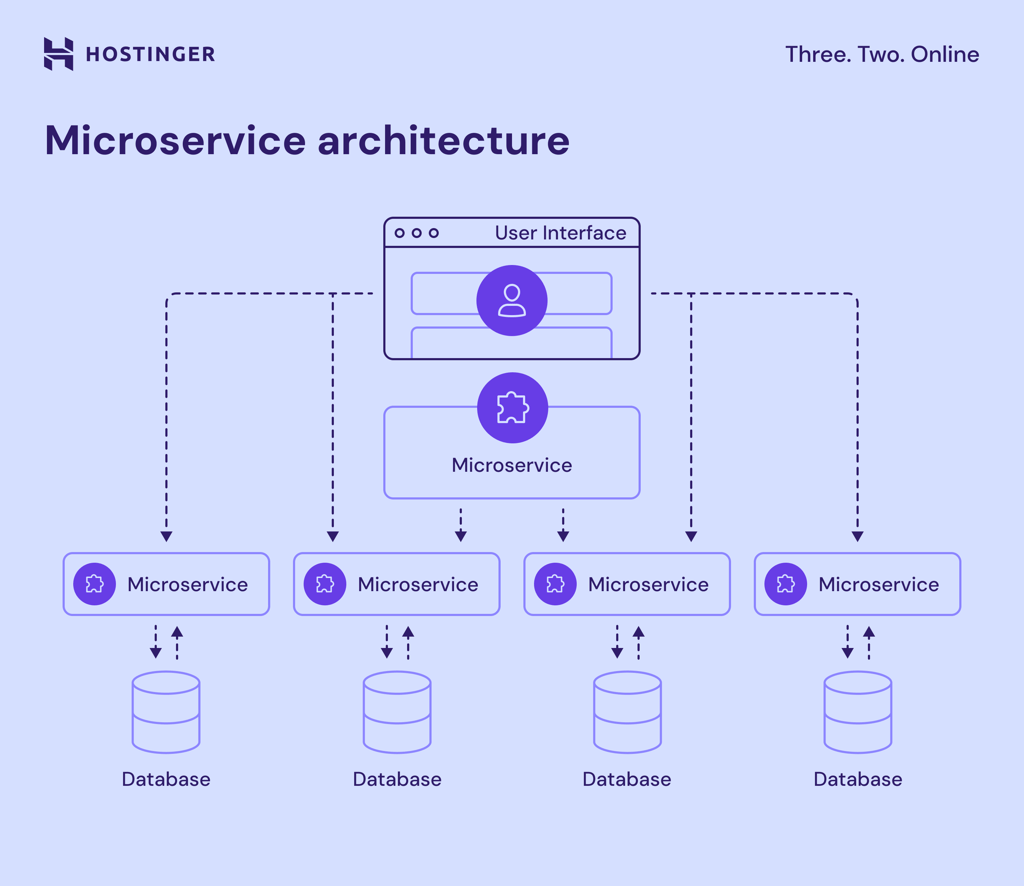
In microservices architecture, the application is divided into smaller, independent services, each handling a specific function. For example, an online banking application distributes services like account management, transaction processing, and customer support into separate microservices.
This approach allows developers to update or scale individual services without affecting the entire application. However, keep in mind that each microservice usually manages its own database, which can lead to data integrity challenges as the system grows more complex.
- Best for: large-scale applications with independent development teams that require faster delivery of features
- Examples: ecommerce web portals, apps with multiple functions (search feature, content tagging, personalized recommendation)
3. Serverless architecture
This app architecture type is popular for its cost efficiency. The cloud provider automatically manages the servers and scales them based on demand, so you only pay for what you use.
The downside is that control and flexibility may be limited. It can also lead to vendor dependency, meaning your application becomes tied to a specific cloud provider’s infrastructure and tools.
- Best for: applications with unpredictable workloads that require low latency
- Examples: machine learning apps, gaming apps, video streaming services
4. Event-driven architecture
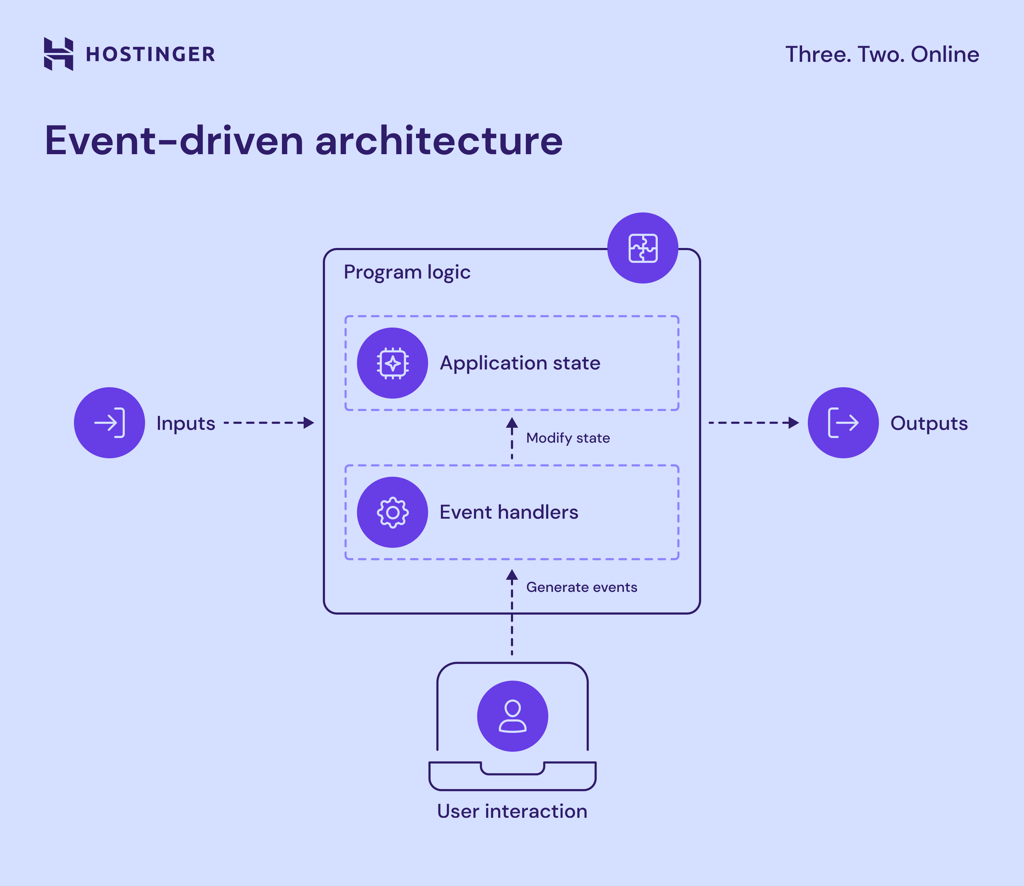
This architecture involves activating necessary components when an event occurs in real time. It allows systems to react quickly to changes and provide timely responses to users ‒ perfect for applications needing real-time processing like monitoring and fraud detection systems.
One common challenge to anticipate is maintaining the order of events. Since events can happen out of order, it can make debugging and monitoring more complex.
- Best for: real-time applications and systems that need to respond to events as they occur
- Examples: chat applications, stock trading platforms, package tracking systems
5. Layered (n-tier) architecture
In layered architecture, the application divides into layers, each handling a specific function. Most applications use three to five layers – some common ones are presentation, business logic, and data access layers.
The separation makes it easier to manage, update, and troubleshoot parts of the application independently. It also lets you scale each layer and reuse code without affecting the core functionality.
- Best for: enterprise apps that need clear boundaries to handle complexity and sensitive data
- Examples: banking applications, ecommerce systems, enterprise applications
6. Service-oriented architecture (SOA)
This model is similar to microservices but usually involves larger, more complex services. It focuses on the reusability of services across different applications within an organization.
For example, in an enterprise system, departments like HR, sales, and finance can use shared services to access common functionality, such as employee records or financial data.
- Best for: large, enterprise-scale applications that require communication between different services across the organization
- Examples: customer relationship management (CRM), software as a service (SaaS)
7. Peer-to-peer architecture (P2P)
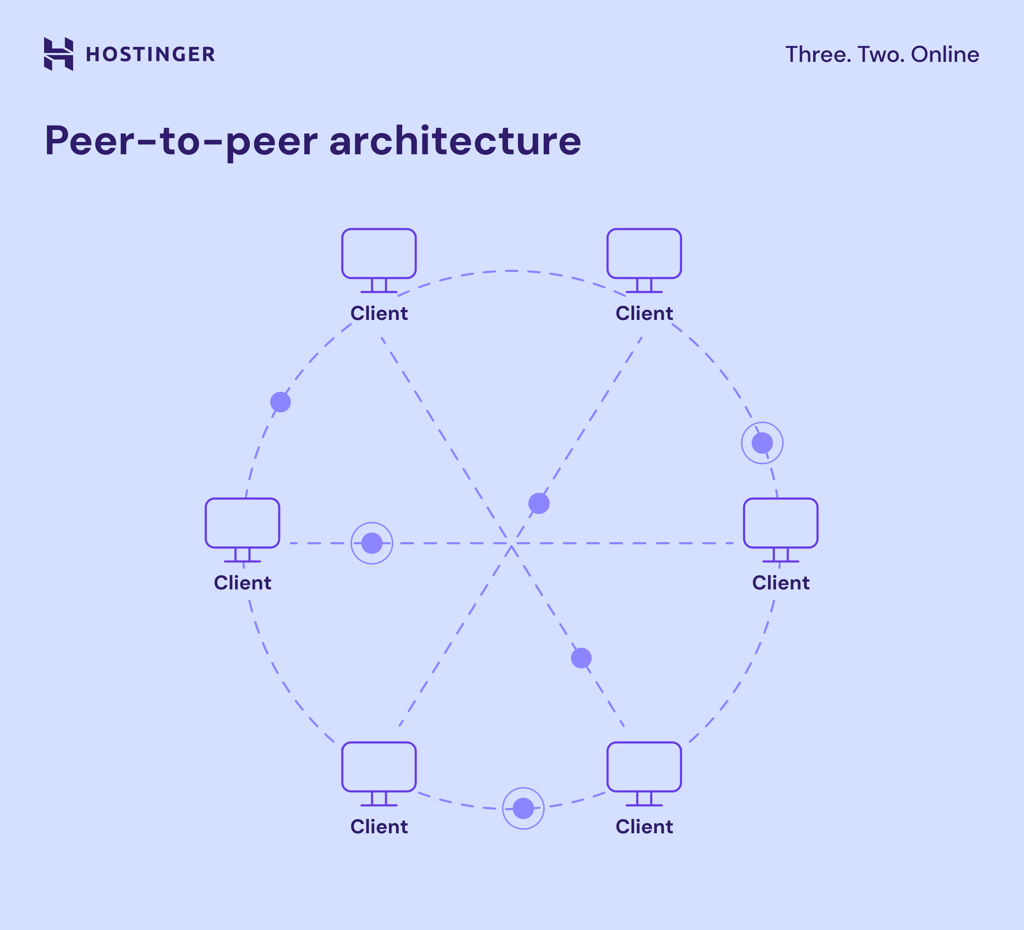
In a peer-to-peer architecture, each device or node acts as both a client and a server, sharing resources directly with others. This structure makes the system more flexible and resilient to node failure, guaranteeing continued availability even when some peers go offline.
- Best for: decentralized applications that need direct communication between users
- Examples: file-sharing applications like BitTorrent
8. Cloud-native architecture
Cloud-native architecture is built for cloud environments, enabling applications to fully leverage the cloud’s scalability, flexibility, and availability. Developers containerize cloud-native apps and manage them with tools like Kubernetes.
Unlike serverless architecture, cloud-native applications give developers more control over their infrastructure and scaling strategies.
- Best for: distributed, scalable web applications that require cloud resources and benefit from automatic scaling and high availability
- Examples: image-sharing platforms, collaboration applications
What are software architecture patterns
If application architecture models define the overall structure of an application, software architecture patterns offer design solutions to specific problems in software development. They address issues such as component communication, data processing, and real-time event handling.
The following are common software architecture patterns and their functions:
- Microkernel architecture pattern. The core system provides basic functions, and extra features are added through plugins.
Example: A browser like Google Chrome, where the core function is browsing, with extensions like ad blockers or password managers as extra features.
- Client-server architecture pattern. The client requests data, and the server processes it and returns the result.
Example: A web browser sending a request to a web server to load a website page.
- Layered architecture pattern. The application is divided into layers, each handling a specific job.
Example: An online banking app, where one layer handles user login, another manages account information, and a third stores transaction data.
- Event-driven architecture pattern. The app reacts to events, allowing different parts to communicate and respond at various times.
Example: A shopping app where adding an item to the cart triggers an update to the total price in real time.
- Microservices architecture pattern. The application is split into small, independent services, each handling a specific function.
Example: A streaming service like Netflix, where microservices handle different functions such as recommendations, video streaming, and user profiles independently.
How do I design better software architecture?
Choosing the right architecture type and pattern is a good starting point when building a web app. It’s also important to apply best practices to ensure the system runs efficiently, protects sensitive data, and adapts to future needs easily.
Here are some tips to help you design a better software architecture:
- Focus on scalability from the start. Plan for scaling up (more power) and scaling out (more servers) to accommodate future growth. Consider implementing load balancing and data partitioning early in the design process.
- Use modular components. Break the system into independent components so each part can be developed, deployed, and scaled independently. Doing so makes it easier to replace or update individual parts.
- Prioritize performance. Optimize data access, minimize queries, and use caching to speed up response times and reduce database load.
- Plan for security. Implement SSL encryption, secure data storage, strong authentication mechanisms like multi-factor authentication (MFA), and other web app security measures. Set up automated tests and real-time monitoring to catch issues early and maintain system health.
- Ensure reliability. Implement redundancy, automated backups, and failover strategies to maintain uptime and prevent data loss. Perform health checks to monitor the system in real time and respond to issues quickly.
- Optimize for low latency and high throughput. Efficient queuing or distributed systems are especially crucial for applications that handle real-time data.
Conclusion
Building a well-designed modern web application requires a solid understanding of application architectures and software patterns. For developers, these concepts simplify future development, making it easier to scale and optimize applications for better performance. Ultimately, this leads to a more seamless user experience that keeps users coming back.
Ready to design your first web application? Give Hostinger Horizons a shot. For only CA$ 27.89/month, you’ll have access to all the tools and security features you need to turn your idea into a fully functional app ‒ no coding required.
Join our Discord channel for more tips and inspiration on making the most of Hostinger Horizons. Connect with the community, get expert advice, and stay updated on the latest features!


Jordana is a Senior Content Writer with a background in Information Systems. She has over five years of experience in WordPress and is casually dabbling with PHP and MySQL. Her passion for writing and technology drives her to create tutorials for anyone wanting to build their online presence. Follow her on LinkedIn.