10 best AI-powered educational web app ideas
Mar 10, 2026
/
Rea G.
/
9 min Read
An AI-powered educational web app is an online tool that uses artificial intelligence to enhance teaching and learning experiences. These apps deliver personalized content, give instant feedback, and adjust to each user’s pace, performance, and learning needs.
Maybe you’re an educator looking to engage students through interactive learning modules, or a developer who wants to showcase your creativity and tap into the growing demand for online learning. Whatever your goal, you can now create educational web apps quickly without coding.
Here are some great AI-powered educational app ideas to get you started:
- Language learning apps to build vocabulary and pronunciation with personalized lessons and speech recognition.
- Career counseling apps for exploring career paths or training options using assessments.
- Educational games and quizzes for reviewing topics through interactive challenges and adaptive questions.
- Accessibility education apps for supporting students with disabilities using tools like text-to-speech and customizable interfaces.
- Question and answer apps for step-by-step explanations from typed or photo-based questions.
- Essay graders for improving writing with instant feedback on grammar, structure, and originality.
- Virtual science labs for running interactive science experiments with real-time feedback.
- Student community apps for collaborating, sharing notes, and asking questions in a moderated space.
- Math solver apps for breaking down math problems into visual, guided steps.
- Study planner and productivity tracker apps for organizing tasks, setting goals, and staying focused.
1. Language learning web app
This app is useful for anyone looking to learn a new language. It offers interactive lessons that include features like tap-to-translate for vocabulary, speaking exercises for pronunciation, and audio-based tasks to enhance listening skills.
An AI-powered language learning app can track each user’s progress and adapt content to match their pace, skill gaps, and learning style. For example, if you’re struggling with Spanish tenses, the app can offer targeted practice and gradually increase the difficulty as you improve.
To create an effective language learning app, focus on habit building. Learning a language requires regular practice and repetition, so features like daily goals can help users stay on track by giving them clear targets and a routine to follow.
You can also add a social sharing feature to reinforce motivation by letting users post their progress or streaks.
Key features:
- Gamification elements. Use points, streaks, and levels to make progress feel rewarding and keep users engaged.
- Bite-sized lessons. Break content into short, easy sessions to support consistent daily learning.
- Speech recognition. Give instant feedback on pronunciation by analyzing how users speak during exercises.
- Personalized learning paths. Adjust lesson difficulty and content based on each user’s performance and pace.
- Spaced repetition. Improve vocabulary retention by reviewing words at timed intervals proven to boost memory.
- Daily goals and reminders. Build strong study habits by setting learning targets and sending helpful nudges.
2. Career counseling application
A career counseling app helps graduating students, professionals, or career shifters explore options based on their skills, goals, and interests.
Users start by completing an assessment. Based on their responses, the app instantly suggests career paths or job roles that align with their profile. AI can refine these suggestions by identifying skill gaps and recommending certifications or learning resources to help users qualify or advance.
You can further enhance your app’s functionality by integrating job market data from public APIs to display trends, demand forecasts, and growth potential. For example, if a user is interested in data analysis, the app might highlight demand across industries like finance or tech and suggest learning Python or Excel to improve their chances.
This app makes career guidance more accessible, especially for people without access to a career counselor.
Key features:
- AI-powered assessments. Analyze users’ skills, traits, and interests to recommend careers that fit their profile.
- Career path insights. Show how suggested roles can evolve over time, including potential next steps and advancement opportunities.
- Dynamic recommendations. Update career matches as users retake assessments, adjust goals, or add new skills.
- Job market data. Display hiring trends, demand forecasts, and long-term stability for each suggested role.
- Salary benchmarks. Provide estimated earnings based on job title, location, and experience level.
- Workplace fit. Suggest industries or work environments that align with the user’s values and preferences.
3. Educational games and quizzes
An educational games and quizzes app lets users input questions or topics, then transforms them into interactive formats such as trivia, puzzles, or timed challenges that help learners actively recall and apply what they’ve learned.
To make the experience more effective, AI can provide insights to educators. For example, a teacher might launch a quiz to check students’ understanding of a specific topic.
The app can display class-wide results after each round, highlight the most frequently missed questions, and suggest follow-up activities to reinforce key concepts. This keeps students engaged while helping teachers identify areas that need more attention.
Key features:
- Custom quiz creation. Allow educators to create quizzes based on specific topics or learning goals.
- Instant feedback. Show correct answers and explanations after each question to reinforce understanding.
- Gamified rewards. Motivate students with badges, points, and streaks for completing activities.
- Timed modes. Include countdowns or speed rounds to build focus and quick recall.
- Multimedia support. Enhance quizzes with images, audio, or video to match different learning styles.
- Classroom reporting. Provide performance summaries, highlight frequently missed questions, and suggest follow-up activities for teachers.
4. Apps for inclusive education
An inclusive education app supports learners with visual, auditory, motor, or cognitive challenges by offering flexible ways to access and interact with content.
AI plays a key role in making content more accessible. For example, the app can use text-to-speech to read content aloud while highlighting text on screen, which helps students with dyslexia, low vision, or reading difficulties. It can also enable voice input and simplify navigation based on a user’s needs.
Key features:
- Smart text suggestions. Use AI to help users write or communicate by predicting words based on what they’re typing.
- Object and text recognition. Provide spoken descriptions of screen content or surroundings for users with visual impairment.
- Text-to-speech and speech-to-text. Let users listen to written content or speak their responses as needed.
- Customizable display settings. Allow font, contrast, and layout adjustments for better readability.
- Automatic captions. Add real-time subtitles to videos to support users who are deaf or hard of hearing.
- Language and sign support. Offer content in multiple spoken languages and include sign language resources.
Pro tip
When creating a special education app or any web content for users with disabilities, follow the Web content accessibility guidelines. These are widely used standards that outline how to make digital content more accessible, covering areas like readable text, color contrast, and keyboard navigation.
5. Question and answer app
This app is designed for students who need fast, accurate help with schoolwork. Students can simply type or snap a photo of a question and get an instant response. Similar to popular tools such as Socratic or Question.AI, this app uses natural language processing and image recognition to understand the question and provide a clear, step-by-step explanation of the answer.
To make the app even more impactful, you can set it up to recommend related content based on the topic. For example, if a student asks about the causes of World War I, the app can suggest a link to a timeline, article, or short video for better understanding.
Key features:
- Photo and text input. Let users either type their questions or upload a photo of the problem for instant analysis.
- AI-powered question detection. Automatically recognize the subject, topic, and format of the question to deliver relevant answers.
- Concept summaries and visuals. Include diagrams, definitions, or video links to explain complex ideas when needed.
- Step-by-step explanations. Break down answers into clear, logical steps that help users learn how to solve similar problems.
- Follow-up support. Allow users to ask clarification questions or dive deeper into related topics using a chat-style interface.
6. Interactive essay grader
This app helps educators review essays faster while ensuring fairness by using AI to automate grading and feedback.
Teachers can either upload essays in bulk or paste text directly into the app. The AI evaluates each essay using a customizable rubric with criteria like organization, thesis clarity, use of evidence, and grammar. Each issue is highlighted with a short explanation, helping students understand exactly what to revise.
You can also include plagiarism detection to catch copied content and highlight missing citations.
Key features:
- Structural feedback. Highlight weak arguments, unclear flow, or disorganized sections with suggestions to improve clarity.
- Style and vocabulary guidance. Recommend stronger word choices, varied sentence structure, and tone adjustments.
- Plagiarism detection. Scan submissions for originality and compare them to online sources.
- Rubric-based scoring. Align grading with academic standards using customizable rubrics.
- Explanations for edits. Provide clear reasons for corrections to support better understanding.
- Version tracking. Let users compare drafts and see how their work has improved.
- Integration support. Connect with word processors and learning platforms for seamless use.
7. Virtual science lab simulator
This app lets teachers offer hands-on science experiences to students without the cost, setup, or safety concerns of a physical lab. It simulates real-world experiments in subjects like chemistry, biology, and physics through interactive environments where students can drag and drop virtual lab tools, mix chemicals, adjust variables, or build circuits step by step.
AI helps replicate realistic lab behavior by simulating how substances react, how equipment should be used, and what happens when procedures go wrong. For example, if a student adds too much of a chemical or skips a safety step, the AI can trigger a realistic reaction and explain the consequence.
To take it a step further, you can add virtual reality (VR) support so students can step inside a 3D lab, move around freely, and observe reactions from different angles for a more immersive experience.
Key features:
- Realistic experiment simulations. Digitally replicate lab activities for safer, scalable use.
- Instant feedback. Help students understand concepts through guided trial and error.
- Data analysis tools. Enable graphing, recording, and interpretation of experiment results.
- Progress tracking. Monitor student performance and learning outcomes.
- VR support. Offer a fully immersive 3D lab environment where students can explore, handle equipment, and observe reactions from multiple angles.
8. Student community web app
This app creates a safe online space where students can join study sessions, exchange notes, and collaborate on assignments. They can use discussion boards, live chat, file sharing, and event calendars to connect in real time.
While popular platforms like Reddit and Discord offer basic community features, creating your own student community web app gives you full control over functionality, privacy settings, and the overall environment. AI can help moderate discussions by flagging inappropriate language or off-topic posts, keeping conversations respectful and focused.
Key features:
- Discussion boards and group chat. Enable real-time communication and idea sharing.
- Automated moderation. Keep interactions respectful and on-topic with built-in filters.
- Event scheduling. Organize group study sessions, deadlines, or peer-led workshops.
- File sharing. Let students upload and access shared resources and materials.
- Notifications. Alert users when there are new messages, replies, or upcoming events.
- Polls and feedback. Gather opinions or plan events with quick, built-in surveys.
9. Math problem solver app
According to a report from Tutor.com, a leading online tutoring service, math has consistently been its most-requested subject. This reinforces the demand for a math problem solver app that helps students tackle math more confidently.
The app works by allowing users to input problems either by typing or uploading a photo. It then provides step-by-step solutions that clearly explain the process.
Your app can include an AI chatbot that acts like a live tutor. It responds instantly with helpful hints, explains confusing steps, and suggests alternative ways to solve problems when users get stuck.
Key features:
- Problem input options. Let users type questions or upload photos for instant analysis.
- Step-by-step solutions. Break down problems into clear, guided steps for better understanding.
- AI-powered chatbot. Offer real-time, interactive help with contextual hints and concept breakdowns.
10. Study planner and productivity tracker app
This app helps students develop time management skills and build effective study routines. It combines planning tools with research-based study methods to help users stay focused, build consistent habits, and break tasks into manageable steps.
The app works by allowing users to input assignments, exams, or study goals and schedule them using a built-in calendar. AI can automatically prioritize tasks, set reminders, and generate a weekly study plan based on deadlines, workload, and task difficulty.
Key features:
- Smart scheduling. Automatically organize tasks and study blocks based on deadlines and workload.
- Goal tracking. Similarly to a daily habit tracking app, users can set academic goals and monitor progress over time.
- Reminders and alerts. Notify users about upcoming deadlines or when to take a break.
- Distraction control. Offer focus timers or app blockers during study sessions.
- Calendar integration. Sync with tools like Google Calendar for better planning.
How to build an education app with AI?
Once you’ve chosen the type of app you want to build, start by creating visual mockups that show how it will look and function.
From there, you can make your web app using an AI-powered builder that lets you add features, customize the layout, and fix any design or functionality issues using simple prompts. This speeds up both front-end and back-end development.
After assembling the core features, test your app across different devices to make sure everything works smoothly. Then deploy the app and perform regular maintenance to keep it running smoothly.
Can I build a web app for education with AI using Hostinger Horizons?
Yes. Hostinger Horizons is an AI web app builder that lets you create an educational app without coding.
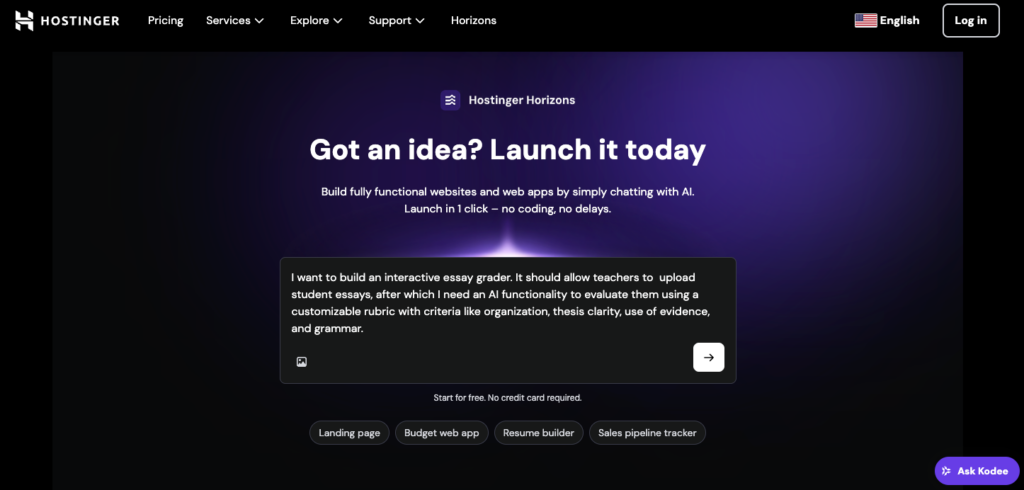
Using simple prompts, you can create a language learning web app, a math problem solver, or a virtual science lab simulator with all the features you need. Just share your idea and adjust the design, text, or functionality along the way. Once you’re ready, publish it live, test and improve it, and start planning how to promote it.
Which educational app should I build?
Deciding which educational web app to build starts with understanding what people actually need. Start by doing keyword research to see what users are actively searching for. This helps you spot high-demand topics and areas worth exploring.
You can also analyze competitors. For example, if you’re considering an interactive essay grader, look at tools like Grammarly, Scribbr, or QuillBot. Identify which features users value and where the current options fall short. These gaps often reveal unmet demand and opportunities for improvement.
You can also explore forums, read app store reviews, or run surveys to uncover common struggles. If you notice frequent complaints about the lack of inclusive educational tools, that can point to a strong demand for a special education app.
Whatever educational app idea you decide to go with, it’s evident that there is strong demand for better learning tools. According to a report from Research and Markets, the global education apps market is expected to grow by $6.07 billion between 2024 and 2029.
Explore this demand using AI web app builders like Hostinger Horizons, where you can publish with one click and get started without a large team or big budget.

Rea has over 10 years of experience in content writing, with a passion for helping small business owners, side hustlers, and freelancers succeed. When not writing, she enjoys spending time with her dog, Shiro, sharing their adventures on social media, and playing online games. Follow her on LinkedIn.