What are WordPress private pages and posts?
Dec 02, 2025
/
By Domantas G.
/
4 min Read
WordPress private page and posts are not visible to the public. In other words, visitors can’t see the content even if they know the URL. It is only available for authorized users who are logged in to the Dashboard.
This might seem contradictory to WordPress’ core function – content publication. But, some things are not meant to be shown publicly.
Let’s say that you are a manager and you want to train your staff. Sharing any material or inside information online might not be the best thing to do.
Let’s dig deeper into this topic, shall we?
Note: To simplify the explanation, we will use the term “post” when referring to both “page” and “post”.
Why and when would you use private posts?
Simply put, a WordPress private page limits visibility to certain users. Before going further, take a look at the WordPress’ user roles below:
- Administrator. This is the site owner. They can modify the post (add, delete, edit, publish), add or remove users, install plugins, and change the Dashboard settings.
- Editor. The administrator lets them modify every post in the Dashboard. However, installing plugins and changing the settings isn’t possible.
- Author. They can only modify their own posts. They don’t have access to any posts written by other authors.
- Contributor. They can modify their own posts. Once published, however, they will lose access to the editing controls. They also can’t add images to their posts.
- Subscriber. They have to log in to your site before they can see your content. No other function is available.
Only the Administrator and Editor can view WordPress private pages, with the former granting the initial permission. This feature is particularly useful if you desire some privacy over your content.
Still sounds too vague? Take a look at more examples below:
- News blog. You can assign different roles to your editors and content writers – making everything less complicated.
- Private blog. Post anything you want and keep it to yourself! You can also invite family members and friends to cherish moments spent together.
- Exclusive forum. People with certain shared interests could use this setting to exchange exclusive content. Ideally, one person will act as a moderator.
- Development area. You might want to see how your post looks before making it public. You can also invite other people temporarily to collect feedback.
- Trial area. If you write a lot about WordPress, chances are you take many WordPress-related screenshots. Use this setting and keep your trial content private.
The list goes on. A special note for site owners – bear in mind that editors have full control over your content. Sharing sensitive information on a WordPress private page therefore not advisable.

How to create a WordPress private page
You can either create a new private post or edit old ones. Regardless, everything starts with the visual editor.
- Head to Posts > Add New. For editing the old posts, head to Posts > All Posts and find the post you’d like to edit.
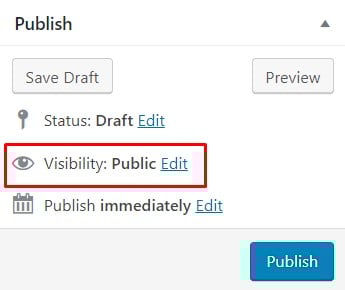
- Find the Visibility section on your Publish module and click on Edit.
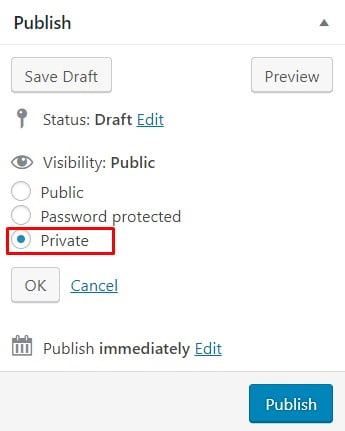
- Select the Private option and hit OK.
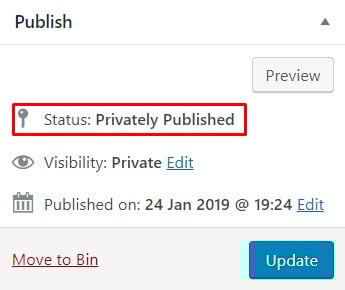
- Click on Publish. The Status section will then say “Privately Published”. If you’re editing an old post instead, the Publish button will appear as Update – including this one, because it was published a few seconds prior.
- Go to the newly published/updated post on your front end. That means that you have to go to your site and find the post there.
- If done correctly, WordPress will add a label that says “Private” next to your post’s title. Make sure that you are logged in as an administrator or editor so that you can see it.

As an alternative, you can use the WordPress password-protected option. Visitors can see the title of your post, but can’t access the content unless they have the correct password. The steps are generally the same.
- Select the Password protected option and hit OK.
- Enter your password and confirm it with OK.
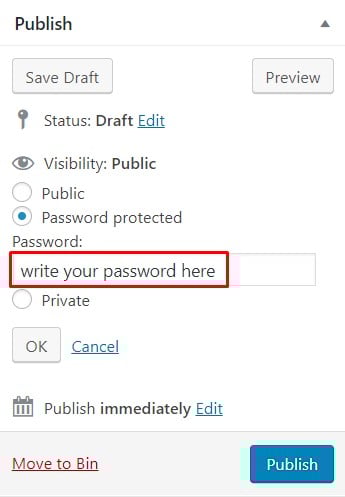
- Click on Publish or Update and go to your post on the front end.
- Although not logged in, you can still see the post on the archive. Enter the password to access the content.
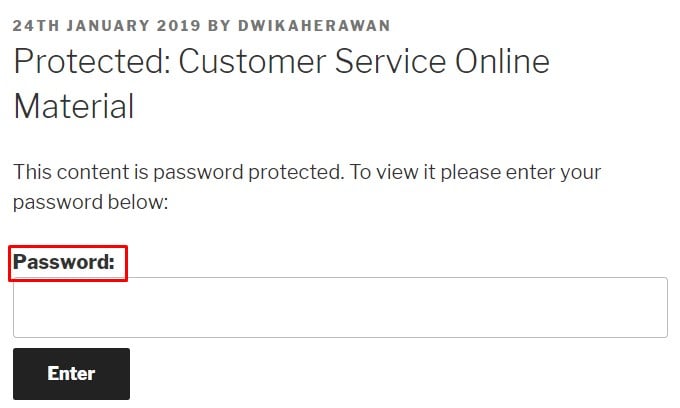
The downside is people might share the password of your WordPress private page recklessly and terminate your terms of privacy. Either way, use the settings accordingly.
Conclusion
Not everything on the web should be public. Luckily, WordPress understands this. Be it for an exclusive forum or other private matters, WordPress is a great place to ‘hide’. You can assign different roles to users and manage your privacy.
However, be careful when sharing delicate information. It’s the internet after all. No one can guarantee that your information is 100% safe.
Learn What Else You Can Do With WordPress
WordPress Media Library Guide
How to Remove "Powered by WordPress" from Footer
2 Methods on Adding WordPress Menu Icons"
How to Disable WordPress Comments
Guide to WordPress Security
How to Find WordPress Post ID
How to Check WordPress Version
How to Embed Google Maps on WordPress
WordPress private page FAQ
The following are frequently asked questions about WordPress’ private pages.
What is the difference between public and private pages in WordPress?
Public pages in WordPress are accessible to everyone, while private pages are only accessible to logged-in users with specific permissions. Private pages are often used for sensitive content or restricted access areas, such as membership sites or learning platforms.
Does having private pages hurt my WordPress site’s SEO?
No, having private pages does not hurt your WordPress site’s SEO as search engines cannot access them. However, it is important to ensure that your public pages are optimized for SEO to rank well in search results and attract organic traffic.
This article is a localized version of What are WordPress private pages and posts?, originally published in English.

Domantas leads the content and SEO teams forward with fresh ideas and out of the box approaches. Armed with extensive SEO and marketing knowledge, he aims to spread the word of Hostinger to every corner of the world. During his free time, Domantas likes to hone his web development skills and travel to exotic places.

Comments
2 responsesMay 01 2022
Password protect should use User Account Login/Pwd.
May 04 2022
Hi there! If you mean the password-protected option, it does not have to be the same as your WP-admin details. In fact, due to security reasons we highly suggest to use a different password :)