How to install Kali Linux on a VPS using Hostinger one click template
Mar 10, 2026
/
By Ariffud M.
/
3 min Read


Kali Linux is an open-source operating system primarily used for penetration testing and security auditing. One of its key advantages is its hardware compatibility, which allows you to install it on a variety of platforms, including a virtual private server (VPS).
By running Kali Linux on a VPS, you can access your system remotely, scale resources as needed, and create a secure environment for running tests without compromising your local machine.
In this article, you’ll learn how to install Kali Linux as a VPS template on Hostinger in just a few steps. By the end of this guide, you’ll be ready to use this Linux distribution for your security-related tasks.
Prerequisites
Before installing Kali Linux on a VPS, make sure your system meets the following requirements:
- RAM. At least 2 GB. We recommend 8 GB if you plan to use web application testing tools like Burp Suite or run multiple tests simultaneously.
- Disk Space. A minimum of 20 GB to accommodate all the default Kali Linux metapackages.
Additionally, use a stable internet connection, whether broadband or WiFi, for a smooth installation process.
How to install Kali Linux
If you choose Hostinger’s Kali VPS plan, Kali Linux comes pre-installed, so you can start using it right away.
Based on the system requirements, we recommend starting with the KVM 1 plan, which offers 4 GB of RAM and 50 GB of NVMe storage for CA$ 9.09/month. You can upgrade later if you need more resources for resource-intensive tasks.
However, if you use one of our regular VPS plans or have changed your operating system, you can still install Kali Linux as a VPS template. This lets you bypass the time-consuming and error-prone manual installation process.
Follow these steps to install the Kali Linux template on your VPS:
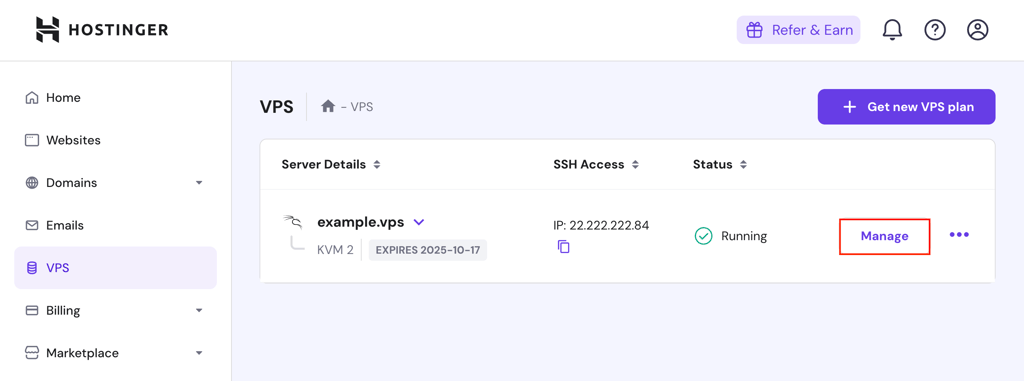
- Log in to hPanel with your Hostinger account and navigate to VPS → Manage.
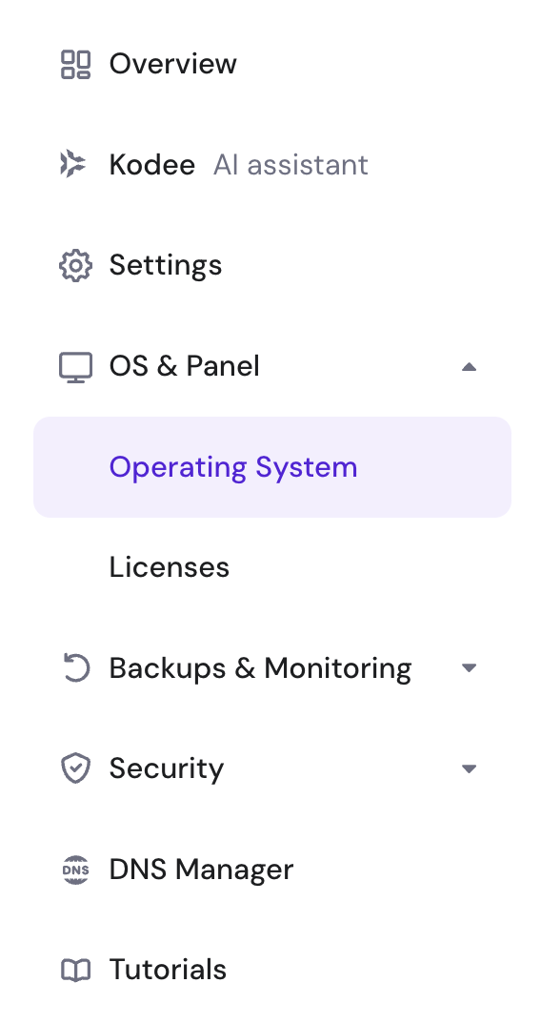
- From your VPS dashboard’s left sidebar, go to OS & Panel → Operating System.
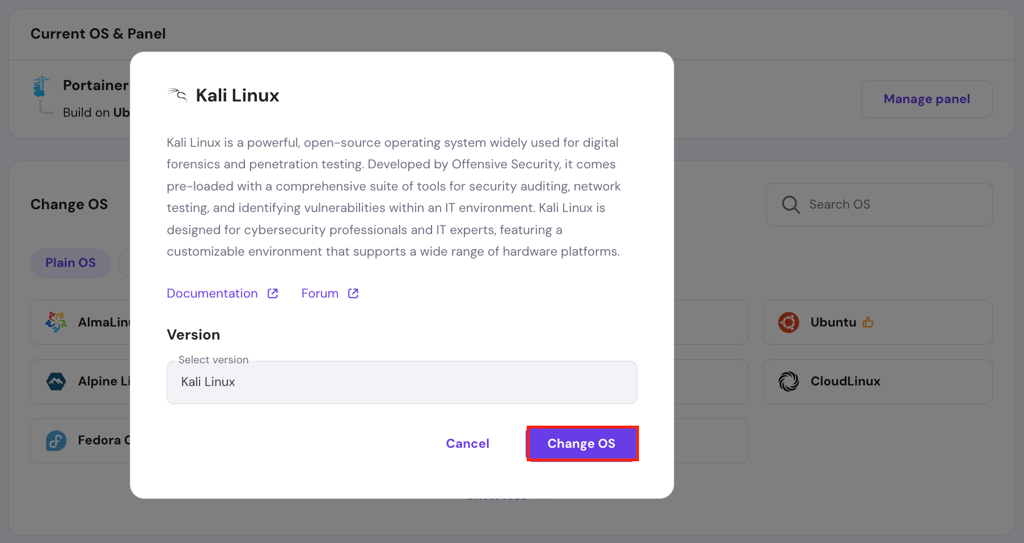
- Scroll to the Change OS section. Select the Plain OS tab, and choose Kali Linux.
- Hit the Change OS button when a pop-up appears.
- A confirmation pop-up will appear. Check the acknowledgement box and click Next.
- Create a new password for your Kali Linux template.
- Wait for the setup to complete, which takes up to 10 minutes.
That’s it! Kali Linux is now running on your server. Next, secure your VPS by setting up a firewall, enabling SSH key authentication, disabling root login, and installing a malware scanner.
Suggested reading
Read our Kali Linux tutorial to familiarize yourself with the distribution.

Benefits of Installing Kali Linux on a VPS
Setting up Kali Linux on a VPS provides unique advantages compared to a local installation. Here’s why you might want to consider this setup:
- Remote accessibility. Unlike installing Kali Linux on a local computer, a VPS lets you access your environment from anywhere, making it ideal for performing security tasks remotely or working with distributed teams.
- Scalability. Running Kali Linux on a physical device restricts you to the hardware’s fixed resources, while a VPS is easier to scale. You can upgrade RAM, CPU, or storage whenever needed without worrying about hardware limitations.
- Enhanced security. A VPS provides an isolated environment, reducing the risk of affecting personal files or damaging hardware during security testing. This ensures your local device remains safe even if something goes wrong on the server.
- Cost efficiency. Using a VPS is more affordable than maintaining dedicated hardware, as you only pay for the resources when needed. It’s great for users who need Kali Linux for short-term projects or specific tasks.
- Full customization. VPS hosting grants you full root access, so you can configure your environment to meet specific security assessment needs, such as installing custom tools.
Conclusion
In this article, you’ve learned how to install Kali Linux on Hostinger’s VPS with just a few simple steps. Running Kali Linux on a VPS offers several benefits, such as performing tasks remotely and upgrading resources as needed.
Once you’ve installed Kali Linux, feel free to explore its powerful tools for assessing system vulnerabilities and analyzing network security. If you still have questions about Kali Linux, use the comment box below.
How to install Kali Linux FAQ
What is Kali Linux used for?
Kali Linux is used for penetration testing and security assessments. It comes with preinstalled tools that help security professionals identify vulnerabilities, test system defenses, and conduct network analysis.
Is Kali Linux free?
Yes, Kali Linux is free to download and use. However, additional costs apply if you install it on a VPS. For example, Hostinger’s VPS plans start from CA$ 9.09/month, offering up to 8 CPU cores, 32 GB of RAM, and 400 GB of disk space.
Can I install additional software on Kali Linux?
Yes, you can install additional software on Kali Linux using the APT package manager, just as you would with other Debian-based distributions like Ubuntu.

Ariffud is a Technical Content Writer with an educational background in Informatics. He has extensive expertise in Linux and VPS, authoring over 200 articles on server management and web development. Follow him on LinkedIn.


Comments
0 responses