Our one-billion-email analysis will make you think differently about your inbox
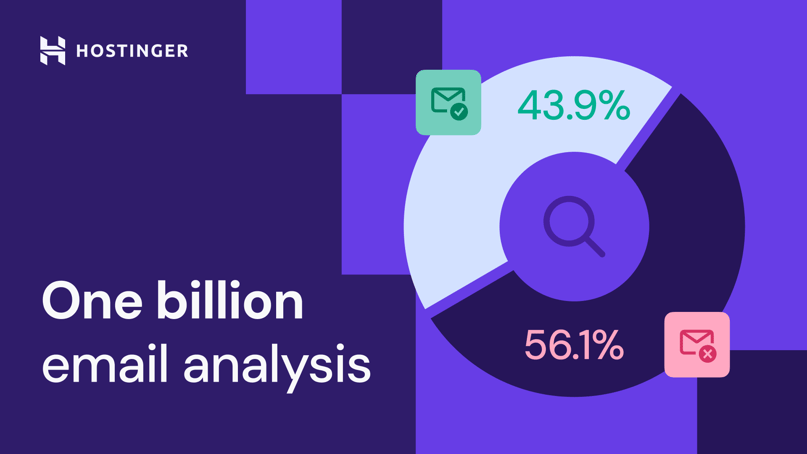
Hit send, and your email lands in someone’s inbox. That’s how most people think email works. When you zoom out and examine one billion messages, reality looks nothing like that.
That’s what we did. After analyzing anonymous data of one billion messages that flew through our platform, we discovered that less than half actually deserved to be delivered to clients inboxes. The rest? Blocked by spam and virus filters for being suspicious, unsafe, or straight-up malicious.
And even among the inbox-worthy emails, very few were written by real people. Only two categories – personal email providers and low-volume senders – usually involve someone actually typing a message and hitting send. Together, they make up under 30% of received mail, which is only about 13% of all email traffic. Nearly everything else comes from automated systems sending notifications, reminders, promotions, digests, and alerts.
Let’s dive deep into our analysis to better understand how the internet actually communicates today.
Inside the 43.9% that gets through
We grouped the received messages into 10 categories based on who was sending them and why. This helps show the “normal” email ecosystem most of us interact with every day.
1. Business tools and SaaS (21.62% of received mail, 9.49% of all mail)
The largest group represents platforms people use every day for work:
- Business apps (CRMs, sales tools, etc.)
- Project management
- File sharing and collaboration
They send things like account updates, task reminders, cart and order notifications, login alerts, password reminders, verification codes, team messages, and workflow automation emails, to name a few. These messages are high-volume but legitimate, forming the backbone of online work.
2. Personal email providers (19.82% of received mail, 8.70% of all mail)
This includes typical everyday senders using services like Gmail, Outlook, Hotmail, Yahoo, and others for regular person-to-person communication, forwarded messages, and small business communication.
While many people still use personal email accounts to communicate, the volume is modest these days. Most day-to-day conversations have shifted to messaging apps, social networks, or team chats.
3. Marketing and newsletter platforms (15.92% of received mail, 6.99% of all mail)
These messages come from businesses and organizations using big email platforms like Amazon SES, SendGrid, and HubSpot to send promotions, newsletters, and similar content.
Such emails are usually allowed as long as the sender follows authentication standards, and people aren’t marking their emails as spam.
4. Social networks and communities (15.00% of received mail, 6.58% of all mail)
Platforms such as Facebook, Instagram, LinkedIn, and TikTok often fill inboxes with emails about:
- Friend requests
- Login alerts
- Messages and post notifications
- Community updates
Some people find these emails unnecessary, but high engagement keeps them deliverable.
5. Low-volume email senders (9.89% of received mail, 4.34% of all mail)
This group covers small businesses, personal domains, and niche services that send only occasional messages, such as person-to-person emails, order confirmations, or support replies from custom domains. Their low volume means they rarely trigger spam filters, which helps their messages reach the inbox reliably.
6. Ecommerce and marketplaces (5.46% of received mail, 2.40% of all mail)
Amazon, eBay, Mercado Livre, AliExpress, and Shopee are some of the busiest marketplaces in our clients’ inboxes. They send order confirmations, shipping updates, seller messages, and account alerts.
Even people who ignore most marketing emails still rely on these messages because they help track purchases and keep customers updated on their orders.
7. Financial services and payments (3.65% of received mail, 1.60% of all mail)
Banks, neobanks, and payment services like PayPal and Stripe mainly send:
- Payment receipts
- Fraud alerts
- One-time passwords
- Statement notifications
These messages are important for clients, but they’re also common targets for spoofing. That’s why a similar group shows up in the blocked messages as well.
8. Media and entertainment (3.65% of received mail, 1.60% of all mail)
Services like Netflix, Disney+, HBO, and Substack keep inboxes busy with updates about what to watch, read, or catch up on next. Besides newsletters and new content recommendations, they also send billing reminders to their clients.
These messages tend to get high engagement because they point people to the content they genuinely care about.
9. Job and recruitment platforms (2.73% of received mail, 1.20% of all mail)
Apply for a job online and your inbox fills up fast with job alerts, interview requests, recruiter messages, and updates about your applications.
Emails from Indeed, Upwork, Naukri, JustDial, and other job platforms stand out because people don’t want to miss an opportunity that could shape their career path.
10. Travel and logistics (2.26% of received mail, 0.99% of all mail)
Inbox spikes from companies like Uber, Booking, and Airbnb often happen right before people travel. These platforms send:
- Booking and reservation details
- Reminders
- Trip-change alerts
- Receipts
These messages are usually welcome because they help people stay organized and avoid unexpected issues during their trip.
Inside the 56.1% that gets blocked
Our filtering system blocks far more email than it delivers – and for good reason. Malware, phishing attempts, fake senders, unsafe servers, and compromised accounts never reach clients’ inboxes. This hidden layer of email traffic shows how much dangerous activity happens behind the scenes, and how we work to keep you safe.
1. Phishing, scams, malware, botnets (33.87% of rejected mail, 19.00% of all mail)
The biggest category is also the most dangerous one. These senders try to steal information, spread malware, or imitate trusted websites to trick users. They often rely on automated systems, fast-changing domains, and botnets to avoid detection.
Fortunately, most threats never make it through, because their patterns match known phishing kits, malware loaders, fake shops, and botnet-driven spam.
2. Suspicious marketers and aggressive lead-gen senders (21.94% of rejected mail, 12.30% of all mail)
This group behaves more like spammers than legitimate businesses. They often use scraped lists and send large volumes of unwanted promotional messages.
Their emails aren’t always malicious, but they create a lot of inbox noise and frustration. They’re blocked due to high complaint rates and bulk campaigns originating from low-reputation domains.
3. Unverified or misconfigured online services (10.82% of rejected mail, 6.07% of all mail)
Sometimes the message itself is perfectly fine, but the system sending it isn’t set up correctly. If an online service sends emails from a server with missing SPF or DKIM records, open relays, weak security, or unusual sending patterns, the message looks risky even when it’s legitimate.
We block these emails because misconfigured systems are a common source of spam, abuse, and compromised activity.
4. Personal mailboxes used suspiciously (9.72% of rejected mail, 5.45% of all mail)
Even messages from Gmail or Outlook can get blocked if they’re being used in ways that don’t look normal. This happens, for example, when a personal inbox is hacked or when someone uses it to send lots of messages through automation tools.
We block emails when we see sudden spikes in volume, or our systems detect spam, phishing, viruses, or unsolicited cold outreach.
5. Email infrastructure and ESPs used by bad actors (6.83% of rejected mail, 3.83% of all mail)
Trusted platforms like Amazon SES or SendGrid serve millions of legitimate customers, but spammers also try to hide behind them. We block messages when sending patterns clearly show abuse or behavior that doesn’t match normal business use.
6. Government and public sector (3.61% of rejected mail, 2.03% of all mail)
Emails from government agencies and public institutions are usually legitimate, but they’re often sent in bulk and sometimes come from outdated systems or have misconfigured DNS records. We block them when weak authentication or unusual behavior makes them look unsafe or similar to phishing attempts that imitate official sources.
7. Financial institutions and payments (3.44% of rejected mail, 1.93% of all mail)
Banks and payment services are common targets for spoofing, so our filters treat them very carefully. We block messages when authentication is weak or the behavior looks even slightly suspicious, since that often signals an impersonation attempt.
8. Legitimate SaaS and B2B brands (3.26% of rejected mail, 1.83% of all mail)
Messages from well-known CRM tools, productivity apps, and other business platforms can still be blocked when something on the technical side isn’t right. Missing authentication, bad DNS settings, poor shared IP reputation, or customers sending in bulk can make these otherwise legitimate emails look suspicious.
9. Invalid, local, or non-internet senders (2.79% of rejected mail, 1.56% of all mail)
Some messages never had a real chance to be delivered because they didn’t come from proper internet-facing domains in the first place. These include internal network hosts, test environments, placeholder domains, or systems configured with non-resolvable addresses like “localhost”.
In most cases, these aren’t malicious, just misconfigured or not meant to send emails to the outside world.
10. Consumer platforms and social networks (2.71% of rejected mail, 1.52% of all mail)
Not all messages from Facebook, Instagram, and Quora reach the inbox. These platforms send large volumes of notifications, which can trigger filters when users rarely engage with them or when sending patterns shift. Low interaction, bulk behavior, or technical issues can make their emails look more like spam than useful updates.
What you can do about it
There are two sides to email: we all want less spam, and we all want our own messages to reach the right people. The good news is that you can improve both with a few simple habits.
How to reduce inbox noise
Here’s how you can keep unwanted mail out of your inbox:
- Stay private. Avoid posting your email publicly and be selective with newsletters or giveaways. Spammers scrape the web and trade mailing lists, so once your address leaks, unwanted mail can follow you for years.
- Train your provider. Use email filters and report spam. This helps your email provider learn your preferences and block similar messages in the future.
- Separate accounts. Use different addresses or email aliases for personal life, shopping, and work. Clear boundaries make inboxes easier to manage and reduce clutter.
- Clean up. Unsubscribe from anything you don’t read, and revisit old signups regularly. But remember: don’t click “unsubscribe” in suspicious emails – it confirms your address is active. Delete those instead.
- Limit alerts. Turn off notifications you don’t need. Social networks and apps send far more email by default than most people expect.
The good news is that smart tools can do most of the heavy lifting for you. In Hostinger Mail, you can ask your AI agent Kodee to report spam in bulk, clean up your mailbox, create filters and rules, set up aliases, or unsubscribe from unwanted senders at scale. On top of that, the built-in AI can summarize threads, highlight what matters, and help you find what you need fast, without any manual work.
How to make sure your own messages are received
Good deliverability isn’t luck; it comes from a few habits that signal to inbox providers that you’re a trustworthy sender.
Let’s see the actual reasons why emails get blocked – and how you can avoid each issue.
- Poor sender reputation (33.9% of rejected mail). Reputation drops when you send to outdated lists, get marked as spam, or generate a lot of undeliverable mail. These signals add up across the entire internet, not just one system. Don’t email people who never asked to hear from you, remove inactive subscribers, and stay relevant with your content to keep your reputation high. Use tools like Google Postmaster or your provider’s analytics to keep an eye on delivery, spam rates, and domain health.
- Domains that don’t resolve (21.73% of rejected mail). If a domain doesn’t exist or hasn’t fully propagated yet, the email won’t get through. This often happens with brand-new domains or spoofed domains used by spammers. If you just bought a domain name, wait a few hours for the receiving systems to confirm who you are.
- Mailbox doesn’t exist (17.29% of rejected mail). Hitting too many invalid inboxes is a fast track to a bad reputation. This often happens with old lists or purchased databases. When providers see repeated attempts to reach nonexistent users, they assume you’re sending blindly – and start blocking you.
- Exceeded rate limits (10.67% of rejected mail). Big bursts of email can look like bot activity. If you’re sending too many messages at once, providers slow you down or temporarily block the traffic. Warm up gradually and avoid sudden spikes that resemble spam.
- Technical or protocol issues (6.98% of rejected mail). When the system can’t verify who you are, it can treat you as an impersonator. Missing SPF, DKIM, or DMARC records, incorrect server identification, and improper headers can all cause rejections.
- Bad message content (6.21% of rejected mail). Sometimes the problem isn’t the sender – it’s the message itself. Phishing-style links, ALL-CAPS subjects, missing headers, mismatched sender details, and unusual formatting all raise red flags. The more signals in an email, the bigger the chance it will get rejected. Emails with virus attachments also fall into this category.
- Mailbox full (3% of rejected mail). The issue can be at the other end of the line: the recipient’s inbox has no room left. These bounces aren’t harmful on their own, but they add up if you keep sending to the same full mailbox without pausing.
Final thoughts
Email may feel simple from the outside, but behind the scenes, it’s one of the most complex – and most abused – communication systems online.
Our analysis of one billion messages shows a clear divide: legitimate work and personal communication make up most received mail, while scammers, botnets, and misconfigured systems generate the majority of blocked traffic.
Understanding who’s sending what and why messages get rejected helps everyone stay safer and communicate more effectively.
With better habits and smarter tools, you can reclaim your inbox – and the time it silently takes from you every day.
Methodology
This analysis is based on anonymized data from one billion emails processed through Hostinger’s infrastructure in January 2026. We don’t read message content – only technical metadata such as sender domains, authentication results, reputation signals, and delivery outcomes.

Gediminas is a communications specialist passionate about technologies and their possibilities. His main responsibility is to help people understand Hostinger products and their features. He likes spending his free time bathing in the hot tub, grilling, playing poker, fishing, and other activities.